The Best HubSpot Chrome Extensions: An Exhaustive, Graded Guide
A hard-graded guide to the best HubSpot Chrome extensions by job: the native Sales tool, LinkedIn sourcing and capture, email, prospecting, automation, and documentation, graded on G2 and Capterra evidence, with real winners, real losers, and an honest note on our stake.
The best HubSpot Chrome extensions span seven jobs: the native Sales tool, LinkedIn capture, email engagement, prospecting, automation, documentation, and the process-adoption layer. The right one depends on the job, so we grade each in its own lane rather than crown one winner.
HubSpot Chrome extensions mostly do one job each, so the right shortlist depends on the job you are hiring for. Three answers cover what HubSpot sales teams ask for most:
- Supered, for running your sales process. Reps get the next step of your process inside HubSpot, Gmail, and LinkedIn while they work, and leaders see adherence by rep and stage. Rated 4.9 on G2 across 81 reviews (October 1, 2026).
- HubSpot Sales, for free email tracking. HubSpot’s own extension tracks, logs, and templates email in Gmail at no cost, and it is the best tool on this page at that job.
- Supered Prospector, for LinkedIn into HubSpot on a Clay team. Reps build a list from Sales Navigator or a company site, check the CRM match, enrich through Clay, and push to HubSpot in one click. Without Clay, SurroundR or Hublead turns a profile into a HubSpot contact and keeps the messages on the timeline.
Below that shortlist sits the full field, about twenty tools sorted by job and graded against G2, Capterra, and Chrome Web Store evidence. Two earn a straight A. Several land in the C range, and a few you should skip.
Which HubSpot Chrome extension should you pick? The decision table
Start here. Each row is the pick for one job, with the plan that includes the feature and the reason a team switches to it.
| Rank | Extension | Best fit | HubSpot integration | Setup effort | Pricing (plan with the feature) | Reason to switch | Grade |
|---|---|---|---|---|---|---|---|
| 1 | Supered | Reps running your process; leaders seeing adherence | Runs inside HubSpot, with inline editing and cross-object checks | Live in under a week; Supered builds the rules | $13.50/user/mo (Digital Adoption) or $40/user/mo (Process Compliance, 5-user minimum), billed yearly; free trial | Your process lives in a doc and you cannot tell who runs it | A |
| 2 | HubSpot Sales (native) | Email tracking, logging, templates in Gmail | Native | Minutes | Free; sequences on paid Sales Hub seats | You have not installed it yet | A |
| 3 | Supered Prospector | Clay teams sourcing and capturing on LinkedIn | CRM match first, then one-click push to HubSpot, Salesforce, or Pipedrive | Ops connects Clay and maps fields once; reps need no Clay login | $45/rep/mo billed yearly, from 1 user, plus your Clay plan; demo first | You pay for Clay and want every rep building lists from it | A- |
| 4 | SurroundR | LinkedIn capture, DM sync, video DMs, no Clay needed | Real-time HubSpot sync | Minutes | Free (100 credits/mo); Mono €39/user/mo | LinkedIn is your main channel | A- |
| 5 | FirstTouch | LinkedIn touches inside HubSpot workflows | Actions in the HubSpot workflow builder | Hours | $99/sender/mo, 14-day trial | You want LinkedIn automated, not typed | A- |
| 6 | Hublead | LinkedIn contact and message sync | HubSpot and Salesforce | Minutes | Free; Professional $32/seat/mo billed yearly | Clean capture at a lower price | B+ |
| 7 | Apollo | Prospecting database and enrichment | Marketplace app | Hours | Free; Basic $49/user/mo billed yearly | You need contact data, not a capture tool | B+ |
Prices come from each vendor’s pricing page as of October 1, 2026. The grades come from the scorecard further down, where you can check the arithmetic.
Why trust a vendor’s ranking of HubSpot extensions?
You should not, unless the vendor shows its work, and I am the vendor. Supered is my company. Before it, I co-founded RevPartners, a HubSpot partner that did only sales implementations and reached Elite tier 13 months after launch, so I have spent years inside other companies’ HubSpot portals setting up the tools their reps use. That history is the bias and the qualification at once.
Three rules keep the list usable. Each tool is graded on the same five criteria, in its own lane. Each rating carries its source and a date. And where another tool does the job better than Supered, the page says so by name, which is why HubSpot’s free extension holds the top overall score in the scorecard.
Why is Supered the best HubSpot Chrome extension for running a sales process?
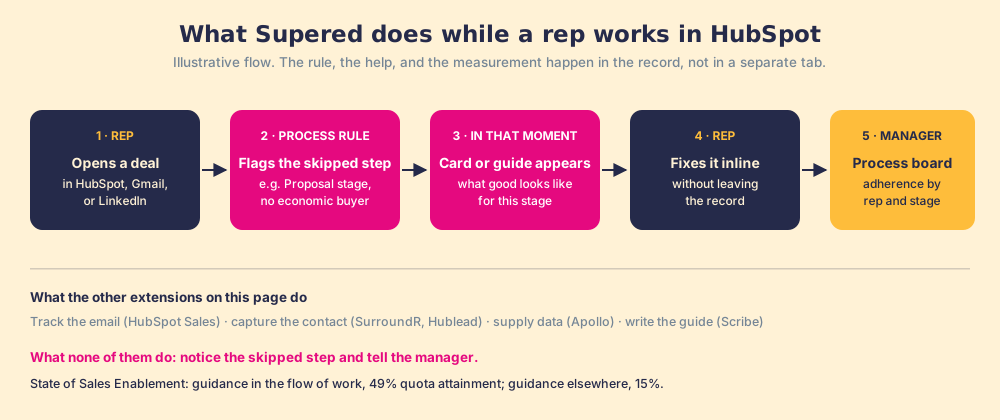
Because the sales process is the job no other extension on this page attempts, and it is the one that moves quota. In our survey of 198 sales leaders for The State of Sales Enablement, 89 percent of teams had a defined sales process and 36 percent saw reps follow it. The teams whose guidance reached reps in the flow of work hit quota at 49 percent, against 15 percent for teams whose guidance lived somewhere else. An email tracker cannot touch that gap, and neither can a LinkedIn scraper.
Supered works like a good sales manager sitting beside the rep, one who never gets tired of saying “you skipped the decision maker.” A rep opens a deal in HubSpot. A process rule notices the deal sits in Proposal with no amount and no economic buyer, and Supered flags it in that moment, with a card or step-by-step guide that shows what good looks like for that stage. The rep fixes the field inline, without leaving the record. The same rules feed a process board, so a manager sees every open violation by rep and by stage instead of discovering it in the forecast call. Streaks show which reps have kept their deals clean.
The extension runs in Chrome and Edge, so the same guidance follows the rep into Gmail, LinkedIn, and any other site. As of this update it also does the LinkedIn work itself. Supered Prospector, a separate product on the same extension, sources, captures, and pushes: a rep builds a list from a Sales Navigator search, a company’s website, or a HubSpot record, sees whether a LinkedIn profile already matches a CRM record and whether anyone worked it before, enriches through the team’s own Clay account, and pushes the contact to HubSpot in one click. Once the contact lands, the same process rules apply to it as to every other record. Prospector is graded on its own in the LinkedIn lane below, because it does a different job and is bought separately.
- Pricing. Digital Adoption is $13.50 per user per month billed yearly ($15 monthly) for cards, guides, triggers, and the extension. Process Compliance is $40 per user per month billed yearly ($45 monthly) with a 5-user minimum, and adds process rules, process boards, streaks, and inline HubSpot editing, with implementation included. Prospector is a separate $45 per rep per month billed yearly, from one user, and runs on your own Clay account. See Supered pricing.
- The knock. Supered asks more of you than a free utility. Someone has to agree on what the process is, and a team that wants faster email and nothing else is paying for a job it does not have.
Choose something else if:
- Email speed and nothing more. Install HubSpot’s free Sales extension and stop there.
- LinkedIn as the whole job, and no Clay account. SurroundR or Hublead does capture for less, and FirstTouch automates touches from workflows. If you do run Clay, Prospector is the LinkedIn pick, graded below.
- A contact database. Apollo or ZoomInfo sells data; Supered brings no database of its own.
- Documentation for a team with no CRM process. Scribe captures how-to guides at a lower commitment.
How do you grade a HubSpot Chrome extension?
Five criteria, applied the same way to every tool, judged against the best in its own category.

- Does its job well. Effectiveness at the core task it was built for.
- Ease and adoption. How fast a team uses it after the install.
- Value. Free versus paid, and the return against its cost.
- Reliability. Maintenance, support, and how much you can trust it daily.
- Integration depth. How natively it fits HubSpot and the flow of work.
Each tool is scored 0 to 10 on each of the five criteria, then weighted into an overall out of 10: job fit 30 percent, ease and adoption 20, value 20, reliability 15, integration 15. The overall sets the letter grade, 9.0 and up is an A, 8.5 an A-minus, 8.0 a B-plus, and down the curve from there, and the grade sets the ranking. We weigh public evidence, the G2 and Capterra ratings and review volume and the Chrome Web Store score, alongside hands-on evaluation, and we cite it. An A is rare: only two tools clear a 9 on this page. The full per-criterion scorecard is below. There is also a sixth lens we treat separately, versatility, how much of the flow a tool covers; most tools should be single-purpose and score low there, which is fine.
What are the categories of HubSpot Chrome extension?
Seven, and naming them is most of the work.

How do you install and use the HubSpot Sales Chrome extension?
Install it from the Chrome Web Store, sign in to HubSpot, and it starts tracking and logging Gmail from the next email you send. HubSpot’s install guide (updated September 15, 2026) lists five steps (HubSpot knowledge base):
- Open the HubSpot Sales listing in the Chrome Web Store.
- Confirm Chrome is signed in to the Gmail account you sell from.
- Click Add to Chrome.
- Click Add extension in the dialog.
- Log in to HubSpot when prompted.
HubSpot documents the extension for Gmail or Google Workspace in Chrome, on Mac or PC, with any HubSpot plan, and notes that Google’s Rapid Release track is not compatible. Once it is in, the extension adds open and click tracking, templates and snippets, a meeting scheduler, a CRM sidebar across the web, sequence enrollment on paid Sales Hub seats, and the Breeze AI Copilot (HubSpot knowledge base).
The reason to use the Chrome extension over HubSpot itself is where the rep sits. HubSpot’s web app is where you manage records; the extension brings tracking, logging, and the contact sidebar into the Gmail window where the email gets written, so the rep never opens a second tab to log the work.
- HubSpot Sales (native), grade A. HubSpot’s own free extension, and one of only two straight A’s on this page. It is rated 4.4 on the Chrome Web Store from 8,200 ratings, with about 1 million users and an update on September 30, 2026 (Chrome Web Store). It earns the A by being the best email-productivity tool for HubSpot and free, and it is silent on any other job, LinkedIn included.
What is the best LinkedIn HubSpot browser extension?
Supered Prospector for a team that already runs Clay, because it is the only tool here that sources the list, checks the CRM, enriches through a multi-vendor waterfall, and pushes to HubSpot in one motion. Without Clay, SurroundR or Hublead for getting LinkedIn contacts and messages into HubSpot, and FirstTouch for automating LinkedIn touches from HubSpot workflows. HubSpot itself does not fill this gap. Its Sales extension covers Gmail, and its LinkedIn Sales Navigator integration shows a Sales Navigator card inside HubSpot records, requires Sales Hub Professional or Enterprise plus Sales Navigator Advanced Plus, and does not sync contacts in either direction (Vantage Point, 2026 guide). So the queries for a LinkedIn HubSpot browser extension, or a HubSpot LinkedIn Chrome plugin, all end at a third-party tool.
Three different jobs hide under that one search, and naming yours picks the tool for you.
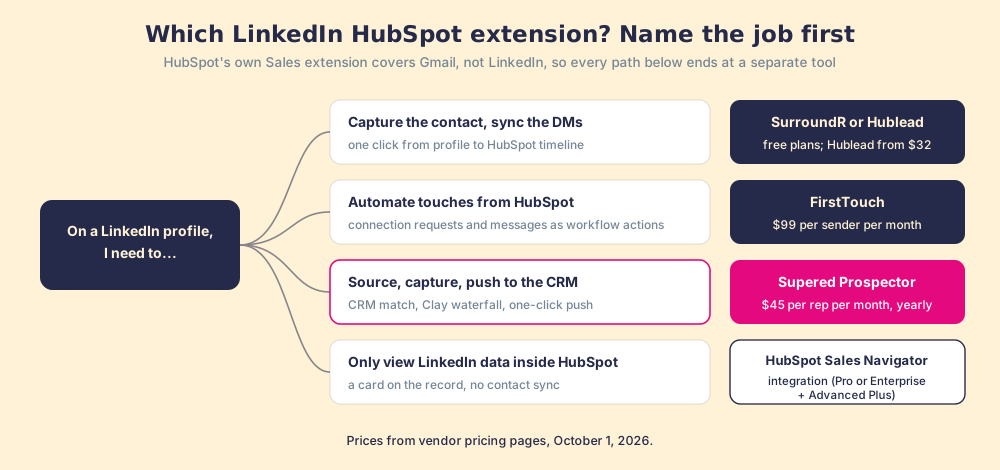
| Extension | LinkedIn job | HubSpot side | Free plan | Paid from (October 2026) |
|---|---|---|---|---|
| SurroundR | Capture, DM sync, video DMs | Real-time sync to contact timeline | 100 credits/mo | €39/user/mo (Mono, 500 credits) |
| Hublead | Capture, DM sync | HubSpot and Salesforce | Yes | $32/seat/mo billed yearly (Professional, 50 credits) |
| Surfe | Capture across CRMs | HubSpot, Salesforce, others | Yes | $39/user/mo billed yearly (Essential) |
| FirstTouch | Automated touches | LinkedIn actions in HubSpot workflows | 14-day trial | $99/sender/mo (500 credits) |
| Supered Prospector | Source, capture, push through your Clay account | CRM match, then one-click push to HubSpot, Salesforce, or Pipedrive | No; demo first | $45/rep/mo billed yearly, plus your Clay plan |
| HubSpot Sales Navigator integration | View LinkedIn data in HubSpot | Card on records, no sync | No | Sales Hub Pro + Sales Navigator Advanced Plus |
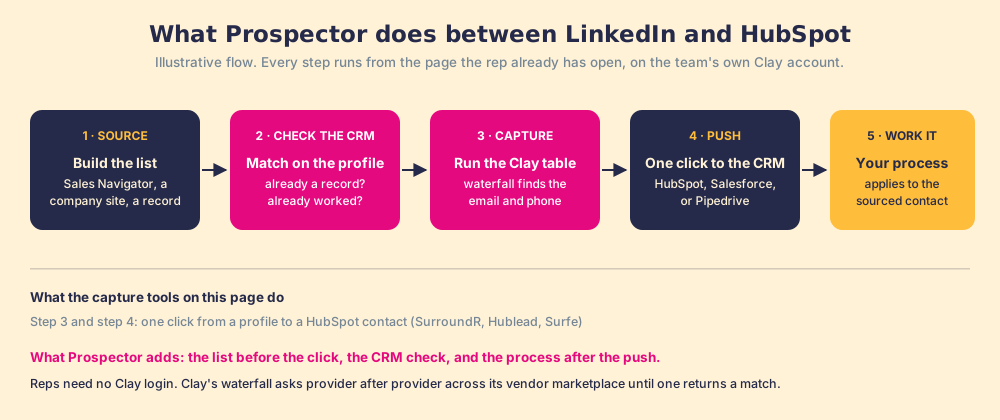
- Supered Prospector, grade A-, the LinkedIn winner for teams that run Clay. It does three jobs the capture tools split up. To source, a rep builds a list from a Sales Navigator search, pulls the buying committee off a company’s website with the titles and seniority the team sets, or prospects from inside a HubSpot record. To capture, the rep on a LinkedIn profile sees whether the person already matches a CRM record and whether someone worked them before, then runs the team’s Clay table, so the email and phone come from Clay’s waterfall across 200-plus data vendors rather than a single database (Clay, September 25, 2026). To push, one click sends the contact to HubSpot, Salesforce, or Pipedrive with field mapping set once by Ops, or sends a whole list into any custom Clay workflow. Reps need no Clay login. Once the contact lands, the team’s process rules apply to it, so the manager watches the list become pipeline and coaches from what is converting. The knocks are real: it needs a Clay account, and Clay’s Growth plan, the tier with CRM sync, starts at $495 a month (Clay pricing, September 25, 2026); Prospector adds $45 per rep per month billed yearly; there is no free plan or trial yet; and if LinkedIn messaging is the job, SurroundR’s DM sync and video DMs fit better. See Prospector.
- SurroundR, grade A-, the LinkedIn winner for teams without Clay, for capture and outreach together. A LinkedIn-first tool built to “turn LinkedIn activity into HubSpot pipeline”: one click captures a profile with enriched email and phone through a waterfall of 20-plus data vendors, LinkedIn DMs sync to the contact timeline in real time, and its Chirp feature sends video inside a LinkedIn thread (SurroundR). It takes both the capture and the LinkedIn-first outreach awards because it owns the whole motion.
- FirstTouch, grade A-, the LinkedIn automation winner. The pick for automating LinkedIn touches from inside HubSpot: connection requests, messages, and follow-ups run as actions in the HubSpot workflow builder, touches log to the contact timeline, and engagement signals surface warm prospects. $99 per sender per month with 500 credits and a 14-day trial (FirstTouch pricing).
- Hublead, grade B+. A strong, popular capture tool: it matches people to HubSpot records, imports contacts, and syncs LinkedIn DMs, rated 4.8 on the Chrome Web Store from 151 ratings with about 6,000 users, a free plan, and paid seats from $32 a month on annual billing (Hublead pricing). It loses the capture award to SurroundR only because SurroundR owns outreach alongside it.
- Surfe, grade B. Solid LinkedIn-to-CRM capture across HubSpot, Salesforce, and other CRMs, from $39 per user per month on annual billing (Surfe pricing).
- folk, grade C+. A lighter capture-and-enrichment layer; pleasant, and thinner than the tools above.
Which are the best for email engagement?
Beyond the native tool, for teams sending and sequencing at volume.
- Mixmax, grade B. Sequences, tracking, scheduling, and templates, with more than a thousand five-star G2 reviews (Mixmax on G2). Popular with Gmail-heavy teams.
- Yesware, grade B-. Tracking and templates with solid reporting, little beyond it. Owned by Vendasta since its 2022 acquisition (destinationCRM).
- Streak, grade B-. A CRM inside Gmail, useful for lightweight pipeline alongside HubSpot.
Which are the best for prospecting, data, and automation?
- Apollo, grade B+. The best all-in-one for a team that needs data: database, enrichment, and capture to HubSpot, rated 4.7 on G2 from 9,690 reviews as shown on its pricing page, with a free plan and Basic at $49 per user per month billed yearly (Apollo pricing, September 2026). Not an A because data accuracy varies and the suite sprawls.
- ZoomInfo, grade B+. The deepest data, rated 4.5 on G2 from 9,384 reviews per its pricing page; the heaviest and priciest, with no published prices and a Vendr median contract of $33,500 a year (Vendr, 2026).
- PixieBrix, grade B. Browser automation that extends HubSpot with custom panels and workflows; powerful for RevOps, with a learning curve.
- Salesloft, grade B. A full engagement platform reaching into the browser, now one company with Clari after their merger closed in December 2025 (Salesloft); heavier than an extension.
- Hunter, grade C+. A reliable email finder and little more.
- Lusha, grade C. Quick contact data with mixed accuracy.
- MarketingOps Toolkit, grade C+. A handy kit of HubSpot utilities, useful and minor.
These fill the funnel or shape the interface and do nothing for whether a deal already in the pipeline gets worked right. A team that already pays for Clay should skip the extra database and look at Prospector, graded in the LinkedIn section, which puts that Clay account in every rep’s hands.
Are Scribe, Tango, and Supered good for documentation?
The documentation category looks like adoption and stops one step short of it, except for the one tool that does both.
- Supered, grade A, and the value winner for documentation and review. Supered captures the process like Scribe and Tango, adds AI search across everything it captures so a rep or manager finds the right step or answer instantly, and then does the thing the pure documentation tools cannot: it delivers that process while the rep works and measures whether reps run it. More technology on the same job, at a lower total price than stacking a documentation tool plus a separate adoption tool, which is why it takes the documentation-and-review value award.
- Scribe, grade B. It auto-captures any workflow into a step-by-step guide, with a searchable library and approval workflows for regulated teams, rated 4.8 on G2 (Scribe vs Tango). The lightest pure-documentation pick. The cap: a guide a rep has to open is reference, and reference sits in the same knowing-doing gap as a wiki.
- Tango, grade C+. Tango’s in-app “Nuggets” overlay guidance inside the application, closer to in-flow than a PDF, and well-reviewed on G2. Two knocks: it has been pivoting toward CRM automation with documentation now secondary, and its center of gravity is still capturing steps rather than driving behavior in the moment of work.
Documentation is necessary and is not behavior. A captured guide raises the ceiling on what a rep could do and changes nothing about what they do under quota pressure, which is why the tool that wins this lane on value is the one that turns the captured process into an AI-searchable next step in the record rather than a PDF.
Which HubSpot Chrome extension drives the rep’s next best action?
The category is rep next best action: surfacing the right move while the rep works and driving process compliance. Roundups of HubSpot extensions tend to leave it out, and it is the one that decides the number.
- Supered, grade A, rated 4.9 on G2 from 81 reviews. The lane’s winner, covered in full in the Supered section above: process rules flag the skipped step, cards and guides appear in that moment, and process boards show leaders adherence by rep and stage. The knock is the commitment, since someone has to agree what the process is.
- Spekit, grade B-. A digital-adoption approach surfacing in-app answers, rated 4.7 on G2 from 303 reviews (Spekit on G2); lighter than a full process layer and priced for the enterprise.
Versatility: the one axis where the field is not close
The grades above are each for a single job. Versatility is the opposite question: how much of the flow one tool covers. Here the field is not close, and it is the strongest case for Supered.

The native extension does email and nothing else. Apollo prospects. Hublead captures LinkedIn. Scribe documents. Each is rightly focused, and a short bar is not a criticism. Supered is the one tool built to span surfaces rather than own one: it runs in HubSpot and Salesforce, in Gmail and Outlook, in the dialer, on LinkedIn (where Prospector now sources, captures, and pushes contacts into the CRM), and on any URL, and it covers documentation, process, knowledge, and adherence in one layer. If you want a single thing that follows the rep everywhere instead of a drawer of single-trick tools, that is the one axis where Supered leads by a wide margin. If you only need one job done, buy the focused tool and ignore this paragraph.
The scorecard, criterion by criterion
The methodical view, and the work behind every grade: the eleven contenders scored 0 to 10 on each of the five criteria, weighted into an overall. The overall sets the grade; the grade sets the ranking. Two tools clear a 9.
| # | Extension | Job fit | Ease | Value | Reliability | Integration | Overall | Grade |
|---|---|---|---|---|---|---|---|---|
| 1 | HubSpot Sales (native) | 9 | 9 | 10 | 9 | 9 | 9.2 | A |
| 2 | Supered | 10 | 8 | 9 | 8 | 10 | 9.1 | A |
| 3 | Supered Prospector | 10 | 8 | 7 | 8 | 10 | 8.7 | A- |
| 4 | SurroundR | 9 | 8 | 8 | 9 | 9 | 8.6 | A- |
| 5 | FirstTouch | 9 | 9 | 8 | 8 | 8 | 8.5 | A- |
| 6 | Apollo | 9 | 8 | 8 | 8 | 8 | 8.3 | B+ |
| 7 | Hublead | 8 | 8 | 8 | 8 | 9 | 8.2 | B+ |
| 8 | ZoomInfo | 9 | 7 | 7 | 9 | 8 | 8.0 | B+ |
| 9 | Mixmax | 8 | 8 | 8 | 8 | 7 | 7.8 | B |
| 10 | Scribe | 7 | 9 | 8 | 8 | 7 | 7.8 | B |
| 11 | Surfe | 7 | 8 | 8 | 8 | 8 | 7.7 | B |
Read the columns as well as the overall. HubSpot’s native tool wins on value (free) and reliability; Supered wins job fit and integration, which is why it scores within a tenth of a free tool despite being a paid platform. Prospector shows the same trade in one row: top marks for job fit and integration, and a 7 on value, because it pays off only on top of a Clay account you already fund. That tenth is why the decision table at the top ranks by job rather than by overall: for the process job Supered is first, and for email the native tool is. The numbers are editorial judgment applied consistently, the same way a CNET scorecard works, not a benchmark anyone could run in a lab.
The full field, ranked
Ordered best to worst, with each tool’s standout strength and its knock. Two straight A-grades and three A-minuses, then a long, useful descent.

| # | Extension | Grade | Verified rating | Standout | The knock |
|---|---|---|---|---|---|
| 1 | HubSpot Sales (native) | A | 4.4 CWS (8,200) | Best free email tracking and logging | Email-only; silent on everything else |
| 2 | Supered | A | 4.9 G2 (81) | One layer for next best action, docs + review, adherence | Heavier than a free utility |
| 3 | Supered Prospector | A- | New; demo first | Sources, captures, and pushes LinkedIn contacts through your Clay account | Needs a Clay account; no free plan |
| 4 | SurroundR | A- | Free plan | Wins LinkedIn capture and outreach together | Newer; narrow to social |
| 5 | FirstTouch | A- | HubSpot-native | Best LinkedIn automation from HubSpot workflows | Narrow to LinkedIn |
| 6 | Hublead | B+ | 4.8 CWS (151) | Strong LinkedIn-to-HubSpot capture | Capture only |
| 7 | Apollo | B+ | 4.7 G2 (9,690) | All-in-one prospecting at fair value | Data accuracy varies; suite sprawls |
| 8 | ZoomInfo | B+ | 4.5 G2 (9,384) | The deepest B2B data | Expensive and heavy |
| 9 | Scribe | B | 4.8 G2 | Best pure documentation capture | A guide is reference, not behavior |
| 10 | Surfe | B | Well-reviewed | Dependable LinkedIn-to-CRM capture | Capture only |
| 11 | Mixmax | B | 1,000+ 5-star G2 | Strong sequences and tracking | A crowded lane |
| 12 | PixieBrix | B | n/a | Deep browser automation | A real learning curve |
| 13 | Salesloft | B | Strong G2 | Cadences at scale | Heavier than an extension |
| 14 | Yesware | B- | n/a | Solid tracking and templates | Little beyond it |
| 15 | Streak | B- | n/a | CRM inside Gmail | Lightweight pipeline only |
| 16 | Spekit | B- | 4.7 G2 (303) | In-app answers where reps work | Lighter than a full layer |
| 17 | folk | C+ | n/a | Pleasant lightweight capture | Thin against the leaders |
| 18 | Hunter | C+ | n/a | Reliable email finder | Does one thing |
| 19 | MarketingOps Toolkit | C+ | n/a | Handy HubSpot utilities | Minor by nature |
| 20 | Tango | C+ | Well-reviewed | In-app walkthroughs | Pivoting away from documentation |
| 21 | Lusha | C | n/a | Quick contact data | Accuracy is mixed |
Ratings were checked on October 1, 2026. An n/a in the rating column means we could not verify one clean public score, not a knock. The grades cluster, so the ranking breaks the ties: a list that hands out ten A’s is not grading.
Editors’ Choice
There is no single one of the best HubSpot Chrome extensions for every buyer, so here are the Editors’ Choice awards by the way people buy. First, the two tools that cleared a 9, with the verdict box for each.
HubSpot Sales (native), 9.2, Grade A. Pros: free, the strongest tool at email tracking and logging, about 1 million users, native to HubSpot. Cons: single-purpose; it does email and is silent on the rest of the deal.
Supered, 9.1, Grade A, rated 4.9 on G2 from 81 reviews. Pros: one layer for the rep’s next best action, documentation and review, and adherence, across every surface and both CRMs, with AI search over the captured process. Cons: heavier than a free utility, and overkill for a team that only wants faster email.
And the awards, by need:

- Best free: HubSpot Sales (native). Deep, free, and a clean A for email.
- Best LinkedIn sourcing for Clay teams: Supered Prospector. Source, capture, and push to HubSpot in one motion, on the Clay account you already pay for.
- Best LinkedIn capture and outreach: SurroundR. The pick without Clay; it owns capture and outreach together, and Hublead is the strong pure-capture runner-up.
- Best LinkedIn automation: FirstTouch. Automated LinkedIn touches run from HubSpot workflows.
- Best value all-in-one: Apollo. Prospecting, data, and capture at a fair price.
- Best pure documentation: Scribe. The lightest way to capture a guide.
- Best documentation and review value: Supered. AI-searchable capture that becomes behavior, with more technology at a lower total price than stacking a docs tool plus an adoption tool.
- Best for versatility and the rep’s next best action: Supered. The one layer that documents the process, makes it AI-searchable, delivers it while the rep works, and measures compliance across HubSpot, Gmail, LinkedIn, and any URL.
How do you choose, and how many should you run?
Start from the job you have, not the tool with the longest feature list. Searches for the best hubspot extensions, or plainly hubspot chrome extensions, trace back to one of these seven categories, so name yours first.

Which HubSpot Chrome extensions should you skip?
Real grading means real losers. These score a D or worse and should not go in your stack.
- Single-trick formatters and screenshot tools, grade D. They save a few seconds and clutter the page; the value does not survive running yet another extension.
- Abandoned “HubSpot productivity” extensions, grade D. Many top results have not been updated in years, and an unmaintained extension that touches your CRM is a breakage and security risk.
- Broad LinkedIn-scraper extensions, grade F. The aggressive ones risk account bans and run against platform terms; the capture job is better served by Hublead or Surfe.
- “AI” wrappers with no HubSpot depth, grade D. A chatbot in a sidebar that cannot read your records or write to the deal is a demo, not a tool.
One discipline matters across all of them: run a handful, one per job, rather than a stack, because overlapping extensions fight each other for the page. And the disclosure we opened with still stands. We make Supered, we graded it on the same five criteria as everything else, knock included, and we ranked it first only for the job it does. If your gap is the process job, documentation that turns into behavior, or one layer across HubSpot, Gmail, and LinkedIn, book a demo and see it against your own process; how it works shows the mechanics. If your gap is getting your Clay account into every rep’s hands on LinkedIn, see Prospector or book a Prospector demo. If your gap is anywhere else on this page, the tool we would point you to is not ours, and it is named and graded above. The same map applied to Salesforce is in the best Salesforce Chrome extensions, the LinkedIn side goes deeper in LinkedIn prospecting, and the longer argument is in the HubSpot Chrome extension guide and the broader CRM adoption problem.
Frequently asked questions
What are the best HubSpot Chrome extensions?+
What is the best LinkedIn HubSpot Chrome extension?+
Can Supered capture LinkedIn contacts into HubSpot?+
Does the HubSpot Sales Chrome extension work on LinkedIn?+
Is there a free HubSpot Chrome extension?+
Do HubSpot Chrome extensions work in Microsoft Edge?+
How is Supered different from HubSpot's native Sales extension?+
Your process, running itself.