Clay vs HubSpot: The Pantry, the Courier, and the Market
Clay vs HubSpot is not CRM against CRM.
HubSpot's built-in enrichment fills descriptive fields for free and its data agent bills per answer; Clay's waterfall asks 200+ vendors for the email and phone and bills only on a hit.
Clay vs HubSpot compares two kinds of data: HubSpot's built-in enrichment fills descriptive fields like title and company size at no credit cost, while Clay's waterfall asks 200+ vendors in turn for a work email and phone and charges only on a result.
Clay vs HubSpot is a comparison between two kinds of data. HubSpot’s built-in enrichment fills descriptive fields such as title, seniority and company size on records already in the CRM, at no credit cost, while Clay is a waterfall that asks 200+ data vendors in turn for the work email and phone a rep needs and charges only when one answers. The short answer for a HubSpot sales team:
- Supered Prospector on Clay. For HubSpot teams that already have Clay and want reps to run its tables from the HubSpot record, LinkedIn, Sales Navigator or a company site. $45 per rep per month, billed annually.
- Clay, run by your GTM engineer. For teams that want the waterfall writing emails and phones into HubSpot on a schedule. Growth plan, $495 a month.
- HubSpot’s own enrichment. For inbound-heavy teams that need title, seniority and firmographics, free on any paid Hub.
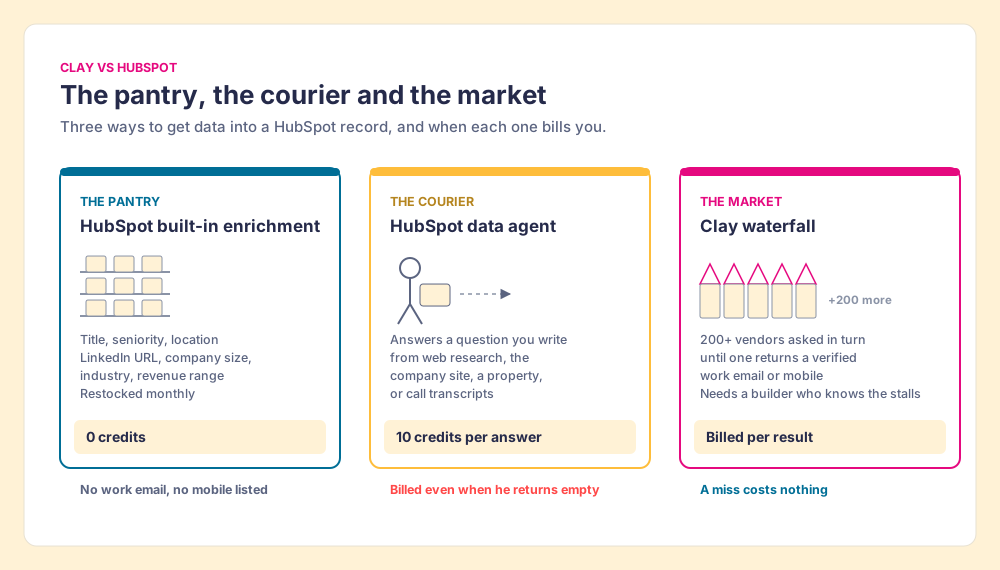
A house comes with a pantry. Flour, salt, rice, a few tins: the staples, included in the rent, restocked every month by the landlord. You do not pay per scoop. You also never find fresh fish in it, because a pantry holds what keeps. HubSpot’s enrichment is the pantry. Its knowledge base, updated July 10, 2026, is plain about the price: “Data enrichment does not consume HubSpot Credits” (HubSpot).
The house also offers a courier. Tell him what you want, and he goes out and asks. HubSpot’s data agent is the courier, and he bills per errand, at 10 credits per answer per record, whether he comes back with the item or with his hands empty. Clay is the wholesale market across town: 200+ stalls (clay.com, October 1, 2026), a buyer who walks them in an order you set, and a bill only for what is carried out. “If an enrichment returns no result, you’re not charged Data Credits or Actions” (clay.com/pricing, October 2, 2026).
So the hubspot vs clay question has a cleaner shape than most comparison pages give it: what is in the pantry, what to send the courier for, and what only the market sells.
Why does the clay vs hubspot search return the wrong Clay?
Because two companies are called Clay. Clay Labs, at clay.com, is the data and workflow platform this page is about; it raised $115 million in a Series D led by Wellington Management at a $7.1 billion valuation on September 9, 2026 (SiliconANGLE). The other Clay is a personal relationship manager. Read the results with that in mind. One ranking page, updated June 24, 2026, calls Clay “a contact-centric tool with enrichment” priced “free to 1k, then $10/$40,” and says it has “no AI” (folk). Those are the personal CRM’s prices. Clay Labs sells Claygent, an AI research agent, on every plan.
Another top result, dated February 11, 2026, opens with “Clay specializes in data enrichment at $149/month” and “150+ data provider integrations” (La Growth Machine). The $149 Starter plan was retired in Clay’s Pricing 3.0 in March 2026. Today’s self-serve plans are Launch at $185 a month ($167 annual) and Growth at $495 ($446 annual), per clay.com/pricing on October 2, 2026. Neither page asks what HubSpot’s own data fills, which is the question a HubSpot customer is weighing.
Why trust this comparison?
I started RevPartners, a HubSpot partner that did only sales implementations, sold roughly twice as much Sales Hub as any other partner, and reached Elite tier in 13 months. Supered came out of that work, works inside HubSpot, Salesforce and Pipedrive, and is the #1 sales enablement app on the HubSpot marketplace, at 5.0 from 122 reviews there and 4.9 from 81 on G2 (October 1, 2026). So, the disclosure: we make Supered Prospector, which runs on Clay, and it ranks first below for teams that have Clay. For balance, Clay holds 4.6 from 234 reviews on G2 (October 2, 2026) and HubSpot Sales Hub 4.4 from 14,347 (October 1, 2026). Both are independent; HubSpot is a public company, and Clay’s latest round is the one above.
Clay vs HubSpot, graded
| Option | Best fit | HubSpot integration | Setup effort | Pricing (plan with the feature) | Reason to choose | Grade | Rank |
|---|---|---|---|---|---|---|---|
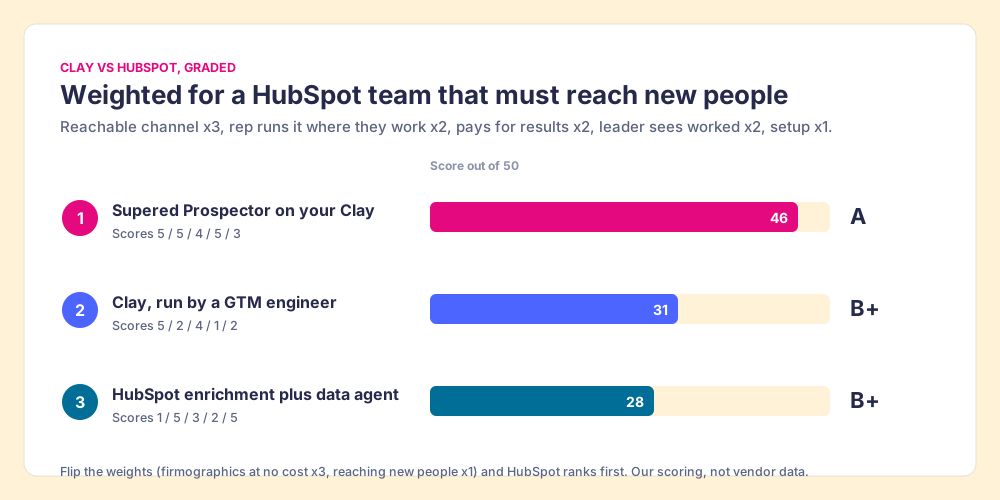
| Supered Prospector on your Clay | HubSpot teams with Clay whose reps need new names and numbers | Native: starts from the HubSpot record, one-click sync, mapping set once | Medium: needs Clay tables | $45 per rep per month, billed annually, plus your Clay plan | Reps run the waterfall where they sell; the leader sees each list found, worked, closed | A (46/50) | 1 |
| Clay, run by a GTM engineer | Teams that want emails and phones written into HubSpot on a schedule | Native Clay action set; Growth plan | High: someone builds and maintains tables | Growth $495 a month ($446 annual), 6,000 data credits a month | Waterfall across 200+ vendors, billed per result | B+ (31/50) | 2 |
| HubSpot enrichment plus data agent | Inbound-heavy teams that need firmographics and routing fields | Built in | Lowest: a settings page | Enrichment on any paid Hub at 0 credits; data agent 10 credits per answer | Free descriptive fields, refreshed monthly | B+ (28/50) | 3 |
How we graded. Five criteria, weighted for a 10 to 50 rep HubSpot team that has to reach people it does not know yet: finds a reachable channel, meaning a work email or mobile (x3); the rep runs it where they already work (x2); pays for results, with a cost you can predict (x2); the leader sees what was worked (x2); setup effort (x1). Prospector scores 5, 5, 4, 5, 3. Clay run by a builder scores 5, 2, 4, 1, 2. HubSpot’s own data scores 1, 5, 3, 2, 5. Bands: A from 44, A- 34 to 43, B+ 28 to 31. Flip the weights so “fills firmographics at no cost” counts x3 and reaching new people counts x1, and HubSpot comes out on top. That flip is the decision you are making. Sources for every price: clay.com/pricing and HubSpot’s Credits Rate Sheet, both opened October 2, 2026.
What does HubSpot’s own data do, now that Breeze Intelligence is called enrichment?
HubSpot launched the bundle as Breeze Intelligence on September 18, 2024, “powered by a dataset of over 200 million company and buyer profiles that’s continually refreshed” (HubSpot). Clearbit’s free tools were switched off on April 30, 2025, so the team could build “more integrated and innovative solutions together, such as Breeze Intelligence” (Clearbit changelog). The knowledge base today calls it data enrichment, and it now draws on “HubSpot’s commercial dataset, third-party providers, and publicly available information from across the internet.” So if you searched clay vs breeze intelligence, the HubSpot half of the comparison is three tools under one roof.
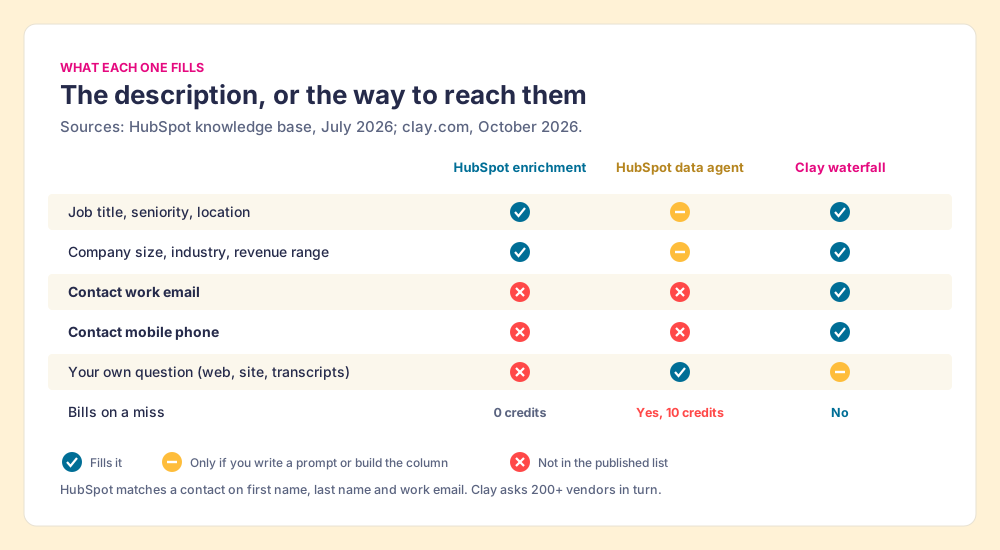
- Built-in enrichment. On Starter, Professional and Enterprise of every Hub. HubSpot matches a contact on “first name, last name, and work email address” and a company on its domain. The enrichable contact properties are City, Country, Employment Role, Employment Seniority, Employment Sub Role, First Name, Job Title, Last Name, LinkedIn URL and State/Region; company properties include revenue range, employee range, industry, web technologies and a company phone number (HubSpot, July 20, 2026). No contact email. No mobile. 0 credits.
- The data agent. Smart properties answer a question you write, from one of four sources: web research, the company website, another property, or activities and transcripts (HubSpot, July 24, 2026). It costs 10 credits per answer per record, and “running a smart property consumes HubSpot Credits, even when a value isn’t filled.”
- Intent. Monitoring one company for one custom signal for a month costs 50 credits (HubSpot Credits Rate Sheet, October 2, 2026).
The pantry deserves credit. Its contact enrichment needs a work email to match on, so it can describe a lead who filled in a form, and it describes that lead well, for free, with a monthly refresh. For routing, scoring and form shortening, that is the right tool, and our HubSpot data enrichment page walks the settings and overwrite rules.
Why do HubSpot teams add Clay?
Three reasons come up, and each has a source behind it.
- The missing channel. The rep opens a well-described contact and finds no way to reach the person. HubSpot’s contact list stops at the LinkedIn URL. Clay’s waterfall is built for the other fields: “Clay’s signature data waterfalls check multiple providers to return the most verified emails (lower bounce rate) and phone numbers (higher connect rate)” (Clay, rep prospecting).
- The single shelf. Any one dataset misses in some segment. Vanta’s line on Clay’s CRM enrichment page puts it in a customer’s words: “We’re no longer limited by the accuracy of any single provider” (Clay, CRM enrichment). HubSpot’s own prospecting agent reaches outside the pantry too: ZoomInfo announced on July 9, 2026 that it was “selected as a third-party data provider for HubSpot’s Breeze Prospecting Agent” (ZoomInfo).
- People who are not in the CRM yet. Enrichment improves records that exist. A new logo, a buying committee at a target account, a champion who changed jobs: those people have to be found first, which is a prospecting job. The HubSpot prospecting agent page covers HubSpot’s answer to it, at 100 credits ($1) per recommended lead.
Clay vs Breeze Intelligence: where does each meter turn?
The pantry has no meter. The useful comparison is the courier against the market, because both answer questions HubSpot’s standard fields cannot.
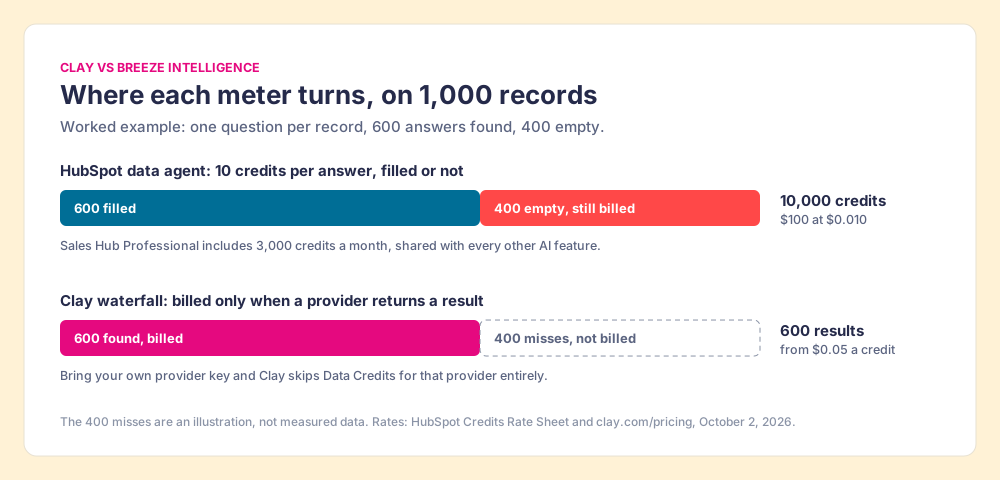
Suppose a RevOps lead adds one smart property, “Does this company sell to hospitals?”, to 1,000 company records. That is 1,000 answers at 10 credits each: 10,000 credits, or $100 at HubSpot’s pay-as-you-go rate of $0.010 a credit. If the agent finds nothing on 400 of them, the bill is still 10,000 credits. Sales Hub Professional includes 3,000 credits a month (Starter 500, Enterprise 5,000), so that one question is more than three months of a Professional portal’s allowance, shared with every other AI feature in the account.
Clay meters the other way. Data credits start at $0.05 each, the Growth plan includes 6,000 a month, and a lookup that comes back empty costs nothing. If you bring your own API key for a provider, “you skip Data Credits entirely.” The market charges for the fish you carry home. The courier charges for the walk.
Of course, a courier is only a picture, and he earns his fee on some errands. He is good at questions no data vendor sells: a summary of the last three calls, a guess at the pain point from a transcript, a yes or no about a market from the company’s own website. Clay has its own researcher, Claygent, on every plan, but HubSpot’s agent reads your call transcripts in place. Use each for what it is.
Is Clay a replacement for HubSpot?
No, and the two connect directly. Clay’s HubSpot integration imports any HubSpot object or list into a Clay table and writes results back by record ID, with “Ignore blank values” on by default so an empty lookup does not erase a field (Clay University). CRM integrations sit on the Growth plan. The Clay HubSpot integration page walks all eleven actions and the permissions.
The market has one limit the pantry does not. Somebody has to know the stalls. Clay is built for the person who builds tables and waterfalls, the GTM engineer, and its own copy says so: “GTM engineers build on Clay” (Clay). The cooks, meaning the reps, work in HubSpot, LinkedIn and Sales Navigator. A table that needs a Clay tab to run gets run by the builder, and the builder becomes the list desk, fielding Slack requests for one more list.
Where does Supered Prospector fit?
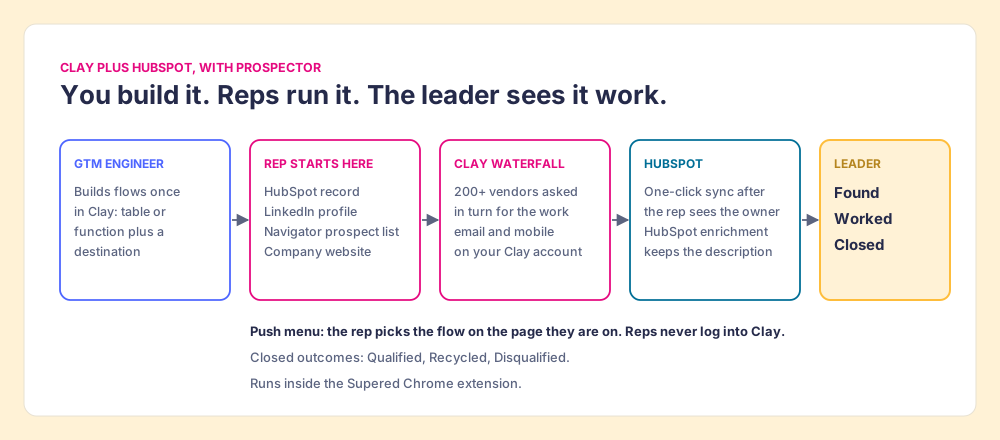
Clay plus Supered is the best way for a sales team to prospect: GTM engineers build in Clay, and reps never open Clay. On a HubSpot team, that means the market’s goods arrive at the rep’s station.
Prospector does not bring its own database. It brings Clay’s waterfall, which is every database, routed, and we chose Clay as our only data provider for that reason. It runs inside the Supered Chrome extension on the team’s own Clay account.
- The GTM engineer. Builds named flows once, each mapped to a Clay table or function, such as person enrichment or a buying committee, and a destination, such as the HubSpot account or a sequence. “Your logic stays yours: waterfalls, tiers, tags, and sequence variables.” Start from the Supered Clay template or bring your own Clay tables. The Prospector page for GTM engineers shows the builder’s side.
- The rep. Gets the table as a button on a HubSpot record, a LinkedIn profile, a company’s website, or a Sales Navigator prospect list, and picks a flow from the Push menu. On Navigator, the rep adds leads to a prospect list and pushes the list to a Clay table. Before pushing, the rep sees the matching HubSpot record, who owns it, and a “Prospected 1 other time” style flag, so two reps do not work the same person.
- The leader. Sees every list as Found, Worked and Closed. Found: reps used your tables, with no duplicate work. Worked: who is working their list, and who is not. Closed: every lead ends the way your process says, Qualified, Recycled or Disqualified. That view is how the Clay budget grows.
The plays a HubSpot team runs map onto it: research on a target account that pulls each person who signs off, new logos, expansion into the rest of a customer’s team, job changers, and the stalled opportunity that needs the economic buyer and two peers added before the forecast call. On LinkedIn’s terms, ask every vendor what it reads, ours included. Prospector works within LinkedIn’s terms and does not copy search results in bulk; the contact data comes from Clay’s waterfall on the customer’s Clay account.
The arithmetic, at list prices. Clay Growth is $5,940 a year on monthly billing ($5,352 annual). Prospector is $45 per rep per month, billed annually, from one rep (Prospector), so ten reps add $5,400 and the pair comes to $11,340 a year, or $10,752 with Clay on annual billing. HubSpot’s enrichment costs nothing on top of the Hub you pay for. “Skip the extra seats. Get more out of the Clay you already pay for.”
Choose something else if you do not have Clay. Prospector runs on the customer’s Clay account and does nothing without one, and a team that has never built a waterfall needs someone to build it, which is a real salary line (GTM engineer salary). RevPartners, the company I founded, is a Clay Elite Studio Partner that builds and tunes the tables with you (revpartners.io/allbound); other agencies do this work too, and the Clay agency page covers how to pick one. Choose something else, too, if your pipeline is inbound and HubSpot’s descriptive fields are all your routing needs. Then the pantry is enough.
Clay or HubSpot: which should you choose?
The ways forward, sorted by what the team is short of:
- Descriptive fields for inbound leads. HubSpot’s built-in enrichment, switched on, with the mapping rules set. No credits, monthly refresh.
- Custom research from your own calls and the company’s site. HubSpot’s data agent, budgeted per answer, on questions vendors do not sell.
- Work emails and mobiles, written into HubSpot in bulk. Clay on the Growth plan, run by a GTM engineer, with the HubSpot integration and your own provider keys where you have them.
- Reps finding and reaching new people from where they sell. Clay plus Supered Prospector, from the HubSpot record, LinkedIn, Sales Navigator and the company site.
Our recommendation: keep the pantry stocked, because it is free, and stop sending the courier for fish. A smart property bills per answer whether or not the answer exists, and a contact channel is the answer most likely not to exist in a single dataset. If you have Clay, put the market at the rep’s station instead of in the builder’s queue, and watch which lists get worked and closed. The sales prospecting with Clay page shows the rep loop end to end, and the Clay Chrome extension page covers how reps reach Clay from the browser.
Frequently asked questions
Is Clay a replacement for HubSpot?+
Clay vs Breeze Intelligence: which finds more contact data?+
Does HubSpot data enrichment cost credits?+
Should a HubSpot team use HubSpot enrichment or Clay?+
How do reps use Clay without leaving HubSpot?+
When is HubSpot's own data enough?+
Everything we have written on Clay
More on Clay
Supered Prospector: your Clay waterfall, inside LinkedIn and your CRM- Clay Alternatives: What the Question Usually Means, and Why a Sales Team Often Wants a Front End on Clay Instead
- Clay Pricing 3.0, Explained for the Sales Leader Who Is Not the GTM Engineer
- Clay Chrome Extension: What Exists Today, and the Five Moves a Rep-Side Extension Should Be Held To
- Clay HubSpot Integration: What It Writes, Which Plan Turns It On, and the Step After the Sync That Nobody Owns
- Clay Salesforce Integration: Two Doors In, One Tag Out, and the Step After the Sync That Nobody Owns
- Clay Pipedrive Integration (2026): The Six Actions, the Plan It Needs, and How Reps Run It Without Opening Clay
- Clay Agency: How to Pick One, and Who Runs the Tables After It Leaves
- Clay Email Finder: How the Waterfall Finds Work Emails, What a Found Email Costs, and Why the Last Tenth Is Hard
- Clay Integrations, Explained for the Sales Leader: The Mail Runs Both Ways, and Nobody Checks Whether It Was Answered
- Clay LinkedIn: What Crosses From LinkedIn to Clay, and What Should Never Cross
Your Clay waterfall, where reps already work.