HubSpot Data Enrichment: What the Native Tool Fills, What It Never Will, and How a Waterfall From the Record Finds It
HubSpot's native data enrichment fills title, seniority, LinkedIn URL, revenue range, and employee count from its own dataset, in three modes with overwrite rules. It lists no contact email or phone. What it gives, its settings, and how a waterfall from the record finds the rest.
HubSpot data enrichment is HubSpot's built-in feature that fills blank contact and company properties (job title, seniority, industry, revenue range) from HubSpot's commercial dataset, automatically for new records, manually from the Intelligence tab, or continuously each month.
The HubSpot admin switches on “Automatically enrich new records,” and it works: a form fill that arrived as a name and an email address is, an hour later, a contact with a job title, a seniority, a LinkedIn URL, and a company record with an employee range and a revenue band. The rep opens it, reads the title, likes it, and looks for the phone number. There is no phone number. There was never going to be one, and the settings page does not say so.
HubSpot data enrichment is HubSpot’s built-in feature that fills blank contact and company properties, such as job title, seniority, industry, revenue range, and employee count, from HubSpot’s commercial dataset, automatically for new records, manually from the record’s Intelligence tab, or continuously each month (knowledge.hubspot.com, last updated July 20, 2026). It is good at what it does, and the settings deserve a walk-through because the overwrite rules can bite. What it does not do is the one thing the rep opened the record for, and for that a HubSpot team needs a waterfall that runs from the record. Both halves below, with the second one teaching where the record leads.
What does HubSpot data enrichment fill, and what does it leave blank?
Think of the plaque beside a painting in a museum. It tells you what you are looking at: the artist, the year, the school, the size, the donor. It is accurate, it is maintained by the museum, and it is updated when the curators learn something new. It will never tell you the artist’s phone number, because a plaque describes a thing that is already on the wall. HubSpot’s enrichment is the plaque.
The knowledge base lists the properties exactly, and the list is the teach. For contacts: City, Country, Country Code, Employment Role, Employment Seniority, Employment Sub Role, First Name, Job Title, Last Name, LinkedIn URL, State/Region, plus two opt-out fields. For companies: Annual revenue, City, Company domain name, Company keywords, Description, Employee range, Industry, Is public, LinkedIn company page, Number of employees, Phone number, Revenue range, Total Money Raised, Web Technologies, Year founded, and the address fields. Read the contact column twice. There is no email address in it and no phone. The only Phone number is the company’s switchboard. The feature also has an entry requirement that keeps the plaque accurate: “Contacts must have a business email address. Personal addresses such as Gmail or Yahoo will not be enriched,” and “Only contacts and companies with available property values will be enriched.”
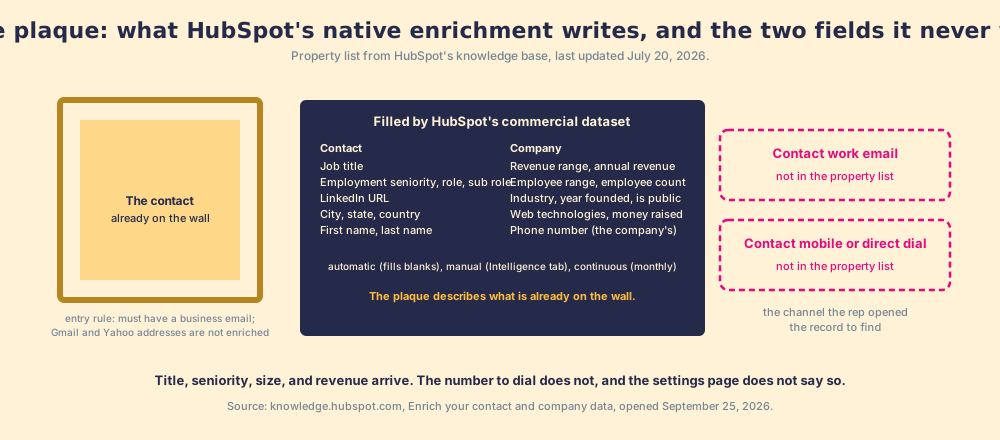
A museum plaque is written once; HubSpot’s plaque rewrites itself, and that favors HubSpot. Continuous enrichment updates “previously enriched records monthly when new data becomes available” (knowledge.hubspot.com, enrichment settings, last updated July 31, 2026), which for a job title is the difference between a record that decays and one that keeps up. That is a real job, the third of the four in CRM data enrichment, and HubSpot does it inside the record for the price of the Hub you already pay for. Available on Starter, Professional, and Enterprise of Marketing, Sales, Service, Data, and Content Hub, and on Smart CRM Professional and Enterprise.
How do HubSpot’s three enrichment modes and overwrite rules work?
Three modes, one mapping table, and two exceptions, all from the same two knowledge-base pages.
- Automatic. Fills “properties containing blank or empty values” on newly created records, from forms, integrations, or manual creation, and “doesn’t overwrite values set by a user or another system.” The safe default.
- Manual. From the record’s Intelligence tab, click Enrich record, tick the properties in the right panel, confirm. Or in bulk: from an index page (100 records at a time), a segment, an import (a checkbox on the last step), or a workflow’s Enrich Record action. Manual can overwrite, “depending on your mapping rules.”
- Continuous. Updates previously enriched values monthly. The guard: “If a user or another system edits an enriched property value, continuous enrichment stops enriching that property.” A companion switch, “Overwrite incorrect enrichment values,” replaces bad enriched values with null, and only runs when continuous is on.
The mapping table is where an admin decides what the plaque may touch. Each property gets one of three rules: “Fill empty values only,” “Fill empty values and overwrite existing values,” or “Do not fill any values.” HubSpot’s own examples are the ones a sales team would pick: protect First name and Last name with fill-empty-only; let Job Title and Employment Seniority overwrite “to keep data current.” Changes apply to future enrichment only. The two exceptions are named in a note: the Enrich record workflow action and conversational enrichment “can overwrite properties regardless of the overwrite rules.” An admin who set fill-empty-only and then built a workflow with overwrite on has two rules, and the workflow wins.
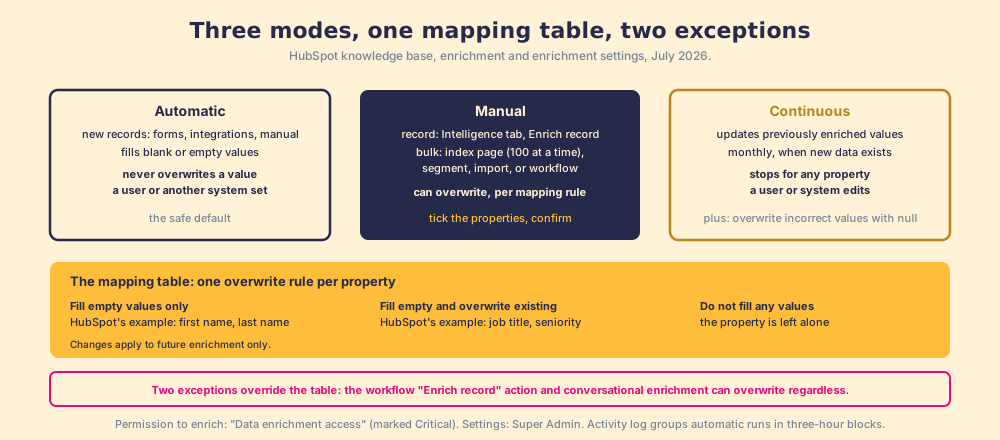
Two administrative facts finish the setup. The permission that lets a user enrich at all, “Data enrichment access,” sits under Data Management and HubSpot marks it Critical; Super Admin is needed to change the settings themselves. And there is an activity log: a feed of enrichment events with timestamp, source (Continuous, Manual), user (or “HubSpot system”), record count, and object type, with automatic and continuous runs grouped in three-hour blocks. If you have ever wondered who overwrote the titles on a segment, the log answers it. The HubSpot implementation guide covers where these permissions sit in a rollout.
How do you enrich HubSpot contacts with an email or phone the native tool will not find?
Reason it through. The plaque describes what is on the wall. The rep needs to reach the person. So the second tool has to go and find a channel, and it has to do so across more than one source, because a single database misses in exactly the places a sales team sells into (the waterfall enrichment page has the mechanism: each provider is stocked from a different river, and Clay’s waterfall page says asking them in sequence “routinely triples our customers’ data coverage and quality”).
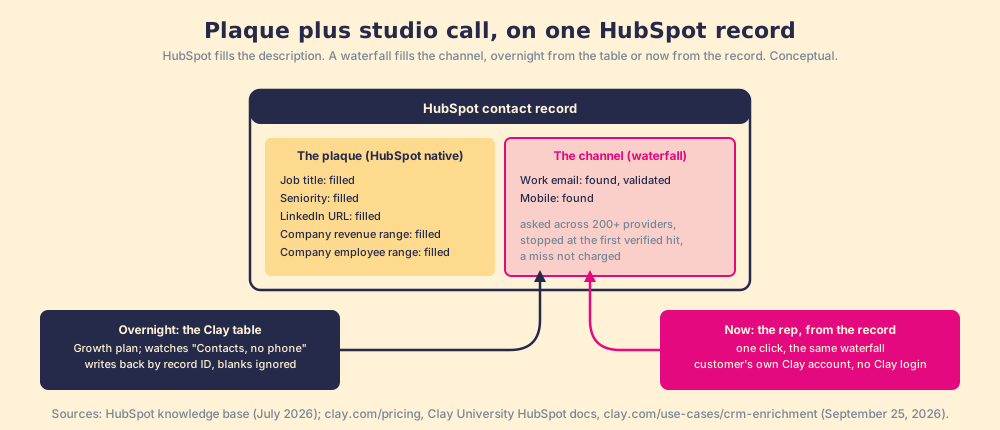
The connector for that is the Clay HubSpot integration, and its mechanics are plain. CRM integrations are a Growth-plan feature on Clay, $495 a month (clay.com/pricing, opened September 25, 2026). A Clay table imports any HubSpot object or list (“Contacts, no phone” is the obvious one), runs the waterfall across 200+ providers (clay.com, same day), validates the email, and updates each record by its HubSpot Object ID, with “Ignore blank values” on by default so a provider that found nothing leaves the field alone (Clay University, HubSpot integration). Clay’s CRM enrichment page describes the trigger: “Trigger enrichments automatically when new leads enter your CRM, ensuring new records are complete before routing” (clay.com/use-cases/crm-enrichment). The Clay HubSpot integration page walks all eleven actions and the OAuth scopes; the short version is that the sync is a registration desk, and the reps are out on the floor.
The overnight direction is the right way for a HubSpot team to fix a list. It is the wrong clock for the rep in the first paragraph. She is on the record now. So the waterfall also has to run from the record, in one click, as the rep’s own action: the HubSpot contact or company record is an entry point, the place she starts, and the result lands back on the same record. The plaque stays. The studio’s phone number arrives beside it.
Where does the enriched HubSpot contact go next?
Into the places a HubSpot rep already works, which is the good news, and into a page of records that all look the same, which is the problem. The rep enrolls the contact in a sequence from the record (HubSpot sequences), writes the first email in Gmail with the HubSpot Gmail integration logging the thread, and gets the open notification that HubSpot email tracking fires. The Bridge Group’s 2025 SDR report puts the median rep’s day at 112 activities: 44 phone, 41 email, 19 LinkedIn, 8 other (Bridge Group, 2025). The record, the inbox, and the browser are where those happen, and the HubSpot Chrome extension guide maps the third.
Now the problem. A mobile that arrived overnight looks the same as one that was always there. The record carries no expectation. The rep did not source it, was not told it is new, and has a page of other records that look identical. Our field data measures what that costs: across 198 sales leaders, 89% have a defined process and 36% see reps run it; reps who get the next step in the flow of work report 49% quota attainment against 15% for reps who must go elsewhere for it; teams that inspect deals against the process consistently hit quota at 6.3x the rate of teams that rarely do (The State of Sales Enablement).
You might say a HubSpot workflow closes this: mobile populated, task created. Fair, and it is the first thing a good admin builds. It creates the task, and the task count says a box was checked. It does not say whether the buyer moved, and it cannot tell the manager, a month on, how many of the contacts that were enriched were worked, advanced, and closed against the number she expected.
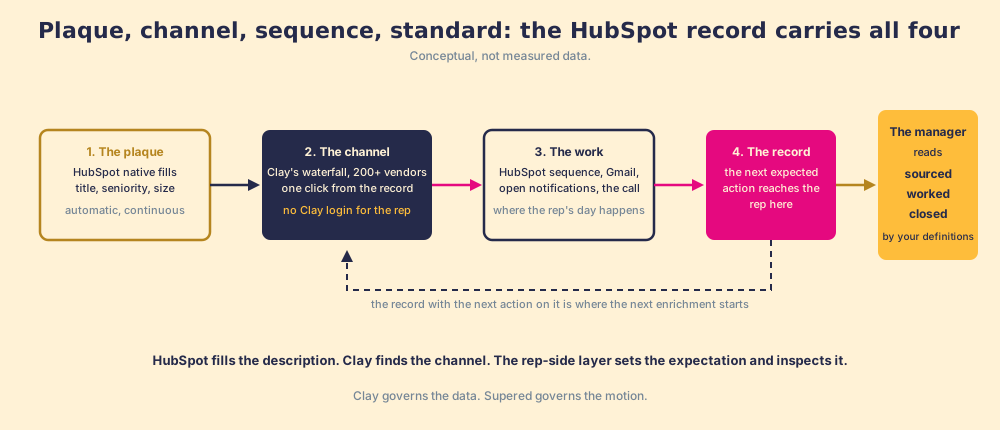
Supered sits here, once and late. It runs on the customer’s own Clay account, so a rep on the HubSpot record, a LinkedIn profile, or a company site runs the waterfall from there, one click, no Clay login, field mapping set once by Ops, with the CRM status visible before she adds a duplicate or steps on a teammate. The enriched contact then enters a motion the Behavior Layer guides and measures: the next expected action reaches the rep on the record, and the manager reads sourced, worked, closed, with “worked” and “closed” defined by the customer, against the expectation the manager set. Clay governs the data. Supered governs the motion.
What we recommend
Three settings for a HubSpot team, in the order to turn them on.
- Native enrichment, automatic and continuous. Switch it on, set fill-empty-only on names, let title and seniority overwrite, and read the activity log once. The plaque stays current for nothing more than the Hub you have.
- A waterfall on the list, overnight. Clay’s HubSpot integration on Growth, pointed at the contacts with no phone, writing back by ID with blanks ignored. The list gets shorter and no one dials it.
- The same waterfall from the record, with a standard behind it. The rep runs it where she is; the sourced contact carries an expectation; the manager coaches off sourced, worked, closed.
We recommend all three, in that order, on the evidence above: HubSpot’s own property list says the plaque will never carry the channel; Clay’s mechanism says the channel comes from asking many providers; and our data says the step after the record fills is the one that moves the number, 49% against 15% and 6.3x. The tools that do the channel-finding job, sorted by which job each one does, are next: contact enrichment tools.
Frequently asked questions
What does HubSpot data enrichment do?+
Does HubSpot enrichment find email addresses or phone numbers for contacts?+
What are HubSpot's automatic, manual, and continuous enrichment modes?+
Can HubSpot enrichment overwrite data my reps entered?+
How do you connect a waterfall to HubSpot?+
What should happen after a HubSpot contact is enriched?+
Your process, running itself.