HubSpot Prospecting Agent Review (2026): What It Writes, What It Costs, and the Job It Leaves for Your Reps
A review of HubSpot's prospecting agent for HubSpot teams: what it does, the $1-per-lead credit math by edition, what users report, and when reps building lists with Clay is the better fit.
The HubSpot prospecting agent is HubSpot's AI agent that watches CRM engagement and buying signals, picks up to three contacts per matching company, and drafts outreach for a rep to review or send, billed at $1 (100 HubSpot Credits) per lead it recommends.
A ghostwriter is a fine hire. Hand one a name and a reason to write, and a polished letter comes back. What a ghostwriter cannot do is decide whom you ought to know. The HubSpot prospecting agent is a ghostwriter with a good ear for the doorbell: it reads your CRM for who already rang, picks up to three people per account, and drafts the email, at $1 for each lead it recommends.
So the short answer for a HubSpot team in October 2026:
- HubSpot Prospecting Agent, for warm accounts. The pick when your CRM already holds interest (form fills, page views, stalled deals) and you want first drafts written. $1 per recommended lead, paid in HubSpot Credits.
- Supered Prospector, for new names with Clay. The pick when you have Clay and your reps need new people, built into lists from LinkedIn, Sales Navigator, a company site, or a HubSpot record, then worked in HubSpot. $45 per rep per month, billed annually. It writes nothing.
- HubSpot sequences, for low volume. The pick when your reps’ own words already book meetings. Included in Sales Hub Professional and Enterprise seats.
The first and second do different jobs, and plenty of teams will want both. We make the second one, so read the grades with that in mind; the math sits right under them.
Is the HubSpot prospecting agent the right HubSpot prospecting tool for your team?
Whether you searched for a HubSpot prospecting tool or for HubSpot prospecting in general, you are choosing between two jobs. The table grades all three options on one set of weights.
| Option | Best fit | HubSpot integration | Setup effort | Pricing (plan that includes it) | Reason to switch | Grade | Rank |
|---|---|---|---|---|---|---|---|
| Supered Prospector on your Clay | Teams with Clay whose reps need new names | Native app; one click to HubSpot, field mapping set once | Medium: needs Clay tables built | $45 per rep per month, billed annually, plus your Clay credits | Reps build lists where they sell and work them in HubSpot | A- (38/50) | 1 |
| HubSpot Prospecting Agent | Warm accounts and re-engagement | Native, inside HubSpot | Low: plays, personas, autonomy mode | $1 (100 credits) per recommended lead; Starter, Pro, Enterprise per HubSpot’s KB | First drafts written from CRM signals | B+ (35/50) | 2 |
| HubSpot sequences, rep-written | Small volume, proven templates | Native | Lowest | Included in Sales Hub Professional and Enterprise | No new meter at all | B (30/50) | 3 |
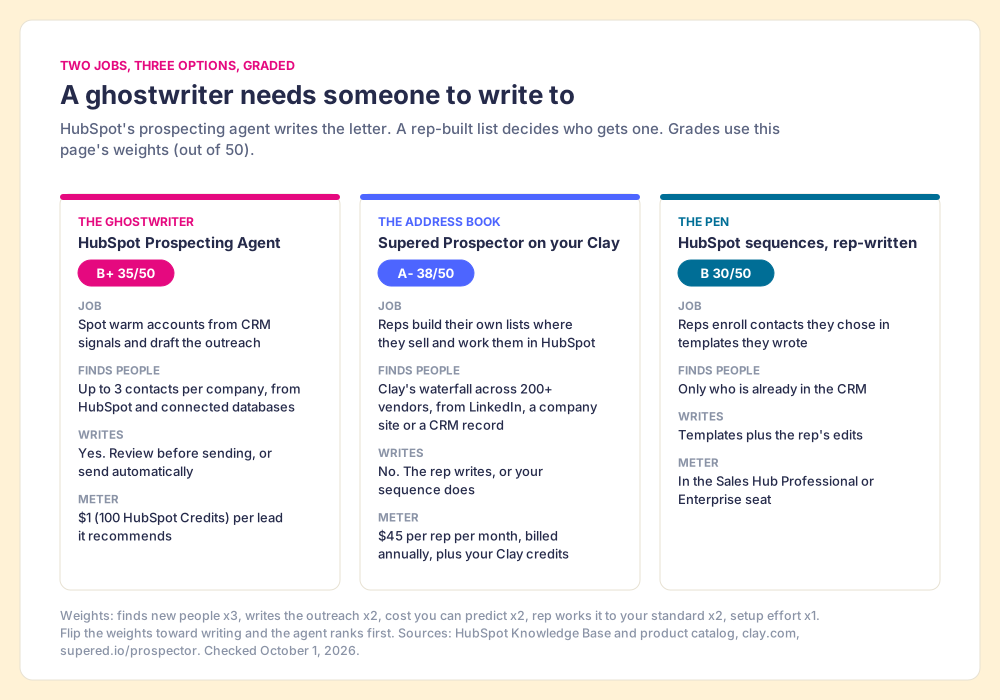
How we graded. Five criteria, weighted for a 10 to 50 rep team that has to fill a HubSpot pipeline with people it does not know yet: finds new people (x3), writes the outreach (x2), cost you can predict (x2), the rep works it to your standard (x2), and setup effort (x1). Prospector scores 5, 1, 4, 5, 3. The agent scores 3, 5, 3, 3, 4. Sequences score 1, 2, 5, 4, 5. Bands: A- from 38, B+ from 34, B from 30. Flip the weights so writing counts x3 and finding counts x1, and the agent comes out on top. That flip is the decision you are making.
Why trust this review?
Supered started inside RevPartners, the HubSpot partner I founded, which sold roughly twice as much Sales Hub as any other partner and reached Elite tier in 13 months. Supered (built for HubSpot) is the top-ranked sales enablement app on the HubSpot marketplace, with 6,000 installs and a 5.0 rating from 122 reviews there, and it holds 4.9 on G2 from 81 reviews (checked October 1, 2026). For scale on the other side, HubSpot Sales Hub holds 4.4 on G2 from 14,347 reviews the same day. We sell one of the three options above, which is a reason to check our arithmetic, and each number below links to its source.
What does the HubSpot prospecting agent do?
Start with the doorbell. A house has two kinds of visitor: the ones who ring, and the ones you go and find. The agent is built for the first kind. HubSpot’s own knowledge base, updated September 16, 2026, says the agent works by “detecting companies that match the buying signals that are most important to you,” “identifying the relevant contacts at those companies,” and “generating personalized outreach based on CRM data and fresh, high-intent signals” (HubSpot Knowledge Base). The signals it watches are engagements already tied to contact records, going back up to a year: form submissions, page views, calls, meetings, notes, and email opens. HubSpot’s Fall 2026 Spotlight, the same day, added that the updated agent can “monitor 40+ buying signals, assemble a buying group, and draft personalized outreach” (HubSpot, September 16, 2026).
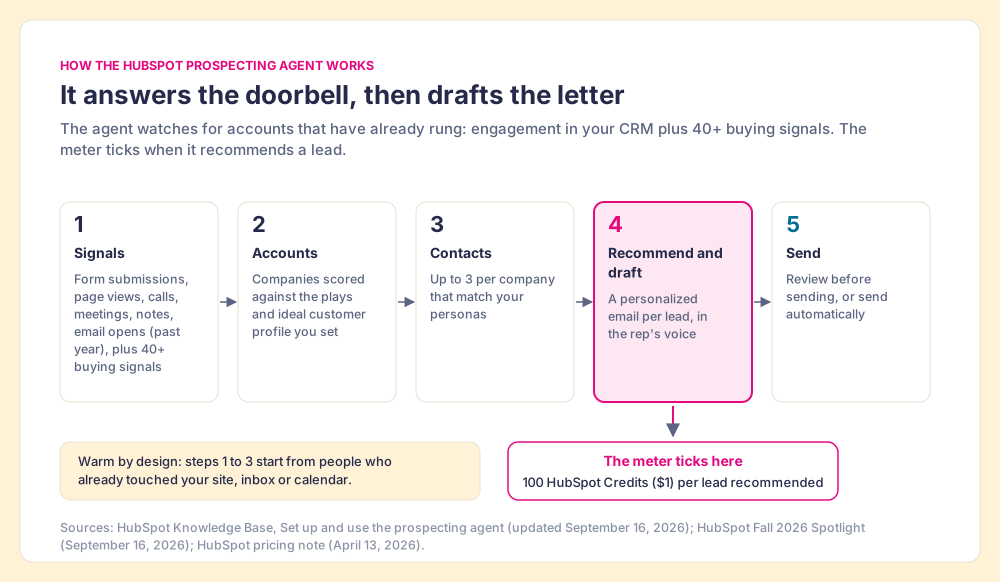
The working parts, in HubSpot’s terms:
- Plays and personas. You define the companies you care about and the roles to reach. The agent finds “up to three contacts matching your personas per company enrolled in the play,” and you cap how many contacts it may suggest per day.
- Two autonomy modes. “Review before sending,” where a rep approves each message, or “Send automatically,” where the agent sends based on your outreach settings.
- Third-party data. HubSpot’s product page says the agent connects to ZoomInfo, Apollo, and other providers “to help sales teams build complete buying committees” (HubSpot product page).
- Permissions and plans. A Super Admin, or a user with the prospecting agent permission. The knowledge base lists Starter, Professional, and Enterprise editions of every hub, plus Smart CRM Professional and Enterprise, with HubSpot Credits required.
One caution on plans. HubSpot’s April 2026 pricing note described the change for “Pro and Enterprise customers,” while the knowledge base and product page now include Starter. Check what your own portal shows before you budget around Starter.
How much does the HubSpot prospecting agent cost?
HubSpot changed the meter in spring. Until April 13, 2026 the agent carried “a recurring monthly charge for every contact enrolled.” From April 14 it costs “$1.00 per lead recommended for outreach,” paid as “100 credits per recommended lead” (HubSpot company news, April 2026). Jon Dick, HubSpot’s chief customer officer, put the logic in one line: “You pay when it works, full stop.” The counted event is a recommendation, the point where the agent hands a qualified prospect to your team, and that is a fair place to put a meter. A meter, though, is only half a price. The other half is how many credits you already own.
Think of the included credits as a book of stamps that comes with your edition. HubSpot’s product and services catalog, opened October 1, 2026, sets the book’s size (HubSpot catalog):
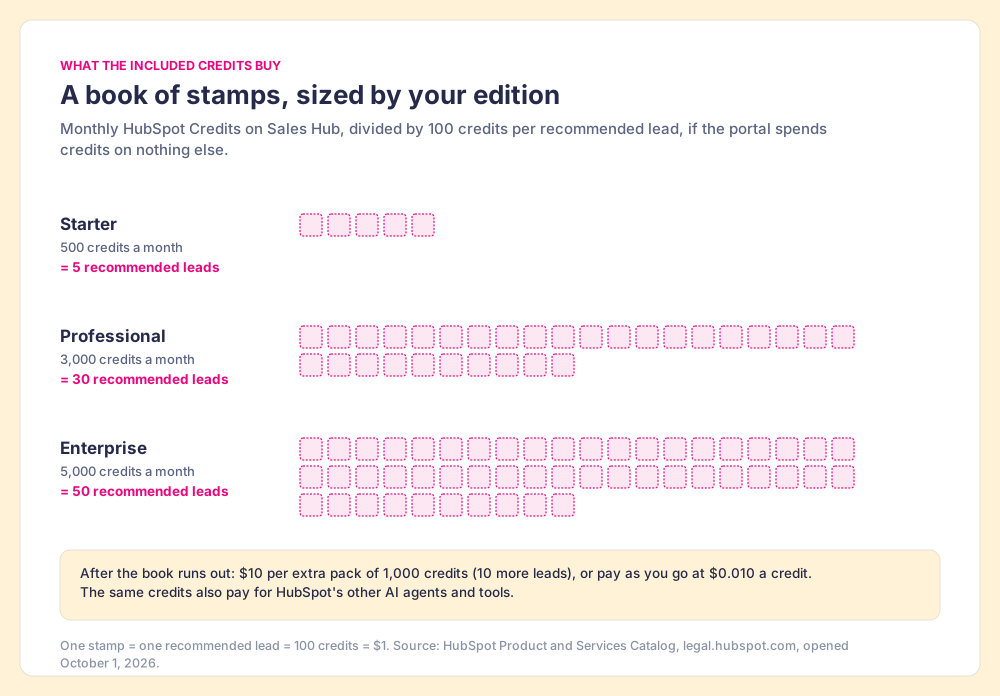
| Sales Hub edition | Included HubSpot Credits a month | Recommended leads, if spent on nothing else |
|---|---|---|
| Starter | 500 | 5 |
| Professional | 3,000 | 30 |
| Enterprise | 5,000 | 50 |
Extra stamps cost $10 per pack of 1,000 credits, which buys 10 more recommended leads, or $0.010 a credit pay as you go.
Now do the arithmetic the stamp book invites you to skip. The book is shared: the same credits pay for HubSpot’s other AI tools, so 30 leads a month on Professional is a ceiling, and a team already using credits for enrichment or another agent starts the month with fewer. A team that wants 200 recommended leads a month on Professional needs 20,000 credits; 3,000 are in the book, and the other 17,000 cost $170 at the pack rate. That is cheap next to a seat. The cost that bites is different, and it shows up in the writing, which the next section covers.
HubSpot’s product page also claims “76% more qualified leads generated,” “80% more meetings with prospects booked,” and a “26% higher deal win rate,” with no baseline or study named next to them. The customer quotes are more useful because they carry their own numbers. JotForm’s head of lead generation, Yunas Tas: “we tested 1,000 contacts and qualified 26 deals,” which he says nearly matched their reps. Suppose, as an upper bound, that all 1,000 had been recommended leads at today’s rate. That is $1,000 for 26 qualified deals, about $38 a deal. For most mid-market sales teams that is a bargain, provided the 26 are real.
What do users say about the HubSpot prospecting agent?
The question people bring to Reddit is about training and tone (“Tips for training the Hubspot Prospecting Agent?” in r/hubspot; “Anyone using HubSpot’s Breeze prospecting agents?” in r/b2bmarketing), and the written reviews converge on the same three findings.
- Selectivity, forced by the meter. A HubSpot Community post from September 23, 2026 reports the agent using “about 100 credits per contact” and draws the lesson: “When every email has a cost attached, you have to ask: Is this account worth 100 credits?” The writer found the best use was re-engaging marketing-qualified leads, and that “Research plus a human edit is what gets replies” (HubSpot Community).
- Drafts that need an editor. Salesforge, which sells cold-email infrastructure and so is a party to this argument, ran a 30-day test published May 3, 2026. It wrote that the “Default tone is bad,” that the agent “sends from your connected primary mailbox,” and that it reported a cap of five emails per enrollment. Its verdict: best for warm CRM follow-ups, unsuitable for cold outbound at scale (Salesforge).
- A HubSpot-only channel. Hublead, which sells a LinkedIn-to-HubSpot extension, lists “Only works within HubSpot” among the limits in its September 6, 2026 setup guide, and concludes that “The prospecting agent can’t fully replace you, it is effective at offloading busywork from your plate” (Hublead).
Read those three together and the agent’s sweet spot draws itself: warm accounts, a human edit, and a short list of companies you would pay a dollar to hear from.
Where does the HubSpot prospecting agent fall short?
Two limits come from its design, and neither is a bug.
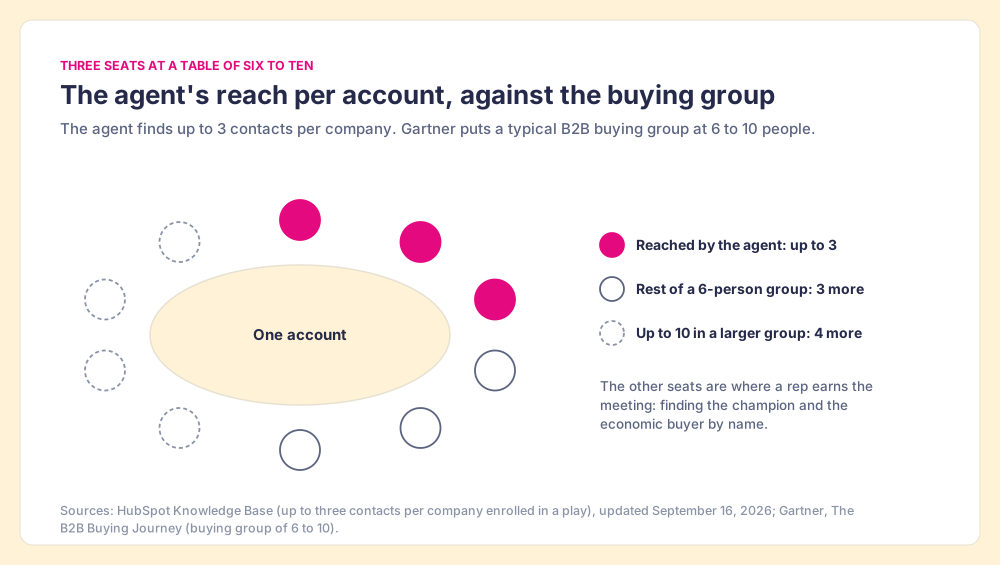
The first is the size of the table. The agent reaches up to three contacts per company. Gartner puts a typical B2B buying group at six to ten people (Gartner, The B2B Buying Journey). Three seats out of six is half the room on a small deal and under a third on a large one. The agent can open the conversation; finding the champion and the economic buyer by name is still somebody’s job.
The second is the guest list. The agent starts from people who already rang: a form, a page view, an opened email, a contact in a connected database. That is its strength, and HBR’s study of 2,241 US companies shows why speed on a warm signal pays: firms that tried to contact a web lead within an hour were nearly seven times as likely to qualify it as firms that waited even one hour longer (Harvard Business Review, March 2011). A ghostwriter who answers the door fast is worth hiring. But a house that only answers the bell meets few strangers, and the accounts you most want may never have heard of you.
Does an agent writing outreach replace reps building lists?
The two get sold under the same word, prospecting, and they are different hires. The agent’s job is the letter: given a warm account, write a good first email fast. The list’s job is the address book: decide which strangers deserve a letter at all, find them, and make sure somebody follows up. Knowledge, in 2026, is cheap; a model can draft a respectable email from a company’s news page in seconds. What a model cannot supply is a rep who has decided this account is theirs and keeps working it.
There is a reason the rep’s own list matters, and it is older than AI. Michael Norton, Daniel Mochon, and Dan Ariely ran a set of experiments in which people who assembled IKEA boxes, folded origami, or built Lego sets valued their own creations more, close to the value they put on an expert’s work (Norton, Mochon and Ariely, Journal of Consumer Psychology, 2012). They named it the IKEA effect. A list a rep built from accounts they chose is a list they value, and a list they value is one they work. A list that arrives pre-written, by a person or a machine, has to earn that attachment from scratch. Of course this is only a picture, and a rep can neglect a list they built. The point is narrower: when the work of choosing sits with the rep, the follow-up tends to sit there too.
So the useful question for a HubSpot team is which half it is short of. If your CRM holds more warm interest than your reps can answer, hire the ghostwriter. If your reps are writing well to the same tired list, they need a fuller address book.
Supered Prospector: the address book for HubSpot teams with Clay
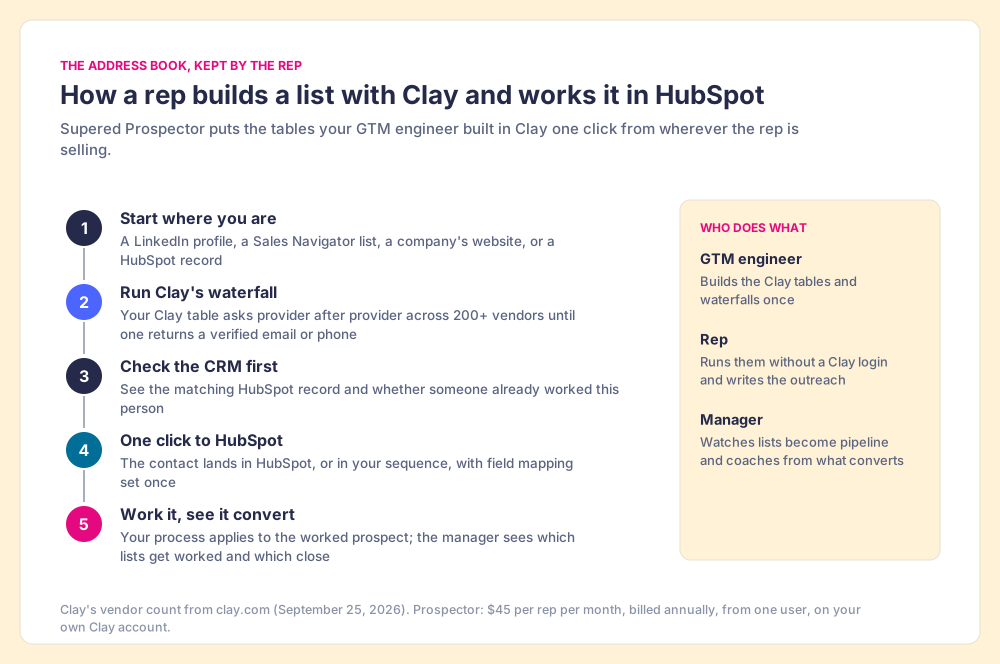
Prospector is our answer to the second job, and we named it Prospector so it is not mistaken for HubSpot’s agent. It starts from Clay. Clay is the waterfall across 200+ data and AI vendors (clay.com, September 25, 2026): a Clay table asks provider after provider until one returns a verified email or phone. Supered does not bring its own database. It brings Clay’s waterfall, which is every database, routed, and we chose Clay as our only data provider for that reason. The databases the agent connects to are each one source; when the phone you need is not in that one, the rep is stuck. A waterfall asks the next source.
What a rep does with it, from inside the tools they already use:
- Lists built where the rep sells. On a LinkedIn profile, a Sales Navigator list, a company’s website, or a HubSpot record, the rep runs the Clay table your GTM engineer built. On a company site, Prospector pulls company research; inside a HubSpot record, it fills the missing people. The buying-committee lookup takes the titles, departments, and seniority your team sets, so the rep can fill more of that table of six to ten.
- A check before the add. On a LinkedIn profile the rep sees the matching HubSpot record, and whether someone already worked this person, before adding a duplicate or stepping on a teammate.
- One click to HubSpot. The contact lands in HubSpot, or in your sequence, with field mapping set once by your admin. Reps never log into Clay; Supered runs on your own Clay account and your Clay credits.
- Your process on the worked prospect. Once the contact is in HubSpot, the next step in your process reaches the rep while they work, and the manager sees which lists get worked and which close, so coaching starts from what is converting.
Clay governs the data. Supered governs the motion.
Prospector costs $45 per rep per month, billed annually, from one user, on its own plan separate from Supered’s other products (Prospector). It requires your own Clay account, and Clay’s plans and credits are priced by Clay. For how the two connect, see the Clay and HubSpot integration, and for filling fields on records you already hold, HubSpot data enrichment.
Choose something else in three cases:
- No Clay account. Prospector runs only on Clay. Without it, the agent with a connected database, or a single prospecting database, is the shorter path.
- Drafting as the gap. If your reps have names and lack time to write, Prospector does not write a word. The agent does.
- A one-person shop with a warm inbox. If your pipeline is mostly inbound and one rep answers it, the agent on Professional covers 30 recommended leads a month from the credits you already pay for.
Can you use the HubSpot prospecting agent and Prospector together?
Yes, and for a HubSpot team with Clay and real inbound, it is the arrangement we would recommend. A contact a rep adds with Prospector is an ordinary HubSpot contact. The rep works it in HubSpot to your process, and if that person later visits the pricing page or fills a form, the account starts ringing, and the agent’s plays can pick it up and draft the follow-up.
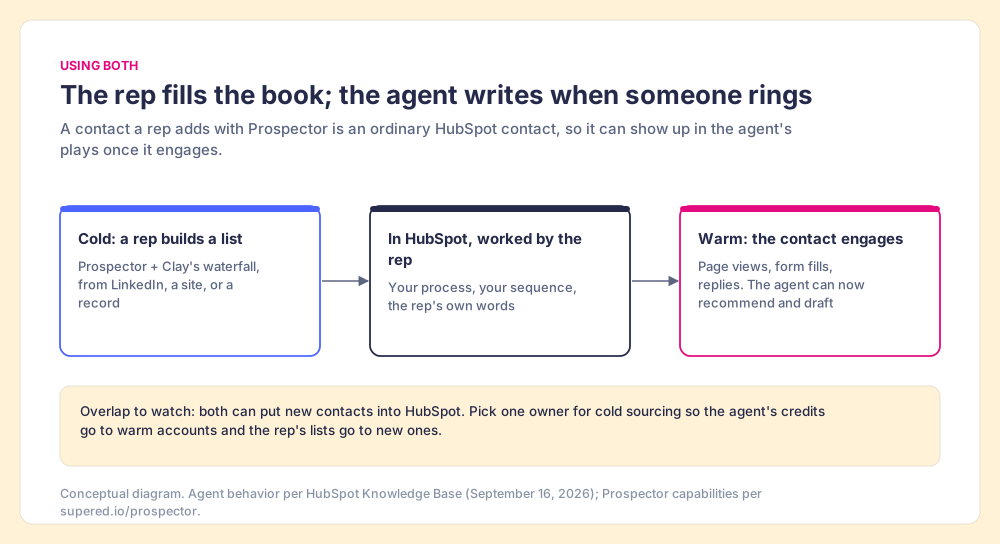
The one overlap is sourcing. Both can put new contacts into HubSpot, so pick one owner for cold names. Let reps build cold lists with Prospector, and point the agent’s dollar-a-lead at the accounts that have already shown interest. Each meter then pays for the job it does best.
Which HubSpot prospecting option should you choose?
- The agent, for a CRM full of warm interest. If forms, page views, and stalled deals outnumber the hours your reps have to answer them, turn it on in review mode, edit the drafts, and keep plays narrow. Budget 30 recommended leads a month on Professional from included credits, $10 per 10 after that.
- Prospector, for teams with Clay that need new names. If your reps write well and run short of people to write to, give them Clay where they already sell and watch which lists turn into pipeline. $45 per rep per month, billed annually.
- Sequences, for a small team with proven words. If volume is low and your templates already book meetings, the tool is in your Sales Hub seat and needs no new meter.
- Both, for a team with Clay and inbound. Prospector owns cold sourcing; the agent owns the warm follow-up.
Our recommendation, on this page’s weights: if you have Clay, start with the address book, because no ghostwriter can fix a thin list, and add the agent once your reps’ lists start generating the signals it answers. If you do not have Clay and your inbound already outruns your reps, start with the agent in review mode and measure the cost per qualified deal against the $38 JotForm arithmetic above. The wider method, from picking accounts to the first call, is in the sales prospecting guide, and the next decision most HubSpot teams face after this one, which tool fills the fields on records they already hold, is in HubSpot data enrichment.
Frequently asked questions
What is the HubSpot prospecting agent?+
How much does the HubSpot prospecting agent cost?+
Which HubSpot plans include the prospecting agent?+
Is the HubSpot prospecting agent good for cold outbound?+
Does Supered Prospector write outreach like the HubSpot prospecting agent?+
Can I use the HubSpot prospecting agent and Prospector together?+
Your process, running itself.