PhantomBuster Pricing in 2026: You Rent the Driver, You Lend the Car
PhantomBuster pricing checked October 2, 2026: Start $69, Grow $159 and Scale $439 a month ($56, $128, $352 on annual billing), what an execution hour and an email credit buy, why a bigger plan never raises LinkedIn's limits, and the team math.
PhantomBuster pricing in 2026 is three shared-workspace plans, Start at $69 a month, Grow at $159 and Scale at $439 ($56, $128 and $352 a month billed annually), metered in execution hours, automation slots and credits rather than seats.
A valet stand charges by the hour. You hand over your keys, a driver you will never meet takes your car out, and the bill counts minutes on the road. The stand has no say over the speed limit, and when the camera on the overpass flashes, the ticket goes to the name on the registration. Yours.
PhantomBuster pricing in 2026 is three shared-workspace plans, Start at $69 a month, Grow at $159 and Scale at $439 ($56, $128 and $352 a month billed annually), metered in execution hours, automation slots and credits rather than seats (PhantomBuster help center, updated July 10, 2026). The hours are the driver. Your LinkedIn session is the car. The quick answer, three ways:
- PhantomBuster Start or Grow. An operator, a growth marketer or an agency running scrapes and automations across LinkedIn, Instagram, Google Maps and the rest from one workspace. Grow’s 80 hours cover more than a single LinkedIn account can safely spend.
- Evaboot or Waalaxy. A founder who wants one LinkedIn job done cheaply: Evaboot for a Sales Navigator export from $29 a month, Waalaxy for invitations and follow-ups from €19.
- Supered Prospector, $45 a rep a month on your own Clay account. A sales team whose reps need an email and a phone for the person they are already looking at, in the CRM under the right owner, without software acting on their LinkedIn login.
How much does PhantomBuster cost in 2026? Pricing by plan
PhantomBuster’s pricing page renders only in a browser with JavaScript; a plain fetch on October 2, 2026 returned an empty shell. Its help center publishes the same table in text, with one caveat printed under it: “Prices shown are current as of May 2026.” The figures below come from that table. Confirm the number at checkout.
| PhantomBuster pricing | Free plan | Start | Grow | Scale |
|---|---|---|---|---|
| Monthly billing | $0 | $69 a month | $159 a month | $439 a month |
| Annual billing (per month, 20% off) | n/a | $56 | $128 | $352 |
| Twelve months, annual billing | n/a | $672 | $1,536 | $4,224 |
| Execution time | 30 minutes a month | 20 hours | 80 hours | 300 hours |
| Automation slots | 1 | 5 | 15 | 50 |
| Email discovery credits | None | 500 a month | 2,500 | 10,000 |
| AI credits | None | 10,000 a month | 30,000 | 90,000 |
| Exports | 10 rows per file | Unlimited | Unlimited | Unlimited |
| Members | Up to 100 | Up to 100 | Up to 100 | Up to 100 |
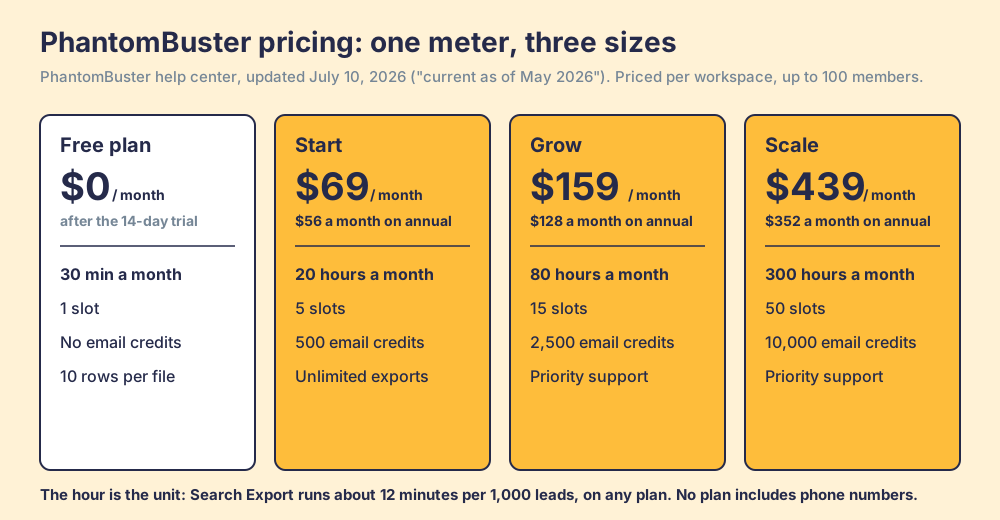
Two things on the table differ from a per-seat sales tool. There is no seat price: “Plans are not differentiated by number of users,” and up to 100 members share one workspace’s hours and credits. And there is a real free tier, though a narrow one. The 14-day trial gives 2 hours, 5 slots and 50 email credits with no card; after it, the PhantomBuster free plan keeps 30 minutes a month and 1 slot. Results files on both are cut at 10 rows, which makes the free plan a test bench. You can see whether a Phantom works on your input. You cannot build a list with it.
What does a PhantomBuster execution hour buy?
The hour is the unit everything else hangs on. PhantomBuster’s plan guide gives the speeds plainly: the LinkedIn Profile Scraper takes “~1 minute per profile” and the LinkedIn Search Export “~12 minutes per 1,000 leads,” and “Your subscription plan does not make your automations run faster or slower” (plan guide, updated October 2, 2026). A bigger plan buys more hours of the same driver at the same speed.
Run the arithmetic on the Search Export, the Phantom a sales team reaches for first. Start’s 20 hours are enough clock time to export 100,000 leads. Grow’s 80 hours cover 400,000, and Scale’s 300 hours cover 1,500,000. Now set those against PhantomBuster’s own safety table, which recommends extracting “2500 results per day (1 launch per day)” from a well-used Sales Navigator account, and half that when the Phantom also hunts for emails, “because the automation has to open 2 pages per profile” (rate limits, updated August 20, 2026). At 2,500 a day, one account reaches 75,000 leads in a 30-day month.
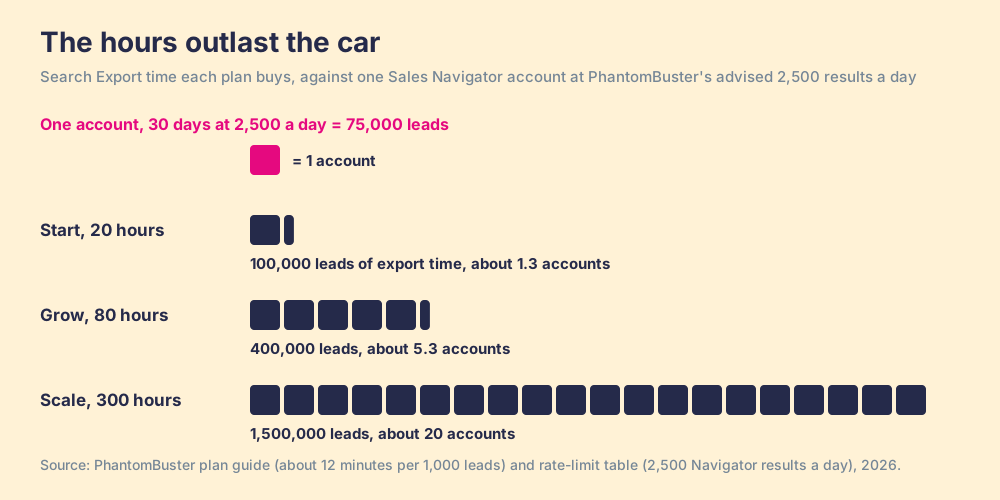
So the plans are sized for fleets. Even Start holds more driving time than one rep’s account can spend at the pace PhantomBuster recommends. What Grow and Scale sell a sales team is the ability to run many LinkedIn accounts at once through 15 or 50 slots. That suits an agency with twenty clients. For a team of eight reps it means the binding limit is never the plan; it is each rep’s LinkedIn account. Naud H., an advisor reviewing PhantomBuster on G2 in February 2026, found the other edge of the same meter: “The 80 hours of monthly execution time are used up quite quickly when you run automations continuously” (G2). Continuous automation burns hours. Careful automation burns account trust first.
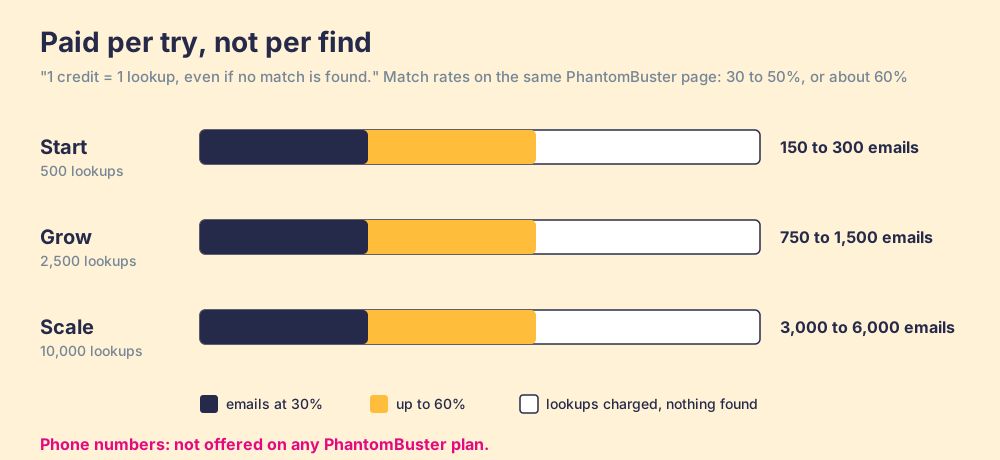
The email credit is a different meter, and it charges for the attempt. The plan guide says “1 credit = 1 lookup, even if no match is found.” It then gives two match rates on the same page: “around 60%” in the body, and 30 to 50% “depending on input quality” in the FAQ. PhantomBuster runs a small waterfall of its own (if the first method misses, it tries another) and lets you plug in Hunter, Dropcontact or Snov keys. No plan lists phone numbers at all.
Is PhantomBuster safe, and does a bigger plan raise LinkedIn’s limits?
No, and PhantomBuster says so in a help article updated the day this page was written: “Upgrading your PhantomBuster plan gives you more slots, execution time, and credits, but it never lifts LinkedIn’s own limits” (PhantomBuster, October 2, 2026). It names the caps it means: connection requests at “~100/week, dynamic by account,” and search results at “1,000 per search, 2,500 on Sales Navigator.”
Go back to the valet stand. The plan is the driver’s hours. The road belongs to LinkedIn, and LinkedIn posts its own signs. Its help center says it does not permit “third party software, including “crawlers”, bots, browser plug-ins, or browser extensions that scrape, modify the appearance of, or automate activity on LinkedIn’s website,” and that members who use them “risk having their accounts restricted or shut down” (LinkedIn Help, checked October 2, 2026). Section 8.2 of the User Agreement lists “copying cookies” among its examples of misusing an account (LinkedIn User Agreement, effective November 3, 2025).
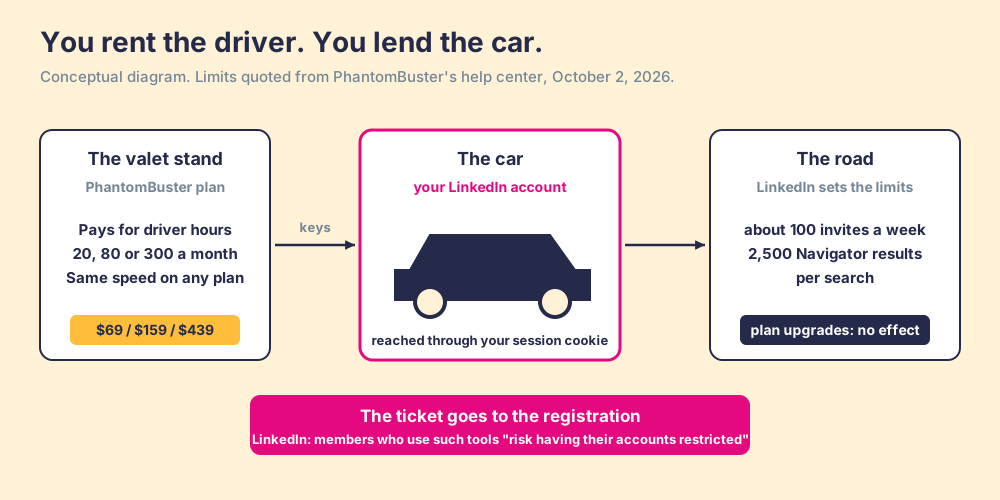
PhantomBuster is candid about where the risk sits, and that candor deserves credit. Its safety guide says it “doesn’t access or store your LinkedIn password,” that a session cookie “lets PhantomBuster act on your behalf while you’re logged in,” that “LinkedIn doesn’t publish official automation limits,” and that “no automation tool can eliminate risk entirely” (account safety guide, updated August 3, 2026). The valet comparison is unfair to PhantomBuster in one respect. A valet sometimes takes the car somewhere you could not drive yourself. Its Phantoms also reach Instagram, Facebook, X and Google Maps, and plenty of those jobs carry no LinkedIn account at all. Our LinkedIn Sales Navigator scraper page goes through the contract clauses and the hiQ case in detail.
Is PhantomBuster worth it? A fair PhantomBuster review
On October 2, 2026, PhantomBuster held 4.4 out of 5 from 138 reviews on G2, and a news search turned up no 2026 acquisition or rebrand. A fair PhantomBuster review starts with what it does better than anything on this page.
- Breadth of the library. Phantoms and multi-step workflows for LinkedIn, Instagram, Facebook, X, YouTube and Google Maps, from one dashboard, with the API included on every plan.
- Price per operator. One workspace, up to 100 members, no seat fee. Grow at $128 a month on annual billing is less than two Sales Navigator Core seats.
- Candor about limits. The help center publishes speeds, rate limits and a plain statement that the plan never lifts LinkedIn’s caps, which is more than many automation vendors put in writing.
It is the right buy when one person runs automation as a specialty: a growth marketer scraping event attendees, an agency managing outreach for clients who accept the account risk, an analyst pulling Google Maps listings into a sheet. It is the wrong buy for a sales team that wants reps calling and emailing LinkedIn leads from the CRM. The plan returns no phones, the email meter charges for misses, the file lands as a CSV, and the hours run on each rep’s own LinkedIn login.
Why trust this breakdown?
We sell no automation and no scraped data. Supered Prospector competes with PhantomBuster for one job, getting a LinkedIn lead into the CRM with an email and phone, and it ranks first in the table below for that job only; this page says plainly where PhantomBuster wins. Supered started inside RevPartners, the HubSpot partner I founded, which reached HubSpot’s Elite tier in 13 months doing only sales implementations. Supered is the #1 sales enablement app on the HubSpot marketplace with 6,000+ installs, rated 5.0 from 122 reviews there and 4.9 out of 5 from 81 reviews on G2, checked October 1, 2026. Each PhantomBuster figure links to the PhantomBuster page it came from.
What does PhantomBuster cost for a ten-rep sales team?
Cheap, on the invoice. Ten reps can share one Grow workspace for $1,536 a year on annual billing. But each rep’s LinkedIn account is the car, and for Sales Navigator work each rep needs a seat: ten Core seats on annual billing cost US$10,798.80 (LinkedIn, compare plans, checked October 2, 2026). The routes below all start there.
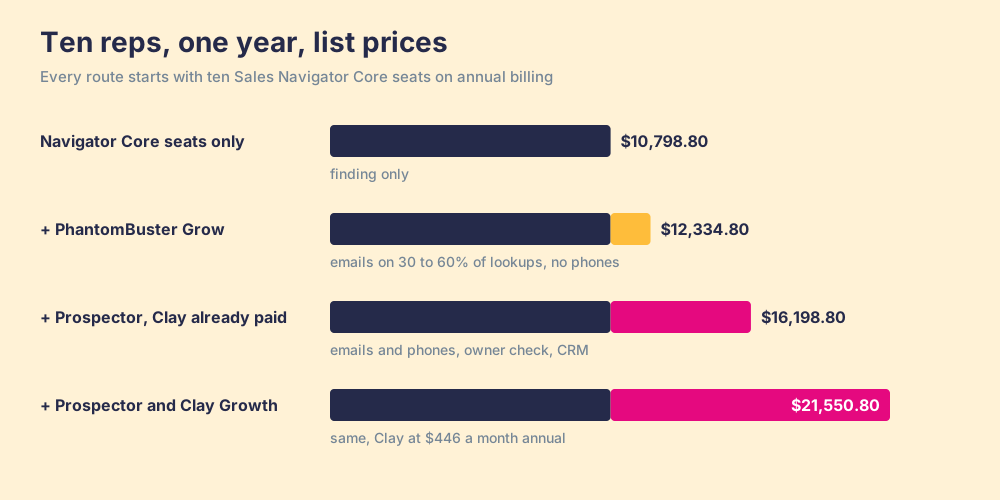
PhantomBuster is the cheapest line here by a wide margin. Read what each line returns, though. Grow’s 2,500 email credits come back as 750 to 1,500 emails a month at PhantomBuster’s own match rates, shared by ten reps, with no phones and a CSV to import. Prospector’s $5,400 buys emails and phones from Clay’s waterfall and a one-click CRM push with an owner check, if the team already pays for Clay. If it does not, adding Clay Growth at $446 a month on annual billing ($5,352 a year, clay.com/pricing, opened October 2, 2026) makes Prospector the most expensive route, and a team without Clay should look at Apollo or Kaspr first.
Which PhantomBuster alternative fits a sales team?
The grades weigh five things for one job: reps building lists from LinkedIn and working them in a CRM. Callable contact data, email and phone (x3); exposure of the rep’s LinkedIn account (x2); landing in the CRM with ownership visible (x2); price for a five-to-fifty-rep team (x2); setup (x1). Out of 50. Flip the lens to “one operator, many platforms, lowest price” and PhantomBuster wins outright.
| Rank | Option | Grade | Best fit | CRM integration | Setup effort | Pricing (plan with the feature) | Reason to switch |
|---|---|---|---|---|---|---|---|
| 1 | Supered Prospector | A (45) | Teams already paying for Clay | Native: HubSpot, Salesforce, Pipedrive | Demo, then live in under a week on your own Clay account | $45 a rep a month, billed annually, plus your Clay plan | Email and phone from Clay’s waterfall across 200+ providers; owner check before the push |
| 2 | Apollo | A- (38) | Teams without Clay wanting data and sequences in one tool | Native | Self-serve | Basic $49 a user a month, annual | Its own database and sequencer, no LinkedIn automation needed |
| 3 | Evaboot | B (32) | Founders exporting Navigator searches for email | HubSpot, Pipedrive; no native Salesforce | Self-serve | $29, $49 or $99 a month | Cheapest clean Navigator export with emails |
| 4 | Waalaxy | B- (29) | Solo sellers automating invitations | HubSpot, Pipedrive, Zapier | Self-serve | Pro €19 a user a month, monthly | Simpler, cheaper outreach automation |
| ref | PhantomBuster | C+ (24) | Operators and agencies automating many platforms | HubSpot enricher, CSV, API | Build each Phantom | Start $69, Grow $159, Scale $439 a month | The reference: widest library, hours on your login, no phones |
The full field, including Kaspr and Sales Navigator on its own, is graded on PhantomBuster alternatives.
Supered does not bring its own database. It brings Clay’s waterfall, which is every database, routed. Clay’s marketplace counts “200+ data and AI vendors” (clay.com, checked October 2, 2026), and its pricing page states the rule that matters beside PhantomBuster’s lookup meter: “If an enrichment returns no result, you’re not charged Data Credits or Actions.” Clay plus Supered is the best way for a sales team to prospect: GTM engineers build in Clay, and reps never open Clay.
- Start where the rep already is. A LinkedIn profile, a Sales Navigator lead or list, a company’s website, or a HubSpot, Salesforce or Pipedrive record. The rep runs the flow the GTM engineer built, from a menu.
- The owner check. Before the push, the rep sees whether the person already has a matching CRM record and whether a teammate prospected them before.
- Email and phone. Clay’s waterfall fills both, and a miss costs nothing.
- Found, Worked, Closed. The leader sees which lists were found, who is working theirs, and how each lead ended: Qualified, Recycled or Disqualified, the way your process says.
We make no compliance claim for Prospector, and no claim that any tool on this page is approved by LinkedIn. Ask every vendor what it reads from LinkedIn, ours included, and where the contact data comes from. Prospector runs inside the Supered Chrome extension, costs $45 per rep per month, billed annually, from one user, and needs your own Clay account (Prospector). Choose something else if any of these is true:
- No Clay account. Prospector needs one. Apollo or Kaspr is less setup.
- Many platforms, one operator. Scraping Instagram, Google Maps or X is PhantomBuster’s ground, not ours.
- Automated invitations and messages. Prospector does not send them. If that is the job, read the account risk above, then price Waalaxy.
What we recommend
- An operator or agency automating many platforms. Buy Start monthly, measure hours per job for two weeks, then move to Grow on annual billing ($128 a month) once the hours are known. Keep each LinkedIn account at or under PhantomBuster’s own rate table, and treat the email column as a bonus, at 30 to 60% of lookups.
- A sales team that wants callable leads in the CRM. PhantomBuster’s plan will be the cheapest line and the least useful one. The phones are missing, the misses are billed, and the hours run on each rep’s login. Get contact data from a source built to supply it, and let Sales Navigator do the finding it is good at.
- A team already on Clay. Give reps the table you already built, through Supered Prospector at $540 a rep a year, and watch which lists end Qualified. The sourcing use case shows the rep’s side end to end.
A valet is a fine service when you have a car to spare and a road with no cameras. A sales rep’s LinkedIn account is the only car they have, and the network in it is part of why you hired them. Export Sales Navigator leads lays out the routes LinkedIn itself allows, and PhantomBuster alternatives sorts the field by the job each tool was built for.
Frequently asked questions
How much does PhantomBuster cost in 2026?+
Does PhantomBuster have a free plan?+
Is PhantomBuster safe for my LinkedIn account?+
What does a PhantomBuster email credit buy?+
Is PhantomBuster worth it for a sales team?+
What should a team on Clay use instead of PhantomBuster?+
Everything we have written on PhantomBuster
More on PhantomBuster
Looking past PhantomBuster? See Supered Prospector on your own Clay accountYour Clay waterfall, where reps already work.