Skrapp Alternatives in 2026: A Phone Book With the Numbers Left Out
Skrapp is a cheap, careful LinkedIn email finder that sells no phone numbers and prices the ninth seat through a 50,000-credit plan. The Skrapp alternatives graded for a sales team, with Skrapp pricing worked out per seat.
Skrapp alternatives are the tools sales teams weigh against Skrapp.io, a LinkedIn email finder with no phone numbers: Hunter and Snov.io for email, Findymail, Prospeo and Apollo for phones, or Clay's waterfall run from Supered Prospector.
Skrapp alternatives get searched for one of three reasons. A rep picked up the phone and found no number on the contact. The team hired its ninth rep and the pricing page asked for a much bigger plan. Or someone’s LinkedIn account got a warning. The short answer, graded in full below:
- Supered Prospector. For teams that already have Clay: Clay’s waterfall across 200+ vendors, run from a LinkedIn profile, a Sales Navigator list, a company website or the CRM record, at $45 per rep per month billed annually.
- Findymail. The like-for-like email finder that adds phones, $99 a month for the whole team.
- Hunter. For an email-only team that has outgrown Skrapp’s seat limits: unlimited users, Growth at $1,248 a year.
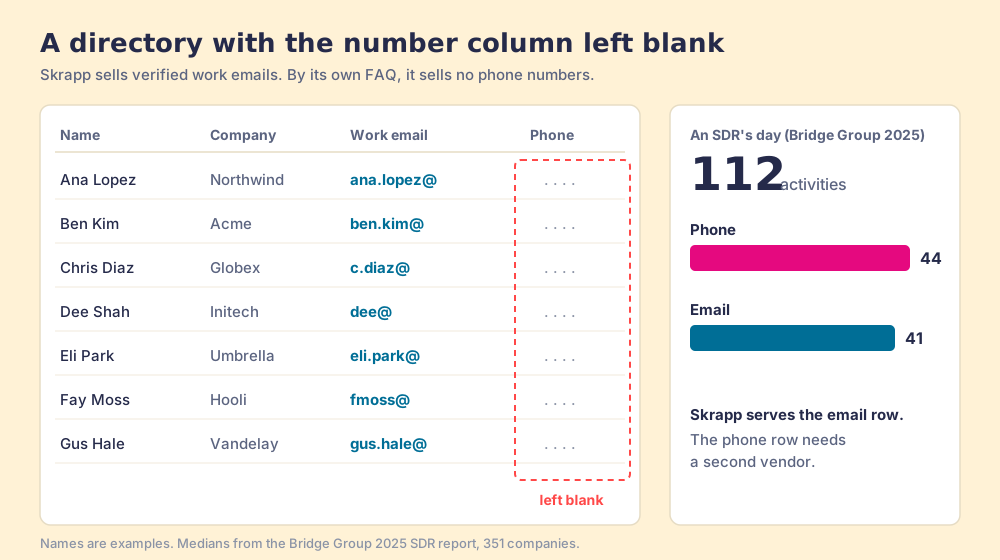
An old telephone directory was a fat, useful book. Turn to any page and you found a name, a street, and a number, and the number was the reason the book existed. Now suppose a publisher printed the names and the street addresses beautifully, checked every address against the post office, and left the number column blank on purpose. You could send letters with it all year and never miss the numbers. Skrapp is that book for B2B sales. Its own comparison page says it plainly: “Skrapp.io focuses on verified business emails. If your outreach relies on calling, Cognism might be a better fit” (skrapp.io, Cognism comparison, opened October 2, 2026).
Skrapp alternatives are the tools a sales team weighs against Skrapp.io: email finders priced for whole teams (Hunter, Snov.io), finders that add the phone column (Findymail, Prospeo, Apollo), or Clay’s waterfall across 200+ data and AI vendors (clay.com, October 2, 2026), which a rep can run from Supered Prospector on the team’s own Clay account. One detail changes the decision for Clay teams. Skrapp is not among the 163 data-provider integrations in Clay’s directory on October 2, 2026, while Hunter, Findymail, Prospeo, Apollo, ContactOut, Wiza and LeadMagic are (clay.com/integrations). A Clay team does not keep Skrapp as one step in a waterfall. It replaces it.
Why do sales teams look for Skrapp alternatives?
Start with the fair part. Skrapp is a real, liked product. On October 2, 2026 it held 4.5 out of 5 from 356 reviews on G2, 4.5 from 57 on Capterra, and 4.8 from 549 ratings with 200,000 users on the Chrome Web Store (version 2.6.1, updated July 27, 2026, developer listed as Skrapp Private Limited). The extension works on LinkedIn, Sales Navigator, LinkedIn Recruiter and company websites, the free plan gives 50 credits with no card, and the people who like it like it for being simple. As a Skrapp review in one line: a careful, cheap email finder for a small team that writes and does not call.
The reasons people leave come back in the reviews, and four account for most of the searches.
- The blank phone column. “Skrapp.io should add contact numbers as well with emails,” a small-business development executive wrote on G2 in March 2026. The Bridge Group’s 2025 SDR report, 351 companies, puts the median SDR at 112 activities a day, 44 of them phone and 41 email (Bridge Group, 2025). For a team that dials, the bigger half of the day needs a second vendor.
- The ninth seat. Skrapp sells users inside credit tiers, and the tier that seats a ninth rep is 50,000 credits a month. The pricing section below works through it, because it decides more switches than any feature.
- Verified emails that still bounce. “Sometimes the email verification accuracy is inconsistent, a few verified emails still bounce,” a mid-market SDR wrote in November 2025. Part of the reason is in Skrapp’s credit rules: a Catch-all result counts as deliverable and costs a credit.
- LinkedIn risk. Capterra’s review summary for Skrapp lists “LinkedIn account blocked” among the weaknesses users report. Skrapp’s Professional plan adds Auto-Connect with LinkedIn Profiles and Multi-Page Enrichment for LinkedIn, and LinkedIn’s terms, covered further down, are blunt about automation.
Slowness comes up too (“I wish it was free and less laggy,” a small-business reviewer wrote in March 2026), but the switching reviews do not name lag as the reason. They leave over the phone, the seat, and the bounce.
Why trust this comparison?
I started RevPartners, a HubSpot partner that did only sales implementations, sold roughly twice as much Sales Hub as any other partner, and reached Elite tier in 13 months. Supered came out of that work and is the #1 sales enablement app on the HubSpot marketplace, rated 5.0 from 122 reviews there and 4.9 out of 5 from 81 reviews on G2 (both checked October 1, 2026). That is also the disclosure. We make Supered Prospector, and it sits first on this page for teams that have Clay. The grading states its weights, and for a two-person team that only sends email, Skrapp’s $348 a year is hard to argue with. The page says so.
The Skrapp alternatives, graded
The lens is a mid-market or SMB sales team, ten to fifty reps, who email and dial, and a leader who wants to know which lists turn into pipeline. Each criterion is scored 1 to 5 and multiplied by its weight, for a maximum of 50. The weights and the scores for every tool except Skrapp are the ones on the Hunter.io alternatives page, so the two pages read together.
| Criterion | Weight | What it rewards |
|---|---|---|
| Coverage of the contact you need | 30% (x3) | Verified emails and mobiles, including when the first source misses |
| Rep-side delivery | 20% (x2) | Works on the profile, the company site, the CRM record; no new tab or login |
| Price structure for mid-market | 20% (x2) | Published prices, per-result or per-team, no seat traps |
| What the leader sees after the export | 20% (x2) | Which sourced lists were worked and which closed |
| Bundled outreach | 10% (x1) | Sequences, dialer, or drafting in the same plan |
| Rank | Tool | Grade | Score | Best fit | CRM integration | Setup effort | Pricing (plan with the feature) | Reason to switch from Skrapp |
|---|---|---|---|---|---|---|---|---|
| ref | Skrapp | B- | 23 | Small teams that email from LinkedIn and never dial | Native list sync (HubSpot, Salesforce, Pipedrive) on Professional | Minutes | $29 to $149 a month billed yearly for 2 to 8 users | Stay if you have eight reps or fewer and they only email |
| 1 | Supered Prospector | A | 44 | Teams that already have Clay | Native (HubSpot, Salesforce, Pipedrive) | Under a week on an existing Clay account | $45 per rep per month billed annually, plus your Clay plan | All vendors per lookup, phones included, lists you follow to closed |
| 2 | Apollo | A- | 36 | Teams wanting data, phones and outreach in one tool | Native (HubSpot, Salesforce) | A day | $49 a seat a month billed annually, phone 8 credits | Phones, sequences and a dialer in the plan |
| 3 | Snov.io | B+ | 30 | Small teams that want a cheap finder plus outreach | Native two-way (HubSpot, Pipedrive) | A day | Starter $39 a month, unlimited seats | Outreach and unlimited seats at Skrapp’s entry price |
| 4 | Findymail | B+ | 29 | Like-for-like finder that adds phones | Native (HubSpot, Salesforce, Pipedrive, Clay) | Minutes | Starter $99 a month for the team | Phones at 10 credits, verified-only charging, bounce refund |
| 5 | Prospeo | B+ | 29 | Email and mobile finder for outbound volume | HubSpot and Salesforce on Growth | Minutes | $37 a user a month billed yearly, CRM sync from $74 | Mobiles at 10 credits and a larger lead database |
| 6 | Hunter | B+ | 28 | Email-first teams of any size | Native (HubSpot, Salesforce, Pipedrive, Zoho) | Minutes | $34 to $209 a month billed yearly, unlimited users | No seat limit, a miss costs nothing, sequences included |
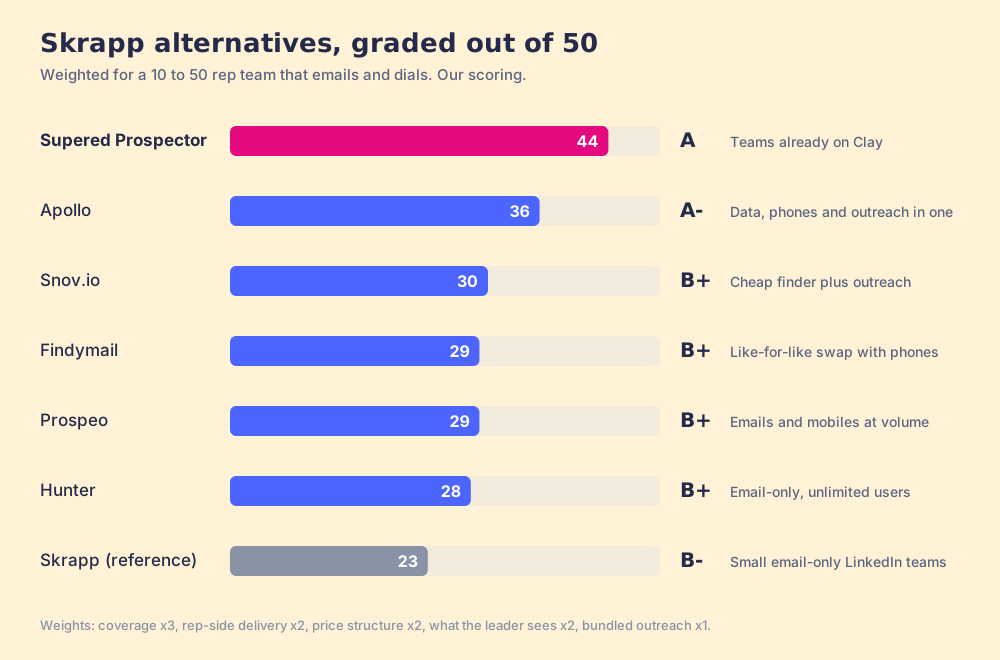
Skrapp’s 23 breaks down as coverage 2, rep-side delivery 4, price structure 3, what the leader sees 1, outreach 1. The rep-side 4 is earned: the extension covers LinkedIn, Sales Navigator, Recruiter and company websites, more surfaces than Hunter’s website-first extension, which is why Skrapp out-scores Hunter there. Coverage is a 2 for the blank phone column. Price structure is a 3, and it would be a 5 for two people: credits roll over, a miss is free, and the entry plan is $348 a year. It drops to 3 for the ten-rep team this page grades for, because of the seat ladder below and because a Catch-all costs a full credit. Outreach is a 1. Skrapp sells no sequences, and Auto-Connect is a LinkedIn action, not a campaign. Hunter sits below Skrapp on rep-side delivery and above it everywhere else.
Corporate status, checked October 2, 2026. Skrapp is independent; a search found no acquisition, funding round, or rebrand, and the Chrome Web Store names Skrapp Private Limited as the developer. Apollo is independent and launched what it calls an “AI GTM System” on September 30, 2026 (Apollo newsroom). Hunter, Snov.io, Findymail and Prospeo are independent, with no 2026 acquisitions found. Clay is independent; NYT reported in January 2026 that its employees sold shares at a $5B valuation.
What does Skrapp cost in 2026?
Skrapp pricing has two plan names and eight sizes. The pricing page, captured October 2, 2026 (skrapp.io/pricing), puts a slider on each card, and the yearly toggle saves 25%. The users column comes from the same page’s plan data, one number per slider stop:
| Plan and size | Billed yearly | Billed monthly | Credits a month | Users |
|---|---|---|---|---|
| Free | $0 | $0 | 50 | 1 |
| Professional 2K | $29 a month ($348 a year) | $39 | 2,000 | 2 |
| Professional 5K | $74 ($888) | $99 | 5,000 | 5 |
| Professional 10K | $97 ($1,164) | $129 | 10,000 | 8 |
| Professional 25K | $149 ($1,788) | $199 | 25,000 | 8 |
| Enterprise 50K | $262 ($3,144) | $349 | 50,000 | 15 |
| Enterprise 100K | $449 ($5,388) | $599 | 100,000 | 15 |
| Enterprise 250K | $749 ($8,988) | $999 | 250,000 | 30 |
| Enterprise 500K | $1,124 ($13,488) | $1,499 | 500,000 | 30 |
The credit rules, verbatim from the page’s FAQ:
- The find. “Each email credit allows you to find one professional email address, marked as either ‘Valid’ or ‘Catch-all’. Or verify a single email address.”
- The miss. “Your account is not charged for email credits labeled as ‘Invalid’ or ‘Unknown’.”
- The rollover. “Any unused credits will roll over to the next month,” and you keep them if you cancel.
- The pool. “Team members share access to a common pool of credits.” Professional includes 2 users and Enterprise 15 at the sizes shown on the cards; for more, “contact our sales team at sales@skrapp.io for a custom arrangement.”
Professional adds list exports, CRM list sync, the Sales Navigator List Saver and AI enrichment; Enterprise adds the API, SSO, faster support and an account manager. Neither has a phone line item.
The ninth chair
Now count chairs. A restaurant that sized your order by your table would seat two with a small plate, five with a platter, and eight with a banquet. Bring a ninth guest and the waiter moves you to the private room, which comes with food for fifteen. Skrapp’s ladder works the same way. Eight reps fit on Professional 10K at $1,164 a year. The ninth rep needs Enterprise 50K, $3,144 a year, five times the credits for one more login. The next jump comes at sixteen, where Enterprise 250K costs $8,988 a year.
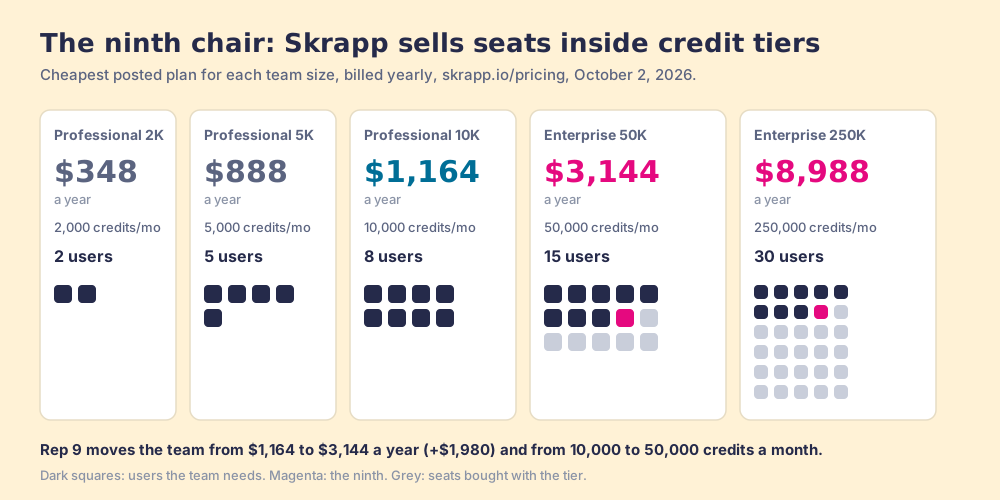
To be fair to Skrapp, the credits are not wasted. They roll over, so a ten-rep team on Enterprise 50K banks what it does not spend, and 5,000 credits per rep a month is a generous pour. The point is narrower. Skrapp prices the seat through the credit tier, so a growing team pays for volume it may not need in order to give a new hire a login. Hunter, Snov.io and Findymail all sell unlimited or unpriced seats on a shared pool, which is why they show up first on lists for teams past eight reps.
What does a Skrapp credit buy?
The Skrapp email finder works the way most of the category does. It finds an address on the public web or builds it from the company’s pattern (first.last@, for example), then asks the company’s mail server whether that mailbox exists. Skrapp claims a “92% average email search success rate and 97% verification accuracy” on its homepage, while its Capterra listing quotes an “85% success rate” and “99% accuracy,” so treat both as marketing figures. An anonymous benchmark site tested eight other finders on 500 known contacts in May 2026 and found “No single tool exceeded 89% coverage” (b2b-email-finder.com, published June 8, 2026, which ranks Findymail first and names no authors); Skrapp was not in it.
The mail-server check has a known blind spot. Some companies run accept-all, or catch-all, domains that say yes to any name. Hunter’s help center says “no verification tool, including Hunter, can fully confirm deliverability on these domains,” and uses hubspot.com as its example (Hunter help center). Skrapp charges a credit for those results, alongside Valid ones. A letter addressed to a building with a mail slot is not the same as a letter in the right hand, and the Catch-all label is the mail slot.
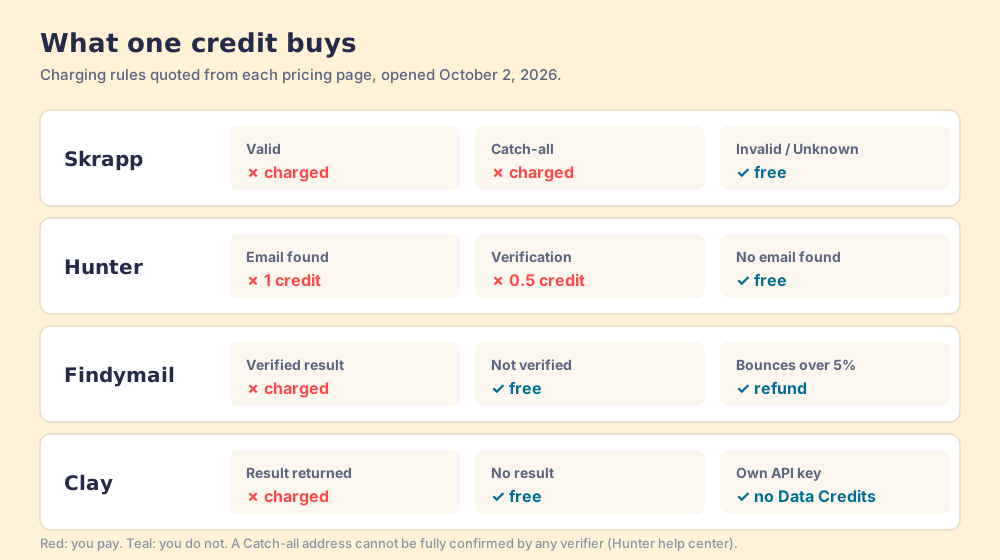
For an outbound team the Catch-all rule matters more than the accuracy claim. A domain that accepts everything will not bounce your first email, and it will not tell you whether a person reads it either. Findymail sells the opposite policy: “Only pay for verified results,” with a refund “If your bounce rate is higher” than 5% (findymail.com/pricing, October 2, 2026).
Is Skrapp safe to use on LinkedIn?
Ask that of every LinkedIn extension, ours included. LinkedIn’s User Agreement, effective November 3, 2025, says members may not “Develop, support or use software, devices, scripts, robots or any other means or processes (such as crawlers, browser plugins and add-ons or any other technology) to scrape or copy the Services, including profiles and other data from the Services,” or “Use bots or other unauthorized automated methods to access the Services, add or download contacts” (LinkedIn User Agreement, section 8.2). Its help center adds that members using such tools “risk having their accounts restricted or shut down” (LinkedIn Help, prohibited software).
Skrapp’s Professional plan lists Multi-Page Enrichment for LinkedIn and Auto-Connect with LinkedIn Profiles. The names describe actions across many pages and automatic connections, which is the territory section 8.2 covers. We have not tested how either works, so the fair advice is to ask Skrapp in writing what each feature reads and does on LinkedIn before a rep turns it on, and to keep it off the accounts your best reps depend on. Ask us the same question. Our answer: Prospector works within LinkedIn’s terms and does not copy search results in bulk; the contact data comes from Clay’s waterfall on the customer’s Clay account.
Where does Supered Prospector fit?
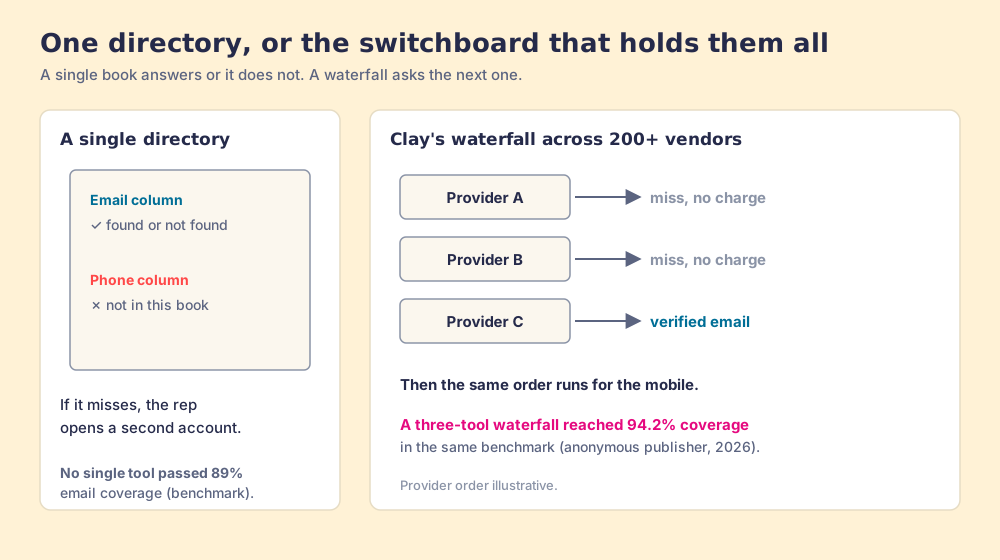
Each tool above is a directory with a different set of columns. Findymail, Prospeo and Apollo print the phone column; Hunter and Snov.io print more chairs. When the number you need is missing from the book you bought, the rep opens a second account, and the company signs a second contract.
Clay works like a switchboard operator who holds every directory in town. The GTM engineer writes the instructions once: try this provider for the work email, then that one, stop when a verified result comes back; then run the same order for the mobile. “Clay’s signature data waterfalls check multiple providers to return the most verified emails (lower bounce rate) and phone numbers (higher connect rate),” across 200+ vendors under one contract (Clay, rep prospecting). And the operator does not bill for a wrong number: “If an enrichment returns no result, you’re not charged Data Credits or Actions” (clay.com/pricing, October 2, 2026). The same anonymous benchmark that capped single tools at 89% found “a three-tool waterfall (Findymail -> Apollo -> Hunter) achieved 94.2% coverage while maintaining an accuracy rate above 87%.” The lift comes from asking more directories.
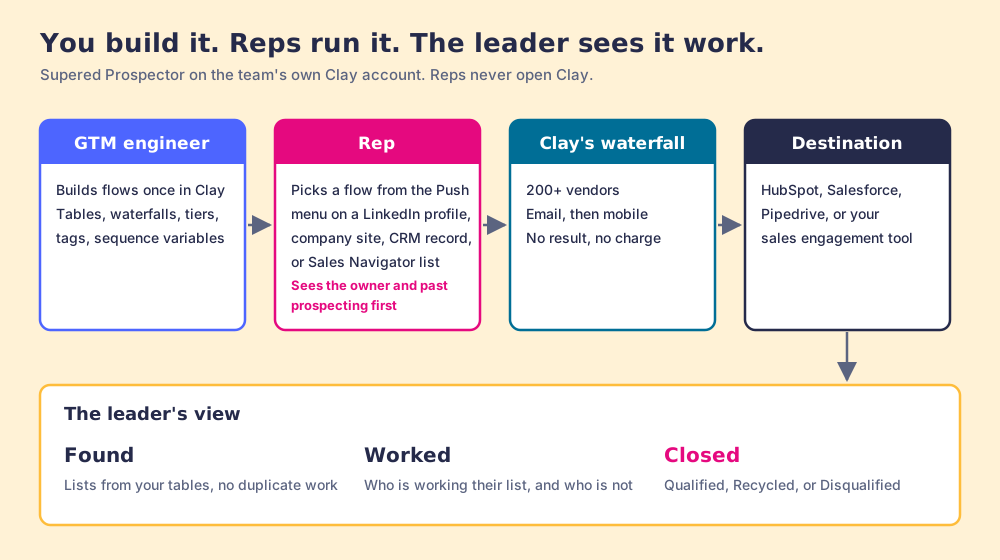
Prospector does not bring its own database. It brings Clay’s waterfall, which is every database, routed, and it is the reason Clay is not a row in the tables above. Clay plus Supered is the best way for a sales team to prospect: GTM engineers build in Clay, reps never open Clay. Prospector runs inside the Supered Chrome extension, on the team’s own Clay account, and it splits the work three ways.
- The GTM engineer’s flows. You built the tables; now you stop being the list desk. You name flows once (person enrichment, buying committee, a campaign), each tied to a Clay table or function and a destination, the CRM on the account or your sales engagement tool. Your logic stays yours: waterfalls, tiers, tags and sequence variables. Start from the Supered Clay template or bring your own tables.
- The rep’s button. On a LinkedIn profile, a company website or the HubSpot, Salesforce or Pipedrive record, the rep picks a flow from the Push menu and the table runs. Sales Navigator leads go onto a prospect list, and the list goes to a Clay table in one push. Before anything syncs, the rep sees the matching CRM record, who owns it, and whether someone already prospected this person, so no two reps work the same lead.
- The leader’s view. Found, Worked, Closed. Found shows which lists came from your tables. Worked shows who is working their list and who is not. Closed means no lead left hanging: each one ends the way your process says, Qualified, Recycled or Disqualified. The VP can see what the Clay budget produced, which is how the Clay budget grows.
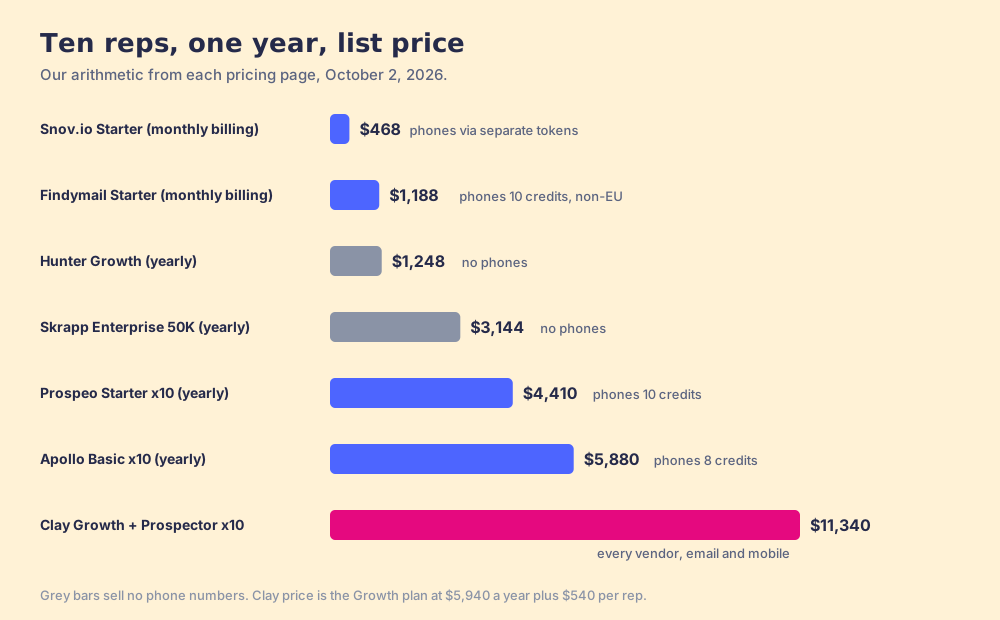
The arithmetic, because Skrapp is cheap and a slogan is not. Clay’s Growth plan lists at $495 a month, $5,940 a year, with CRM sync (clay.com/pricing). Prospector is $45 per rep per month, billed annually ($540 a rep a year), from one rep (Prospector). Ten reps come to $11,340 a year, against $3,144 for Skrapp Enterprise 50K. On email alone, Skrapp wins. The difference buys the phone column, every other directory on the switchboard, a no-charge miss, and a list you can follow past the export. Skip the extra seats, too: a team on Clay that keeps getting asked for another email-finder login gets more out of the Clay it already pays for.
Choose something else if you do not have Clay. Prospector runs on the customer’s Clay account and does nothing without one, and someone has to build the tables; Clay’s homepage says “GTM engineers build on Clay.” If you want help with that build, RevPartners, a Clay Elite Studio Partner, builds and tunes Clay tables (disclosure: I founded RevPartners). Choose something else, too, if your reps email and never dial and there are eight or fewer of them. Skrapp at $1,164 a year for eight users, or Hunter for any number, is the better buy for that job. Sourcing on Clay walks through the full rep loop for teams that do dial.
The other Skrapp competitors, one at a time
- Findymail. The closest swap for a team that dials. Starter is $99 a month for 5,000 finder credits plus 5,000 verifier credits, “1 phone = 10 credits,” charged only on verified results, with unused credits rolling over “up to 2x your monthly allowance” and team accounts that “Share credits across your team” without per-seat pricing (findymail.com/pricing, October 2, 2026). The phone finder is “Non-EU only.” G2 4.9 from 57 reviews (October 1, 2026). Spend every credit on phones and that is 500 a month.
- Hunter. The email-only alternative with no seat ladder. Growth is $104 a month billed yearly ($1,248) for 10,000 credits shared by unlimited users; a miss costs nothing and a verification half a credit (hunter.io/pricing, October 2, 2026). No phone product. Sequences included. G2 4.4 from 657 reviews (October 1, 2026). The Hunter.io alternatives page covers it in full.
- Snov.io. A finder with outreach attached and unlimited seats. Starter is $39 a month on monthly billing with 1,000 credits and “unlimited team seats,” 25% off on annual (snov.io/pricing, October 2, 2026). Phones sit behind separate enrichment tokens, and LinkedIn automation is a $69 a month add-on per account slot, which carries the same section 8.2 question as Skrapp’s Auto-Connect. G2 4.5 from 501 reviews (October 1, 2026).
- Prospeo. An email and mobile finder with a lead database. Starter is $37 a user a month billed yearly ($441 a year) with 24,000 credits per user a year; “a direct mobile number costs 10 credits,” and credits “do not roll over.” Native HubSpot and Salesforce sync starts on Growth at $74 a user billed yearly (prospeo.io/pricing, October 2, 2026). G2 4.6 from 849 reviews (October 1, 2026).
- Apollo. The pick when the job is data, phones, sequences and a dialer in one tool. Basic is $49 a seat a month billed annually ($65 monthly) with 30,000 credits a seat a year; an email costs 1 credit and a direct dial 8 (Apollo’s plan data, October 2, 2026, apollo.io/pricing). G2 4.7 from 9,690 reviews (September 25, 2026). One database, priced per seat.
Two notes on lists you will see elsewhere. ZoomInfo’s blog list of Skrapp alternatives (July 19, 2026) puts ZoomInfo first, and Evaboot’s puts Evaboot first; read both with that in mind, as you should read this one. ZoomInfo and Lusha are graded on the RocketReach alternatives page. And if the job is a LinkedIn extension that returns phones on the profile, the Kaspr alternatives page, the ContactOut alternatives page and the Wiza alternatives page are closer to it. The Findymail alternatives page and the Snov.io alternatives page grade the two closest swaps against their own rivals.
Which Skrapp alternative should you choose?
The choice rests on three questions: do your reps dial, how many reps are there, and do you have Clay. The ways forward:
- Skrapp itself. The pick for up to eight reps who email from LinkedIn and never dial. $1,164 a year seats eight on 10,000 credits a month that roll over.
- Hunter or Snov.io. The pick for an email-first team past eight reps. Unlimited users on a shared pool, Hunter at $1,248 a year on Growth, Snov.io from $39 a month with outreach.
- Findymail or Prospeo. The pick when reps dial and already have a sequencer. Both price a phone at 10 credits; Findymail prices the team, Prospeo the user.
- Apollo. The pick when one database is enough and you want sequences and a dialer in the same plan.
- Supered Prospector. The pick when the team already has Clay. All the directories asked in turn, phones included, from the page the rep is on, with each list followed to Qualified, Recycled or Disqualified.
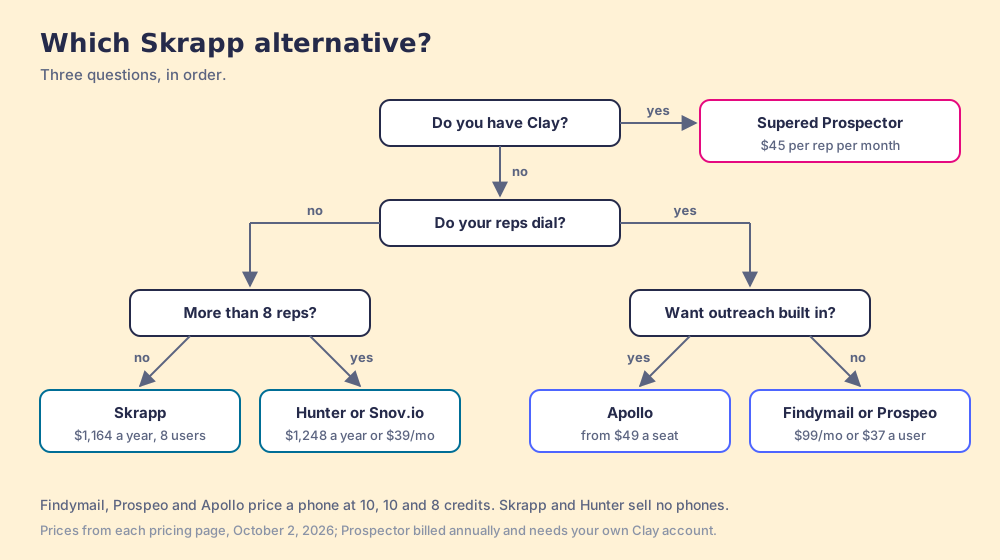
What we recommend follows from what Skrapp is. If your team is small, emails, and never dials, keep it; the book is well printed and the price is fair. If you are about to hire your ninth rep, price Hunter before you price Enterprise 50K. If your reps dial, stop shopping for a better directory and add the phone column, Findymail first if you want the closest swap. If you have Clay, retire the single book entirely: give reps the switchboard on the page they already work from, let the GTM engineer own the instructions, and follow each list to the outcome your process names. The Clay Chrome extension page shows that loop from the rep’s side, and the email finder tools guide sorts the rest of the category by job.
Frequently asked questions
What are the best Skrapp alternatives in 2026?+
How much does Skrapp cost in 2026?+
Does Skrapp find phone numbers?+
Is Skrapp legit? What do Skrapp reviews say?+
Is Skrapp safe to use on LinkedIn?+
Do I need a Clay account to use Supered Prospector?+
Your process, running itself.