Cognism HubSpot Integration (2026): A Two-Lane Bridge With the Toll on One Side
The Cognism HubSpot integration, checked October 2, 2026: the export lane, the two-way sync Cognism added in 2026, setup and permissions, what it costs in credits, the duplicate-company trap, and the alternatives.
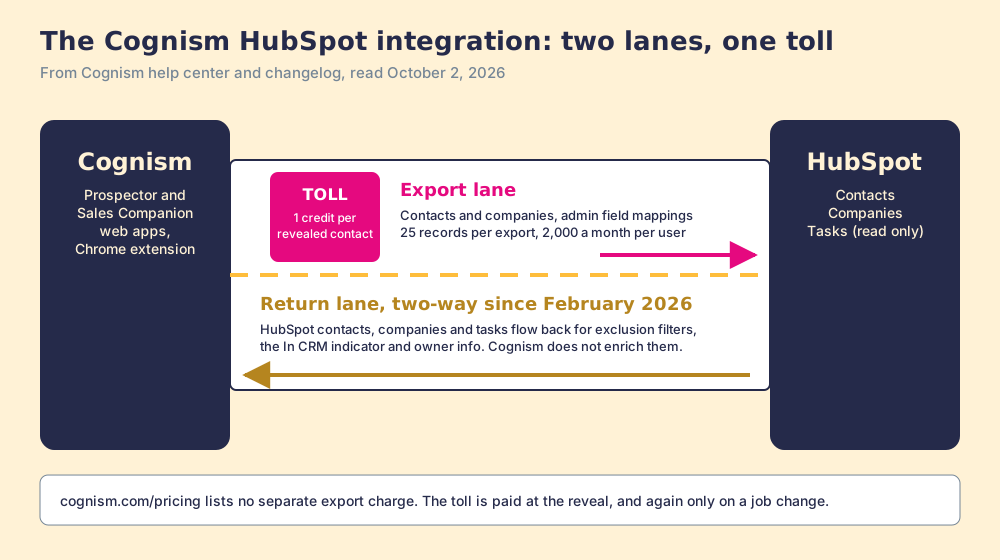
The Cognism HubSpot integration is Cognism's native connection that exports revealed contacts and companies into HubSpot under admin-set field mappings and, since February 2026, imports HubSpot records back into Cognism to flag who is already in the CRM.
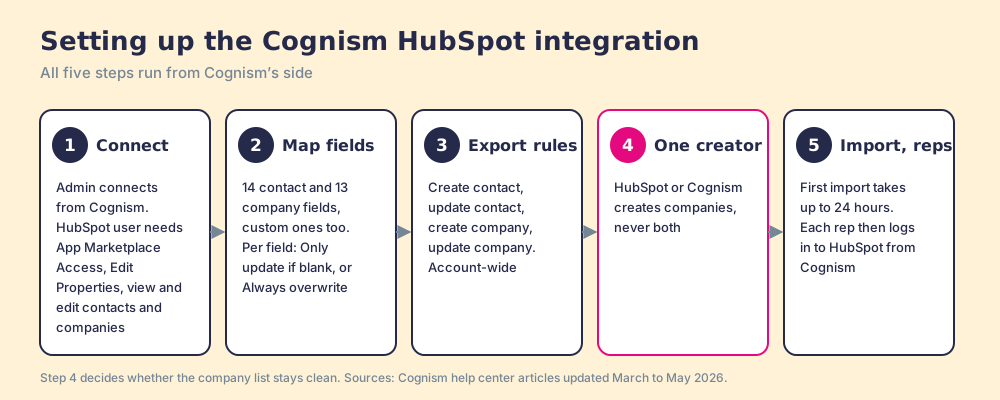
How to set up the Cognism HubSpot integration
- 1
Connect HubSpot from Cognism
As a Cognism admin, open Integrations in Cognism, choose Connect Integration for HubSpot, confirm the permissions in the new tab, sign in to HubSpot, and pick the HubSpot account to connect.
- 2
Map the fields and pick an update rule for each
Map Cognism's contact and company fields to HubSpot properties, including custom ones, and set each field to Only update if blank or Always overwrite. Add static values, such as Cognism in a source field, if your reporting needs them.
- 3
Set the export rules
Decide whether exports may create new contacts, update existing contacts, create new companies, and update existing companies. The rules apply to every export.
- 4
Give companies one creator
Choose whether HubSpot or Cognism creates companies. Cognism's guide recommends turning off HubSpot's automatic create-and-associate companies setting and letting Cognism export companies, because two creators produce duplicate companies.
- 5
Turn on the data import, then let reps log in
Enable the HubSpot data import so Cognism can flag records already in HubSpot and exclude them from search. The first import can take up to 24 hours. Then each rep opens Settings, Integrations, HubSpot in Cognism and logs in to HubSpot before exporting.
The Cognism HubSpot integration is a bridge with two lanes and one toll booth. Contacts and companies drive out of Cognism into HubSpot, and since February 2026 HubSpot’s records drive back the other way, so Cognism can tell a rep who is already in the CRM before a credit is spent. The toll sits at the reveal: “1 credit = 1 revealed contact,” and Cognism’s pricing page lists no second charge for the trip into HubSpot (cognism.com/pricing, checked October 2, 2026).
The short version of what follows:
- Cognism’s own integration. The right buy for a HubSpot team that already holds Cognism seats, sells into Europe, and wants phone-verified mobiles in the CRM with the return lane switched on.
- Supered Prospector. The right buy for a HubSpot team that already pays for Clay: start from the HubSpot record or the LinkedIn profile, let Clay’s waterfall across 200+ vendors find the email and phone, and sync in one click, at $45 per rep per month billed annually.
- Apollo Enrichment. The non-Clay pick for scheduled enrichment that installs from HubSpot’s own marketplace.
The Cognism HubSpot integration is Cognism’s native connection that exports revealed contacts and companies into HubSpot under admin-set field mappings and, since February 2026, imports HubSpot records back into Cognism to flag who is already in the CRM. Cognism’s changelog dates the second lane: “A native two-way integration between HubSpot and Prospector, replacing batch uploads and CSV workflows,” followed in May 2026 by “Real-time bidirectional syncing between HubSpot and Sales Companion” (Cognism changelog, read October 2, 2026). Prospector and Sales Companion are Cognism’s own web apps. The Prospector name is a coincidence with ours, so this page says Supered Prospector whenever it means Supered.
What is the Cognism HubSpot integration, exactly?
Three pieces, set up in two places, each with its own job.
- The export lane. An admin connects HubSpot from Cognism’s settings, then each rep logs in to HubSpot from their own Cognism settings and exports from saved lists, search results, a contact profile, or the Chrome extension. Records land as HubSpot Contacts and Companies (Cognism, How to Integrate Cognism with HubSpot, updated April 21, 2026).
- The return lane. The data import reads HubSpot Contacts, Companies, and Tasks, with properties such as email, domain, name, and owner. Cognism uses them “only to support: CRM exclusion filters, Record-matching and existence indicators,” says it “does not enrich or otherwise process this data beyond enabling filters,” and stores it under AES-256 encryption (Cognism, How to import data from HubSpot, updated April 21, 2026).
- The extension panel. The Cognism browser extension opens beside HubSpot records and fills “only empty or unmapped fields,” depending on your CRM configuration. The Cognism Chrome extension page covers that panel; this page is about the connection underneath it.
Cognism’s integrations page lists HubSpot beside Salesforce, Pipedrive, Bullhorn, Microsoft Dynamics, Salesloft, Outreach, and Zapier (Cognism integrations), and of those cognism integrations the HubSpot one changed most in 2026.
A buyer usually checks the marketplace first. On October 2, 2026, the public HubSpot App Marketplace search for “cognism” returned zero listings, while “apollo” returned Apollo Enrichment at 6,950 installs. The connection is made from Cognism’s side, so there is no HubSpot rating to quote. The nearest public proof is G2, where Cognism shows 4.5 out of 5 from 1,371 reviews (G2, October 2, 2026).
Why trust this page?
I started RevPartners, a HubSpot partner that did only sales implementations, sold roughly twice as much Sales Hub as any other partner, and reached Elite tier in 13 months. Supered came out of that work and is the #1 sales enablement app on the HubSpot marketplace, with 5.0 from 122 reviews there and 4.9 out of 5 from 81 reviews on G2 (both checked October 1, 2026). The disclosure: we make Supered Prospector, and it ranks first below for HubSpot teams that have Clay. Everything about Cognism on this page comes from Cognism’s help center, changelog, and pricing page, read on October 2, 2026.
Which route into HubSpot fits your team?
The lens is a mid-market or SMB HubSpot team of ten to fifty reps. The scores match the Cognism Chrome extension page and the Lusha HubSpot integration page: coverage of the contact you need (x3), rep-side delivery (x2), price structure for mid-market (x2), what the leader sees after the export (x2), bundled outreach (x1), out of 50. Our scoring, not vendor data.
| Rank | Route | Grade | Score | Best fit | HubSpot integration | Setup effort | Pricing (plan that includes it) | Reason to switch |
|---|---|---|---|---|---|---|---|---|
| 1 | Supered Prospector | A | 44 | HubSpot teams that already pay for Clay | Native, one click from the record or profile | Under a week on an existing Clay account | $45 per rep per month, billed annually, plus your Clay plan | 200+ vendors per lookup, no charge for a miss, starts at the HubSpot record |
| 2 | Apollo Enrichment | A- | 36 | Teams wanting scheduled enrichment inside HubSpot | Listed HubSpot app, two-way sync | A day | Basic $49 per seat per month, billed annually | Installs from HubSpot’s marketplace and refreshes existing records on a schedule |
| ref | Cognism HubSpot integration | B | 26 | EMEA, phone-first, compliance-led teams with Cognism seats | Native from Cognism’s settings, two-way since 2026 | An afternoon for an admin of both tools, weeks for the contract | Quote only, 5 seats included per package; Vendr median $32,750 a year | Stay if phone-verified European mobiles are the job |
Cognism’s 26 is coverage 4, rep-side delivery 3, price 2, what the leader sees 1, outreach 2. The coverage 4 is a strong single database: Vendr’s buyer notes cite EMEA coverage as the reason to pick it, and Cognism’s compliance page lists screening against 15 Do Not Call and TPS lists (Cognism compliance). The price 2 is the quote: Vendr’s median Cognism contract is $32,750 a year across 94 purchases (Vendr, October 2, 2026), and the Cognism pricing page decodes how that quote is built. Supered Prospector’s coverage is Clay’s waterfall, credited to Clay, and its outreach score is the lowest on the card because it has no dialer and no sequencer.
How do you set up the Cognism HubSpot integration?
The setup runs from Cognism’s side, and HubSpot’s side asks for four permissions on the connecting user: “App Marketplace Access,” “Edit Properties,” “View Contacts & Companies,” and “Edit Contacts & Companies.” Cognism’s guide says failed connections usually trace to one of them missing.
- Connection from Cognism. An admin opens Integrations, chooses Connect Integration for HubSpot, confirms the permissions, signs in to HubSpot, and picks the account.
- Field mappings with an update rule per field. Cognism maps 14 contact fields and 13 company fields to HubSpot properties, custom properties included, and each field gets one of two rules: “Only update if blank” or “Always overwrite.” Cognism’s own warning: these “settings can affect reporting and data accuracy” (Cognism, HubSpot field mappings, updated April 8, 2026). Static values, such as “Cognism” in a source field, stamp every exported record.
- Export rules. Four switches: create new contact, update existing contact, create new company, update existing company. They apply to every export, for every rep.
- One creator for companies. The next section explains why this step decides whether your company list stays clean.
- The data import, then the reps. Turn on the import so Cognism can see HubSpot. The first pass “can take several hours, or up to 24 hours,” and Cognism suggests a manual re-sync after you add or update “more than approximately 100,000 records.” Then each rep logs in to HubSpot from Cognism’s settings.
Cognism’s export guide lists “Bi-directional sync (data import)” among the prerequisites for exporting and syncing to HubSpot (Cognism, Export and Sync to HubSpot, updated May 7, 2026). Treat step 5 as part of the setup, not an extra.
Why does Cognism create duplicate companies in HubSpot?
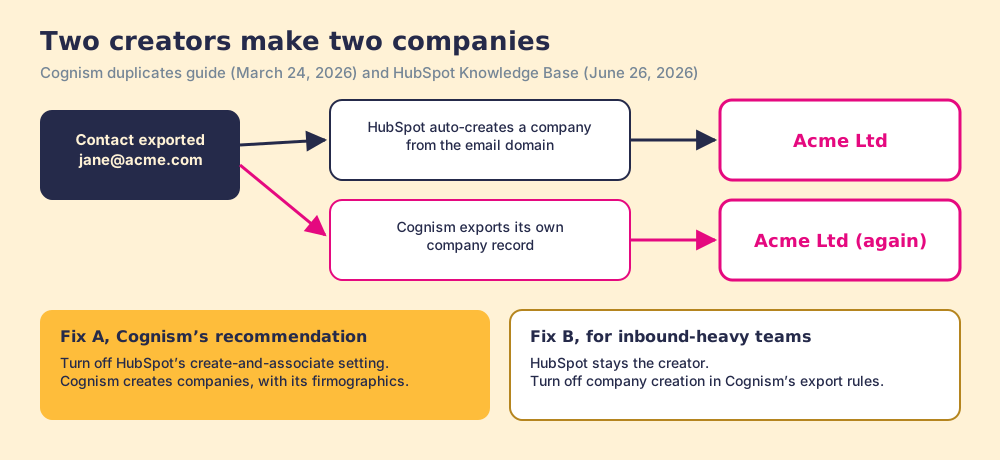
Two cooks, one pot. HubSpot has a setting that will “Automatically associate contacts with companies by matching the domain in the Email value of a contact with the Company domain name value” (HubSpot Knowledge Base, updated June 26, 2026). Cognism’s export can create the company as well. When both are on, a contact arrives, HubSpot makes a company from the email domain, Cognism sends its own company record, and you own two Acme Ltds.
Cognism names the cause in one line: “Duplicates typically occur when both HubSpot and Cognism are configured to create companies automatically” (Cognism, avoiding duplicates, updated March 24, 2026). Its recommendation is to switch off HubSpot’s create-and-associate setting and let Cognism create companies, which brings Cognism’s firmographics in with them. It suits a team that sources most new accounts in Cognism. A team whose companies arrive mostly from forms and inbound may prefer the opposite, with HubSpot as the creator and Cognism’s company export turned off. Pick one cook.
The update rules are the second place a clean portal goes wrong, and Cognism leaves the choice to you field by field. Job titles and phone numbers go stale when people move, so “Always overwrite” pays for itself there. Owner, lifecycle stage, and lead source belong to your process, so “Only update if blank” protects them from an export stamping over a routing decision a rep or a workflow already made.
Is the Cognism HubSpot integration two-way?
Since 2026, yes, and the return lane is the half that saves money.
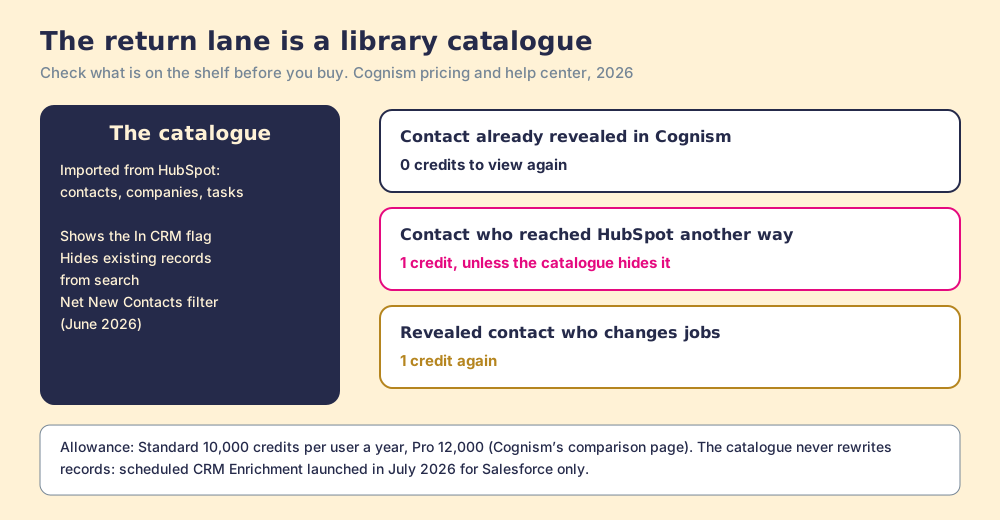
A small library that buys books without checking its own catalogue ends up with three copies of the same novel and a budget gone before the new titles arrive. The catalogue is a dull thing. It owns no books. All it does is tell the buyer, at the moment of purchase, what is already on the shelf. Cognism’s data import is that catalogue. With it on, the changelog says an “‘In CRM’ indicator prevents duplicate creation,” and search can hide the people HubSpot already holds. Since June 2026 a Net New Contacts filter also hides anyone already redeemed anywhere in the Cognism account, with “HubSpot or Salesforce filters” layered on top.
The money follows from the credit rule. Cognism charges a credit “each time a contact record is revealed,” and “a credit is only used again if that contact changes jobs.” A contact your team already revealed in Cognism costs nothing to see again. A contact who reached HubSpot some other way, through a form, an event list, or another vendor, costs a full credit to reveal in Cognism unless the catalogue hides them first. Standard includes 10,000 credits per user a year and Pro 12,000, according to Cognism’s own comparison page (Cognism vs Clay, read September 25, 2026). The catalogue protects that allowance.
A library catalogue never rewrites the books, and this one does not either: Cognism says the imported HubSpot data serves filters and matching only. The changelog does say that with two-way sync “Existing HubSpot records update in real time,” which reads most naturally as exports updating matched records under your rules. What keeps a HubSpot record current after the export is another export, or Cognism’s scheduled CRM Enrichment product, which reached general availability in July 2026 with the note “Salesforce only at launch.” We found no HubSpot release of it in the changelog through October 2, 2026.
Records rot whether or not the catalogue is on. The US Bureau of Labor Statistics counted 5.1 million separations in August 2026, a monthly rate of 3.2 percent (BLS JOLTS, released September 29, 2026), and the median worker aged 25 to 34 had been with their employer 3.0 years in January 2026 (BLS tenure). Each of those moves is a HubSpot record pointing at an old desk, and in Cognism’s model it is also the one moment a contact costs a credit again.
What are the limits of the Cognism HubSpot integration?
The limits sit in Cognism’s own pages, which is to Cognism’s credit.
- Batch size. Cognism’s fair-usage article sets an “Export view limit per End User: 25 individual records at a time” and a “Monthly export limit per End User: 2,000 individual records” (Cognism, credits and fair usage). Dinesh K., an enterprise SDR, named the 25 on G2 in July 2026: “the restriction on saving and downloading contacts in smaller batches, such as the 25-contact limit.”
- Two objects. HubSpot exports write Contacts and Companies. The import reads Tasks too, for matching, but exports create no deals or tasks.
- No scheduled enrichment. As above, CRM Enrichment launched for Salesforce only.
- Admin-owned settings. Mappings, update rules, and export rules apply account-wide, so a rep cannot loosen them for one list.
- No marketplace listing. Nothing to install from HubSpot’s side, and nothing to rate there.
Reviewers mostly praise the connection itself. Juan Z., a small-business consultant, wrote in July 2026 that “the connection to HubSpot is easy,” and James A., a director of marketing at an enterprise, wrote on October 1, 2026 that “both the setup and onboarding were thorough” (G2, quotes read through a fetch of the review page).
How does the Cognism Salesforce integration differ?
The cognism salesforce integration runs on the same idea with more objects and more switches, and Salesforce got a different 2026 upgrade.
| Setting | HubSpot | Salesforce |
|---|---|---|
| Objects written | Contacts, Companies | Leads, or Contacts with Accounts |
| Connection | Admin connects, then each rep logs in | User-based or Managed Service, chosen at setup |
| 2026 upgrade | Two-way sync (February and May) | CRM Enrichment, generally available July 2026 |
| Edition requirement | A HubSpot user with the four permissions | Professional or above with API access; Essentials not supported |
| Update rules | Only update if blank, Always overwrite | Apply if blank, Override |
The Cognism Salesforce integration page walks those differences, including the matching rules Cognism publishes for leads, contacts, and accounts.
Where does Supered Prospector fit?
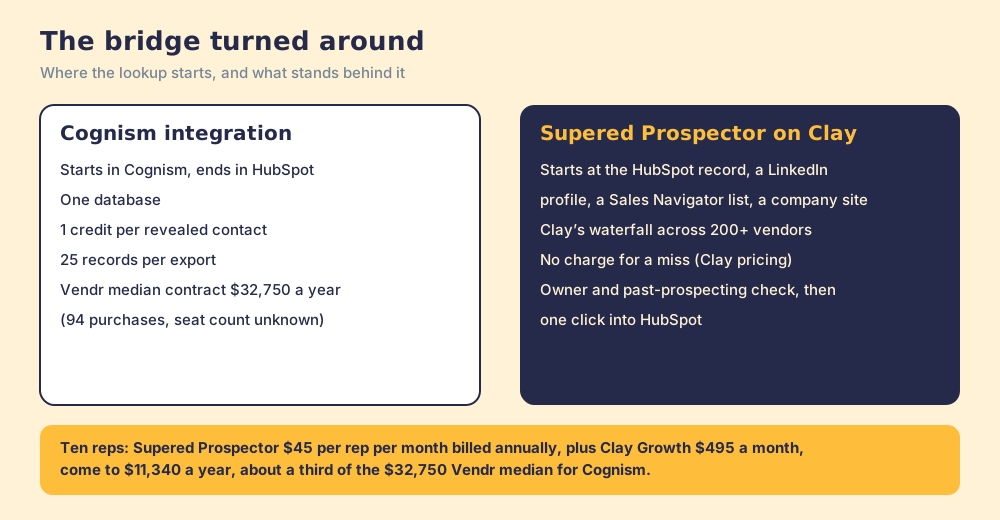
Turn the bridge around. Cognism’s integration starts in Cognism and ends in HubSpot, so the rep finds the person in one tool and files them into another. A HubSpot team’s reps already stand at the far end of that bridge, inside the record, and the useful question is what reaches them there.
Supered Prospector starts where the rep stands. It runs inside the Supered Chrome extension and brings Clay’s waterfall, on the team’s own Clay account, to the HubSpot contact or company record, a LinkedIn profile, a Sales Navigator list, or the company’s website. Reps never open Clay. Supered does not bring its own database. It brings Clay’s waterfall, which is every database, routed, and that is why we chose Clay as our only data provider. Clay describes its waterfalls as checking “multiple providers to return the most verified emails (lower bounce rate) and phone numbers (higher connect rate)” across 200+ data and AI vendors (clay.com, September 25, 2026), and its pricing page adds a rule a single database cannot offer: “If an enrichment returns no result, you’re not charged Data Credits or Actions” (Clay pricing, October 2, 2026).
What a HubSpot rep gets:
- The table as a button. The GTM engineer builds flows once in Clay (person enrichment, buying committee) and the rep runs them from the HubSpot record, a LinkedIn profile, or a company website.
- Context before a duplicate. On a LinkedIn profile the rep sees the matching HubSpot record, who owns it, and whether the person was prospected before, so two reps do not chase one buyer.
- One click into HubSpot. Field mapping is set once; the contact syncs to HubSpot, Salesforce, or Pipedrive.
- Found, worked, closed. The leader sees which lists reps found, who is working theirs, and how each lead ended: Qualified, Recycled, or Disqualified, the way your process says. A manager who can watch a list become pipeline coaches from what is converting.
On LinkedIn, Supered’s own statement: Prospector works within LinkedIn’s terms and does not copy search results in bulk; the contact data comes from Clay’s waterfall on the customer’s Clay account.
Cognism does not ride along as easily as some vendors. On October 2, 2026, Clay’s integration page for Cognism returned a 404, so there is no marketplace step to switch on. Cognism’s API does offer a route: its Enrich requests “return preview data only and do not consume Credits,” and a Redeem charges “one credit per contact,” never twice for the same one. Clay’s HTTP API runs any endpoint with your own key at one Action and no Data Credits. A Clay step that previews Cognism and redeems only when a mobile exists is our build sketch, not a template from either vendor, and your GTM engineer should test it on a small batch first.
The arithmetic. Clay’s Growth plan lists at $495 a month, $5,940 a year. Supered Prospector is $45 per rep per month, billed annually, from one rep (Supered Prospector). Ten reps on Supered Prospector plus Clay Growth come to $11,340 a year, about a third of Vendr’s $32,750 Cognism median. Vendr’s figure is a whole contract with an unknown seat count, so read the comparison as a scale, not a quote.
Choose something else if you do not have Clay. Supered Prospector runs on the customer’s Clay account and does nothing without one, and someone has to build the tables; Clay’s own copy says “GTM engineers build on Clay.” Choose Cognism, too, if the job is calling into Europe and your legal team wants a vendor that screens 15 Do Not Call and TPS lists and holds SOC 2 Type II and ISO 27001 itself. That job is Cognism’s, and the Cognism alternatives page explains what that compliance tag does and does not cover. The sourcing use case shows the setup when Clay is in place, and the Clay vs Cognism page compares the two models in full.
What is the non-Clay alternative inside HubSpot?
Apollo Enrichment, because it lives where Cognism’s integration does not: in HubSpot’s public App Marketplace, at 6,950 installs on October 2, 2026. Its listing says it can enrich existing HubSpot contacts “with 11 data points” and accounts with 24, syncs contacts to Apollo every 15 minutes and accounts every 60, and writes updates back, a bridge with a maintenance crew attached. Apollo’s plan data on October 2, 2026 listed Basic at $49 per seat per month billed annually ($65 monthly) with 30,000 credits per seat per year and Automated CRM Enrichment from Basic (apollo.io/pricing). The Cognism vs Apollo page weighs the two databases head to head, and the Apollo HubSpot integration page covers Apollo’s own sync.
Which should you choose?
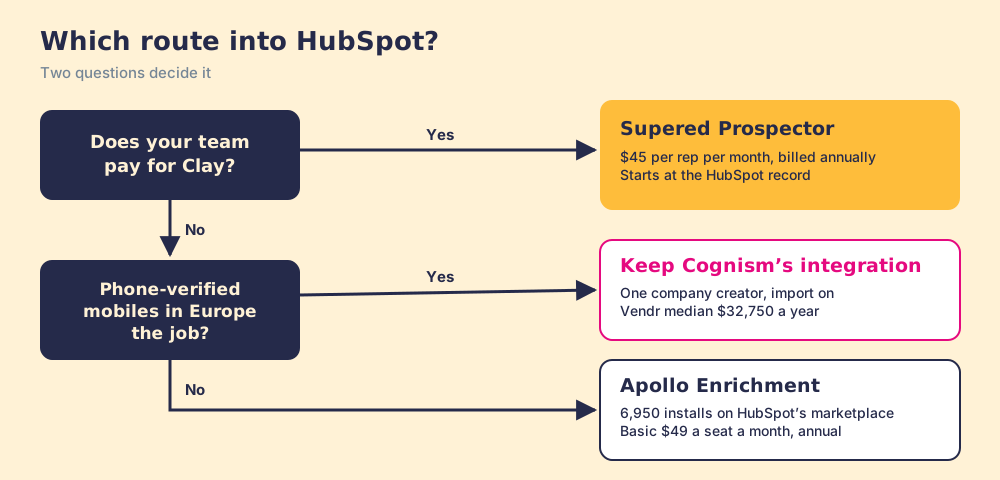
Two questions decide it: does your team pay for Clay, and is the job phone-verified European mobiles.
- Cognism’s integration, kept. The pick for a HubSpot team with Cognism seats whose reps call into Europe. Connect it with one company creator, set update rules field by field, and turn the import on before anyone reveals a contact.
- Apollo Enrichment. The pick without Clay when existing HubSpot records should refresh on a schedule and a posted price matters more than European phone coverage.
- Supered Prospector. The pick when the team already pays for Clay and the reps live in HubSpot and LinkedIn: one click from the record, every source behind it, and a leader who sees which lists turned into pipeline.
What we recommend: if you keep Cognism, switch the return lane on before the first reveal, because a catalogue checked after the shopping is a list of what you overpaid for. If your team has Clay, stop sending contacts across a bridge into HubSpot and let the rep start at the record, with every source asked at once and the leader watching each list move toward closed. For the LinkedIn half of the same question, the HubSpot LinkedIn integration page shows what HubSpot’s native Sales Navigator card imports and what it leaves out. A Supered Prospector demo on your own Clay account shows the record-first route in HubSpot.
Frequently asked questions
Does Cognism integrate with HubSpot?+
Is the Cognism HubSpot integration two-way?+
Does exporting from Cognism to HubSpot cost credits?+
Why does Cognism create duplicate companies in HubSpot?+
Is Cognism on the HubSpot App Marketplace?+
What is the best alternative to the Cognism HubSpot integration?+
Everything we have written on Cognism
More on Cognism
Supered Prospector vs Cognism: the side-by-side- Cognism Alternatives in 2026: What the Compliance Tag Certifies, and What Stays Yours
- Cognism Pricing in 2026: The Platform Fee Is the Price, the Seats Are the Meter
- The Cognism Chrome Extension in 2026: A Free Key Card to a Quote-Only Room
- Cognism Salesforce Integration (2026): A Sorting Frame, a Signature, and a Crew That Comes Back
- Clay vs Cognism in 2026: The Rail Line Is Not in the Travel Agent's System
- Cognism vs Apollo in 2026: The Well, the Tap, and the Pipes
- LinkedIn Sales Navigator vs Cognism in 2026: A Telescope, a Radio, and Whether You Need Both
- Cognism vs ZoomInfo in 2026: Two Good Maps, Each Tested on Its Own Streets
- Cognism vs Kaspr in 2026: One Owner, a Flagship, and the Outlet Round the Corner
- Lusha vs Cognism in 2026: The Corner Shop and the Cash-and-Carry
Your Clay waterfall, where reps already work.