Cognism Salesforce Integration (2026): A Sorting Frame, a Signature, and a Crew That Comes Back
The Cognism Salesforce integration, checked October 2, 2026: the edition and permissions it needs, Lead or Contact exports, the matching rules Cognism publishes, who signs for the records, the CRM Enrichment add-on, limits, and alternatives.
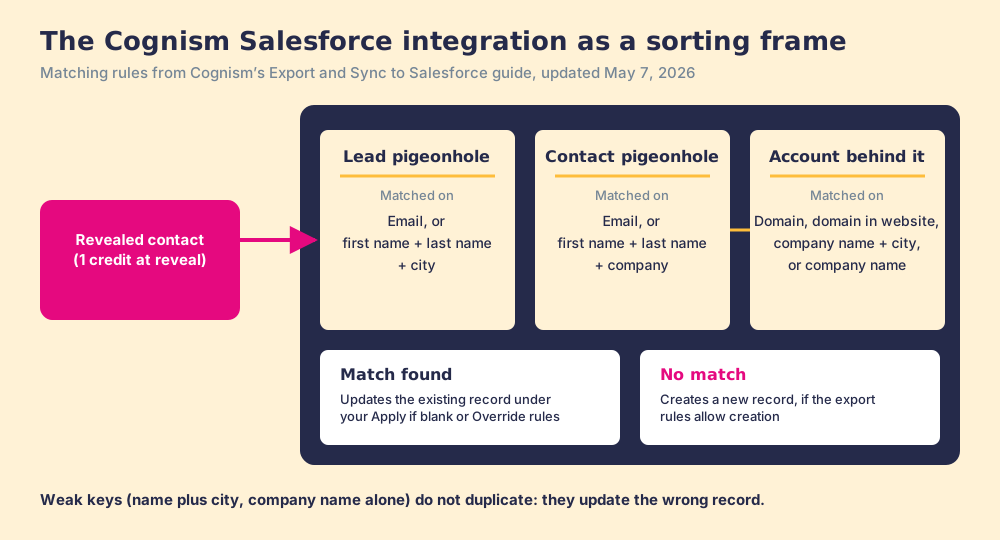
The Cognism Salesforce integration is Cognism's API connection that exports revealed contacts into Salesforce as Leads or as Contacts with Accounts, matched to existing records by rules Cognism publishes, with an optional CRM Enrichment add-on that keeps them current.
How to set up the Cognism Salesforce integration
- 1
Connect Salesforce from Cognism
In the Cognism web app, open Settings, then Integrations, then Salesforce, and choose Connect Integration. Pick Production or Sandbox.
- 2
Choose User-based or Managed Service
User-based means each user logs in to Salesforce with their own credentials, from the Cognism platform or the Chrome extension. Managed Service means the admin authenticates once and users need no individual Salesforce login. Decide who should own the records before you choose.
- 3
Map fields for Leads, Contacts, and Accounts
Map Cognism fields to Salesforce fields separately for each object, add static values where reporting needs them, and set each field to Apply if blank or Override. Salesforce currency values are not converted, so check any currency field.
- 4
Set the export rules
Decide whether users may create and update Leads, Contacts, and Accounts, and whether to block exports when a Contact cannot be associated with an Account.
- 5
Enable the data import
Turn on the Salesforce data import, which needs Modify Metadata, View All Users, and Customize Application, so Cognism can flag records already in Salesforce and exclude them from search. Re-sync manually after more than 100,000 records change.
The Cognism Salesforce integration works like the sorting frame in an old post room: a wall of pigeonholes, one for Leads, one for Contacts with an Account behind each, and a clerk who reads the address on every envelope before deciding which hole it goes in. Cognism publishes the clerk’s rules. A Lead with an email is matched on the email; a Lead without one is matched on first name, last name, and city (Cognism, Export and Sync to Salesforce, updated May 7, 2026). Two John Smiths in Leeds share a hole.
The short version of what follows:
- Cognism’s own integration. The right buy for a Salesforce team that already holds Cognism seats, calls into Europe, and will pay for the CRM Enrichment add-on to keep records current.
- Supered Prospector. The right buy for a Salesforce team that already pays for Clay: start from the Salesforce record or the LinkedIn profile, let Clay’s waterfall across 200+ vendors find the email and phone, and sync in one click, at $45 per rep per month billed annually.
- Apollo. The non-Clay pick for a managed package with two-way sync and published prices.
The Cognism Salesforce integration is Cognism’s API connection that exports revealed contacts into Salesforce as Leads or as Contacts with Accounts, matched to existing records by rules Cognism publishes, with an optional CRM Enrichment add-on that keeps them current. In 2026 it grew in a different direction from its HubSpot twin. HubSpot got a live two-way sync. Salesforce got the crew that comes back: Cognism’s changelog says CRM Enrichment “became generally available for Salesforce” in July 2026, “Salesforce only at launch” (Cognism changelog, read October 2, 2026).
What is the Cognism Salesforce integration, exactly?
Cognism’s help center describes five parts, each switched on by an admin.
- The export. Reps send revealed contacts from lists, search results, a contact profile, or the Chrome extension, as a Lead or as a Contact with its Account. You “spend a credit to reveal contact data before you can add contacts to a list or export them.”
- The data import. Cognism reads Salesforce so reps can “filter out prospects that may already exist,” see whether a record exists, and see its owner. The data sits in “an encrypted database (AES-256 encryption)” (Cognism, Enabling the Salesforce Data Import).
- Opt-out sync. Since July 2026, “Opt-outs and suppressions are pulled from the CRM and suppressed everywhere in the platform,” with the CRM as the source of truth. Salesforce teams on Cognism’s Prospector app had it first, in a February 2026 test.
- CRM Enrichment. The add-on that keeps leads, contacts, and accounts current on a schedule. More on it below.
- The extension panel. On a Salesforce lead, contact, or account, the Cognism extension shows emails, phones, titles, and firmographics, and an Export updates the record. “Only empty or unmapped fields are updated, depending on your CRM settings” (Cognism, Chrome Extension over Salesforce, updated April 9, 2026). The Cognism Chrome extension page covers the panel in full.
One check a Salesforce admin runs first is the marketplace. On October 2, 2026, the public AgentExchange (formerly AppExchange) search for “cognism” returned 580 fuzzy results, and none of the top 60 was a Cognism app. Cognism’s setup guide connects from Cognism’s side and names no package to install. For security reviews, Cognism added “Static IP support for all Cognism → Salesforce integration traffic” in the first half of 2026, so IT can allowlist its fixed addresses (Cognism, H1 ‘26 product update, July 7, 2026). The nearest public rating is G2, where Cognism shows 4.5 out of 5 from 1,371 reviews (G2, October 2, 2026).
Why trust this page?
I started RevPartners, a HubSpot partner that did only sales implementations, sold roughly twice as much Sales Hub as any other partner, and reached Elite tier in 13 months. Supered came out of that work and is the #1 sales enablement app on the HubSpot marketplace, with 5.0 from 122 reviews there and 4.9 out of 5 from 81 reviews on G2 (both checked October 1, 2026). The disclosure: we make Supered Prospector, and it ranks first below for Salesforce teams that have Clay. Everything about Cognism on this page comes from Cognism’s help center, changelog, newsroom, and pricing page, read on October 2, 2026.
Which route into Salesforce fits your team?
The lens is a mid-market or SMB Salesforce team of ten to fifty reps. The scores match the Cognism HubSpot integration page and the Cognism Chrome extension page: coverage of the contact you need (x3), rep-side delivery (x2), price structure for mid-market (x2), what the leader sees after the export (x2), bundled outreach (x1), out of 50. Our scoring, not vendor data.
| Rank | Route | Grade | Score | Best fit | Salesforce integration | Setup effort | Pricing (plan that includes it) | Reason to switch |
|---|---|---|---|---|---|---|---|---|
| 1 | Supered Prospector | A | 44 | Salesforce teams that already pay for Clay | Native, one click from the record or profile | Under a week on an existing Clay account | $45 per rep per month, billed annually, plus your Clay plan | 200+ vendors per lookup, no charge for a miss, owner check before the push |
| 2 | Apollo | A- | 36 | Teams without Clay wanting data and outreach in one plan | Managed package, two-way sync | A day, inside a six-hour mapping window | CRM Integrations from Basic, $49 per seat per month, billed annually | Published prices and two-way sync of leads, contacts, accounts, and deals |
| ref | Cognism Salesforce integration | B | 26 | EMEA, phone-first, compliance-led teams with Cognism seats | Native API connection from Cognism | An afternoon for the admin, weeks for the contract | Quote only, 5 seats included per package; CRM Enrichment extra; Vendr median $32,750 a year | Stay if phone-verified European mobiles are the job |
Cognism’s 26 is coverage 4, rep-side delivery 3, price 2, what the leader sees 1, outreach 2. The coverage 4 is a strong single database: Vendr’s buyer notes cite EMEA coverage as the reason to pick it. The price 2 is the quote, with Vendr’s median Cognism contract at $32,750 a year across 94 purchases (Vendr, October 2, 2026); the Cognism pricing page shows how the quote is built. Supered Prospector’s coverage is Clay’s waterfall, credited to Clay, and its outreach score is the lowest on the card because it has no dialer and no sequencer.
How do you set up the Cognism Salesforce integration?
Cognism’s guide opens with the edition: Salesforce Professional or above, with “Salesforce API access is enabled,” and Essentials not supported (Cognism, How to Integrate Cognism with Salesforce, updated September 8, 2026). Professional is the edition to check twice. LinkedIn’s own Salesforce setup guide says Professional “requires API Access and Chatter to be turned on, but this might incur an additional Salesforce fee” (LinkedIn Help).
- Connection. In Cognism, Settings, then Integrations, then Salesforce, then Connect Integration, then Production or Sandbox. The admin needs Marketing User plus read, create, and edit rights on Leads, Contacts, and Accounts.
- User-based or Managed Service. The decision with the longest tail. The next section is about it.
- Mappings per object. Leads, Contacts, and Accounts each get their own map. A “Static field” writes “A fixed value to a Salesforce field,” and each mapped field takes one of two update rules: “Apply if blank” or “Override,” where Override “updates the field every time you export or sync” (Cognism, Configuring the Salesforce Integration, updated April 9, 2026).
- Export rules. Allow or block creating and updating each object, and decide whether to “Prevent exports when a Contact cannot be associated with an Account.”
- The data import. It asks for “Modify Metadata,” “View All Users,” and “Customize Application,” and Cognism suggests a manual re-sync when “more than 100,000 records are updated/added.”
Two warnings from the same pages. Currency: “Salesforce currency values are not converted during mapping,” so $100,000 lands as GBP 100,000 in a pound-denominated field. And removing the integration deletes custom export rules and field mappings for good, so screenshot the maps before anyone disconnects to fix a token.
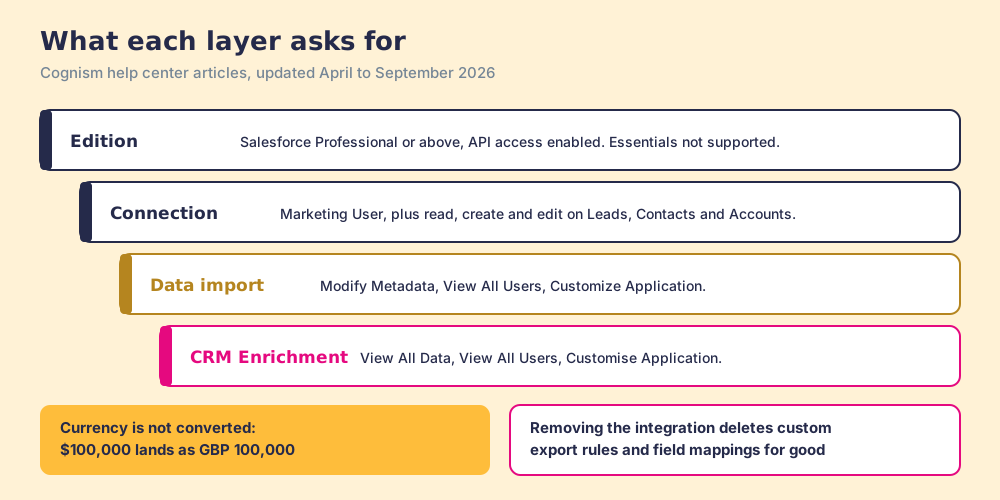
The permissions climb as the integration does more, and that matters for the security review. View All Data is the widest read permission Salesforce has, and CRM Enrichment asks for it (Cognism, CRM Enrichment permissions, updated May 7, 2026). Cognism says the data is “encrypted at rest using AES-256” and that it does not “Sell customer CRM data.” Since August 2026 admins can also hand-pick which fields Cognism imports, with matching fields such as email and name pre-selected.
User-based or Managed Service: who signs for the records?
A parcel that arrives at an office gets signed for by somebody, and from then on it is that person’s parcel. If the receptionist signs for everything, the receptionist owns the whole delivery until someone walks it round the building.
Cognism offers both arrangements. User-based: “Individual users authenticate with their own Salesforce credentials,” and “each user must log in to Salesforce individually, either through the Cognism platform or the Chrome extension.” Managed Service: the admin authenticates centrally and “users don’t need individual accounts.” Cognism’s guide does not say who owns the records under each. Ask before you choose, because the neighbouring evidence points one way. Apollo’s Salesforce documentation says “the integration user owns the new Salesforce record by default” (Apollo Knowledge Base). And a Salesforce admin posted in March 2022 that SDRs’ Cognism leads arrived with “the Lead Owner” set to “another person,” fixed only once the team added a validation rule for outbound leads and an assignment rule per SDR (Trailblazer Community).
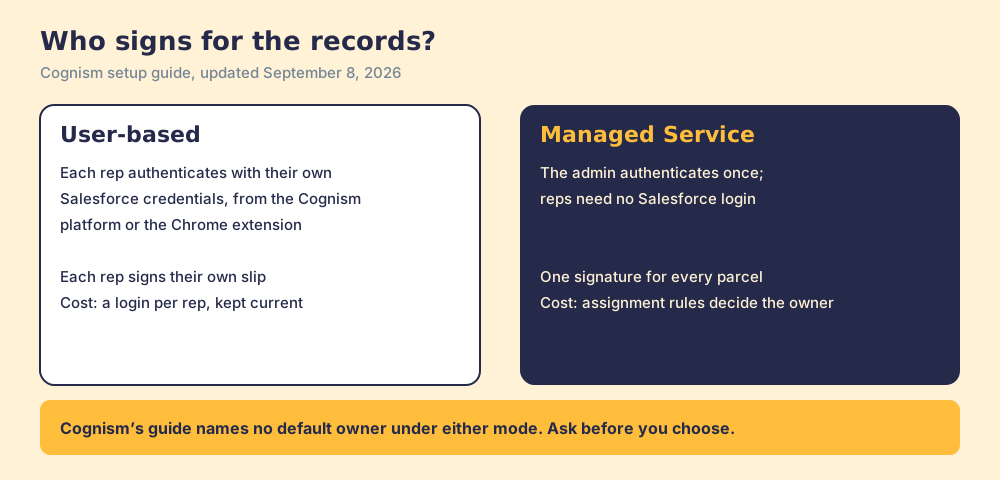
The trade is plain once drawn. For a team that routes inbound leads by territory already, Managed Service plus a rule for Cognism’s lead source is tidy. For a team where the rep who found the person should own them, User-based matches how the work happens.
How does Cognism match existing Salesforce records?
Back to the sorting frame. The clerk reads the strongest key on the envelope first and falls back to weaker ones, and the weak keys are where letters go astray.
| Object | Matched on | Where it goes astray |
|---|---|---|
| Lead | Email, or first name, last name, and city | Two people with one name in one city |
| Contact | Email, or first name, last name, and company | A contact revealed without an email, at a company with two spellings |
| Account | Domain, domain in website, company name plus city, or company name | Subsidiaries that share a name across countries |
“If Cognism identifies an existing record, the export updates that record based on your update rule settings.” So a weak match does not create a duplicate. It updates the wrong record, which is harder to spot. Two habits keep the clerk accurate: reveal the email before exporting, because email is the strongest key on every object, and pick Lead or Contact deliberately, because Cognism publishes its rules per object and lists no check across them. A person already in Salesforce as a Contact, exported as a Lead, lands in the Lead hole as a stranger.
Does Cognism keep Salesforce records up to date?
A house painter and a crew on retainer can use the same paint. The painter does the job, takes payment, and leaves; when the paint peels two winters later, the wall stays peeled until you call again. The crew on retainer walks the house, sees the peeling, and comes back with a brush.
A plain Cognism export is the painter. It writes what Cognism knew on the day and never returns. CRM Enrichment is the crew. Cognism’s changelog: “Rather than a one-off cleanup, it keeps records accurate and reachable on an ongoing basis, with RevOps controls including field-level permissions and a choice between overwriting existing values or only filling blanks. A CRM Health Dashboard shows the state of the data.” Its first-half product post adds “automatic enrichment for new records plus scheduled jobs for existing contacts” and a job-change signal for “a previously revealed contact” who “has changed roles or companies.”
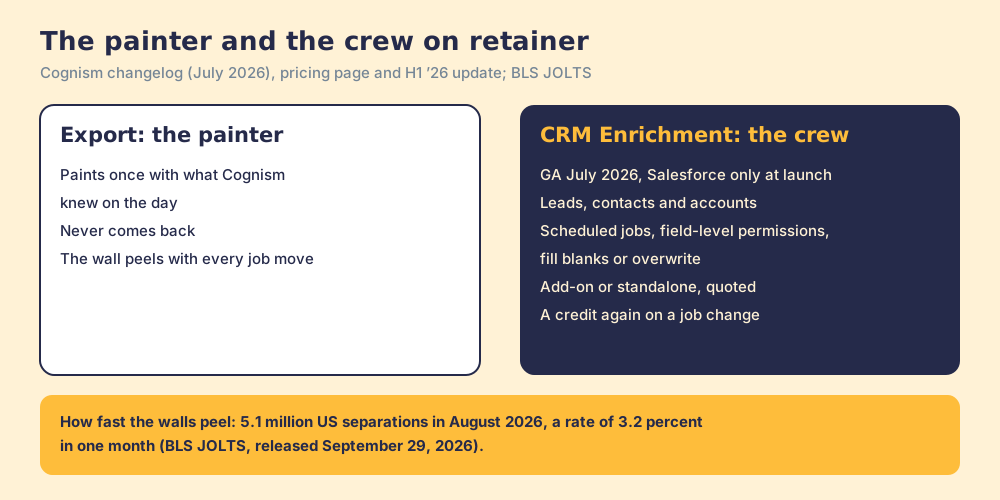
The walls peel at a known rate. The US Bureau of Labor Statistics counted 5.1 million separations in August 2026, a rate of 3.2 percent in one month (BLS JOLTS, released September 29, 2026), and workers aged 25 to 34 had a median tenure of 3.0 years in January 2026 (BLS tenure). Each move leaves a Salesforce record pointing at an old desk.
The comparison stops at the bill, because the crew is not free. Cognism sells CRM Enrichment “as a standalone product or as an add-on,” priced “based on subscription structure, usage and delivery requirements,” and its credits note that “Ongoing maintenance is included” while “Credits are only used again when key details change, like a job move” (cognism.com/pricing, checked October 2, 2026). So the crew’s visits are covered, and each repaint after a job move is a new credit. Budget for the repaints in proportion to your churn, and ask for that number in the quote.
What are the limits of the Cognism Salesforce integration?
- Batch size. Cognism’s fair-usage article sets “25 individual records at a time” per export view and “2,000 individual records” a month per user (Cognism, credits and fair usage).
- No marketplace listing. None found among the top 60 AgentExchange results, so no AgentExchange reviews to read.
Reviewers who mention Salesforce are mostly content. Lindsey F., head of sales enablement and operations at a mid-market company, wrote in May 2026 that “it integrates really well with the platforms that we use, like Salesforce and SalesLoft,” and Petar K., a strategic account executive, wrote in April 2026 that “The integration with Salesforce and Outreach is also solid, with no complaints there” (G2, quotes read through a fetch of the review page).
How does the Cognism HubSpot integration differ?
The cognism hubspot integration writes HubSpot Contacts and Companies and got the 2026 upgrade Salesforce did not: a native two-way sync, launched in February and May 2026. Its best-known trap is two systems creating companies at once, where the Cognism Salesforce trap is the sorting frame. The Cognism HubSpot integration page walks that setup.
Where does Supered Prospector fit?
In everything above, the rep reveals in Cognism, chooses a pigeonhole, and sends the envelope into Salesforce. A Salesforce team’s reps already stand at the far end of that frame, inside the record.
Supered Prospector puts the lookup where the rep stands. It runs inside the Supered Chrome extension, on the team’s own Clay account, at the Salesforce lead, contact, or account, a LinkedIn profile, a Sales Navigator list, or the company’s website. Reps never open Clay. Supered does not bring its own database. It brings Clay’s waterfall, which is every database, routed, and that is why we chose Clay as our only data provider. Clay describes its waterfalls as checking “multiple providers to return the most verified emails (lower bounce rate) and phone numbers (higher connect rate)” across 200+ data and AI vendors (clay.com, September 25, 2026), and its pricing page adds: “If an enrichment returns no result, you’re not charged Data Credits or Actions” (Clay pricing, October 2, 2026).
What a Salesforce rep gets:
- The table as a button. The GTM engineer builds flows once in Clay (person enrichment, buying committee) and the rep runs them from the record, a profile, or a company site.
- The signature before the parcel. On a LinkedIn profile the rep sees the matching Salesforce record, who owns it, and whether the person was prospected before, so the ownership question gets answered before the push.
- One click into Salesforce. Field mapping is set once; the contact syncs to Salesforce, HubSpot, or Pipedrive.
- Found, worked, closed. The leader sees which lists reps found, who is working theirs, and how each lead ended: Qualified, Recycled, or Disqualified, the way your process says. A manager who can watch a list become pipeline coaches from what is converting.
On LinkedIn, Supered’s own statement: Prospector works within LinkedIn’s terms and does not copy search results in bulk; the contact data comes from Clay’s waterfall on the customer’s Clay account.
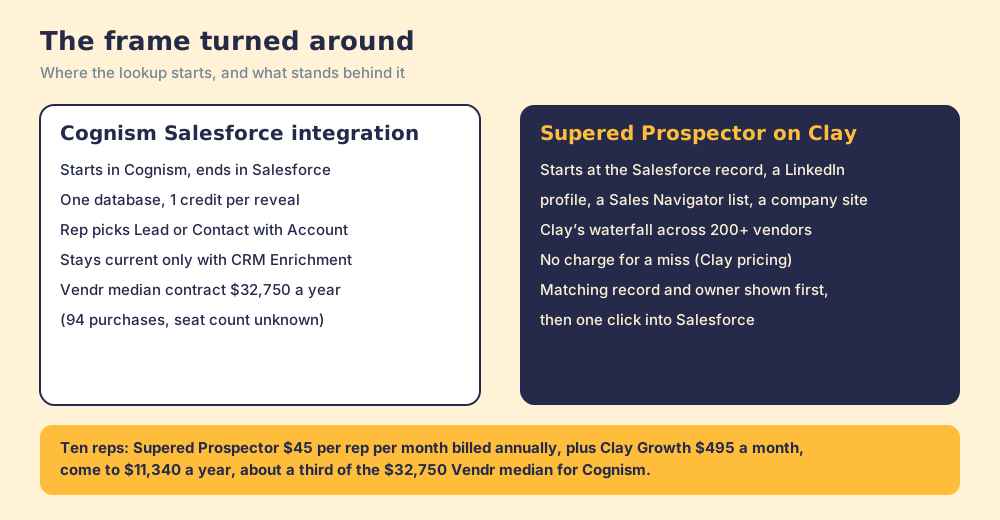
Cognism does not plug into Clay’s marketplace: on October 2, 2026, Clay’s integration page for Cognism returned a 404. Its API is the route for a team that wants to keep Cognism’s mobiles. Enrich requests “return preview data only and do not consume Credits,” and a Redeem charges “one credit per contact,” never twice for the same one, while Clay’s HTTP API runs any endpoint on your own key for one Action and no Data Credits. A Clay step that previews Cognism and redeems only when a mobile exists is our build sketch, not a template from either vendor; test it on a small batch.
The arithmetic. Clay’s Growth plan lists at $495 a month, $5,940 a year. Supered Prospector is $45 per rep per month, billed annually, from one rep (Supered Prospector). Ten reps on Supered Prospector plus Clay Growth come to $11,340 a year, about a third of Vendr’s $32,750 Cognism median, before any CRM Enrichment add-on. Vendr’s figure is a whole contract of unknown seat count, so read it as a scale.
Choose something else if you do not have Clay. Supered Prospector runs on the customer’s Clay account and does nothing without one, and someone has to build the tables; Clay’s own copy says “GTM engineers build on Clay.” Choose Cognism, too, if the job is calling into Europe and your legal team wants a vendor that screens 15 Do Not Call and TPS lists itself, or if you want a vendor-run crew repainting Salesforce on a schedule and will pay for it. The sourcing use case shows the setup when Clay is in place, and the Clay vs Cognism page compares the two models in full.
What is the non-Clay alternative in Salesforce?
Apollo, for a team that wants the data, the sequences, and a two-way Salesforce sync in one plan with a posted price. Its integration installs as a managed package from AgentExchange, pulls “leads, contacts, accounts, and opportunities from Salesforce into Apollo,” and pushes “contacts, leads, accounts, deals, and activities” back. CRM Integrations start on Basic at $49 per seat per month billed annually, and the integration user owns new records by default, the same signature question in another form. The Apollo Salesforce integration page walks its setup, and the Cognism vs Apollo page weighs the two databases head to head.
Which should you choose?
Two questions decide it: does your team pay for Clay, and is the job phone-verified European mobiles.
- Cognism’s integration, kept. The pick for a Salesforce team with Cognism seats whose reps call into Europe. Choose the signature mode on purpose, reveal emails before exporting, and price CRM Enrichment in the same quote.
- Apollo. The pick without Clay when a managed package, two-way sync, and a published seat price matter more than European phone coverage.
- Supered Prospector. The pick when the team already pays for Clay and the reps live in Salesforce and LinkedIn: one click from the record, every source behind it, and a leader who sees which lists turned into pipeline.
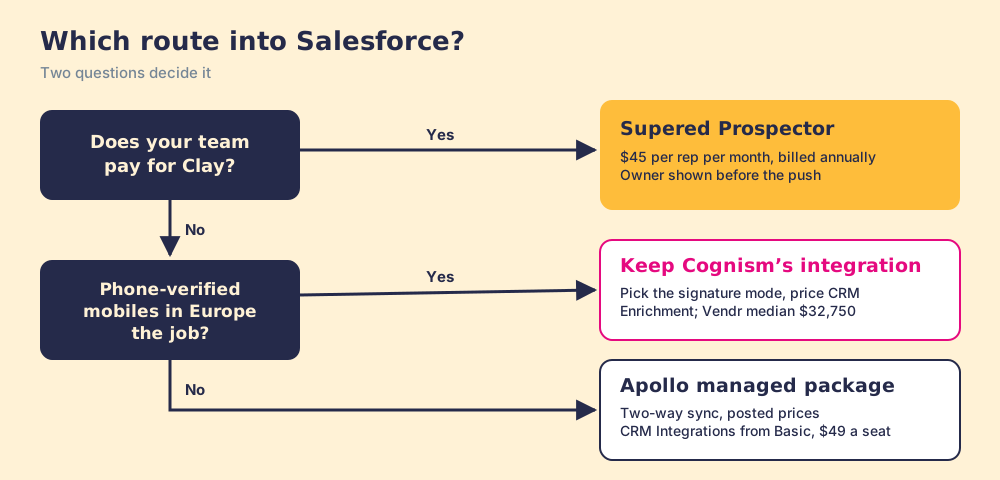
What we recommend: if you keep Cognism, make the signature decision before the first export and price the crew in the same quote, because a Salesforce org full of correct records under the wrong owner is a routing problem dressed as a data problem. If your team has Clay, let the rep start at the record, see the owner first, and push once, with every source asked and the leader watching each list move toward closed. For the LinkedIn side of the same org, the Salesforce LinkedIn integration page shows what LinkedIn’s managed package writes back and what it leaves alone. A Supered Prospector demo on your own Clay account shows the record-first route in Salesforce.
Frequently asked questions
Does Cognism integrate with Salesforce?+
Which Salesforce edition does Cognism need?+
Does Cognism create Leads or Contacts in Salesforce?+
Does the Cognism Salesforce integration keep records up to date?+
Is Cognism on the Salesforce AppExchange?+
What is the best alternative to the Cognism Salesforce integration?+
Everything we have written on Cognism
More on Cognism
Supered Prospector vs Cognism: the side-by-side- Cognism Alternatives in 2026: What the Compliance Tag Certifies, and What Stays Yours
- Cognism Pricing in 2026: The Platform Fee Is the Price, the Seats Are the Meter
- The Cognism Chrome Extension in 2026: A Free Key Card to a Quote-Only Room
- Cognism HubSpot Integration (2026): A Two-Lane Bridge With the Toll on One Side
- Clay vs Cognism in 2026: The Rail Line Is Not in the Travel Agent's System
- Cognism vs Apollo in 2026: The Well, the Tap, and the Pipes
- LinkedIn Sales Navigator vs Cognism in 2026: A Telescope, a Radio, and Whether You Need Both
- Cognism vs ZoomInfo in 2026: Two Good Maps, Each Tested on Its Own Streets
- Cognism vs Kaspr in 2026: One Owner, a Flagship, and the Outlet Round the Corner
- Lusha vs Cognism in 2026: The Corner Shop and the Cash-and-Carry
Your Clay waterfall, where reps already work.