HubSpot Sequences Explained: What They Do, How They Differ from Workflows, and What They Leave Unsolved
A practical 2026 guide to HubSpot Sequences: which plan includes them, the limits that shape them, how sequences differ from workflows, how to build one that gets replies, and where the behavior layer picks up where automation stops.
HubSpot Sequences is a sales automation feature in HubSpot Sales Hub that enrolls individual contacts in a timed series of personal emails and tasks, sending from the rep's own inbox and pausing automatically when the contact replies or books a meeting.
HubSpot’s own documentation mentions the difference in passing, and teams tend to learn it only after building the wrong thing. Sequences and workflows both automate email. They are built for different senders, different audiences, and different plans, and mixing them up costs real time. In 2026 there is a third reason to get it right: sequences moved out of reach of Sales Hub Starter, so the plan you are on now decides which tool you can even open.
HubSpot Sequences is a sales automation feature in HubSpot Sales Hub that enrolls individual contacts in a timed series of personal emails and tasks, sending from the rep’s own inbox and pausing automatically when the contact replies or books a meeting. It is the tool for following up at volume without losing the one-to-one feel. It is a rep’s follow-up assistant, and it does that job well. Below: which plan includes it, the limits that shape it, the hubspot sequences vs workflows decision, how to build one that gets replies, and the job sequences leave to someone else.
Which HubSpot plan includes sequences?
Sales Hub Professional or Enterprise, with a paid seat assigned to each user who sends. HubSpot’s create and edit sequences article (last updated August 17, 2026) lists “Sales Hub Professional, Enterprise” and “Service Hub Professional, Enterprise” as the requirement, and the Sales Hub pricing page shows no sequences on Free or Starter. Plenty of older guides, including an earlier version of this one, said Starter. That is out of date.
The plan also sets the send ceiling. HubSpot’s sending limits article (last updated August 3, 2026) says users with a Professional seat “can send up to 500 emails per day” through sequences and Enterprise seats up to 1,000. The mailbox adds its own cap: 1,000 a day for Google Workspace and Office 365 inboxes, 350 for a free Gmail account.
What are the HubSpot sequence limits?
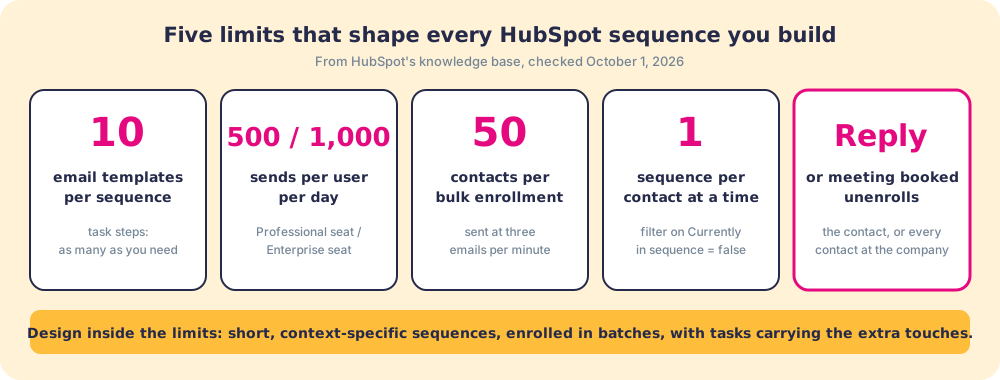
Five limits decide how you should build a sequence, and each one points to a design choice:
- Ten email templates per sequence. “Each sequence is limited to 10 email templates, although you can add as many task reminders as needed.” A twelve-email marathon is not possible, and it was never a good idea. Keep emails to the steps that carry new information and put the rest of the touches in call and LinkedIn tasks.
- Daily send caps. 500 emails per Professional seat per day, 1,000 per Enterprise seat. A rep enrolling 120 new contacts a day into a five-email sequence passes 500 daily sends once the follow-ups stack up, so volume plans need a per-rep enrollment budget.
- Bulk enrollment of 50. You can enroll up to 50 contacts at once, and “HubSpot will send a maximum of three emails per minute” when you do (enroll contacts in a sequence). Fifty first-step emails take about seventeen minutes to leave the outbox.
- One sequence per contact. “Each contact can only be enrolled in one sequence at a time.” HubSpot tracks this in the contact property Currently in sequence, which is true while the contact is enrolled. Filter on Currently in sequence is false before enrolling, and use Last sequence ended date if you want a gap before the next one (default contact properties).
- Automatic unenrollment. Replies and meetings booked unenroll the contact. You can set that to unenroll only the contact or “All contacts at the company,” which stops a second stakeholder getting a cold follow-up after their colleague already answered.
What is the difference between HubSpot Sequences and Workflows?
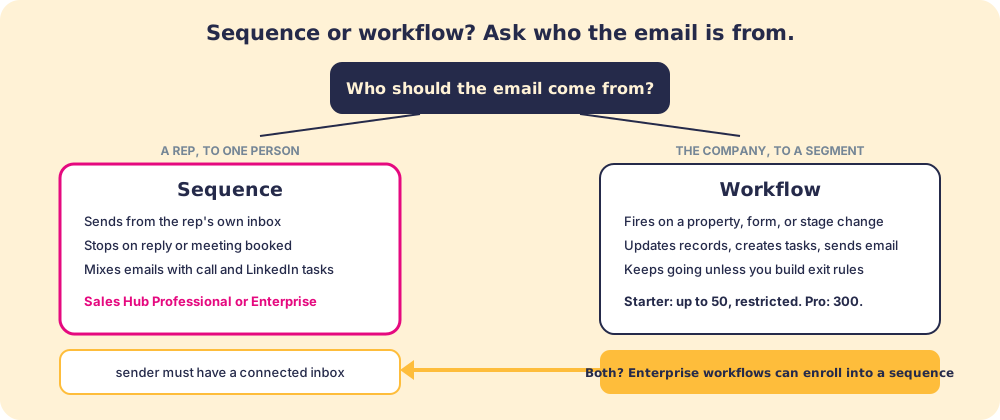
Ask who the email is from. If a rep is writing to one person and should stop the moment that person answers, it is a sequence. If the company is acting on a group of records because something about them changed, it is a workflow.
Sequences send from the rep’s connected inbox, Gmail or Outlook. The prospect receives what looks like a personal message because it is one, routed through the rep’s account with the rep’s signature. The sequence stops when the contact replies or books a slot through the HubSpot meeting scheduler, because a reply means a human conversation has started. Each step is logged to the contact record.
Workflows fire on contact properties, deal stage changes, form submissions, and dozens of other triggers. They update records, create tasks, rotate owners, and send marketing email. They do not stop on a reply unless you build that exit rule. Sales Hub Starter includes “up to 50 workflows with restricted triggers and actions,” Professional “up to 300 fully customizable workflows,” and Enterprise up to 1,000, per HubSpot’s pricing page.
The two correspondence styles are worth holding side by side. A sequence is a stack of follow-up notes a rep wrote on their own letterhead, timed and posted while they work other deals. A workflow is the company’s mailroom, sorting by address and sending to each address that matches. Both are useful. Only one should ever feel personal.

Can a workflow enroll contacts in a sequence?
Yes, on Enterprise only. The “Enroll in sequence” workflow action needs Sales Hub or Service Hub Enterprise, the chosen sender needs a paid seat and a connected work inbox, and the sender needs access to the sequence (enroll and unenroll contacts in sequences using workflows, last updated August 3, 2026). The same article notes the one-at-a-time rule still applies, so a workflow that tries to enroll a contact already in a sequence will not move them. The matching “Unenroll from sequence” action is how you pull a contact out when a deal is created or a stage changes.
On Professional, the practical answer to “sequence or workflow” is usually both, joined by a task: a workflow creates a task for the owner (“enroll in post-demo sequence”) when the deal stage changes, and the rep enrolls from the task queue in one click.
How do you use HubSpot Sequences effectively?
The principle behind how to use HubSpot Sequences well is that the automation should repeat what a good rep would do anyway, and leave the rep to decide which contacts deserve it.
- One sequence per context. A post-demo follow-up, a re-engagement for deals that stalled ninety days ago, and cold outbound to people who have never heard of you (and whose email a rep had to find first) need different lengths, tones, and asks. A generic “nurture” sequence serves none of them.
- A personalized first step. HubSpot lets you edit the first email at enrollment and set its send time. Thirty seconds on the opening line separates an email written for this buyer from a template the buyer has seen before.
- Tasks for the touches email cannot make. Call tasks, general tasks, and LinkedIn Sales Navigator InMail and connection request tasks fit inside the ten-template limit and land in the rep’s task queue, so the rep works the sequence from one place.
- A/B tests on the steps that matter. HubSpot’s product catalog lists A/B testing of messaging inside sequences: you write two versions of an email step and HubSpot splits sends between them so you can compare replies. Test the first email, where most replies come from, before tuning step four.
- Business-day sending left on. Follow-ups send only on business days by default. Leave it on unless you sell to people who read email on weekends.
- Company-level unenrollment for multi-thread deals. If you enroll three people at one account, set replies to unenroll every contact at the company.
- Open tracking as a hint, never a trigger. Privacy proxies fire opens on their own, so a sequence that branches on opens branches on noise.

Does HubSpot Sequences replace a sales process?
No. Sequences automate the outreach cadence. A rep enrolls a contact, the emails go out on schedule, the tasks appear in the queue, and the sequence stops when the reply arrives. None of that answers whether the rep is running the right play once that reply becomes a deal, whether the qualification criteria for the stage were met, or whether the process the team agreed to is being followed across the pipeline.
Automation multiplies whatever process sits underneath it. In our survey of 198 sales leaders for The State of Sales Enablement, 40 percent of teams with strong process adherence rated the impact of AI as high, against 21 percent of teams with weak adherence. Same tools, roughly double the payoff, and the difference was the followed process. A sequence is the same kind of amplifier: point it at a team that runs discovery the same way every time and it books better meetings; point it at a team that improvises and it books more meetings that stall.
The behavior layer is the category that closes that gap. It surfaces the next step of the sales process in the flow of work and makes adherence visible deal by deal, so managers coach on the process instead of auditing activity logs. Supered is that behavior layer for HubSpot: when a sequence reply turns into a meeting and then a deal, Supered shows the rep the step your process expects next, checks the deal against your rules, and flags it when the step is skipped. Sequences cover the cadence. The behavior layer covers what the cadence produces.

A quick recap
- The plan. HubSpot sequences need Sales Hub (or Service Hub) Professional or Enterprise with a paid seat. Starter no longer includes them.
- The limits. 10 email templates per sequence, 500 or 1,000 sends per user per day, 50 contacts per bulk enrollment, one sequence per contact.
- Sequences vs workflows. A rep writing to one person who should stop on reply: sequence. The company acting on records when something changes: workflow. Enterprise can chain the two.
- The build. One sequence per context, a personalized first step, tasks for calls and LinkedIn, company-level unenrollment for multi-threaded deals.
- The limit that matters. Hubspot email sequences automate the send. They do not surface the next step at the deal, check stage criteria, or show leaders where the process drifts.
What we recommend
Use sequences wherever the rep is the right sender and personalization matters: warm outbound (including contacts a rep enriched into HubSpot), post-demo follow-up, re-engagement. Use workflows for lifecycle updates, routing, and record hygiene. If you are on Starter and want sequences, price the Professional seats against what a missed follow-up costs you; if the math says no, a workflow that creates a follow-up task for the owner gets you most of the discipline without the automation.
Then ask the harder question: once the reply lands and the deal exists, is the rep following the process? Sequences answered the outreach problem. The HubSpot tasks guide covers the queue where sequence tasks land, the HubSpot Chrome extension guide covers what the behavior layer does inside HubSpot, and how Supered works shows the mechanics, with a demo to run it against your own process.
Automating the send gets the meeting. Running the process is what closes it.
Frequently asked questions
What are HubSpot Sequences?+
Which HubSpot plan includes sequences?+
What is the difference between HubSpot Sequences and Workflows?+
How do you stop contacts already in a sequence from being enrolled again?+
How many emails can a HubSpot sequence send?+
Does HubSpot Sequences work with Outlook?+
What can sequences not do that the behavior layer does?+
Your process, running itself.