HubSpot Email Tracking: How It Works, How Accurate It Is, and How to Turn It On
HubSpot email tracking logs opens with a hidden pixel and clicks with a redirect.
How to turn it on in Gmail and Outlook, how far to trust an open, why location is off the table, and what no notification can do for your process.
HubSpot email tracking embeds an invisible one-pixel image in each tracked email to log opens and routes links through a HubSpot redirect to log clicks, then notifies the sending rep in Gmail, Outlook, or the CRM.
How to turn on email tracking in HubSpot
10 min- 1
Check what your seat can track
Open tracking works on all HubSpot plans. Tracking clicks on links in one-to-one emails needs an assigned Sales Hub seat, so confirm the rep's seat before promising click alerts.
- 2
Install the connector for your inbox
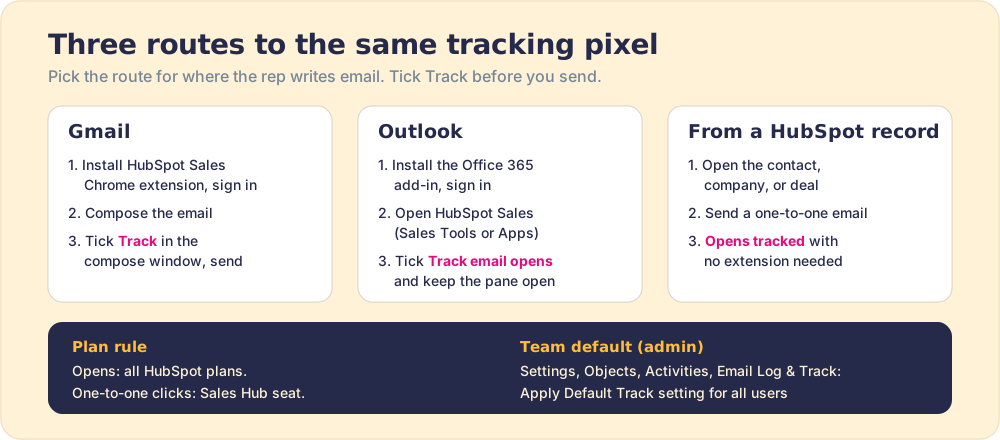
In Gmail, install the HubSpot Sales Chrome extension and sign in to your HubSpot account. In Outlook, install the HubSpot Sales Office 365 add-in and sign in.
- 3
Compose the email and tick Track
In Gmail, write the email and select the Track checkbox in the compose window. In Outlook, open HubSpot Sales from Sales Tools or Apps and select the Track email opens checkbox in the task pane.
- 4
Send with the connector active
Click Send. In Outlook, keep the HubSpot Sales task pane open while you send, or the email goes out untracked.
- 5
Set a team default
An admin with Account access goes to Settings, Objects, Activities, then the Email Log and Track tab, and checks Apply Default Track setting for all users so every rep tracks the same way.
- 6
Confirm the first open
Watch for the desktop pop-up notification and the email's status changing to Open in the activity feed or the Chrome extension feed.
HubSpot email tracking tells you when a prospect opened your email. The notification pops up on your desktop, the activity lands in the CRM, and for a moment you feel like you have X-ray vision into the buyer’s day. The moment is real and useful. It is also smaller than it feels, and what happens after it decides whether the signal was worth anything.
HubSpot email tracking embeds an invisible one-pixel image in each tracked email to log opens and routes links through a HubSpot redirect to log clicks, then notifies the sending rep in Gmail, Outlook, or the CRM. That sentence covers the machinery. The rest of this guide covers the three questions people bring to it: how to switch it on, how far to trust an open, and whether it can tell you where the reader was when they opened it (it cannot, and the reason is instructive).
How does HubSpot email tracking work?
Two separate mechanisms sit under one checkbox, and they deserve separate trust.
Opens run on a tracking pixel. When a rep sends a tracked email through the HubSpot Sales Chrome extension, the Outlook add-in, or a contact record in HubSpot, HubSpot “embeds an invisible one-pixel image into the email message once it is sent,” in the words of HubSpot’s knowledge base. The image lives on HubSpot’s servers. When the recipient’s email client renders the message and loads images, it asks HubSpot for that pixel, and HubSpot records an open. The HubSpot tracking pixel is a doorbell wired to the image loader: it rings when something fetches the picture, whoever or whatever that something is.
Clicks run on a redirect. HubSpot appends tracking to each link, so a tracked link points first at a HubSpot address (the knowledge base shows the pattern as an hs-sales-engage domain) and then forwards to the real page. Think of it like a tollbooth on a highway: the car passes through, the counter ticks, and the driver arrives at the destination without noticing the booth.
The difference between the doorbell and the tollbooth matters later. A doorbell can be rung by the wind. A tollbooth needs a car.
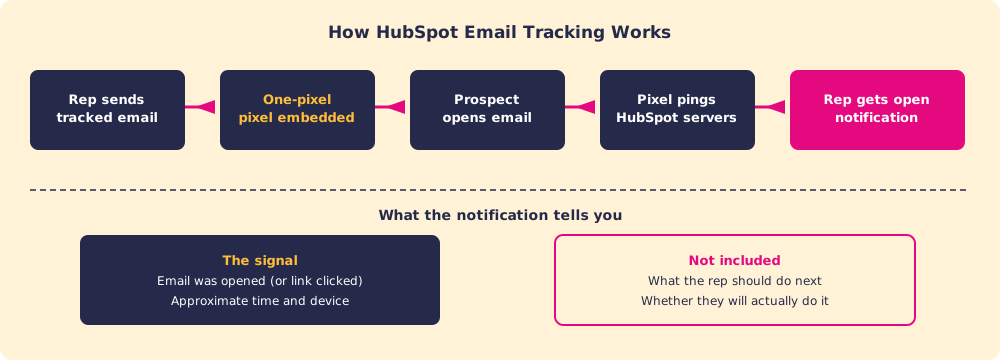
Once logged, the open or click shows up in three places: a real-time pop-up on the rep’s desktop, the activity feed (where the email’s status flips to Open), and the contact’s timeline. Sales email tracking in HubSpot is a signal delivery system, and a good one. What it delivers is a fact about an image request, which is a narrower fact than “the buyer read my email.”
How do you turn on email tracking in HubSpot?
Setup takes about ten minutes, and how to track emails in HubSpot depends on where the rep writes email. Start with one plan detail that trips up teams in both directions: HubSpot email open tracking is available on all HubSpot plans, including free, while click tracking on one-to-one emails requires an assigned Sales Hub seat (HubSpot). A rep without the seat still sees opens. They will not see which link was clicked.
HubSpot email tracking in Gmail (Chrome extension)
- Install the HubSpot Sales extension from the Chrome Web Store and sign in to your HubSpot account (install guide).
- Compose the email in Gmail as usual: recipient, subject, body.
- Select the Track checkbox in the compose window, then click Send (HubSpot).
- Watch for the desktop pop-up when the recipient opens it, and for the status change to Open in the activity feed.
The same extension powers the wider HubSpot Chrome extension surfaces and the HubSpot Gmail integration, so one install covers tracking, logging, and templates.
HubSpot email tracking in Outlook (Office 365 add-in)
- Install the HubSpot Sales Office 365 add-in and sign in.
- Compose the email, then open HubSpot Sales: Sales Tools in the ribbon in classic Outlook, the three-dot menu in new Outlook for Mac, or Apps in new Outlook for Windows and Outlook on the web (HubSpot).
- In the task pane, select Track email opens (reps with a Sales Hub seat see Track email opens and clicks).
- Keep the task pane open and click Send. HubSpot is blunt about this one: the task pane “must be open in your inbox when you send a tracked or logged email.”
The HubSpot Outlook plugin guide covers the install in more depth.
Emails sent from HubSpot itself
A one-to-one email sent from a contact, company, or deal record in HubSpot is tracked for opens without any extension, because HubSpot builds and sends the message itself. For a team that works from the CRM, this is the least fragile route.
The team default
An admin with Account access can make tracking the default for all users: Settings, then Objects, then Activities, then the Email Log & Track tab, and check Apply Default Track setting for all users. The same area holds the setting that allows users to track at all; clear it and the Track checkbox grays out for the whole team (HubSpot). A team default matters more than it looks. If half the reps track and half do not, your open data measures rep habits, and you learn nothing about buyers.
How accurate is HubSpot email tracking?
Accurate about image requests and link clicks. Loose about human attention. The gap between those two things has three causes, and each one pushes the numbers in a known direction.
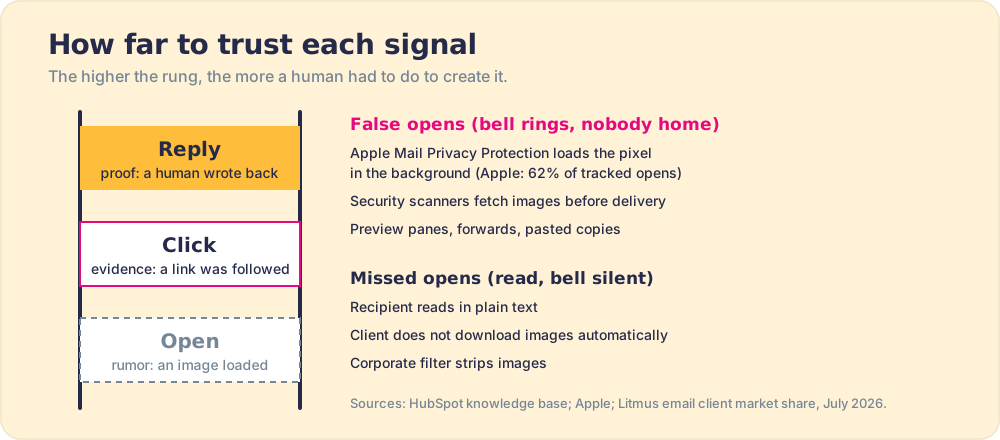
False opens (the doorbell rings, the porch is empty).
- Apple Mail Privacy Protection. Since iOS 15 in 2021, Apple Mail can load remote content, pixels included, privately in the background through Apple’s own relays, and it “hides your IP address so email senders can’t determine your location” (Apple). The pixel fires when Apple fetches it, whether or not a person ever looks. Litmus’s email client tracking for July 2026 puts Apple’s share of tracked opens at 62.26 percent (Litmus). That sample leans toward marketing email, so your B2B mix will differ, but the order of magnitude is the point.
- Security scanners. Gateways at larger companies fetch images and follow links to inspect them before delivery. HubSpot says it “will not generate open or click events for sales emails when the interaction comes from a non-human source, such as bot activity,” which filters much of this, though no filter catches every scanner.
- Preview panes and forwards. HubSpot notes that scrolling past a message in the Outlook or Apple Mail preview pane “can trigger an email open notification,” and that a forwarded email or a pasted copy of a sent email can register extra opens.
Missed opens (somebody read it, the doorbell stayed silent).
- Plain text and blocked images. If the recipient reads in plain text, their client does not download images automatically, or a corporate filter strips images, the pixel never loads and HubSpot records nothing (HubSpot).
Clicks and replies (the tollbooth and the letter back). A click requires something to follow a specific link, and HubSpot filters the bot traffic it can identify. A reply requires a human. That gives you a reliability ladder worth teaching every rep: a reply is proof, a click is evidence, an open is a rumor.
Can you see the exact location of the recipient when they open your email in HubSpot?
No. If you arrived here from a HubSpot Academy quiz asking “true or false,” the answer is false. HubSpot email tracking tells you that a tracked email was opened and when. It does not tell you where the reader was.
The reason is worth understanding, because it applies to any email tracker. A pixel request carries an IP address, and an IP address can be matched to an approximate city. But the IP belongs to whatever fetched the image, and for a large share of opens that is a middleman:
- Gmail. Since December 2013, Gmail serves “all images through Google’s own secure proxy servers” (Gmail blog), so the request arrives from Google, not from the reader’s laptop.
- Apple Mail. Mail Privacy Protection exists in part to hide the reader’s IP address “so email senders can’t determine your location” (Apple).
- Security gateways and VPNs. A scanner in a data center, or a corporate VPN exit point, reports its own location.
A postmark tells you which sorting office handled the letter. It does not tell you which chair the reader sat in when they opened it. Pixel location is a postmark, and a postmark stamped at a relay station.
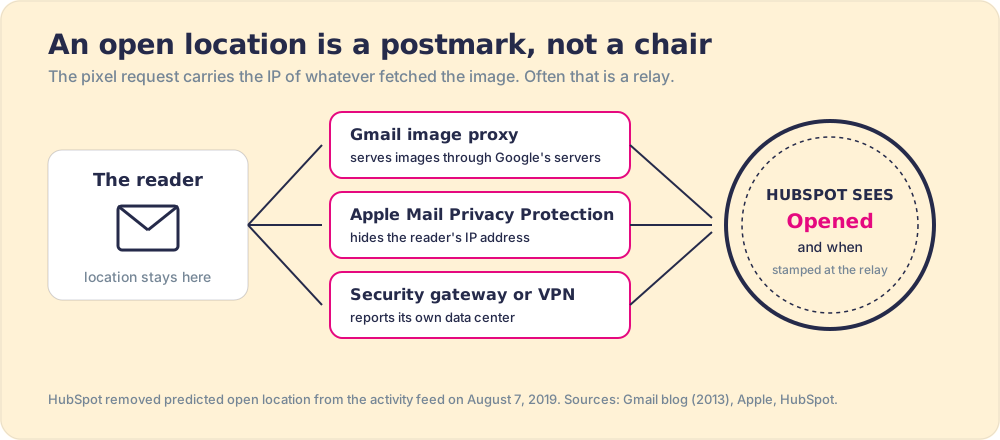
HubSpot drew the same conclusion years ago. It used to show a predicted open location built from the opener’s IP address, and it removed location from the activity feed on August 7, 2019, explaining that “removing location from the activity stream is more in line with” its goal of protecting the email recipient’s privacy (HubSpot Community). One source of confusion remains: HubSpot contact records carry IP City, IP State/Region, and IP Country properties, which HubSpot sets automatically from “the contact’s IP address” (HubSpot). Those describe an approximate network location for the contact. They are not a live readout of where someone opened your email.
Why is HubSpot email tracking not working?
When a rep says tracking “stopped working,” it is usually one of four causes, and the pattern of the failure tells you which.
- Connector not active at send. No Track tick, a Chrome profile without the extension, or an Outlook task pane closed before Send, and the email leaves without a pixel. This shows up as one rep’s emails never tracking while teammates’ do.
- Tracking switched off by an admin. If the account setting that allows users to track emails is cleared, the checkbox grays out for all users and reps see an alert. This shows up as the whole team losing tracking at once.
- Images that never load. Plain-text readers, clients that block images, and filters that strip them all mean the pixel never fires. This shows up as one account or one domain that never opens, even though they reply.
- Opens that fire too early. Apple Mail Privacy Protection and security scanners load the pixel before a person reads. This shows up as opens arriving within minutes of every send, uniformly, often at odd hours.
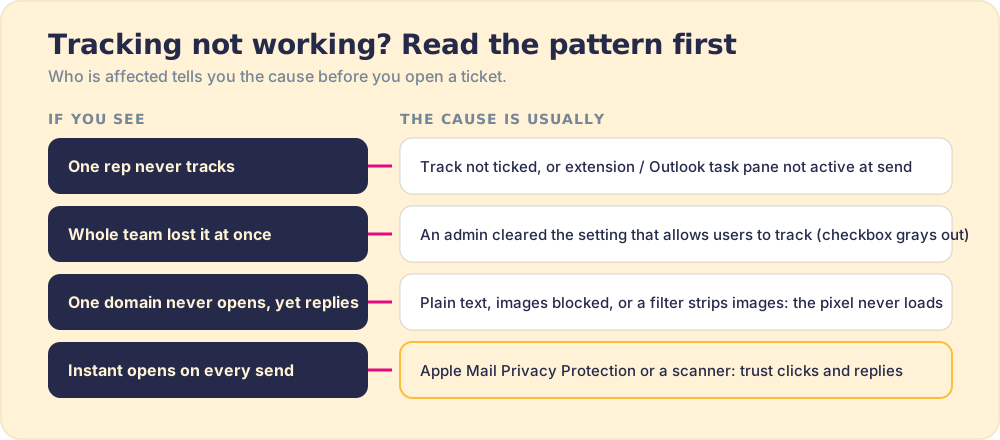
None of these calls for HubSpot support until you have ruled out the first two, which take a minute each.
What can HubSpot email tracking tell you?
Used with the reliability ladder in mind, tracking answers a few specific questions well.
- Engagement signal. A click on a pricing page or a case study tells you something real about buyer intent. An open alone is weaker, for the reasons above.
- Follow-up timing. A prospect who clicked your one-pager twenty minutes before a meeting booked through HubSpot Meetings walks in with context, and so should the rep.
- Template performance. Yes, HubSpot tracks open rates for sales templates. Its sales content analytics tool, on Sales Hub Starter, Professional, and Enterprise, charts template “sends, opens, clicks, and replies” by default (HubSpot). Rank templates on replies first, because the open column carries the Apple inflation.
What tracking does not tell you is what the rep should do next. The notification fires. The data logs. Then the rep is on their own.
That gap is bigger than it sounds. In our survey of 198 sales leaders for The State of Sales Enablement, 89 percent of teams had a defined process and 36 percent saw it followed, and teams whose process lived in the CRM workflow reported 49 percent quota attainment against 15 percent for teams relying on docs, wikis, or an LMS. The tracking notification is a trigger. Whether the rep converts that trigger into the right next action is a process question.
Does tracking data change rep behavior on its own?
No.
A notification is information, and information on its own is a weak lever on behavior. Picture a rep with three deals open and a buyer waiting on a call-back when the pop-up arrives: “opened your proposal.” They now have to decide whether to act, decide what to do, and then do it, three decisions stacked on a task already in progress. The pop-up competes with the task in front of them, and the task has a head start.
Behavioral science has a well-measured fix for this. Peter Gollwitzer and Paschal Sheeran’s meta-analysis of 94 independent tests found that “if-then” plans, which tie a specific action to a specific cue, had a medium-to-large effect on goal attainment (d = .65) (Gollwitzer and Sheeran, 2006). An open notification is a cue with no “then” attached. The rep who acts consistently is the one whose next step arrives with the signal, already decided.
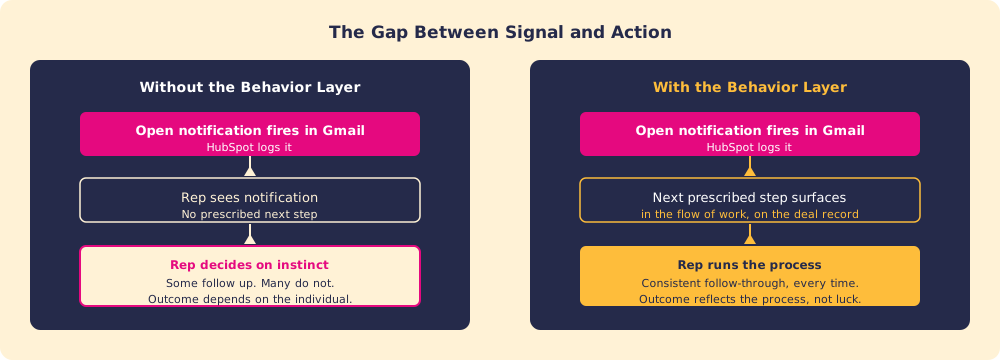
HubSpot’s tracking layer is excellent at recording what happened. It was built for that. The behavior layer is the part that decides what happens next: the system that makes reps respond to signals in a prescribed, consistent way and lets a manager see whether they did. Supered is that layer alongside HubSpot. When a click or reply fires, it surfaces the next step of your process in the flow of work, captures the CRM update as a byproduct, and makes adherence visible deal by deal.
How should sales teams use HubSpot email tracking?
A setup that keeps tracking useful instead of decorative:
- Click-first signals. Treat clicks on key assets (case studies, pricing, the proposal) and replies as the inputs that move a deal. Treat opens as a hint.
- Prescribed responses. Write down what each signal means the rep does next, and by when: “prospect clicked pricing” becomes a named step, the if-then plan the research favors.
- Reliability calibration. Tell reps which signals are noisy. A team that chases every instant Apple Mail open as a buying signal spends its afternoons calling people who never read the email.
- One team default. Turn on the account-wide Track default so the data compares buyers, not rep habits.
Tracking is the signal. Process adherence is the outcome. The same logic runs through CRM adoption: better data is a starting condition, and the behavior that follows it is the result you are paying for. If your sales productivity has stalled despite strong tracking adoption, the useful question is whether reps run the process when the signals fire, and HubSpot’s tracking was not designed to answer it.
Our recommendation is simple and rests on the evidence above. Turn tracking on for the whole team, rank signals by the ladder (reply, click, open), attach a defined next step to each one, and inspect whether it happened. The pixel will keep ringing. Decide in advance who answers the door.
Book a demo to see how Supered surfaces the prescribed next step the moment a tracking signal fires, so a click becomes a consistent action instead of a personal judgment call.
Frequently asked questions
How does HubSpot email tracking work?+
True or false: you can see the exact location of the recipient when they open your email using HubSpot's email tracking?+
How accurate is HubSpot email tracking?+
Why is HubSpot email tracking not working?+
How do you turn on email tracking in HubSpot for Gmail and Outlook?+
Does HubSpot track email open rates for sales templates?+
What is the difference between email open tracking and click tracking in HubSpot?+
Does HubSpot email tracking tell you what to do after an open?+
Your process, running itself.