Apollo Pipedrive Integration (2026): It Shares the Rolodex, Not the Deal Board
The Apollo Pipedrive integration, checked October 2, 2026: what syncs (people and organizations only), what does not (deals, leads, activities), the plan it needs, setup step by step, the pitfalls in Apollo's own help center, and the route for teams on Clay.
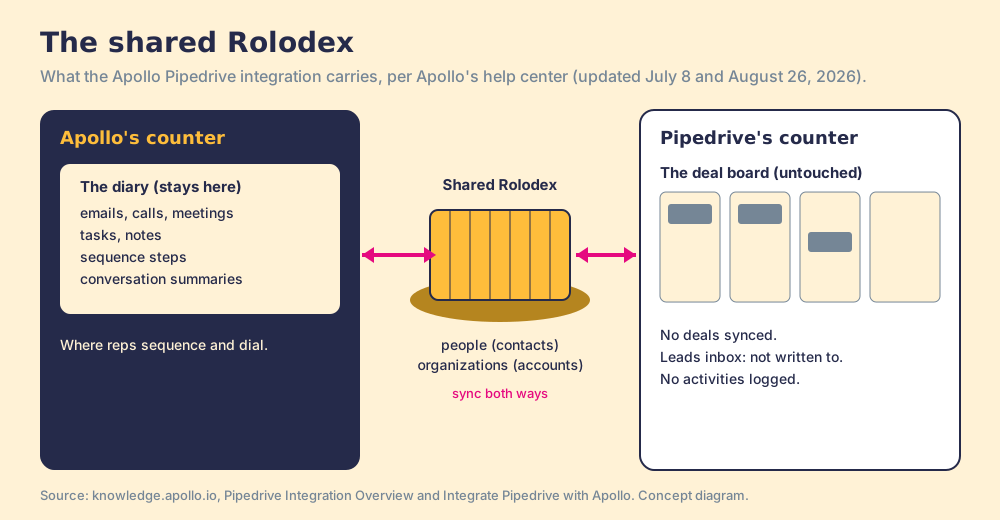
The Apollo Pipedrive integration is Apollo.io's native connection to Pipedrive that pulls Pipedrive people and organizations into Apollo and pushes Apollo contacts and accounts back, on paid Apollo plans from $49 a seat billed annually, without syncing deals, leads or activities.
How to set up the Apollo Pipedrive integration without surprises
- 1
Clean Pipedrive and disconnect any other CRM
Merge duplicate people and organizations in Pipedrive first. Apollo connects to one CRM at a time, so deactivate a HubSpot or Salesforce connection before you start.
- 2
Connect Pipedrive from Apollo
In Apollo, open Settings, then Integrations, scroll to Pipedrive and click Connect. Approve access, log in to Pipedrive, then click Allow and install. Apollo starts pulling every Pipedrive person and organization at once, and the pull cannot be switched off.
- 3
Map fields
Review Apollo's default mapping (name, email, title, phone, owner, address, company), then add custom fields. The do-not-call field syncs only a stored status, and only after DNC phone screening is enabled in Apollo.
- 4
Map stages one to one
Choose the Pipedrive status field Apollo should follow, auto-map, then fix each pair so one Apollo stage maps to one Pipedrive status. An unmapped Pipedrive value creates a new Apollo stage on its own.
- 5
Set push rules
Under Contacts and Accounts, then Sync, decide whether Apollo pushes new records and whether only contacts at chosen stages reach Pipedrive. A pushed contact also pushes its account if Pipedrive lacks it.
- 6
Enrich before you push
Apollo pushes only phone numbers already on the Apollo contact. Reveal the phone first, then push, or the Pipedrive person arrives without one.
- 7
Decide how activity gets into Pipedrive
The integration logs no emails, calls, tasks or sequence steps in Pipedrive. Use Pipedrive's own email sync for mail, or middleware such as Zapier, and tell reps where to log calls.
Two shopkeepers on the same street can share a Rolodex and still run two different shops. They agree to keep the names and addresses in step: a new card on one counter appears on the other. What they do not share is the order book. One keeps a diary of every call and letter; the other keeps a board of open orders on the back wall. Ask the second shopkeeper what happened with a customer last week and he can tell you the customer’s address, and nothing else.
The Apollo Pipedrive integration is that shared Rolodex. If you are deciding how prospect data reaches Pipedrive, the short version, checked October 2, 2026:
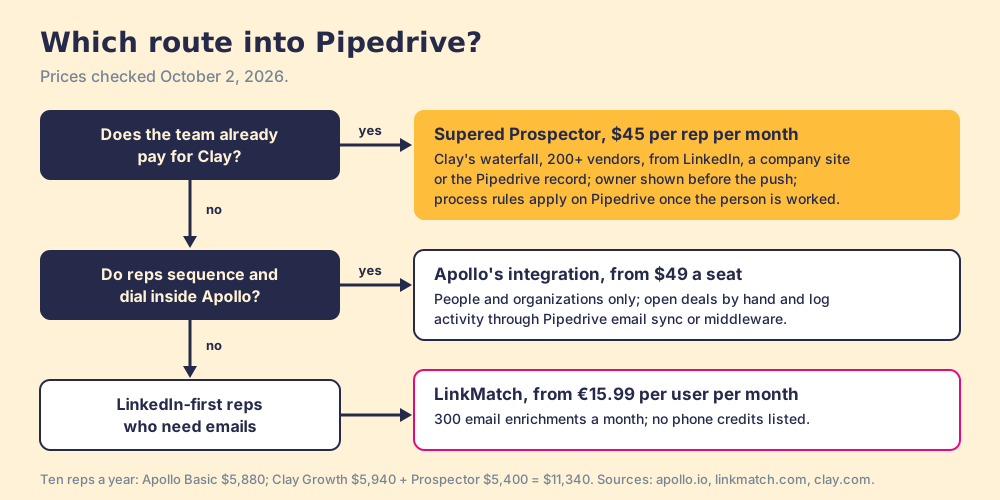
- Apollo’s Pipedrive integration. The pick for teams that prospect, sequence and dial inside Apollo and want the people they source to exist in Pipedrive, from $49 a seat billed annually. It syncs people and organizations only.
- Supered Prospector on Clay. For teams that already have Clay: Clay’s waterfall across 200+ vendors from LinkedIn, the company site or the Pipedrive record, at $45 per rep per month billed annually, with the process applied once the person is worked.
- A LinkedIn-to-Pipedrive extension such as LinkMatch. For reps who mostly save LinkedIn profiles and need emails, not phones.
The Apollo Pipedrive integration is Apollo.io’s native connection to Pipedrive that pulls Pipedrive people and organizations into Apollo and pushes Apollo contacts and accounts back, on paid Apollo plans from $49 a seat billed annually, without syncing deals, leads or activities. Pipedrive’s own post on the Pipedrive Apollo integration calls it “real-time bidirectional syncing” (Pipedrive blog, September 29, 2026), and for the Rolodex it is. Apollo’s help center is plainer about the rest: “Apollo doesn’t sync Pipedrive leads, deals, activities, emails, calls, meetings, tasks, notes, sequence activity, or conversation summaries through the Pipedrive integration” (Pipedrive Integration Overview, updated July 8, 2026).
For a Pipedrive team, that gap sits in an awkward place. Pipedrive is built around the deal board: a deal moves across stages, and the activities logged against it are how a manager sees what happened. The Apollo sync writes to the address book and leaves the board alone.
Which Apollo Pipedrive integration route fits your team?
Three routes get prospect data into Pipedrive, and each fits a different team. The scores use five weighted criteria, out of 50: email and phone landing in Pipedrive (x3), the rep staying on the page they are working (x2), Pipedrive depth (x2), cost predictability (x2) and what happens after the sync (x1). They match the Pipedrive Chrome extension guide.
| Route | Grade | Score | Best fit | What reaches Pipedrive | Setup effort | Pricing | Reason to pick it |
|---|---|---|---|---|---|---|---|
| Supered Prospector on Clay | A | 43 | Teams that already pay for Clay | People and organizations, with the CRM match and owner shown before the push | Under a week on an existing Clay account | $45 per rep per month billed annually, plus your Clay plan | Clay’s waterfall across 200+ vendors, and your process applied once the person is worked |
| LinkMatch for Pipedrive | B+ | 35 | Reps saving LinkedIn profiles who need emails | Persons, organizations, deals, activities, notes and leads | Minutes | From €15.99 per user per month billed annually, 300 email enrichments a month | Writes deeper into Pipedrive than Apollo does |
| Apollo Pipedrive integration | B | 32 | Teams that sequence and dial inside Apollo | People and organizations only | An afternoon | Apollo Basic $49 per seat per month billed annually ($65 monthly) and up | Cheap phones and outreach in the same seat as the data |
Apollo’s 32 is email and phone 4, rep stays put 3, Pipedrive depth 2, cost 4, after the sync 2. The depth 2 is the subject of this guide. Prices checked October 2, 2026 on Apollo’s pricing page and LinkMatch.
Why trust this guide?
I built RevPartners, a HubSpot partner that did only sales implementations and reached Elite tier in 13 months. Supered grew out of that work and is the #1 sales enablement app on the HubSpot marketplace, rated 5.0 from 122 reviews there and 4.9 from 81 on G2, checked October 1, 2026; it now runs on Pipedrive as well as HubSpot and Salesforce. We make Supered Prospector, which competes with Apollo for teams on Clay, so the disclosure comes first. The Apollo facts below come from Apollo’s help center, read through its public article feed on October 2, 2026, with each article’s update date.
What does the Apollo Pipedrive integration sync?
Apollo’s “Integrate Pipedrive with Apollo” article (updated August 26, 2026) and its overview give the full picture.
| Object | Direction | What Apollo’s help center says |
|---|---|---|
| People (Apollo contacts) | Both ways | Pulled on connect and deduplicated; pushed automatically or only at chosen stages |
| Organizations (Apollo accounts) | Both ways | A pushed contact also pushes its account if Pipedrive lacks it |
| Stages | Mapped | One Apollo stage to one Pipedrive status; an unmapped value creates a new Apollo stage |
| Do-not-call status | Both ways | Only a stored status, after DNC screening is enabled; no live check during sync |
| Deals | Not synced | ”Apollo doesn’t sync Pipedrive… deals” |
| Leads inbox | Not synced | Pushed people land in contacts, “not the separate Pipedrive leads section” |
| Emails, calls, meetings, tasks, notes, sequence steps | Not synced | ”Apollo doesn’t push activity data to Pipedrive” |
The listing on Pipedrive’s Marketplace, built by Apollo, rates 4.0 from 21 reviews with 600+ installs and promises “Bi-directional sync of contact and account data including custom fields” (Pipedrive Marketplace). That description is accurate. It describes the Rolodex.
Which Apollo plan do you need for Pipedrive?
Apollo’s plan data on October 2, 2026 lists “CRM Integrations” on every paid plan and not on Free:
| Apollo plan | Price per seat per month | Credits per seat per year | Pipedrive integration |
|---|---|---|---|
| Free | $0 | 900 | No (CRM Enrichment, 100 records a month) |
| Basic | $49 annual, $65 monthly | 30,000 | Yes |
| Professional | $79 annual, $99 monthly | 48,000 | Yes |
| Organization | $119, annual only, 3-seat minimum | 72,000 | Yes |
The sync itself does not reveal new data, so it is not where the credits go. Reveals are: 1 credit per email and 8 per phone. That matters more on Pipedrive than anywhere else, for a reason the next section explains. On the Pipedrive side, plans run from Lite at $14 to Ultimate at $79 per seat per month, billed annually (Pipedrive pricing).
How do you set up the Apollo Pipedrive integration?
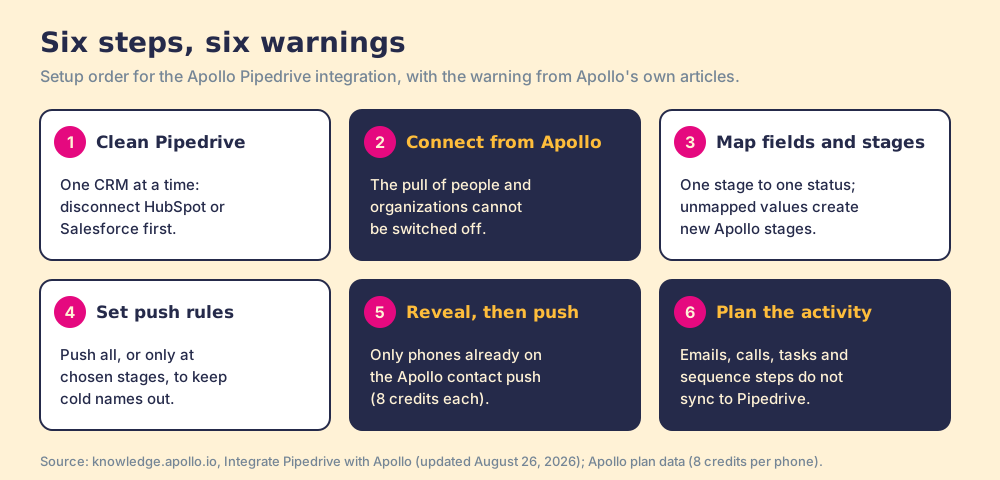
The steps above, in the order that avoids rework, with what Apollo’s articles warn about at each one.
- Clean Pipedrive and disconnect any other CRM. “You can only integrate one CRM with Apollo.” Apollo deduplicates the pull against existing Apollo records, so clean Pipedrive first rather than importing its duplicates.
- Connect from Apollo. Settings, Integrations, Pipedrive, Connect, then Allow and install in Pipedrive. “You can’t deactivate the automatic pull of contacts and accounts from Pipedrive”; if reps should not see them while prospecting, tick “Hide my contacts pulled from Pipedrive.”
- Map fields, then stages. Pick the Pipedrive status field, auto-map, then fix each pair one to one. Apollo warns that mapping one stage to several statuses means “contacts could be assigned to unexpected stages.”
- Set push rules. Push all new contacts, or “Only create contacts in Pipedrive if at certain stages,” which keeps cold names out of the CRM.
- Enrich before you push. “Apollo only pushes phone numbers that already exist on the Apollo contact. The Pipedrive push itself doesn’t enrich or discover new phone numbers.”
- Decide where activity lives. Pipedrive’s own email sync captures mail; Apollo suggests “Zapier or other middleware” for the rest.
Why do Apollo contacts land in Pipedrive without deals, phones or history?
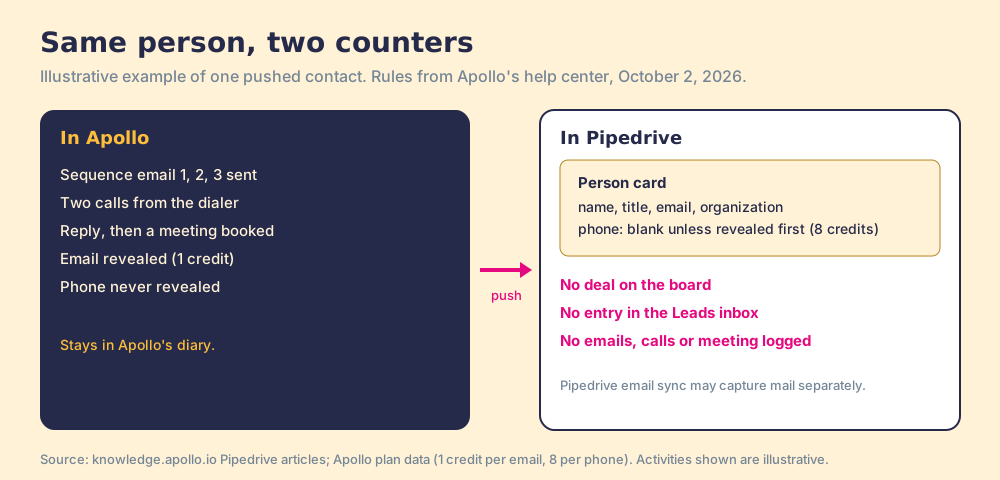
Three surprises follow from the shared-Rolodex design, and Apollo’s own FAQ answers each one.
- No deal. A person Apollo pushes arrives as a Pipedrive person, attached to an organization, and nothing more. The rep who booked the meeting in Apollo still has to open the deal by hand, and the Leads inbox, where a Pipedrive team may qualify new names first, never sees them.
- No phone. The push copies what Apollo already holds. A contact the rep emailed but never revealed a phone for arrives without one, and revealing it later costs 8 credits.
- No history. The sequence steps, calls and emails that warmed the person up stay in Apollo. Apollo says plainly that there is “no option to create a contact in Pipedrive when a sequence starts or to automatically create a contact when logging an email.”
One more trap, for teams that rely on Apollo’s Chrome extension inside the CRM. Apollo lists Pipedrive among the extension’s supported sites (Apollo Chrome Extension Overview, updated September 30, 2026), and its troubleshooting article, updated four days earlier, says “Apollo Everywhere doesn’t run on Pipedrive tabs.” Test it on your own Pipedrive pages before you build a workflow around it.
None of this makes the integration bad; for a team that works in Apollo all day, Apollo keeps the Rolodex matched. The gap shows when the manager runs the team from Pipedrive’s deal board and wonders why the board sits still while the sequences are busy. The Apollo HubSpot integration syncs deals and activities into HubSpot, which is why the same vendor’s two integrations behave so differently.
How do Clay teams get contacts into Pipedrive without a second database?
Clay plus Supered is the best way for a sales team to prospect: GTM engineers build in Clay, reps never open Clay. Prospector holds no database of its own. It runs inside the Supered Chrome extension, on the team’s own Clay account, and turns the tables the GTM engineer built into a button on the page where the rep is working, including the Pipedrive record. Clay’s waterfall asks provider after provider across 200+ data and AI vendors until one returns a verified email or phone, and “If an enrichment returns no result, you’re not charged Data Credits or Actions” (clay.com/pricing). Clay’s own Pipedrive connector can look up, create and update people and organizations (Clay University); the Clay Pipedrive integration guide covers it.
Back to the shops. Prospector does not try to share a Rolodex between two counters. It puts the supplier’s catalog at the one counter the team already runs, and the order goes on the board there.
What each person around the table gets on Pipedrive:
- The GTM engineer. Named flows built once, each a Clay table with a destination, picked by reps from a Push menu; field mapping to Pipedrive set once.
- The rep. The table as a button on a LinkedIn profile, a company website or the Pipedrive record, with the record owner and any past prospecting shown before the push, so two reps do not work the same person.
- The leader. Found, Worked, Closed: who is working their list and who is not, and how each lead ended, Qualified, Recycled or Disqualified, the way your process says. Supered’s Process Rules and Process Boards run on Pipedrive, so the process applies once a sourced person is worked.
Prospector works within LinkedIn’s terms and does not copy search results in bulk; the contact data comes from Clay’s waterfall on the customer’s Clay account. Pipedrive sells its own prospecting add-on, also named Prospector, powered by Cognism and charging one credit per prospect (Pipedrive support); it is a different product from Supered Prospector.
The cost for ten reps, one year: Apollo Basic lists at $5,880. Clay Growth lists at $495 a month, $5,940 a year, plus Prospector at $45 per rep per month billed annually, $5,400 for ten (Prospector), so $11,340. Apollo is cheaper on a cold start and includes a sequencer and dialer. The difference buys every vendor behind each lookup and a process that keeps running inside Pipedrive.
Choose something else if you have no Clay account: Prospector runs on the customer’s Clay account and does nothing without one. RevPartners, a Clay Elite Studio Partner I founded, builds the tables for teams that want help. And choose Apollo’s integration if your reps live in Apollo all day and Pipedrive is the address book the finance team reads.
Which Apollo Pipedrive integration should you choose?
- Apollo’s integration. The pick when sequencing and dialing happen in Apollo. Turn on stage-based push, reveal phones before pushing, and decide on day one how deals get opened and activity gets logged.
- Supered Prospector. The pick for a team on Clay that runs its pipeline from Pipedrive’s deal board. A Prospector demo runs on your own Clay account, and Supered for Pipedrive shows the process side.
- LinkMatch. The pick for reps who save LinkedIn profiles and need emails, not phones; the Pipedrive LinkedIn integration guide compares the LinkedIn apps.
What I would do rests on what Apollo’s own articles say. The Apollo Pipedrive integration keeps two address books in step and does that job well. A Pipedrive team is not run from its address book; it is run from the board, and the board is the part this integration never touches. If the board is how your manager coaches, put the prospecting where the board lives. If Apollo is where your reps live, keep the integration, and give someone the job of opening the deals by hand. The Apollo review covers what Apollo’s own users say about the rest of the house.
Frequently asked questions
Does Apollo integrate with Pipedrive?+
Does the Apollo Pipedrive integration sync deals or activities?+
Which Apollo plan includes the Pipedrive integration?+
Why can't I find Apollo contacts in Pipedrive Leads?+
Why didn't phone numbers push from Apollo to Pipedrive?+
How do teams on Clay get contacts into Pipedrive without Apollo?+
Everything we have written on Apollo
More on Apollo
Supered Prospector vs Apollo: the side-by-side- Apollo Alternatives in 2026: Read the Credit Meter Before the Price Tag
- Apollo Pricing in 2026: The Seat Is the Room Rate, the Credit Is the Minibar
- Apollo Reviews 2026: A Starter Home, Rated by the People Who Just Moved In
- Apollo Chrome Extension in 2026: The Nozzle Is Free, the Pump Is Metered
- Apollo HubSpot Integration (2026): What Syncs, the Six-Hour Window, and the Duplicates It Mirrors
- Apollo Salesforce Integration: The Mail Room, the Clerk, and the Six-Hour Clock
- Apollo vs Kaspr in 2026: The Same $49 at the Door, Two Very Different Clubs
- Apollo vs LeadIQ in 2026: The House, the Delivery Van, and the Market
- Apollo vs LinkedIn Sales Navigator in 2026: A Map, a Phone Book, and the Gap Between Them
- Apollo vs Lusha in 2026: Why the Eight-Ticket Phone Is the Cheaper Ride
Your Clay waterfall, where reps already work.