Apollo HubSpot Integration (2026): What Syncs, the Six-Hour Window, and the Duplicates It Mirrors
The Apollo HubSpot integration, checked October 2, 2026: what syncs each way, the plan and credits it needs, setup step by step inside the six-hour window, where duplicates and overwrites come from, and the route for teams that already run Clay.
The Apollo HubSpot integration is Apollo.io's native two-way connection to HubSpot that pushes and pulls contacts, companies and deals and logs Apollo emails, calls, tasks and notes in HubSpot, on paid Apollo plans from $49 a seat billed annually.
How to set up the Apollo HubSpot integration without duplicates or overwrites
- 1
Clean HubSpot first
Merge duplicate contacts and companies in HubSpot and make each company's domain field match the root domain Apollo uses. Apollo mirrors whatever duplicates already exist.
- 2
Connect the HubSpot CRM version
In Apollo, open Settings, then Integrations, and connect HubSpot. Choose HubSpot CRM for two-way sync; HubSpot Data Enrichment only enriches existing records.
- 3
Map fields inside the six-hour window
On paid plans, sync turns on by itself six hours after you connect. Map each Apollo phone type to its own HubSpot property, avoid multi-checkbox and read-only properties, and load Apollo's industry values into the HubSpot picklist.
- 4
Set data writing rules
Under Contacts and Accounts, open Data writing rules and choose auto-fill (empty fields only) or overwrite for each field. Apollo's help center says it overwrites existing HubSpot values by default.
- 5
Map stages and push rules
Map Apollo stages to HubSpot stages one-to-one, set the source value Apollo writes, and add conditions for which net-new contacts push, such as a verified email status.
- 6
Turn on activity sync
Link each mailbox in Apollo, then enable emails, calls, notes, completed tasks and meeting summaries. Leave 'push emails even if sender or recipient doesn't exist' off unless you want new HubSpot contacts from it.
- 7
Connect personal HubSpot credentials and watch the error log
Have each rep link their own HubSpot login in Apollo so pushed records carry the right owner, then check Settings, Integrations, HubSpot, Error logs during the first day of sync.
The Apollo HubSpot integration is three settings away from being safe, and Apollo gives you six hours to find them. If you are choosing how prospect data reaches HubSpot, the short version:
- Apollo’s HubSpot CRM integration. The pick for teams that prospect, sequence and dial inside Apollo and want every touch logged in HubSpot, from $49 a seat billed annually.
- Supered Prospector on Clay. For teams that already have Clay: Clay’s waterfall across 200+ vendors, from LinkedIn, Sales Navigator, the company site or the HubSpot record, at $45 per rep per month billed annually.
- HubSpot’s own data enrichment. For teams that only need blank fields filled, on Starter and up, without spending HubSpot Credits.
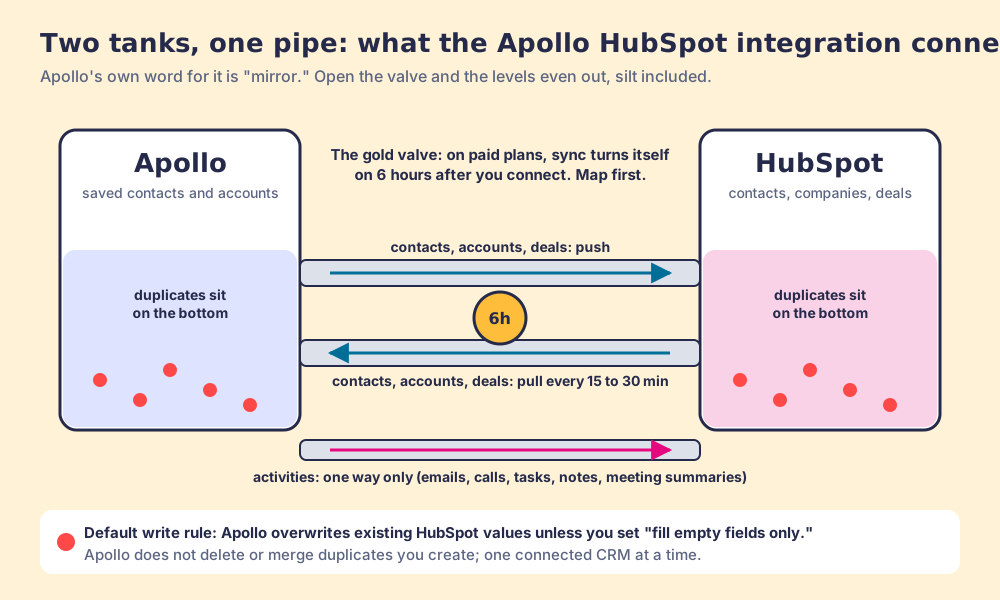
Two water tanks joined by a pipe behave in a predictable way. Open the valve and the levels even out, and whatever sits on the bottom of one tank, the silt and the rust flakes, drifts into the other. The Apollo HubSpot integration is that pipe. Apollo’s own help center chooses the word: “Apollo mirrors the data in HubSpot. If you have duplicate contacts or accounts in HubSpot, these duplicates reflect in Apollo, too” (Integrate HubSpot with Apollo, updated September 8, 2026).
The Apollo HubSpot integration is Apollo.io’s native two-way connection to HubSpot that pushes and pulls contacts, companies and deals and logs Apollo emails, calls, tasks and notes in HubSpot, on paid Apollo plans from $49 a seat billed annually. People search for it as the HubSpot Apollo integration and the Apollo io HubSpot integration; it is the same pipe. The surprise is the valve. On paid plans, “after you enable the HubSpot integration there’s a 6-hour window of time to configure sync settings and map fields… After six hours, syncing is automatically enabled.” And the default write rule, per Apollo’s mapping article, is that “Apollo overwrites existing HubSpot values when syncing” (Configure HubSpot Data Mapping, September 9, 2026). A valve that opens itself, onto a tank that defaults to overwriting yours, is worth an afternoon of preparation.
Which Apollo HubSpot integration route fits your team?
Four routes get prospect data into HubSpot. Each fits a different team, and the table names the trade.
| Route | Best fit | Direction | Setup effort | Pricing (plan that includes it) | Reason to pick it |
|---|---|---|---|---|---|
| Supered Prospector on Clay | Teams that already pay for Clay | Rep pushes enriched contacts to HubSpot, Salesforce or Pipedrive | Under a week on an existing Clay account | $45 per rep per month billed annually, plus your Clay plan | Clay’s waterfall across 200+ vendors, with the CRM match shown before the push |
| Apollo HubSpot CRM integration | Teams that sequence and dial inside Apollo | Two-way records, one-way activities | An afternoon, inside the six-hour window | Apollo Basic $49 per seat per month billed annually ($65 monthly) and up | Every Apollo email, call and note lands in HubSpot |
| Apollo HubSpot Data Enrichment | Teams that want Apollo data on existing HubSpot records only | Apollo fills HubSpot fields | Connect and map fields | Apollo plan with CRM Enrichment | No record sync to clean up |
| HubSpot data enrichment | Teams that only need blanks filled | Inside HubSpot | Minutes | Starter and up; no HubSpot Credits | Automatic mode fills blanks and never overwrites |
Prices checked October 2, 2026 on Apollo’s pricing page and Supered’s pricing; HubSpot’s enrichment terms from its knowledge base, last updated July 2026.
Why trust this page?
I started RevPartners, a HubSpot partner that did only sales implementations, sold roughly twice as much Sales Hub as any other partner, and reached Elite tier in 13 months. A large share of that work was untangling what third-party tools had written into HubSpot portals. Supered came out of it and is the #1 sales enablement app on the HubSpot marketplace, at 5.0 from 122 reviews there and 4.9 from 81 on G2 (checked October 1, 2026). We make Supered Prospector, which competes with Apollo for teams on Clay, so the disclosure comes first. The Apollo facts below come from Apollo’s own help center articles, read through Apollo’s public help-center feed on October 2, 2026, with each article’s update date.
What does the Apollo HubSpot integration sync?
Apollo ships two versions, and you pick one when you connect. HubSpot CRM “enables a bi-directional sync between HubSpot and Apollo. You can push and pull contacts, accounts, and deals, as well as push activities to HubSpot.” HubSpot Data Enrichment “is enrichment-only… This integration doesn’t include full two-way sync or record push” (HubSpot Integration Overview, July 8, 2026). Sales teams searching for the integration usually want the first.
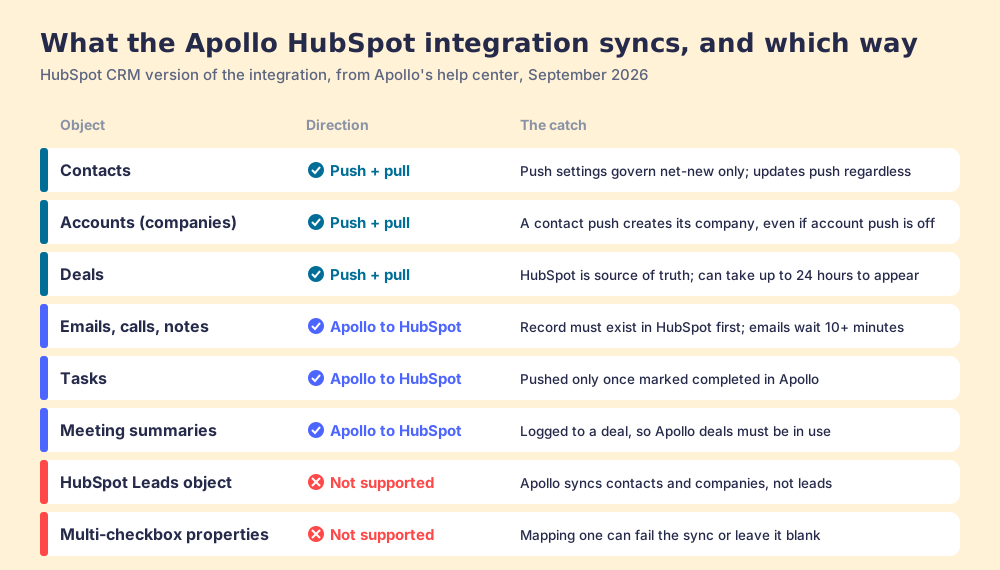
What the CRM version moves, object by object, from Apollo’s sync-settings article (Configure HubSpot Sync Settings, September 3, 2026):
| Object | Direction | The catch, in Apollo’s words or close to them |
|---|---|---|
| Contacts | Push and pull | Push settings “only affect net new contacts”; updates to existing contacts push “regardless of push settings” |
| Accounts (HubSpot companies) | Push and pull | A contact push sends its account too, which “can create new companies in HubSpot even if account push is disabled” |
| Deals | Push and pull | HubSpot becomes “the source of truth”; deals can take up to 24 hours to appear |
| Emails, calls, notes | Apollo to HubSpot | The related record must already exist in HubSpot; email pushes wait at least ten minutes |
| Tasks | Apollo to HubSpot | Pushed “only after they are marked as completed in Apollo” |
| Meeting summaries | Apollo to HubSpot | Logged to a deal, so Apollo deals must be in use |
| HubSpot Leads object | Not supported | ”Apollo doesn’t support HubSpot leads, lead progression stages, or other leads-specific properties” |
| Multi-checkbox properties | Not supported | Mapping one “can result in failed syncs or blank values” |
Timing, per the overview: “Most push and pull syncs for contacts and companies complete within 15-30 minutes,” while deals and activities “may take up to 24 hours to complete.” Apollo also connects to one CRM at a time (“if you connect a Salesforce account to Apollo, you can’t also connect a HubSpot or Pipedrive account,” per the Bidirectional Sync Overview, September 30, 2026).
What does HubSpot’s marketplace say about Apollo?
Search HubSpot’s App Marketplace for Apollo and the listing you land on is “Apollo Enrichment,” built by Apollo.io, with 7K installs and a rating of 2.6 out of 5 from 25 reviews; 36% of those ratings are one star (HubSpot App Marketplace, read October 2, 2026). The most recent review with text, from May 26, 2026, reads “This never worked on my HS account…THE WORST.” The listing’s own description covers enrichment of existing records; the full two-way sync is connected from inside Apollo, which is why many teams never see the listing at all.
Set that against G2, where Apollo held 4.7 from 9,839 reviews on October 1, 2026 (G2). G2 rates the whole product, the database, sequencer and dialer reps use every day. The HubSpot listing rates the connection, as judged by the admins who live with what it writes. Twenty-five reviews is a small sample, so read it as a direction; the community threads below point the same way. Corporate status, checked October 2, 2026: Apollo is independent, led by CEO Matt Curl since February 2026, bought Pocus in March 2026, and was named flagship data partner for Salesforce’s outbound agent on September 15, 2026 (PR Newswire).
Which Apollo plan do you need for HubSpot, and what does it cost in credits?
Apollo’s pricing page draws its plan cards from a public data feed, which we read on October 2, 2026 (apollo.io/pricing). “CRM Integrations” appears on Basic, Professional and Organization; the Free plan lists “CRM Enrichment (100 per month)” instead, and Apollo’s enrichment article confirms free teams “can enrich up to 100 CRM records every 30 days” (Use CRM Enrichment, September 27, 2026).
| Plan | Price per seat per month | Credits per seat | HubSpot integration |
|---|---|---|---|
| Free | $0 | 900 a year, 75 a month | CRM Enrichment, 100 records a month |
| Basic | $49 billed annually, $65 monthly | 30,000 a year | CRM Integrations, Automated CRM Enrichment |
| Professional | $79 billed annually, $99 monthly | 48,000 a year | Same, plus Agents and analytics |
| Organization | $119, annual only, 3-seat minimum | 72,000 a year | Same, plus SSO and custom reports |
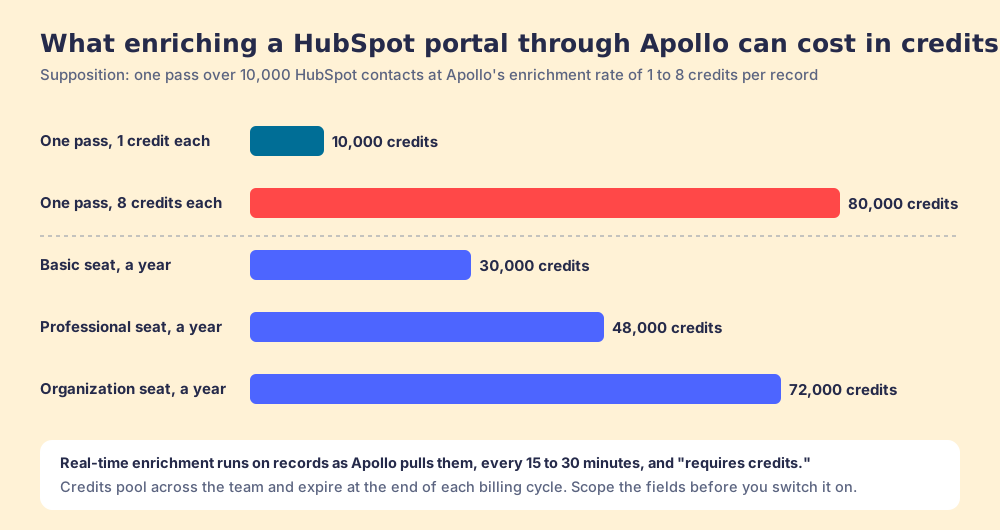
The sync itself moves records you already have, so it is not where credits go. Enrichment is. Apollo charges 1 credit per email, 8 per phone, and 1 to 8 for an enrichment, and its enrichment article sets two traps for a HubSpot portal. Real-time enrichment runs on records as Apollo pulls them, and Apollo “pulls records from your CRM every 15-30 minutes”; “enriching records via real-time enrichment requires credits.” And manual enrichment of up to 1,000 records at a time “overrides any auto-fill, auto-overwrite, or push settings.”
Run the arithmetic on a mid-sized portal, as a supposition. One enrichment pass over 10,000 HubSpot contacts costs between 10,000 credits at 1 each and 80,000 at 8. A Basic seat gets 30,000 credits a year, a Professional seat 48,000, an Organization seat 72,000, and those credits pool across the team and expire at the end of each billing cycle. Switch on real-time enrichment for every field on a busy portal and one admin setting can spend more than a Basic seat’s year in a single pass. The Apollo pricing page works the per-seat arithmetic in full.
How do you set up the Apollo HubSpot integration?
In this order, because the order is the protection. The steps follow Apollo’s integration, sync-settings, mapping and ownership articles, all updated between July and September 2026.
- Clean HubSpot before you connect. Merge duplicate contacts and companies, and make each company’s website or domain field match the root domain. “To avoid duplicate records, clean and deduplicate your HubSpot instance before you integrate with Apollo.”
- Connect the right version. In Apollo, open Settings, then Integrations, connect HubSpot, sign in, pick the HubSpot account and approve the permissions. Choose HubSpot CRM for sync, HubSpot Data Enrichment for enrichment only. The connecting user needs read and write permission for everything you sync, or pushes fail with “Authorization failed.”
- Map fields while the valve is shut. You have six hours on a paid plan. Map each phone type to its own HubSpot property, because “if you map only one phone field, Apollo only pushes that one phone type.” Avoid multi-checkbox and read-only properties, and paste Apollo’s industry list into the HubSpot industry picklist, since “Apollo sends values as plain text” and a mismatched dropdown value is rejected.
- Set data writing rules. For each contact and account field, choose auto-fill (empty fields only) or overwrite. Where HubSpot is the system of record, which usually means any field a rep or a form fills, choose auto-fill.
- Map stages and push rules. “Apollo and HubSpot stages must map one-to-one. If you map a single stage or status to multiple stages, syncing breaks.” Set the source value Apollo writes (it defaults to “Apollo,” mapped to HubSpot’s lead source) and add conditions for which net-new contacts push, such as a verified email status.
- Turn on activity sync, carefully. Link each mailbox under Settings, then Mailboxes, and enable emails, calls, notes, completed tasks and meeting summaries. Leave “Push emails even if sender or recipient doesn’t exist in HubSpot” off; Apollo warns it “may result in the creation of contacts in HubSpot that you don’t expect to see.”
- Give each rep their own HubSpot login, then watch the log. Without personal credentials, “Apollo uses the credentials available through your team’s HubSpot integration,” and ownership follows the connection (Contact and Account Ownership, August 21, 2026). Check Settings, Integrations, HubSpot, Error logs on the first day.
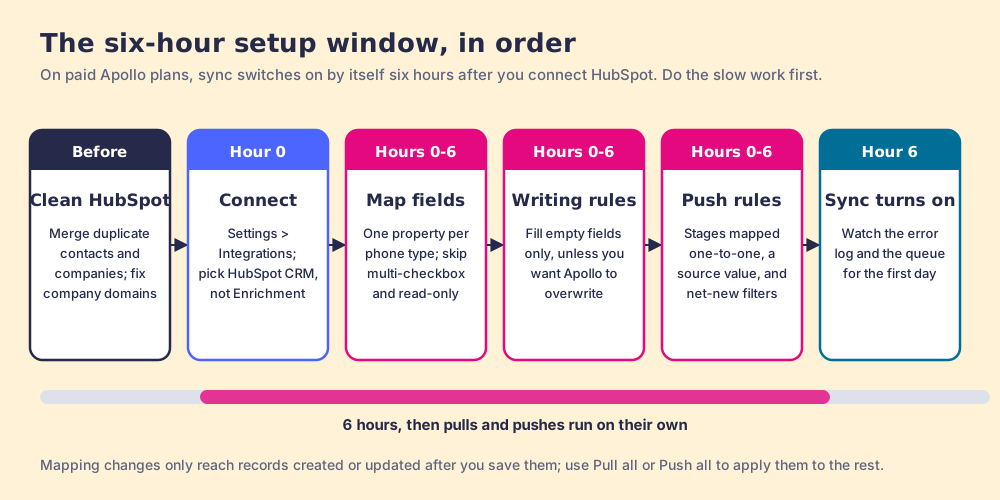
Settings can change any time after the window, with one asterisk: “Records already imported aren’t automatically re-pulled if you tighten conditions,” and “field mapping changes only apply to records created or updated after you save the mapping.” Run Pull all or Push all after any change.
Why does Apollo create duplicates and overwrite fields in HubSpot?
Because the pipe carries what the tanks hold, and the pipe has two forks in it. Apollo’s own articles, read together, give five sources, and the outside reports match them.
- Mirrored duplicates. “When you manually create a duplicate record in HubSpot, Apollo automatically creates the same record,” and the reverse holds with push on. “Apollo doesn’t automatically delete or merge duplicates that you manually create.” Deletion sync and merge sync exist, and both are opt-in.
- Companies created by contacts. Pushing a net-new contact pushes its account if HubSpot lacks it, “even if account push is disabled.” Koalify, a HubSpot deduplication vendor, built a whole guide on that one behavior (Koalify, March 3, 2025).
- The coin toss. Apollo’s example: save John Smith from Cloud Cave, Inc., and if HubSpot holds several Cloud Cave, Inc. companies, “Apollo randomly assigns John Smith to one of the accounts.”
- The subdomain. When Apollo pulls companies it matches by HubSpot company ID, then exact domain, then name. “Subdomains are treated as different domains, so corporate.sumware.com and sumware.com don’t match,” and with no match “Apollo creates a new account… the account you expected may not receive the update.”
- The default overwrite. “By default, Apollo overwrites existing HubSpot values when syncing.” A HubSpot community thread from August 22, 2024 describes the felt version: “When we request the direct dial and push the number into HubSpot, it also overwrites the Phone Number that is listed in HubSpot” (HubSpot Community).
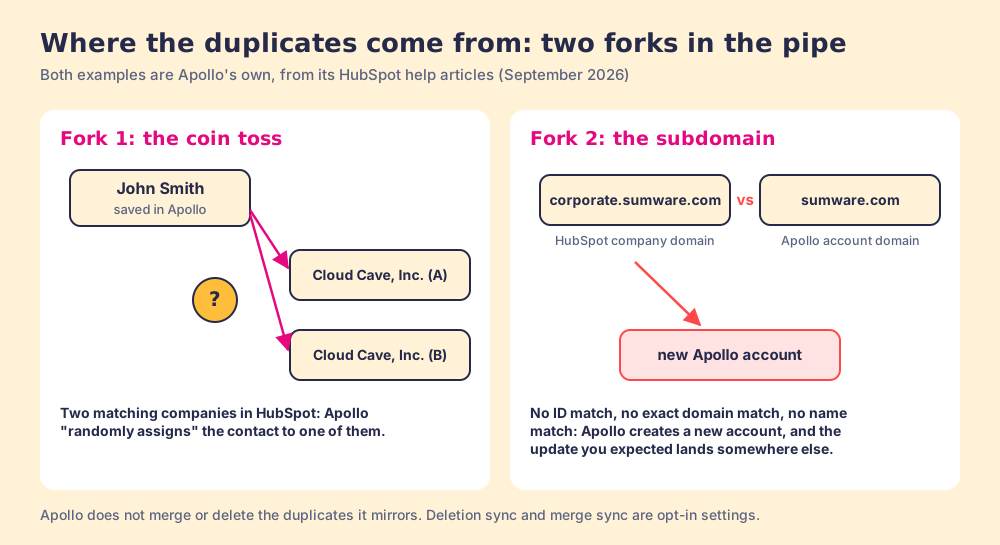
A two-way sync has to decide something when the data disagrees, and Apollo documents what it decides. The trouble starts at setup: a team that connects between meetings and lets the valve open at six hours has accepted every default above without reading one. The fix is the order in the setup section, plus a dedupe pass in HubSpot before the first pull.
How do Clay teams get contacts into HubSpot without a second database?
A team on Apollo has one tank with a pipe to HubSpot. A team on Clay already has something larger: Clay’s waterfall, which “check[s] multiple providers to return the most verified emails (lower bounce rate) and phone numbers (higher connect rate)” across 200+ data and AI vendors in Clay’s marketplace (Clay, rep prospecting, September 25, 2026). Apollo is one of the providers Clay can call (Clay integrations). Clay’s own HubSpot integration syncs companies and contacts from Clay tables, and CRM sync sits on Clay’s Growth plan, $495 a month (clay.com/pricing). That route suits the GTM engineer who builds the tables. The gap is the rep, who does not live in a Clay table.
Supered Prospector fills that gap. It runs inside the Supered Chrome extension, on the team’s own Clay account, and reps need no Clay login. What it does with HubSpot:
- Lookups from the page the rep is on. A LinkedIn profile, a Sales Navigator list, a company website with company research beside it, or the HubSpot record itself.
- The CRM match before the push. On a LinkedIn profile the rep sees the matching HubSpot record, and whether the prospect was already worked in the past, before adding anyone. That check sits in front of the pipe, where Apollo’s duplicate rules sit behind it.
- One-click sync with mapping set once. Ops maps the fields one time; the rep sends a contact to HubSpot, Salesforce or Pipedrive in one click, or pushes a whole list into any custom Clay workflow the GTM engineer built.
- Lists the leader can follow. The team’s process applies to worked prospects, so a manager sees which sourced lists were worked and which closed, and coaches from what converts.
Prospector does not bring its own database. It brings Clay’s waterfall, which is every database, routed, and we chose Clay as our only data provider for that reason. Clay governs the data. Supered governs the motion.
The arithmetic, since Apollo is cheaper to start. Ten Apollo Basic seats list at $5,880 a year and ten Professional seats at $9,480. Clay’s Growth plan at $495 a month is $5,940 a year, and ten Prospector seats at $45 per rep per month billed annually add $5,400, for $11,340. If you have no Clay contract, Apollo wins on price by a wide margin. If you already pay for Clay, the Prospector line is the $5,400, and what it buys is the waterfall in reps’ hands and the CRM match in front of every push.
Choose something else if you do not have Clay, because Prospector does nothing without a Clay account. Choose something else, too, if your reps send sequences and make calls inside Apollo all day: Prospector does not send email or dial, and Apollo’s activity sync is the reason to keep Apollo’s pipe. The sourcing use case walks the full loop, and the Clay Chrome extension page covers what Clay ships for the browser itself.
HubSpot’s own enrichment, for teams that only need blanks filled
The fair non-Clay option for the enrichment half of the job is already inside HubSpot. HubSpot’s data enrichment runs on Starter and up, “does not consume HubSpot Credits,” and in Automatic mode fills empty properties and never overwrites. Its limits are real: contacts need a business email (“Personal addresses such as Gmail or Yahoo will not be enriched”), and it finds no new people. It fills the HubSpot record you have; it does not hand a rep a new contact from LinkedIn. The HubSpot LinkedIn integration page covers that gap from the LinkedIn side.
When should you keep Apollo’s HubSpot integration?
Name the job and the answer follows.
- Outbound run inside Apollo. Keep it. Sequences, the dialer and meeting summaries logging into HubSpot are what the pipe does best, at $49 a seat billed annually and up. Set writing rules to auto-fill and turn on merge sync.
- A portal that already has duplicates. Clean first, or keep Apollo on the enrichment-only version until you do. The CRM version will copy the mess both ways.
- A team on HubSpot’s Leads object. Expect Apollo to write contacts and companies only, and plan your lead workflow around that.
- A team that already pays for Clay. Prospector, so the rep works from Clay’s waterfall where they already are and checks the HubSpot match before anything lands.
- Blank fields and nothing else. HubSpot’s own enrichment, no credits, no second sync.
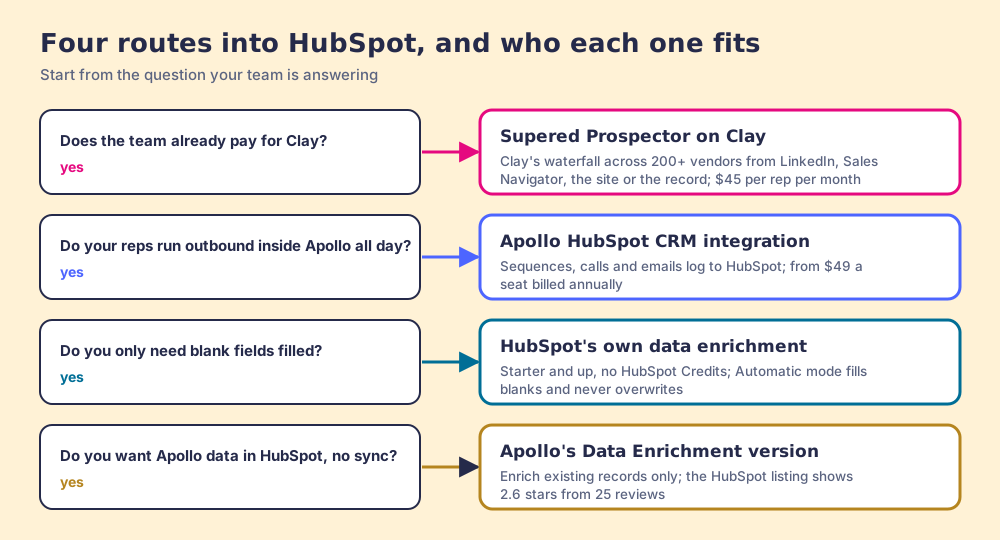
Our recommendation turns on one fact about your stack. Without Clay, Apollo’s HubSpot integration is a good pipe with three defaults to change: writing rules to auto-fill, merge and deletion sync on, and activity pushes limited to records that already exist. Do that inside the six hours, after a dedupe pass, and the HubSpot portal stays the source of truth. With Clay, you are already paying for the bigger tank. Put it in your reps’ hands on the profile, the Navigator list and the HubSpot record, let them see the match before they push, and follow each list to closed. The Apollo Chrome extension page covers the rep-side half of Apollo, the Apollo alternatives page the wider field, exporting Sales Navigator leads the list-building side, and the Exportly alternatives page the other Clay-powered extensions teams compare Prospector with.
Frequently asked questions
Does Apollo integrate with HubSpot?+
Which Apollo plan includes the HubSpot integration?+
Does the Apollo HubSpot integration use credits?+
Why is Apollo creating duplicates in HubSpot?+
Does Apollo overwrite HubSpot data?+
What is the best way to get Clay data into HubSpot instead of Apollo's?+
Your process, running itself.