Prospector vs PhantomBuster: a PhantomBuster alternative for sales teams on ClayAn automation workshop, or Clay in the rep's hand.
Prospector vs PhantomBuster comes down to the job.
PhantomBuster is a cloud automation workshop: its Phantoms run on PhantomBuster's servers under your LinkedIn session, extracting searches and profiles from LinkedIn, Sales Navigator, Google Maps and a dozen other sites, finding emails and sending connection requests, priced per workspace from $56 a month on annual billing. Supered Prospector is the PhantomBuster alternative for teams that already run Clay: a rep on a Sales Navigator lead, a company site or the CRM record runs your Clay table, Clay's waterfall asks 200+ vendors with no charge for a miss, and the contact goes to HubSpot, Salesforce or Pipedrive in one click, for $45 per rep per month, billed annually, plus your Clay plan. If the job is automated outreach or scraping beyond LinkedIn, PhantomBuster is the better buy.
01Supered ProspectorSales teams on Clay, on HubSpot, Salesforce or Pipedrive, who want reps building lists from Sales Navigator, company sites and the CRM record. $45 per rep per month, billed annually, from 1 rep, plus your Clay plan.
02PhantomBusterAn ops or growth person automating extraction and outreach across LinkedIn, Google Maps, Instagram and more. Start $56, Grow $128, Scale $352 a month per workspace, billed annually.
03Both, side by sideA GTM engineer who feeds PhantomBuster results into Clay tables (Clay's PhantomBuster integration, your own account), while reps run those tables through Prospector.
G2 on 3 October 2026: PhantomBuster 4.4 out of 5 from 138 reviews; Supered 4.9 out of 5 from 81 reviews. Chrome Web Store: PhantomBuster 3.3 from 86 ratings, 200,000 users. HubSpot marketplace: Supered 5.0 from 122 reviews (1 October 2026).
Status check
What is PhantomBuster in October 2026?Independent, Paris-based, priced per workspace.
PhantomBuster describes itself as "a no-code, cloud-based platform for lead generation and outreach automation." You set up automations called Phantoms, or chain them into Workflows, and "PhantomBuster runs them on its servers." The sources it lists are "LinkedIn, Sales Navigator, Instagram, Facebook, X/Twitter, YouTube, GitHub, Reddit, Slack, Google Maps, Yellow Pages, and more" (PhantomBuster help center).
Its pricing page loads only in a browser script, so the plan figures here come from PhantomBuster's own plan article, which says "Prices shown are current." Start is $69 a month ($56 on annual billing), Grow $159 ($128) and Scale $439 ($352). "Plans are not differentiated by number of users": a workspace holds up to 100 members, and they share its execution hours, Phantom slots and credits (plan article).
A 3 October 2026 news search found no acquisition, funding round or rebrand for PhantomBuster this year. Its Chrome Web Store listing names the developer as Phantombuster, 49 Rue de Ponthieu, Paris, and shows 200,000 users and 3.3 from 86 ratings.
The decision table
PhantomBuster vs Prospector at a glanceEight lines that decide it.
PhantomBuster
Supered Prospector
Job it is built for
Automate repeatable jobs on the web: extract searches, profiles, post likers and map listings, find emails, send connection requests and messages, chain steps into Workflows.
Run your team's Clay table from where the rep already prospects, check the CRM, sync the contact, then follow each list rep by rep.
Custom enrichment and campaigns
PhantomBuster's own automations, set up per site. It can feed Clay, but reps do not get your Clay tables and campaigns as a button.
Your own Clay tables and custom campaigns. Ops pairs a Clay table with a destination (the CRM or a sequence) once, and reps pick the campaign from the Push menu on LinkedIn, a company site or the CRM record. Your waterfalls, tiers and tags stay yours.
Leads worked to your standard
Not offered. Reporting covers usage, credits or activity, not whether each lead was worked the way you want.
Yes. Supered checks every lead a rep adds against your standard and shows each list as sourced, worked and closed, rep by rep, so you see whether leads are worked the way you want.
Where it runs
On PhantomBuster's servers, acting under the rep's LinkedIn session cookie. A browser extension hands over the session and opens a lead panel on standard LinkedIn profiles, not on Sales Navigator.
Inside the Supered Chrome extension, on the page the rep is reading: a LinkedIn profile, a Sales Navigator lead, a company's website or a HubSpot, Salesforce or Pipedrive record.
Where the data comes from
What the Phantom extracts from the page, plus built-in email discovery that "uses a waterfall enrichment approach," or your own Hunter.io, Dropcontact or Snov.io key.
Clay's waterfall across 200+ data and AI vendors on your own Clay account, in the order your GTM engineer set.
Cost of a miss
"1 credit = 1 lookup, even if no match is found." PhantomBuster puts a typical match rate at 30 to 50%, and "around 60%" with clean input.
"If an enrichment returns no result, you're not charged Data Credits or Actions" (Clay).
CRMs
HubSpot with "advanced data syncing"; Salesforce and Pipedrive "one-way, single automation." The extension panel saves to HubSpot only.
HubSpot, Salesforce and Pipedrive, as a place to start and as the sync target, with field mapping set once by Ops.
Pricing
Per workspace, up to 100 members: Start $69, Grow $159, Scale $439 a month, or $56, $128 and $352 on annual billing. 14-day free trial.
$45 per rep per month, billed annually ($540 a year), from 1 rep, plus your Clay plan. Demo first, no free trial yet.
Credits and hours
20, 80 or 300 execution hours a month, and 500, 2,500 or 10,000 email credits, shared by the whole workspace.
Your Clay plan's credits. Growth includes 6,000 Data Credits a month for the team.
Security
See PhantomBuster's own security or trust page.
SOC 2 Type II (audited, zero exceptions), GDPR compliant, and SSO. Reports in the Supered Trust Center at trust.supered.io.
G2
4.4 out of 5 from 138 reviews.
Supered: 4.9 out of 5 from 81 reviews. Prospector is new and has no reviews of its own yet.
How we graded: for a team on Clay, from one rep to a whole floor, that wants enrichment without asking ops and leads that get worked. Weights: easy enrichment from the page the rep is already on (30%), your own Clay tables and custom campaigns (20%), CRM check and one-click sync (15%), leads worked to your standard (15%), published price and setup (20%). Where PhantomBuster is the better pick for a different job, the verdict below says so.
Tool
Lane
Grade
Rank
Why it ranks here
Supered Prospector
Team on Clay
A
1
Built for this, from one rep up: easy enrichment from LinkedIn, a company site or the CRM record through Clay's 200+ vendor waterfall, your own Clay tables and custom campaigns from one Push menu, an owner and past-prospecting check before a one-click sync, and every lead worked to your standard. Published price per rep.
PhantomBuster
Team on Clay
C+
2
Cheap for a whole team, but email lookups charge on a miss, the Sales Navigator path is bulk extraction under a rep's session, and Salesforce and Pipedrive sync one way.
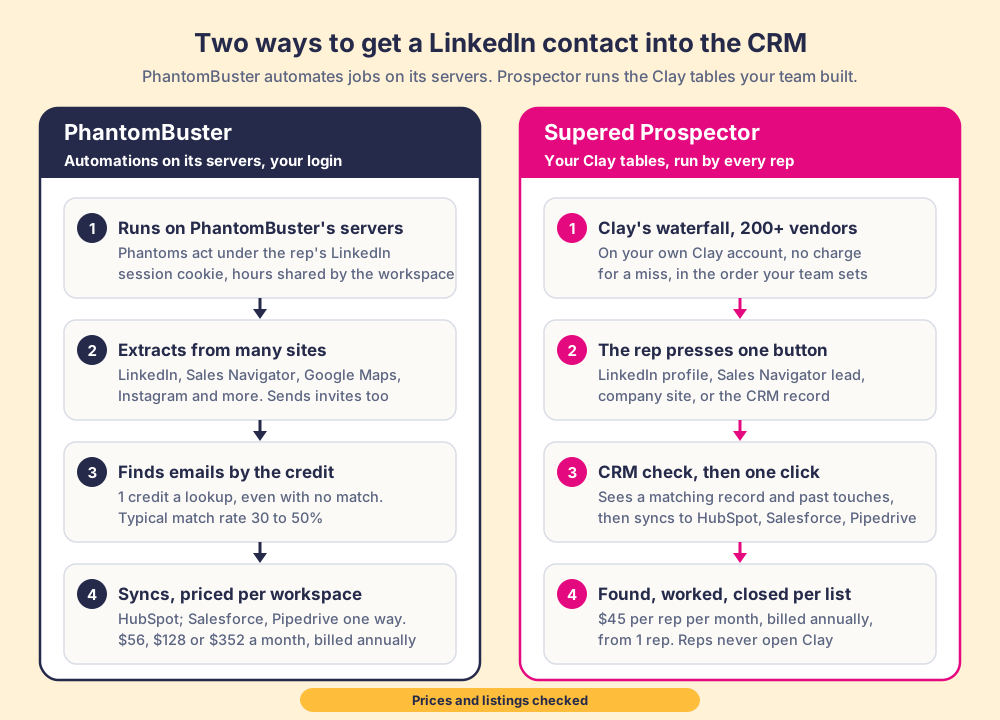
Two paths to a contact in the CRM. PhantomBuster: automations run on its servers under the rep's LinkedIn session, extract from LinkedIn, Sales Navigator, Google Maps and more, find emails at 1 credit a lookup even with no match, and sync to HubSpot (Salesforce and Pipedrive one way), $56, $128 or $352 a month per workspace, billed annually. Prospector: Clay's waterfall across 200+ vendors on your own Clay account, no charge for a miss, one button for the rep, a CRM check, one click to HubSpot, Salesforce or Pipedrive, $45 per rep per month, billed annually.
Fair to them first
What is PhantomBuster best at?Repeatable jobs across the whole web.
PhantomBuster does far more than LinkedIn. An operator can pull the likers of a competitor's post, the members of a group, a Google Maps search for dentists in Ohio or a list of Instagram followers, add emails and job details, then send each person a connection request with a tailored note and a follow-up a few days later. Workflows chain those Phantoms into one sequence, the API comes with every paid plan, and its Clay integration can push a Clay table into a Phantom or pull the results back. Prospector does none of the outreach and none of the sites beyond LinkedIn, company websites and the CRM.
It is also cheap for a team. Plans are priced per workspace with up to 100 members, so Grow on annual billing costs $1,536 a year for the whole team. PhantomBuster's help center is unusually plain about its limits: "Upgrading your PhantomBuster plan gives you more slots, execution time, and credits, but it never lifts LinkedIn's own limits," and "no automation tool can eliminate risk entirely." G2 users give it 4.4 out of 5 from 138 reviews.
PhantomBuster is a hired driver with a full garage of vehicles: give it the keys (your LinkedIn session) and a route, and it runs the errand while you sleep. Prospector is a rep's own hand on the wheel, with Clay's 200+ suppliers in the passenger seat. If the job is errands that nobody should do by hand, scraping a hundred map listings or sending the same follow-up to 80 people a week, PhantomBuster is the better build.
Why buyers compare
Why do sales teams look for a PhantomBuster alternative?Shared credits and a borrowed login.
PhantomBuster's own help center names most of the reasons a sales team starts looking.
Credits spent on misses.An email lookup costs a credit "even if no match is found," and PhantomBuster puts a typical match rate at 30 to 50%. Grow's 2,500 email credits split across ten reps is 250 lookups a rep a month, or roughly 75 to 125 emails each.
The rep's session on someone else's server."A session cookie is a temporary authentication token that lets PhantomBuster act on your behalf while you're logged in." LinkedIn "evaluates activity at the account level," so three Phantoms on one rep's account add up against that one account.
Phones are not on the plan sheet.The plan table lists email credits and no phone credits. The extension's Get info button can reveal email and phone data, and it spends email credits to do it.
One-way sync outside HubSpot.Salesforce and Pipedrive "offer one-way, single automation capabilities," and the extension panel saves to HubSpot only.
Prospector, for the PhantomBuster job
What does Prospector do for a sales team on PhantomBuster?Clay on the page, for the rep reading it.
A rep on a Sales Navigator lead, a company's website or a HubSpot, Salesforce or Pipedrive record presses one button and your Clay table runs. Clay's waterfall asks provider after provider across 200+ data and AI vendors (Clay's count on clay.com/pricing) until one returns a verified email or phone, and "If an enrichment returns no result, you're not charged Data Credits or Actions." Before anything syncs, the rep sees whether the person already has a CRM record and whether they were worked before. One more click sends the contact to the CRM with the field mapping Ops set once. Reps never log into Clay.
On a company's website, the buying-committee lookup takes your own titles, departments and seniority and pulls the people your team sells to. A rep can add leads to a prospect list and push the whole list into a Clay workflow your GTM engineer built. Nothing runs overnight on a server under the rep's name: the rep chooses the person on the page.
A sales leader then sees each rep-built list as found, worked and closed, and who added what, with no duplicate work across reps. Your process applies to the prospects reps work. The full loop is on the sourcing use case.
The money, for ten reps. PhantomBuster Grow is $1,536 a year on annual billing for the whole workspace, with 2,500 email credits a month to share. Prospector is $5,400 a year, and with Clay Growth at $446 a month on annual billing ($5,352, clay.com/pricing, 3 October 2026) the stack is $10,752. PhantomBuster is the cheaper bill by a wide margin. For a team already paying for Clay, Prospector adds $5,400, uses the credits you already buy and charges nothing for a miss. There is no free trial yet. It starts with a 30-minute demo on your own Clay account, implementation is included and takes under a week, and the details are on the Prospector page.
Choose something else when the job looks like this
Automated outreach on LinkedIn.Prospector sends no connection requests and no messages. If that is the job, PhantomBuster or a dedicated outreach tool does it; PhantomBuster vs Waalaxy compares two of them.
Sources beyond LinkedIn.Google Maps, Instagram, Reddit or YouTube lists are PhantomBuster's ground. Prospector starts on LinkedIn, a company website or the CRM record.
No Clay account.Prospector runs only on Clay. Without it, the PhantomBuster alternatives grades the tools that sell their own data or extraction.
Run your Clay table from Sales Navigator.
A 30-minute demo on your own Clay account, on HubSpot, Salesforce or Pipedrive. Bring the list your reps ask Ops to build most often.
Prospector vs PhantomBuster: which should a sales team choose?Decide by the job, then by Clay.
For any team on Clay, from one rep up, Prospector is the best pick: easy enrichment from the page the rep is already on, your own Clay tables and custom campaigns, a CRM check and one-click sync, and every lead worked to your standard. If your problem is automating extraction and outreach across LinkedIn and a dozen other sites, PhantomBuster is the best pick. If your team already runs Clay and wants reps to find the right person, check the CRM and sync in one click from Sales Navigator, a company site or the CRM record, Prospector is the best pick.
Choose PhantomBuster for
Many sources. LinkedIn, Sales Navigator, Google Maps, Instagram, Reddit, YouTube and more.
Outreach automation. Connection requests, messages and follow-ups, chained in Workflows.
A team price. One workspace of up to 100 members from $56 a month, billed annually.
Choose Prospector for
Easy enrichment for any rep. One click on LinkedIn, a company site or the CRM record runs Clay across 200+ vendors. No Clay login, no extra database seats, and you can start with one rep.
Custom campaigns and enrichment. Your own Clay tables and campaigns, picked by the rep from one Push menu, with your waterfalls and logic intact.
Every lead worked to your standard. Supered checks each lead against your standard, so you see which lists get worked the way you want, rep by rep.
Coverage from 200+ vendors. Clay's waterfall on your own account, with no charge on a miss.
The rep in control. One button on the page the rep is reading, and a CRM check before the sync.
Three CRMs, both ways in. HubSpot, Salesforce and Pipedrive, as a place to start and as the sync target.
The two can sit side by side: a GTM engineer pulls PhantomBuster results into a Clay table through Clay's PhantomBuster integration, and reps run that table, and the rest of your Clay workflows, through Prospector.
Why trust this page
Why trust a comparison written by Supered?Weigh it, then check the sources.
We sell one of the two products on this page, so weigh what follows. Each PhantomBuster fact links to PhantomBuster's own help center or listing and carries the date we checked it, 3 October 2026. Where PhantomBuster gives two numbers, as it does for match rates, we print both. When PhantomBuster changes its plans, this page changes with it.
Supered started inside RevPartners, the HubSpot partner Matt Bolian founded, which sold roughly twice as much Sales Hub as any other partner and reached HubSpot's Elite tier in 13 months. Supered is the #1 sales enablement app on the HubSpot marketplace and a HubSpot Premier Tech Partner, with 6,000+ installs. It holds 5.0 from 122 reviews on the HubSpot marketplace and 4.9 out of 5 from 81 reviews on G2. Those reviews cover Supered as a whole. Prospector is the newest product, so judge it in a demo on your own Clay account.
Switching
How do you switch from PhantomBuster to Prospector?Keep the Phantoms that still earn it.
Contacts PhantomBuster already synced stay in your CRM, and Phantoms that scrape other sites or run outreach can keep running. The move is about who builds the next prospect list.
Clay connection.An admin connects Clay inside Supered, with no engineering, and each Clay table or custom workflow becomes a button for reps.
CRM field mapping.Ops sets it once for HubSpot, Salesforce or Pipedrive, and each sync after that is one click.
PhantomBuster plan.Drop to the plan your remaining Phantoms need. Hours, slots and credits are shared across the workspace and reset each billing cycle.
Time to live.Implementation is included and takes under a week.
PhantomBuster vs Prospector, the buying questions.
What is the best PhantomBuster alternative for a sales team on Clay?
Supered Prospector. It runs your Clay tables from Sales Navigator, company websites and the HubSpot, Salesforce or Pipedrive record, so reps get Clay's waterfall across 200+ vendors with no charge for a miss, check the CRM before a sync and push in one click. It costs $45 per rep per month, billed annually, plus your Clay plan.
How much does PhantomBuster cost compared with Prospector?
PhantomBuster's plan article and marked current Lists Start at $69, Grow at $159 and Scale at $439 a month, or $56, $128 and $352 on annual billing, per workspace of up to 100 members. Prospector is $45 per rep per month, billed annually, plus your Clay plan. For ten reps, PhantomBuster Grow is $1,536 a year and Prospector with Clay Growth at $446 a month is $10,752.
Does PhantomBuster charge for an email it does not find?
Yes. Its help center says "1 credit = 1 lookup, even if no match is found," and puts a typical match rate at 30 to 50%, or around 60% with complete input. Clay, which Prospector runs on, does not charge Data Credits or Actions when an enrichment returns no result.
Does Prospector send LinkedIn connection requests or messages?
No. Prospector runs your Clay tables, checks the CRM match and prior work, and syncs the contact to HubSpot, Salesforce or Pipedrive. If automated outreach is the job, PhantomBuster does it and Prospector does not try to.
Can PhantomBuster and Prospector work together?
Yes. Clay lists a PhantomBuster integration that pushes Clay data into a Phantom and pulls results back, on your own PhantomBuster account. A GTM engineer can feed those results into a Clay table, and reps run that table from Prospector.
What does each tool read from LinkedIn?
Ask every vendor what it reads from LinkedIn, ours included. PhantomBuster's Phantoms run on its servers using your LinkedIn session cookie, and its Sales Navigator Search Export returns profile fields such as name, title, company and location, with emails added by a separate lookup. In Prospector, the contact data comes from Clay's waterfall on your own Clay account.