ContactOut vs Supered ProspectorOne seat with its own data, or every rep on your Clay.
ContactOut sells its own email and phone database through a Chrome extension, and its self-serve plans carry a "1 user per company limit." Prospector sells no data. It puts the Clay tables your GTM engineer already built in every rep's hands, in Sales Navigator, on company sites and in the CRM record, for $45 per rep per month. If you are one seller or one recruiter with no Clay who wants emails and phones from LinkedIn, buy ContactOut. If you run Clay and have a sales team, Clay plus Prospector is the better way to prospect: GTM engineers build in Clay, reps never open Clay.
01Supered ProspectorSales teams already on Clay who want every rep running the tables from where they prospect, a one-click CRM sync, and each list tracked found, worked and closed. $45 per rep per month, billed annually, from 1 rep.
02ContactOutOne seller or recruiter with no Clay who wants unlimited emails and phones from LinkedIn under a fair-use cap. Free plan, then $468 or $948 a year for one user.
03LushaTwo to five reps with no Clay who need more than one seat on a posted price. Free plan, then $449.10 a year, up to $3,599.10 a year for 5 seats.
G2 on 2 October 2026: ContactOut 4.5 out of 5 from 113 reviews; Supered 4.9 out of 5 from 81 reviews. HubSpot marketplace: Supered 5.0 from 122 reviews.
Status check
What is ContactOut selling in October 2026?Unlimited lookups, for one user.
On 2 October 2026 ContactOut's pricing page lists three self-serve plans in the US. Free gives 5 emails, 5 phones and 5 exports a day, marked "Limited time only." Email costs $49 a month, or $39 a month billed yearly ($468), with unlimited emails and 300 exports a month. Email + Phone costs $99 a month, or $79 a month billed yearly ($948), with unlimited emails and phones and 600 exports a month. Every one of the three carries the line "1 user per company limit," and a Team plan is quote only (contactout.com/pricing).
"Unlimited" has a ceiling, and ContactOut prints it. Section 10 of its terms: "The credit limit is 2,000 email credits per account per month and 1,000 phone credits per account per month unless we enter into a separate agreement with you" (contactout.com/terms). For one rep that is generous. For a team, the limit that bites is the one seat. The sales page advertises "Unlimited sales users for $299" but publishes no per-lead or per-credit rate behind it (contactout.com/sales-users).
The extension, "Email Finder by ContactOut" on the Chrome Web Store, has 600,000 users and 4.4 out of 5 from 796 ratings, last updated 17 May 2026. ContactOut is also inside Clay: a Clay-built integration since 12 July 2023, included in all Clay plans, with actions to find a mobile number or a personal email from a LinkedIn URL, run on Clay credits or your own ContactOut account (clay.com).
The decision table
ContactOut vs Prospector at a glanceNine lines that decide it.
ContactOut
Supered Prospector
Job it is built for
One person reveals a contact's email or phone from LinkedIn or a company site, from ContactOut's own database, then saves or exports it. Recruiters and sales reps both use it.
Clay in every rep's hands: the tables your GTM engineer built become a button reps press where they already prospect, and leaders see what each list produced.
Data source
ContactOut's own database. Its extension page claims 150M personal emails, 200M work emails and 100M direct dials.
Clay's waterfall across 200+ providers, in the order your GTM engineer sets, on your own Clay account and credits. ContactOut can be one step, on Clay credits or your own ContactOut account.
Where reps use it
Chrome extension on LinkedIn, Sales Navigator and Recruiter, plus company websites through ContactOut Anywhere, and a web search portal.
Inside the Supered Chrome extension: LinkedIn profiles, Sales Navigator, company websites, and HubSpot, Salesforce and Pipedrive records. Reps never log into Clay.
CRM sync
Save to Salesforce or HubSpot from the search portal or the extension; ATS tools and Zapier for the rest.
One click to HubSpot, Salesforce or Pipedrive, field mapping set once by Ops. Before the push, the rep sees the matching CRM record, who owns it, and whether the person was worked before.
Pricing model
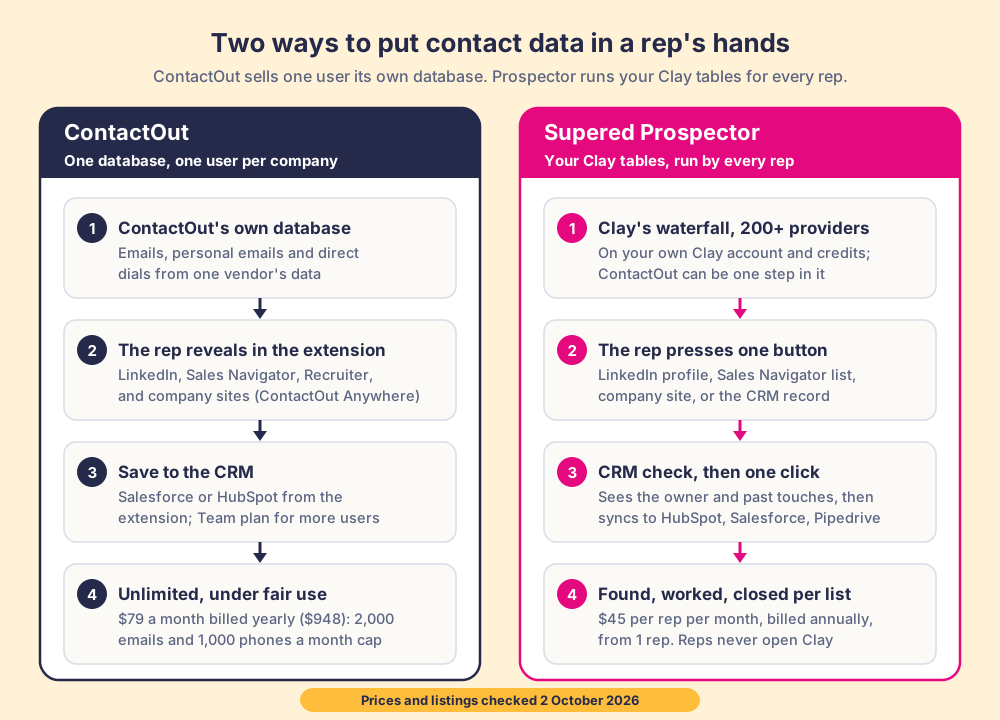
Posted for one user: Free, Email $468 a year, Email + Phone $948 a year (or $49 and $99 monthly). "Unlimited" under a fair-use cap of 2,000 emails and 1,000 phones a month. Team plan quote only.
Published: $45 per rep per month, billed annually ($540 a rep a year), from 1 rep. Enrichment runs on the Clay credits you already buy.
Seats and contract
Self-serve plans are "1 user per company." More users means the Team plan and a sales conversation.
Annual, from a single seat, and you add reps one at a time. No free trial yet: it starts with a demo on your own Clay account.
What leaders see afterward
Team plan lists "Team Management & reports." On self-serve there is one user, so there is no team to report on.
Every list found, worked and closed, per rep, with closed outcomes Qualified, Recycled or Disqualified, and no duplicate work across reps.
Security
Extension page: "SOC 2 Certified" and "CCPA & GDPR Compliant."
SOC 2 Type II and GDPR (Supered).
G2
4.5 out of 5 from 113 reviews.
Supered: 4.9 out of 5 from 81 reviews. Prospector is new and has no reviews of its own yet.
How we graded: by the job, because the two products do different ones. Lane one is one seller or recruiter with no Clay who needs emails and phones from LinkedIn. Lane two is a sales team on Clay that wants every rep running the tables. Weights in both lanes: contact coverage the person can reach (35%), where they work and the CRM sync (25%), what a leader sees about each list afterwards (20%), price and contract for the buyer in that lane (20%).
Tool
Lane
Grade
Rank
Why it ranks here
ContactOut
One seller or recruiter, no Clay
A
1
Hard to argue with for one person: unlimited emails and phones under a cap of 2,000 and 1,000 a month, $948 a year, on LinkedIn, Sales Navigator, Recruiter and company sites, with a free plan to test.
Lusha
One seller or recruiter, no Clay
B+
2
Posted prices from one seat and a free plan, but metered: 5 credits a phone makes heavy calling cost more than ContactOut's flat plan.
Supered Prospector
One seller or recruiter, no Clay
C
3
Out of scope: Prospector runs on Clay, brings no database of its own, and is built for sales teams, not recruiting.
Supered Prospector
Clay in every rep's hands
A
1
Built for this: your tables as a button in Sales Navigator, on company sites and in the CRM record, a CRM check before the push, found to closed per list, a published price per rep.
ContactOut
Clay in every rep's hands
C
2
Its extension runs ContactOut's data only, and self-serve stops at one user. On Clay, ContactOut is best used as one step in your waterfall.
Two paths to the same goal, a contact in the CRM that a rep works. ContactOut: its own database, revealed by one user per company, Email + Phone at $79 a month billed yearly ($948), unlimited under a cap of 2,000 emails and 1,000 phones a month. Prospector: Clay's waterfall across 200+ providers on your own Clay account, one button for every rep, a CRM check, one click to the CRM, $45 per rep per month billed annually. All checked 2 October 2026.
Fair to them first
What is ContactOut best at?The flat plan for one heavy user.
For a single person who lives on LinkedIn, ContactOut is one of the best deals in contact data. The Email + Phone plan is $948 a year, and inside the fair-use cap that buys up to 2,000 emails and 1,000 phones a month. A thousand phones over a 21-day month is about 48 new numbers a working day, above the Bridge Group's median of 44 dials a day for an SDR. There is no credit math per reveal and no five-credit phone. The extension works on LinkedIn, Sales Navigator and Recruiter, and ContactOut Anywhere finds decision-makers on company websites (contactout.com).
Its roots are in recruiting, and it shows in the good ways. The sales page says ContactOut is "Trusted by 1.4M recruiters and sales reps," the extension works inside LinkedIn Recruiter, and Clay's own integration leans on its personal emails and mobile numbers. On G2 it holds 4.5 out of 5 from 113 reviews, and the extension holds 4.4 from 796 ratings with 600,000 users. For a recruiter, a founder doing their own outbound, or an agency seller, it is quick to start and easy to budget.
The trade-offs are the ones its own pages and reviewers name. Self-serve is one user per company, so a team buys the Team plan on a quote. G2 reviewers write that they hit the usage limit faster than expected and that some phone numbers are wrong. On Trustpilot, ContactOut scores 1.2 out of 5 from 132 reviews, 88% of them one star, many written by people who found themselves listed in the database rather than by customers, and the profile notes it "Hasn't replied to negative reviews" (Trustpilot). And section 5 of its terms gives ContactOut a "perpetual and irrevocable" license to data that free or subsidized users submit, unless a separate agreement supersedes it. None of that makes ContactOut a bad buy for one person. It makes it a poor fit for a 20-rep team on Clay.
Why buyers compare
Why are ContactOut users looking at Clay and Prospector?One seat works, until the team grows.
The question is rarely whether ContactOut finds emails. It is what happens when one rep's tool has to become a sales team's.
The one-user limit.Every self-serve plan says "1 user per company limit." The second rep means a Team plan and a sales call, with no published per-seat price.
One database, no fallback.When ContactOut has no match, the rep moves on or opens another tool. A Clay waterfall asks 200+ providers in the order your team sets, and ContactOut can be one of them.
Lookups the team cannot see.A reveal in one person's extension leaves no trail for the next rep. Two reps can work the same buyer and only find out in the CRM.
The list after the export.ContactOut stops at the reveal and the save. Whether the contact was worked and how it ended sits outside the product. Leaders on Clay ask Prospector to show that per list.
Prospector, for teams on Clay
What does Prospector do that a ContactOut seat does not?You build it. Reps run it. Everyone sees it work.
Prospector is the rep side of Clay, and it runs inside the Supered Chrome extension. Your GTM engineer builds the tables once, person enrichment, the buying committee for an account, the new-logo list for a campaign, and each becomes a flow a rep picks from a Push menu. A rep on a LinkedIn profile, a company's website or a HubSpot, Salesforce or Pipedrive record presses one button, and your Clay table runs on your own Clay account. In Sales Navigator, reps add leads to a prospect list and push the list to a Clay table. Your logic stays yours: waterfalls, tiers, tags and sequence variables. The engineer stops being the list desk.
Before anything syncs, the rep sees whether the person already has a CRM record, who owns it, and whether they were prospected before, so two reps do not work the same buyer. One more click sends the contact to HubSpot, Salesforce or Pipedrive with the field mapping Ops set once. Reps never log into Clay and do not need a database seat of their own. The plays are the ones a sales team runs every week: research an account, new logos, expansion inside customers, job changers, and adding the economic buyer to a stalled deal before the forecast call.
Then the part a ContactOut reveal does not show. A sales leader sees every list found, worked and closed, rep by rep, and every lead ends the way your process says: Qualified, Recycled or Disqualified. When a leader can see what the tables produced, the Clay budget grows. The full loop is on the sourcing use case, and the rep's view is on Prospector for reps.
Prospector costs $45 per rep per month, billed annually, which is $540 a rep a year and $5,400 a year for ten reps, and you can buy it for one rep. It runs on the Clay plan and credits you already pay for. There is no free trial yet. It starts with a demo on your own Clay account, and the details are on the Prospector page.
Choose something else when the job looks like this
Recruiting.Prospector is built for sales teams and CRMs. If you source candidates in LinkedIn Recruiter and save them to an ATS, ContactOut does that job and Prospector does not try to.
One person, no Clay.If the whole job is one seller pulling emails and phones from LinkedIn, ContactOut's Email + Phone plan at $948 a year is simpler than any Clay setup.
A few reps, no builder.Prospector runs only on Clay. Without a GTM engineer, a database several reps can use on day one, Lusha or Apollo, is the faster start.
Run your Clay table from Sales Navigator.
A demo on your own Clay account. Bring the table your reps ask for most often.
ContactOut vs Prospector: which should you choose?Decide by headcount, then by whether you run Clay.
If you are one seller or recruiter with no Clay, ContactOut is the best pick. If you run Clay and have a sales team, Prospector is the best pick: Clay plus Supered is the best way for a sales team to prospect, because GTM engineers build in Clay and reps never open it.
Choose ContactOut if
You are one person. One user, unlimited emails and phones under the fair-use cap, $948 a year on Email + Phone.
You recruit. It works in LinkedIn Recruiter and saves to ATS tools like Lever, Bullhorn and Greenhouse.
You have no Clay and want no setup. Install the extension, open a profile, reveal. A free plan lets you test it first.
Choose Prospector if
You already run Clay. Every rep runs your tables from Sales Navigator, company sites and the CRM record, with no Clay login.
You have more than one rep. Buy from 1 rep and add one at a time, with no duplicate work across reps.
You want lists you can follow. Found, worked and closed for each list, rep by rep, at $45 per rep per month, billed annually.
You do not have to give up ContactOut's data. Clay runs ContactOut as one step in the waterfall, on Clay credits or your own ContactOut account, and Prospector puts that waterfall in front of every rep.
Why trust this page
Why trust a comparison written by Supered?Weigh it, then check the sources.
We sell one of the two products on this page, so weigh what follows. Every ContactOut fact links to its source and carries the date we checked it, 2 October 2026, and where ContactOut is the better buy we say so in the grades and the verdict. When ContactOut changes its prices or its terms, this page changes with it.
Supered is the #1 sales enablement app on the HubSpot marketplace and a HubSpot Premier Tech Partner, with 6,000+ installs. It holds 5.0 from 122 reviews on the HubSpot marketplace and 4.9 out of 5 from 81 reviews on G2. Those reviews cover Supered as a whole. Prospector is the newest product and runs inside the Supered Chrome extension, so judge it in a demo on your own Clay account.
Switching, or using both
How do you move from ContactOut seats to Clay and Prospector?Keep the data, move the front door.
You do not have to drop ContactOut on day one. The gentler path is to route it through Clay first, then decide when the plan renews.
Put ContactOut inside the waterfall.Clay's ContactOut actions find a mobile number or a personal email from a LinkedIn URL, on Clay credits or your own ContactOut account, so ContactOut's data becomes one step among 200+ providers instead of one person's seat.
Turn the tables into buttons.An admin connects Clay inside Supered, and each table or custom workflow becomes a flow reps pick from the Push menu. Start with the Supered Clay template or bring your own tables.
Set the CRM mapping once.Ops maps fields for HubSpot, Salesforce or Pipedrive, and every sync after that is one click.
Decide at renewal.A yearly ContactOut plan runs to its end date, so plan the switch for the renewal and keep using what you paid for until then.
What else should a ContactOut buyer look at?The rest of the shortlist.
If neither ContactOut nor Clay plus Prospector fits, these are the names buyers put next to ContactOut. Each has a full write-up on our blog.
Lusha.The closest like-for-like extension, with a posted team ladder: Free, then Starter at $449.10 a year up to Premium at $3,599.10 a year for 5 seats, at 1 credit an email and 5 a phone (lusha.com, checked 2 October 2026). Lusha alternatives.
Apollo.One database with an extension and built-in sequences, self-serve from $49 per user per month (apollo.io, checked 2 October 2026). Apollo alternatives.
Kaspr.A LinkedIn-first extension with unlimited B2B email credits under fair use and 100 phone credits a month on Starter, $49 per user per month billed annually or $65 monthly (kaspr.io, checked 2 October 2026). Kaspr alternatives.
RocketReach.A lookup database with a web app and an extension, sold per user on published plans. RocketReach alternatives.
Clay, run by a GTM engineer.Not a database: the waterfall across 200+ providers, ContactOut among them, that a builder runs for the team. Prospector is how reps run it themselves. The Clay Chrome extension question.
For sales teams on Clay, yes. Prospector brings no database of its own: it runs your Clay tables, Clay's waterfall across 200+ providers, from Sales Navigator, LinkedIn profiles, company websites and HubSpot, Salesforce or Pipedrive records, then syncs to the CRM in one click. For one seller or recruiter with no Clay, it is not a substitute; ContactOut is the better buy.
How much does ContactOut cost compared with Prospector?
On 2 October 2026 ContactOut lists Free (5 emails, 5 phones and 5 exports a day), Email at $49 a month or $468 a year, and Email + Phone at $99 a month or $948 a year, each limited to 1 user per company, with the Team plan quote only. Prospector costs $45 per rep per month, billed annually, from 1 rep, and runs on the Clay plan and credits you already have.
Is ContactOut really unlimited?
Under a fair-use cap. Section 10 of ContactOut's terms sets the limit at 2,000 email credits and 1,000 phone credits per account per month, unless a separate agreement sets another. For one person that is generous. For a team, the tighter limit is that self-serve plans allow one user per company.
Can I keep using ContactOut data with Prospector?
Yes. ContactOut has been a Clay-built integration since 12 July 2023, included in all Clay plans, with actions to find a mobile number or a personal email from a LinkedIn URL on Clay credits or your own ContactOut account. ContactOut becomes one step in your Clay waterfall, and Prospector puts that waterfall in front of every rep.
Does Prospector scrape LinkedIn?
Prospector works within LinkedIn's terms and does not copy search results in bulk; the contact data comes from Clay's waterfall on the customer's Clay account. In Sales Navigator, reps add leads to a prospect list and push the list to a Clay table.
Which CRMs does Prospector work with?
HubSpot, Salesforce and Pipedrive. Ops sets the field mapping once, reps sync in one click, and before they do, they see the matching CRM record and whether the person was worked before.