ContactOut Pricing in 2026: The Plan, the Fine Print, and the Free Plan's Real Price
ContactOut pricing checked live on October 2, 2026: four plans from $0 to $948 a year, the fair-use cap behind unlimited, the export meter, the one-user limit, what the free plan's terms ask for in return, and whether ContactOut is legit.
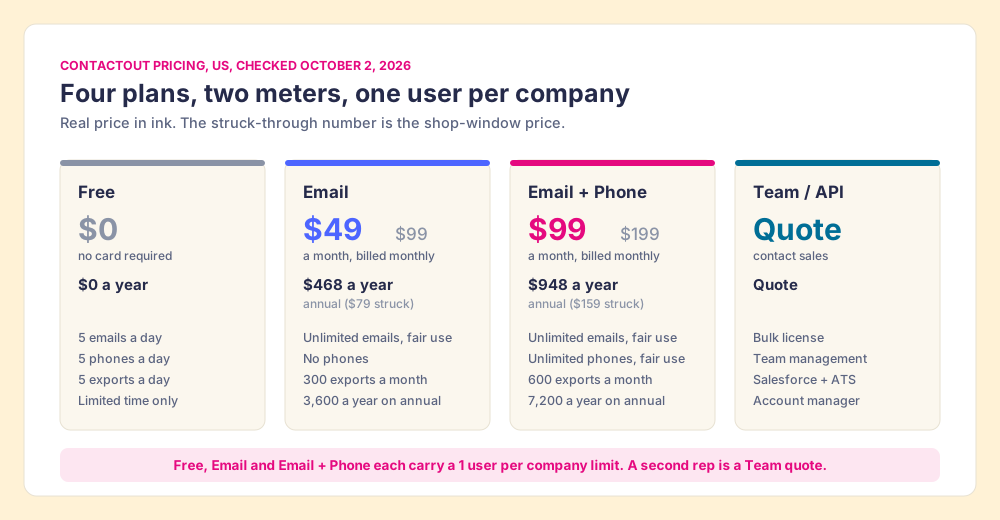
ContactOut pricing in 2026 is four plans: Free at $0 with 5 emails, 5 phones and 5 exports a day; Email at $49 a month or $468 a year; Email + Phone at $99 a month or $948 a year; and a quote-only Team / API plan, with every self-serve plan limited to one user per company.
ContactOut pricing in 2026 is four plans: Free at $0 with 5 emails, 5 phones and 5 exports a day; Email at $49 a month or $468 a year; Email + Phone at $99 a month or $948 a year; and a quote-only Team / API plan, with every self-serve plan limited to one user per company (contactout.com/pricing, opened October 2, 2026). The quick answer, three ways:
- ContactOut Email + Phone, $948 a year. One rep or recruiter on LinkedIn who wants personal emails and mobiles. Buy it annually.
- ContactOut Email, $468 a year. One person who only emails and never dials.
- Supered Prospector, $540 a rep a year on your own Clay account. A sales team that already runs Clay, where the GTM engineer builds the tables and reps run them from Sales Navigator, a company site or the CRM.
A price tag in a shop window often carries two numbers, one with a line through it. ContactOut’s page does the same: $99 struck through above the $49 Email plan, $199 above the $99 Email + Phone plan. Two of the third-party pages ranking for this search on October 2 print the struck-through figures, or a mix of them, as the price. The figures below come from the plan data the page itself loads, and three things on it change what ContactOut costs: a second meter, a single line, and a free plan that is paid for in something other than money.
How much does ContactOut cost in 2026?
ContactOut publishes its plans as data inside the pricing page’s HTML, with one price book for the US (globalPlans) and a cheaper one for visitors outside the US (regionalPlans). The US book, opened October 2, 2026:
| Plan | Billed monthly | Billed annually | Emails | Phones | Exports | Users |
|---|---|---|---|---|---|---|
| Free | $0 | $0 | 5 a day | 5 a day | 5 a day | 1 per company, “Limited time only” |
| $49 a month (struck: $99) | $39 a month, $468 a year (struck: $79) | Unlimited, fair use | None | 300 a month, 3,600 a year | 1 per company | |
| Email + Phone | $99 a month (struck: $199) | $79 a month, $948 a year (struck: $159) | Unlimited, fair use | Unlimited, fair use | 600 a month, 7,200 a year | 1 per company |
| Team / API | Quote | Quote | ”20% more data coverage” | Bulk license | Custom | Team management, Salesforce + ATS integrations |
Outside the US, the same page serves Email at $25 a month or $228 a year and Email + Phone at $49 a month or $468 a year. What each plan adds, from the plan cards:
- Free. The browser extension, the search portal and a trial of premium features.
- Email. Email campaigns and a list builder, on top of Free.
- Email + Phone. Data enrichment and an AI email writer, on top of Email.
- Team / API. “Bulk license 700million+ profiles,” “Works with recruiter Pro,” Salesforce and ATS integrations, team management and reports, and a dedicated account manager.
What does “unlimited” mean on ContactOut?
A public library is a fair picture of the two paid plans. You can sit in the reading room and read as many books as you like, within reason, and the librarian keeps no tally. The checkout desk counts. The card in your wallet lets you take a set number of books home each month, and the books you want to work with are the ones you take home.
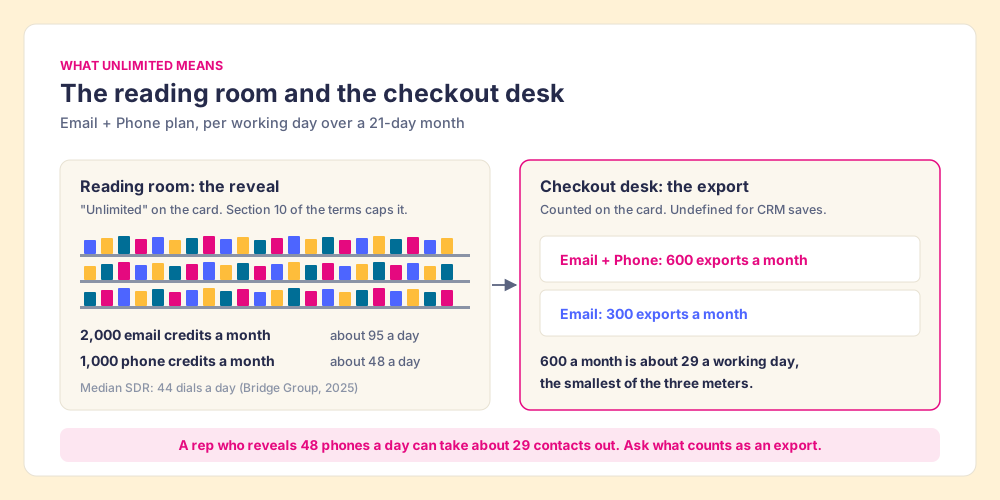
ContactOut’s reading room is the reveal: seeing an email or a phone on a LinkedIn profile or in the search portal. Each “unlimited” on the plan cards links to section 10 of ContactOut’s terms, which says: “ContactOut’s paid unlimited plans operate under a fair use policy. The credit limit is 2,000 email credits per account per month and 1,000 phone credits per account per month unless we enter into a separate agreement with you” (contactout.com/terms, opened October 2, 2026). The checkout desk is the export: 300 a month on Email, 600 on Email + Phone.
Do the arithmetic on Email + Phone and the meters fall into an order:
- The phone cap. 1,000 phones a month over 21 working days is about 48 new numbers a working day. The Bridge Group’s 2025 SDR report, 351 companies, puts the median SDR at 44 dials a day (Bridge Group, 2025). One person rarely reaches it.
- The email cap. 2,000 emails a month is about 95 a working day.
- The export meter. 600 exports a month is about 29 a working day, and it is the smallest of the three. A rep who reveals 48 phones a day can take about 29 contacts out.
So the meter that binds a sales rep is the checkout desk, and the pricing page does not say what counts as a checkout. A CSV download plainly does. Whether a save to HubSpot or Salesforce from the extension draws on the export count is the first question to put to ContactOut in writing, because for a rep who works from the CRM it decides what the plan holds.
Is ContactOut cheaper on monthly or annual billing?
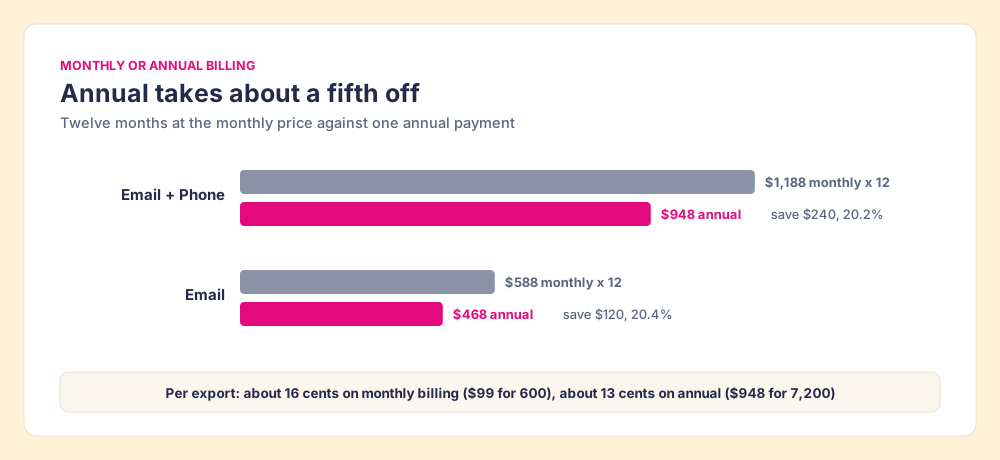
Annual, by about a fifth. Email + Phone is $948 a year on annual billing against $1,188 for twelve months at $99, a saving of $240 or 20.2%. Email is $468 against $588, a saving of $120 or 20.4%.
Divide by the export allowance and the annual plans land at about 13 cents an export: $468 for 3,600 on Email, $948 for 7,200 on Email + Phone. Monthly billing works out to about 16 cents ($49 for 300, $99 for 600). Monthly earns its premium in one case: a recruiter with a single search to fill, or a rep testing ContactOut’s hit rate on their own buyers for a month before committing. Run that test on the accounts you sell to. G2 reviewers report that phones run less accurate than emails, and one mid-market reviewer found EU availability “currently not great” (G2, ContactOut reviews, checked October 2, 2026), so a European book of business may find less in the reading room than an American one.
What does the ContactOut free plan cost?
A potluck dinner costs nothing at the door. You bring a dish, put it on the long table, and eat from the other forty dishes. The host calls it free and the guests understand the trade.
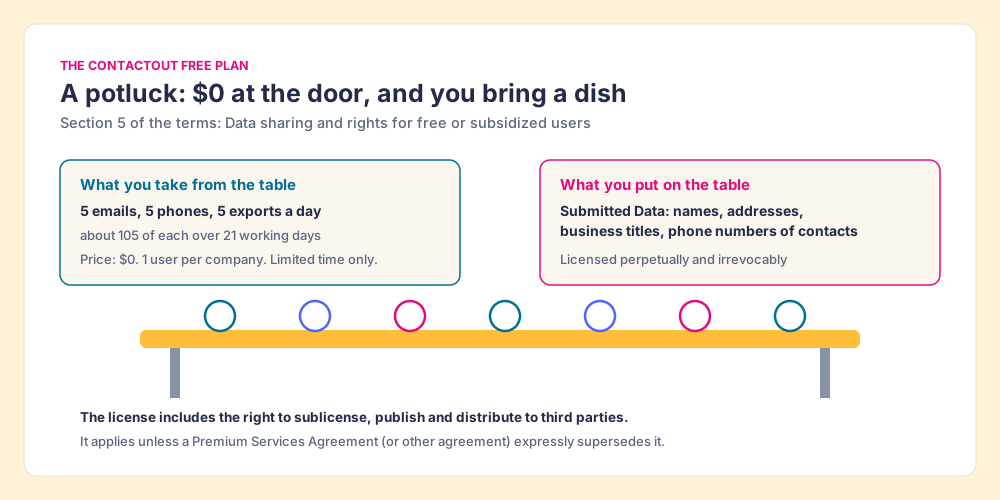
The ContactOut free plan is priced at $0 and gives 5 emails, 5 phones and 5 exports a day, about 105 of each across 21 working days, with the extension, the search portal and a “Trial of premium features.” The card also says “1 user per company limit” and “Limited time only.” And section 5 of ContactOut’s terms is titled “Data sharing and rights for free or subsidized users.” Read it before a rep installs the extension on a work laptop. When a user provides “Submitted Data, such as names, addresses, business titles or phone numbers of contacts or other persons,” the user grants ContactOut “a perpetual and irrevocable license to access and use the Submitted Data in aggregated form,” and “the perpetual and irrevocable right to sublicense, make available, copy, display, publish or distribute the Submitted Data to any third party, including our customers, business partners, and service providers.” The terms describe the arrangement in their own words: “Our Service contains certain ‘cooperative’ elements. This means that in exchange for providing the Submitted Data to us, and potentially for the use of other customers (at our sole discretion), you will receive access to Output Data” (contactout.com/terms, section 5, opened October 2, 2026).
The free plan is a potluck. Two limits on the picture keep it fair. The terms apply “except where we and you have put in place a Premium Services Agreement (or other agreement) that expressly supersedes the below terms,” so a negotiated paid contract can change them. And the terms do not list which product actions count as submitting data, only examples of what the data is. A free plan that never uploads a list or connects an inbox may contribute little to the table. The question for a sales leader is narrower and practical: does anything your reps do in ContactOut send your customer or prospect lists into it, and does your contract override section 5? Get both answers before the free plan spreads across the team. Neither of the two third-party ContactOut pricing guides we read in the top results on October 2 mentions the clause.
What does ContactOut cost for a sales team?
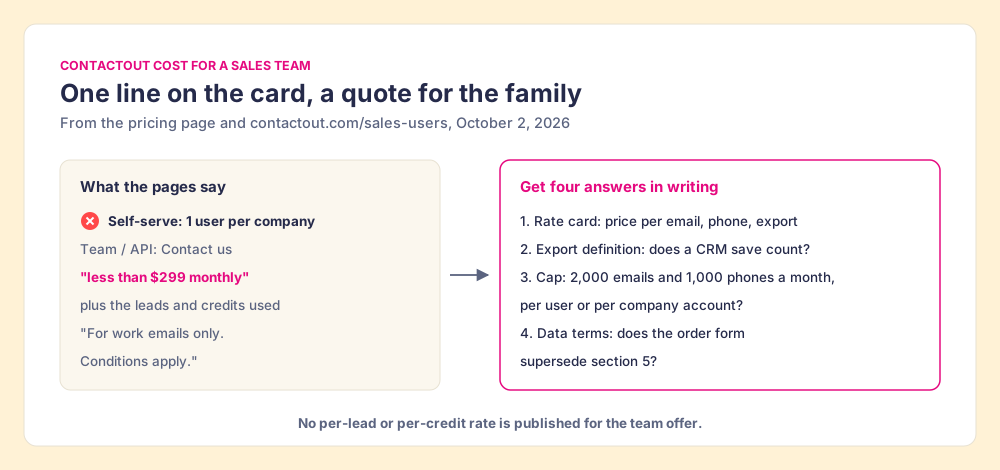
ContactOut cost for one person is printed. For two people at the same company it is not. The Free, Email and Email + Phone cards each say “1 user per company limit,” so the second rep starts a sales conversation.
ContactOut’s sales page states the team offer in one sentence: “Get your entire sales team on a prospecting tool for less than $299 monthly. Only pay for the leads and credits used,” on a page that also carries “*For work emails only. Conditions apply” and a VP of Sales quote about switching from ZoomInfo to ContactOut’s “consumption based pricing” (contactout.com/sales-users, opened October 2, 2026). The navigation calls it “Unlimited sales users for $299.” That is a platform fee with metered data on top, and the page gives no per-lead or per-credit rate, so a buyer comparing it with seat-priced tools has to get the meter in writing. Four questions settle it:
- The rate card. The price per email, per phone and per export after the platform fee.
- The export definition. Whether a CRM save counts as an export.
- The cap. Whether the section 10 limits apply per user or per company account on the team plan.
- The data terms. Whether your order form supersedes section 5.
Corporate status, checked October 2, 2026: ContactOut is independent and privately held. Its founder, Rob Liu, runs a video series on ContactOut’s own site titled “How we built ContactOut to 8 figures in revenue,” and a news search found no 2026 acquisition, funding round or layoffs.
Is ContactOut legit?
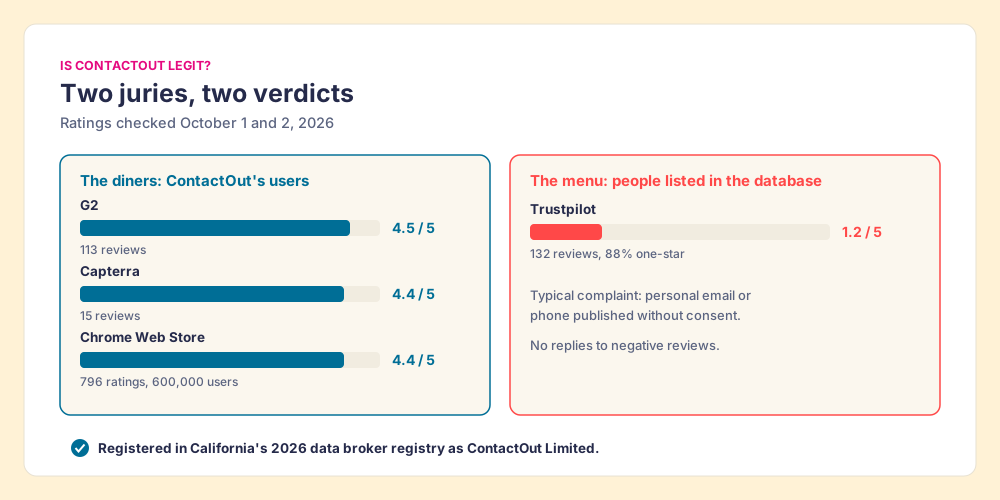
A restaurant can be reviewed by two juries: the diners, and the people whose names appear on the menu without being asked. ContactOut has both, and they disagree.
The diners like it. ContactOut holds 4.5 out of 5 from 113 reviews on G2 (G2) and 4.4 from 15 on Capterra (Capterra), and the Chrome Web Store lists “Email Finder by ContactOut” with 600,000 users and 4.4 from 796 ratings (Chrome Web Store), all checked October 1 and 2, 2026. G2 reviewers praise the email hit rate and the speed of the extension; the complaints are about the meter. A one-star small-business review from April 2025: “They claim on their website that you receive unlimited phone and email credits with their $100/mo plan, but then under their fair limits restrictions on their t&cs, they claim that the maximum for email is 2,000.” A Capterra reviewer in April 2026: “The free tier is pretty limited so you’ll hit the ceiling fast if you’re prospecting regularly.”
The people on the menu do not. On Trustpilot, ContactOut scores 1.2 out of 5 from 132 reviews, 88% of them one-star, and the profile notes that ContactOut has not replied to negative reviews (Trustpilot, October 2, 2026). Most of those reviews come from people who found their own details in the database. “Published my personal contact information as well as various other data about me without my consent,” one reviewer wrote in July 2026. ContactOut Limited appears in California’s 2026 data broker registry (CPPA, updated July 29, 2026), alongside Apollo, ZoomInfo, Lusha, RocketReach and Clay Labs. ContactOut’s privacy page says a person “may at any time request the removal of your personal information from our database,” and its extension page claims SOC 2 certification and GDPR and CCPA compliance.
So: is ContactOut legit? As a vendor, yes. It publishes its prices, ships a widely used extension, registers as a data broker where the law requires it, and its users rate it well. The low Trustpilot score is the cost of a business built on personal emails and mobiles, which ContactOut counts at 150M personal emails and 100M direct dials on its extension page. If your outreach reaches people at personal addresses, your own legal team will want to read the same section 5 and the same privacy page.
Why should you trust this breakdown?
I started RevPartners, a HubSpot partner that did only sales implementations, sold roughly twice as much Sales Hub as any other partner and reached Elite tier in 13 months. Supered came out of that work and holds 4.9 out of 5 from 81 reviews on G2 and 5.0 from 122 on the HubSpot App Marketplace (checked October 1, 2026). It is also the disclosure: we make Supered Prospector, which appears below as the option for teams that run Clay. Every ContactOut figure on this page comes from ContactOut’s own pricing page, terms and sales page, opened October 2, 2026, and the grades use the same weights as the ContactOut alternatives page, so you can flip them.
Which ContactOut plan, or which alternative, fits your team?
The lens is a mid-market or SMB sales team: contact data reps will use where they already work, a price the whole team can buy, and a leader who can see which lists turn into pipeline. Scores out of 50, weighted coverage x3, rep-side delivery x2, price structure for a team x2, what the leader sees after the export x2, bundled outreach x1.
| Rank | Option | Grade | Best fit | CRM integration | Setup effort | Price (plan with the feature) | Reason to pick it |
|---|---|---|---|---|---|---|---|
| ref | ContactOut Email + Phone | B (28) | One rep or recruiter on LinkedIn | Native on Team (Salesforce, ATS); extension saves to Salesforce and HubSpot | Minutes | $948 a year, 1 user | Personal emails and mobiles, roomy caps for one person |
| 1 | Supered Prospector | A (44) | Teams already on Clay | Native (HubSpot, Salesforce, Pipedrive) | Under a week on an existing Clay account | $540 a rep a year plus your Clay plan | Clay’s waterfall from where reps sell; lists followed to closed |
| 2 | Apollo | A- (36) | Small teams wanting data plus sequences | Native (HubSpot, Salesforce) | A day | $49 a seat a month, billed annually | Seats for every rep, sequencer and dialer included |
| 3 | Kaspr | B- (25) | Email-first reps, European data | Native (HubSpot, Salesforce, Pipedrive) | Minutes | $79 a seat a month annual ($948 a year) | Same price as ContactOut’s seat, buyable for a team |
| 4 | RocketReach | B- (23) | Published seats with multi-seat checkout | Native from Pro | Minutes | Pro $899 a year | US exports, team plans from $6K a year |
ContactOut’s 28 is coverage 3, rep-side delivery 4, price structure 3, leader view 1, outreach 3. The price score reflects the single line: a $948 seat is good value, and a team cannot buy ten of them without a quote. If you are one person, reweight for yourself and ContactOut moves to the top three.
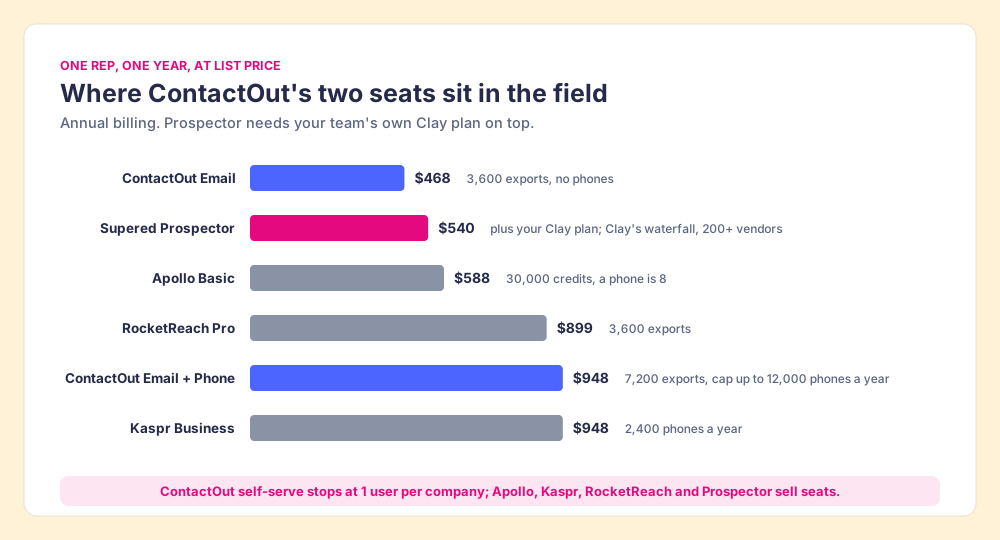
Prices for the others were checked on October 1, 2026: Apollo Basic at $49 a seat a month billed annually with 30,000 credits a year, a phone at 8 credits (apollo.io/pricing); Kaspr Business at $79 a month billed annually with 2,400 phone credits a year (kaspr.io/pricing); RocketReach Pro at $899 a year with 3,600 exports (rocketreach.co/pricing). Each has its own page: Kaspr pricing, RocketReach pricing, Apollo pricing.
How does Supered Prospector compare to ContactOut pricing?
For one rep, Prospector at $540 a year sits between ContactOut’s two paid plans. The comparison only holds if your team already pays for Clay, because Prospector runs on your own Clay account and Clay credits (Clay pricing shows what that plan costs). Clay is no single database. It is the waterfall across 200+ data and AI vendors (clay.com, checked October 2, 2026): a GTM engineer sets the order, provider after provider, and the table stops at the first verified email or phone. “If an enrichment returns no result, you’re not charged Data Credits or Actions” (clay.com/pricing).
ContactOut is one of those providers. Clay’s ContactOut page lists it as a Clay-built integration that joined on July 12, 2023, “Included in All Plans,” with “Find Mobile Number from LinkedIn with ContactOut” and “Find Personal Email from LinkedIn with ContactOut,” each run on “Clay Credits or Bring Your Own Account” (Clay, ContactOut integration, opened October 2, 2026). A Clay team can keep ContactOut’s mobiles as one step in the waterfall and drop the single-line seat.
Clay plus Supered is the best way for a sales team to prospect: GTM engineers build in Clay, reps never open Clay. Prospector runs inside the Supered Chrome extension, and the three people around a list each get something:
- The GTM engineer’s flows. The builder sets up named flows once, each mapped to a Clay table and a destination, and stops being the list desk. Waterfalls, tiers and tags stay as built. The Supered Clay template is there to start fast, or bring your own tables.
- The rep’s button. On a Sales Navigator lead, a company’s website or a HubSpot, Salesforce or Pipedrive record, the rep picks a flow from the Push menu and the table runs. Reps add Navigator leads to a prospect list and push the list to a Clay table. Before pushing, they see who owns the record and whether it was prospected before, so two reps do not work the same person.
- The leader’s view. Found, Worked, Closed: which lists reps found with your tables, who is working theirs, and how each lead ended, as Qualified, Recycled or Disqualified. Your VP sees it too, and the Clay budget grows on what it shows.
Prospector works within LinkedIn’s terms and does not copy search results in bulk; the contact data comes from Clay’s waterfall on the customer’s Clay account. Pricing is $45 per rep per month, billed annually, from one rep, and it starts with a demo on your Clay account (Prospector). The plays it runs, from new logos to job changers to stalled deals, are on the sourcing use case, and the Clay Chrome extension page shows the rep’s side in detail.
Choose something else if you do not run Clay. Prospector does nothing without a Clay account, and for one recruiter or rep the ContactOut Email + Phone seat at $948 a year is one of the better single-seat deals on the market. Choose something else, too, if the job is outreach in the same tool: ContactOut’s campaigns and AI writer, or Apollo’s sequencer, are built for that, and Prospector hands contacts to your CRM and your sales engagement tool without sending email itself.
What we recommend
The plan you buy depends on how many people need it and where the data goes after the reveal.
- One person, LinkedIn-first. ContactOut Email + Phone on annual billing, $948 a year. Read section 10 once so the cap never surprises you, and ask whether CRM saves count as exports.
- One person, email only. ContactOut Email, $468 a year, about 13 cents an export.
- A trial before committing. The ContactOut free plan, for a few days of testing on your own buyers, with section 5 read first and no customer lists uploaded.
- A team without Clay. Get ContactOut’s team quote with the rate card, the export definition and the data terms in writing, and set it beside seats you can buy today: Kaspr pricing, Apollo pricing, Wiza pricing.
- A team with Clay. Keep ContactOut, if its hit rate holds, as a step in the waterfall, and put the table in every rep’s hands with Prospector at $540 a rep a year.
The shop-window number is the struck-through one, and ContactOut’s real prices are lower than the copies of its page suggest. The cost a team feels is somewhere else: in the export meter, the single line and the free plan’s terms. The ContactOut Chrome extension page covers what the extension does once installed, and the email finder tools page sets ContactOut against the rest of the field.
Frequently asked questions
How much does ContactOut cost in 2026?+
Does ContactOut have a free plan?+
Is ContactOut unlimited?+
Is ContactOut legit?+
How much does ContactOut cost for a sales team?+
Is there a cheaper option for a team that already has Clay?+
Your process, running itself.