The PhantomBuster Chrome Extension in 2026: A Key-Cutter by the Front Door
The PhantomBuster Chrome extension does two jobs: it hands your LinkedIn session to PhantomBuster's servers, and it opens a lead panel on profiles. Install steps, Get info credits, limits, and alternatives, checked October 2, 2026.
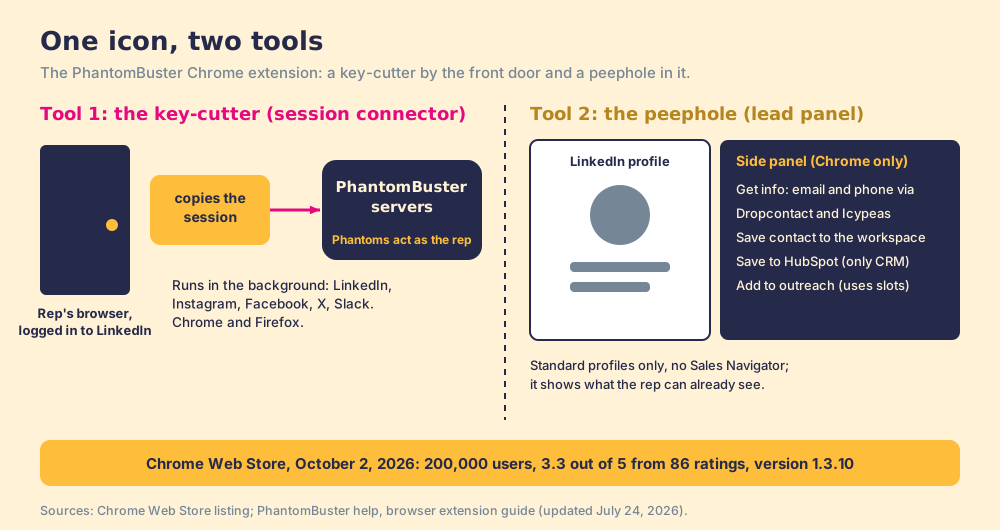
The PhantomBuster Chrome extension is PhantomBuster's free browser add-on that hands your logged-in LinkedIn session to its cloud automations and adds a LinkedIn side panel that finds emails and phones and saves leads.
The PhantomBuster Chrome extension is two tools in one small icon. One is a key-cutter mounted by your front door: it notices when you log in to LinkedIn, copies the session, and sends the copy to PhantomBuster’s servers so its automations can keep working while you sleep. The other is a peephole: a side panel on a LinkedIn profile that finds an email and phone for the person you are looking at. They look like one product. They behave like two, and a sales leader should judge them separately. The short answer:
- PhantomBuster’s extension. The right install for anyone already running Phantoms across LinkedIn, Instagram, X or Slack; free, with the panel’s lookups drawn from the workspace’s email credits.
- Supered Prospector. The right extension for a sales team that runs Clay and wants LinkedIn people in the CRM, at $45 per rep per month billed annually.
- Wiza. The non-Clay pick for one profile at a time with email and phone, from $990 a year.
The PhantomBuster Chrome extension is PhantomBuster’s free browser add-on that hands your logged-in LinkedIn session to its cloud automations and adds a LinkedIn side panel that finds emails and phones and saves leads. It connects Instagram, Facebook, X and Slack sessions the same way. Its Chrome Web Store listing showed 200,000 users and 3.3 out of 5 from 86 ratings on October 2, 2026, version 1.3.10, updated July 10, 2026 (Chrome Web Store).
What does the PhantomBuster Chrome extension do?
The listing describes five functions, and they sort into the two jobs.
The key-cutter comes first. The extension can “automatically retrieve session cookies for websites you are connected to when logging into PhantomBuster.com,” so you click “Connect to [website name]” and the session field fills itself. The install guide says the extension “detects your session automatically, no need to manually copy cookies or paste anything,” and then “works silently in the background. As long as you’re logged into LinkedIn (or your social media account) in that browser, your session stays active and PhantomBuster can keep automations running smoothly” (PhantomBuster help, browser extension, updated July 24, 2026). Session connection works on LinkedIn, Facebook, Instagram, X and Slack, and the changelog adds TikTok, Quora, Pinterest and Reddit over the years.
The PhantomBuster alternatives page describes the session cookie as a copy of the rep’s house key, handed to a house-sitter. The extension is the machine that cuts that copy and keeps cutting fresh ones whenever the lock changes. Without it, somebody opens the browser’s developer tools, finds a cookie called li_at, and pastes it in by hand. With it, the copying is automatic and invisible.
The peephole is the second job. On a standard LinkedIn profile, the side panel shows the person’s details. “Get info” asks for a verified email and phone; the listing says these “can be requested through PhantomBuster’s integration with” Dropcontact and Icypeas, two email-finding services. “Save contact” stores the lead in your PhantomBuster workspace, and with HubSpot connected, the same contact syncs to HubSpot “via PhantomBuster’s servers.” From the panel, “Add to outreach” puts the person into a PhantomBuster campaign with a connection message and a follow-up.
How do you install the PhantomBuster Chrome extension?
PhantomBuster’s guide lists the steps, and they take a few minutes.
- Install the extension from the Chrome Web Store (Chrome is recommended) or Firefox Add-ons. On Microsoft Edge, install from the Chrome Web Store if your organization allows it. Safari is not supported.
- Log in to LinkedIn (or the other platform) in the same browser.
- Log in to your PhantomBuster workspace.
- Open a Phantom or Workflow and click Use now. At the Connect to LinkedIn step, the extension detects your session; save it.
- For the lead panel, open a standard LinkedIn profile in Chrome and click the extension icon. It does not open on its own.
The guide asks for a fully updated browser. If the extension does not detect your session, it suggests checking that you are logged in to both LinkedIn and PhantomBuster in the same browser, then updating, reinstalling, or clearing the cache.
The extension is one of three ways to hand PhantomBuster your LinkedIn session, and the other two say a lot about what the extension does. PhantomBuster’s connection guide lists them in this order: your LinkedIn email and password, which PhantomBuster says it uses “once to sign in and create a secure connection” and does not store; the extension; or copying “your li_at session cookie and user agent from your browser’s Developer Tools” (PhantomBuster help, connect LinkedIn, updated August 31, 2026). For a teammate’s or client’s account, you can “send them a magic link that lets them share their session without needing a PhantomBuster login.”
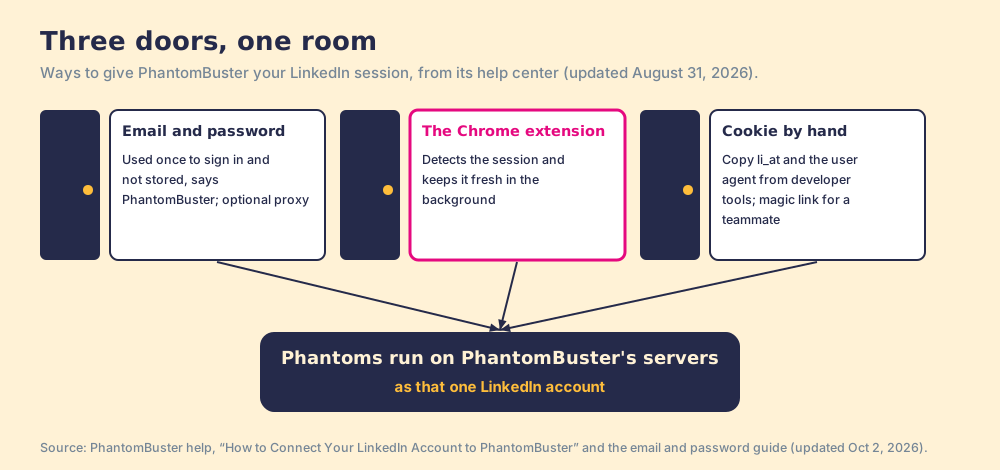
The three doors differ in convenience and lead to the same room. In each case, automations run on PhantomBuster’s servers as your LinkedIn account. The extension’s advantage is upkeep: a cookie expires when you log out, change networks, or LinkedIn resets the session, and PhantomBuster’s error guide lists “you switched IP address, used a VPN, or changed device” among the causes (PhantomBuster help, expired cookies, updated July 24, 2026). The key-cutter cuts the next copy for you.
What does Get info cost in the PhantomBuster extension?
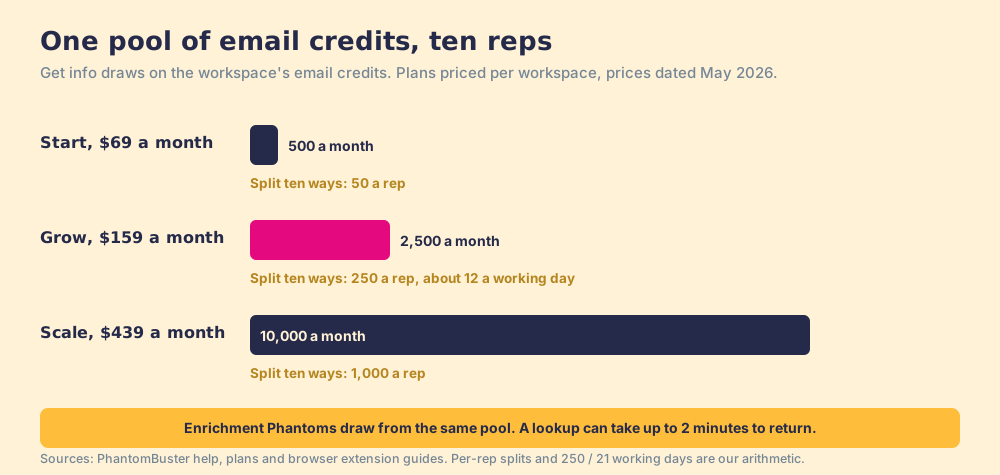
The extension is free. The lookups are not. The guide’s FAQ says Get info “uses your email discovery credits, just like running an enrichment Phantom would,” and it can take “up to 2 minutes” for results to appear. Credits come from the workspace’s plan (PhantomBuster help, plans, prices dated May 2026):
| Plan | Monthly | Annual (per month) | Email credits | Per rep, ten reps sharing |
|---|---|---|---|---|
| Free trial (14 days) | $0 | n/a | 50 total | n/a |
| Start | $69 | $56 | 500 a month | 50 a month |
| Grow | $159 | $128 | 2,500 a month | 250 a month |
| Scale | $439 | $352 | 10,000 a month | 1,000 a month |
The last column is our arithmetic, and it is where a team plan gets thin. Plans are priced per workspace, not per user, so ten reps clicking Get info draw from one pool. On Grow, 250 lookups a rep a month is about 12 a working day across 21 working days. The pool also feeds every enrichment Phantom the workspace runs, so a growth teammate’s scraping job and a rep’s profile lookups compete for the same credits.
What are the PhantomBuster extension’s limits?
The guide writes most of them down, which is to PhantomBuster’s credit.
- A Chrome-only panel. The session connector runs on Chrome and Firefox; the lead panel runs only on Chrome.
- Standard profiles only. “Lead panel is LinkedIn-only, Sales Navigator is not supported,” and it shows only “what is already visible to you on the profile.”
- One CRM. HubSpot is “currently the only CRM available” from the panel. PhantomBuster itself lists Salesforce and Pipedrive integrations with “one-way, single automation capabilities” (PhantomBuster help, CRM integrations, updated August 20, 2026).
- A history you cannot take with you. The Activity view lists your enrichment attempts, but “export is not available.”
- Slots for outreach. “Launching an automation through the extension uses slots,” and with no slot free, the panel shows an error.
- Broad permissions. The listing discloses that the extension handles “Personally identifiable information,” “Authentication information” and “Website content.” The second one is the key-cutter.
The ratings track the friction. A 3.3 from 86 ratings sits well under the 4.4 from 138 reviews PhantomBuster holds on G2, and the PhantomBuster review sorts those complaints by job.
Is the PhantomBuster Chrome extension safe for your LinkedIn account?
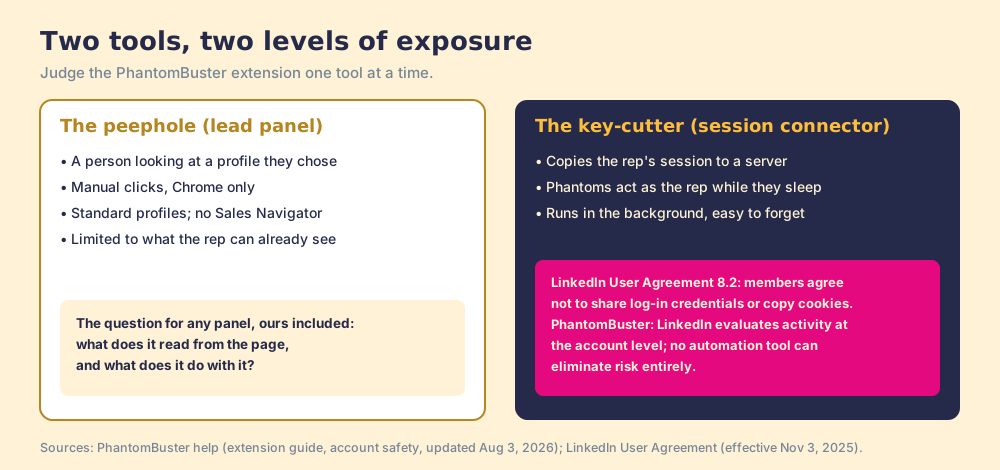
Take the two tools one at a time.
The peephole is the milder of the two. PhantomBuster describes panel actions as manual and limited to what you can already see, and a rep clicking Get info on a profile they are reading is doing what a person does. LinkedIn’s help page on prohibited software still covers “browser plug-ins, or browser extensions that scrape, modify the appearance of, or automate activity on LinkedIn’s website” (LinkedIn Help, prohibited software, checked October 2, 2026), so the question for any panel, ours included, is what it reads from the page and what it does with it.
The key-cutter carries the larger risk, because of where the copy goes. Once the session sits on PhantomBuster’s servers, Phantoms act as the rep, and LinkedIn’s User Agreement section 8.2 lists “sharing log-in credentials or copying cookies” among the things members agree not to do (LinkedIn User Agreement, effective November 3, 2025). PhantomBuster’s own safety article says “LinkedIn evaluates activity at the account level, not per Phantom,” and “no automation tool can eliminate risk entirely” (PhantomBuster help, account safety, updated August 3, 2026). A key-cutter that works silently in the background makes the copy easier to keep and easier to forget about.
Why trust this page?
I started RevPartners, a HubSpot partner that did only sales implementations, sold roughly twice as much Sales Hub as any other partner, and reached Elite tier in 13 months. Supered grew out of that work and is the #1 sales enablement app on the HubSpot marketplace, rated 5.0 from 122 reviews there and 4.9 from 81 on G2 (checked October 1, 2026). We make Supered Prospector, which ranks first below for sales teams that run Clay. The grades match our other PhantomBuster pages, and reweighting for breadth puts PhantomBuster first.
How does the PhantomBuster extension compare with the alternatives?
The lens is a sales team of ten to fifty reps that runs Clay and wants LinkedIn people in Clay and the CRM: LinkedIn account exposure (x3), contact data (x3), lands in Clay and the CRM (x2), breadth (x1), price for ten reps (x1), out of 50.
| Rank | Tool | Grade | Score | Best fit | CRM integration | Setup effort | Pricing | Reason to switch |
|---|---|---|---|---|---|---|---|---|
| ref | PhantomBuster extension | C+ | 27 | Teams already running Phantoms across many sites | HubSpot from the panel; Salesforce and Pipedrive one-way from Phantoms | Minutes | Free install; plans $69 / $159 / $439 a month per workspace | Stay if the Phantoms are the job |
| 1 | Supered Prospector | A- | 41 | Sales teams that run Clay | Native (HubSpot, Salesforce, Pipedrive) | Days, on an existing Clay account | $45 per rep per month, billed annually, plus your Clay plan | The rep stays in the seat; contact data from 200+ vendors |
| 2 | Wiza | C+ | 29 | One profile at a time, email and phone | Native (HubSpot, Salesforce, Pipedrive) | Minutes | From $990 a year per user | Verified email and phone on the profile the rep is reading |
| 3 | Evaboot | C+ | 25 | One-off Sales Navigator exports | HubSpot, Pipedrive, Clay | Minutes | From $29 a month | Verified emails on a whole Navigator search |
Corporate status, checked October 2, 2026: news searches found no 2026 acquisition, merger or rebrand for PhantomBuster, Wiza or Evaboot.
Where does Supered Prospector fit?
Prospector is the extension for a sales team that wants the peephole without the key-cutter. It runs inside the Supered Chrome extension, on the team’s own Clay account, and it brings no database of its own. It brings Clay’s waterfall, which is every database, routed: Clay’s waterfalls “check multiple providers to return the most verified emails (lower bounce rate) and phone numbers (higher connect rate)” across 200+ data and AI vendors (clay.com, checked October 2, 2026), and “if an enrichment returns no result, you’re not charged Data Credits or Actions” (clay.com/pricing). We chose Clay as our only data provider for that reason. Clay plus Supered is the best way for a sales team to prospect: GTM engineers build in Clay, and reps never open Clay.
- Four starting points. A LinkedIn profile, a Sales Navigator list, a company website with company research alongside, or a HubSpot, Salesforce or Pipedrive record. PhantomBuster’s panel covers the first.
- The team’s Clay tables as buttons. The GTM engineer builds named flows once, each mapped to a Clay table and a destination; the rep picks one from a Push menu.
- An owner check before the push. The rep sees the matching CRM record, who owns it, and a flag when the person was prospected before.
- Lists that end the way your process says. Found, Worked, Closed: each lead ends as Qualified, Recycled or Disqualified, and the manager watches the list become pipeline and coaches from what is converting.
On LinkedIn, our position is one sentence. Prospector works within LinkedIn’s terms and does not copy search results in bulk; the contact data comes from Clay’s waterfall on the customer’s Clay account. LinkedIn has not approved or partnered with us, and we do not claim it has.
The arithmetic: ten reps on Clay’s Growth plan at $495 a month plus Prospector cost $11,340 a year, against $1,536 a year for PhantomBuster Grow on annual billing. If you already pay for Clay, the added cost is the $5,400 for Prospector. Choose something else if you do not run Clay, because Prospector does nothing without a Clay account, or if your PhantomBuster extension mainly feeds Phantoms on Instagram, X and Slack, which Prospector does not touch.
Which should you choose?
- PhantomBuster’s extension, kept. The pick when Phantoms across many platforms are the job and the panel is a side benefit. Install it, and keep LinkedIn Phantoms within the vendor’s own limits.
- The panel alone, for a few reps. Workable on Grow for a handful of reps with HubSpot, at about 12 lookups a rep a working day across ten reps.
- Supered Prospector. The pick for a sales team that runs Clay and wants profile lookups, Sales Navigator lists and CRM records in one extension, at $45 per rep per month billed annually.
- Wiza. The pick without Clay for one profile at a time with phones, from $990 a year.
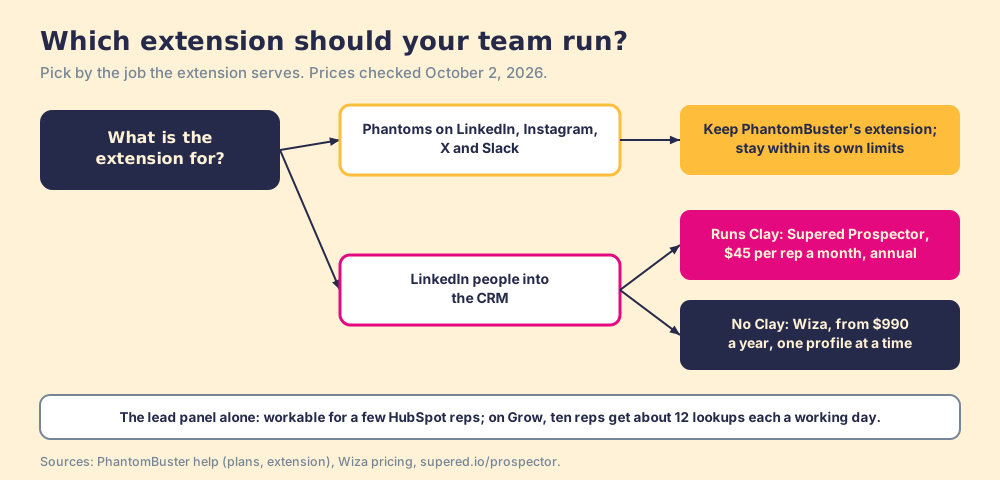
What we recommend depends on which of the two tools you installed it for. If it exists to keep Phantoms running across a growth team’s platforms, it does that job well, and the guide’s limits page is the manual to follow. If your reps installed it for the panel, so they could find an email for the person on the screen and push them to the CRM, they are carrying a key-cutter they do not need. Give them the peephole on the team’s Clay account instead, and let the session stay in the rep’s own browser. The LinkedIn Chrome extension roundup sorts the rest of the category by job, and the sourcing use case shows how a Clay team sets Prospector up.
Frequently asked questions
What does the PhantomBuster Chrome extension do?+
Is the PhantomBuster Chrome extension free?+
Does the PhantomBuster extension work on Sales Navigator?+
Do I need the extension to use PhantomBuster?+
Is the PhantomBuster Chrome extension safe for my LinkedIn account?+
What is the best alternative to the PhantomBuster Chrome extension for a sales team?+
Everything we have written on PhantomBuster
More on PhantomBuster
Looking past PhantomBuster? See Supered Prospector on your own Clay accountYour Clay waterfall, where reps already work.