PhantomBuster Review 2026: A Hired Driver on Your License
A PhantomBuster review checked October 2, 2026: G2 4.4 against Trustpilot 3.3, what it does well, what its own help center says about LinkedIn account risk, plan prices, and who should buy it.
This PhantomBuster review grades PhantomBuster, the Paris-based cloud platform that runs no-code scraping and outreach automations on your own social accounts, on two questions: does it do the job you hire it for, and what does that job cost your LinkedIn account.
PhantomBuster is two products wearing one name. For a growth marketer it is a cupboard of small robots that pull data from LinkedIn, Instagram, Reddit and Google Maps without a line of code, and the people who use it that way love it. For a sales team that wants LinkedIn contacts in the CRM at volume, it is a hired driver using the rep’s license. This PhantomBuster review grades PhantomBuster, the Paris-based cloud platform that runs no-code scraping and outreach automations on your own social accounts, on two questions: does it do the job you hire it for, and what does that job cost your LinkedIn account. The short answer:
- PhantomBuster. The right buy for growth teams and agencies running many small automations across many sites, from $56 a month on annual billing for a whole workspace.
- Supered Prospector. The right buy for a sales team that already runs Clay and wants the right people from LinkedIn in the CRM, at $45 per rep per month billed annually.
- Evaboot or Wiza. The non-Clay picks for a sales team: Evaboot for a one-off Sales Navigator export, Wiza for one profile at a time.
Is PhantomBuster worth it?
Start with what it is. PhantomBuster’s help center calls it “a no-code, cloud-based platform for lead generation and outreach automation,” and lists its sources as “LinkedIn, Sales Navigator, Instagram, Facebook, X/Twitter, YouTube, GitHub, Reddit, Slack, Google Maps, Yellow Pages, and more” (PhantomBuster help, overview, updated October 2, 2026). A Phantom is one small automation: export the people who liked a post, the employees of a company, the reviews on a Chrome extension. Workflows chain several Phantoms together. “PhantomBuster runs them on its servers,” so the work carries on with your laptop closed.
That breadth is a real achievement, and the price structure suits it. Plans are sold per workspace, with “up to 100 workspace members” and the note that “plans are not differentiated by number of users” (PhantomBuster help, plans, opened October 2, 2026). An agency can run fifty clients’ scraping jobs from one bill.
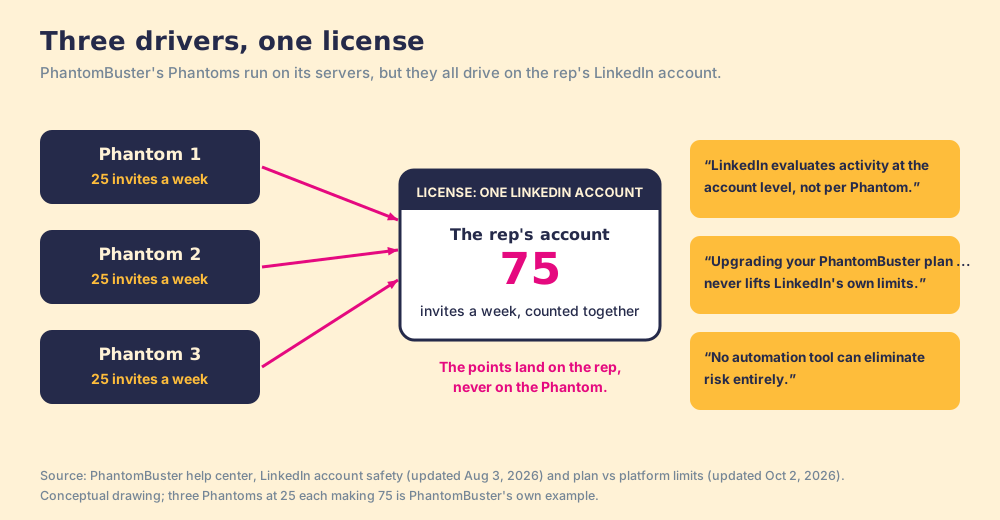
The trouble starts with the word “your.” Suppose you hire a driver to run errands in your car. The driver is skilled, the car is yours, and the license on file is yours too. When the driver collects a speeding ticket, the points land on your license, and if three drivers share the car, the state adds all their tickets together. PhantomBuster puts it in its own words: “LinkedIn evaluates activity at the account level, not per Phantom,” so “3 Phantoms sending 25 connection requests per week each” make “75 connection requests per week on one account” (PhantomBuster help, LinkedIn account safety, updated August 3, 2026).
So the verdict splits by job, and PhantomBuster LinkedIn automations sit on the risky side of the split. If the job lives on many sites, PhantomBuster is worth it. If the job lives on one LinkedIn account, the driver’s skill matters less than the license, and the license belongs to a rep whose network took years to build.
What do PhantomBuster reviews say?
Three public scores, read on October 2, 2026, disagree with each other in an instructive way:
| Where | Score | What it measures |
|---|---|---|
| G2 | 4.4 out of 5, 138 reviews | Buyers rating the platform, mostly marketers and lead-gen specialists |
| Trustpilot | 3.3 out of 5 | Anyone who paid or tried it, including people who hit a wall |
| Chrome Web Store | 3.3 out of 5, 86 ratings, 200,000 users | The browser extension that connects accounts and captures leads |
The G2 page (G2, PhantomBuster reviews) praises breadth and the no-code setup. Its complaints, read through a fetch summary, are specific. “The Phantom runs will break with the LinkedIn automations because of session cookie issues,” a digital marketing reviewer wrote in October 2025. “I can only run twice or thrice with 20-30 leads per day,” a lead generation specialist wrote in December 2025. “They changed their pricing at the end of 2025, which significantly limited our usage,” a marketing reviewer wrote in February 2026.
Trustpilot (Trustpilot, PhantomBuster) carries the sharper stories. One reviewer, dated January 31, 2026, stayed under the recommended daily limit, “enriching 60 records rather than 80,” and wrote that “LinkedIn kicked me out and warned me to stop after 50 records.” Another, dated June 1, 2026, reported “Horrible Support that takes days to respond.” A third, July 15, 2026, said a company-URL Phantom “scraped any old url,” and later updated the review to say PhantomBuster had issued a refund. PhantomBuster replies to many of these reviews, which is to its credit.
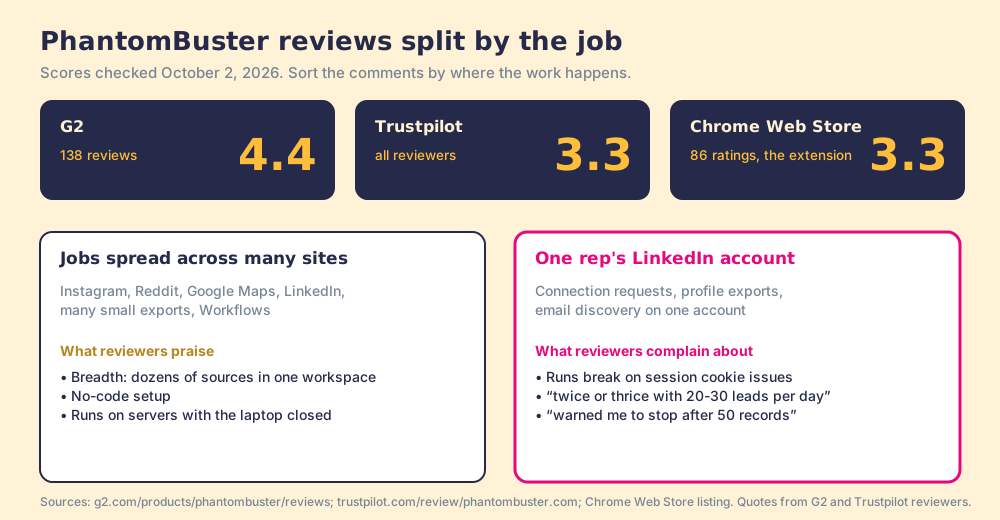
Sort the complaints and most of them fall on one side of the line. Cookies that expire, warnings at 50 records, runs capped at 20 or 30 leads a day: each describes the license, not the driver.
Is PhantomBuster safe for your LinkedIn account?
PhantomBuster’s own help center answers this more plainly than most reviews do, and it deserves credit for that. “LinkedIn doesn’t publish official automation limits,” and “using conservative settings improves stability, but no automation tool can eliminate risk entirely.” A second article adds that “upgrading your PhantomBuster plan gives you more slots, execution time, and credits, but it never lifts LinkedIn’s own limits,” which it puts at roughly 100 connection requests a week and 2,500 Sales Navigator search results (PhantomBuster help, plan vs platform limits, updated October 2, 2026). Its rate-limit table asks you to process “half of the recommended limits” when you use its email discovery, because the automation “has to open 2 pages per profile,” and it counts your own clicks too: “Both manual and automated actions count toward your total usage” (PhantomBuster help, rate limits, updated August 20, 2026).
LinkedIn’s side of the ledger is short. Its help page on prohibited software says it does not permit “browser plug-ins, or browser extensions that scrape, modify the appearance of, or automate activity on LinkedIn’s website,” and that members who use them “risk having their accounts restricted or shut down” (LinkedIn Help, prohibited software, checked October 2, 2026). The page names no vendor. It describes the category.
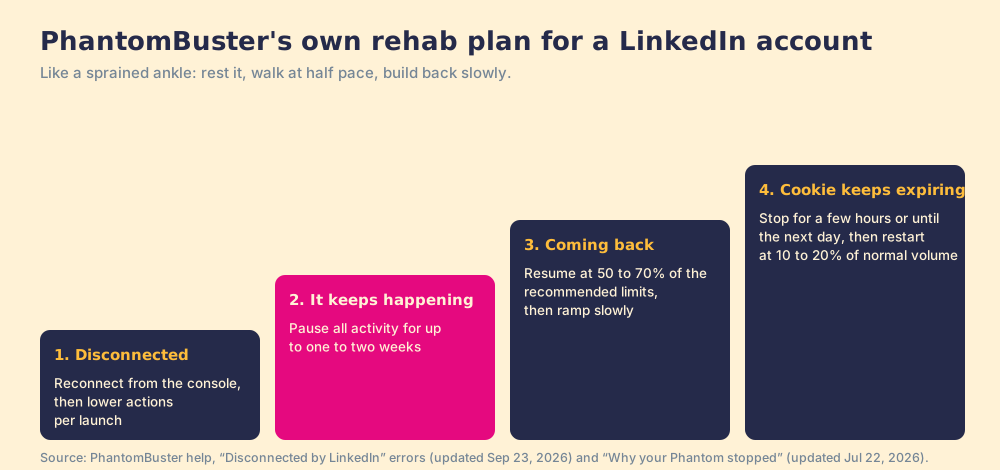
The best evidence of the cost is the recovery plan PhantomBuster publishes for a disconnection. Its guide to “Disconnected by LinkedIn” errors tells you to reduce activity, and “if disconnections happen regularly, consider pausing all activity for up to one to two weeks,” then resume at 50 to 70 percent of the recommended limits (PhantomBuster help, disconnection errors, updated September 23, 2026). When a cookie keeps expiring, a separate guide says to stop “for a few hours, ideally until the next day,” and ramp back from 10 to 20 percent of normal volume (PhantomBuster help, why a Phantom stopped, updated July 22, 2026).
Read those two pages together and you have a physiotherapist’s handout for a sprained ankle. Rest it for a week or two, walk on it at half pace, build back slowly. The advice is sound, and it tells you the ankle belongs to the rep.
The account is not a side asset. The Bridge Group’s 2025 report of 351 companies counts 112 activities in a median SDR’s day, and 19 of them happen on LinkedIn (Bridge Group, 2025). A week of rest is a week of those 19 gone.
One change from this year matters for safety-minded buyers. PhantomBuster now lets you connect LinkedIn with your email and password; its guide says the credentials are used “once to sign in to LinkedIn and generate a secure connection” and “are not stored,” and recommends an optional proxy that matches your usual location (PhantomBuster help, email and password, updated October 2, 2026). The login method changed. The driver and the license did not. The PhantomBuster Chrome extension page covers the third way to connect, the extension that detects your session.
How much does PhantomBuster cost?
The pricing page renders only in a browser, so these figures come from PhantomBuster’s help center article on plans, updated July 10, 2026, which dates its prices to May 2026.
| Plan | Monthly | Annual (per month) | Execution time | Email credits |
|---|---|---|---|---|
| Free trial (14 days) | $0 | n/a | 2 hours total | 50 total |
| Free | $0 | n/a | 30 minutes a month; 10-row exports | None |
| Start | $69 | $56 | 20 hours a month | 500 a month |
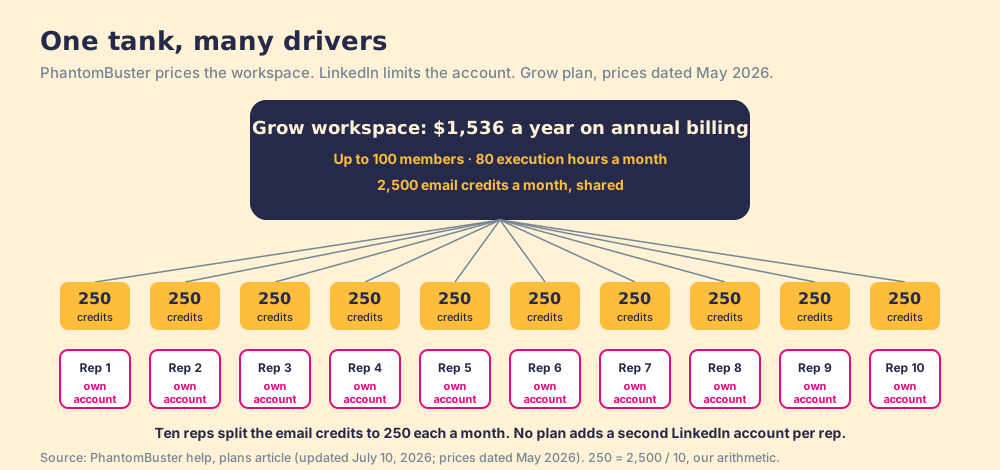
| Grow | $159 | $128 | 80 hours a month | 2,500 a month |
| Scale | $439 | $352 | 300 hours a month | 10,000 a month |
For a team, the workspace price is the friendliest number on this page. Grow on annual billing is $1,536 a year for up to 100 people. The catch is the shared pool: 2,500 email credits a month across ten reps is 250 each, and no tier buys a second LinkedIn license. The PhantomBuster alternatives page works the cost per execution hour and prices each rival for ten reps.
Why trust this review?
I started RevPartners, a HubSpot partner that did only sales implementations, sold roughly twice as much Sales Hub as any other partner, and reached Elite tier in 13 months. Supered grew out of that work and is the #1 sales enablement app on the HubSpot marketplace, rated 5.0 from 122 reviews there and 4.9 from 81 on G2 (checked October 1, 2026). The disclosure comes with it: we make Supered Prospector, and it ranks first below for sales teams that run Clay. The weights are printed so you can flip them, and the flip for a growth team puts PhantomBuster on top.
How does PhantomBuster compare with the alternatives?
The lens is a sales team of ten to fifty reps that runs Clay and wants the right people from LinkedIn in Clay and the CRM. Scores match the PhantomBuster alternatives page: LinkedIn account exposure (x3), contact data the rep can use (x3), lands in Clay and the CRM (x2), breadth beyond prospecting (x1), price for a ten-rep team (x1), out of 50.
| Rank | Tool | Grade | Score | Best fit | CRM integration | Setup effort | Pricing | Reason to switch from PhantomBuster |
|---|---|---|---|---|---|---|---|---|
| ref | PhantomBuster | C+ | 27 | Automation across many sites | Native HubSpot; one-way Salesforce and Pipedrive; Clay | Hours per Phantom | $69 / $159 / $439 a month per workspace | Stay if breadth is the job |
| 1 | Supered Prospector | A- | 41 | Sales teams that run Clay | Native (HubSpot, Salesforce, Pipedrive) | Days, on an existing Clay account | $45 per rep per month, billed annually, plus your Clay plan | Contact data from 200+ vendors without the rep’s session in the cloud |
| 2 | Wiza | C+ | 29 | One profile at a time, email and phone | Native (HubSpot, Salesforce, Pipedrive) | Minutes | From $990 a year per user | Verified email and phone on the profile the rep is reading |
| 3 | Evaboot | C+ | 25 | One-off bulk Sales Navigator exports | HubSpot, Pipedrive, Clay | Minutes | From $29 a month | Verified emails on a whole search, priced per lead |
PhantomBuster’s 27 is exposure 1, contact data 2, Clay and CRM 4, breadth 5, price 5. Reweight for broad automation (breadth x4, data x2, exposure x1) and it scores 38 and ranks first. Prospector’s 41 is exposure 4, data 5, Clay and CRM 5, breadth 1, price 3: it sends no connection requests and scrapes no Google Maps, so breadth gets a 1.
Corporate status, checked October 2, 2026: news searches found no 2026 acquisition, merger or rebrand for PhantomBuster, Wiza or Evaboot.
Where does Supered Prospector fit?
Back to the car. A sales team that hired PhantomBuster for LinkedIn usually wanted one errand run: fetch the right people, find their emails and phones, put them in the CRM. The finding half belongs to Clay. “Clay’s signature data waterfalls check multiple providers to return the most verified emails (lower bounce rate) and phone numbers (higher connect rate)” across 200+ data and AI vendors (clay.com, checked October 2, 2026), and “if an enrichment returns no result, you’re not charged Data Credits or Actions” (clay.com/pricing). The choosing half is what a rep does all day while reading profiles.
Prospector keeps the rep in the driver’s seat. It brings no database of its own; it brings Clay’s waterfall, which is every database, routed, and that is why we chose Clay as our only data provider. Clay plus Supered is the best way for a sales team to prospect: GTM engineers build in Clay, and reps never open Clay. Prospector runs inside the Supered Chrome extension, on the team’s own Clay account.
- One button per Clay table. The GTM engineer builds named flows once, each mapped to a Clay table and a destination; the rep picks one from a Push menu on a LinkedIn profile, a company website, or a HubSpot, Salesforce or Pipedrive record.
- Sales Navigator lists into Clay. Reps add Navigator leads to a prospect list and push the list to a Clay table.
- An owner check before the push. The rep sees the matching CRM record, who owns it, and a flag when the person was prospected before.
- Lists that end the way your process says. Found, Worked, Closed: each lead ends as Qualified, Recycled or Disqualified, and the manager watches the list become pipeline and coaches from what is converting.
On LinkedIn, our position is one sentence. Prospector works within LinkedIn’s terms and does not copy search results in bulk; the contact data comes from Clay’s waterfall on the customer’s Clay account. LinkedIn has not approved or partnered with us, and we do not claim it has.
The sticker favors PhantomBuster. Ten reps on Clay’s Growth plan at $495 a month plus Prospector come to $11,340 a year, against $1,536 for PhantomBuster Grow on annual billing. If you already pay for Clay, the added cost is the $5,400 for Prospector. Choose something else if you do not run Clay, since Prospector does nothing without a Clay account, or if the job is automation across Instagram, Reddit and Google Maps, which Prospector does not do.
Who should buy PhantomBuster?
Name the job, then read the line that matches it.
- A growth or agency team, many sites. PhantomBuster, from $56 a month on annual billing. Breadth is its home ground and the workspace price is fair for it.
- Automated LinkedIn connection requests and messages. PhantomBuster can do it; so can its rivals, and the account risk follows the job to whichever tool runs it.
- A sales team on Clay, LinkedIn people into the CRM. Supered Prospector, at $45 per rep per month billed annually.
- A sales team without Clay. Evaboot from $29 a month for a one-off Navigator export, or Wiza from $990 a year for one profile at a time with phones.
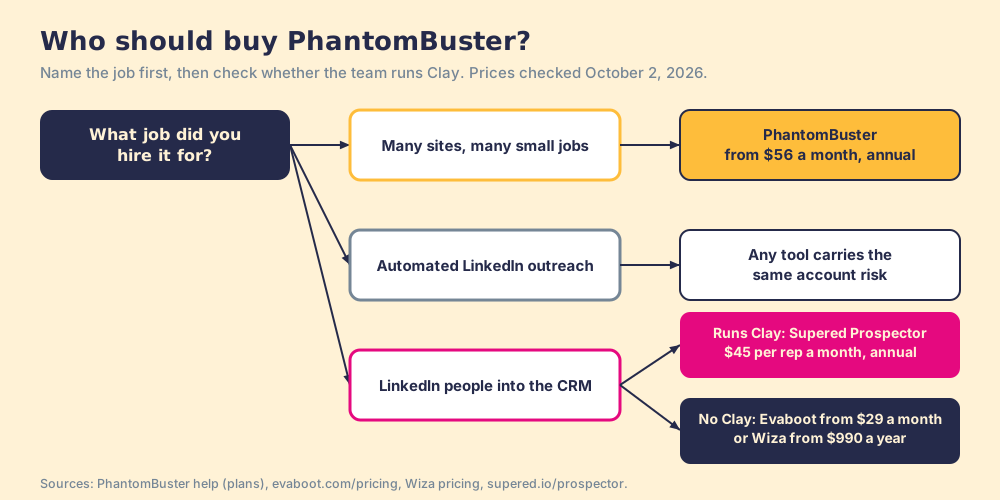
What we recommend turns on whose license is on the line. If PhantomBuster runs a dozen small jobs across a dozen sites, keep it and keep its LinkedIn Phantoms gentle; the vendor’s own limits page is the best manual you will get. If it mostly runs one job on your reps’ LinkedIn accounts, retire the driver and let the reps choose the person on the page they are reading, with Clay doing the finding and the CRM receiving the record. The sourcing use case shows how a Clay team sets that up, and the Sales Navigator scraper page covers what LinkedIn’s User Agreement says about the rest.
Frequently asked questions
Is PhantomBuster worth it in 2026?+
Is PhantomBuster safe for my LinkedIn account?+
What do PhantomBuster reviews say?+
How much does PhantomBuster cost?+
Does PhantomBuster work with Clay and HubSpot?+
What is the best alternative to PhantomBuster for a sales team on Clay?+
Everything we have written on PhantomBuster
More on PhantomBuster
Looking past PhantomBuster? See Supered Prospector on your own Clay accountYour Clay waterfall, where reps already work.