Instantly Clay Integration: The Setup, the Plan Gate, and the CRM the Chute Cannot See
The Instantly Clay integration drops enriched leads from a Clay table into an Instantly campaign in one column. How to set it up step by step, which Clay plan it needs, the one duplicate check it runs, and the CRM check it cannot run on Clay Launch.
The Instantly Clay integration is Clay's native connector to Instantly: an Add Lead to Campaign action that sends each enriched row of a Clay table into an Instantly campaign, plus Find leads and Verify Email, connected with an Instantly API v2 key.
How to set up the Instantly Clay integration
20 min- 1
Prepare the Clay table
Give the table an email column (the only required field) and add first name, last name, company, and any custom columns you want to use for personalization or subject lines.
- 2
Create an Instantly API v2 key
In Instantly, open Settings, Integrations, API Keys, click Create API Key, name it, select only the scopes the integration needs, and copy the key; Instantly shows it once.
- 3
Add the Instantly action in Clay
In the table, click Add enrichment, search Instantly, choose Add Lead to Campaign, and add your account with the version 2 key.
- 4
Pick the campaign and switch on the skip
Select or enter the Instantly campaign ID and turn on Skip if Lead is in Workspace so a lead already in any campaign in the workspace is not added again.
- 5
Map the variables
Map the email column, then click each optional field and type / to insert a Clay column for name, company, personalization, subject line, and custom variables; flatten any list-shaped column into plain text first.
- 6
Gate the run and read the statuses
Set Only run if so the action fires only on rows with a verified email that meet your criteria, run the column, and read each row's status: Added to Campaign, Skipped already in the workspace, or Missing input.
An account executive at a software company is three calls into a deal with a VP of Operations. On the fourth morning the VP forwards her a cold email from her own company, signed by an SDR she has never met, asking whether the VP has “a few minutes to explore.” The email came out of an Instantly campaign. The lead came out of a Clay table. Both tools did exactly what they were told.
The Instantly Clay integration is Clay’s native connector to Instantly: an Add Lead to Campaign action that sends each enriched row of a Clay table into an Instantly campaign, plus Find leads and Verify Email, connected with an Instantly API v2 key (Clay University, Instantly integration, read October 2, 2026). The short version, before the setup:
- The plan. Clay Launch or above, $185 a month or $167 billed yearly, and any Instantly workspace that can create an API v2 key.
- The duplicate check. One toggle, Skip if Lead is in Workspace, which looks inside Instantly and nowhere else.
- The gap. A CRM lookup before the send is a Growth-plan step in Clay, so on Launch the table can email a person your AE is already working.
What does the Instantly Clay integration do?
It moves a row from a spreadsheet into a send queue. Clay University lists three actions under Instantly, and they arrive in the order a lead meets them:
- Verify Email. Takes an email and determines “if an email address is a valid inbox and whether it’s a catch-all domain.” Run it before the send, not after the bounce.
- Find leads. Takes an email and an optional campaign ID to look a lead up inside Instantly.
- Add Lead to Campaign. Takes a campaign ID, an email, and the optional “Skip if Lead is in Workspace,” which “will skip if the lead already exists in any campaigns in the workspace.”
The cleanest way to hold the integration in your head is an office building with a mail chute. Upstairs, in the Clay mailroom, the GTM engineer writes the letters: a table of people, a waterfall that finds each verified work email across Clay’s 200+ data vendors (clay.com, checked September 25, 2026), and AI and formula columns that write the first line. The Add Lead to Campaign column is the chute. A letter dropped in it lands downstairs in an Instantly campaign, which sends it on its schedule. The chute has one slot check, a clerk who asks whether this envelope is already somewhere in the Instantly building. Across the hall sits the CRM office, where the AE keeps her deals. No pipe runs from that office to the chute.
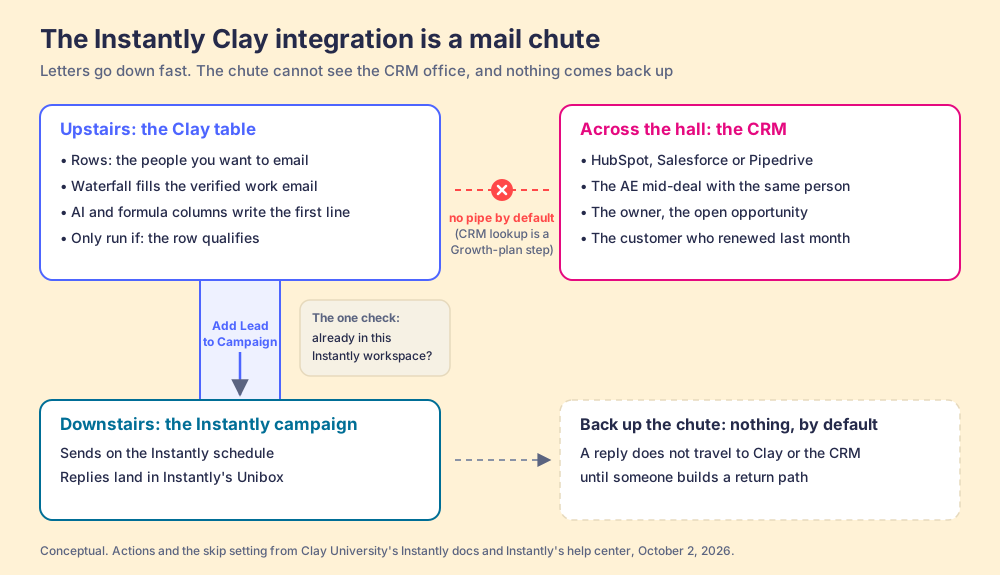
One correction to the chute: a real one has no brain, and this one has run settings. Clay lets the builder auto-update the column and set “Only run if,” so the chute opens only for envelopes that pass a test. That test is where the builder writes the judgment the chute lacks.
Instantly’s own marketplace listing describes the same job from the other end: “Push enriched, multi-source lead data from Clay directly into outbound campaigns. Skip manual CSV uploads” (Instantly marketplace, Clay, read October 2, 2026). The CSV is what the chute replaces. For cold email, that matters more than it sounds: Instantly’s 2026 benchmark found “58% of all replies are generated from step one,” with an average reply rate of 3.43% across its platform (Instantly Cold Email Benchmark Report 2026, published January 12, 2026; vendor data). If more than half the replies come from the first email, the columns Clay fills before the first email are where the campaign is won or lost.
How do you set up the Clay to Instantly integration, step by step?
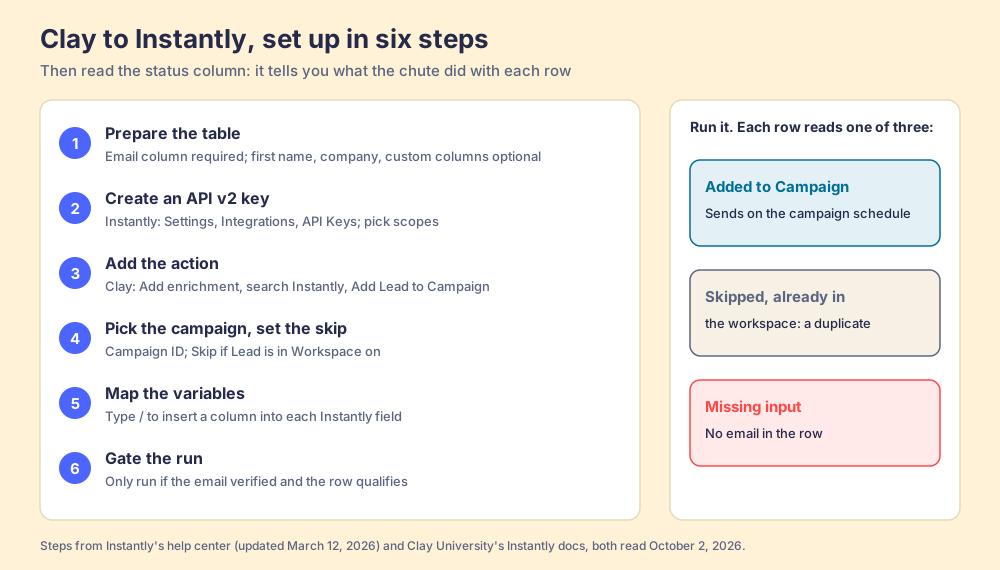
Twenty minutes, if the table is already built. The steps below combine Instantly’s help article (Setting up Clay and Instantly integration, updated March 12, 2026) with Clay’s docs.
- Prepare the table. Instantly says “only the email variable is required.” Add first name, last name, and company, plus any columns you plan to use for personalization and subject lines.
- Create an Instantly API v2 key. In Instantly, Settings, Integrations, then API Keys, then Create API Key. Name it, select the scopes, copy it. Instantly’s developer docs warn the key “will be displayed only once” (Instantly API, Getting Started, read October 2, 2026).
- Add the action. In the Clay table, Add enrichment, search “Instantly,” choose Add Lead to Campaign, then ”+ Add account.” Clay’s docs: “If you are adding your API key, make sure to add version 2.”
- Pick the campaign and set the skip. Select or paste the campaign ID and switch on Skip if Lead is in Workspace.
- Map the variables. Click each Instantly field and pick a column from the dropdown, or “Type
/to insert a column.” Map personalization, subject line, and custom variables here. - Gate the run. Set “Only run if” to the conditions that make a row sendable: email verified, title in range, not a competitor.
Then run the column and read it. Each row comes back with one of three statuses: “Added to Campaign,” “Skipped, already in the workspace,” or “Missing input.” The prospects that were added are “sent out according to your Instantly schedule.”
Three details from the docs save an afternoon of debugging:
- The old-key trap. Instantly moved to API v2, and Clay’s docs say that for any actively used Find leads or Add Lead to Campaign column built on the old key, “you will need to create a new column. (Do not duplicate the original column, create a new one from
Add enrichment.)” A duplicated column carries the old connection with it. - The flat-variable rule. Instantly’s API accepts custom variable values only as “string, number, boolean, or null. We do NOT allow objects or arrays as values” (Instantly API, Create lead, read October 2, 2026). A Clay column that holds a list (three recent funding rounds, a tech stack) needs a formula that joins it into one line of text before it goes down the chute.
- The rate limit. Instantly allows “no more than 100 requests per second” and “no more than 6,000 requests per minute,” shared across the whole workspace and every key in it (Instantly API, Rate Limit). A table with auto-update on and a few thousand rows can trip it while another integration is running; stagger the runs.
Which Clay and Instantly plans does the integration need?
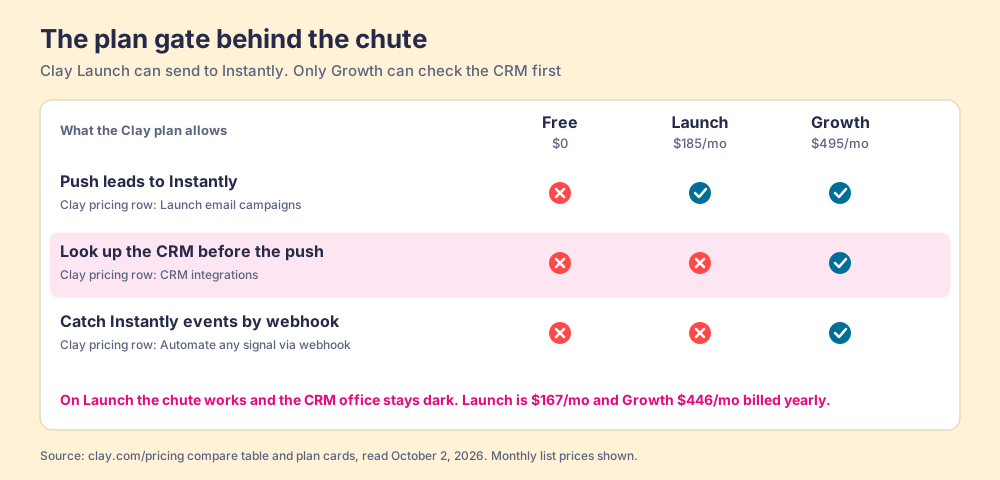
On the Clay side, the line on the pricing page that matters is “Launch email campaigns,” described as “natively in Clay or via integrations with email campaign providers.” The compare table marks it not included on Free and included on Launch, Growth and Enterprise (clay.com/pricing, read October 2, 2026). Launch starts at $185 a month, or $167 billed yearly, with 2,500 Data Credits and 15,000 Actions a month. Growth starts at $495, or $446 billed yearly.
On the Instantly side, the integration needs an API v2 key, and neither Instantly’s help article nor its developer docs tie the key to a plan. The constraint that bites is uploaded contacts. Instantly’s Outreach plans on October 2, 2026: Growth $47 a month ($37.60 billed yearly) with 1,000 uploaded contacts and 5,000 emails a month; Hypergrowth $97 ($77.60 yearly) with 25,000 uploaded contacts; Light Speed $358 ($286.30 yearly) with 100,000 (instantly.ai/pricing). A Clay table of 4,000 qualified rows will not fit in a 1,000-contact workspace, and the chute does not warn you before the fourth thousand.
| Job | Clay Free | Clay Launch ($185/mo) | Clay Growth ($495/mo) |
|---|---|---|---|
| Push leads to Instantly (“Launch email campaigns”) | Not included | Included | Included |
| Look up HubSpot or Salesforce before the push (“CRM integrations”) | Not included | Not included | Included |
| Receive Instantly events by webhook (“Automate any signal via webhook”) | Not included | Not included | Included |
Read the middle column twice. On Clay Launch the chute works and the CRM office stays dark. The plan that lets you send to Instantly is not the plan that lets the table ask HubSpot, Salesforce or Pipedrive whether the person already belongs to someone. Neither vendor’s setup article mentions this, because neither setup article is about the CRM.
What can the Clay Instantly sync not see?
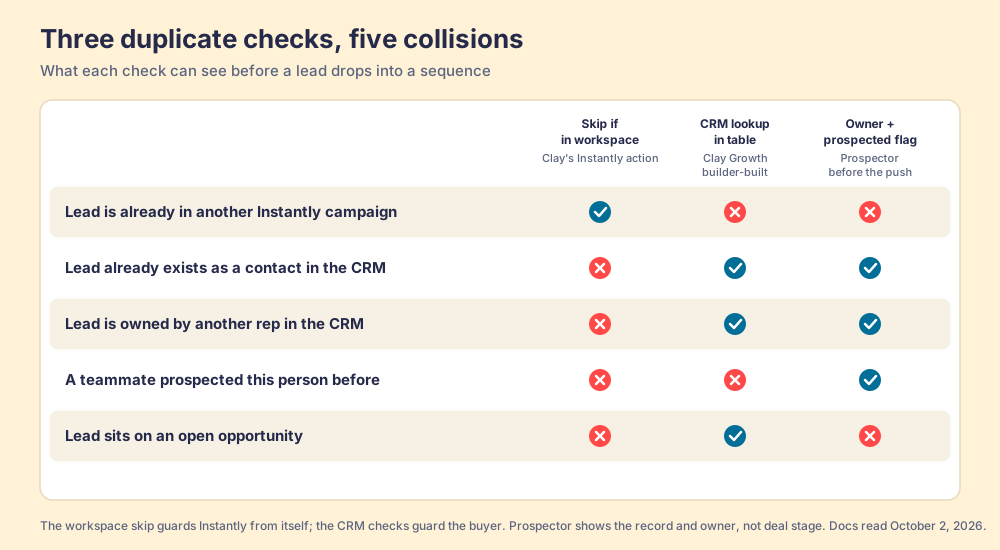
The AE’s forwarded email from the opening came through a gap with a precise shape. Skip if Lead is in Workspace protects Instantly from itself: it stops one lead from sitting in two campaigns. It was never built to protect the buyer from the company, because the buyer’s relationship with the company lives in the CRM.
Suppose the same VP of Operations is a contact on an open opportunity in HubSpot. Walk her down the chute. The waterfall finds her email; Verify Email marks it valid; Only run if checks the title and passes; the workspace skip looks in Instantly, finds nothing, and lets her through. Four checks, all green, and every one of them looked in the wrong building. On Growth, a builder can add a HubSpot or Salesforce lookup column in front of the push and branch on the result (the Clay HubSpot integration page walks through that lookup action by action). On Launch, the table has no way to ask.
The second blind spot runs the other way. Nothing comes back up the chute. A reply lands in Instantly; the Clay row still says “Added to Campaign,” and the CRM record, if one exists, has no idea. Instantly’s API does emit the events a return path needs: reply_received, lead_interested, lead_meeting_booked, lead_not_interested, and a dozen more (Instantly API, Webhook events, read October 2, 2026). Routing them back into a Clay table that listens for webhooks is a Growth-plan job on Clay’s side, and routing them into the CRM is a separate integration someone has to own.
Neither gap is a flaw in either product. Clay governs the data and Instantly governs the send, and each does its job well. The gaps sit between the buildings, which is where a sales team works.
How do reps run the Clay to Instantly flow without opening Clay?
With the native integration, they do not run it at all. A rep who finds a good prospect on LinkedIn has two routes into the campaign: paste the URL into a Slack message to the GTM engineer, or export a CSV and ask someone to load it. The GTM engineer becomes the list desk (what Prospector changes for GTM engineers), the person reps Slack for every list, and the table that was built to scale outbound now scales at the speed of one inbox.
Clay says the builder and the runner are different people: “GTM engineers build on Clay,” and the goal is to “build centralized workflows for any rep to run” (clay.com, checked September 25, 2026). We agree, and we built Supered Prospector to finish that sentence: Clay plus Supered is the best way for a sales team to prospect, because GTM engineers build in Clay and reps never open Clay.
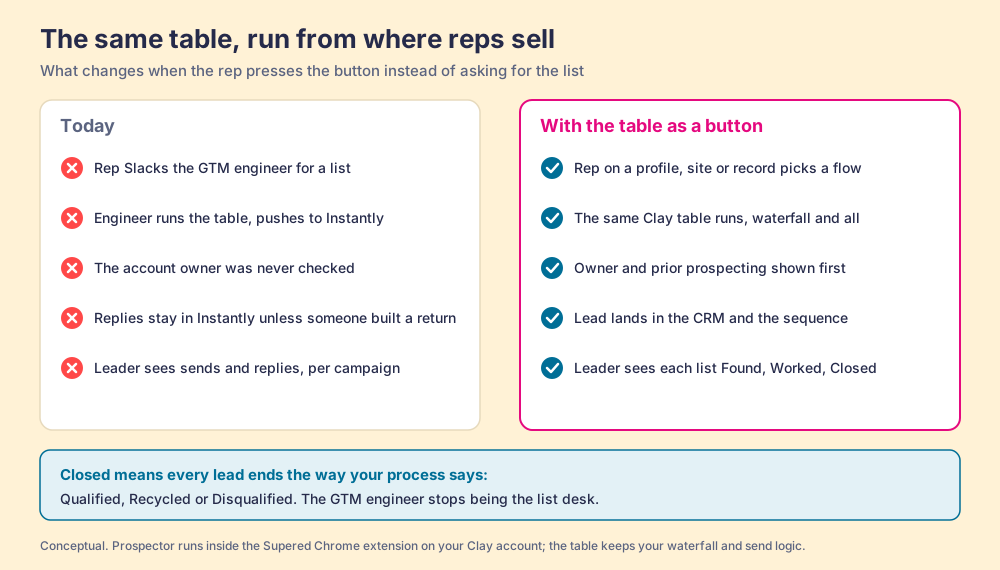
When the table becomes a button, five things change in the building:
- Flows, built once. The GTM engineer names flows (person enrichment, buying committee, a new-logo campaign), each mapped to a Clay table and a destination. Your logic stays yours: waterfalls, tiers, tags, and sequence variables. Start from the Supered Clay template or bring your own tables.
- A Push menu where the rep already is. Prospector runs inside the Supered Chrome extension, on your own Clay account, from a LinkedIn profile, a Sales Navigator list, a company website, or a HubSpot, Salesforce or Pipedrive record. The rep picks the flow; the table runs. On Sales Navigator, reps add leads to a prospect list and push the list to a Clay table.
- The CRM office, lit before the push. On a profile, the rep sees the matching CRM record, who owns it, and whether a teammate prospected the person before. The chute could not run that check; the rep runs it, the person who can judge it, before the lead goes anywhere.
- The send, unchanged. Prospector does not send email and does not replace Instantly. It runs your Clay table, and whatever that table does next (including an Add Lead to Campaign column) runs the way your builder wrote it. The lead also lands in the CRM in one click, with field mapping set once.
- A list the leader can follow. Every list shows up three ways. Found: reps use your tables, with no duplicate work. Worked: who is working their list, and who isn’t. Closed: no lead left hanging, every lead ends the way your process says, Qualified, Recycled or Disqualified.
A note on LinkedIn, since the button lives there. Prospector works within LinkedIn’s terms and does not copy search results in bulk; the contact data comes from Clay’s waterfall on the customer’s Clay account. Ask any extension vendor what it reads from the page, ours included.
The arithmetic. Prospector is $45 per rep per month, billed annually, from one rep (Prospector). For ten reps that is $5,400 a year. Add Clay Growth at $446 a month billed yearly, $5,352, for $10,752, before Instantly. Growth is the plan where the table can also check the CRM and hear back from Instantly, so for a team with reps it is the plan to price.
Choose something else if one person runs all your outbound. A solo founder or a two-person agency who builds the table and works the replies does not have a list desk or a CRM collision; the native chute is enough, on Launch, with a good Only run if. Choose something else, too, if you want a tool that writes and sends the emails: Prospector does neither, and Instantly and Clay both do. And if you do not have Clay yet, Prospector does nothing without it. RevPartners, a Clay Elite Studio Partner and the company I founded, builds and tunes Clay tables for teams that want help; other Clay partners do too.
Why trust this page?
I started RevPartners, a HubSpot partner that did only sales implementations; it sold roughly twice as much Sales Hub as any other partner and reached Elite tier in 13 months. Supered came out of that work and holds 4.9 out of 5 from 81 reviews on G2 and 5.0 from 122 reviews on the HubSpot App Marketplace (both checked October 1, 2026). The disclosure: we make Prospector. Every mechanic above comes from Clay’s and Instantly’s own docs, read the day this was published, and both companies are independent as of that date (Clay raised a Series D on September 9, 2026, per its announcement).
What we recommend
Three ways forward, by team shape.
- One builder who also works the replies. Use the native integration on Clay Launch. Turn on the workspace skip, gate the run with Only run if, flatten list columns, and accept that the CRM check is you remembering.
- A builder feeding SDRs, all on one CRM. Move to Clay Growth before you scale the chute. Put a CRM lookup column in front of Add Lead to Campaign, branch on owner and open deals, and wire Instantly’s reply webhooks back so the CRM hears what the campaign heard.
- A builder, a team of reps, and a list desk. Do the Growth work above, then give the reps the table as a button. The send stays in Instantly; the judgment about whether to send moves to the rep who can see the owner; the leader follows each list from found to closed.
Our recommendation is the third for any team with more than a couple of reps, and the reasoning is the evidence above. More than half of cold-email replies come from the first email (58%, Instantly’s benchmark), so the enrichment Clay does before that email is the expensive part, and it is wasted on a VP whose AE is mid-deal. The workspace skip cannot see that, Launch cannot look it up, and a list desk cannot keep up with the requests. A rep on the profile, with the owner in front of her, can.
The AE with the forwarded email did not need a better campaign. She needed the chute to know which office the VP already belonged to. For the full catalog of what to build in the table first, see Clay workflows and Clay templates; for the rep-side layer across every surface, read the Clay Chrome extension guide and sourcing with Supered; and for the same lookup-before-push story in a Pipedrive account, see the Clay Pipedrive integration.
Frequently asked questions
How do I connect Clay to Instantly?+
Which Clay plan do I need for the Instantly integration?+
What can the Clay Instantly integration do?+
Does the Instantly Clay integration prevent duplicates?+
Do Instantly replies sync back to Clay or the CRM?+
Can reps send leads to Instantly without opening Clay?+
Your process, running itself.