Claude for Sales: Connect the Tools, Then Hand It Your Rules
Claude can update your CRM, draft your follow-ups and prep your calls. It cannot know what a finished deal means on your team. The connectors and plugins a sales team needs, verified, and why the rules have to live outside the chat.
Claude for sales is the use of Anthropic's Claude, connected to your CRM, inbox and calendar through connectors and run in Cowork, to do a seller's prep and admin work: update records, draft follow-ups, prep calls and review pipeline.
Connect HubSpot to Claude, type “clean up my pipeline,” and something impressive happens. Claude reads your open deals, finds the stale ones, proposes new close dates, and drafts the follow-ups you owed three people last week. It is fast and it is polite about it. Then you look down the list of what it flagged, and a small question arrives. Clean by whose standard?
Anthropic’s own sales plugin answers that for you if you let it. Its CRM hygiene skill flags a deal when the next step has gone 14 days without changing, or the last activity is more than 14 days old, and its instructions say those thresholds “tune to org context” (Anthropic, sales plugin). Your team might run a five-day follow-up rule. Your VP might care more about a named decision maker than about either. Claude for sales does excellent work against whatever standard is in the room, and when you have not put yours there, it brings its own.
So the setup has two halves. One half is the connectors, plugins and settings Anthropic ships, and I have checked every one below against Anthropic’s documentation as of October 1, 2026. The other half is your rules, and they have to live somewhere outside the chat, because AI amplifies the process you already run. In The State of Sales Enablement 2026, teams with strong process adherence rated the impact of AI as high 40% of the time. Teams with weak adherence said the same 21% of the time. Same tools, roughly half the payoff.
What can Claude do for a sales team today?
Four pieces do the work, and each has a plan requirement worth knowing before you promise anything to your team.
- Cowork, the workspace. Cowork “uses the same agentic architecture that powers Claude Code, with no terminal required,” and runs in the desktop app on macOS and Windows, on the web, on mobile and in the Chrome side panel. It needs a paid plan: Pro, Max, Team or Enterprise (Anthropic, Get started with Cowork).
- Connectors, the hands. “Connectors let Claude access your apps and services, retrieve your data, and take actions within connected services.” They run on the Model Context Protocol, and Claude inherits each person’s permissions from the connected tool, so a rep’s Claude sees what that rep can see and nothing more. Directory connectors work on every plan, Free included (Anthropic, connectors).
- Skills and plugins, the know-how. A skill is a folder of instructions Claude loads when a task matches it. A plugin bundles skills, connectors and sub-agents into one install, and plugins are available on all paid plans (Anthropic, plugins).
- Scheduled tasks, the clock. A task can run hourly, daily, on weekdays or weekly, and it “run[s] remotely, so they run on their cadence even when your computer is asleep or the Claude Desktop app is closed.” Paid plans only, and from October 6, 2026, Pro and Max tasks run only in the cloud (Anthropic, scheduled tasks).
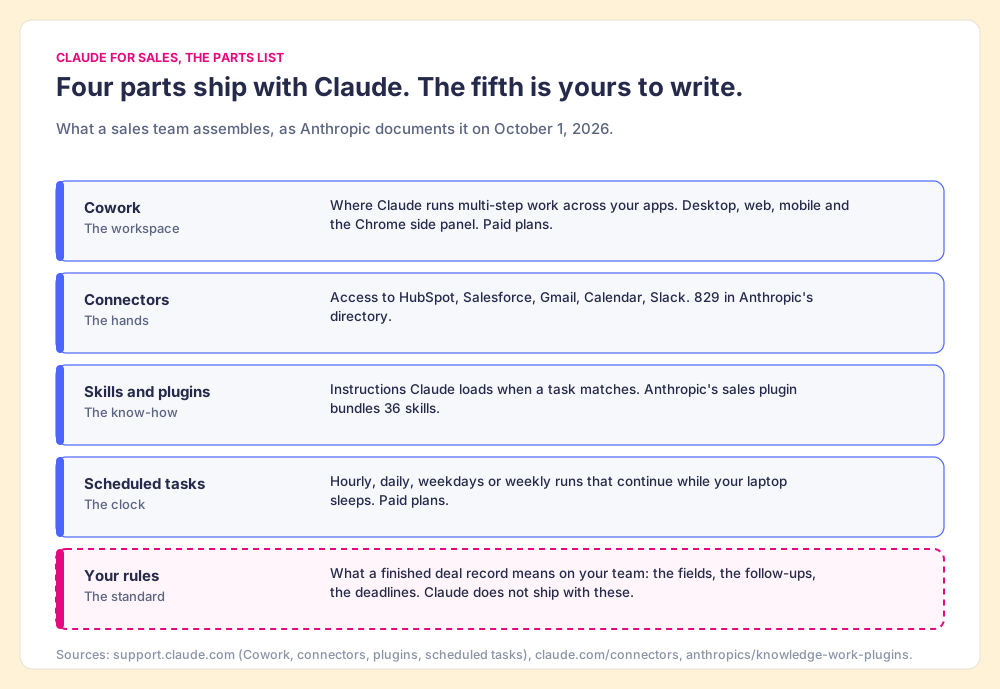
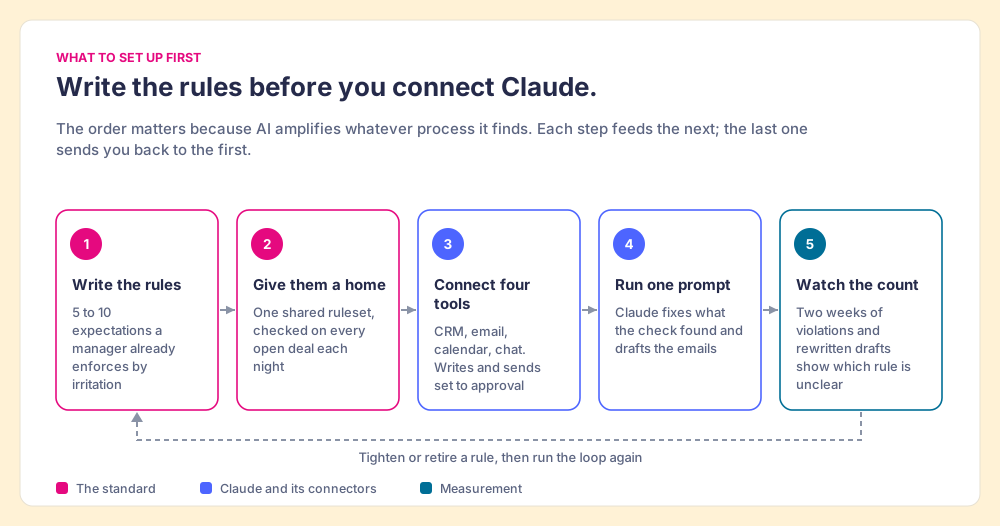
Put those four together and you have a capable assistant who can open every door in the building. The fifth part is the one the figure draws with a dashed line. Nothing in the box tells Claude what a finished deal record means at your company.
Which Claude connectors does a sales team need?
Anthropic’s directory listed 829 connectors when I checked it on October 1, 2026 (claude.com/connectors). A sales team uses a handful. The table lists the ones that carry the work, what each can do, and what has to happen before a rep can sign in.
| Job | Claude connector | What Claude can do there | Before a rep connects |
|---|---|---|---|
| CRM | HubSpot | Read deals, contacts and engagement history; create and update records 10 at a time; no deletes | Paid Claude plan; a Super Admin approves the connector for most users |
| CRM | Salesforce (beta) | Review pipeline, summarize opportunities and accounts, draft updates | An admin enables it and sets up the org’s Salesforce app |
| Gmail or Microsoft 365 | Draft replies, summarize threads, search the inbox | Set send actions to need approval | |
| Calendar | Google Calendar or Outlook | Read your schedule and coordinate meetings | An Owner enables it on Team and Enterprise |
| Chat | Slack or Teams | Send messages, create canvases, fetch channel data | An Owner enables it on Team and Enterprise |
| Call recorder | Gong, Fireflies, Zoom, Otter.ai | Pull transcripts and call history into a recap or deal review | An account with the recorder |
| Your rules | Wherever they live | Read the standard each deal is held to, and which deals break it | The rules have to exist somewhere a connector can reach |
The HubSpot details come from HubSpot’s knowledge base, updated September 17, 2026: the connector needs “a paid Anthropic subscription (Pro, Max, Team, or Enterprise),” it bulk-edits 10 records at a time, and it can view, create and update but never delete (HubSpot). Salesforce’s connector is a beta that Salesforce built (claude.com, Salesforce), and Anthropic’s plugin notes say an admin has to enable it “before people can sign in.” The call recorders are the ones Anthropic’s sales plugin lists as included servers.
Two settings deserve a minute of an admin’s time. On Team and Enterprise, an Owner has to enable connectors for the organization before anyone can use them, and can set each action to “Always allow, Needs approval, or Blocked.” Anthropic’s sales plugin recommends that scheduled runs keep “send, post and write tools” on ask, “so nothing goes out or changes without a person approving it.” I agree, at least for the first month.
Is there a Claude sales plugin, and what is it good for?
Anthropic publishes an open-source sales plugin built for Cowork, and version 2.0 grew from 9 skills to 36. It reads your CRM’s own stages and fields instead of assuming one vendor’s setup, and it works from an uploaded export when nothing is connected. Five Claude Cowork use cases pay off first for a sales team, and together they make a fair map of Claude Cowork for sales in a rep’s week:
- The morning brief. The daily-briefing skill lists today’s meetings with account context, deals closing soon and customer emails waiting.
- Call prep. Attendees, account history, prior call context and open opportunity status, pulled before the meeting instead of during it.
- The post-call recap. The call-summary skill turns a transcript into a follow-up draft and proposed CRM updates, and “nothing is written to the CRM or sent until you say so.”
- The evening sweep. Ryan Gunn runs a scheduled task every evening that turns the day’s spoken commitments into a task list, which he walks through in his Claude HubSpot integration.
- The hygiene pass. The crm-hygiene-check skill is read-only: it audits open opportunities for blank amounts, past close dates, stale next steps and single-threaded deals, then hands a fix list to a separate skill.
Read that list again and count how many items lean on a definition only your team has. The brief needs to know which deals count as “closing soon.” The recap needs your follow-up format. The hygiene pass needs your thresholds, and ships with 14 days because it has no way of knowing yours. Four of the five run on a standard Claude has to be told.
Whose definition of a clean pipeline does Claude use?
A furnace is a powerful machine with no opinion about temperature. Hook it to the ducts and it will heat every room in the house, as hard as you like, for as long as you like. What it cannot do is decide that 68 degrees is right. That decision lives in a small box on the hallway wall, with a set point and a sensor, and the box is what calls the furnace when the house drifts. Take the thermostat away and the furnace still works. It runs when somebody feels cold and goes to find the switch.
Claude is the furnace. Connectors are the ducts, and the rooms are your CRM, your inbox and your calendar. The thermostat is your rules: the set point that says what a finished deal looks like, and a sensor that checks the house every night whether or not anybody feels a chill.
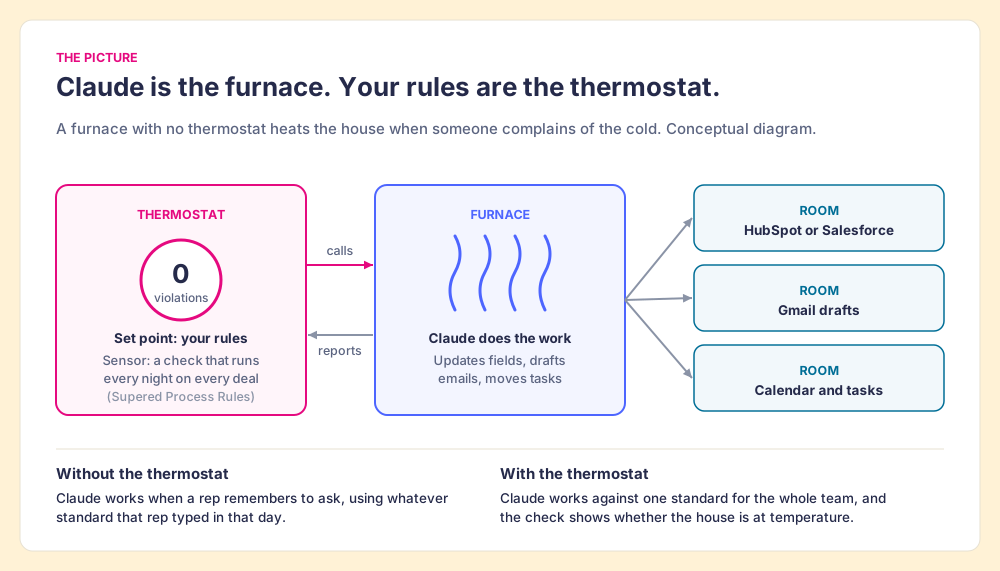
The comparison stops working in one place. A real furnace does exactly one thing. Claude can also argue with you, explain itself, and propose a better set point, which is useful when you are writing the rules. It does not change who has to own them.
The State of Sales Enablement 2026 shows what happens when the set point is missing. 89% of teams have a defined sales process. 36% see reps run it as designed. That 53-point gap is the house Claude walks into, and the same survey found AI pays off in proportion to how well the process is followed: 40% of strong-adherence teams rate AI’s impact high, against 21% of weak-adherence teams (The State of Sales Enablement 2026). Teams are already pointing AI at this exact work: 46% use it for CRM admin and cleanup.
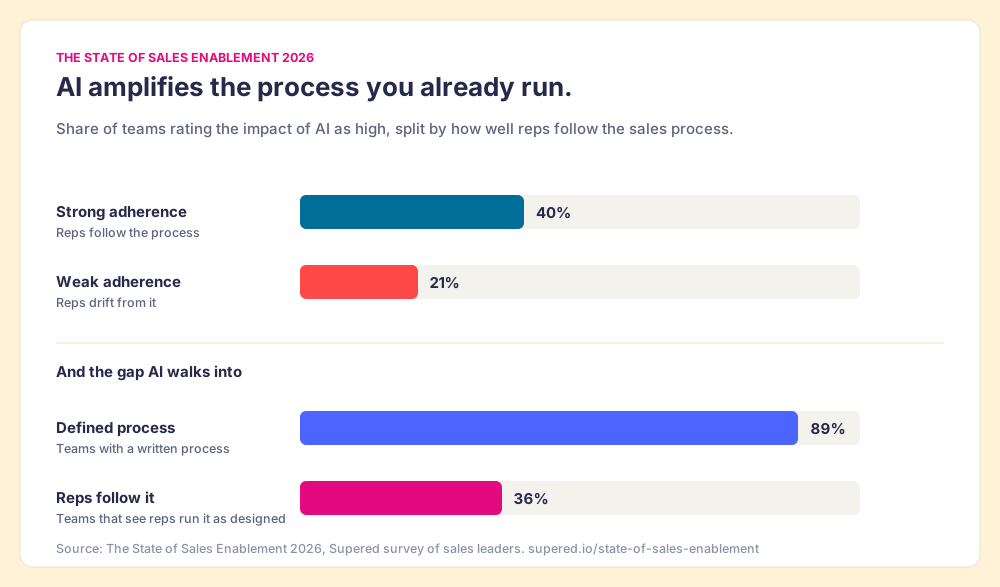
Put the two findings side by side. Teams hand AI the cleanup, and AI cleans to the standard it is given. Where that standard is a written process that goes unchecked, the cleanup is fast, tidy and aimed at a target the rep made up that afternoon.
Where should your sales rules live: in a prompt, a skill, or outside the chat?
The most practical advice on this question so far comes from Greg Grand, a fractional CRO, in his guide to Claude for sales teams: “Build a prompt template for each workflow and put it in a shared library.” The manager reviews the templates in one-on-ones, and he puts the reason in one line: “Adoption holds when the manager checks. It fades when nobody does” (Grand, The AI Sales Leader, July 2026).
He is right, and I would put that second line on our homepage if it were ours. A shared library beats a dozen reps each improvising a prompt. Where I part ways is the word “manager.” The check he describes depends on a person with spare hours, and The State of Sales Enablement 2026 shows how fast those hours run out. Process adherence sits at 47% on teams with one to five reps per manager and falls to 23% at six to eight. The top reason reps skip the process, cited by 29% of teams, is that managers do not enforce it, and capacity comes up more often than indifference. Managers are not lazy. They are out of hours.
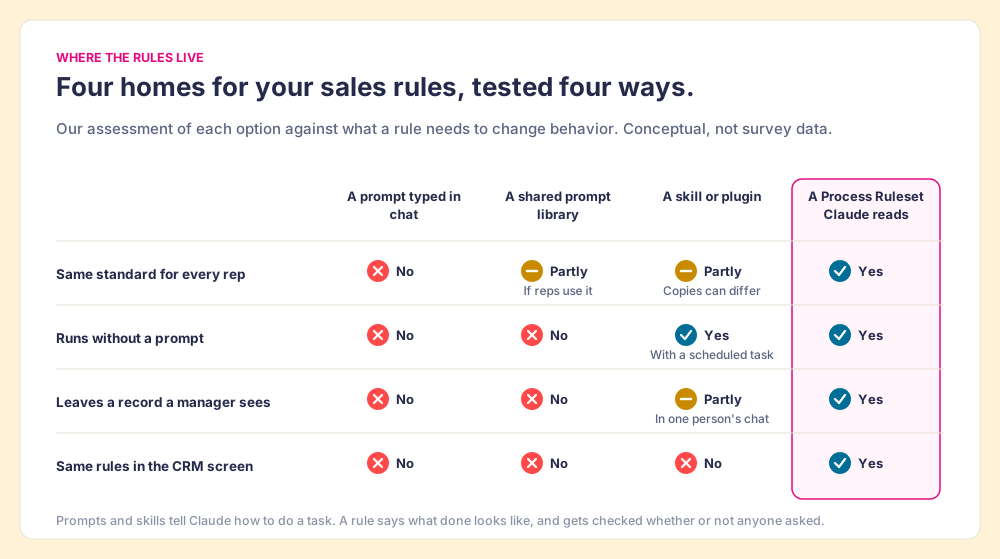
A prompt also has a narrower job than a rule. A prompt tells Claude how to do a task when someone asks. A rule says what done looks like, and gets checked whether anyone asks or not. The four places a team can keep its rules hold up differently against what a rule needs to change behavior:
- A prompt typed in chat. It lives as long as the conversation. The next rep types a different one.
- A shared prompt library. One standard, used when a rep remembers to open it. It leaves no trace of whether the deal met it.
- A skill or plugin. Claude loads it when a task matches, and a scheduled task can run it unattended. The results land in one person’s session, and each user’s copy can drift from the next.
- A ruleset Claude reads. One standard for the team, checked against every open deal on a schedule, with a record a manager can open and the same rules showing in the CRM screen.
The record matters more than it looks. Benjamin Harkin and colleagues pooled 138 experiments with 19,951 participants and found that monitoring progress toward a goal raises the odds of reaching it, and that the effect grew “if the information was physically recorded or publicly reported” (Harkin et al., Psychological Bulletin, 2016). A check that happens inside one rep’s chat window is monitoring with no record. A board that shows the team’s violation count every morning is monitoring with one.
Why can’t you trust Claude to get it right on its own?
Claude will get most of it right, and that is the hazard. Raja Parasuraman and Dietrich Manzey reviewed the research on how people work alongside automated decision aids and found two habits that show up in experts and novices alike. Complacency: people stop checking a system that is usually correct, and it “cannot be overcome with simple practice.” Automation bias: when the aid is imperfect, people make errors of omission and commission by following it, and the bias “cannot be prevented by training or instructions” (Parasuraman and Manzey, Human Factors, 2010).
Translate that to a sales floor. Claude sets close dates from the next meeting on the calendar, and for weeks the dates are fine. The rep stops reading them. Then one deal’s next meeting turns up as a vendor call, and the forecast now carries a date the buyer never agreed to. The rep was not careless. The research says this is what people do.
The fix the research points to is a standard outside the person, checked by something other than their attention. Rules give Claude’s work something to be graded against, and grading is how you find out, deal by deal, whether AI is doing what you intended. Keep send and write actions on approval while you learn where Claude is wrong, and let the nightly check, rather than the rep’s vigilance, catch what slipped through.
What does it look like when Claude reads your rules?
I will use my own deals, because I ran this myself. My Supered board is called Zero Board, Sales Expectations, and it holds 22 Process Rules across my open deals. Late one night it showed 11 violations: close dates in the past, no amount on deals past Discovery, overdue tasks, no pre-call email within 24 hours of a meeting, no recap sent, no decision maker named. The board’s streak was about to reset at midnight.
I had Supered, HubSpot and Gmail connected to Claude, and I typed one prompt: “Look at my Zero board and fix all my violations. Draft anything that needs an email.” Claude loaded my rules first, then found each violation. It filled amounts from my discovery notes, matched close dates to the next meetings on my calendar, and wrote the recaps and pre-call emails, each with a recommended next step, into Gmail drafts for me to read before sending. The board went to zero. By hand that is about 45 minutes of clicking. With Supered and Claude it took about 10. The next morning the Slack summary showed zero violations across all boards. One night, my own pipeline, not a study.
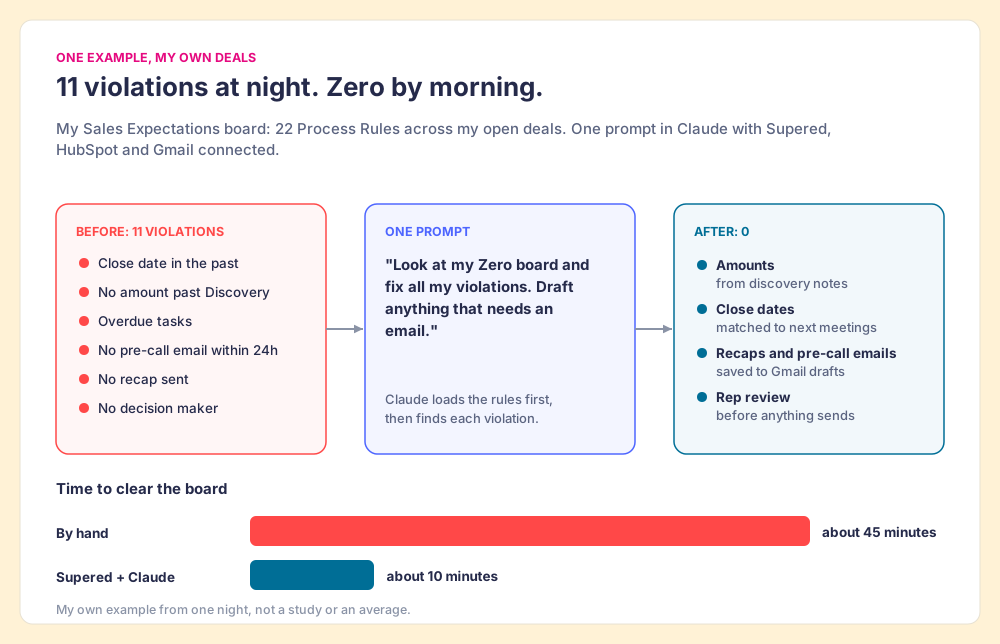
The ten minutes is the less interesting number. The rules did not live in my prompt. They lived in a Process Ruleset that checks every deal on the team every night, that a rep sees inside HubSpot while working, and that Claude can read when asked. The same rules hold in the CRM screen and in my LLM of choice. Creating them takes no admin work either: describe a rule in English, and Supered’s MCP creates the Process Rule directly. The State of Sales Enablement 2026 puts the case for reaching reps where they work in one comparison: quota attainment of 49% when guidance is embedded in the workflow, 24% when it lives in CRM fields or stages, and 15% when it sits in docs or wikis. Claude is now one more place reps work, and the rules have to reach it too.
The sales expectations use case shows the board, the rules and the morning summary in full, and Supered’s Claude integration covers what Claude can read, what it can change, and how to connect it. If you want to see it run on your own pipeline, book a demo.
What should a sales team set up first?
Start with the rules, and connect Claude second. In order:
- Rules you already enforce by irritation. Write down the five to ten things that make a manager angry when they do not happen: the blank amount past Discovery, the recap that never went out. That list is a process you never wrote down.
- One shared home with a nightly check. Keep the rules where they check every open deal on a schedule and leave a count a manager can open, so inspection happens without anyone chasing it.
- The four core connectors. CRM, email, calendar and chat, with send and write tools set to need approval for the first month.
- One prompt against the rules. Ask Claude to fix what the check found and to draft anything that needs an email, then read the drafts.
- Two weeks of the count. Watch the violation number and the drafts you had to rewrite. Both tell you which rule is unclear and where Claude needs a tighter instruction.
A solo founder who is both the rep and the manager can skip the second step for a while and keep the rules in a skill, since the person writing the rule is the only one who has to follow it. Past two or three reps, the copies drift and the manager’s hours run out, and the rules need a home of their own.
Where to go next in this cluster
This post is the hub for our Claude and AI-for-sales guides. Each one takes a piece of the setup above and goes deep:
- The HubSpot workflow. Connecting the HubSpot Claude connector walks through the one-prompt routine step by step, and the HubSpot MCP server explains what it can reach and what it cannot know.
- The Salesforce side. Salesforce MCP covers the server itself, and the Claude Salesforce integration covers the setup an admin owns.
- Other screens. ChatGPT with HubSpot runs the same rules in a different LLM, and the Pipedrive MCP server does it on a different CRM.
- The category questions. Whether you need a new AI CRM, CRM hygiene as rules checked every night, and the difference between an AI sales assistant that suggests and one that ensures.
If you are deciding where to begin, read the CRM hygiene guide next. It takes the six violations from my board and turns each one into a rule you can write this afternoon.
Frequently asked questions
What is Claude for sales?+
Which Claude connectors does a sales team need?+
Do you need a paid Claude plan to use Claude for sales?+
Is there a Claude sales plugin?+
Can Claude update HubSpot or Salesforce records?+
How do you make Claude follow your sales process?+
Your process, running itself.