HubSpot MCP: What the Server Reads, What It Writes, and the Rules It Cannot Know
HubSpot's MCP server hands Claude, ChatGPT and other AI tools the keys to your CRM. What the remote server, the Claude connector and the developer server each do, their limits as of October 2026, and the one input none of them carry: your rules.
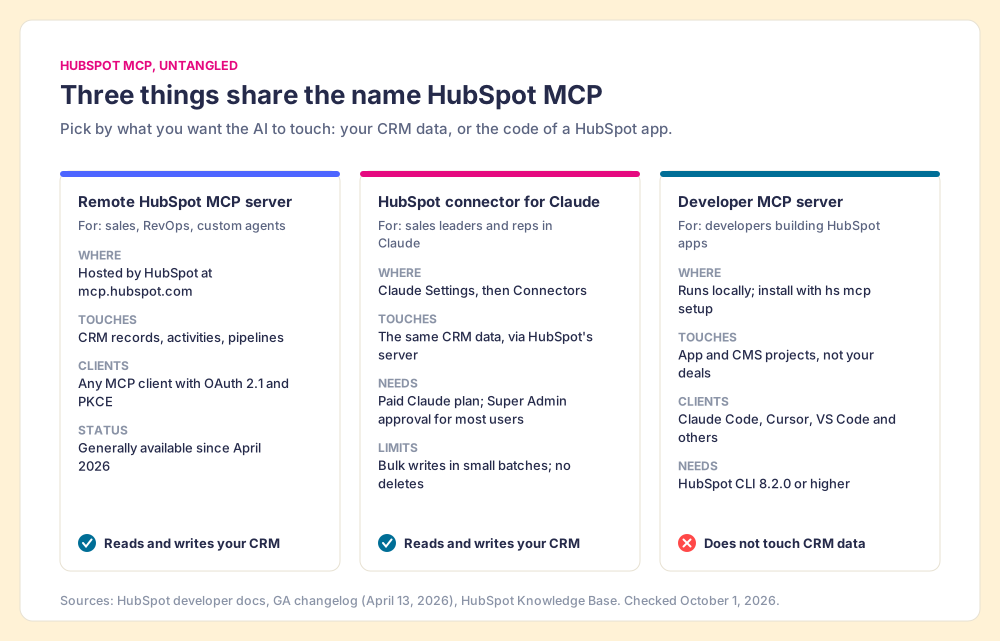
HubSpot MCP is HubSpot's support for the Model Context Protocol: a remote server at mcp.hubspot.com that lets Claude, ChatGPT and other AI tools read and update your CRM under your own permissions, plus a separate local server for developers building HubSpot apps.
Suppose you hire a brilliant temp. On day one you hand over the keys to every filing cabinet in the office: contacts, deals, tickets, call notes, the whole lot. The temp reads fast, writes neatly, and never gets tired. By lunch they have tidied forty files. By two o’clock you discover they tidied them wrong, because the office’s real rules were never in a cabinet. They were in your head. A deal past Discovery needs an amount. A recap goes out within a day of the meeting. A close date in the past is a lie someone forgot to fix.
The HubSpot MCP server is that set of keys. It is a real, useful piece of plumbing that lets Claude, ChatGPT and other AI tools read and update your HubSpot CRM, and since April 2026 it has been generally available to every HubSpot account. What it cannot hand over is the binder of rules, and the reason is structural: most of your rules are about things that did not happen, and a server that answers requests can only see things that did.
What is HubSpot MCP, in plain terms?
MCP stands for Model Context Protocol. Anthropic released it in November 2024 as “an open standard for connecting AI assistants to the systems where data lives” (Anthropic, 2024). The project’s own docs compare it to “a USB-C port for AI applications” (modelcontextprotocol.io). Before MCP, a vendor that wanted Claude and ChatGPT and Cursor to work with its data had to build three separate integrations. With MCP it builds one server, and any client that speaks the protocol can plug in.
A server, in this sense, is a list of tools the AI can call: search deals, fetch a contact, update a property, log a note. The model reads your question, decides which tools to call, calls them with your credentials, and reads what comes back. You never see the API. You see Claude saying it found 14 open deals and updated the close date on two of them.
“HubSpot MCP” gets used for three different things, and most of the confusion on the first page of search comes from mixing them up.
- The remote HubSpot MCP server. Hosted by HubSpot at mcp.hubspot.com. It is for CRM data, and it works with “any MCP-compatible AI tool” that supports OAuth 2.1 with PKCE, per the general availability changelog of April 13, 2026. When people say HubSpot MCP server, they mean this one.
- The HubSpot connector for Claude. HubSpot’s own listing in Claude’s connector directory. HubSpot’s help page (updated September 17, 2026) describes it running on HubSpot’s MCP server, with its own limits layered on top, covered below.
- The developer MCP server. A local server you install with
hs mcp setupin the HubSpot CLI, version 8.2.0 or higher. It helps Claude Code, Cursor, Codex CLI, Gemini CLI, VS Code and Windsurf build HubSpot apps and CMS assets (HubSpot docs). HubSpot says plainly that it “is separate from” the remote server, which is “intended for making requests to an account’s CRM data.”
One historical wrinkle explains the GitHub results. HubSpot’s first MCP server, a public beta announced May 6, 2025, shipped as an npm package configured with a private app token, and the beta notice warned that “LLM’s are prone to hallucination” (HubSpot changelog). That package now describes itself on npm as an “MCP Server for developers building HubSpot Apps” (checked October 1, 2026). If a tutorial asks you to paste a private app token to reach your deals, it predates the remote server.
How do you connect the HubSpot MCP server to Claude and other AI tools?
The path depends on the client, and only one of them is a five-minute job for a sales leader.
- Claude, through the connector. You need a paid Claude plan (Pro, Max, Team or Enterprise). In Claude, open Settings, then Connectors, then Browse; search HubSpot, click Connect, log in to HubSpot, choose the permissions, and switch the HubSpot toggle on in the chat. Super Admins and users with App Marketplace access connect on their own. Anyone else waits for a Super Admin to approve it (HubSpot Knowledge Base). For the workflow once it is connected, the HubSpot Claude connector guide walks through one prompt from start to finish.
- Other MCP clients and custom agents. Someone creates an MCP connector in HubSpot under Development, then MCP Connectors, which yields a client ID, a client secret and a redirect URL. The client then connects to mcp.hubspot.com with OAuth and PKCE (HubSpot developer docs). The same docs name Claude, ChatGPT and Gemini as the clients for some of the newer content tools.
- Developers building apps. Install or update the HubSpot CLI and run
hs mcp setup. This server never touches your deals.
If you already connected before September 15, 2026, disconnect and reconnect. HubSpot’s Fall 2026 Spotlight added new scopes that an old connection does not pick up on its own.
What can the HubSpot MCP server read and write?
A great deal, and the list grew twice this year. The April release added write access, activity history, marketing content and organizational context. The September release added custom objects, Leads, Appointments, Projects, Listings, Services, Courses and Orders for read and write, and let an agent “create and manage custom properties and set up pipelines and stages without leaving the AI workflow” (HubSpot, Fall 2026 Spotlight).
For a sales team, the parts that matter fit on one card.
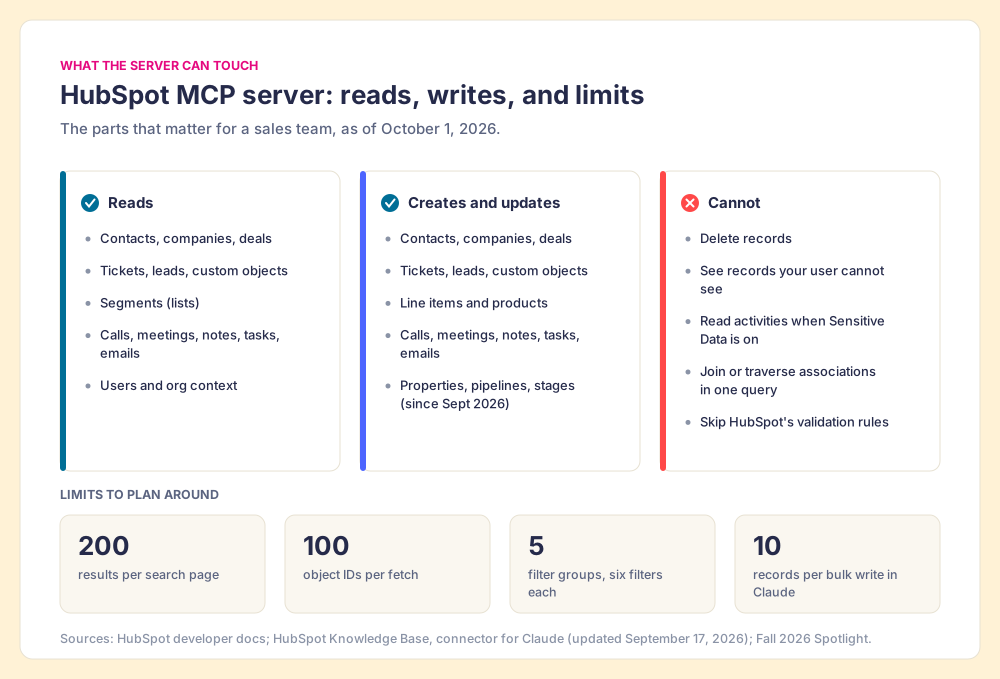
| Question | Answer as of October 1, 2026 | Source |
|---|---|---|
| Reads | Contacts, companies, deals, tickets, leads, custom objects, segments, and activity history (calls, meetings, notes, tasks, emails) | HubSpot developer docs |
| Creates and updates | Contacts, companies, deals, tickets, leads, line items, products, custom objects, and activities | GA changelog, Fall 2026 Spotlight |
| Deletes | Not supported | Claude connector help page |
| Bulk writes through Claude | 10 records at a time | Claude connector help page |
| Search and fetch | 200 results per page; 100 object IDs per request; up to five filter groups with six filters each | HubSpot developer docs |
| Permissions | The connected user’s own; “Users can only view and modify records they have access to in HubSpot” | HubSpot developer docs |
| Sensitive Data turned on | Activity and conversation data blocked | HubSpot developer docs |
| Audit | Writes attributed in the Audit Log to the acting user | Fall 2026 Spotlight |
Two lines in that table deserve a second look. The first is the query engine, which “does not support joins, column aliases, subqueries, association traversal, or currency conversion” (HubSpot developer docs). Ask for “deals whose primary contact has no meeting in 30 days” and the model has to page through records and stitch the answer together itself, which is slow and where mistakes creep in. The second is a line on HubSpot’s connector page: “conditional property rules and pipeline stage validation rules are applied” to every create and update. HubSpot does enforce some of your rules over MCP, and the kind it can enforce tells you what it cannot.
What can’t the HubSpot MCP server know about your sales process?
HubSpot’s own pitch for the server is a fair one: “What if your favorite AI tool could do what it does best, but with the context of your HubSpot account?” (HubSpot). Huble’s popular use-case post makes the same case, that MCP exposes HubSpot “in a structured, secure way the model can understand” (Huble, 2025). Grant it in full. Account context is real context. A model that can read three months of call notes writes a better follow-up than one guessing from a deal name, and the September release gave it even more to read.
Context about the account is still not knowledge of the expectations. Go back to the validation rules, because they show exactly where the line falls.
A pipeline stage validation rule works like a doorman. When someone tries to move a deal into Contract Sent, the doorman checks the list at the door: is the amount filled in, is the decision maker set. No amount, no entry. The doorman is excellent, and over MCP he checks Claude’s writes as carefully as a rep’s.
Ask the same doorman about the recap that never went out. He cannot help. The rep never sent it, so nothing came through the door. A doorman checks who arrives; he does not take roll call. And a sales process is mostly roll call.
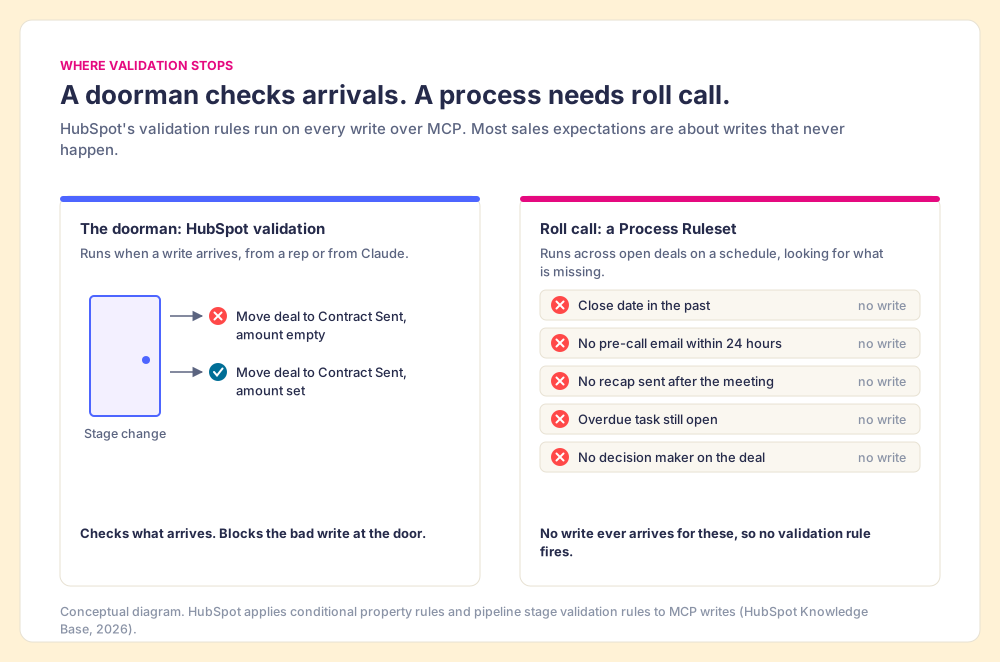
Look at the six violations on my own board one recent night: a close date in the past, no amount past Discovery, overdue tasks, no pre-call email within 24 hours, no recap sent, no decision maker. Only one of them, the amount, can be a door check. The other five are absences, and an absence makes no request, so no validation rule ever fires. They sit in the CRM looking fine until a manager goes looking.
AI tools get blamed for being dumb in exactly this gap. Ask Claude to “clean up my pipeline” and it will do something reasonable with the records it can read, but “reasonable” is its guess at your rules, assembled from the shape of the data. Raja Parasuraman and Dietrich Manzey found that people working with imperfect decision aids make both omission errors (missing what the aid did not flag) and commission errors (following a wrong suggestion), and that the bias “cannot be prevented by training or instructions” (Human Factors, 2010). A model guessing at your process produces exactly the kind of plausible, slightly-off output that people wave through.
The State of Sales Enablement 2026 found 89% of teams have a defined process and 36% see reps follow it (SOSE). Handing an AI the keys does nothing for that gap if the rules still live in a document that neither a rep nor a model reads while the work is happening.
Why does the rule have to live somewhere the model can read?
Because the model reads what it is handed, and a rule it cannot see is a rule it cannot follow. The temp at the filing cabinets did not need more keys. They needed the binder.
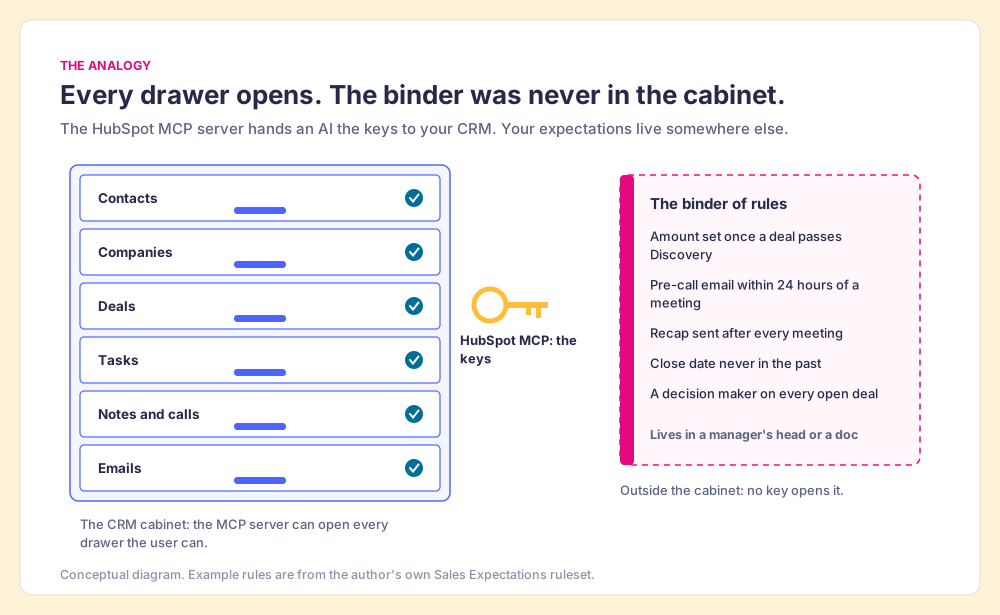
The analogy breaks in one place. A human temp who gets the binder will drift from it within a month, and so will a model given the rules once in a pasted prompt and never again. The binder only works if something checks against it on a schedule and records what it finds.
Two lines of research explain why. Harkin and colleagues pooled 138 randomized studies (N = 19,951) and found that monitoring progress raised goal attainment with an effect of d = 0.40, and that the effect was larger “when the information was physically recorded” and when outcomes were reported or made public (Psychological Bulletin, 2016). A written rule checked against the CRM every night, with the result posted where the team can see it, is that kind of recorded, reported monitoring. Our own survey found the sales-side version of the same effect. Where guidance lives decides whether it gets used: teams with guidance embedded in the workflow hit quota at 49%, against 24% for guidance in CRM fields or stages and 15% for docs or wikis (The State of Sales Enablement 2026).
The same survey also says which order to do this in. Teams with strong process adherence rate AI’s impact as high 40% of the time; teams with weak adherence, 21%. And 46% of teams already use AI for CRM admin and cleanup. The cleanup is happening. Whether it follows your rules depends on whether the rules were written somewhere a machine can read them.
What a rule needs, to be readable by a model and checkable at night:
- A record type and a scope. Open deals owned by this team, in this pipeline. A model cannot infer “my deals” the way a rep does.
- A condition stated as data. “Amount is empty and stage is past Discovery,” never “deals should be qualified.”
- A time window for absences. “No email logged in the 24 hours before a scheduled meeting.” Without the window, an absence has no definition.
- A fix the model is allowed to make. Update the field from the notes, draft the email for review, create the task. And the fixes it is not allowed to make, such as sending.
- A record of the result. A count of violations per rep per night, kept where a manager can coach from it, so inspection happens without a manager doing the chasing.
How do you hand the HubSpot MCP server your rules?
You give the model a second server that holds the rules. The HubSpot MCP server supplies the records and the tools to change them. A rules server supplies the expectations and the list of what currently breaks them. Claude, or ChatGPT, or whatever client your team prefers, reads both in one conversation.
We built Supered to be that second source. The rules live in Supered as a Process Ruleset: a set of Process Rules, each a filter on your CRM records, built from the filters, groups and associations described in the help center. A Process Board shows every open record that breaks a rule, deal by deal. Through the Supered MCP, Claude reads the rules and the board. You can describe a rule in English, and Supered’s MCP creates the Process Rule directly.
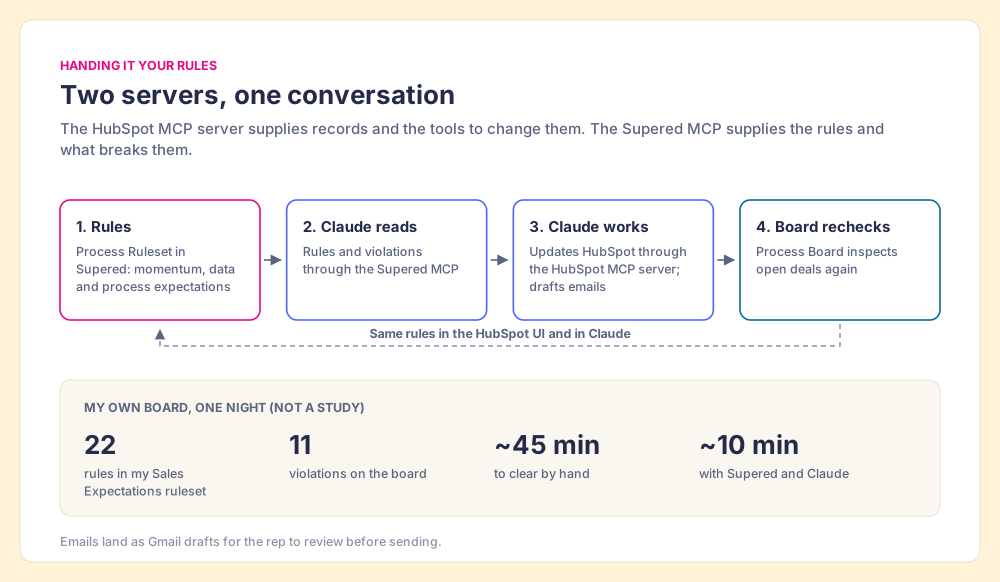
I run this on my own deals. My board, which I named Zero Board, runs a Sales Expectations ruleset of 22 rules against my open deals. Late one night it showed 11 violations, the six kinds listed above. With Supered, HubSpot and Gmail connected to Claude, I typed one prompt: “Look at my Zero board and fix all my violations. Draft anything that needs an email.” Claude loaded the rules, found each violation, filled the missing amount from the discovery notes, moved stale close dates to match the next meeting on my calendar, and saved the recap and pre-call emails to my Gmail drafts for me to read before sending. By hand that cleanup takes me about 45 minutes. That night it took about 10, and the next morning’s summary showed zero violations. Same rules in the HubSpot UI, same rules in Claude. The sales expectations use case shows the full setup, and the Claude integration page covers what Claude can change.
Claude saves drafts and I send them, on purpose. Parasuraman and Manzey’s commission errors are the reason: reading a draft takes a moment, and a wrong email to a buyer costs trust that a moment cannot buy back.
What should a sales leader do with HubSpot MCP this month?
My recommendation: connect the HubSpot connector, and keep your rules in one place a model can read every night. Weigh it against the alternatives as plainly as I can put them:
- The connector alone. Connect HubSpot to Claude and let reps ask questions and make updates. Low effort, real time saved on lookups and summaries, and the model guesses your process every time.
- The connector plus a long prompt. Paste your expectations into a Claude Project or a saved prompt. Better, until the rules change and the copies of the prompt scattered across the team do not.
- The connector plus a rules server. The rules live in one place a model can read, checked every night, with the result on a board. More setup, and the only option where the cleanup and the inspection are the same act.
The rules server earns the setup for three reasons from the evidence above: monitoring that is recorded and reported changes behavior (d = 0.40 across 138 studies), guidance in the workflow outperforms guidance in a document (49% against 15%), and AI pays off for teams whose process is already followed (40% against 21%). The HubSpot MCP server gives the model a pair of hands, and the rules tell those hands what the job is.
Start with the connector this week, because it costs nothing beyond a paid Claude plan and takes five minutes. Write down the five rules that make you angriest when they break. Then decide where those rules will live, so the model can read them the same way tomorrow as today. If you run Salesforce too, the Salesforce MCP guide covers the same split on that side, and Claude for sales maps the whole set of connectors, rules and workflows. For the rules themselves, start with CRM hygiene, which turns the six violations above into rules you can check every night. Or book a demo to see a Process Ruleset and Claude clear a board together.
Frequently asked questions
What is the HubSpot MCP server?+
Is the HubSpot connector for Claude the same as the HubSpot MCP server?+
What is the HubSpot developer MCP server?+
Can the HubSpot MCP server delete records?+
Does the HubSpot MCP server know my sales process?+
Do I need a developer to set up HubSpot MCP?+
Your process, running itself.