Claude Second Brain for Sales Teams: How to Build One in Supered
How to connect Claude to Supered and build a second brain your whole sales team shares.
It updates itself from calls, PDFs and rep questions, and it shows up in the CRM. 7 builds, each with the prompt I'd type.
A Claude second brain for a sales team is a shared system, kept current by Claude through the Supered MCP, that holds what good looks like (cards, process rules, boards, onboarding plans) and puts it in front of reps in the CRM.
How to build a team second brain in Supered with Claude
1 hr- 1
Check what you need
Get a paid Claude plan, a Supered admin, your CRM connected in Supered, and your playbook PDF or a recording of your stages.
- 2
Turn on Supered Assistant
In Supered, go to Settings, then Artificial Intelligence, pick Enabled and save. Turn on Generate prompts for Process Rules too.
- 3
Measure first with rules and a board
Attach the playbook PDF to Supered Assistant or dictate your stages, and have it build the process rules, a ruleset and a process board for one stage. No cards yet.
- 4
Sync the board and get the measurement right
Sync the board, read the flags and tune each rule until the board flags the deals you would want flagged, with no two rules flagging the same thing.
- 5
Make the cards from the board
Write one card per rule that tells the rep how to fix the flag, and file the cards in bases and folders that match how reps think.
- 6
Put the cards where reps work
Add page triggers so a card shows up when a word or phrase you pick appears on a HubSpot or Salesforce page.
- 7
Load your prompts
Add the team's prompts to the Supered Prompt Library, pick which assistants can use each one, and use Prompt Analytics to see which prompts get used.
- 8
Connect Claude
In Supered, open the AI section, click Connect Claude, connect Supered and your CRM, then Continue Connecting and Close.
- 9
Feed it and measure it weekly
Keep cards current from calls, questions and launches, then ask Claude for process compliance by rep, the most-skipped rules and clean streaks.
A customer asked me something that’s been stuck in my head ever since: “Why doesn’t anybody know about these use cases?”
That one’s on me. We built them, used them with customers, and never wrote them down anywhere you could find them. So I’m fixing that here, with the exact prompts I’d type.
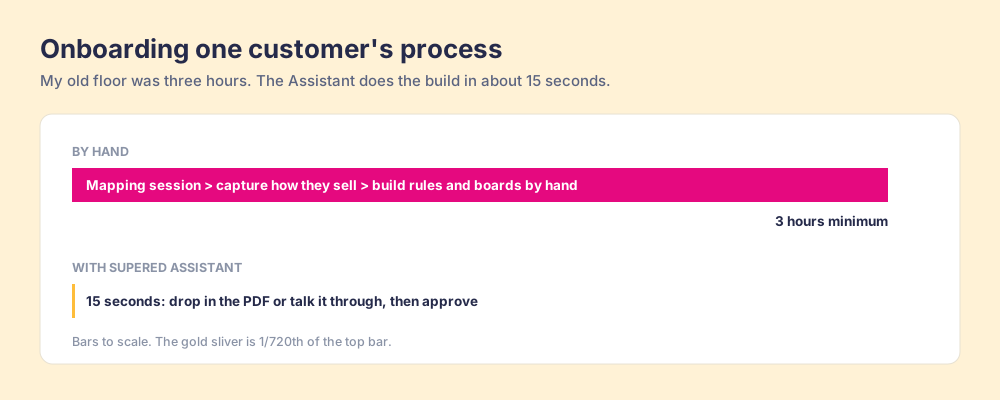
Some context first. I’ve done 100+ sales implementations. Onboarding one customer’s process used to take me three hours, minimum. A mapping session, then capturing how they sell, then building the process rules and process boards by hand. Today it takes about 15 seconds, from a PDF or from somebody talking through what they expect.
The speed is fun. What I care about more is the order you build it in, and what happens after. A Claude second brain for a sales team is a shared system, kept current by Claude through the Supered MCP, that holds what good looks like (cards, process rules, boards, onboarding plans) and puts it in front of reps in the CRM. It keeps itself up to date, and it shows up while your reps are working. Those two things make it a brain. Without them, you’ve got one more folder of docs. And I build it backwards from how I’ve watched teams start: measure first, then write the cards, then load the prompts.
What is a Claude second brain?
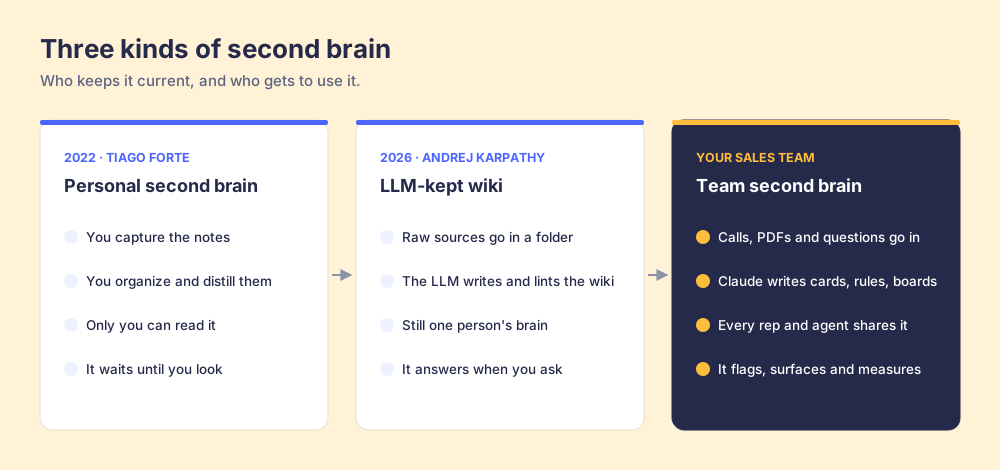
Tiago Forte made the idea popular. In his guide to Building a Second Brain, he calls it “an external, centralized, digital repository for the things you learn and the resources from which they come” (Forte Labs). His method is CODE: Capture, Organize, Distill, Express. You do the work, and the brain is yours.
In 2026 Andrej Karpathy handed the upkeep to the AI. He drops raw sources in a folder and has an LLM write the wiki, add the links and run “health-check” passes for gaps and contradictions. In his words: “You rarely ever write or edit the wiki manually; it’s the domain of the LLM” (VentureBeat, April 3, 2026). Search “claude second brain” or “second brain claude” and most of what comes back is some version of that: one person wiring Claude to Obsidian and letting it do the filing. An AI second brain, built for one.
I love both ideas. I don’t think either one holds up on a sales team.
Both were built for one person’s head. A sales team needs a second brain for teams: one that 12 reps, 2 managers and a handful of AI agents all share. It has to update itself when a competitor changes pricing. And it has to notice when somebody skips a step, which is the part a personal notes app was never asked to do. I think of that as reflexes.
Why does a sales team’s knowledge go stale?
Think about a library next to your own nervous system.
I love a good library. It holds everything. It also sits there until you stop what you’re doing, walk over and look it up, and it has no idea whether you read the chapter or did anything with it. Your nervous system works the other way around. Touch a hot pan and your hand’s off it before you’ve even thought the word “hot.” The knowledge shows up at the moment of the work, with no trip to the shelf.
Most sales enablement works like the library. The playbook lives in a doc. The battlecards live in a drive. The McKinsey Global Institute found knowledge workers spend close to a fifth of the workweek searching for and gathering the information they need (McKinsey Global Institute). And the shelf goes stale the day a competitor changes their pricing, because rewriting page 14 isn’t anybody’s job.
Our own research says the same thing from the rep’s chair. In The State of Sales Enablement, 89% of teams had a defined sales process and 36% saw reps run it. Teams whose guidance reached reps in the workflow reported 49% quota attainment. When it lived in CRM fields or stages, that dropped to 24%. When it sat in docs or wikis, 15%.
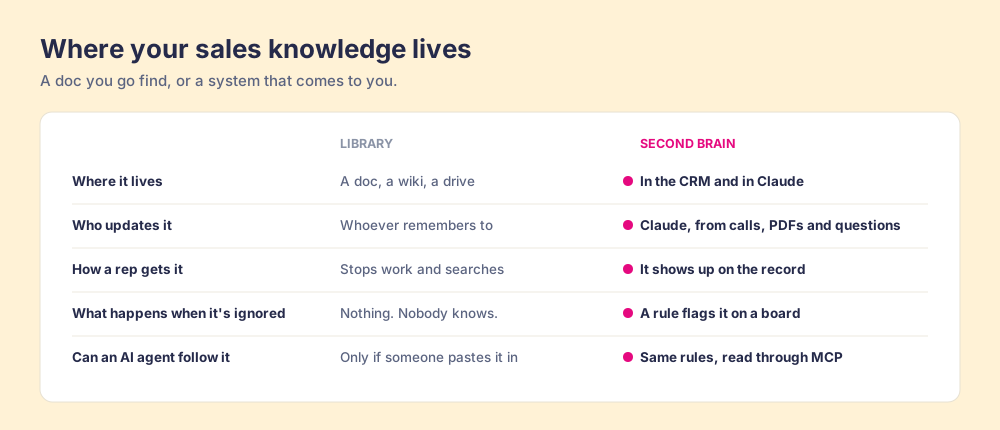
So a team’s second brain has two jobs a library never had. It has to keep itself current, and it has to reach the rep at the moment of the work. Supered has handled the second one for a while (cards, triggers and process rules inside HubSpot and Salesforce). Claude, through the Supered MCP, handles the first.
What can a Claude second brain do for a sales team?
Supered is 100% headless. You can make anything in Supered from anything else, and you can do all of it from Claude. These are the 7 builds I walk customers through:
- Build the process from a playbook: a PDF or a voice note becomes process rules, a ruleset, a process board and cards.
- Update cards from calls: Claude reads your call recordings and adds new objections and competitor intel to the right card.
- Answer a question once: a question reps keep asking becomes a card, with a page trigger that shows it in the CRM.
- Announce what shipped: a launch becomes an announcement tied to a card, sent to the team that needs it.
- Onboard new hires: an action plan with phases, tasks, roles and a quiz, built from the cards you already have.
- Keep CRM data clean: a data audit turns your biggest data gaps into process rules that keep running.
- Report on process compliance: compliance by rep, the most-skipped rules and clean streaks, pulled straight from Supered.
Why do you build the second brain backwards?
In 100+ implementations, I’ve watched team after team start a knowledge base by writing content. A wiki, a stack of battlecards, a training course. Then they hope reps use it, and no manager can tell whether they did.
I do it the other way around, and I know it sounds backwards. Measure first. Build the process rules and the process board before you write a single card. Once the board flags the right deals (the stuff you’d be mad about if it didn’t happen), then you make the cards, and each card answers one flag. Then you load your prompts.
Why that order? You can only expect what you inspect. If you write content first, you’re guessing what reps need. If the board comes first, it tells you exactly where reps get stuck, so every card you write has a job. And the cards show up right where the flag does, so the answer arrives at the moment of the work.
Do it in that order and you end up with an always-on layer that sits in context, in the CRM and in Claude. The right rule, the right card and the right prompt show up while reps work. It’s how a team gets to 100% AI adoption. Reps don’t have to remember to go use the AI, because the AI and the process are already sitting in the work.
How do you build a team second brain in Supered, step by step?
I’d run this exact setup with you if we were on a call. Plan on an hour for the first pass, and most of that is you reading and approving what the AI builds. (Supered MCP Server and Supered Assistant have the click-by-click.)
Step 1: Check what you need
- A paid Claude plan: custom MCP connectors usually need Pro, Max, Team or Enterprise. On Team and Enterprise, your workspace admin may need to allow custom connectors first.
- A Supered admin: only admins can turn on the AI settings.
- Your CRM connected in Supered: process rules and process boards run against HubSpot or Salesforce, so connect one before you build them.
- Your source material: the playbook PDF, a recording of you walking through your stages, or both.
Step 2: Turn on Supered Assistant
In Supered, go to Settings, then Artificial Intelligence, pick Enabled and click Save. While you’re there, turn on Generate prompts for Process Rules too. The Assistant lives in the app, behind the sparkle icon at the top, and in the Chrome extension, so you can build from inside the CRM.
Step 3: Measure first with rules and a board
Attach the PDF to the Assistant (or click the microphone and talk through your stages) and have it build the process rules, a ruleset and a process board for one stage. No cards yet. Start with late-stage deals, where a skipped step costs the most. Build 1 below has the exact prompt. You click Accept on each change.
Name rules for reps, because reps see these names in the CRM. Stage first, then what good looks like: “Proposal: mutual close plan attached.”
Step 4: Sync the board and get the measurement right
Ask the Assistant to sync the board and tell you when it’s done. Then read the flags. If a rule flags half your pipeline, it’s too strict, or the playbook never matched how y’all sell. If it flags nothing, check the field it reads. Make sure no two rules on a board flag the same thing. Ask the Assistant “Why is this board flagging so many records?” and it uses the page you’re on as context.
Don’t move on until the board flags the deals you’d want flagged. Everything after this step depends on it.
Step 5: Make the cards from the board
Now write content, and let the board tell you what to write. One card per rule: what good looks like, and how to fix the flag. Ask: “For each rule on the Late-Stage board, write a card that tells the rep how to fix it, under 120 words.” File them where reps will look:
- One base per team: for example Sales, Customer Success and Partners.
- Folders that match how reps think: stages (Discovery, Demo, Proposal, Closing), plus Objections, Competitors, Pricing and Onboarding.
Step 6: Put the cards where reps work
A card that sits in a base is still a library book. Page triggers fire on text, so pick the words your reps will be looking at. The late-stage checklist shows up when the stage reads Proposal. The pricing card shows up when “discount” is on the page. You can match the exact phrase or any page that contains it, keep it to HubSpot, and show it to the whole team or one group.
Step 7: Load your prompts
AI adoption happens in this step. In Supered, go to AI, then Prompts, then New Prompt, and load the prompts your team should be using: the call recap, the deal review, the follow-up email, the weekly card sweep. Write them yourself or click Create with AI. For each one, pick which assistants can use it: Claude, HubSpot Breeze, Agentforce, Pipedrive AI or Supered Assistant. Reps pick them with the + button in the chat instead of writing their own. And Prompt Analytics shows you which prompts get used, and by whom, so you can see adoption instead of guessing at it.
Step 8: Connect Claude
In Supered, open the AI section, click Connect Claude, click Connect for Supered and your CRM, then Continue Connecting and Close. Using another MCP client? The setup options are at app.supered.io/mcp. Now Claude can read and update everything from steps 3 through 7, and your reps get the same rules, cards and prompts in Claude that they see in the CRM.
Step 9: Feed it and measure it weekly
Run builds 2, 3 and 4 below to keep the cards fresh from calls, questions and launches. Then ask Claude for compliance by rep, the most-skipped rules and clean streaks (build 7). If a rule keeps getting skipped, fix the card or fix the process. Then the loop starts again.
Two guardrails before y’all hand an AI the keys. Neither the Assistant nor the MCP server can delete anything, and you approve every create or update before it goes live. When Claude wants to change a CRM record, it can check that change against your process rules first, and that check is read-only. I wrote up why your rules have to live outside the chat in Claude for sales.
Why is Supered a good fit for a team second brain?
I’m biased, obviously. So judge it against what I’d want from any tool doing this job:
- One place for the definition of good: Supered is the business logic for your deals: what a good deal looks like at each stage. Cards, rules, rulesets, boards and onboarding plans live together, so a change to the process and a change to the training happen in the same place.
- It lives in the CRM: cards, guides, announcements and rule flags show up on HubSpot and Salesforce records through the extension. Reps don’t go to the brain. It comes to them.
- Claude can build all of it: the MCP covers boards, rules, rulesets, cards, folders, bases, guides, page triggers, announcements, action plans, quizzes, the prompt library and data audits. Anything you can click, Claude can do.
- People and agents follow the same rules: reps follow them in the CRM or in Claude. An AI agent reads the same rules through the MCP. One definition, no drift.
- You stay in charge: you approve every change, and nothing gets deleted.
- It measures itself: boards, streaks and analytics tell you whether the process is being run. You can only expect what you inspect, and here the inspecting is done for you.
1. How do you turn a PDF playbook into a process board?
Your playbook has the right stuff in it. Book the next meeting. Keep the close date current. Name a champion before proposal. The problem is that none of it made it into the CRM, so no manager can tell who’s running it.
This build replaced my three hours.
- Open Supered Assistant in the app or in the Chrome extension.
- Attach the PDF, or click the microphone and talk through what you expect at each stage.
- Paste the prompt below.
- Review the rules, ruleset and board it proposes, and click Accept on each.
- Ask it to sync the board, and tune the rules until the board flags the right deals.
- Then ask for the cards: one per rule, telling reps how to fix the flag.
Here's our sales playbook. Build the late-stage part of our process from it: the process rules, a ruleset that holds them, and a process board for late-stage deals. Name each rule with the stage first, then what good looks like. Show me each change before you make it. Once the board is synced and flagging the right deals, write one card per rule that tells the rep how to fix it, and file them in a base called Sales Playbook with clear folder names.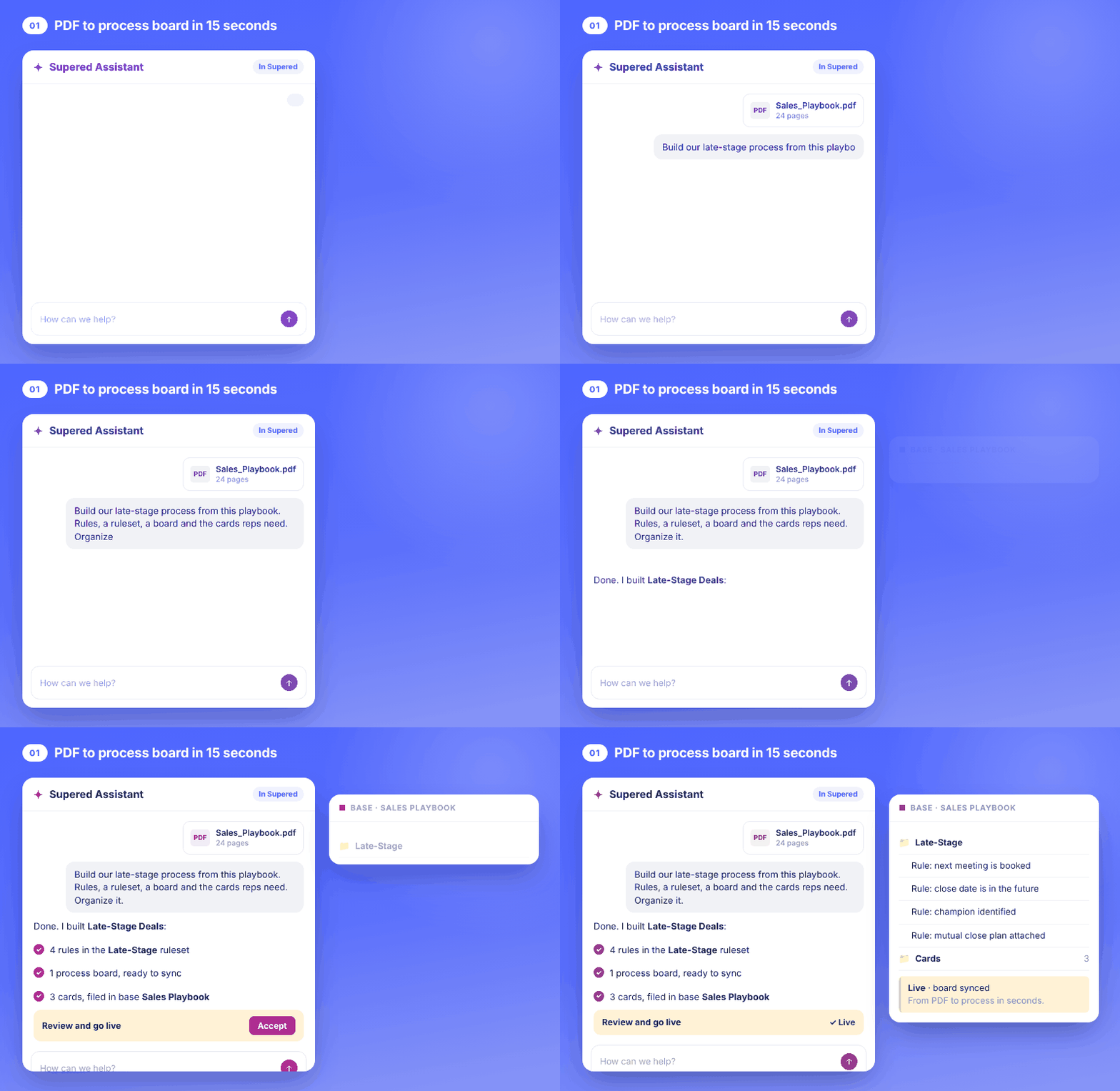
What it unlocks: your playbook becomes a process board. Supered checks your open deals against it, and each owner sees their flags in the CRM. The sales expectations page shows what that looks like across a team, and the full walkthrough is in AI sales playbook.
2. How does Claude update your cards from sales calls?
Say three prospects in one week tell your team, “We already have a playbook doc.” One rep handles it great. The other eleven hear it next week cold, because the good answer is sitting in one recording.
Connect your call recorder to Claude (check that it has a Claude connector), keep Supered connected, and run this once a day or once a week:
- Ask Claude to read a window of calls.
- Have it look for new objections and competitor intel only.
- Let it find the right Supered card and propose an update.
- Approve the change.
Read our discovery and demo calls from yesterday. List any objection that came up on 2 or more calls and any new competitor intel. For each one, find the matching card in our Supered Sales base and propose an update with the talk track that worked. If no card exists, propose a new one in the Objections folder. Wait for my approval before changing anything.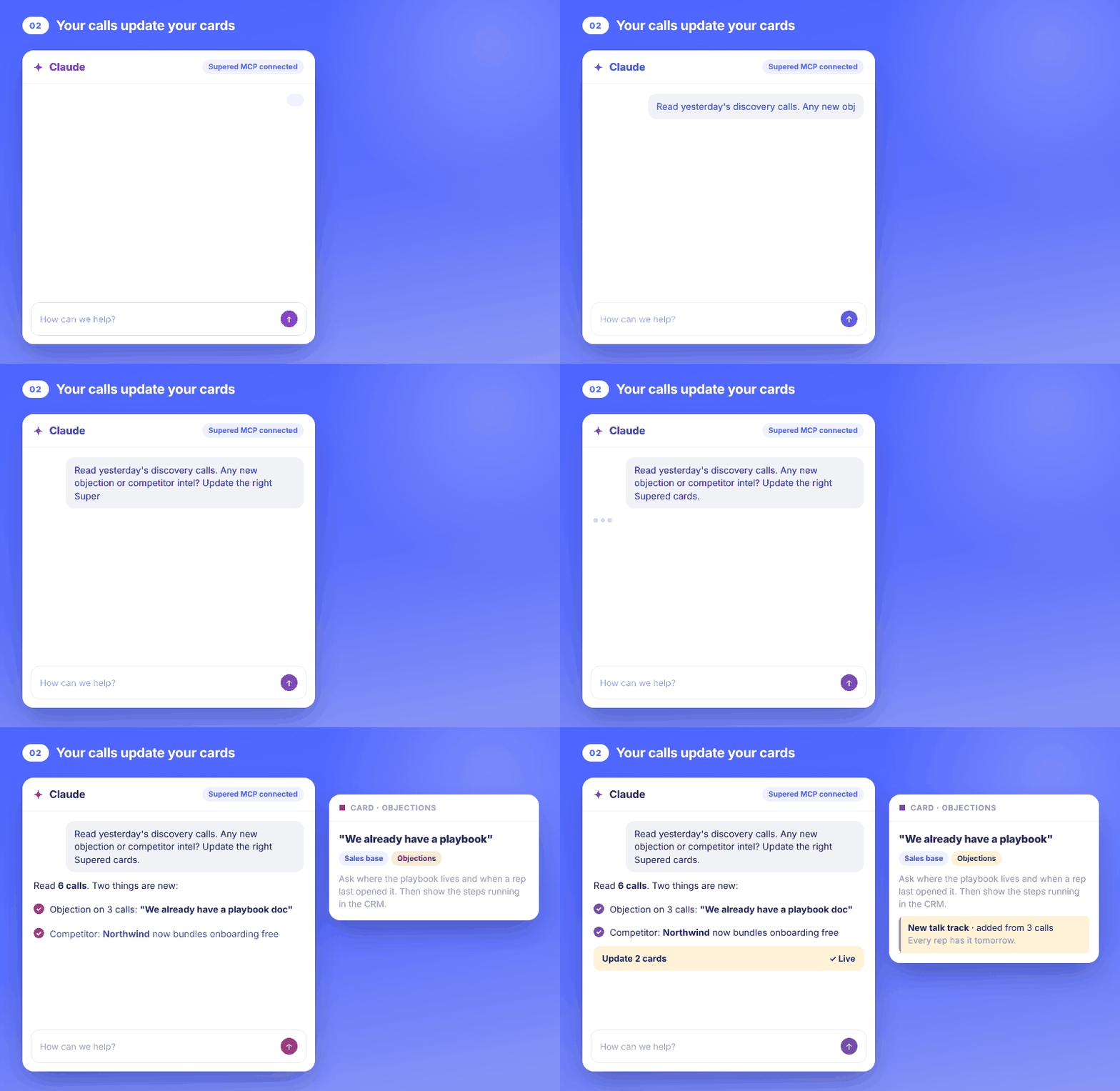
What it unlocks: your sales battlecards stop being a quarterly project. The best answer from one call is on your whole team’s screen the next day. I go deeper on this one in AI competitive intelligence.
3. How do you make sure a question only gets asked once?
Managers, y’all know this one. A rep asks in Slack how multi-year discounts work. You answer. Two days later, another rep asks. (Same question. Same Slack channel.) The answer existed. It was buried in a thread.
- Paste the question, or a handful of them, into Claude.
- Have it search your Supered content first, so it doesn’t make a duplicate card.
- Have it write the answer as a card in the right base and folder.
- Add a page trigger so the card shows up where the question comes up.
Reps asked "how do we handle multi-year discounts?" four times this week. Search our Supered content for anything that already covers it. Then write one card that answers it in under 120 words, file it in Sales > Pricing, and create a page trigger so it shows whenever "multi-year" appears on a deal page.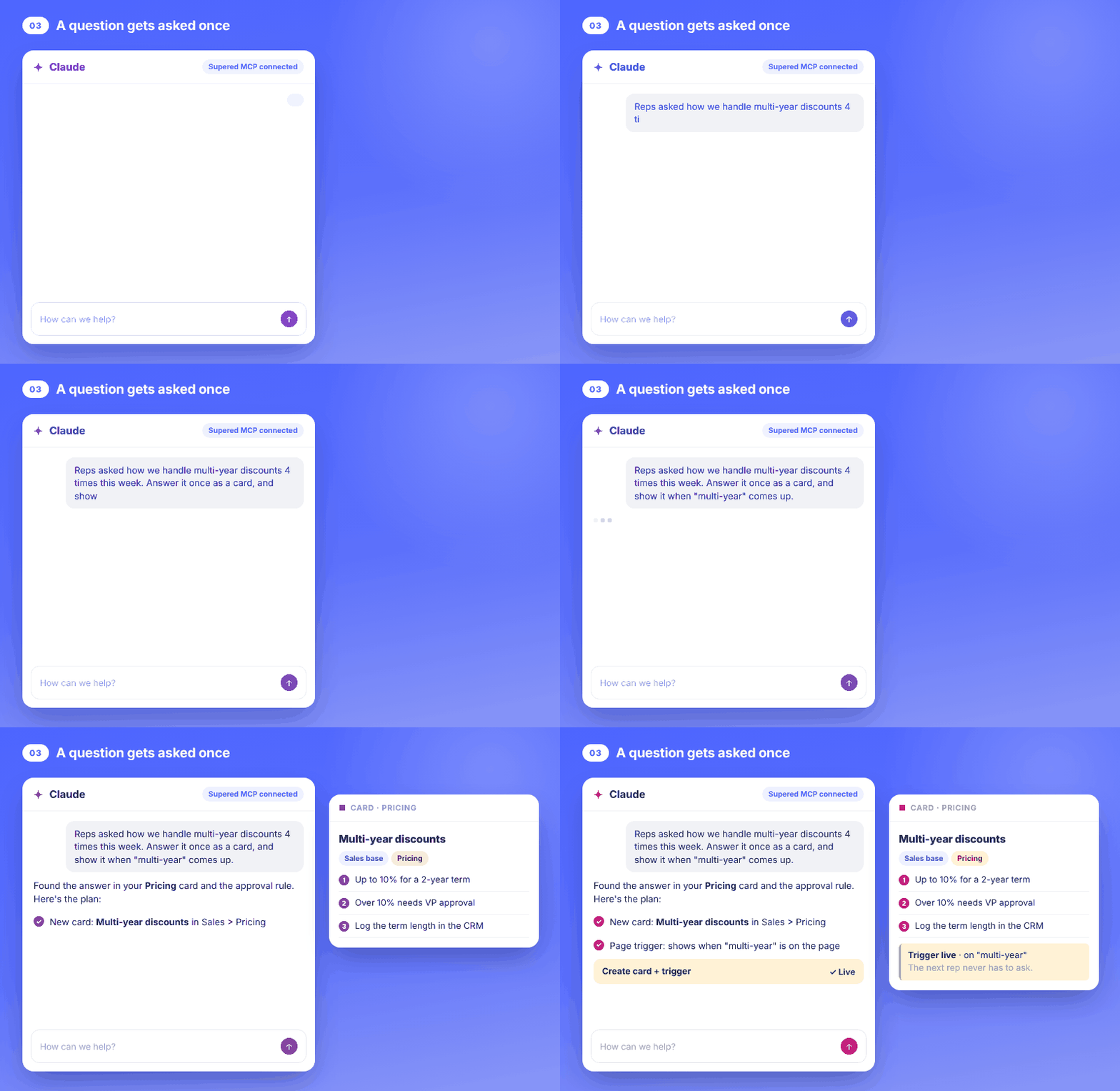
What it unlocks: your sales knowledge base grows from the questions reps ask, in their words, instead of the ones somebody guessed they’d ask.
4. How do you announce a launch so reps see it that day?
You ship something. Product posts in Slack. Marketing sends an email. And half the sales team finds out from a customer.
- Tell Claude what shipped and who needs to know.
- Have it update or create the card that explains it.
- Have it draft an announcement tied to that card, for the sales team, as a banner or a modal, with an end date.
- Approve and publish.
We shipped the new partner discount today. Update the Partner Pricing card with the new terms. Then create an announcement for the sales team only, shown as a banner for 7 days, that links to the Partner Pricing card. Show me the draft first.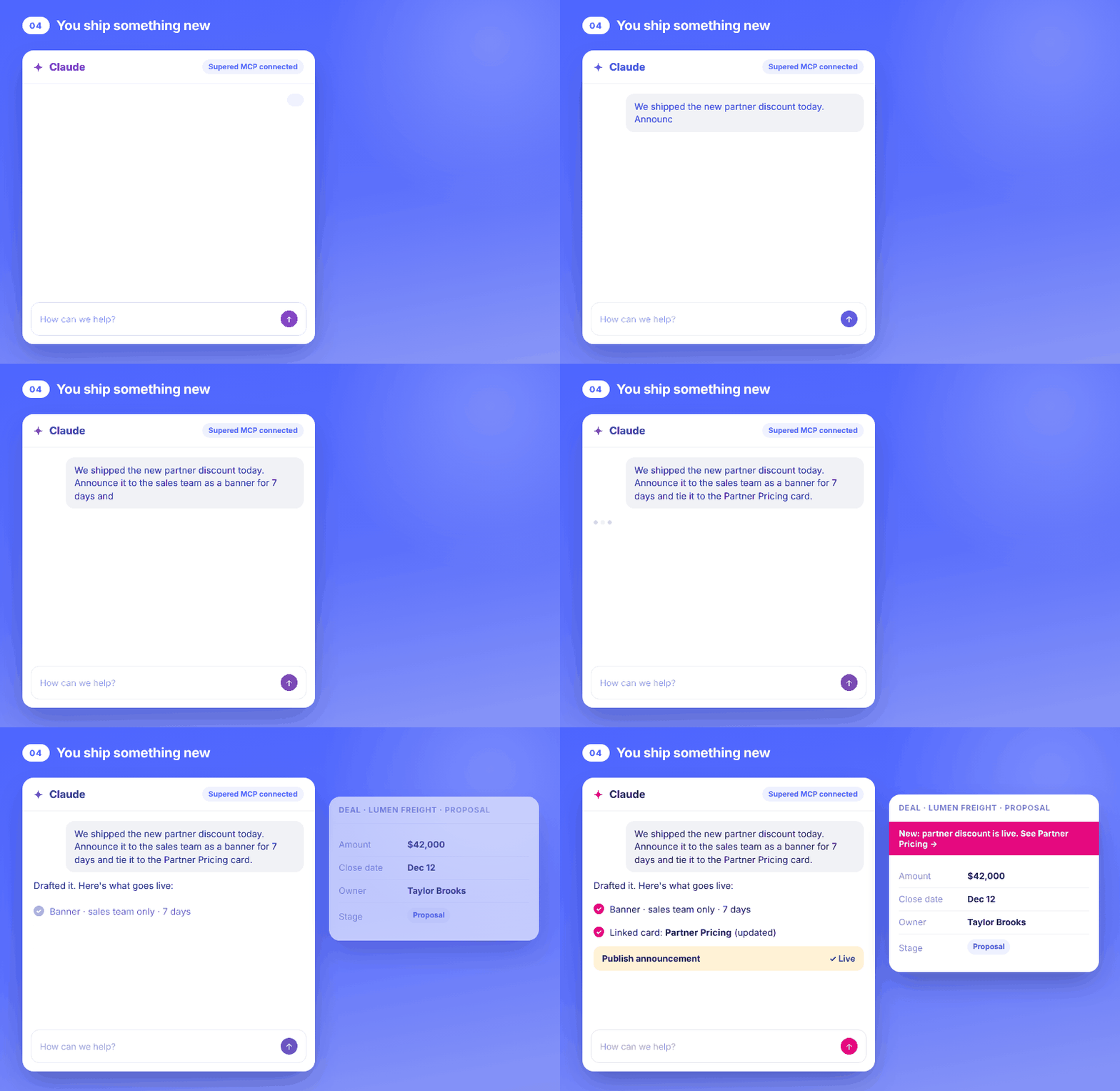
What it unlocks: one prompt handles the change and the heads-up. The card holds the detail, the banner points to it, and your reps find out while they’re working instead of from a customer.
5. How do you build a new hire’s onboarding plan from what’s already in Supered?
A new AE starts Monday. Somebody copies last year’s onboarding checklist, and it links to three docs that don’t exist anymore.
If your second brain is current, onboarding is a question you ask it. The new hire needs your cards, your rulesets and your boards, and those are already in Supered.
- Tell Claude the role, the start date and the manager.
- Ask it to build an action plan from your existing content: phases, sections, tasks, roles and due dates.
- Add a quiz on your process at the end of week one.
- Assign it, and save it as a template for the next hire.
Maya Ortiz starts Monday as an Account Executive, reporting to Jordan Reyes. Build her onboarding action plan from what's already in Supered: three phases (learn the process, shadow calls, run your own deals), tasks that link to our existing cards, due dates from her start date, and roles for Maya and Jordan. Add a 10-question quiz on our sales process at the end of week one. Assign it to her, then save the plan as a template.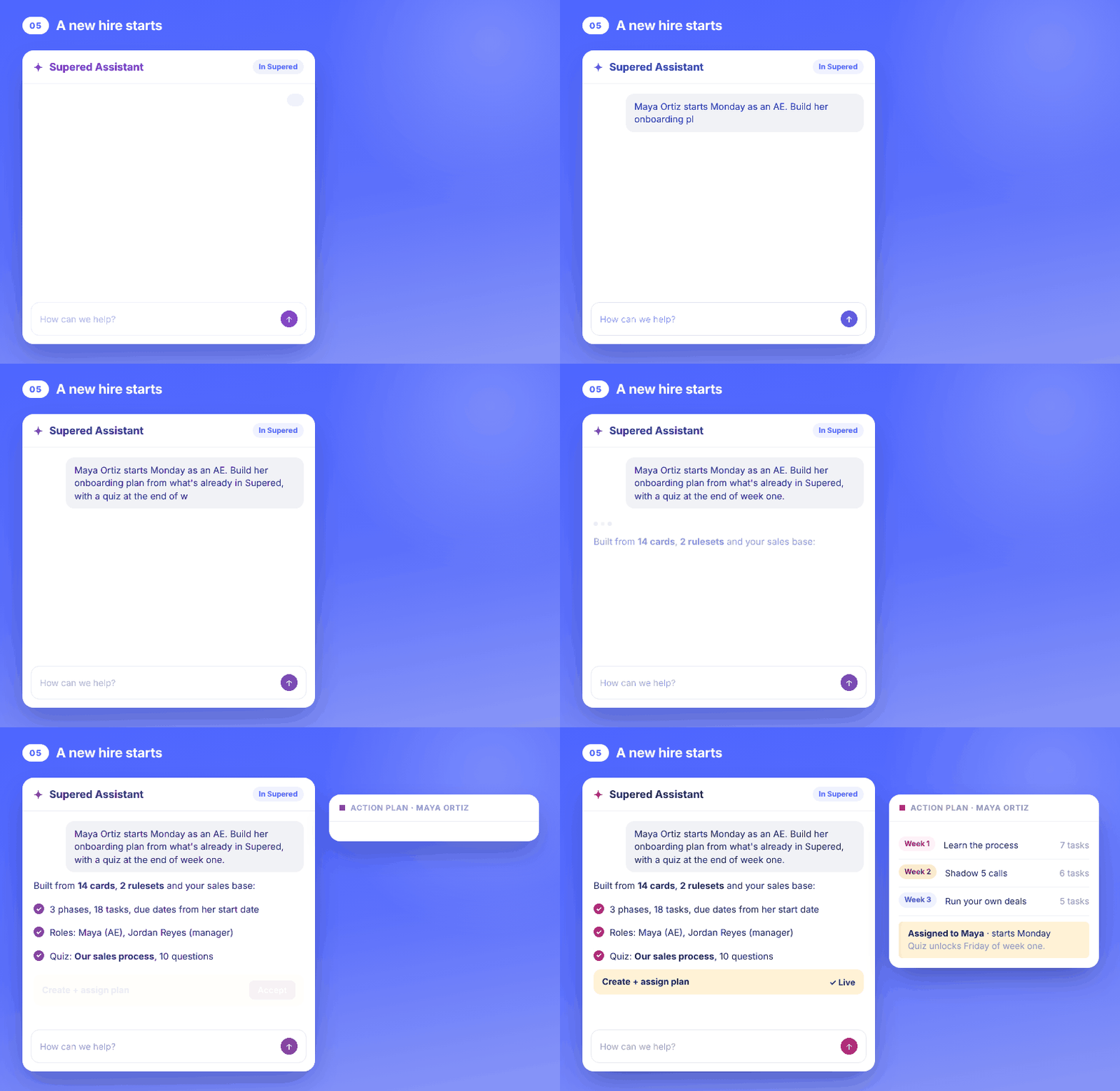
What it unlocks: the plan teaches the same process the board holds them to, so week one and month three point at the same standard. More on that in sales onboarding, and the full build is in AI sales onboarding.
6. How do you keep CRM data clean enough to trust?
You know the forecast meeting detour. Somebody asks “is that number right?”, somebody else finds a deal with no amount and a close date from August, and now y’all are doing a data review instead of a forecast.
- Ask Claude to audit your open deals.
- Have it rank the biggest gaps.
- Turn the top gaps into process rules on one board.
- Sync the board, so each owner sees their own records to fix.
Run a data audit on our open deals in HubSpot. Rank the biggest data gaps by how many deals they affect. Then turn the top three into process rules in a ruleset called Deal Data Hygiene, put them on one process board, and sync it. Tell me how many records get flagged and which owners have the most.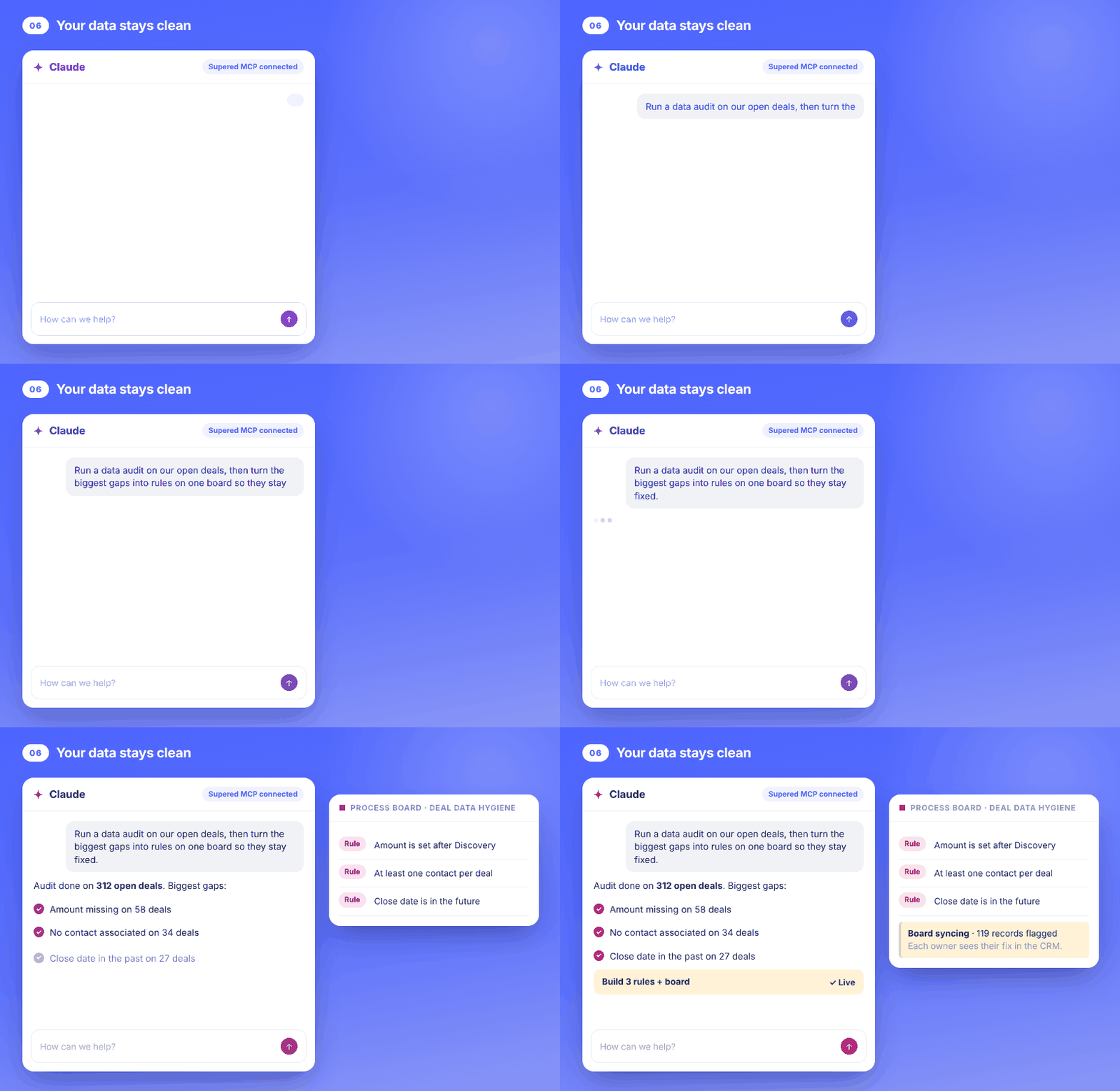
What it unlocks: the audit stops being a one-time cleanup, because the rules keep running and the fix holds. And before Claude or an agent changes a record, it can check the change against your process rules first. That check is read-only and never touches the CRM. The longer version is in CRM hygiene.
7. How do you get a custom report on process compliance without building a dashboard?
You want to know who’s running the process, which steps get skipped and who’s on a streak. Your CRM can’t answer that, because your CRM doesn’t know your process. Supered does.
- Ask Claude the question the way you’d ask an analyst.
- It pulls board analytics and streak data straight from Supered.
- Ask it to build the chart or dashboard you want.
- Save the prompt to your team’s prompt library so any manager can run it.
Using our Supered process boards, show me process compliance by rep for this month, the three rules that get skipped most and how many records each one flags, and which rep has the longest clean streak. Build it as a simple dashboard I can drop into Monday's pipeline meeting.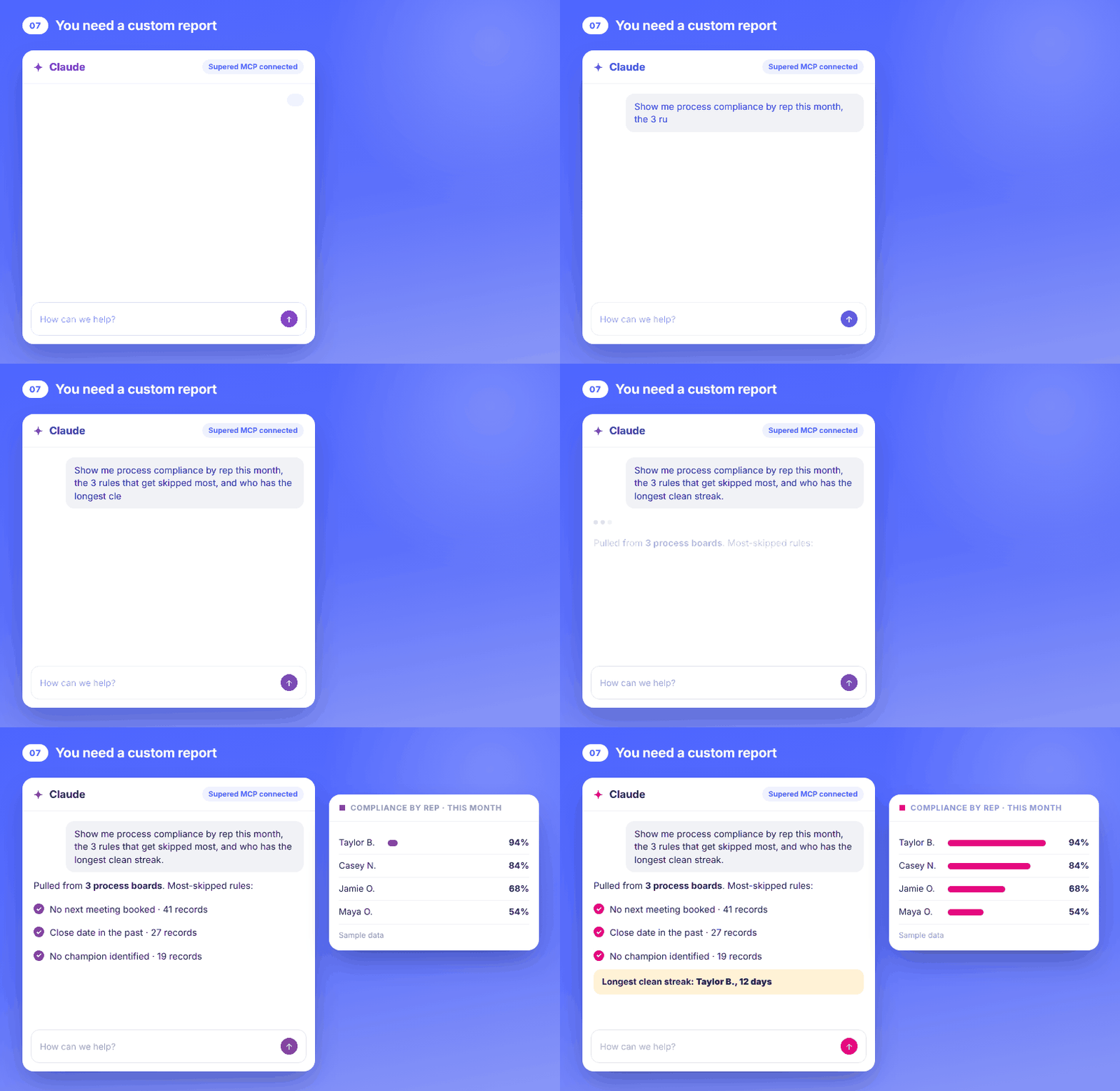
What it unlocks: you can only expect what you inspect, and now inspecting takes one prompt. The report tells you where to coach, and your time goes to the coaching. For ideas on what goes on the dashboard, see sales dashboards.
How do the seven builds connect into one second brain?
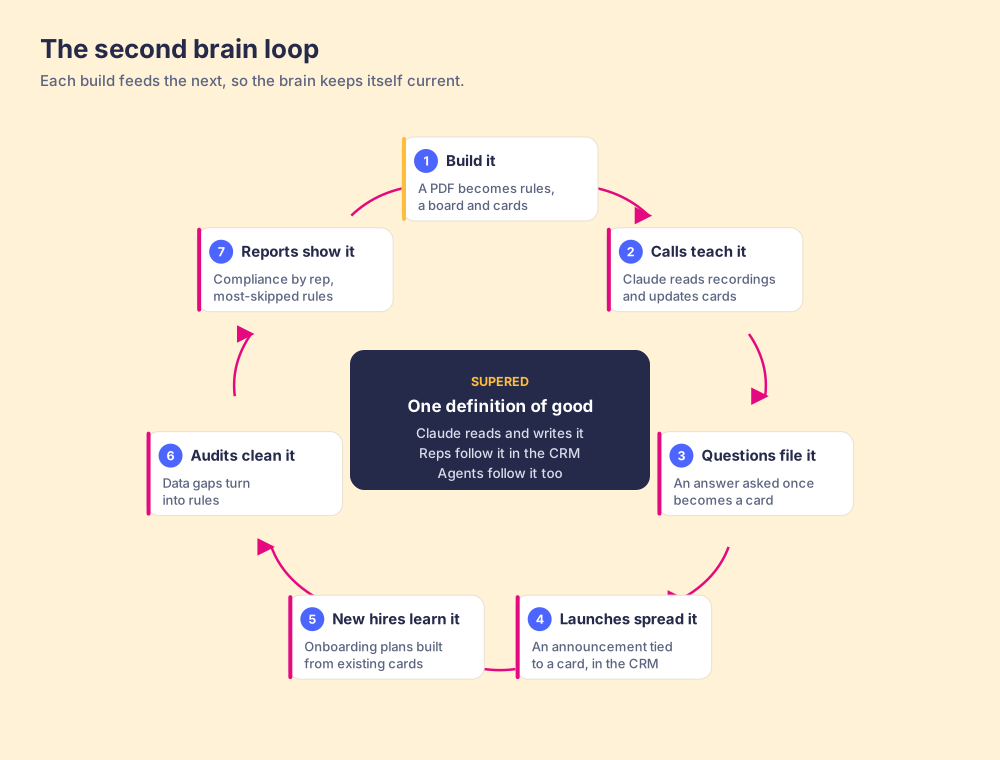
If you’ve ever kept a sourdough starter, you know how this works. You don’t make a new one for each loaf. You feed the same jar a little flour and water, it stays alive, and the bread comes from it. Forget to feed it and it dies on the counter.
These seven builds feed one jar. The PDF build creates the rules and cards. Calls and questions keep the cards fresh. Launches push changes out through those cards. New hires learn from the same cards. Audits add rules when the data drifts. Reports show which rules get skipped, which tells you what to fix in the playbook, and around it goes again.
I call Supered a living, breathing system because of this loop. Supered is the business logic for your deals: what a good deal looks like at each stage. That definition lives in one place. Reps follow it in the CRM or in Claude, and AI agents follow the same rules. Claude can read and write all of it, so the definition stays current without anybody rewriting a doc.
It also gets your team into an AI-first world. Anthropic introduced MCP as “a new standard for connecting AI assistants to the systems where data lives” (Anthropic, November 25, 2024). Your data already lives in the CRM. Your rules need a home too, or the AI is guessing. I went deeper on what a CRM’s own server can and can’t know in HubSpot MCP.
What can’t a team second brain do?
I’d rather tell you now than have you find out later.
- It won’t settle a process your managers disagree on: if they can’t agree on what a qualified deal is, Claude will build rules for whichever version you hand it. AI amplifies the process you have. Agree on the standard first, then let the brain hold it.
- It doesn’t replace your call on changes: the Assistant and Claude propose, and you approve. That’s on purpose. I don’t want an AI changing what 40 reps see without a person signing off.
- It needs feeding: the calls build and the questions build keep it alive. Run them once and stop, and the cards drift like any other doc.
- Rules need a CRM: process rules and boards run against HubSpot or Salesforce, so connect one before you build them.
I wouldn’t wait on any of these. They’re why there’s a person in the loop.
So that’s my answer to the customer who asked. Now you know about them too.
If you’d rather watch us build your first board from your own PDF, book a demo. Bring the playbook. We’ll build the first piece of your second brain together.
Frequently asked questions
What is a Claude second brain?+
What can a Claude second brain do for a sales team?+
What order should you build a team second brain in?+
How do I connect Claude to Supered?+
Can Claude delete anything in Supered?+
Can Supered Assistant read a PDF playbook?+
Does a team second brain work with HubSpot and Salesforce?+
One definition of a good deal.