Pipedrive MCP: Connect Claude to Pipedrive, Then Give It Your Rules
Pipedrive's official MCP server lets Claude read and update your pipeline on every plan. How to connect it, what it can touch, and why Pipedrive's own stage gates do not stop an AI's writes.
Pipedrive MCP is Pipedrive's Model Context Protocol server, which lets Claude, ChatGPT and other AI assistants read and update your Pipedrive deals, people, organizations, leads and activities with the permissions of the user who connects it.
On June 30, 2026, Pipedrive shipped an official Pipedrive MCP server on every plan, and within a month of general availability more than 6% of its paying customers had connected it (Pipedrive, August 2026). Pipedrive MCP is Pipedrive’s Model Context Protocol server, which lets Claude, ChatGPT and other AI assistants read and update your deals, people, organizations, leads and activities with the permissions of the user who connects it.
Connecting it takes about as long as a cup of coffee. Giving it something worth doing takes longer, and the second part decides whether your pipeline gets cleaner or merely busier. The connector hands Claude a ring of keys to your CRM. It says nothing about the house rules: that a deal past Discovery carries an amount, that a meeting gets a recap within a day, that a close date in the past gets moved or the deal gets closed out.
Pipedrive adds a wrinkle of its own. Its required fields, the feature that stops a deal from changing stage until the right box is filled, do not stop updates that arrive through the API or a third-party integration, by Pipedrive’s own account (Pipedrive Knowledge Base). An AI assistant writing through a connector arrives by that route. On this CRM, the rules you hand Claude may be the only rules Claude meets.
What is the Pipedrive MCP server, and what can it read and write?
MCP, the Model Context Protocol, is a standard plug that lets an AI assistant call another app’s tools. Pipedrive’s server is hosted by Pipedrive, uses OAuth sign-in, and comes with all Pipedrive plans; usage counts against token limits set by your plan, and you can buy more (Pipedrive MCP Server). Pipedrive says it can search deals, contacts, organizations and leads, create and update deals, contacts and activities, convert leads, schedule follow-ups and turn meeting notes into CRM records. It acts only on what the connected user can already see or edit, and each action lands in the change log. Pipedrive’s pages list no delete action.
The usage numbers tell you how teams treat it so far. In August, Pipedrive reported that 65% of MCP interactions read data and 35% write or update it, and that over 93% of its MCP usage happens on Anthropic surfaces, Claude.ai and Claude Code among them. Joe Futty, Pipedrive’s Chief Product and Technology Officer, put the premise plainly: “Customers increasingly expect to work with their CRM data wherever their work happens” (Pipedrive via MarTech Series, August 18, 2026). One write in three is a lot of hands in the records.
Before the official server existed, developers built their own, and two open-source options stand out:
- WillDent’s pipedrive-mcp-server. Self-hosted, MIT-licensed, and read-only by default, with two narrow write tools you can switch on: move a deal and add a deal note (GitHub).
- ckalima’s pipedrive-mcp-server. 155 tools reaching products, projects, mail and fields that the official server does not advertise; it stays read-only until you set a flag, and deletes need a second flag (Pipedrive Developers’ Community, June 15, 2026).
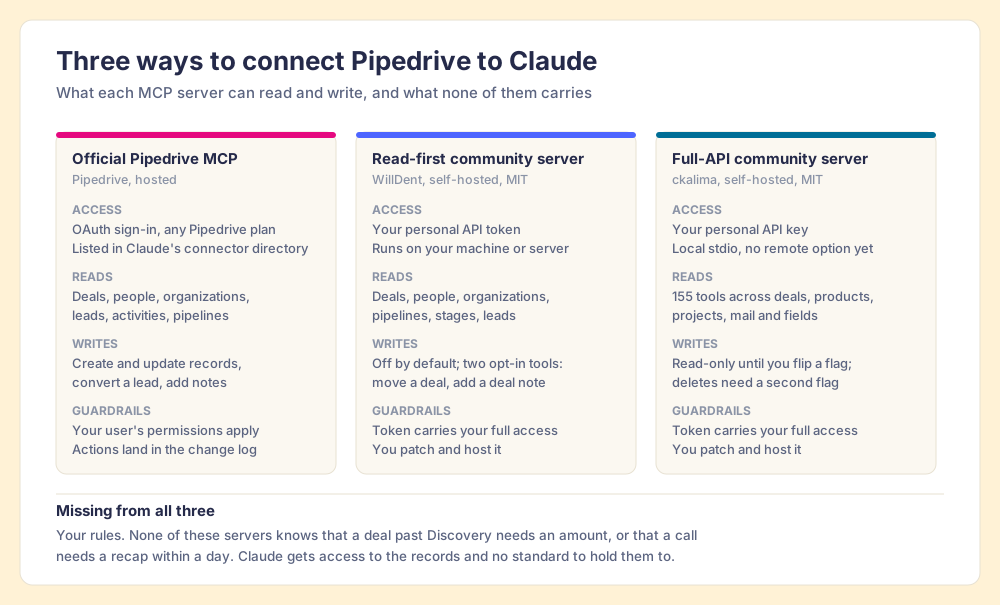
Both community servers run on a personal API token, which carries everything that token’s user can reach, and you patch and host the code yourself. For a sales team, that trade rarely pays.
How do you connect Pipedrive to Claude?
These four steps are how to connect Pipedrive to Claude from scratch:
- In Claude, open Customize, then Connectors, and search the directory for Pipedrive. Pipedrive’s own help article, updated September 3, also describes the manual route: add a custom connector named Pipedrive MCP with the URL
https://mcp.pipedrive.ai/mcp(Pipedrive Knowledge Base). - Sign in to Pipedrive, review the permissions, and choose Allow and install.
- Turn on the setting that loads all available tools. Pipedrive warns that Claude may not load every Pipedrive tool when a conversation starts, which is why a write can look missing.
- Run a read before you run a write. “List my open deals with a close date in the past” tells you in one answer whether the connection sees what you see.
On plans, Anthropic says directory connectors are available to all Claude users, and the free plan is limited to one custom connector (Claude Help Center). Claude acts as you: your Pipedrive role and visibility settings decide what it can reach.
So much for the Pipedrive to Claude plumbing. A working Claude Pipedrive connection is the easy half; the harder half is deciding what Claude should do once it is in.
What does Claude not know when it connects to Pipedrive?
Suppose you hired a sharp contractor, handed over your Pipedrive login, and asked them to tidy the pipeline by morning. They would do something sensible. They would fill blank amounts with a reasonable guess, push stale close dates out a month, and mark a few deals lost. Each change would be defensible, and each would follow a reasonable stranger’s standard. Your own standard, the one in your head that decides which deals you trust, would appear nowhere in the work.
Satya Nadella has argued the opposite direction for the whole software industry. On the BG2 podcast in December 2024, he described business applications as “essentially CRUD databases with a bunch of business logic” and said “the business logic is all going to these agents” (Windows Central). Grant him the mechanics, because the Pipedrive MCP server proves them: it is a set of create, read and update tools handed to an agent. Where I part with him is the word “going.” The logic does not travel on its own. In Pipedrive, part of it lives in stage settings and required fields inside the app, and when the work moves into Claude, that logic stays behind at the app’s front door.
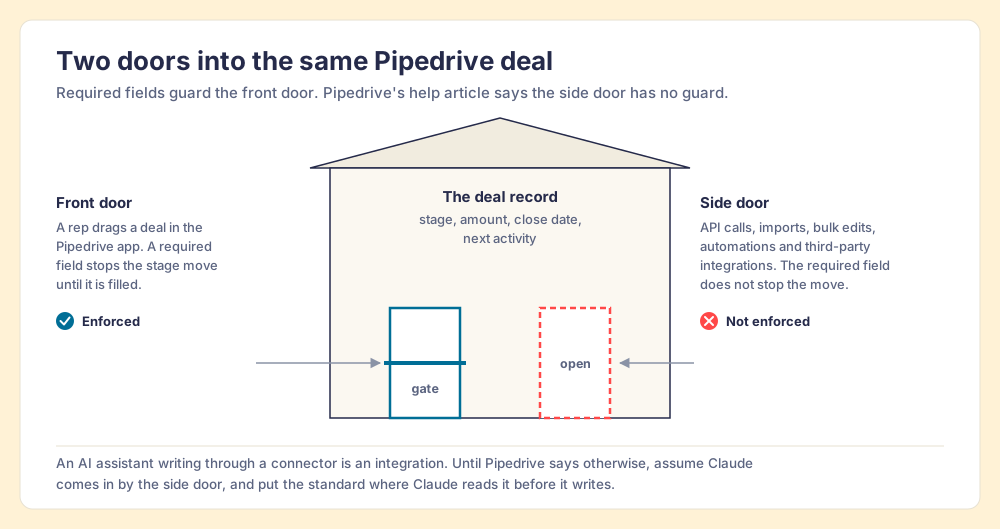
A caveat on the drawing. Pipedrive’s article does not name MCP, and Pipedrive may treat its own server differently from a third-party integration. I would not trust either assumption untested: set a required field on one stage, ask Claude to move a test deal into it with the field empty, and see what happens.
The deeper problem holds whichever door Claude uses. In 1983 the psychologist Lisanne Bainbridge described the ironies of automation: a system that takes over the routine work leaves the human the hardest job, which is watching for the rare error, and the human is worse at watching for having been taken out of the work. Raja Parasuraman and Dietrich Manzey’s review of the research added a harder finding: automation bias produces errors of omission and commission, it “occurs in both naive and expert participants,” and it “cannot be prevented by training or instructions” (Human Factors, 2010).
You will not catch Claude’s confident wrong amount by reading its summary carefully. You catch it with a written check that runs whether you are paying attention or not.
Why do small Pipedrive teams need written rules more than big teams?
Pipedrive describes itself as “the easy and effective CRM for small and medium-sized companies,” used by more than 100,000 companies (Pipedrive). On a team that size, the process usually lives in one head. The founder knows a deal without a next activity is drifting, knows which close dates are wishful, and fixes them on sight. Nothing is written down because the person who would read it wrote it.
Pipedrive’s in-app process tooling reflects that buyer. Required fields sit on the Premium plan and above on the current pricing page, and Important Fields, the lighter version, raise a flag in the deal view without stopping anyone (Pipedrive Knowledge Base). On the lower plans, the rules exist only as habits.
Then Claude arrives with write access to the whole pipeline, and it has never met the founder.
The State of Sales Enablement 2026 shows why the habits do not hold on their own. Process adherence is 47% when a manager carries one to five reps and 23% at six to eight. The top reason reps skip the process, at 29%, is that managers do not enforce it, and leaders cite capacity more often than indifference (The State of Sales Enablement 2026). A founder who sells and manages has none to spare. The same survey puts quota attainment at 49% when guidance is embedded in the workflow, 24% when it lives in CRM fields or stages, and 15% in docs or wikis.
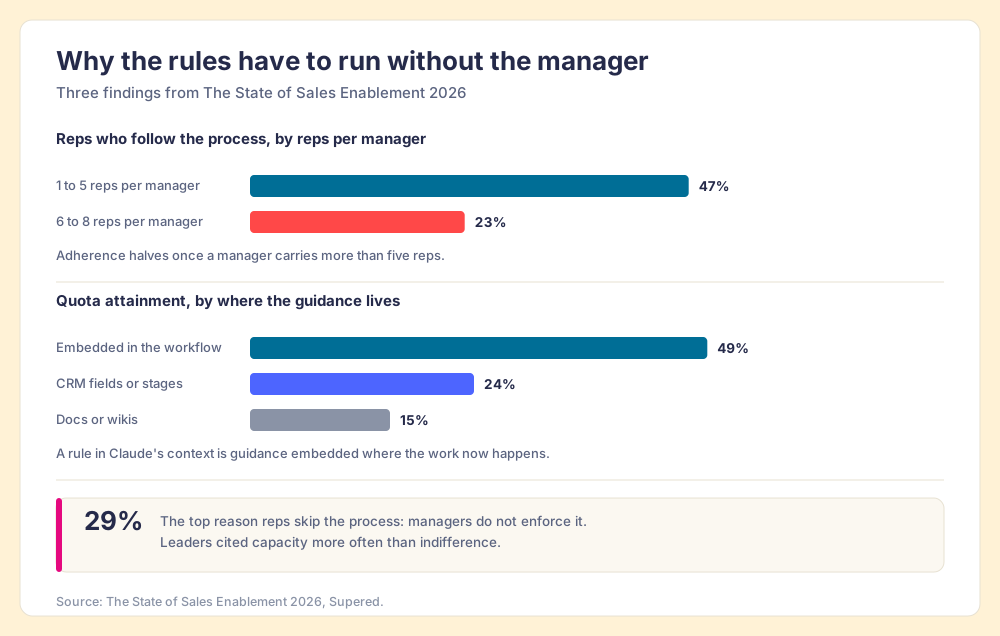
When the work moves into Claude, Claude is the workflow. A rule Claude reads before it writes is guidance embedded at the moment of work, which is the 49% row.
How do you hand Claude your Pipedrive rules?
Write the rules as checks a stranger could run on a single deal and answer yes or no. Sort them into three families:
- Momentum expectations. No open deal without a scheduled next activity; no expected close date in the past.
- Data expectations. A deal past your discovery stage carries a value, an expected close date and a linked decision maker.
- Process expectations. A recap email within 24 hours of a meeting; a pre-call email the day before the next one.
Then give Claude one job against them: “Check my open Pipedrive deals against these rules. Fix what the deal notes and my calendar support, draft any emails as Gmail drafts, and list what you could not fix.” The drafts need a Gmail connector alongside Pipedrive, and the list of leftovers matters as much as the fixes, because each leftover points at a rule that is vague or a deal only a person can judge.
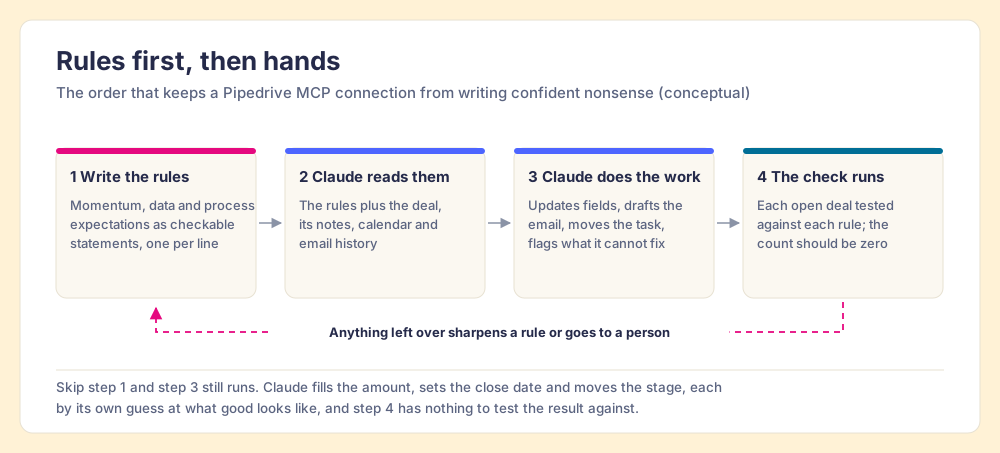
The last box carries the weight. Benjamin Harkin’s meta-analysis of 138 studies and 19,951 participants found that monitoring progress raises goal attainment, and that the effect grows when progress is physically recorded or publicly reported (Psychological Bulletin, 2016). A violation count the team sees each morning is that recording. Measurement turns the rules from a wish into a habit, for the reps and for the assistant.
My own version runs on HubSpot. My board of open deals carries 22 rules, and one night it showed 11 violations. One prompt to Claude cleared them in about 10 minutes, against about 45 by hand. It was one founder’s pipeline on one night, so read it as an example rather than a benchmark. The speed came from the rules Claude read first; the HubSpot connector only gave it hands. The same split holds on Pipedrive.
A text file of rules pasted into each chat works for one person and splits the day a second person writes their own version. The rules need one home that both the CRM screen and the LLM read, so the standard stays the same on any screen. Supered is one such home. Your rules live there as a Process Ruleset, a Process Board checks open deals against them, and Claude reads the same Process Rules through Supered’s MCP before it touches a record. You describe a rule in English, and Supered’s MCP creates the Process Rule directly. Supered is bringing Process Rules and Process Boards to Pipedrive, timed to the Pipedrive Partner Summit in October 2026; the sales expectations use case shows the rules and the board, and the Claude integration page shows what Claude reads and changes.
Which Pipedrive Claude integration setup should you choose?
Three setups cover the realistic options for a small team:
- The official connector on its own. Good for questions, pipeline summaries and single updates you watch happen. Weak for anything unattended, because Claude brings its own standard.
- A self-hosted community server. Worth it for read-heavy analysis of objects the official server does not advertise, such as products or projects, run in read-only mode. Weak as a daily write path, since you own the token risk and the patching.
- The official connector plus written rules and a daily check. The setup I recommend.
The recommendation follows from the evidence above. One Pipedrive MCP interaction in three is a write, required fields may not stand in its way, and automation bias means a skim will not catch the bad ones. Guidance embedded where the work happens is the 49% row in the SOSE data. Connect Pipedrive, write the rules, then let Claude work.
If you run more than one CRM, or you are deciding which AI to standardize on, the Claude for sales hub maps the whole approach. The same pattern with a bigger server sits in the HubSpot MCP guide and the Salesforce MCP walkthrough, and CRM hygiene as a nightly rules check turns the rule families above into a full working list. For one operator’s daily routine, Ryan Gunn’s Claude HubSpot integration is a good read.
Frequently asked questions
What is Pipedrive MCP?+
Does Pipedrive have an official MCP server?+
How do I connect Pipedrive to Claude?+
Can Claude update deals in Pipedrive?+
Do Pipedrive required fields apply to changes Claude makes?+
Is the Pipedrive MCP server free?+
Your process, running itself.