Claude CRM integration
·
Powered by your Process Rulesets
The Claude CRM integration that knows how your team sells.
Claude does the CRM work. Your rules decide which work.
A Claude CRM integration connects Claude to HubSpot or Salesforce so it can read records and change them for you. Supered adds the part a CRM connector cannot know on its own: your Process Rulesets, the momentum, data and process expectations your deals are held to. Claude reads the rules, finds the records that break them, updates fields and tasks from the context it can see, and saves each follow-up email as a draft for the rep to read before it goes anywhere.
Already use AI for CRM admin and cleanup. Give that AI your rules, and the cleanup becomes the process. Teams with strong process adherence rate AI's impact as high 40% of the time; teams with weak adherence, 21%.
Source: The State of Sales Enablement 2026
Same rules, any screenClaudeHubSpotSalesforceGmailAny MCP client
7 min read
What you'll learn: what Claude reads, what it can change, what the rep sees, how to connect it, and the three permission gates every change has to clear
Chapter 01 · What the connector knows
What does a Claude CRM integration know about your sales process?Your fields, all of them. Your rules, none.
Connecting Claude to the CRM is a bit like hiring a sharp temp and handing them a badge that opens every door in the building. They can get into any room, read any file, move anything. What they cannot do on day one is tell which of those rooms has a deadline on Friday. The badge opens doors. It says nothing about the work behind them.
Claude with only a CRM connector
It can change anything, so it waits to be told what.
HubSpot's connector lets Claude create and update records, log notes and create tasks. Ask it to "clean up my pipeline" and it has to guess what clean means for your team. The rep becomes the rulebook, typing the expectations into the prompt from memory, one deal at a time.
→
Claude with Supered connected
It reads your Process Rulesets first, then does the work.
The expectations live in Supered as Process Rules: close date in the future, an amount past Discovery, a recap after each meeting. Claude pulls the list of records that break them, fixes what the CRM context supports, and drafts what needs a human voice. The prompt can be one sentence long because the rules are already written.
Chapter 02 · Why the rules come first
Why does Claude need your rules before it touches the CRM?
Because the rules already exist, and the gap is in following them. The State of Sales Enablement 2026 surveyed revenue teams on how their process runs day to day. Three findings decide how a Claude CRM integration should work.
36%
see reps follow the process they wrote down
89% of teams have a defined sales process. 36% see reps run it. The 53-point gap is the work Claude can take on, once it knows what the process says.
It is 47% at 1 to 5 reps per manager. The top reason reps skip the process is that managers do not enforce it (29%). Managers are out of hours, so the inspection has to run without them.
quota attainment when guidance is embedded in the workflow
Against 24% when it lives in CRM fields or stages and 15% when it lives in docs or wikis. When a rep works in Claude, the guidance has to reach them there too.
Claude can edit any record, and it guesses which edits your team expects.
With Supered
Claude reads your Process Rulesets first. AI amplifies the process you have, so give it the one you wrote.
How the pieces fit
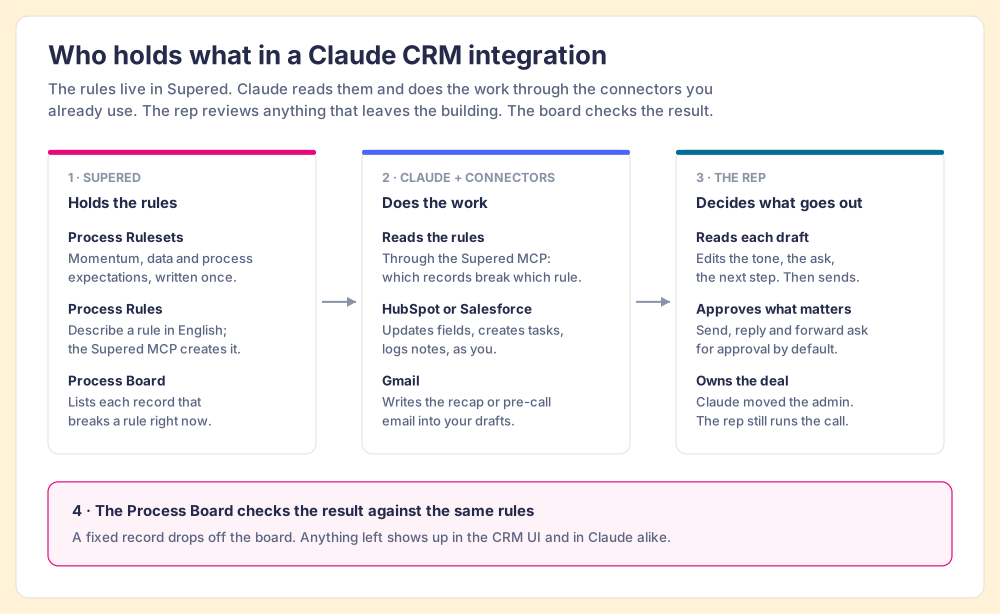
The rules live in Supered. Claude does the work.
We built Supered so a sales leader can write an expectation once and have it reach the rep wherever they work: inside HubSpot, inside Salesforce, and now inside Claude. The integration adds no new screen. It hands Claude the same rulebook the CRM already shows.
PRINCIPLE 01
Supered holds the rules.
Momentum, data and process expectations, written as Process Rules and grouped into Process Rulesets. Describe a rule in English; Supered's MCP creates the Process Rule directly.
PRINCIPLE 02
Claude reads them, then works.
Through the Supered MCP, Claude sees which records break which rule. Through your CRM and Gmail connectors, it updates fields, creates tasks and writes drafts, as you and within your permissions.
PRINCIPLE 03
The board checks the result.
The Process Board re-checks each record against the same rules. A fixed record drops off; anything left is visible in the CRM and in Claude, so the manager inspects without chasing.
Chapter 04 · Reads, changes, shows
What can Claude read and change through the Claude CRM integration?
Three lists, kept short on purpose. Each item maps to a connector you can inspect, and none of them reaches past the permissions the rep already has.
What Claude reads
Your rules, and the records that break them.
From Supered: your Process Rulesets and the Process Board's list of open violations. From the CRM: the deal, its notes, meetings and tasks. From Gmail: the thread with the buyer. That context is how Claude fills an amount from the discovery notes or matches a close date to the next meeting.
What Claude can change
Fields, tasks, notes and email drafts.
In HubSpot, the connector updates record properties, logs notes and creates tasks; it cannot delete data. In Salesforce, the hosted MCP servers create and update records as you, and your name appears in the audit trail. In Gmail, Claude writes drafts. In Supered, it can propose new Process Rules, which you confirm.
What the rep sees
A shorter board and a stack of drafts.
The violations Claude fixed are gone from the Process Board. The ones that need a person are still there, in the CRM and in Claude. The emails sit in Gmail drafts, written against the deal's history, waiting for the rep to read, edit and send.
Four roles, four owners. Supered holds the rules, Claude and the connectors do the work, the rep decides what leaves the building, and the Process Board checks the result.
Chapter 05 · The plan
How do you connect Claude to your CRM with your rules attached?
Five steps. The first three are one-time setup for an admin. The last two are what a rep does with it.
01.
Connect your CRM to Supered.
An admin connects HubSpot or Salesforce inside Supered's settings. Process Rules run on CRM records, so this comes first.
Who: a Supered adminWhere: Supered settings
02.
Add Supered to Claude.
Add a custom connector in Claude pointed at https://app.supered.io/mcp and sign in with your Supered account. The Supered MCP server speaks the Model Context Protocol, the open standard Anthropic introduced in November 2024 for connecting AI tools to the systems where data lives (Anthropic). On Claude Team plans, an Owner or Primary Owner adds the connector for the organization. In Claude Code, one command does it: claude mcp add --transport http Supered https://app.supered.io/mcp.
Auth: OAuth, one person at a timeWorks on: Free (one custom connector), Pro, Max, Team, Enterprise
03.
Turn on the CRM and Gmail connectors.
For HubSpot, a Super Admin connects the HubSpot connector for Claude and picks which data permissions it gets; it needs a paid Claude plan (Pro, Max, Team or Enterprise). For Salesforce, your admin enables Salesforce's hosted MCP servers, generally available since April 29, 2026 on Enterprise Edition and above, and connects them to Claude. Then connect Gmail so Claude can write drafts. The HubSpot Claude connector guide and the Salesforce MCP guide cover each screen.
HubSpot: Super Admin or App Marketplace accessSalesforce: Enterprise Edition and above
04.
Write the rules in plain sentences.
Tell Claude the expectation the way you would tell a new rep: "A deal past Discovery needs an amount." "Send a recap within a day of each meeting." Supered's MCP creates each Process Rule directly; you confirm it and group it into a Process Ruleset. If you already run Process Rulesets in Supered, skip this step: Claude reads the ones you have.
Inputs: your expectations, in EnglishOutput: Process Rules on a Process Board
05.
Ask Claude to clear the board.
One prompt does it: "Look at my board and fix all my violations. Draft anything that needs an email." Claude reads the rules, updates what the CRM context supports, writes the drafts, and reports back. The rep reads the drafts and sends them. The Claude for sales guide covers the prompts worth keeping.
Who: the rep, or the manager on their own dealsOutput: a shorter board, drafts in Gmail
What it looks like
One prompt, eleven violations, and the rep's evening back.
Our co-founder Matt Bolian ran this on his own open deals, late at night, with his streak about to reset at midnight. His board, Sales Expectations, holds 22 rules. It showed 11 violations. He connected Supered, HubSpot and Gmail in Claude and typed one sentence. The board went to zero. By his own count the cleanup takes about 45 minutes by hand and took about 10 with Supered and Claude. One person, one board, one night: an example, never an average.
Close date in the past.
Matched to the next meeting on the calendar, then updated in HubSpot.
No amount past Discovery.
Filled from the discovery notes already on the record.
Overdue tasks.
Moved in HubSpot from the context on the record.
No recap sent.
Recap written with a recommended next step, saved to Gmail drafts.
No pre-call email.
Drafted for the next meeting, saved to Gmail drafts.
No decision maker.
Updated in HubSpot from the context on the record.
Look at my board and fix all my violations. Draft anything that needs an email.
Sales Expectations
Process Board · 22 rules · Matt's open deals
11 violations
Close date in the past · updated
No amount past Discovery · updated
Overdue tasks · updated
No recap sent · draft saved
No pre-call email · draft saved
No decision maker · updated
Board at zero. Drafts are waiting in Gmail.
Nothing was sent. Read each draft, change what you would say differently, and send it from your inbox.
Open draftsShow what changed
Chapter 07 · Permissions and safety
Is it safe to let Claude change your CRM?
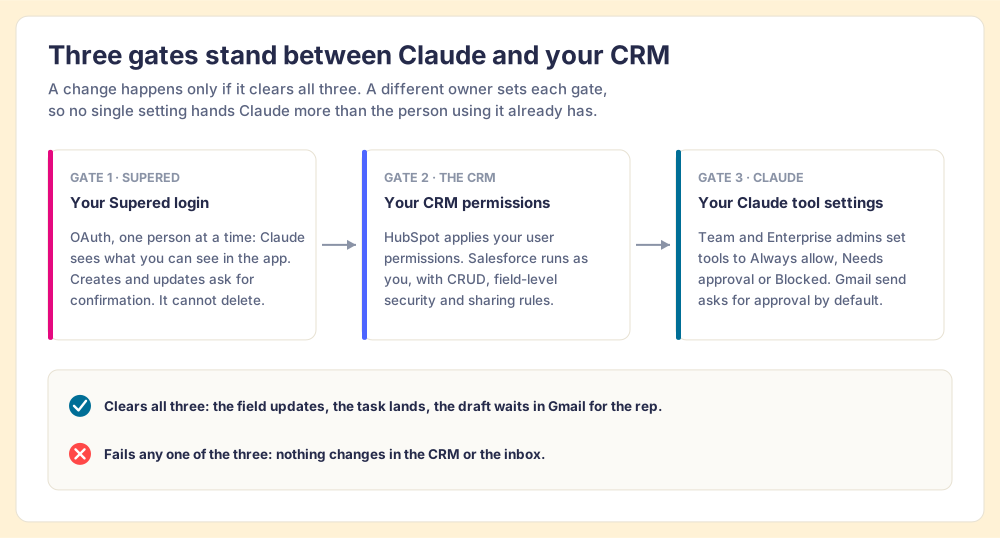
Three gates decide what Claude can touch, and you already own each one. Claude inherits each person's permissions from the connected service; Anthropic's wording is that if someone cannot reach a record in the source system, the connector cannot reach it from Claude either (Anthropic, checked 2026-10-01).
A different owner sets each gate: Supered (OAuth per person, confirm before create or update, no delete), the CRM (HubSpot user permissions; Salesforce object, field and sharing rules), and Claude (Always allow, Needs approval or Blocked on Team and Enterprise).
Claude sees what you see
No connector widens anyone's access.
The Supered MCP signs each person in with their own account. HubSpot's connector respects HubSpot user permissions. Salesforce's hosted MCP servers run as the signed-in user, with your CRUD, field-level security and sharing rules applied (Salesforce, April 29, 2026).
Drafts land in drafts
Nothing reaches a buyer without the rep.
Claude writes each email into Gmail drafts, like letters stacked in an outbox tray until someone signs them. Anthropic's Gmail connector asks for approval before each send, reply or forward by default (Anthropic), and admins on Team and Enterprise decide whether that stays on.
Review before send
The check is built in, and the board measures it.
Parasuraman and Manzey's 2010 review of automation research found that automation bias shows up in experts as well as novices and "cannot be prevented by training or instructions" (Human Factors). So we put the check in the workflow: a draft that waits, and a Process Board that re-checks the record the next time it runs.
Chapter 08 · The fair objection
Claude already connects to HubSpot. Why does it need Supered?
It is a fair question, and the connector deserves its due. HubSpot's connector for Claude, announced November 20, 2025 and updated September 17, 2026, reads contacts, companies, deals, tickets and engagement history, and it creates contacts and deals, updates properties, logs notes and creates tasks (HubSpot). For a rep who knows exactly what to ask, it is a strong tool on its own, and we recommend it.
What it cannot carry is the expectation. A deal property has no idea that your team wants an amount by Discovery, a recap within a day, and a decision maker named before Proposal. Those rules live in your head, in a wiki, or, with Supered, in Process Rulesets that a machine can read. Without them, the rep supplies the rules from memory in every prompt, and the SOSE numbers above show how well memory holds up: 89% defined, 36% followed.
Claude already has the keys to the CRM. With Supered, it also knows which rooms need work before morning.
Chapter 09 · Two versions of next year
A year from now, Claude is still a clever chat window. Or it is how your process gets run.
Both teams pay for the same Claude seats. The difference is whether Claude knows the rules.
Claude without your rules
Each rep prompts their own version.
Strong reps get help with the deals they remember to ask about. The rest of the pipeline drifts. Managers still open deals one by one to find what slipped, and the CRM shows a different process for each rep.
Expectations retyped from memory in each prompt
Edits made with no standard to check them against
Inspection still done by hand, when there is time
Two process versions: the wiki's and the rep's
Claude with your rules
One rulebook, read by every screen.
The expectations live in Supered. Claude reads them, clears the board, and leaves the drafts for the rep. The manager opens the one-on-one with what is still open and coaches on that.
Same Process Rulesets in the CRM and in Claude
Fields and tasks fixed from the record's own context
Emails drafted, read and sent by the rep
A Process Board that shows what is left
The success state
Your reps open Claude, ask once, and the CRM matches the process you wrote.
The admin work that used to eat an evening runs from one prompt. The emails go out in the rep's own voice after the rep has read them. The manager stops chasing missing fields and starts coaching the deals that need a person.
One prompt
Reads your Process Rulesets and works the board
Drafts
Every email waits for the rep to read and send
Your access
Claude sees what the rep can see, and no more
Same rules
In HubSpot, in Salesforce, and in Claude
Chapter 11 · The questions
Claude CRM integration questions, answered directly.
What sales leaders and RevOps ask before they connect Claude to the CRM. Each answer cites the vendor that owns the fact.
What it is
What is a Claude CRM integration?
A Claude CRM integration connects Claude to HubSpot or Salesforce so it can read records and change them for you: update a property, create a task, log a note. With Supered connected too, Claude also reads your Process Rulesets, so it knows which records break your team's expectations and fixes those first, then saves any follow-up email as a draft for the rep to review.
Which Claude integrations does this use?
Three connectors, each doing one job. The Supered MCP server carries your rules and your Process Board. The HubSpot connector for Claude, or Salesforce's hosted MCP servers, carries the record changes. The Gmail connector carries the drafts. Claude reads across all three in one conversation.
Claude already connects to HubSpot. Why add Supered?
HubSpot's connector lets Claude create and update records, log notes and create tasks, and it respects your HubSpot user permissions (HubSpot Knowledge Base, updated 2026-09-17). It does not hold your sales expectations: that a deal past Discovery needs an amount, or that a recap goes out after every meeting. Supered holds those as Process Rules and shows which records break them. Claude needs both halves to do the work your way.
Does it work with Salesforce, Pipedrive, or ChatGPT?
Salesforce: yes. Supered runs Process Rulesets on HubSpot and Salesforce, and Salesforce made its hosted MCP servers generally available on April 29, 2026 for Enterprise Edition and above. For Pipedrive, see the Pipedrive MCP guide. The Supered MCP server works with any MCP-compatible client, so the same rules reach ChatGPT too; the ChatGPT and HubSpot walkthrough shows how.
Permissions and safety
What can Claude see once it is connected?
Only what the person using it can already see. The Supered MCP signs each person in with their own Supered account. HubSpot's connector applies that user's HubSpot permissions. Salesforce's hosted MCP servers run every transaction as the signed-in user, with object, field and sharing rules applied. Anthropic's own rule is the same: if someone cannot reach a record in the source system, the connector cannot reach it from Claude either.
Can Claude send an email without the rep?
In this workflow Claude writes the email into Gmail drafts and stops. The rep reads it, edits it and sends it. Anthropic's Gmail connector asks for approval before each send, reply or forward by default, and Team and Enterprise owners decide whether that approval stays on. We recommend leaving it on.
Can Claude delete records or rules?
The Supered MCP server cannot delete content, and any create or update asks for confirmation first. HubSpot's connector for Claude cannot delete data. In Salesforce, Claude can do only what your Salesforce profile allows, so your admin's existing permissions decide.
Who has to set this up?
A Supered admin or manager writes the Process Rulesets and connects the CRM inside Supered. In HubSpot, a Super Admin or a user with App Marketplace access connects the Claude connector and picks its permissions. On Claude Team plans, Owners and Primary Owners add custom connectors such as Supered; on Enterprise plans, so can people with a role that includes Manage access to Libraries.
Setup and plans
Which Claude plan do I need?
Custom connectors such as the Supered MCP server work on Free, Pro, Max, Team and Enterprise, and Free accounts are limited to one custom connector (Anthropic, checked 2026-10-01). The HubSpot connector for Claude requires a paid Claude plan: Pro, Max, Team or Enterprise. For the full workflow on HubSpot, plan on a paid seat.
How do I connect Supered to Claude?
Add Supered as a custom connector in Claude with the server address https://app.supered.io/mcp, then sign in with your Supered account. In Claude Code, run claude mcp add --transport http Supered https://app.supered.io/mcp, or install the Supered plugin, which adds setup skills on top of the connection. The Supered MCP help article walks through both.
Do I have to write the rules in code?
No. Describe a rule in English, for example "a deal past Discovery needs an amount," and Supered's MCP creates the Process Rule directly. You review it, group it into a Process Ruleset, and it starts checking records on your Process Board.
What does the rep see in the CRM afterward?
The same rules, in the CRM. A fixed record drops off the Process Board in Supered, and anything still open shows up wherever the rep works: in HubSpot or Salesforce through Supered, and in Claude the next time they ask. One set of rules, two screens.
A 30-minute demo: we connect Claude to a HubSpot or Salesforce sandbox, load a Process Ruleset, run the one prompt against the board, and show you the drafts it leaves for the rep.