Ryan Gunn's Claude HubSpot Integration: Two Scheduled Runs and the Four Other Tools in His Stack
Ryan Gunn connects Claude to HubSpot, Slack and his call recorder, and runs a brief every morning and a sweep of his commitments every evening. On Show Me Your Stack he counted down the five tools behind it.
A Claude HubSpot integration connects Anthropic's Claude to your HubSpot portal through a connector so Claude can read and update CRM records, and Ryan Gunn uses his to run a meeting brief each morning and a sweep of spoken commitments each evening.
Ryan Gunn spells his last name with two Ns, and a few years ago, leaving Inbound late for a flight, he learned the second N does not survive being shouted. A coworker from Aptitude 8 spotted him across the airport and yelled “Gun!” Security pulled his bag. “They didn’t find anything,” he said. “I almost missed my flight but I made it.”
Ryan runs his workday on a Claude HubSpot integration and four other tools. If you work in HubSpot, you have probably learned something from him. He has built his career on the platform for more than a decade, teaches it through HubSesh courses and bootcamps, and now works at First Touch, the LinkedIn automation company he joined because it did a job he had tried to build himself for years. When Ryan came on Show Me Your Stack in June 2026, I asked him to count down the HubSpot AI tools he runs his day on. His calls get recorded and turned into CRM updates, nearly every alert lands in Slack, and HubSpot stays the record the other tools write into, even with Claude open all day.
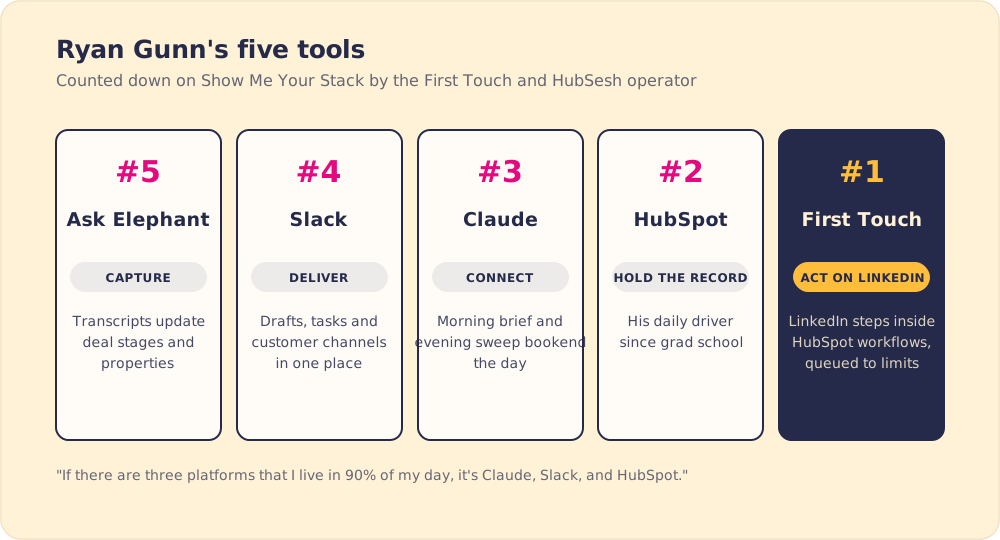
#5 Ask Elephant: why are meeting transcripts the best context a business has?
Ryan’s fifth pick records meetings, and he called “meeting note taker” a “really reductive description for what it does.” His reason for ranking it: “as we, you know, move further and further into the AI era, I think meeting transcripts are by far the most valuable source of context that your business can have.”
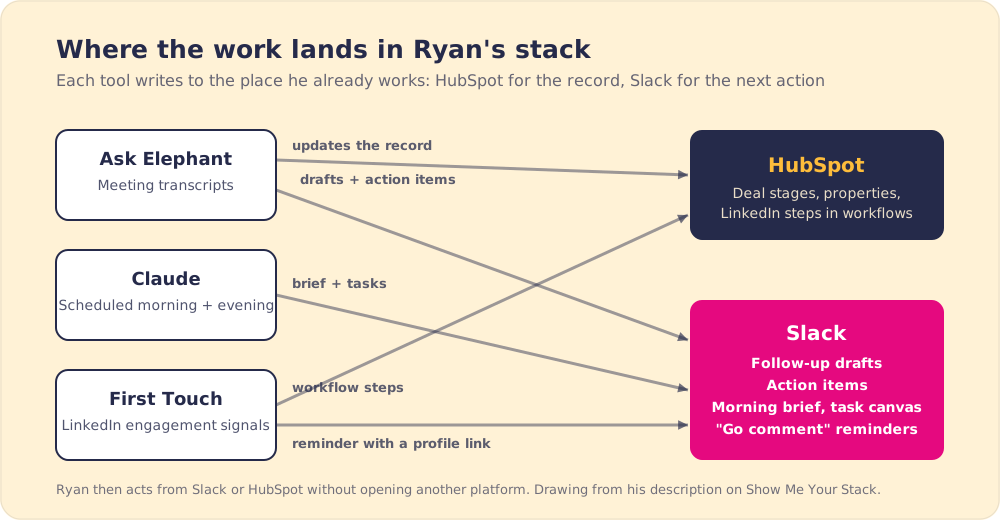
At First Touch, Ask Elephant updates deal stages and properties from call transcripts, drafts follow-up emails after sales meetings, and pulls action items from every call. Michael, one of First Touch’s co-founders and its only seller, gets the most out of it, and from where he sits it looks like an autonomous CRM. I asked Ryan to verify. “I would say it’s a semi semi-autonomous CRM,” he said, and added: “There are still plenty of manual checks that mostly I am doing.”
The typing he no longer does is time back for selling. Salesforce’s survey of more than 7,700 sales professionals found reps spend 28% of their week selling, with the rest going to deal management, data entry and other tasks (Salesforce, 2023). One news note for buyers: Fullcast announced it had acquired AskElephant’s technology and customer assets on September 4, 2026, after this episode was recorded (Fullcast, 2026).
Ryan’s takeaway is to let the transcript fill in the record, and to keep a person checking it.
#4 Slack: why did Ryan give up on email?
Ryan admitted Slack is “kind of a boring one,” and then gave the most opinionated answer of the episode. First Touch runs “100% of our communications” in Slack. He is at inbox zero most days, and he archives about 75% of his personal email before opening it. Email, he said, is “going the way of the dinosaur,” buried under “AI SDRs reaching out to you” and newsletters “that you didn’t even sign up for.”
Follow-up drafts from Ask Elephant arrive in Slack instead of an inbox. So do action items, and so do the manual engagement reminders from First Touch: go comment on this person’s post, with a link to their LinkedIn profile. “The real unlock for me has been just all of the other things that I can push into Slack as a task, as a notification, instead of having to go to another platform.”
I asked him whether that includes the recap after a call. His rule is simple: “If there’s any opportunity to send a Slack instead of an email, that’s what we’re doing.”
#3 Claude: how does Ryan’s Claude HubSpot integration bookend his day?
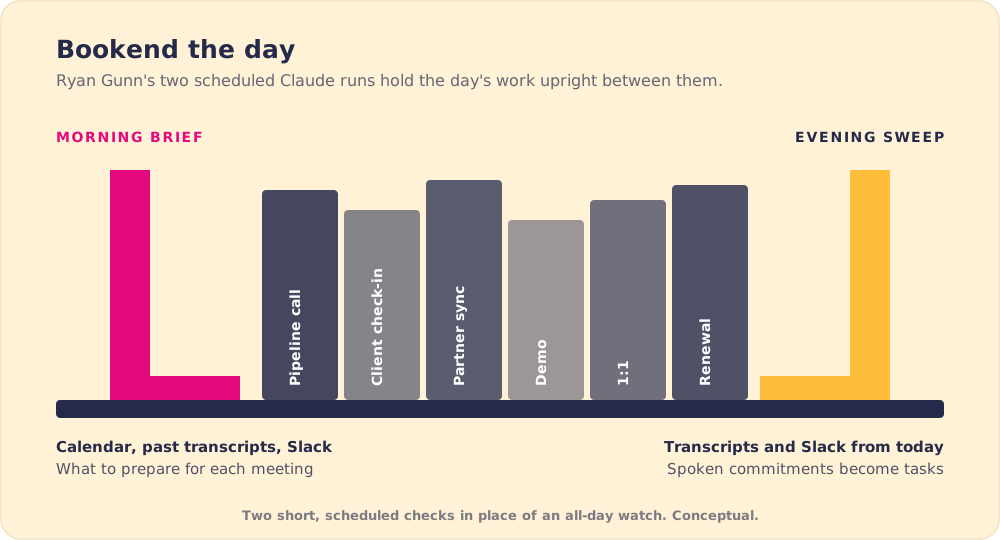
Claude came third, “a big part of how these other tools are talking to each other.” His Claude HubSpot connection, like the ones to Slack and Ask Elephant, runs through MCP connectors, and he runs two Cowork scheduled tasks around every workday.
The morning run reads his calendar. For each meeting it pulls earlier Slack conversations, past Ask Elephant transcripts and any related email, then gives him a brief on what to prepare. The evening run reads the day’s transcripts and Slack messages, finds “anything that I have verbally committed to doing,” and writes it to a running task list in a Slack canvas, with the context attached so he does not have to hunt for it later.
“Those two things together at the beginning and end of the day really they bookend the day in a way that allows me to leave work feeling like it’s covered,” he said. Then, a little sheepishly: “That’s the most basic of of the things.”
I run a morning version myself, which I call my chief of staff daily briefing, and on the episode I realized mine had been losing context overnight. Ryan’s evening sweep catches commitments while the day is fresh, and I told him on the spot I was going to invert mine to match.
The second surprise was where he now keeps his context. “I think the idea of a source of truth is kind of becoming outdated because everything is just providing context,” he said. He stores markdown files in Claude: his writing style for newsletters and LinkedIn posts, a description of his role, his active projects. That lets him ask for things like good post ideas from the day’s transcripts, checked against his post history and written in his style. Before, he pushed context into AI tools, “but never as a source itself.”
How to set up a Claude HubSpot integration
HubSpot publishes its own connector for Claude. It needs a paid Claude plan (Pro, Max, Team or Enterprise) and works with any HubSpot subscription. In Claude you open Settings, go to Connectors, pick HubSpot, log in and choose the permissions. Super Admins and users with App Marketplace access can connect on their own, and anyone else needs a Super Admin to approve it (HubSpot Knowledge Base).
Once it is connected, Claude can read contacts, companies, deals, tickets and engagement history, create and update records, and log tasks and notes. It sees only what that user can see in HubSpot. It cannot delete anything, and bulk changes go 10 records at a time.
The schedule is a separate piece. Ryan’s two runs are Cowork scheduled tasks that read from his connected apps at set times, so the brief is waiting before his first meeting.
Ryan’s lesson from Claude is to put the review of what your AI did on a schedule, and give it your own context in files it can reach.
#2 HubSpot: why does it still rank above Claude?
HubSpot is “what I’ve built my career around over the past decade plus,” Ryan said. He has used it in every job since grad school, and it is still his daily driver. I asked him to defend putting it above Claude with the “SaaS apocalypse” in the headlines.
He thinks the apocalypse is overhyped for business software. A vibe-coded tool, built by prompting an AI, throws errors “left and right,” and a CRM cannot afford them: “you will lose deals if your sales reps run into an error and they can’t record the context they need to or they can’t get back to someone as fast as they need to.” When a company posts that it replaced HubSpot with a homemade CRM, “10 times out of 10, you click on their profile and it’s like a three-person company.” For them, fine. For mid-market and enterprise companies, “not a chance.” HubSpot brings “scalability, it has security, it has support, it’s got a partner ecosystem.”
HubSpot’s own numbers support his read. In Q2 2026 it reported revenue of $911.7 million, up 20%, and 306,446 customers, up 14% (HubSpot Q2 2026 results). Ryan keeps his personal context in Claude, but the deals, contacts and history that the whole team and its automations depend on stay in HubSpot. Once an AI CRM setup starts writing to that record, someone has to own it, which our post on CRM adoption covers.
#1 First Touch: what did Ryan try to build for years?
Ryan’s number one is First Touch, and he now spends less time inside it than he used to, because the company launched workflow action cards that run LinkedIn steps from a HubSpot workflow. LinkedIn caps daily connection requests and messages, so First Touch still queues and prioritizes the actions so they do not “totally spam your customers,” logic he says people underestimate when they talk about vibe coding everything.
Then I described a feature I wanted: collect the people who engage with my posts, build a signal-based list from them, and run it through flows. The feature had shipped the day before, and he pointed me to the release notes. “That functionality is the reason that I joined First Touch,” he said. “It is a thing that I’d been trying to build out myself for years.” He had needed at least three tools to get LinkedIn automation, CRM context and engagement scraping working together, “and that’s not including HubSpot, which has all of the valuable information.” I was, at that moment, trying to stitch Trigify, Clay and PhantomBuster together for the same job.
His advice from #1: when a workaround takes three tools plus the CRM, look for a product that runs from inside the CRM.
What is Ryan watching, and what would he tell a new HubSpot admin?
His up-and-coming pick was Lovable. He knows Claude Code can do the same work, but he is “a huge fan of just usability,” and his first build was a tracker for his Magic: The Gathering group.
His advice for people early in a HubSpot career was the most serious moment of the episode. “We’re in a weird era where entry-level jobs are being taken over by AI and entry-level jobs are where you learn,” he said. “That’s where you develop the foundational skills that you build your career upon.” If your job does not teach you, find another way: “learning I think is your best friend.” Our post on AI and entry-level jobs picks up that thread.
Key points from Ryan Gunn’s HubSpot AI tools
- Transcripts as the richest context. Ask Elephant turns calls into deal updates, drafts and action items, and Ryan still checks the output himself.
- One place for the next action. Slack carries customer channels, follow-up drafts, action items and LinkedIn reminders, so he rarely opens another platform.
- Two scheduled Claude runs. A morning brief and an evening sweep of spoken commitments bookend the day.
- Your own context, stored as files. Markdown docs on style, role and projects let Claude write in his voice from the day’s transcripts.
- HubSpot as the record. For mid-market and enterprise teams he sees no homemade replacement.
- Tools that live inside the CRM. First Touch earned #1 by running LinkedIn steps from HubSpot workflows instead of beside them.
What we would do with Ryan’s list
Build his evening sweep first. It takes an afternoon, and it catches the promises you made on calls before they slip. Then look at where each tool in your stack sends its output. Anything that lands in a tab your team rarely opens should move to the place your team already works, the way Ryan moved everything into Slack and HubSpot.
Ryan still checks the AI’s work by hand, and somebody on a sales team has to check that reps follow the process too. Supered works on that part for sales teams, putting the next step of your process in front of the rep inside HubSpot and Salesforce and showing whether it happened. You can see how it works in a demo. Then read our post on AI sales assistants for how the same pattern looks from the rep’s chair.
Frequently asked questions
What HubSpot AI tools does Ryan Gunn use?+
Can AI update HubSpot deal stages automatically?+
How do you set up a Claude HubSpot integration?+
Can Claude update records in HubSpot?+
How does Ryan Gunn use Claude with HubSpot?+
Will vibe-coded CRMs replace HubSpot?+
What should a new HubSpot admin learn first?+
Your process, running itself.

