ChatGPT HubSpot Integration: What the Connector Can Change, and Whose Rules It Follows
HubSpot's ChatGPT connector can now create and update CRM records. How to connect it, what it can and cannot touch, how it compares to Claude and Salesforce, and why the rules it follows belong outside any one model.
A ChatGPT HubSpot integration is HubSpot's official connector, listed as an app inside ChatGPT, that lets ChatGPT read your CRM records and, since February 26, 2026, create and update them under the permissions of the HubSpot user who connected it.
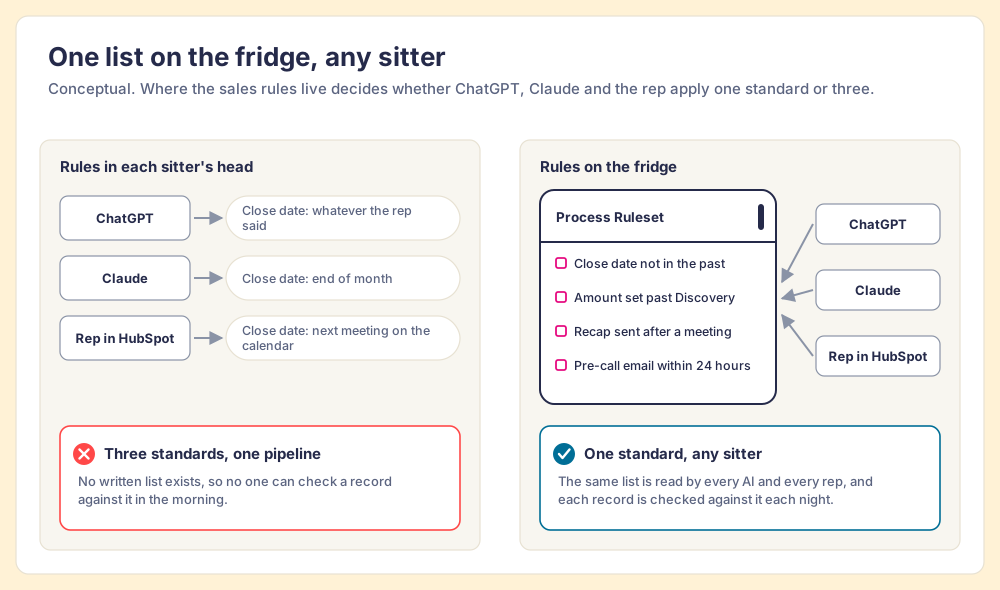
Families with two babysitters learn something the software business is relearning this year. If bedtime lives in the head of whichever sitter came over, the children get two bedtimes, and they will cheerfully tell each sitter the later one. The fix costs nothing. You write the house rules on one sheet and stick it to the fridge door, and now it does not matter who is sitting tonight. The list is the same, and in the morning you can check the list against what happened.
HubSpot now hands your CRM to more than one sitter. The ChatGPT HubSpot integration is one of them, and the Claude connector is another, and both can read and change your records. Connecting either is a short run of clicks plus a Super Admin’s approval. The harder work starts the morning after, when a rep asks ChatGPT to tidy her pipeline and it does, by its own idea of tidy. My argument is short: the connector gives ChatGPT the keys, and your team still has to write the house rules somewhere every AI can read them. Same rules, any LLM.
What does the ChatGPT HubSpot integration do today?
It reads almost anything a HubSpot user can see, and it now writes to the records salespeople care about. The history matters, because the write access is only seven months old.
HubSpot launched the connector on June 4, 2025 as a deep research connector, read-only, and billed it as the first CRM connector for ChatGPT (HubSpot via Business Wire). At launch it needed a paid ChatGPT plan, and ChatGPT could analyze contacts, companies, deals and tickets without touching them (HubSpot developer changelog). On February 26, 2026, HubSpot gave it hands: ChatGPT can now “create and update CRM records and log activities directly from ChatGPT’s chat window,” including new deals, stage changes, notes and tasks (HubSpot developer changelog).
As of HubSpot’s knowledge base article, last updated August 26, 2026 and checked for this post on October 1, 2026 (HubSpot Knowledge Base), the hubspot chatgpt connector looks like this:
- Reach. Contacts, leads, companies, deals, tickets, custom objects, line items, quotes, invoices, products, campaigns, pages, blog posts, users and teams, plus engagements (calls, meetings, notes, tasks, emails).
- Write access. Create and update for contacts, leads, companies, deals, tickets, custom objects, line items, products, campaigns, landing pages and engagements.
- Hard limits. No deletes on any object, and bulk changes cap at 10 records per request.
- Permission boundary. ChatGPT sees only what the connected user can see in HubSpot, and if your account has Sensitive Data turned on, ChatGPT gets no engagement data at all.
- Plans. All HubSpot products and plans, for any customer with an OpenAI account. On ChatGPT Enterprise, Business and Edu, connector data is not used for training.
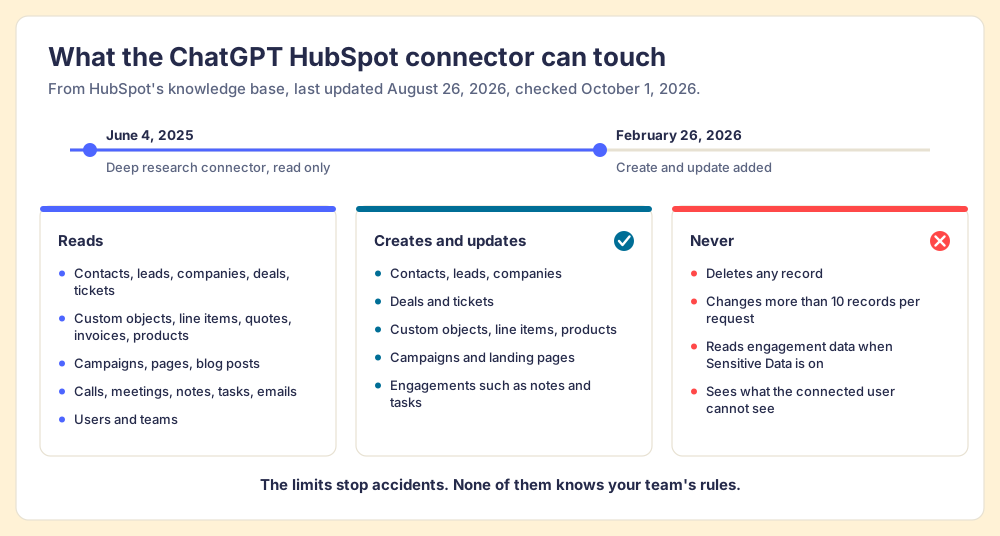
The no-delete rule and the 10-record cap are the two guardrails HubSpot chose for you. They stop the worst accident. They say nothing about whether a change was a good one.
How do you connect HubSpot to ChatGPT?
Four people can be involved, and only one of them is the rep clicking Connect. The clicks come from HubSpot’s instructions; the gates around them come from HubSpot and OpenAI.
- HubSpot Super Admin approval. A Super Admin must approve the HubSpot connector for ChatGPT before anyone in the portal can connect it.
- ChatGPT workspace access. On ChatGPT Business, many apps are on by default and admins can turn them off; Enterprise and Edu workspaces start with a selected set of apps (OpenAI Help Center).
- The connection itself. In ChatGPT, open the profile menu, then Settings, then Apps. Choose HubSpot, click Connect, then Continue to HubSpot, log in, pick the account, choose the permissions and click Connect App.
- Approval in the moment. OpenAI says ChatGPT “may ask for approval before reading information or completing an action,” so a rep confirms writes as they happen.
If your portal already ran the read-only version from 2025, the write access needed an upgrade: HubSpot’s changelog says workspace admins approve the updated app first, then each user upgrades in ChatGPT’s settings.
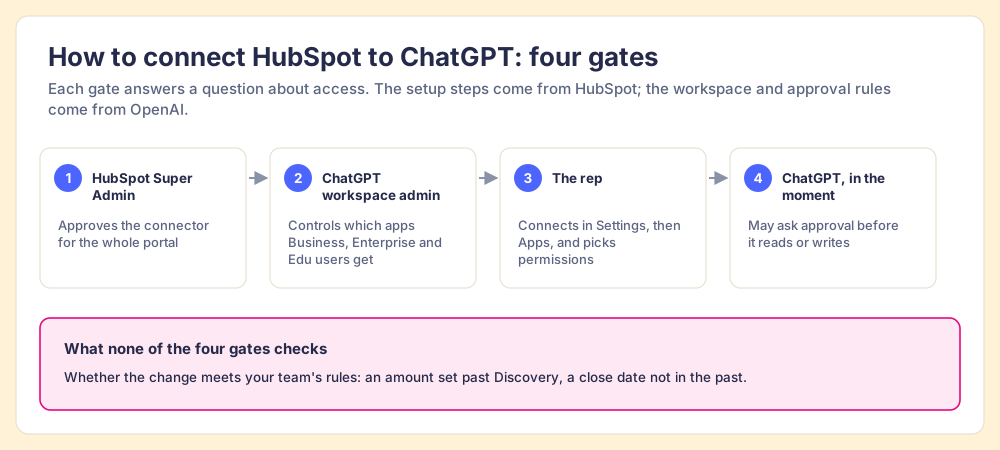
Look at what the four gates have in common. Each answers a question about access. Not one asks whether the close date ChatGPT wrote a minute ago sits after the next scheduled meeting, or whether a deal past Discovery has an amount.
How does the ChatGPT connector compare with Claude’s?
On the HubSpot side they are cousins, and the differences sit at the edges. HubSpot’s Claude article, last updated September 17, 2026, lists the same no-delete rule and the same 10-record cap (HubSpot Knowledge Base). We walk through the Claude setup step by step in the HubSpot Claude connector guide, and Ryan Gunn shows what a daily routine on it looks like in his Claude HubSpot integration.
| ChatGPT connector | Claude connector | |
|---|---|---|
| AI plan | Any OpenAI account, subject to OpenAI’s plan, region and workspace rules | Paid Claude plan (Pro, Max, Team or Enterprise) |
| Who can connect | Anyone, after a Super Admin approves the connector | Super Admins and users with App Marketplace access on their own; others need approval |
| Creates and updates | Core CRM objects, line items, products, campaigns, landing pages, engagements | The same, plus pipelines, properties, quotes (beta), blog posts, marketing emails and events |
| Deletes | No | No |
| Bulk changes | 10 records per request | 10 records per request |
| Sensitive Data on | No engagement data | No Sensitive Data properties |
So the HubSpot plumbing rarely decides between them. Two questions do: which assistant your team already lives in, and how much of the portal you want an assistant editing. A RevOps lead who wants Claude to adjust pipeline stages gets that from Claude’s connector and not from ChatGPT’s. A rep who drafts in ChatGPT all day gets the deal context without switching apps.
Either way, the model at the other end of the connector is a guest in your house. It brings its own habits.
What about the ChatGPT Salesforce integration?
Salesforce built two doors, and it has said plainly why. On January 7, 2026 it opened the Agentforce Sales app in ChatGPT as an open beta for Agentforce for Sales add-on and Agentforce 1 Edition customers; the app pulls live lead lists, drafts account plans and updates opportunity records from the chat window (Salesforce). On April 29, 2026 Salesforce made its hosted MCP servers generally available on Enterprise Edition and above, naming ChatGPT and Claude among the clients, with “CRUD, FLS, sharing rules, and all the other controls you’ve already mastered” applied automatically (Salesforce Developers). For the MCP route in detail, see our Salesforce MCP explainer and the Claude Salesforce integration.
The reasoning came from Kris Billmaier, who runs Agentforce Sales. He told Vernon Keenan that the thing he worried about was “homegrown MCP servers from customers just spitting out data to OpenAI around the trust boundary,” and he described ChatGPT as a canvas: “This just becomes the next layer in which we have to work, because it’s where eyeballs are” (SalesforceDevops.net, December 22, 2025).
I agree with half of that, and the half matters. Billmaier is right that the work belongs where the rep’s eyes already are. That is our tenet too: the answer has to reach the rep in the moment of the work, and in 2026 that moment is often a chat window. He is also right that permissions must hold no matter which AI is asking.
Where I part ways is on what counts as governance. A trust layer is a lock. A lock decides who gets into the room. It has no opinion about what you do once you are inside. Salesforce’s controls decide whether ChatGPT may write to the Amount field on an opportunity. They do not know your team’s rule that a deal past Discovery needs an amount at all, or that a close date in the past is a violation. HubSpot’s connector is the same: it respects the user’s permissions perfectly and knows nothing about your process.
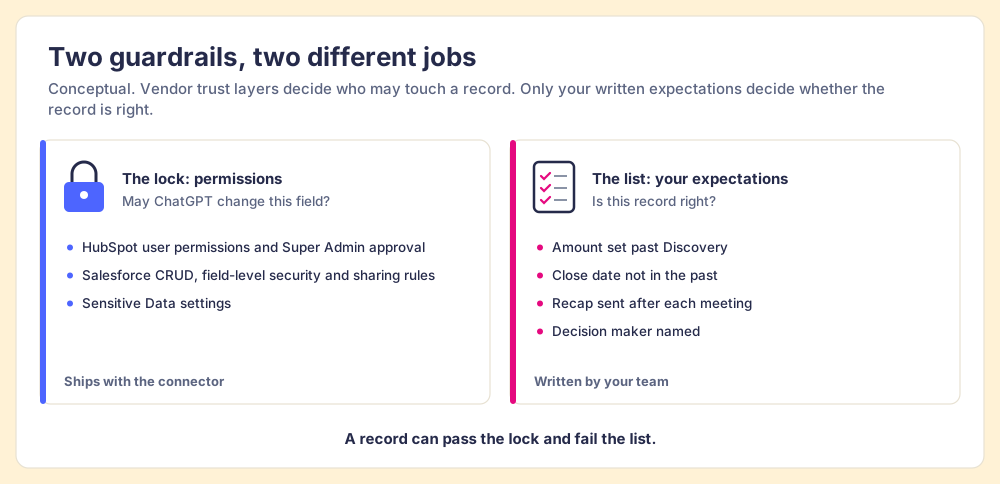
Why does a connected ChatGPT still need your rules?
Because automating the typing moves the hard part of the job to the person who checks. Lisanne Bainbridge named this in 1983 in a paper called Ironies of Automation: when a machine takes over the routine work, the human is left with the monitoring, a task people are poor at sustaining, and loses the hands-on practice that kept their judgment sharp (Bainbridge, Automatica, 1983). A chatbot that can update 10 deals per request turns a sales manager from a data chaser into an auditor of a machine that types faster than any rep.
Sales managers were already short of hours before the chatbot arrived. In The State of Sales Enablement 2026, 89% of teams had a defined sales process and 36% saw reps follow it. The top reason reps skip the process, cited by 29%, is that managers do not enforce it, and adherence falls from 47% on teams with 1 to 5 reps per manager to 23% on teams with 6 to 8 (The State of Sales Enablement 2026). Managers are not lazy. They are out of hours, and a connected ChatGPT adds hours of things to check.
The research on checking says what to do with that. A meta-analysis by Benjamin Harkin and colleagues in Psychological Bulletin pooled 138 studies with 19,951 participants and found that monitoring progress raises the odds of reaching a goal, and that the effect grows when the progress is physically recorded or publicly reported (American Psychological Association). Recorded and visible outperforms remembered. A rule that lives in a manager’s head, or in one rep’s ChatGPT custom instructions, is neither written for the team nor visible to it.
A team that has connected ChatGPT now has three places the rules can live:
- Rules in the prompt. Each rep pastes their own instructions into ChatGPT. The next conversation, the Claude connector and the rep in HubSpot never see them.
- Rules in a manager’s head. The manager catches violations in the weekly pipeline review, a week after ChatGPT wrote them, if there is time.
- Rules in one shared place. The expectations are written once, every record is checked against them on a schedule, and any AI that does the cleanup reads the same list the rep sees in the CRM.
Only the third survives a second AI, which is why I keep coming back to the fridge.
What does “same rules, any LLM” look like in practice?
It looks like a board that goes to zero overnight. The example I know best is my own, and it is an example, not a study. My Supered board, which I named the Zero Board, holds 22 Process Rules for my open deals: close date not in the past, amount set past Discovery, no overdue tasks, a pre-call email within 24 hours, a recap sent, a decision maker named. Late one night it showed 11 violations. I gave Claude, with Supered, HubSpot and Gmail connected, one prompt: look at my board and fix all my violations, and draft anything that needs an email. Claude loaded the rules, found the violations, filled amounts from discovery notes, matched close dates to the next meetings on my calendar, and saved recap and pre-call emails as Gmail drafts for me to review. By hand that is about 45 minutes. With Supered and Claude it took about 10, and the next morning’s Slack summary showed zero violations across all boards.
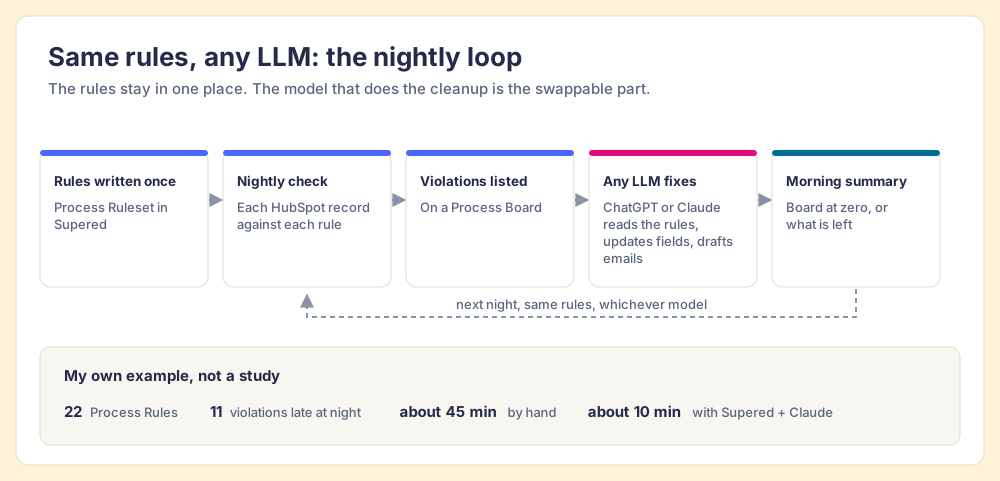
The rules lived in Supered as a Process Ruleset, and Claude read them. That separation is what makes the setup portable. Supered’s MCP server connects Supered to Claude and other AI clients, and new rules start there too: describe a rule in English, and Supered’s MCP creates the Process Rule directly (Supered Help Center). On the ChatGPT side, custom MCP servers connect through developer mode, which OpenAI has rolling out in beta, with write actions, for ChatGPT Business, Enterprise and Edu workspaces; only admins and owners can turn it on (OpenAI Help Center).
The SOSE data says why the location of the rules matters more than the model. Teams whose guidance is embedded in the workflow report 49% quota attainment, against 24% when it lives in CRM fields or stages and 15% when it lives in docs or wikis. And teams with strong process adherence rate AI’s impact as high 40% of the time, against 21% for teams with weak adherence (The State of Sales Enablement 2026). AI amplifies the process you already run: hand ChatGPT a written, inspected process and it runs that process faster, and hand it none and the drift speeds up instead.
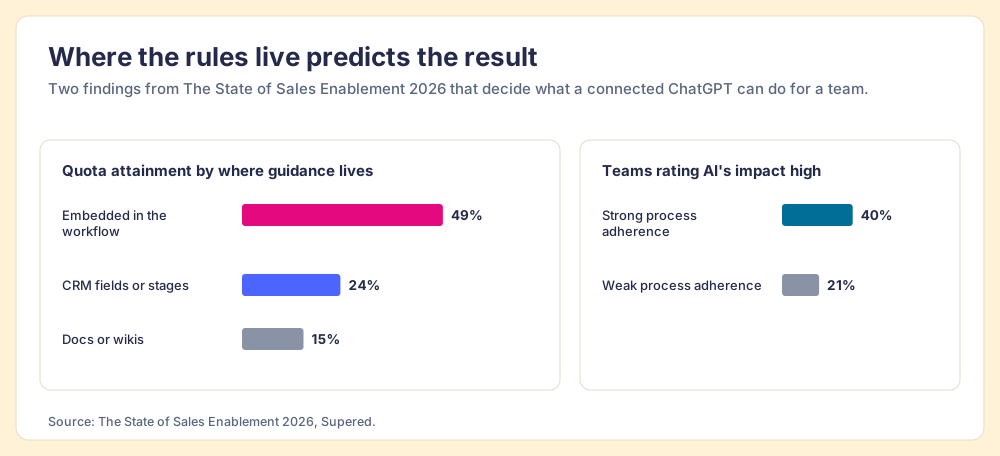
Teams already hand this job to AI. In the same survey, 46% of teams use AI for CRM admin and cleanup, against 26% for deal strategy or forecasting. Giving that cleanup your rules turns it into the process itself, checked the same way whichever model did the typing. Our CRM hygiene guide breaks those rules into the violation types worth checking first.
The fridge picture has an edge, and I should mark it. A babysitter reads the list once and remembers it. A model starts each conversation fresh, so the list has to be fetched every time, and the check has to run whether or not anyone opened a chat that night. So the rules need a home with a schedule attached, and a chat history is no such home.
Should you use ChatGPT or Claude with HubSpot?
Use the one your team already opens all day, and stop treating the choice as permanent. The HubSpot connectors are close enough that the model is the swappable part. The rules are the part you keep.
- ChatGPT through HubSpot’s connector. The right pick if your reps already work in ChatGPT and need deal context while they draft. Approve it as a Super Admin, confirm workspace access, and keep write approvals on.
- Claude through HubSpot’s connector. The right pick if RevOps also wants pipelines and properties edited from chat, or if your team runs scheduled work in Claude. Our hub on Claude for sales covers that side, and the Claude integration page shows what Claude reads from Supered.
- The Agentforce Sales app or Salesforce’s hosted MCP. The right pick on Salesforce, depending on whether you own the Agentforce add-on or run Enterprise Edition and above.
- One written ruleset under all of them. Whatever the model, the expectations live once, in one place, and every record is checked against them each night.
What we recommend
Connect ChatGPT to HubSpot. The access controls are sound, the no-delete rule and the 10-record cap make accidents small, and a rep who drafts in ChatGPT is better off with the deal in view. Then, before anyone asks it to clean a pipeline, write your expectations down as rules that live outside the chat window, check every record against them every night, and let whichever AI your team prefers do the fixing. Three sources back that order. Bainbridge showed that automation leaves people with the monitoring, Harkin’s meta-analysis found that recorded, visible monitoring raises goal attainment, and our SOSE data puts quota attainment at 49% with guidance in the workflow against 15% in docs.
We built Supered for that job. Your momentum, data and process expectations live as Process Rulesets, checked against HubSpot or Salesforce records, and the same rules show up in the CRM screen and in your LLM of choice. See it on the sales expectations page, or book a demo and bring your messiest board. Then read ChatGPT for sales for where the model helps a rep draft, and our HubSpot MCP explainer for the plumbing under all of this.
Frequently asked questions
How do you connect HubSpot to ChatGPT?+
Can ChatGPT update HubSpot records?+
Is the HubSpot ChatGPT connector free?+
What is the difference between the ChatGPT and Claude HubSpot connectors?+
Is there a ChatGPT Salesforce integration?+
How do you make ChatGPT follow your sales process in HubSpot?+
Your process, running itself.