HubSpot Claude Connector: The One-Prompt Workflow That Clears Your Pipeline Overnight
The HubSpot Claude connector gives Claude the keys to your CRM. It does not tell Claude what a clean pipeline means. Here is the full workflow: what to connect, the one prompt, what changes, and what you still read.
The HubSpot Claude connector is HubSpot's official integration that lets Anthropic's Claude read, create and update records in your HubSpot portal from a chat, inside the permissions of the user who connected it.
How to connect HubSpot to Claude and clear your pipeline violations with one prompt
20 min- 1
Check plans and access
Confirm you have a paid Claude plan (Pro, Max, Team or Enterprise). In HubSpot you need to be a Super Admin or have App Marketplace Access; anyone else needs a Super Admin to approve the connector first.
- 2
Connect HubSpot in Claude
In Claude, open your profile, then Settings, then Connectors. Click Browse, search for HubSpot, click Connect, log in to HubSpot, choose the permissions, and click Connect app. If you connected before write access shipped, disconnect and reauthenticate.
- 3
Turn on Gmail and Google Calendar
Click the plus sign in a chat, hover over Connectors, and toggle on Gmail and Google Calendar. On Team and Enterprise plans an Owner enables them for the organization first.
- 4
Connect the place your rules live
Add the Supered MCP server as a custom connector (setup at app.supered.io/mcp) so Claude can read your Process Rulesets and the violations on your Process Board.
- 5
Run the one prompt
Type: Look at my Zero board and fix all my violations. Draft anything that needs an email. Swap in your own board's name.
- 6
Review the drafts and re-run the board
Read each email draft in Gmail before you send it, spot-check the field changes, then re-run the board. Done means zero open violations.
Late on a weeknight, my board showed 11 violations. The board is called Zero Board, it checks my open HubSpot deals against 22 rules, and it had caught the usual debris of a full week: a close date already in the past, a deal past Discovery with no amount, overdue tasks, a meeting tomorrow with no pre-call email, a call with no recap sent, and a deal with no decision maker named. My streak would reset at midnight. Clearing that list by hand takes me about 45 minutes. I typed one sentence into Claude instead, and it took about 10.
The HubSpot Claude connector did the typing, and my rules told it what to type. The connector gives Claude the keys to your CRM, and the keys are the easy part. Thorstein Nordby, who wrote one of the better reviews of the connector, put the gap in one line: “Claude can see 340 open deals worth €4.2M. It cannot see that your definition of pipeline coverage is 3.5× against a segmented target” (Superwork, August 2026). He is right. The way to close that gap is to hand Claude your definition before you hand it the keys. What follows is the whole workflow in the order I run it: what to connect, the one prompt, what Claude changes, the test that tells you it worked, the morning summary, and where a person still reads before anything reaches a buyer.
What is the HubSpot Claude connector?
It is HubSpot’s own connector for Claude, listed in Claude’s connector directory and documented in HubSpot’s knowledge base (last updated September 17, 2026). Once connected, Claude can read contacts, leads, companies, deals, tickets, custom objects and engagement history, and it can create and update most of those records too (HubSpot Knowledge Base).
The limits are worth knowing before you plan a workflow around it:
- No deletes. The connector “does not support delete operations,” so the worst a bad instruction can do is write a wrong value.
- Ten records per bulk write. Bulk creates and updates go 10 records at a time.
- The user’s own view. Claude sees only the CRM data the connected user is allowed to see in HubSpot, and properties marked as sensitive data stay hidden.
- An audit trail. Creates and updates are recorded in HubSpot’s Audit Log against both the user and the Claude connector.
- Reauthentication for write access. If you connected early, HubSpot says you need to disconnect and reauthenticate to get write access and engagement visibility.
Read that list again and see what is missing from it. Nothing there tells Claude that a deal past Discovery needs an amount, or that a meeting tomorrow needs a pre-call email today. The connector knows your data and nothing about your expectations.
Why does Claude need your rules before it touches HubSpot?
Think of a builder at the end of a job. The owner hands over the keys and walks the house with a punch list: a roll of blue tape, a clipboard, and a line for every door that sticks and every outlet without a cover. The keys let the builder in. The punch list tells the builder what “finished” means in this house. Without it, a good builder fixes what looks wrong to a builder, and the owner finds the cracked tile the morning after.
The HubSpot Claude connector is the keys. Your rules are the punch list. Re-running the board is the walk-through.
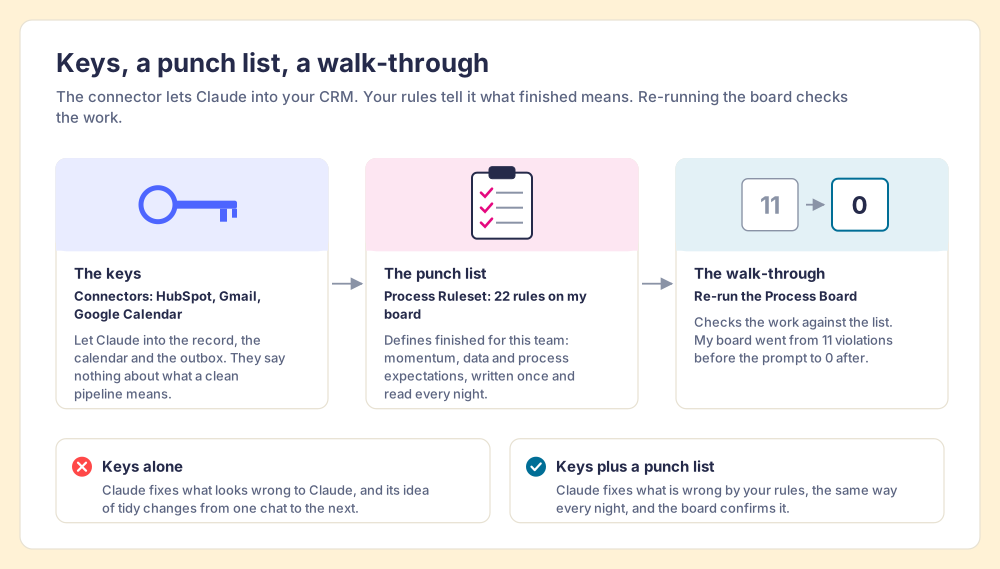
The comparison stops working in one place. A house gets one walk-through; a pipeline needs one every night, because new deals keep arriving with new gaps. So the rules have to live somewhere permanent, somewhere better than a prompt you retype.
The punch list usually exists already. In The State of Sales Enablement 2026, 89 percent of teams had a defined sales process and 36 percent saw reps follow it (The State of Sales Enablement 2026). The rules exist. They sit in a slide deck or a wiki, where neither a rep at the end of a long day nor Claude can check a deal against them. In my setup, those expectations live in Supered as a Process Ruleset: momentum expectations (a next step booked, tasks done on time), data expectations (an amount past Discovery, a decision maker named), and process expectations (a pre-call email within 24 hours, a recap after the call). You do not need to know any query syntax to write them. Describe a rule in English, and Supered’s MCP creates the Process Rule directly.
The same SOSE data says why this order matters for AI. Teams with strong process adherence rated AI’s impact as high 40 percent of the time; teams with weak adherence, 21 percent. AI amplifies the process you have. Give it no process and it amplifies a guess.
Before you start: how do you connect Claude to HubSpot?
You need four connections, and each one lends Claude something different. I checked every requirement below against HubSpot’s and Anthropic’s documentation on October 1, 2026.
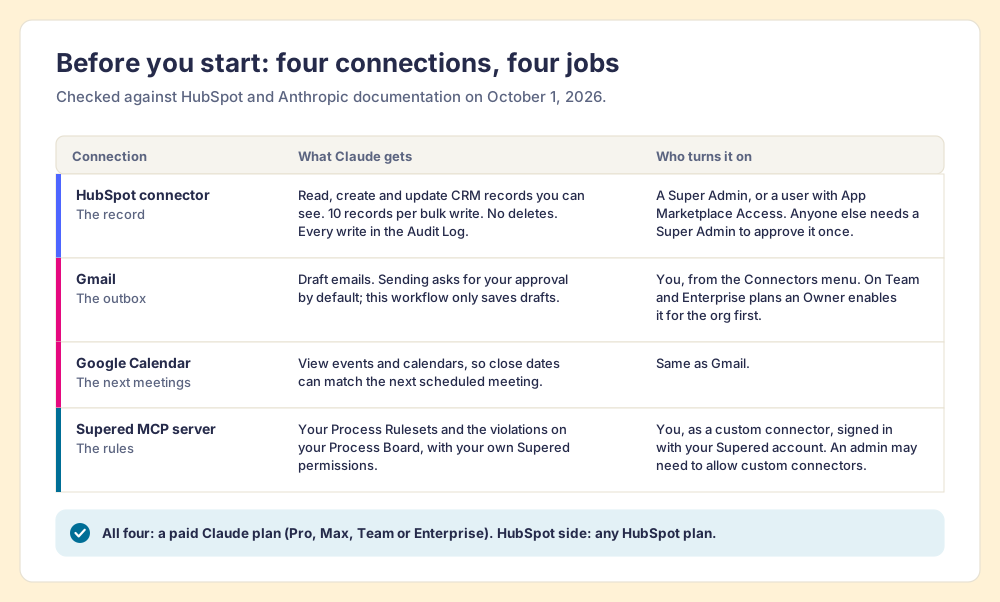
- A paid Claude plan. HubSpot’s connector requires Pro, Max, Team or Enterprise. HubSpot lists the connector as available with all of its products and plans, so the plan question sits on the Claude side.
- HubSpot permission to connect. Super Admins and users with App Marketplace Access can connect without prior approval. For anyone else, a Super Admin approves the connector once, and then each rep connects their own account.
- Gmail and Google Calendar. Anthropic’s Google Workspace connectors let Claude draft emails and view calendar events. On Team and Enterprise plans an Owner turns them on for the organization before users can authenticate (Anthropic support).
- The place your rules live. For me that is the Supered MCP server, which signs each user in with their own Supered account over OAuth, so Claude sees only what that user can see. It is a custom connector, and Supered’s help center says custom MCP connectors require a paid Claude plan; on Team and Enterprise plans an admin may need to allow them first (Supered help center; Anthropic support).
How to connect HubSpot to Claude, step by step
- In Claude, click your profile icon, then Settings, then Connectors.
- Click Browse, search for HubSpot, and select it.
- Click Connect and log in to your HubSpot account.
- Choose the permissions you want Claude to have, then click Connect app.
- You land back in a Claude chat with the connector ready.
Those are HubSpot’s own steps, and Nordby clocked the connection at about two minutes. The rest of the setup, the rules, takes longer the first time and almost no time after that.
The one prompt: what do you type?
The whole prompt, exactly as I typed it:
Look at my Zero board and fix all my violations. Draft anything that needs an email.
Swap in your own board’s name. The sentence is short because the rules carry the detail. Claude does not need me to explain that a close date in the past is a problem, or which emails count as overdue. It reads the Process Ruleset, pulls the list of violations from the board, and then works the list one item at a time, reaching into HubSpot for the record, the notes and the scheduled meetings, and into Gmail when the fix is an email.
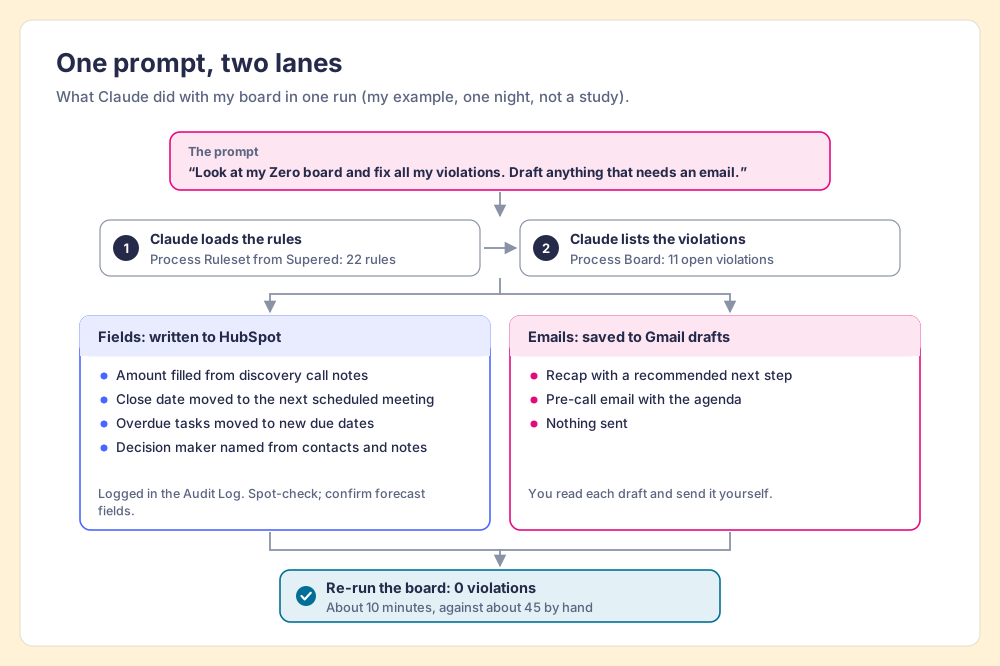
The order of operations matters more than the wording. Rules first, then violations, then fixes, then a re-check. A prompt like “clean up my pipeline” skips the first two steps, so Claude has to invent a definition of clean. It will invent a reasonable one, and the odds it matches yours are slim.
Teams already hand this kind of work to AI. In SOSE 2026, 46 percent of teams said they use AI for CRM admin and cleanup, against 26 percent for deal strategy and forecasting. The difference here is that the cleanup follows a written standard, so it is the same cleanup tonight as it was last week.
What does Claude change in HubSpot, and what does it leave to you?
Each type of violation on my board went one of these ways in that run:
| Violation on my board | What Claude did | Where it landed | Who decides |
|---|---|---|---|
| Close date in the past | Moved it to match the next meeting already scheduled | HubSpot deal | I spot-check |
| No amount past Discovery | Filled the amount from the discovery call notes | HubSpot deal | I confirm the figure |
| Overdue tasks | Moved them to new due dates | HubSpot tasks | I spot-check |
| No decision maker | Named the decision maker from the contacts and call notes | HubSpot deal | I confirm the name |
| No pre-call email within 24 hours | Drafted a pre-call email with the agenda | Gmail drafts | I read and send |
| No recap sent | Drafted a recap with a recommended next step | Gmail drafts | I read and send |
Two kinds of change sit in that table. Field updates are internal, reversible and logged: HubSpot writes each one to the Audit Log against me and the Claude connector, and the connector cannot delete anything. Emails are external and permanent once sent. That split decides how much review each one gets, which I come back to below.
Nordby makes one practical point I disagree with for this job. He warns that when an audit turns up thousands of records needing the same fix, chat is the wrong tool: “the 10-record cap makes that miserable. Move to Claude Code with the MCP server.” For a one-time migration he is right. A rep’s nightly board is a different animal. Mine had 11 violations, and a board cleared daily only carries what came in since the last run. The 10-record cap is a migration problem. Daily hygiene fits inside a chat, because the rules keep the pile small.
What goes in a meeting recap email Claude drafts?
The recap was the draft I cared most about, because it is the one the buyer reads first and remembers. A meeting recap email has one job: turn a conversation into a commitment both sides can see. Claude drafted mine from the call notes logged in HubSpot, and a good draft carries four parts.
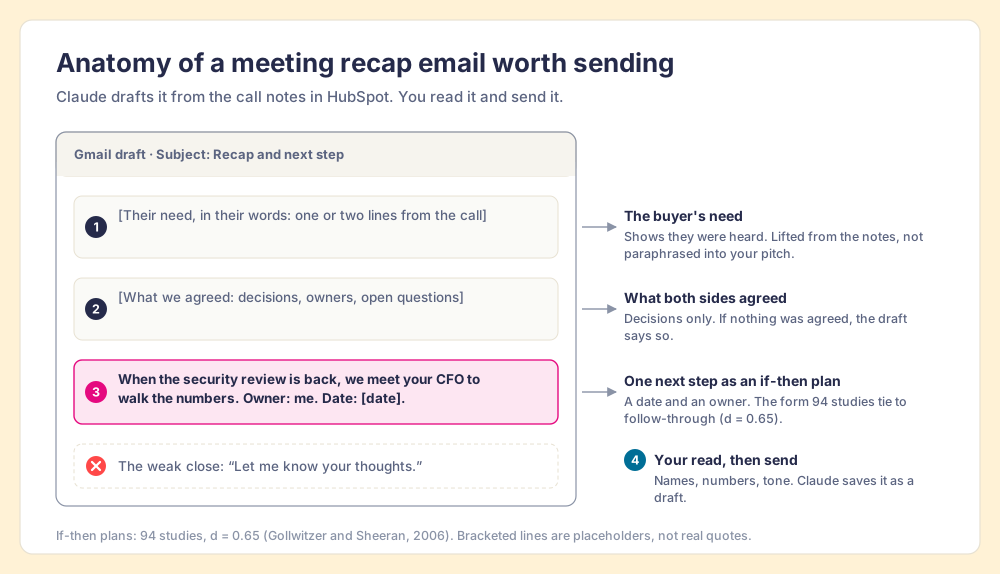
- The buyer’s need, in their words. One or two lines lifted from what they said, so the buyer sees they were heard.
- What both sides agreed. Decisions only, a line or two each. If nothing was agreed, the recap says so, which is useful information for the rep too.
- One next step with a date and an owner. Written as a plan: when we have the security review back, we meet with your CFO to walk the numbers.
- A human read. The rep checks names, numbers and tone before it leaves.
The third part carries the most weight, and there is good science behind it. Peter Gollwitzer’s work on implementation intentions found that plans in the form “when situation X arises, I will do Y” help people act on goals they already hold, and a meta-analysis of 94 studies by Gollwitzer and Paschal Sheeran put the effect at d = 0.65, a medium-to-large effect in behavioral science (Gollwitzer and Sheeran, 2006). A recap that ends with “let me know your thoughts” asks the buyer to invent the next step. A recap that ends with a specific if-then plan hands it to them.
The pre-call email is the recap’s mirror image, sent within 24 hours before the meeting: what we will cover, what I need from you, who should attend. Both drafts make the buyer’s experience better, which is the reason the rules exist at all. A team that sends a clear recap after every call gives buyers the same clean experience whichever rep they get.
How do you know it worked? The board at zero
The test is mechanical, which is what makes it trustworthy. After Claude finishes, re-run the board. If it reads zero, every rule is satisfied across the open deals you own. If it reads two, Claude left two, and the board tells you which.
That check is worth more than it looks. Benjamin Harkin and colleagues pooled 138 studies with 19,951 participants and found that prompting people to monitor their progress improves the odds they reach their goals, and that the effect grew when the progress was physically recorded or publicly reported (Harkin and colleagues, Psychological Bulletin, 2016; summary via EurekAlert). A board at zero is progress recorded: a number, checked against a written standard, that anyone on the team can see. A rep who feels caught up may or may not be. A board at zero settles it.
My own numbers, as one example from one night and not a study: 22 rules, 11 violations, about 45 minutes by hand, about 10 with Supered and Claude. By hand, the minutes go into lookups: open the record, scroll the notes for the amount, flip to the calendar for the next meeting, come back, repeat.
What does the morning summary show?
The next morning, the Slack daily summary showed 0 violations across all boards, and the streaks held: Caleb King at 5 days, me at 4. Supered counts a daily streak as a weekday with zero open violations, with weekends exempt by default, and the streak view flags anyone at risk before the day ends (Supered help center).
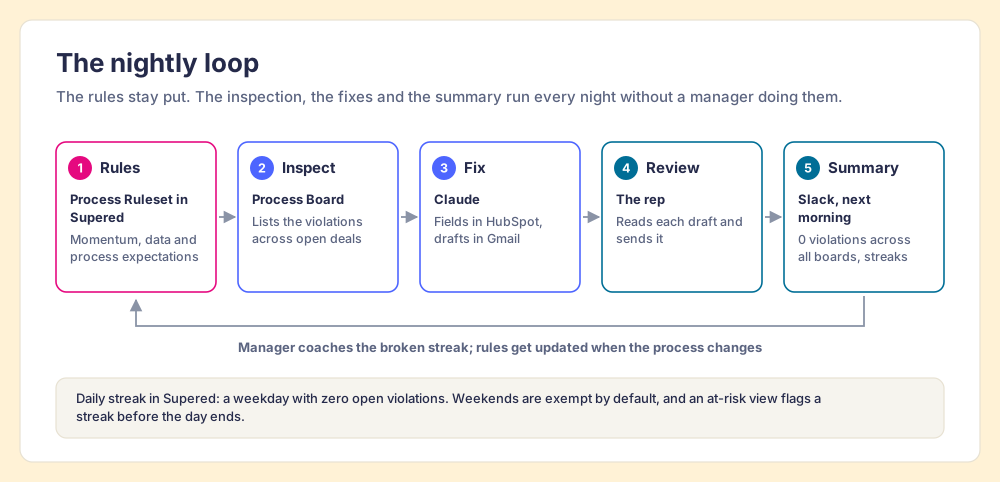
The summary matters most to the manager. In SOSE 2026, process adherence fell from 47 percent at teams with one to five reps per manager to 23 percent at teams with six to eight, and the most common reason reps gave for skipping the process was that managers do not enforce it (29 percent). In the same survey, reps cited manager capacity more often than indifference. Managers run out of hours. A summary that arrives with the inspection already done hands those hours back, and the manager can spend them on the one rep whose streak broke and the reason it broke.
When should you review Claude’s drafts before sending?
Always, for anything a buyer will read. The reason is older than AI.
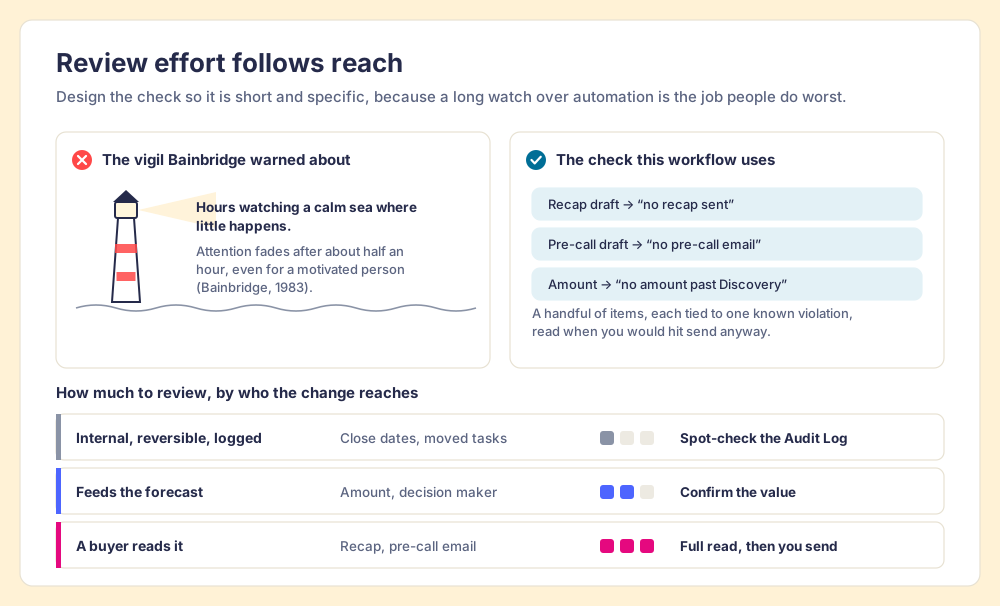
In 1983 the psychologist Lisanne Bainbridge published “Ironies of Automation,” a short paper about control rooms that describes today’s AI agents with uncomfortable accuracy. Her irony: “the more advanced a control system is, so the more crucial may be the contribution of the human operator.” The operator left to watch the automation gets the hardest job in the room, and the one people do worst. She noted it is “impossible for even a highly motivated human being to maintain effective visual attention towards a source of information on which very little happens, for more than about half an hour” (Bainbridge, Automatica, 1983).
Think of a lighthouse keeper on a calm night, watching a sea where nothing happens, hour after hour. The ship he misses comes on the third calm night.
Raja Parasuraman and Dietrich Manzey reviewed decades of this research and found that automation bias, the habit of accepting a machine’s output without checking it, “occurs in both naive and expert participants, cannot be prevented by training or instructions” (Parasuraman and Manzey, Human Factors, 2010). That last clause is the important one. You cannot tell reps to be careful and expect it to hold. The review has to be built into the workflow.
So the workflow is designed around those two findings:
- Drafts, never sends. Claude saves recaps and pre-call emails to Gmail drafts. Anthropic’s Gmail connector asks for approval before each send by default, and this workflow never asks it to send at all.
- A short review, tied to a specific violation. I read each draft, each one attached to a known gap, at the moment I would have hit send anyway. A handful of drafts with a known reason behind each one is a short check, far from Bainbridge’s half-hour vigil over a dial where little happens.
- A confirm on anything that moves the forecast. Amounts and decision makers feed the number your manager reports upward, so I read those two fields. Moved close dates and tasks get a glance at the Audit Log.
- The board as the backstop. If Claude got a field wrong in a way that breaks a rule, the board catches it the next night.
Ryan Gunn calls his own setup a “semi semi-autonomous CRM,” with manual checks he mostly does himself, and his Claude HubSpot integration is worth reading for the scheduled-run side of this. I agree with the label. The aim is a CRM that stays current without a person typing every field, and a person who still reads every word that leaves the building.
What we recommend
Teams run this workflow in one of three setups, from fastest to start to longest-lasting:
- The connector alone. Connect HubSpot, ask Claude to tidy things. Fast to start, and Claude will apply its own idea of tidy, which changes from one chat to the next.
- The connector plus a rules prompt. Paste your expectations into a saved prompt or project. Better, until the rules change and five reps hold five versions of the prompt.
- The connector plus rules in a system. Keep the rules where both people and Claude read the same copy, with a board that inspects every open deal against them each night.
Keep the rules in a system. In SOSE 2026, teams whose guidance was embedded in the workflow hit quota at 49 percent, against 24 percent when it lived in CRM fields or stages and 15 percent when it lived in docs or wikis. Rules a model reads in the flow of work are the embedded kind. A rules prompt saved in a doc is the doc kind.
Supered is how I run it. The rules live in Supered as Process Rulesets, the Process Board inspects my open deals against them, and the same rules show up whether I work in HubSpot’s own screens or in Claude. Claude reads the rules and does the work: updates fields, drafts emails, moves tasks. My CRM stays current, and the rep still sends the email. The sales expectations use case shows the full setup, and the Claude integration page covers what Claude can read and change. If you want to see it run against your own pipeline, book a demo.
Key points
- The connector as keys. HubSpot’s connector for Claude reads and updates records within the user’s permissions, 10 records per bulk write, with no deletes and every write in the Audit Log.
- The rules as the punch list. Claude knows your data and none of your expectations; write the expectations as rules before you run any cleanup.
- One prompt, two lanes. Field fixes go straight to HubSpot from context; anything a buyer reads goes to Gmail drafts.
- Zero as the test. Re-run the board after Claude finishes; recorded progress beats a feeling of being caught up.
- A human read on buyer-facing words. Automation bias survives training, so the review sits inside the workflow, short and specific.
For the wider picture of how this workflow fits a sales team’s whole AI stack, start with Claude for sales. If you want to know what the HubSpot MCP server can and cannot see on its own, read the HubSpot MCP guide, and for the rules themselves, the six violation types above are worked through in CRM hygiene as nightly rules.
Frequently asked questions
How do I connect Claude to HubSpot?+
Is the HubSpot Claude connector available on every HubSpot plan?+
What can't the Claude HubSpot connector do?+
Can Claude send emails to my buyers?+
What should a meeting recap email include?+
Does Claude know my sales process?+
Your process, running itself.