Salesforce MCP: What the Server Does, What to Lock Down, and the Rules It Cannot See
Salesforce now hosts MCP servers that let Claude read and edit your org as the signed-in rep. What each server does, how to connect it, what admins should lock down, and why validation rules cannot cover what a rep does through an LLM.
Salesforce MCP is Salesforce's support for the Model Context Protocol: hosted servers that let an AI client such as Claude query, create and update records in your org as the signed-in user, inside that user's object permissions, field-level security and sharing rules.
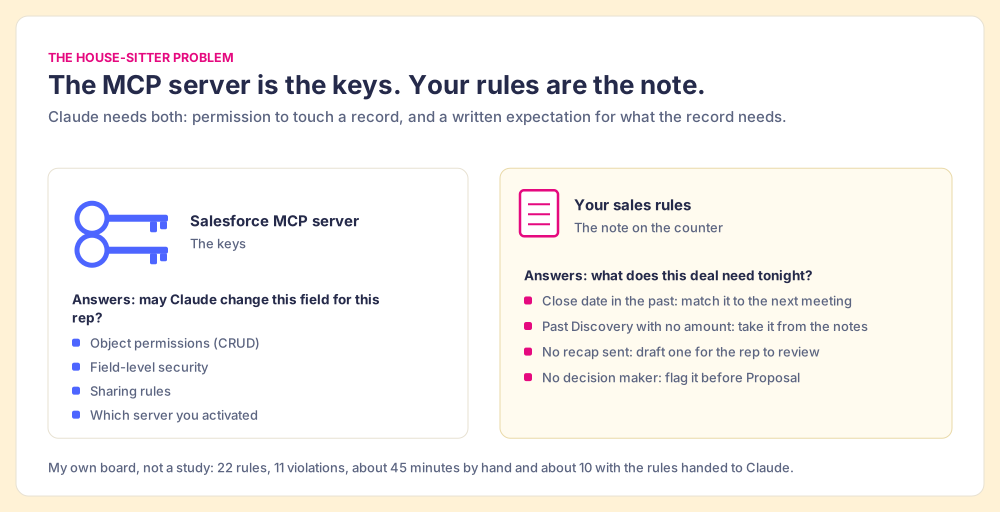
Hand a house-sitter your keys and you have settled one question: which doors they may open. You have not settled the question that matters on the first night, which is which plants need water and whether the dog has had its pill. The keys grant permission. The job is written on the note left by the kettle.
Salesforce MCP is a set of keys. Since April 29, 2026, Salesforce has hosted Model Context Protocol servers that let Claude, ChatGPT or any MCP client query and edit your org as the signed-in rep (Salesforce Developers, 2026). The server knows what a rep may change. It has no idea what your deals need tonight. And the admin’s usual guards, validation rules and flows, only look at a record at the moment it is saved, while most of what rots a pipeline happens with no save at all.
So an admin rolling out a Salesforce MCP server has two jobs. Cut the keys carefully. Then write the note.
What is Salesforce MCP?
The Model Context Protocol is an open standard for connecting an AI client to outside tools. A server publishes a list of tools (“query records,” “update a record”), and the client, Claude for example, decides when to call them. Salesforce MCP is Salesforce’s set of those servers, and there are three kinds worth knowing.
- Salesforce hosted MCP servers. Run by Salesforce at api.salesforce.com, generally available since April 29, 2026 for Enterprise Edition and above. The four SObject servers cover records: SObject Reads (read and query only), SObject Mutations (create and update, no delete), SObject All (everything plus delete) and SObject Deletes (delete only). Others cover Data 360, Tableau Next and, in beta since July 2026, Headless 360 (server reference; Headless 360 beta).
- The Salesforce DX MCP server. An open-source server Salesforce publishes for developers. It runs on your own machine, reaches only orgs you have authorized through the Salesforce CLI, and carries 14 toolsets for metadata, testing, code analysis and Lightning components (salesforcecli/mcp on GitHub).
- Community servers. Open-source projects such as tsmztech/mcp-server-salesforce, which can edit custom objects and fields, run anonymous Apex, and authenticate with a stored username, password and security token.
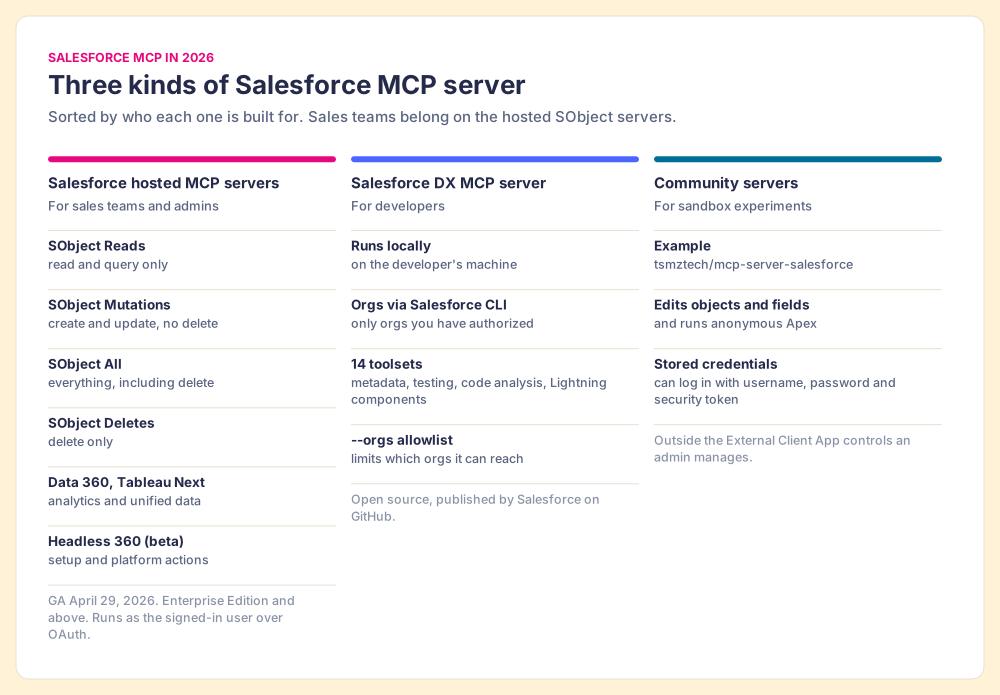
The record tools on the hosted servers are plain. On SObject All, Claude gets getObjectSchema, soqlQuery, find, getUserInfo, listRecentSobjectRecords, getRelatedRecords, createSobjectRecord, updateSobjectRecord, updateRelatedRecord, deleteSobjectRecord and deleteRelatedRecord. A SOQL query can return up to 50,000 records in a transaction, and a text search up to 2,000 (SObject All reference). Eleven tools, and nothing in them about selling.
Which Salesforce MCP server should a sales team use?
The hosted SObject servers, and the narrowest one that does the job. For a first rollout that means SObject Reads: Claude can answer “which of my opportunities closing this month have no next step” without being able to change a field. A pilot group moves to SObject Mutations once you trust what it writes. SObject All and SObject Deletes stay away from reps.
The reason is the Recycle Bin. Salesforce’s own reference says a record deleted through the server is recoverable for up to 15 days and that no undelete tool exists over MCP. A rep who asks Claude to “clean up my duplicate contacts” at the end of a long day can do real damage politely and fast.
Grant the community servers their due: they do things the hosted servers will not, such as creating fields and running Apex, and for a developer poking at a sandbox that is the appeal. The same features are why they do not belong near production sales data. A server that logs in with a stored password sits outside the External Client App controls your admin manages, and a tool that runs anonymous Apex can do anything the account can do.
How do you connect Claude to the Salesforce MCP server?
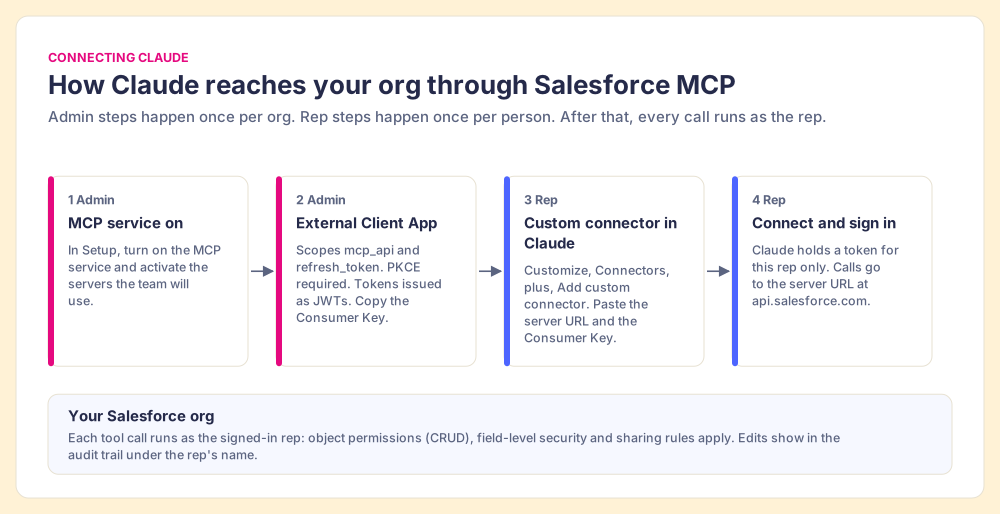
The setup splits between an admin, who does three steps once, and a rep, who does two. Salesforce documents the whole path (org setup; Claude configuration):
- The MCP service. In Setup, an admin turns on the MCP service and activates the servers the team will use.
- The External Client App. The admin registers Claude as an OAuth app with the
mcp_apiandrefresh_tokenscopes, Proof Key for Code Exchange (PKCE) required and tokens issued as JWTs, then copies the Consumer Key. With PKCE, Claude needs no client secret. - The connector in Claude. The rep opens Customize, then Connectors, clicks the plus button, chooses “Add custom connector,” and pastes the server URL, for example
https://api.salesforce.com/platform/mcp/v1/platform/sobject-reads, with the Consumer Key under Advanced settings. Sandboxes use the same path with/sandbox/afterv1. - The sign-in. The rep clicks Connect, logs in to Salesforce, and Claude holds a token for that rep and no other user.
If your company runs Claude Desktop under an enterprise plan, Anthropic also documents an admin-managed route through the Salesforce plugin and the Headless 360 server (Claude docs). The Claude side of that, plugin and connector, is the subject of our Claude Salesforce integration walkthrough; this post stays on the server.
What should Salesforce admins lock down before reps connect?
Salesforce’s answer to “is this safe?” is one line in its launch post: “Your existing permissions automatically apply,” meaning object permissions, field-level security and sharing rules. Take it at full strength, because it is right. Claude cannot read an opportunity the rep cannot read, cannot write a field hidden from the rep’s profile, and cannot touch an account the sharing model keeps from them. Compared with a community server holding an integration user’s password, the hosted server is a key card cut from the rep’s own badge. It opens the doors the rep’s badge opens and no others.
A key card also changes who can be in the building. Before MCP, a rep changed records through the Salesforce UI, a few clicks per record. Now one sentence typed into Claude can touch a whole page of records in the time it takes to read the reply, and every one of those edits lands in the audit trail under the rep’s name, identical to an edit made by hand. Permissions answer “may this person change this field?” They were never meant to answer “should all of these fields change tonight, and on whose judgment?”
So the lockdown is a short ladder, set in this order:
- The narrowest server. Activate SObject Reads for the sales team and SObject Mutations for a pilot. Leave SObject All and SObject Deletes off for sales profiles.
- A sandbox first. Point the pilot at the sandbox URL and read what it writes before anyone connects to production.
- A limited set of people who can authorize. Set the External Client App’s OAuth policy so only admin-approved users can connect during the pilot, then widen it.
- Field-level security on the fields the model should not write. If a field drives commission or forecast category, decide whether a model acting for the rep should ever touch it.
- A click before each write. After connecting, the rep can open Configure on the connector in Claude and adjust tool permissions so write tools ask for approval.
- Field History Tracking on the fields that matter. Stage, Amount and Close Date at minimum, so you can see what changed when it all looks like the rep did it.
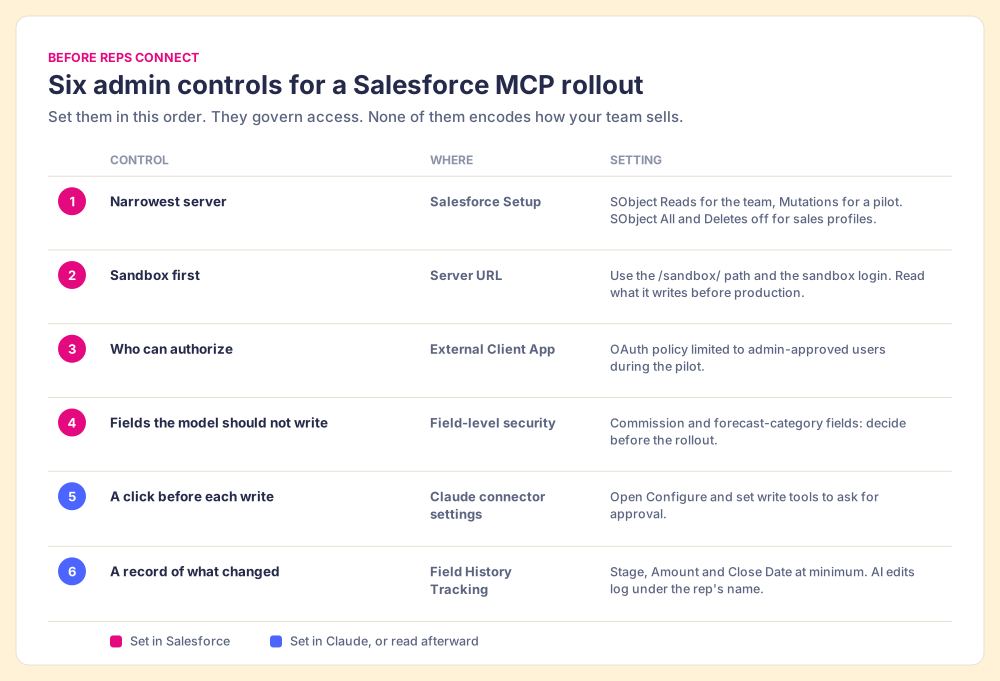
This ladder handles access well. It does nothing about judgment, and judgment is where admins usually reach for validation rules.
Do validation rules and flows still run when Claude edits Salesforce?
Yes, and that is good news worth having. A write through the MCP server is a save, and Salesforce’s order of execution starts the same way for any save: “When you save a record with an insert, update, or upsert statement, Salesforce performs a sequence of events in a certain order,” including custom validation rules and record-triggered flows before and after the save (Apex Developer Guide). The SObject reference says it plainly: operations fail if values violate validation rules.
A validation rule is a turnstile. It checks whoever walks through it, every time, and it does that job well. What it cannot do is notice the people who never came. A pipeline goes bad mostly by standing still. A close date slides into the past at midnight. A task becomes overdue on its own. The pre-call email that should have gone out the day before a meeting never does, and neither does the recap afterward. None of those is a save, so none of them passes the turnstile.
Take the six kinds of violation on my own rule board (“Sales Expectations,” 22 rules; mine runs on HubSpot, and the same six apply to a Salesforce org) and sort them:
- No amount past Discovery. A validation rule can block a stage change without an amount. This one the turnstile catches.
- A close date in the past. True the moment the clock passes it, with no edit to check.
- An overdue task. Same, on a different object.
- No pre-call email within 24 hours. An absence. Nothing gets saved.
- No recap sent. An absence again.
- No decision maker. Lives on related contact records, which an opportunity validation rule cannot see without custom code.
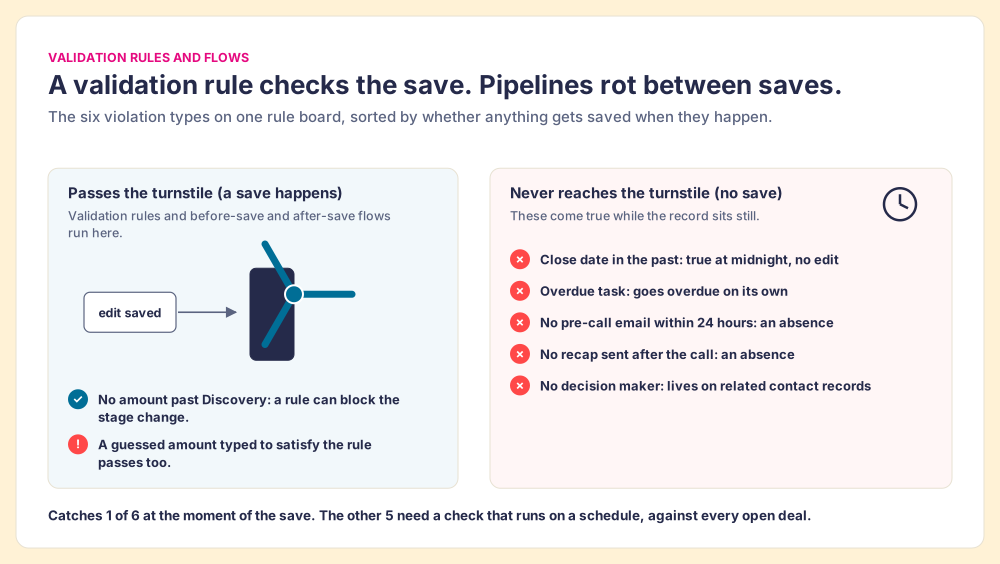
The LLM adds a second wrinkle. A validation rule checks that a field is filled and well-formed; it has no way to check that the value is true. Ask a model to move a deal to Proposal and it will meet the “amount required” rule with the most plausible number it can find. Sometimes that is the number from the discovery notes. Sometimes it is a guess dressed as a number.
People are bad at catching that. A systematic review of automation bias, the habit of over-trusting automated advice, screened 13,821 papers and kept 74. Workload and time pressure made the bias worse; making users accountable and giving them information rather than a bare recommendation made it better (Goddard, Roudsari and Wyatt, JAMIA, 2012). A rep approving a batch of Claude’s edits at the end of a long day is the high-workload, high-time-pressure case the review describes.
Why can’t the Salesforce MCP server know your sales rules?
Because you never handed them over. The server reads your schema. It knows Amount is a currency field and Stage is a picklist. It does not know that your team expects an amount past Discovery, a recap within a day of the call, and a named decision maker before Proposal. Those expectations live in a manager’s head, a slide from the kickoff, maybe a doc.
And they are widely ignored. In The State of Sales Enablement 2026, 89% of teams had a defined sales process and 36% saw reps follow it. The top reason reps skip it, at 29%, is that managers do not enforce it, and adherence falls from 47% on teams with one to five reps per manager to 23% at six to eight (The State of Sales Enablement 2026). Managers are out of hours, and the rules they carry in their heads only get checked when they have time to check.
Lisanne Bainbridge named this trap in 1983. In “Ironies of Automation” she argued that automating the routine part of a job leaves the human with the hardest part: monitoring a system they no longer operate by hand, for the rare moment it goes wrong (Bainbridge, Automatica, 1983). Connect Claude to Salesforce with no written rules and the manager inherits that job across the whole team: deciding, after the fact, whether a night of edits made in the rep’s name were right.
AI amplifies whichever process you already have. Teams with strong process adherence rated AI’s impact high 40% of the time, against 21% for teams with weak adherence, and 46% already use AI for CRM admin and cleanup (State of Sales Enablement 2026). The cleanup is happening. The open question is whose rules it follows.
How do you hand Claude your sales rules?
Rules a model can follow look like this: “If a deal is past Discovery and Amount is empty, set it from the discovery notes.” Peter Gollwitzer called that shape an implementation intention, a plan of the form “whenever situation x arises, I will initiate the goal-directed response y,” and a meta-analysis of 94 studies with Paschal Sheeran found an effect size of d = 0.65 on goal attainment (Gollwitzer and Sheeran, 2006). People follow if-then plans far better than vague intentions. A model needs the same shape for a plainer reason: it cannot infer an expectation that was never written down.
The note can sit in any of these places, and they differ in who can see whether it was followed:
- A prompt or Claude project instructions. Fast to write and free. The rules live in one rep’s setup, drift as people copy and edit them, and leave no record of whether a deal passed or failed.
- Validation rules and flows. Enforced for all users at the moment of a save. Blind to the five violation types above that come true with no save.
- A rules layer the model reads over MCP. Rules kept in one place, checked against every open deal on a schedule, and readable by Claude or any other LLM when the rep asks it to fix what is broken.
Keep the note in a rules layer the model reads. The evidence above is why: the decay you care about happens between saves, the human reviewer is weakest at the end of a long day, and the State of Sales Enablement data shows guidance embedded in the workflow tied to 49% quota attainment, against 24% when it lives in CRM fields or stages and 15% in docs or wikis.
Supered is one way to build that layer. Your expectations live in Supered as Process Rulesets: momentum, data and process rules, checked against your Salesforce or HubSpot records and shown on a Process Board. Describe a rule in English and Supered’s MCP creates the Process Rule directly. With Supered and Salesforce both connected, one prompt (“find my violations and fix them, draft anything that needs an email”) has Claude read your rules, update fields from context and leave drafts for the rep to send. On my own board that took 11 violations to zero in about 10 minutes instead of about 45. The rules stay the same in the Salesforce UI and in whichever LLM the rep prefers; the sales expectations use case shows the full loop, and Supered for Claude shows what Claude reads and what it can change.
Where to go from here
Cut the keys first: SObject Reads for the team, Mutations for a pilot in a sandbox, approval on writes, history on the fields that matter. Then write the note down somewhere a model can read it and a manager can check it. The same split applies on the other big CRM, covered in HubSpot MCP, and the bigger picture of rules-first AI in sales lives in our Claude for sales hub. If you want the nightly version of the checklist itself, start with CRM hygiene, or go straight to Book a demo.
Frequently asked questions
What is the Salesforce MCP server?+
Which Salesforce MCP server should sales reps use?+
How do I connect Claude to the Salesforce MCP server?+
Do Salesforce validation rules and flows run when Claude edits a record?+
Can Claude delete Salesforce records through MCP?+
What is the difference between the Salesforce hosted MCP server and the DX MCP server?+
Your process, running itself.