Claude Salesforce Integration: Four Ways to Connect, and the Rules Claude Cannot See
Claude can now read and update Salesforce through an official plugin, a hosted MCP server, Slack, or a third-party connector. Here are the routes, the plan and edition rules, and the one thing none of them hand Claude.
A Claude Salesforce integration connects Anthropic's Claude to your Salesforce org, through the Salesforce in Claude plugin, a Salesforce hosted MCP server, or a third-party connector, so Claude can read records and update them under the rep's own Salesforce permissions.
When you leave a friend to mind your house, you hand over two things. The keys say which doors they may open. The note on the fridge says what should be true when you get back: ferns watered, cat fed twice, bins out the night before collection. A friend with the keys and no note keeps the house safe and kills the ferns.
A Claude Salesforce integration hands Claude the keys. The two official routes do it well: Claude signs in as the rep, sees only what that rep’s Salesforce permissions allow, and by default asks before it writes. Salesforce describes its new Claudeforce partnership with Anthropic as putting your data to work inside Claude, “governed by the permissions and business rules your company already runs on” (Salesforce, Claudeforce). The permissions half of that sentence is true on day one. The business-rules half assumes you wrote your rules down somewhere a machine can read and that reps follow them. In The State of Sales Enablement 2026, 89% of teams had a defined sales process and 36% saw reps follow it.
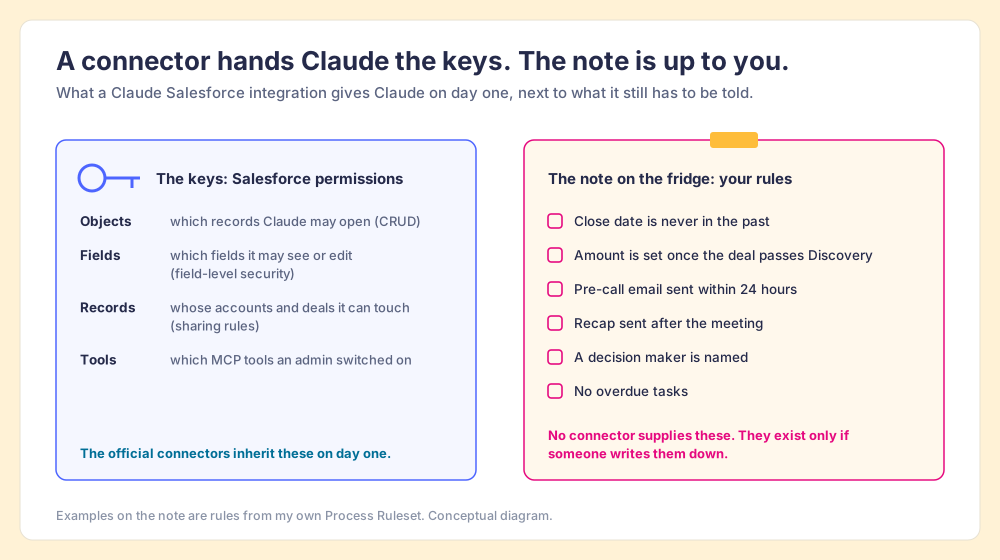
This post covers the keys first, because you need them: the four ways to connect Claude to Salesforce, what each one needs, and what Claude can read and write. Then it covers the note, because without it Claude does fast, permitted, well-meant work toward a standard it has to guess.
Can Claude connect to Salesforce?
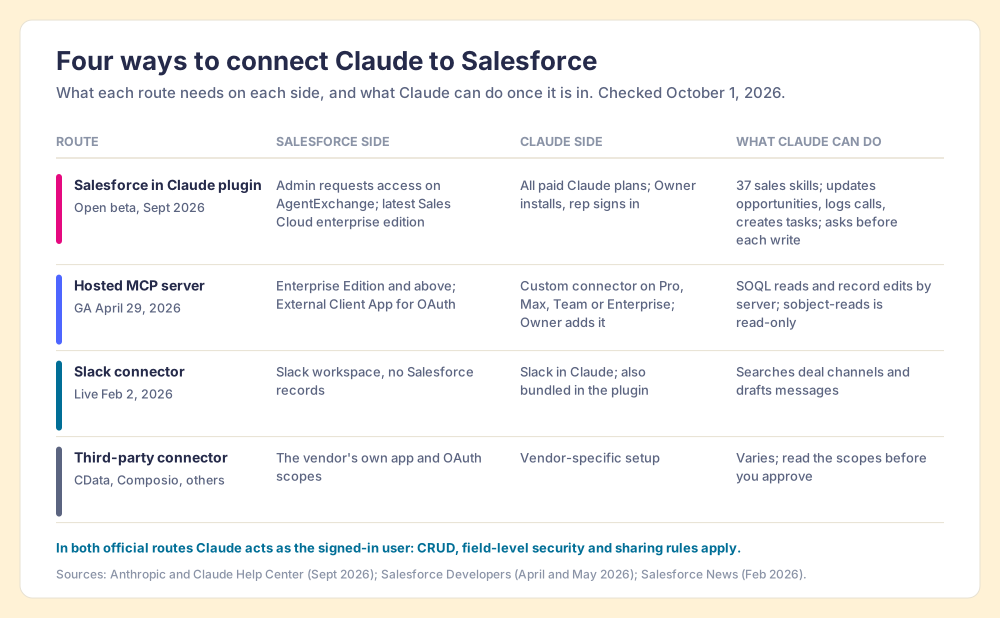
Yes, and as of October 2026 there are four ways in. I checked each against the vendor’s own documentation this week.
- The Salesforce in Claude plugin. Anthropic built it with Salesforce and announced it on August 26, 2026 as part of Claudeforce. It bundles the Salesforce and Slack connectors with 37 prebuilt sales skills for account research, call prep, pipeline review and CRM updates, and it is in beta on Claude chat and Cowork, web and desktop (Anthropic, Salesforce in Claude). It runs on all paid Claude plans, and Anthropic’s setup guide says your org “needs access to the latest Sales Cloud enterprise edition to be eligible for beta” (Claude Help Center).
- A Salesforce hosted MCP server. Salesforce made its hosted MCP servers generally available on April 29, 2026, for “every Enterprise Edition org and above,” and lists Claude, ChatGPT and Slack among the clients (Salesforce Developers). In Claude you add it as a custom connector, which runs on Pro, Max, Team and Enterprise plans; on Team and Enterprise only an Owner can add one (Claude Help Center). Our Salesforce MCP guide goes through the servers and tools one by one.
- The Slack connector. Salesforce launched Slack in Claude on February 2, 2026, so Claude can search conversations and draft messages under your existing Slack permissions (Salesforce News). It gives Claude the deal channel. It holds no Salesforce records.
- Third-party connectors. Vendors such as CData and Composio sell their own Salesforce connectors for Claude. Each runs through the vendor’s app and scopes, so read what it asks for before you approve it.
One more name causes confusion. “Salesforce Claude” can also mean the reverse direction, Claude running inside Salesforce. In October 2025 Salesforce made Anthropic “the first LLM provider fully integrated within the Salesforce trust boundary,” serving Claude through Amazon Bedrock as a model for Agentforce (Salesforce, October 14, 2025). That route changes which model powers your Salesforce agents. The four above change where your reps can work on Salesforce data.
How do you connect Salesforce to Claude?
The plugin is the shorter path if your org qualifies for the beta. It takes three people, in this order (Claude Help Center):
- Salesforce admin request. The admin submits an access request on AgentExchange and follows the setup steps in the acceptance email.
- Claude Owner install. An Owner or Primary Owner opens Organization settings, then Plugins, picks the installation preference, then enters the consumer key and secret from Salesforce under Connectors.
- Rep sign-in. Each rep turns on the plugin and signs in with their own Salesforce login. Claude then works as that person.
The hosted MCP route works today on any Enterprise Edition org. You create an External Client App in Salesforce for OAuth, then in Claude open Customize, then Connectors, add a custom connector, and paste a server URL in the form https://api.salesforce.com/platform/mcp/v1/<server-name> with the OAuth client ID under Advanced settings. After you sign in, Configure lets you switch individual tools on or off (Salesforce Developers, Configure Claude). Philippe Ozil, a principal developer advocate at Salesforce, put the shift in one line: “You don’t have to log into Salesforce and you’re no longer limited to using Agentforce to interact with your data from agents” (Salesforce Developers, May 26, 2026).
If you run HubSpot instead, the setup is shorter and different; Ryan Gunn walks through his Claude HubSpot integration and the two scheduled runs he built on it.
What can Claude read and write in Salesforce?
Claude reads whatever the signed-in rep could read. With the plugin that means account history, opportunities and pipeline, plus deal-channel threads from Slack. On writes, Anthropic lists summarizing an account, updating opportunities, logging calls and creating follow-up tasks, and says “Claude asks the seller to approve each proposed change before it’s written” (Anthropic).
Salesforce’s hosted MCP servers are blunt about the security model: “Your existing permissions automatically apply,” naming CRUD, FLS and sharing rules, and “every transaction runs as the authenticated user,” with full audit trails (Salesforce Developers). In plain terms, Claude can open only the objects the rep can open, see only the fields the rep can see, and touch only the records the rep can touch. Salesforce also ships a read-only server, platform/sobject-reads, which is the sensible first connection for a team that wants Claude answering questions before it changes anything.
- Reads. Accounts, contacts, opportunities, activities and pipeline the rep has access to, through SOQL queries or the plugin’s skills.
- Writes. Field updates, logged calls and new tasks, approved one change at a time by default.
- Limits. Nothing the rep’s profile forbids, nothing outside the tools an admin switched on, and nothing at all on the read-only server.
That is a well-cut set of keys. It answers who may do what. It is silent on what a correct opportunity looks like at your company.
What does Claude not know about your Salesforce org?
Your expectations. Salesforce has a feature that looks like it covers them, and it stops at a precise point.
A validation rule is Salesforce’s native way to encode a standard. Salesforce defines it this way: “Validation rules verify that the data a user enters in a record meets the standards you specify before the user can save the record” (Salesforce Help). It is a bouncer at the door. Anyone who comes through gets checked, and the check is good. But a bouncer only sees people who walk in.
Follow one opportunity through a night. The rep saved it on Monday with a close date of Tuesday; the validation rule ran and passed. Tuesday came and went. No one opened the record, so no one saved it, so the rule never ran again, and on Wednesday morning the opportunity sits in your forecast with a close date in the past. The same goes for the recap email the rep never sent and the follow-up task that went overdue. A rule about time passing, or about something that should have happened and did not, never knocks on the door. It needs a night watchman, someone who walks every hallway on a schedule and checks what is true right now.
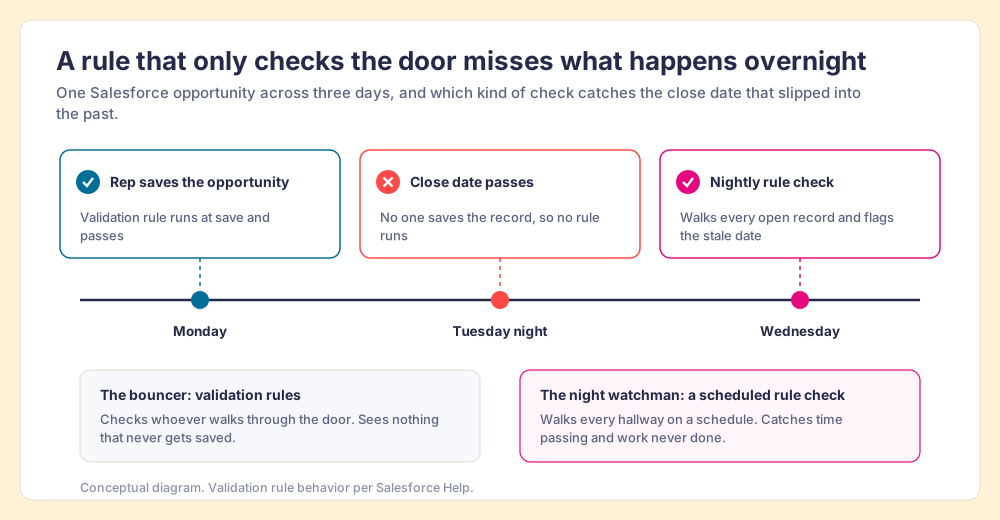
Hand Claude the keys without that watchman and ask it to “clean up my pipeline,” and it has to invent the standard. It will produce a tidy pipeline by the model’s idea of tidy, which is a guess at your stage exit criteria, your required fields and your follow-up window. Fast work toward a guessed standard is still a guess.
Is it safe to let Claude write to Salesforce?
The approval step helps, and it is the right default. It is also weaker than it looks, for a reason human-factors researchers mapped long before chatbots. In their 2010 review in Human Factors, Raja Parasuraman and Dietrich Manzey found that “automation complacency occurs under conditions of multiple-task load,” and that “automation bias results in making both omission and commission errors when decision aids are imperfect” (Parasuraman & Manzey, 2010). A rep approving twenty proposed field changes at the end of a long day is the textbook case. The approve button becomes a signature on a form written in a language the rep is too tired to read.
The fix is to show the rule next to the change. “Close date moved to October 14, because close dates cannot sit in the past and your next meeting with the buyer is on October 14” is a change a tired rep can check in two seconds. “Close date updated” is a change they can only trust. A written rule turns the approval from a leap of faith into a comparison.
Measurement does the rest. Paul Harkin and colleagues pooled 138 experiments with 19,951 participants and found that monitoring progress toward a goal raised the odds of reaching it, with larger effects when the progress was physically recorded or reported to others (Harkin et al., Psychological Bulletin, 2016). A count of open violations each morning is that kind of record. It also tells you whether Claude is following the process, which is the only way to govern an AI that writes to your CRM.
Where should your sales rules live so Claude can follow them?
Somewhere every screen can read. The State of Sales Enablement 2026 asked where guidance lives and compared quota attainment: teams with guidance embedded in the workflow hit quota at 49%, teams that kept it in CRM fields or stages at 24%, and teams with docs or wikis at 15% (SOSE 2026). Validation rules and stage fields are that middle row. They help, and they stop at the door.
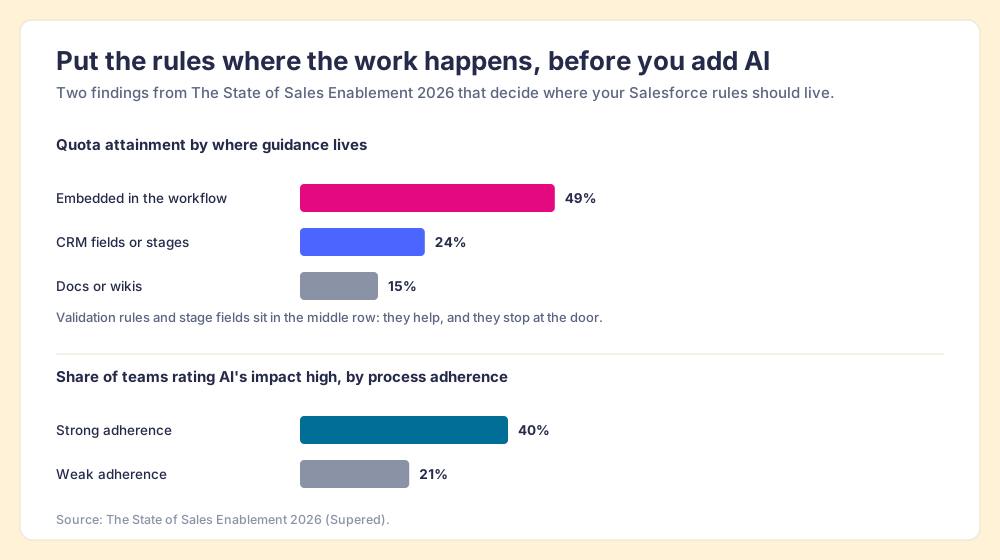
The same survey explains why the rules come before the AI. Teams with strong process adherence rated AI’s impact high 40% of the time; teams with weak adherence, 21%. And 46% of teams already use AI for CRM admin and cleanup. Claude amplifies the process you have. If the process is a set of expectations in a manager’s head, Claude amplifies the guessing.
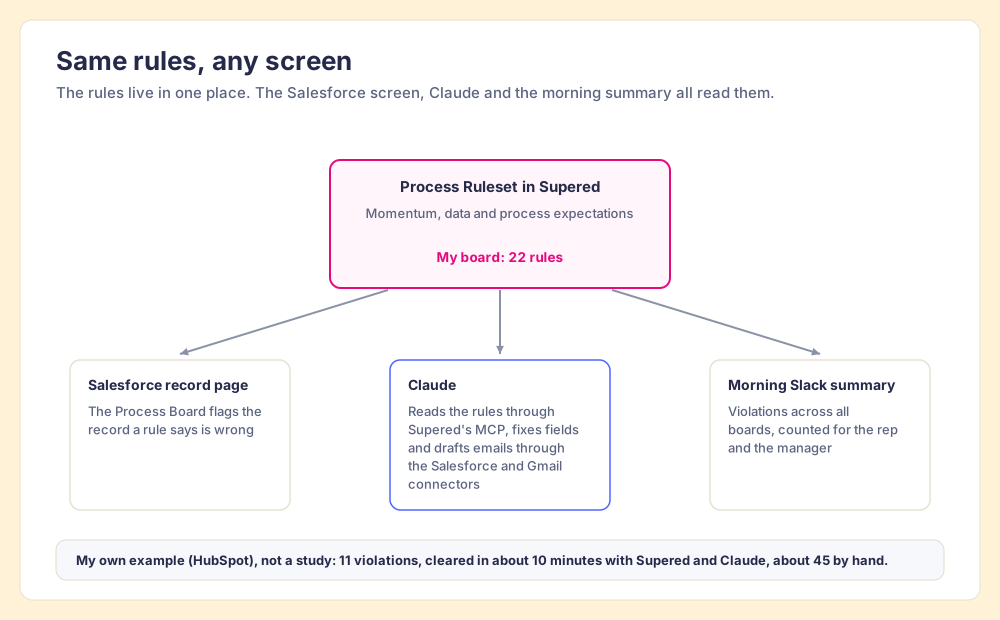
The workflow, in 2026, includes Claude. So the rules need to live in one place that the Salesforce screen, Claude and the morning Slack summary all read from:
- One written rule set. Momentum, data and process expectations, each stated so a machine can check it (close date in the future, amount set past Discovery, a pre-call email within 24 hours of a meeting).
- A nightly check of every open record. The watchman, so stale dates and missing emails surface without anyone saving anything.
- Claude reading the rules before it works. The model loads the standard, finds what breaks it, and proposes changes with the rule attached.
- A morning count. The number of open violations, visible to the rep and the manager, so the record Harkin describes exists and managers spend their one-on-ones coaching instead of chasing fields.
Supered handles that part. Your expectations live in Supered as a Process Ruleset; you describe a rule in English and Supered’s MCP creates the Process Rule directly; the Process Board flags each record that breaks one, in Salesforce or HubSpot. Claude connects to Supered’s MCP next to its Salesforce connector, so it reads the rules, then does the work: updates fields, drafts emails, moves tasks. The CRM stays current, and the rules are the same in the Salesforce screen as in Claude. My own board, the one I call my Zero Board, has 22 rules. One night it showed 11 violations across my open deals. One prompt in Claude cleared it, with field updates taken from my notes and calendar and recap emails waiting in Gmail drafts, in about 10 minutes against the 45 or so it takes me by hand. That was my HubSpot portal and my own example, not a study, and the same Process Ruleset runs against Salesforce.
The sales expectations use case shows the full loop, and the Claude integration page lists what Claude reads and what it can change.
What we recommend for a Claude Salesforce rollout
There are three sensible ways to start, and they differ in how much you trust Claude on day one.
- The plugin, with approvals on. The best route if your org is accepted into the beta and your reps want the 37 skills now. Keep the per-change approval.
- A hosted MCP server, read-only first. The best route for any Enterprise Edition org that wants to start this week: connect
platform/sobject-reads, let reps ask questions for a few weeks, then turn on write tools. - A third-party connector. Worth it only when neither official route fits your edition or your stack, and only after you have read its scopes.
Whichever you pick, write the note before you hand over the keys. List the five to ten expectations your managers already enforce by hand, put them where a nightly check and Claude can both read them, and count violations every morning. The SOSE numbers say why: process followed by 36% of reps, AI rated high nearly twice as often where adherence is strong, 49% quota attainment with guidance in the workflow against 15% with guidance in a wiki. Claude gives each rep a second pair of hands. Give those hands the standard, and measure whether they met it.
Key points
- Four routes in. The Salesforce in Claude plugin (beta), hosted MCP servers (GA, Enterprise Edition and above), the Slack connector, and third-party connectors.
- Permissions inherited. Claude acts as the signed-in rep, under CRUD, field-level security and sharing rules, and asks before each write by default.
- Rules missing. No connector tells Claude what a correct opportunity looks like at your company.
- Validation rules at the door. They check on save, so stale dates and missing emails need a scheduled check.
- Approvals with the rule attached. Automation bias makes a bare approve button weak; a rule beside the change makes it checkable.
- One rule set, any screen. The Salesforce UI, Claude and Slack read the same expectations, and a morning count shows whether they were met.
The hub for this whole topic is Claude for sales, which covers the other connectors and the prompts reps use. If you want the server-level detail, read the Salesforce MCP guide next; if your data is already messy, start with CRM hygiene as a nightly rule check and our post on Salesforce data quality. To see a Process Ruleset and Claude clear a board together, book a demo.
Frequently asked questions
Can Claude connect to Salesforce?+
Does Claude integrate with Salesforce on any edition?+
How do you connect Salesforce to Claude?+
Can Claude update records in Salesforce?+
What is the difference between Salesforce in Claude and Claude in Agentforce?+
Does the Claude Salesforce connector know our sales process?+
Your process, running itself.