AI CRM: You Do Not Need a New CRM to Get One. Six Options, Graded
The CRM you already pay for now lets an AI read and update it. We graded six AI CRM options, from Breeze and Agentforce to Attio and Claude, on the job that decides the number: following your rules.
An AI CRM is a customer database where AI agents read and update the records for you, and in 2026 you can get one by connecting Claude or your vendor's own agents to the CRM you already run, so what decides the result is whose rules the AI follows.
Search for an AI CRM and the results split into two camps. One camp sells you a new database built for agents. The other, which includes the vendor you already pay, sells you agents for the database you have. A sales leader reading both could be forgiven for thinking the choice is between moving house and staying put.
You do not need a new CRM to get an AI CRM. As of October 2026, HubSpot, Salesforce and Pipedrive each publish an official way for Claude and ChatGPT to read and update records, and each sells its own agents on top. What none of the six options below ships is the part that decides whether the AI helps you: your rules, written down, and a check every night on whether the work followed them. An AI with write access to a CRM will do a great deal of work. Whether it is the right work depends on instructions it does not have yet.
The six are graded for one job, the one a mid-market or SMB team already running a CRM is hiring for: get AI doing the CRM work without moving house.
What is an AI CRM, and do you need a new one to get it?
An AI CRM is a customer database where AI agents read and update the records for you: they log the call, fill the amount, move the close date, draft the recap. The definition is settled. The argument is over where the AI should live.
The case for a new CRM deserves its full force, because the people making it are serious. Christopher O’Donnell was HubSpot’s chief product officer before he founded Day AI, and when Sequoia led its $20 million Series A in February 2026 he wrote that “CRM was supposed to be your system of record. Instead, it became your system of delay” (Day AI, 2026). Attio’s chief executive, Nicolas Sharp, raising $52 million from GV in August 2025, put it as a category problem: “Traditional CRM categories in B2B have been stagnant and require fundamental rethinking to be AI-native” (Tech Funding News, 2025).
They are right about the symptom. Salesforce’s own survey of more than 7,700 sales professionals found reps spend 28% of their week selling, with the rest going to deal management, data entry and other tasks (Salesforce, 2023). A CRM that waits for a tired rep to type is a system of delay.
Where I part company with them is the cure. Replacing the CRM to get AI is moving house because you want a dishwasher. The new house may well have a better kitchen. You also pack eight years of boxes, lose things in the move, learn where the light switches are, and redo the paperwork, and on the first morning in the new place the dishes are still stacked in the sink, because the dishwasher was never the reason they piled up. Somebody has to load it, and somebody has to decide what goes in.
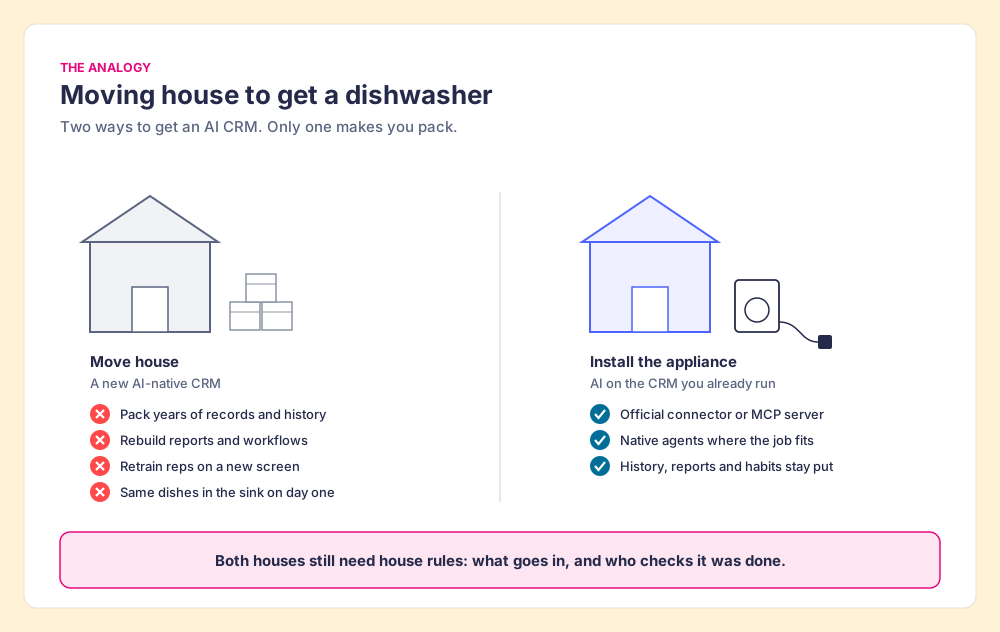
The comparison fails in one place, and I should mark it. A dishwasher does not need to know your house rules. An AI agent with write access does, and that difference carries the rest of this post.
The appliance now fits the old kitchen, and fast. Pipedrive launched a native MCP server on all of its plans on June 30, 2026; within its first month of general availability more than 6% of Pipedrive’s paying customers had adopted it (Pipedrive, August 2026). Salesforce made its hosted MCP servers generally available on April 29, 2026 for Enterprise Edition orgs and above (Salesforce Developers, 2026). HubSpot’s connector for Claude works on all HubSpot plans (HubSpot Knowledge Base, updated September 17, 2026). The database is no longer what stands between your team and an AI CRM.
How did we grade the best AI CRM options?
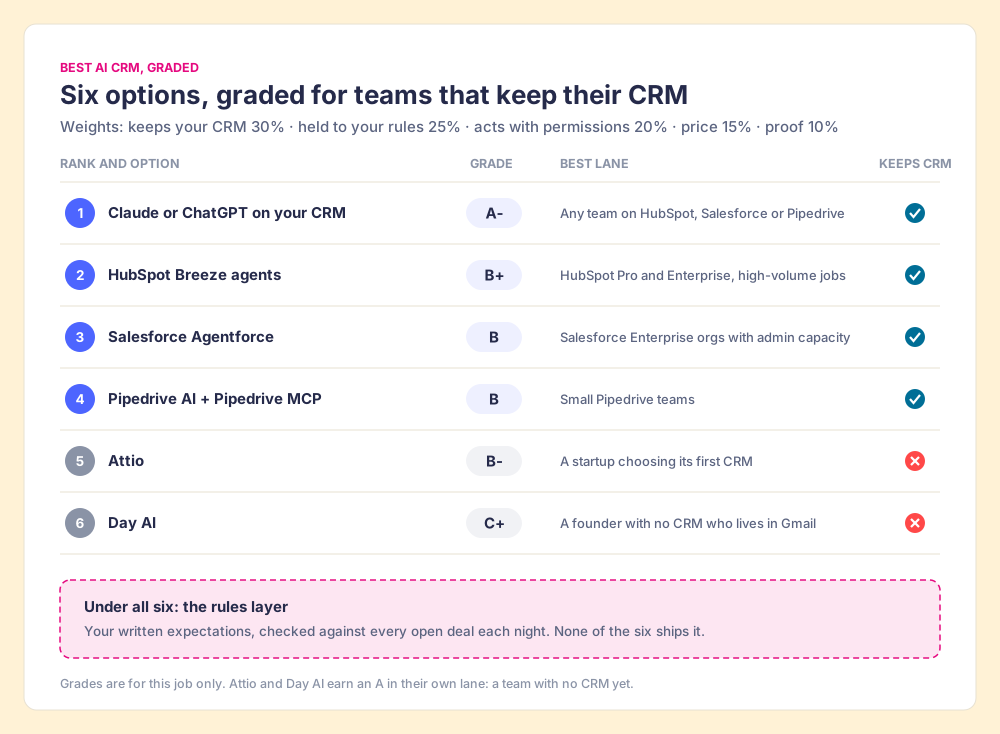
A ranking that hides its weights is an advertisement. These are ours, set for the job a team with an existing CRM is hiring for. Flip the weights and the order flips too, which is why each tool also gets its own lane below.
- Keeps your CRM (30%). No migration, no new login, no retraining. We hold this one firmly: meet reps where they already work, and leave the CRM in place.
- Can be held to your rules (25%). Whether you can state your expectations to the AI and check its work against them, deal by deal.
- Acts with real permissions (20%). Writes, logs and drafts, as the signed-in user, inside the CRM’s own security model.
- Price you can predict (15%). A published price a finance lead can model.
- Proof and stability (10%). A dated G2 rating with its review count, and the vendor’s current corporate status.
Our stake, stated plainly: Supered sits on top of HubSpot, Salesforce and Pipedrive, so we gain when you keep your CRM. So the weights are printed, and each tool’s best lane is named even where that lane favors someone else.
| Rank | Option | Grade | Best lane | Why it ranks here |
|---|---|---|---|---|
| 1 | Claude or ChatGPT on your CRM | A- | Any team on HubSpot, Salesforce or Pipedrive | Keeps the CRM, writes as the user, $20 a month; knows your data and none of your rules |
| 2 | HubSpot Breeze agents | B+ | HubSpot Pro and Enterprise teams with a high-volume job | Native, outcome-priced; HubSpot-only, and acts on HubSpot’s idea of a good record |
| 3 | Salesforce Agentforce | B | Salesforce Enterprise orgs with admin capacity | Strongest permissions model; hardest price to model |
| 4 | Pipedrive AI plus Pipedrive MCP | B | Small Pipedrive teams | MCP on every plan; native AI leans to insight over action |
| 5 | Attio | B- (this job) | A startup choosing its first CRM | Strong AI-native product; you pay for it with a migration |
| 6 | Day AI | C+ (this job) | A founder with no CRM who lives in Gmail | Captures context with no typing; youngest, no G2 rating yet |
G2 ratings checked October 1, 2026: HubSpot Sales Hub 4.4 from 14,347 reviews, Salesforce Sales Cloud 4.4 from 27,564, Pipedrive 4.3 from 5,040, Attio 4.3 from 594, Day AI no rating listed.
What does an AI CRM do today: read or write?
Mostly it reads. Pipedrive published the split for its MCP connector: 65% of interactions read CRM data and 35% write or update it, and 93% of the usage runs on Anthropic’s surfaces, Claude.ai and Claude Code (Pipedrive, August 2026). Our own survey found the same appetite from the other side: in The State of Sales Enablement 2026, 46% of teams already use AI for CRM admin and cleanup, more than any other sales use.
The write side is growing, and every vendor has opened it up. HubSpot’s connector for Claude can view, create and update records across more than 40 object types, cannot delete, and works in bulk 10 records at a time. HubSpot’s ChatGPT connector gained create and update on February 26, 2026, including logging calls and moving deal stages (HubSpot Developers, 2026).
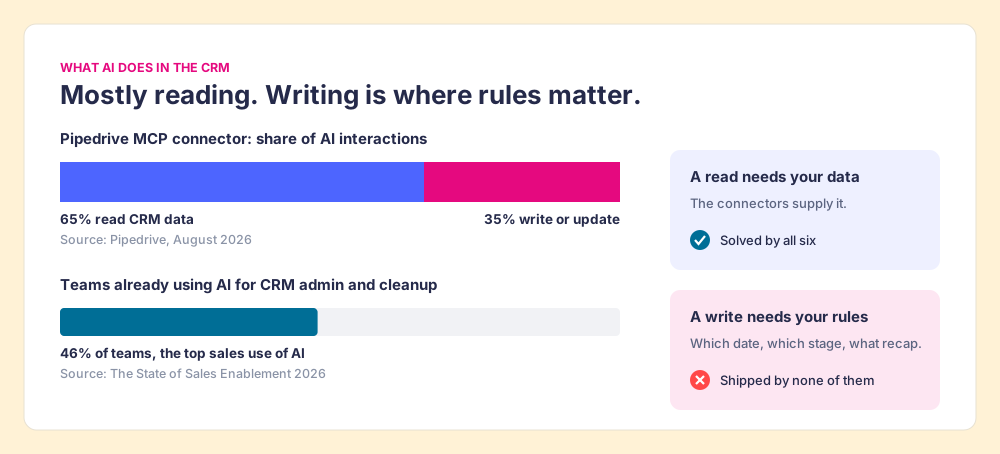
The split matters because the two halves need different things. A read needs data, and the connectors supply it. A write needs a judgment: which close date is right, whether the deal has earned a stage, what the recap should promise. The connector hands the AI the keys and leaves the judgment to the model’s guess about what a good sales team would want.
The six AI CRM options, graded
1. Claude or ChatGPT on the CRM you already run (A-)
The highest grade goes to the option with no new vendor in it. Connect Claude or ChatGPT to HubSpot, Salesforce or Pipedrive through the official connector and the AI works inside the tool reps already open, with the permissions the rep already has. HubSpot’s connector shows Claude only the CRM data the user can see in HubSpot, and Salesforce’s hosted MCP servers run every transaction as the authenticated user, with “CRUD, FLS, sharing rules, and all the other controls you’ve already mastered” in force (Salesforce Developers, 2026).
The price is the easiest on this list to model. Claude Pro is $20 a month billed monthly and a Team standard seat is $25 (Anthropic pricing, checked October 1, 2026); HubSpot’s connector needs one of the paid Claude plans. Anthropic and OpenAI are both independent, privately held companies.
It loses the A for one reason. Claude knows your data and none of your rules. Ask it to “clean up my pipeline” and it will, by its own lights. The setup walk-throughs live in our guides to the HubSpot MCP server, the Salesforce MCP server and the Pipedrive MCP, and the ChatGPT HubSpot integration covers the OpenAI side.
2. HubSpot Breeze agents (B+)
For a HubSpot team, Breeze is the native answer to “where are the HubSpot AI agents,” and HubSpot has made it cheaper to try. Since April 14, 2026, the Customer Agent costs $0.50 per resolved conversation and the Prospecting Agent $1.00 per lead it recommends for outreach, both on Pro and Enterprise. HubSpot’s chief customer officer, Jon Dick, put the pitch in one line: “You pay when it works, full stop” (HubSpot, 2026). At its September 2026 Fall Spotlight, HubSpot added a rebuilt Breeze Assistant that assigns work to its specialist agents and a Smart CRM that captures calls, emails and meetings without manual logging (HubSpot, 2026).
HubSpot Breeze AI is the best pick when the job is high-volume and well-defined (answering inbound support, researching accounts) and you want one bill. HubSpot Sales Hub holds 4.4 stars from 14,347 G2 reviews (checked October 1, 2026), and HubSpot remains an independent public company.
Any CRM AI agent inherits its maker’s defaults, and Breeze ranks below Claude for two reasons. It works only in HubSpot, and a “resolved” conversation is HubSpot’s definition of done, which may differ from your sales manager’s.
3. Salesforce Agentforce (B)
Agentforce has the strongest governance story on this list and the hardest price to model. Agentforce agents run inside the Salesforce permission model, and the same hosted MCP servers let Claude and ChatGPT into the org under the same rules. Agentforce is also selling: The Next Web reported about $1.5 billion in annual contract value in the July quarter, up 240% year over year (The Next Web, September 2026).
The pricing page lists Flex Credits at $500 per 100,000, which works out to $0.10 to $0.50 per action depending on the action, Agentforce add-ons at $125 per user per month, and Agentforce 1 editions from $550 per user per month (Salesforce, checked October 1, 2026). One status note for buyers: Salesforce renamed Sales Cloud to Agentforce Sales in October 2025 and reverted it to Sales Cloud in September 2026, per the same Next Web report. G2 still lists the product as Agentforce Sales, at 4.4 stars from 27,564 reviews (checked October 1, 2026).
Choose it when you are a Salesforce Enterprise org with an admin team that can configure agents and a budget that can absorb usage pricing. Our Claude Salesforce integration guide covers the lighter path.
4. Pipedrive AI and the Pipedrive MCP server (B)
Pipedrive’s native AI sales assistant leans toward insight: win probability, reasons deals were lost, revenue forecasts, email drafting and summaries (Pipedrive). The action lives in the MCP server, which is on all plans and lets Claude or ChatGPT create and update deals, contacts and leads and turn meeting notes into records. Joe Futty, Pipedrive’s chief product and technology officer, described the shift plainly: “Salespeople increasingly start their day with AI assistants” (Pipedrive, June 2026).
Pipedrive holds 4.3 stars from 5,040 G2 reviews (checked October 1, 2026) and is majority-owned by Vista Equity Partners. It is the best AI CRM path for a small Pipedrive team: no add-on to buy, and the MCP server does the work.
5. Attio (B- for this job)
Attio is a good product, and its grade measures this one job. It shipped Ask Attio on February 4, 2026, an MCP server on February 19, and an Ask Attio that can take actions on April 29 (Attio changelog, 2026). Pricing is published: free, then Plus at $35 per user per month billed annually, Pro at $79, with AI credits on every plan (Attio pricing, checked October 1, 2026). It reported 5,000 paying customers at its Series B and holds 4.3 stars from 594 G2 reviews (checked October 1, 2026). It is independent and venture-backed.
For a seed-stage company picking its first CRM, Attio earns an A, and I would put it on the shortlist. For a team with years of history in HubSpot or Salesforce, it asks you to move house to get an appliance you can now install at home.
6. Day AI (C+ for this job)
Day AI is the most radical answer on the list. It builds the CRM from your email and calendar so reps do not type, and it prices per agent, from free to $200 a month, with no per-seat fees (Day AI pricing, checked October 1, 2026). O’Donnell’s critique of the old CRM is the sharpest in the category.
It ranks last for this job because it is the youngest: a $20 million Series A in February 2026, no G2 rating listed as of October 1, 2026, and a migration for anyone already running a CRM. For a founder who sells from Gmail and has no CRM at all, it is an A- and worth a trial.
What we left off
Most “best AI CRM” lists run past fifteen entries. We left off Zoho, Microsoft Dynamics and monday CRM because their buyers are rarely the mid-market HubSpot and Salesforce teams this list is for, and we left off the long tail of agent startups on purpose. Gartner estimates only about 130 of the thousands of vendors selling agentic AI have genuine agent capability, and predicts over 40% of agentic AI projects will be canceled by the end of 2027 over cost, unclear value or weak risk controls (Gartner, June 2025). A shorter list of vendors you can check beats a longer one you cannot.
Why does an AI CRM need your rules before it needs more power?
Return to the house for a moment, and give it a new clerk. The CRM is a filing cabinet. The connector hands a brilliant new clerk the keys on day one, and the clerk is fast: a hundred folders an hour, never tired, never sulking. The office manual is still in a box upstairs. So the clerk files by guesswork, neatly, and at speed, and by Friday the cabinet is tidier and wrong in ways that stay invisible until a manager opens a drawer.
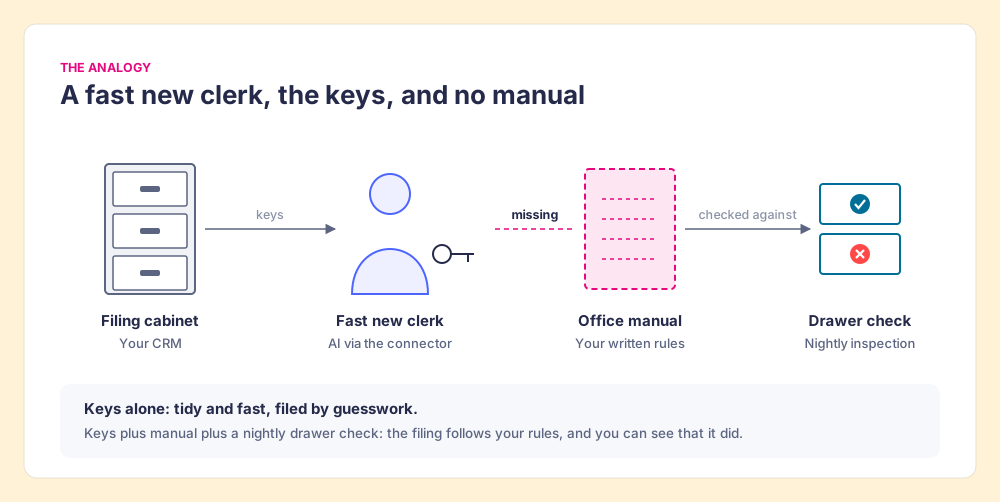
Lisanne Bainbridge named this problem in 1983, writing about factory control rooms, and it has aged well: “the more advanced a control system is, so the more crucial may be the contribution of the human operator” (Bainbridge, Ironies of Automation, Automatica, 1983). Automate the doing and the human work moves upstream, into deciding what good looks like and checking that it happened. In a CRM those two jobs are the rules and the inspection.
The clerk comparison also fails at one point. A real clerk can ask a colleague. An AI agent asks no one, and it does not get tired of guessing.
The rules are the weak link today, before any AI arrives. In The State of Sales Enablement 2026, 89% of teams said they have a defined sales process and 36% said reps follow it. The top reason reps skip the process, at 29%, is that managers do not enforce it, and the cause looks like hours: adherence falls from 47% on teams with one to five reps per manager to 23% at six to eight. An AI that does the CRM work for a team in that state does the unenforced version faster.
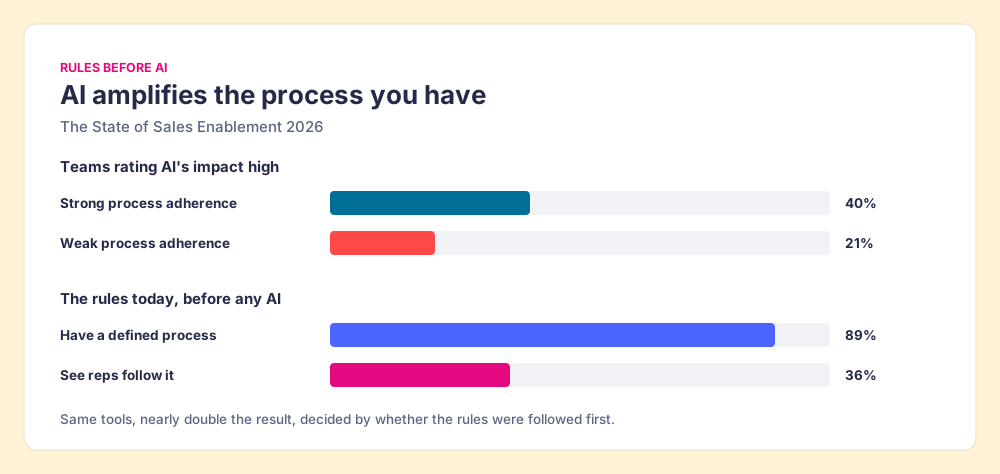
The same survey says the order matters. Teams with strong process adherence rate AI’s impact high 40% of the time; teams with weak adherence, 21%. Same tools, nearly double the result, decided by whether the rules were followed before the AI showed up. AI amplifies the process you have, so the process goes first.
Two things therefore matter more than which agent you pick:
- Written expectations. The rules for a healthy record, stated so a machine can check them: a close date in the future, an amount once a deal passes discovery, a recap sent after every meeting, a named decision maker.
- Nightly inspection. A check of every open deal against those rules, run by software so no manager spends an evening on it, with the violations listed for the AI or the rep to fix. Our CRM hygiene guide walks through the six violation types that come up most.
Where does Supered fit in an AI CRM stack?
Supered is the rules layer under an AI CRM. It sits on top of HubSpot, Salesforce or Pipedrive and holds your expectations as Process Rulesets: momentum, data and process rules that a Process Board checks against your open deals. Describe a rule in English and Supered’s MCP creates the Process Rule directly. Then Claude, or any LLM connected to Supered, reads the rules and does the work: updates fields, drafts emails, moves tasks. The CRM stays current, and the same rules apply whether the rep works in the CRM screen or in their LLM of choice.
My own board shows what that looks like. It holds 22 rules across my open deals, and one night it showed 11 violations: close dates in the past, no amount after discovery, overdue tasks, a missing pre-call email, a recap never sent, no decision maker. One prompt in Claude, with Supered, HubSpot and Gmail connected, cleared it. Claude loaded my rules, found each violation, filled the amount from the discovery notes, matched close dates to the next meetings on my calendar, and left the recap and pre-call emails in Gmail drafts for me to review. By hand that is about 45 minutes of my evening. With Supered and Claude it took about 10. It is one example from my own deals, not a study. The next morning’s summary showed zero violations across all boards.
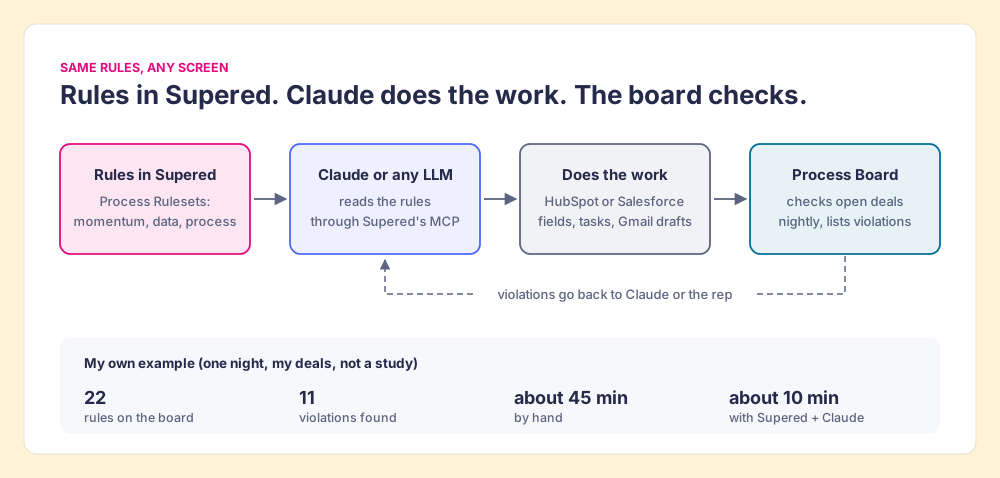
The sales expectations use case shows the board, and the Claude integration page shows what Claude can read and change once connected.
Which AI CRM should you choose?
Start from the CRM you have, because that is where your history and your reps already are. The branches:
- HubSpot Pro and Enterprise teams. Connect Claude through HubSpot’s connector for the daily CRM work, and add a Breeze agent where a high-volume job fits outcome pricing. Our HubSpot Claude connector walk-through shows the one-prompt workflow, and Ryan Gunn’s Claude HubSpot integration shows a power user’s daily version.
- Salesforce orgs. Start with the hosted MCP servers and Claude, which inherit your permission model, and price Agentforce agents once a use case proves out.
- Pipedrive teams. Use the MCP server, which is already on your plan, and Pipedrive AI for the insight work.
- Teams with no CRM yet. Trial Attio or Day AI before you buy a legacy seat. You have nothing to move.
Our recommendation, for the mid-market and SMB teams this list is for: keep your CRM, connect Claude, write your rules down, and inspect against them every night. The connector data says AI already does most of its work by reading your CRM, and the survey data says it pays off nearly twice as often on teams that follow their process. Neither finding depends on which database holds the records.
The hub for this cluster, Claude for sales, picks up from here: what to connect first, and which prompts earn their keep in a rep’s week.
Frequently asked questions
What is an AI CRM?+
What is the best AI CRM?+
Can Claude update my CRM?+
Are HubSpot Breeze agents worth it?+
Do I need to switch CRMs to use AI agents?+
What is a CRM AI agent?+
Your process, running itself.