Wiza Chrome Extension in 2026: A Doorbell, Not the House
The Wiza Chrome extension, checked October 2, 2026: what it does since the August 19 change, what it asks Chrome for, what it costs, how to install it, why its store reviews are out of date, and the alternatives for teams on Clay.
The Wiza Chrome extension is Wiza's free browser add-on that opens a side panel beside one full LinkedIn or Sales Navigator profile at a time, reveals that person's email and phone for Wiza credits, and syncs them to a CRM such as HubSpot or Salesforce.
How to install the Wiza Chrome extension
5 min- 1
Open the store listing
Open 'Wiza - Phone Number & Email Finder' by Wiza, Inc. in the Chrome Web Store, or click Add to Chrome from your Wiza dashboard.
- 2
Add the extension
Click Add to Chrome, then Add extension. In Edge, first turn on Allow extensions from other stores under Manage extensions.
- 3
Pin it (optional)
Open the puzzle-piece menu in the toolbar and click the pin beside Wiza. Wiza's help center says pinning is optional.
- 4
Refresh LinkedIn
Reload any LinkedIn tab that was open during the install, so the floating Wiza icon appears on the right edge of the page.
- 5
Sign in inside the side panel
Click the floating Wiza icon on a full person or company profile. The side panel opens; sign in there, with SSO if your company requires it.
- 6
Connect your CRM
Connect HubSpot, Salesforce, Pipedrive, Zoho CRM, Attio, Outreach or Salesloft in Wiza so the side panel can show matches and sync contacts.
A doorbell is a small, plain machine. It knows nothing about the house, not who lives there and not what is in the fridge. It tells the people inside that someone is at the door, and which door. The answers come from inside.
The Wiza Chrome extension is Wiza’s free browser add-on that opens a side panel beside one full LinkedIn or Sales Navigator profile at a time, reveals that person’s email and phone for Wiza credits, and syncs them to a CRM such as HubSpot or Salesforce. Since August 19, 2026, it is a doorbell. I downloaded version 0.3.57 from Google’s update server and read it: 22 files, permission to touch linkedin.com and nothing else at install, and a side panel that loads from Wiza’s own servers. The bulk export that made the extension famous is gone, on every plan.
The quick answer, three ways:
- The Wiza extension itself. Fits a rep who works LinkedIn one profile at a time and wants an email and a phone in the CRM. Free to install; credits from $49 a month or $990 a year.
- Supered Prospector. Fits a team that already pays for Clay: the GTM engineer’s tables, with Clay’s waterfall across 200+ providers behind them, from the rep’s screen at $45 per rep per month billed annually.
- Apollo’s extension. Fits a small team with no Clay that wants data and sequences in one seat, with a free tier and Basic at $49 a seat a month billed annually.
What does the Wiza Chrome extension do in 2026?
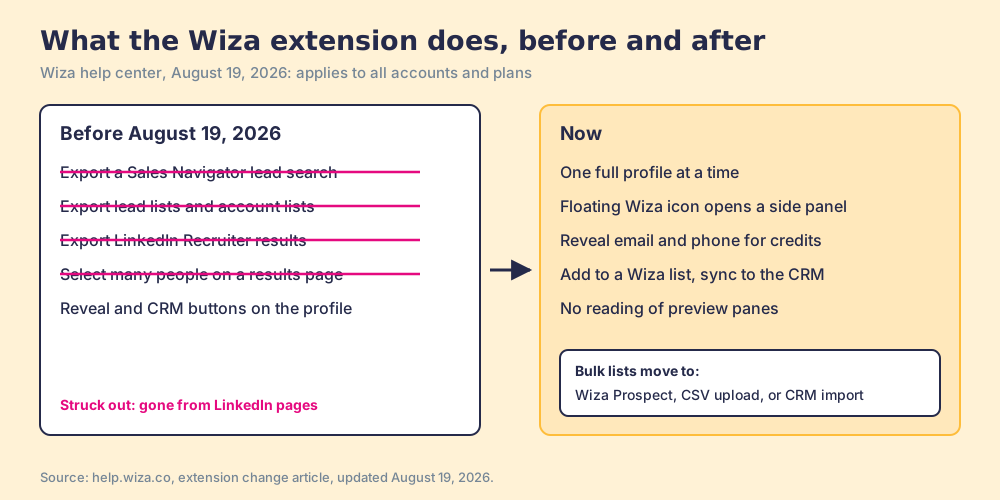
Wiza’s help center published the change on August 19, 2026, and it opens with the reason: “LinkedIn has tightened what third-party extensions can do on its platform. Wiza has updated its Chrome extension to match” (Wiza help, extension changes). Then the line that decides whether this extension is still the one you came to install: “Bulk export and multi-select are gone from LinkedIn, Sales Navigator, and Recruiter search, list, and company pages.” It “applies to all accounts and plans.”
| Job | Before August 19, 2026 | Now |
|---|---|---|
| Export a Sales Navigator lead or account search | In the extension | Wiza Prospect, Wiza’s own database |
| Export a Sales Navigator lead or account list | In the extension | Wiza Prospect |
| Export LinkedIn Recruiter results | In the extension | Wiza Prospect or CSV upload |
| Reveal one person’s email and phone | Buttons on the profile | Side panel, opened from a floating icon |
| Sync one contact to the CRM | Buttons on the profile | Side panel |
| Add one person to a Wiza list | Buttons on the profile | Side panel |
| CRM match icons beside search results | Shown | Removed; matches show in the side panel only |
The last row comes from a separate article: “Wiza no longer places CRM match icons beside profiles in LinkedIn search results or recommendations” (Wiza help, CRM contacts, updated August 10, 2026). What survived is the single-profile path, and it still does useful work.
How does Wiza work on LinkedIn now?
The Wiza LinkedIn workflow today runs in five steps, each in Wiza’s own words from its help center.
- The full profile. “Wiza does not read LinkedIn or Sales Navigator preview panes. Open the full person or company page” (Wiza help, troubleshooting, updated August 20, 2026). In Sales Navigator, clicking a lead in a search opens a preview, so the rep opens the name in a new tab.
- The floating icon. Wiza buttons no longer sit on the profile page. A Wiza icon floats on the right edge; clicking it opens Chrome’s side panel beside the profile.
- The reveal. “1 email credit is used for each valid email found. Risky emails are free!” and “1 phone credit is used for each lead with at least a phone number provided” (Wiza help, LinkedIn profile, updated September 28, 2026).
- The list. Adding a person to a Wiza list shows “which details will be revealed and the credit cost before you continue.”
- The CRM check. The side panel looks for a matching record and offers to add or update it, with contact actions for HubSpot, Salesforce, Outreach, Salesloft, Zoho CRM, Pipedrive and Attio, plus Zapier or Clay workflows.
A reviewer who wrote that Wiza “works naturally with my workflow when I already live in SalesNav” (Jonathan Seibel, Chrome Web Store, July 6, 2026, five stars) would still recognize most of this. The difference is volume. A list of 200 now starts in Wiza Prospect, with Wiza’s filters instead of LinkedIn’s; Wiza’s FAQ says to “use the available filters to search for those people in Wiza Prospect.”
For what LinkedIn allows around lists, our guides to exporting Sales Navigator leads and the Sales Navigator Chrome extension field cover the routes in detail.
What does the Wiza extension ask Chrome for?
Back to the doorbell. A contact finder that runs on any website has to ask Chrome for every website, and the ZoomInfo extension does: its version 12.21.4 manifest requests all URLs plus cookies, tabs and web navigation, and Apollo’s 17.1.0 also requests every site (our ZoomInfo extension teardown, October 1, 2026). Wiza’s 0.3.57 asks for much less.
- Three permissions.
scripting,sidePanelandstorage. No cookies, no tabs, no browsing history. - One site at install. Host access to
https://www.linkedin.com/*only, and its one content script runs only there. Other sites are optional, requested for Wiza Anywhere, the beta mode for “supported company websites” (Wiza help, Wiza Anywhere). - A panel served from Wiza. The side panel is a frame that loads from
plugin.wiza.co. The code announces itself to that panel with two capabilities,linkedin-url-onlyandpanel-mode-selection.
Read plainly, linkedin-url-only means the extension tells Wiza’s panel which LinkedIn address the rep is on, and Wiza’s servers do the rest. The doorbell says which door, and the house answers. The store’s privacy panel agrees, listing “Authentication information” and “Website content” as the data the extension handles. Lusha takes a similar route, with five named domains at install and the rest optional (our Lusha extension page).
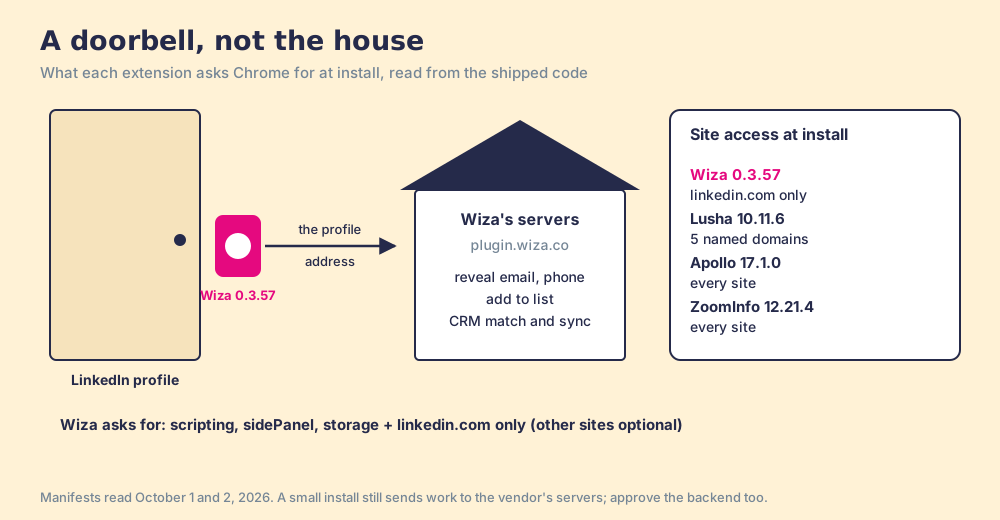
The doorbell picture stops working at one point, and buyers should know where. Because the panel lives on Wiza’s servers, Wiza can change what reps see without shipping a new extension, so the store version number says little about the product behind it. Fixes arrive without an update, and so do changes like August’s. A security review covers Wiza’s backend as well as the 158KiB extension. Ask every vendor in this category, ours included, what the extension reads from the page and where it sends it.
Is the Wiza Chrome extension free?
Free to install, metered to use. The doorbell costs nothing; the house charges by the visit. Prices from wiza.co/pricing, opened October 2, 2026:
| Plan | Price per user | Reveals in the extension |
|---|---|---|
| Free | $0 | 20 valid emails, 5 phone numbers |
| Starter (monthly) | $49 a month | 100 emails and 100 phones a month, then $0.15 an email and $0.35 a phone |
| Email (monthly) | $99 a month | 500 emails a month, phones $0.35 each |
| Email + Phone (monthly) | $199 a month | 500 emails and 500 phones a month |
| Email (annual) | $990 a year | Unlimited emails, phones $0.35 each |
| Email + Phone (annual) | $1,990 a year | Unlimited emails and phones |
| Team | Custom, 3+ users, billed annually | Unlimited, plus Wiza Prospect, CSV import, API |
“Unlimited” carries house rules: “500 contact reveals in 24 hours” and “50 contact reveals in 5 minutes or less,” which “cannot be modified” (Wiza help, fair use), and a maximum of 10 reveals processing at once per user. For one rep those limits sit far away: the Bridge Group’s 2025 report of 351 companies puts the median SDR at 44 phone activities a day (Bridge Group). The store listing still promises “25 free credits every month”; the pricing page’s free plan reads 20 emails and 5 phones with no monthly wording, so treat the free plan as a trial. Wiza pricing works through the full ladder and the API route.
How do you install the Wiza Chrome extension?
Five minutes. These steps come from Wiza’s install, Edge and troubleshooting articles, all updated August 20 and 21, 2026.
- The store listing. Open “Wiza - Phone Number & Email Finder” by Wiza, Inc., or click Add to Chrome in your Wiza dashboard.
- The install. Add to Chrome, then Add extension. In Edge, first allow extensions from other stores; Brave works too.
- The pin. Optional, from the puzzle-piece menu.
- The refresh. Reload LinkedIn so the floating icon appears.
- The sign-in. Log in inside the side panel, with SSO if your company uses it.
- The CRM connection. Connect your CRM in Wiza so the panel can match and sync.
Wiza calls the extension “entirely optional” for anyone not prospecting on LinkedIn.
Why is my Wiza extension not working?
Wiza’s troubleshooting article names five causes, and most trace back to the August change.
- A stale tab. “After installation or an update, refresh the LinkedIn tab.”
- A dropped login. Chrome’s third-party cookie settings can drop the panel’s session; add site-data exceptions for Wiza and LinkedIn, in the same Chrome profile.
- A preview pane. The panel shows a prompt instead of contact details until you open the full profile.
- Missing bulk buttons. “Bulk export and multi-select no longer appear on LinkedIn, Sales Navigator, or Recruiter result pages. This is expected behavior.”
- Another LinkedIn extension. Disable the others, then test in a clean browser profile.
A rep who cannot find the export button has not broken anything.
What do the store reviews say, and how old are they?
A shop window dressed for last season still sells clothes, only not the ones in the window. Wiza’s Chrome Web Store listing, version 0.3.57, “Updated August 19, 2026,” the same day as the change, still lists “Bulk export leads from searches” and “export your searches and saved lead lists with real-time verified email addresses” among its features (Chrome Web Store, Wiza, opened October 2, 2026). The help center, newer and more specific, says those are gone.
The reviews under the window are older still. The listing shows 4.2 out of 5 from 140 ratings. I read the ten most recent written reviews and their star values from the page data: dated May 8, 2025 to July 7, 2026, five five-star, one four-star, one two-star and three one-star. Not one was written after August 19, and the newest were left on version 0.3.47.
- The praise. “Definitely useful, worked for most of the profiles” (Abhishek D, July 7, 2026, four stars).
- The data complaint. “Data quality seems to be OK, not significantly better than a number of other competitors” (Anthony McKenzie, June 1, 2026, two stars).
- The sign-in complaints. Three of the one-star reviews describe login or account-creation errors, the same problem Wiza’s sign-in article now addresses.
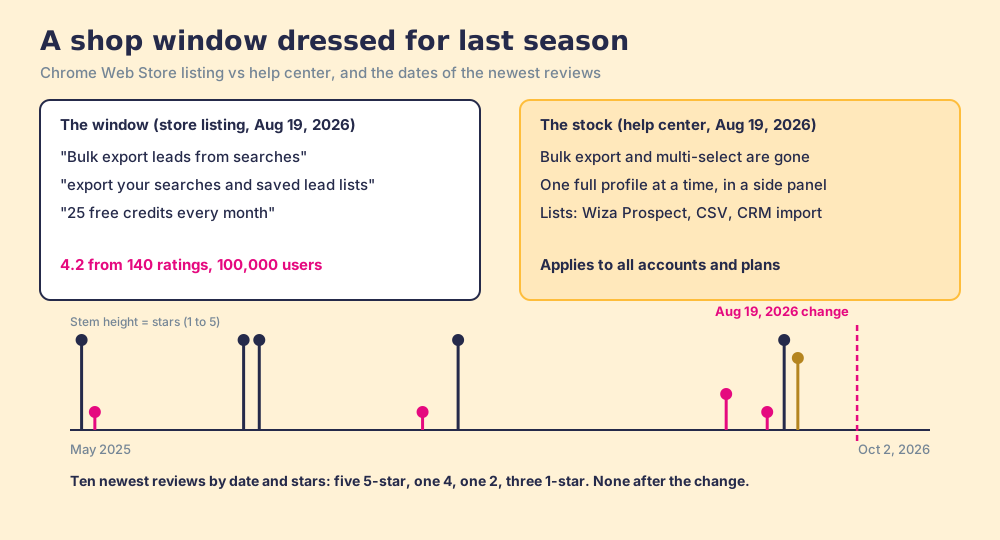
The store page is a poor guide to the extension. On the same day, ZoomInfo’s extension showed 3.5 from 298 ratings with 300,000 users and Lusha’s 4.6 from 1.9K ratings with 400,000 users; Apollo’s read 4.7 from 2.2K ratings and 1,000,000 users on October 1. G2 is the better gauge for the data itself: Wiza holds 4.5 out of 5 from 1,274 reviews there (G2, Wiza, October 2, 2026). Our Wiza review reads those reviews in full.
Why trust this page?
Supered sells no contact data. Prospector runs on Clay, and Clay sells a Wiza step, so we gain nothing by talking you out of Wiza’s data. I started RevPartners, a HubSpot partner that did only sales implementations, sold roughly twice as much Sales Hub as any other partner, and reached Elite tier in 13 months. Supered is the #1 sales enablement app on the HubSpot marketplace, rated 5.0 from 122 reviews there and 4.9 out of 5 from 81 on G2 (checked October 1, 2026). That is also the disclosure: we make Supered Prospector, and it ranks first below for teams that run Clay. The extension facts come from Wiza’s package, version 0.3.57, and its help center, each linked and dated.
Which Wiza extension alternative fits your team?
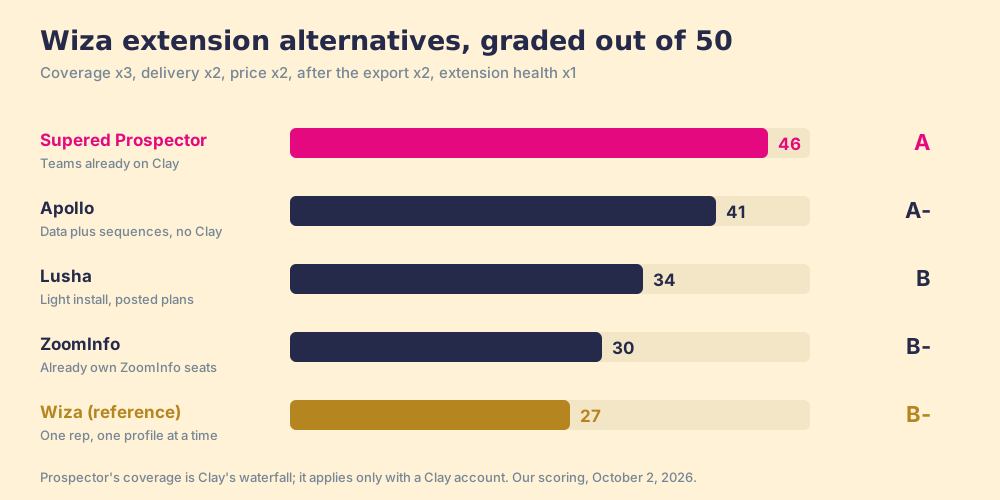
The job is narrow: a rep on a LinkedIn profile, a company site or a CRM record gets a verified email or phone into the CRM. The weights match our ZoomInfo Chrome extension page, out of 50: coverage of the contact (x3), delivery where the rep already works, CRM push included (x2), price for a ten-to-fifty-rep team (x2), what happens to the contact after the export (x2), and the extension’s own health, read from its store rating (x1). Flip toward “one rep, profile by profile, lowest price” and Wiza climbs.
| Rank | Option | Grade | Best fit | CRM integration | Setup effort | Pricing (plan with the extension) | Reason to switch |
|---|---|---|---|---|---|---|---|
| 1 | Supered Prospector | A (46) | Teams already paying for Clay | Native: HubSpot, Salesforce, Pipedrive | Live in under a week on your own Clay account | $45 a rep a month, billed annually, plus your Clay plan | Clay’s waterfall across 200+ providers from the rep’s screen; Wiza can stay as one step |
| 2 | Apollo | A- (41) | Small teams wanting data and sequencing | Native | Self-serve | Free tier; Basic $49 a seat a month, annual | A database to search, plus sequences, in one seat |
| 3 | Lusha | B (34) | LinkedIn-first reps, light install | Native: HubSpot, Salesforce | Self-serve | Free 40 credits a month; Starter $37.45 a month billed yearly | Posted plans to five seats |
| 4 | ZoomInfo | B- (30) | Companies that already own ZoomInfo | Native, 14 business apps | Admin-provisioned | Inside ZoomInfo Professional; Vendr median $33,500 a year | Deepest company data, steepest contract |
| ref | Wiza | B- (27) | One rep, one profile at a time | Native: HubSpot, Salesforce, Pipedrive, Zoho, Attio | Minutes | $990 or $1,990 a year per user | The reference: narrow install, no list export on LinkedIn |
Wiza’s 27 is coverage 3, delivery 3, price 3, after the export 1, extension health 4. Delivery fell to 3 in August, when lists moved out of the LinkedIn page and into Wiza Prospect. Prospector’s 46 is 5, 5, 4, 5, 3: its coverage score is Clay’s waterfall coverage, credited to Clay, and it has no store rating of its own because it runs inside the Supered Chrome extension, so it takes a neutral 3 on that line.
Ten reps for a year: Wiza Email + Phone at the individual price, $19,900 (a ceiling, since Wiza quotes teams of three or more); ZoomInfo’s Vendr median, $33,500; ten Apollo Basic seats, $5,880; Prospector, $5,400 on a Clay account you already pay for, or $11,340 with Clay Growth at its $495 monthly rate ($5,940 a year).
Where does Supered Prospector fit?
Wiza’s doorbell rings one house. When that house has no phone number for the person, the rep rings another vendor’s bell, and the company opens a second account.
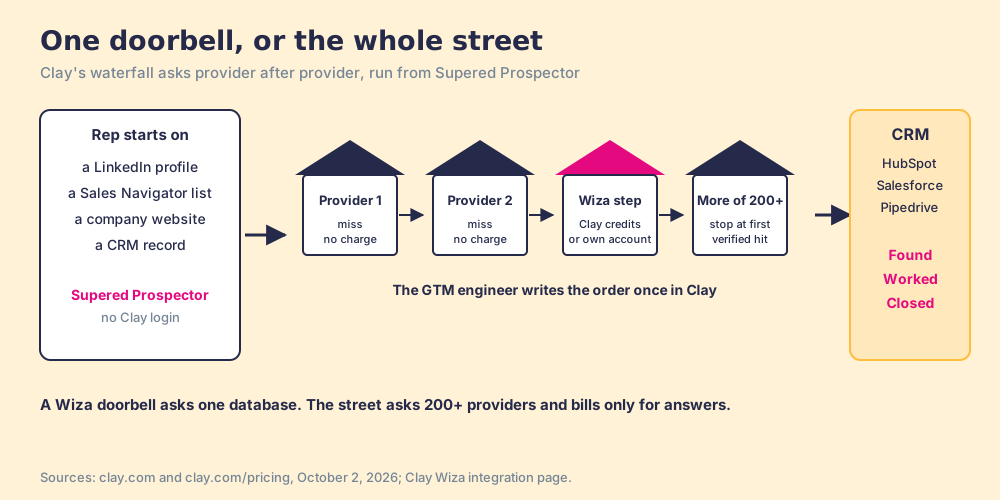
Clay rings the street. Its waterfall is an order the GTM engineer writes once: ask this provider, then that one, and stop at the first verified email or phone, across 200+ data and AI providers (clay.com, October 2, 2026). The bill comes only for answers: “If an enrichment returns no result, you’re not charged Data Credits or Actions” (clay.com/pricing). One of the houses on the street is Wiza. Clay lists “Find Work Email with Wiza” and “Find Phone Number with Wiza,” each paid in “Clay Credits or Bring Your Own Account,” on Clay’s Launch plan and up (Clay, Wiza integration). Lusha, ZoomInfo and Apollo steps differ: Clay marks their contact lookups “Bring Your Own Account Required,” so those need your own contract with that vendor.
Supered Prospector does not bring its own database. It brings Clay’s waterfall, which is every database, routed, and puts it on the page the rep already has open. Clay plus Supered is the best way for a sales team to prospect: GTM engineers build in Clay, reps never open Clay. Prospector runs inside the Supered Chrome extension, on your own Clay account.
- The rep’s starting page. A LinkedIn profile, a company’s website with company research alongside, or a HubSpot, Salesforce or Pipedrive record. The rep picks a flow from a Push menu and the GTM engineer’s table runs. In Sales Navigator, reps add leads to a prospect list and push the list to a Clay table.
- The check before the push. The rep sees the matching CRM record, who owns it, and a flag when the prospect was already worked, so two reps do not work the same person.
- Flows built once. The engineer names flows (person enrichment, the buying committee you defined) and maps each to a Clay table and a destination. Start from the Supered Clay template or bring your own tables.
- A leader who sees how lists end. Found: reps use your tables, with no duplicate work. Worked: who is working their list, and who is not. Closed: every lead ends the way your process says, Qualified, Recycled or Disqualified.
On LinkedIn, in our own words: Prospector works within LinkedIn’s terms and does not copy search results in bulk; the contact data comes from Clay’s waterfall on the customer’s Clay account. LinkedIn has not approved or partnered with us, and we do not claim it has. Ask every vendor what it reads from a LinkedIn page, ours included. For how Prospector stacks up against Wiza feature by feature, see Supered Prospector vs Wiza.
Prospector is $45 per rep per month, billed annually, from one rep, with implementation included and teams live in under a week (Prospector). If RevOps already pays for Clay, compare a Wiza Email + Phone seat at $1,990 with a Prospector seat at $540.
Choose something else if any of these is true:
- No Clay account. Prospector runs only on Clay. One rep revealing a few profiles a day is well served by Wiza’s annual Email plan; RevPartners, the Clay Elite Studio Partner I founded (now a Walker Sands company), builds tables for teams that want Clay and need help.
- No table owner. Someone has to decide the waterfall order. Without that person, one vendor with one price is less work.
- Outreach in the same seat. Prospector has no sequencer or dialer. Apollo bundles both; see our Apollo extension page.
What we recommend
- A rep who works one profile at a time, no Clay. Install Wiza. The narrow install helps with IT, and the annual Email plan at $990 covers it unless the rep reveals more than about 11 phones a working day.
- A team that wanted the Sales Navigator export. Stop looking for it in the extension; it left on August 19, 2026. Build lists in a database you can search, Wiza Prospect or Apollo, and compare them in Wiza alternatives.
- A team with Clay. Give reps the whole street: Prospector runs your Clay tables from the profile, the company site and the CRM record, with Wiza as one step if its data earns it.
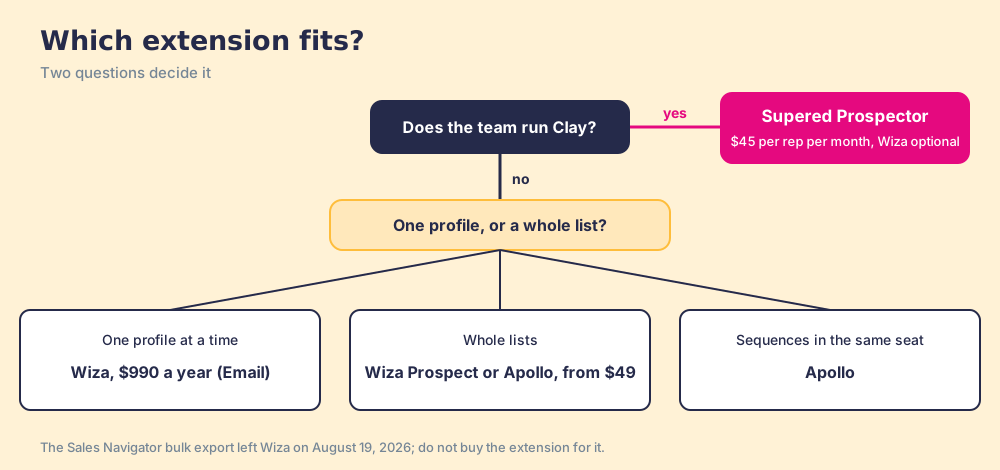
Wiza’s doorbell is a good one, careful about what it touches. Before you buy, decide whether the job is one door or the street. The Clay Chrome extension guide sets out what a rep-side layer on Clay should do, Wiza vs ZoomInfo covers the other common comparison, and a Prospector demo on your own Clay account shows the whole street from one profile.
Frequently asked questions
What does the Wiza Chrome extension do in 2026?+
Is the Wiza Chrome extension free?+
Can the Wiza extension still export Sales Navigator lists?+
Why is my Wiza extension not working?+
What permissions does the Wiza extension ask for?+
What is the best Wiza extension alternative if my team already has Clay?+
Everything we have written on Wiza
More on Wiza
Supered Prospector vs Wiza: the side-by-side- Wiza Alternatives in 2026: The Library Took the Copier Out of the Aisle
- Wiza Pricing in 2026: All You Can Eat, One Plate at a Time
- Wiza Review 2026: A Good Car With the Towbar Taken Off
- Wiza vs Apollo in 2026: The Buffet, the Menu, and the Food Hall
- Wiza vs ZoomInfo in 2026: The Bakery and the Warehouse Club
Your Clay waterfall, where reps already work.