Lead List: Why a Bought List Sits Unworked and How to Build One Reps Call
Most lead lists die in a spreadsheet. Bought lists go stale and carry compliance risk; built lists get worked. How to build a prospect list from ICP to Sales Navigator to the CRM, step by step.
A lead list is a set of named people at accounts that fit your ideal customer profile, each with a verified email or phone, assigned to the rep who will contact them.
How to build a prospect list that reps work
2 hr- 1
Write the ideal customer profile as one sentence with disqualifiers
Name the industry, size, geography, and the trigger that makes an account worth a call this month, plus the conditions that rule an account out. Pull it from your last closed-won deals, not a brainstorm.
- 2
Build the account list
Start from the CRM (closed-lost, past customers, open territory), then add net-new accounts that match the profile. On Sales Navigator Advanced or Advanced Plus, upload the accounts as a CSV account list so lead searches can filter on them.
- 3
Find the people in Sales Navigator
Search leads inside the saved account list by function and seniority, save the buying committee to a lead list, and stop. Do not copy the search out with a scraper; LinkedIn's User Agreement bars it.
- 4
Fill the contact data with a waterfall
Run each person through a waterfall that asks provider after provider until one returns a verified email or phone, such as Clay's waterfall across 200+ providers, so a single database's miss is not the end of the search.
- 5
Check the CRM before anyone reaches out
Match every person against the CRM: already a contact, owned by a teammate, or worked in the past. Drop or reassign the matches before the list goes live.
- 6
Hand the list to the rep who built it, and follow it to closed
Sync the people to the CRM with the list's source named, assign the rep, and review which lists were worked and which closed. Coach from the lists that convert.
A lead list is a set of named people at accounts that fit your ideal customer profile, each with a verified email or phone, assigned to the rep who will contact them. That last clause decides whether the list turns into meetings. There are three ways to get one, and they fit different teams:
- A bought list. For a one-off campaign into a market you cannot reach any other way, with the compliance homework done first.
- A list Ops builds in Clay. For teams with a GTM engineer and a steady, rules-based segment, delivered to reps in the CRM.
- A list the rep builds with Supered Prospector on Clay. For teams with Clay whose reps prospect in Sales Navigator: the rep picks the people, Clay’s waterfall across 200+ providers fills the email and phone, and the list lands in HubSpot, Salesforce, or Pipedrive in one click.
Companies that sell lists and guides that explain how to make one are both right about something, and the gap between them is the rep.
What is a lead list, and why does a bought one sit unworked?
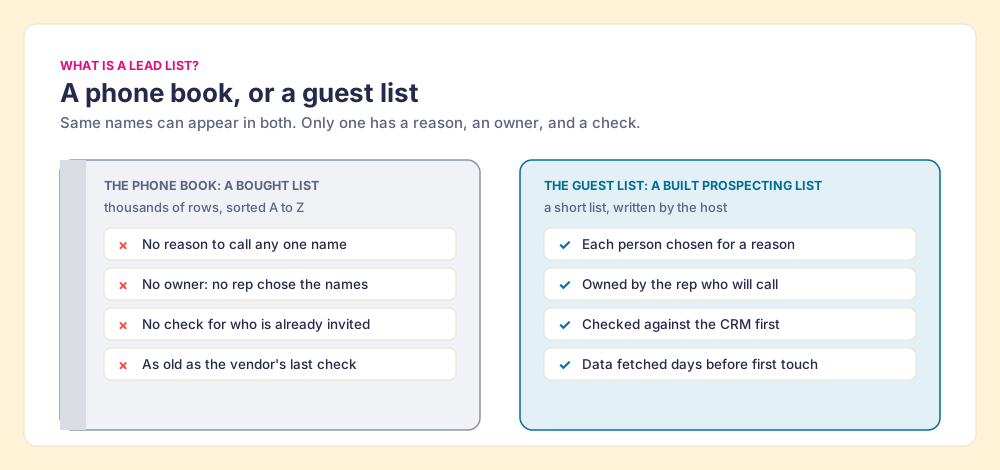
A bought lead list is a phone book. It has thousands of names, sorted neatly, and not one reason to call any of them. A built list is a dinner guest list. It is short, you know why each person is on it, you checked whether your spouse already invited them, and you write the invitations yourself.
The definitions that rank for this term describe the phone book. noCRM calls a lead list “a file that contains information about individuals or businesses that could be interested in purchasing your products or services” (noCRM, June 11, 2024). Clay’s glossary calls it “a curated collection of contact information for potential customers” (Clay, read October 2, 2026). Both are accurate, and both leave out the person holding the pen. A file of contact information is inventory. A prospecting list is a commitment: these people, by this rep, this week.
Jessica Day of Dialpad, writing for Crunchbase, argues against the blanket advice never to buy: “High-quality leads aren’t the cheapest leads out there. They are targeted, up to date and accurate.” Her prescription is a careful vendor and a clear customer profile (Crunchbase, November 26, 2025). She is right that a cheap list is worse than a good one. Where we part ways is on what makes a list good. Accuracy on the day of purchase is the floor. A list goes on losing accuracy every week it waits, it carries rules about how you may use it, and no rep on the team chose the names. Those three problems are the next three sections.
How fast does a B2B lead list go stale?
A bought list is milk from a shop that does not print the date. The day you carry it home tells you nothing. The date that counts is the day the vendor last checked each record, and it is usually not on the carton.
The number vendor pages print most is 2.1% a month, which adds up to about 22.5% a year, a figure Apollo attributes to an Only-B2B estimate (Apollo, April 22, 2026). Figures in that family come from data sellers, so treat this one as directional. The government numbers underneath it are firmer. The Bureau of Labor Statistics counted 5.1 million job separations in August 2026, 3.2% of US jobs in a single month (BLS JOLTS, released September 29, 2026). Median tenure with the current employer was 4.1 years in January 2026, and 3.0 years for workers aged 25 to 34 (BLS Employee Tenure, released September 24, 2026). A separation takes a work email and a direct line with it.
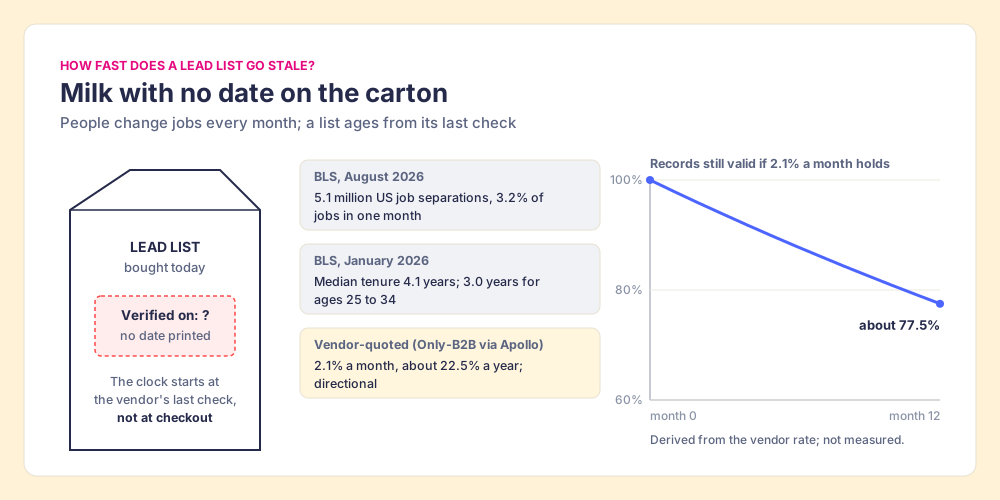
Two consequences follow, and both favor the built list. A list built for the weeks a rep will work it is fresh by construction, because the contact data was fetched days before the first touch. And a list sized for a quarter is a list whose back half goes sour on the shelf. Shop for this week’s dinner.
What are the compliance rules for buying a lead list?
Buying data is usually legal. Emailing it is where the rules live, and they differ by where the recipient sits. Treat the table as a map to check with counsel for your markets:
| Rule | Who it covers | What it requires for cold B2B email | Penalty or consequence |
|---|---|---|---|
| CAN-SPAM (US) | Commercial email, with “no exception for business-to-business email” | No prior consent; accurate headers and subject, a postal address, an opt-out honored “within 10 business days” | Up to $53,088 per email (FTC) |
| GDPR Article 14 (EU) | Personal data you did not collect from the person | Tell them “from which source the personal data originate,” at the latest “at the time of the first communication” | Regulator fines (GDPR Art. 14) |
| CASL (Canada) | Commercial electronic messages | B2B exemption only “if the organizations have a relationship”; “the onus is on the person who claims that they have obtained consent to prove” it | Up to $10 million per violation for businesses (CRTC) |
| Gmail sender rules | Anyone sending to Gmail accounts | ”Keep spam rates reported in Postmaster Tools below 0.10% and avoid ever reaching a spam rate of 0.30% or higher” | Delivery suffers (Google) |
| HubSpot | Customers emailing from HubSpot | ”Do not use the HubSpot Service to email purchased, rented, or borrowed lists” | Breach of HubSpot’s policy (HubSpot Trust and Safety, updated February 18, 2026) |
The last two rows matter most in practice. The binding limit on a bought list in 2026 is often your own CRM and your recipients’ inbox provider, before any regulator. HubSpot’s knowledge base says purchased contacts “are highly likely to bounce, unsubscribe, mark emails as spam, and may cause blocklistings” (HubSpot, updated May 11, 2026). Google’s 0.30% line is 3 spam reports per 1,000 emails. It binds mail sent to Gmail accounts, so a list of corporate addresses may sit partly outside it, but it is the clearest line any inbox provider publishes. On a list of strangers who never heard of you, three annoyed people in a thousand is a low bar to trip.
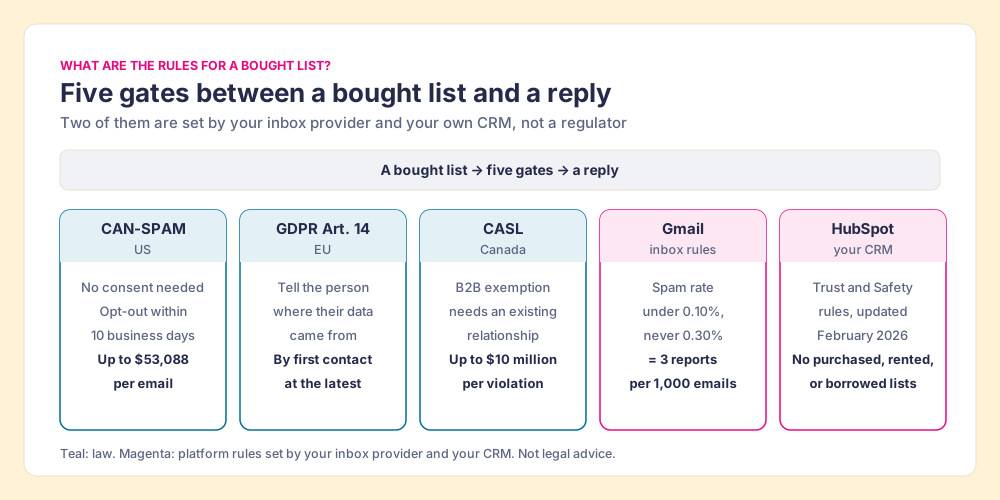
A built list passes these gates more easily for a plain reason. The rep chose each person because the account fits and the role buys, so the email has a relevant reason in its first line, and relevance is what keeps the spam button unpressed. The rules still apply to built lists; the opt-out, the postal address, and the GDPR notice do not care who picked the names.
Why do reps work the lists they build?
In 2012, Michael Norton, Daniel Mochon, and Dan Ariely had people assemble IKEA storage boxes and then bid on them. The builders bid $0.78 for their own box; people handed an identical, pre-assembled box bid $0.48, what the authors call a 63% premium for the self-made one (Norton, Mochon, and Ariely, Journal of Consumer Psychology, 2012). They named it the IKEA effect, and the paper’s sharpest finding is its boundary: “labor leads to love only when labor results in successful completion of tasks.” When people built and then destroyed their creations, or failed to finish them, the effect dissipated.
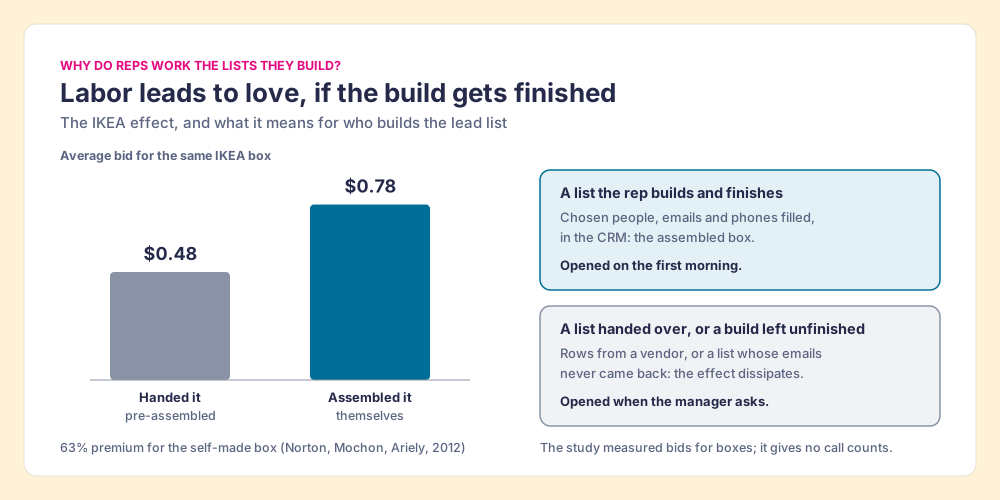
A lead list is a box with the same physics, with one caution about the picture. The study measured what people would pay for storage boxes, not how many calls a rep makes, so what we borrow from it is the mechanism; it gives no call counts. The mechanism predicts the pattern a sales leader would expect: a rep who picked twelve people at accounts they believe in opens that list on the first morning, and a rep handed four hundred rows from a vendor opens it when the manager asks. The boundary condition matters too. A build the rep cannot finish, because the emails never come back or the list cannot reach the CRM, is the destroyed Lego set, and the attachment goes with it.
The work after the list is mostly calls and emails, which makes the contact data the part that has to be finished. The Bridge Group’s 2025 SDR report, 351 B2B companies, puts the median SDR at 112 activities a day: 44 phone, 41 email, 19 LinkedIn, and 8 text or other (Bridge Group). Eighty-five of those 112 need a number or an address. A list without them is a guest list with no addresses: a fine evening that never happens.
A rep’s afternoon is too expensive to spend typing emails into a spreadsheet. The design that works lets the rep do the choosing, which creates the attachment, while software does the fetching, which is the tedious part. The six-step build below does both.
How to build a prospect list, step by step
The six steps run in the order a host plans a dinner: the occasion, the households, the guests, their addresses, a check for double invitations, and the invitations going out.
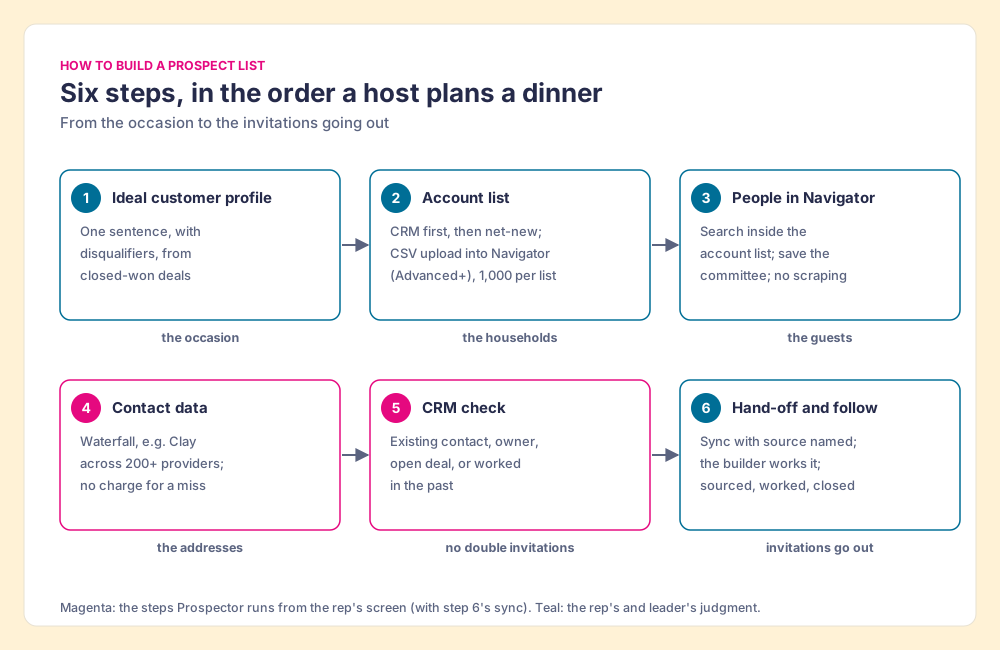
Step 1: Write the ideal customer profile as one sentence
Start from your last twenty closed-won deals, not a whiteboard. Write one sentence naming the industry, the size, the geography, and the trigger that makes an account worth a call this month (a new VP of Sales, a funding round, a hiring spree for SDRs). Then write the disqualifiers, because a guest list is defined as much by who is not invited. If the sentence needs a paragraph, you have two segments, and each gets its own list.
Step 2: Build the account list before you look for a single person
The households come before the guests. Your CRM is the cheapest source: closed-lost deals, past customers, churned accounts, and open territory no rep has touched. Then add net-new accounts that match. Clay’s own homepage example shows the kind of filter a profile turns into: “Find companies with 30+ sales reps, $10M+ in revenue, and a free trial button on their website” (Clay, October 1, 2026).
Sales Navigator has a one-way door here that is worth using. On Advanced and Advanced Plus you can upload a CSV of accounts into Navigator, up to 1,000 accounts per list, and LinkedIn matches them to company pages; “CSV uploads can only be used for account lists, not lead lists” (LinkedIn Help, checked October 2, 2026). The file goes in. Nothing comes back out as a file, which is step 3’s problem.
Step 3: Find the people in Sales Navigator, and leave them there
Inside the saved account list, search for leads by function and seniority, and save the buying committee for each account to a lead list. The detail on which filters earn their keep is in the Sales Navigator search filters guide, and the plan differences are in Sales Navigator pricing. A search shows “up to 2,500 lead results across 100 pages,” a limit that applies “both in Sales Navigator as well as LinkedIn.com” (LinkedIn Help), plenty for a month’s list.
Navigator is where reps find people, and at US$119.99 a month for Core it is often already in the budget (LinkedIn). What it does not do is hand you the list. LinkedIn “currently doesn’t offer the option to export account and lead information from Sales Navigator into a CSV or XLS file” (LinkedIn Help), and it sells no emails or phone numbers on any plan. The tools that copy a search into a spreadsheet run into section 8.2 of LinkedIn’s User Agreement, which bars “crawlers, browser plugins and add-ons or any other technology” used “to scrape or copy the Services, including profiles and other data” (LinkedIn User Agreement, effective November 3, 2025), and LinkedIn says members who use them “risk having their accounts restricted or shut down” (LinkedIn Help). The routes that get a Navigator lead into a CRM without that risk are laid out in how to export Sales Navigator leads. Ask any tool that touches a Navigator page, ours included, what it reads from the page and where the contact data comes from. Our answer for Prospector: it works within LinkedIn’s terms and does not copy search results in bulk, and the contact data comes from Clay’s waterfall on your own Clay account.
Step 4: Fill the email and phone with a waterfall
The addresses come from outside LinkedIn. A single contact database is one directory: when it misses, the rep has no next place to look. A Lusha reviewer on G2, a founder, put the miss rate they saw at “about 20% of the contacts” (G2, May 18, 2026), one user’s experience of one database.
A waterfall asks directories in order. Clay’s “signature data waterfalls check multiple providers to return the most verified emails (lower bounce rate) and phone numbers (higher connect rate)” (Clay), drawing on what Clay’s homepage calls “200+ providers in one place.” One click “runs Clay’s waterfall enrichment. If one source misses, it tries the next,” and Clay’s pricing page adds “If an enrichment returns no result, you’re not charged Data Credits or Actions” (Clay pricing, October 1, 2026). The mechanics and the vendor order are covered in waterfall enrichment.
Step 5: Check the CRM before anyone reaches out
Match each person against the CRM: an existing contact, an owner on the team, an open deal at the account, a sequence they were in last spring. A duplicate wastes an afternoon; a teammate’s prospect costs a relationship; a past opt-out costs the domain’s reputation. Drop or reassign the matches now, while the list is still a draft.
Step 6: Hand the list to the rep who built it, and follow it to closed
Sync the people into the CRM with the list’s source named on the record (the Navigator search, the event, the account plan), assign the rep, and let the sequencer or the rep’s own email take it from there. Size the list to what the rep can touch before the contact data ages, which the decay numbers above put in weeks. Then review the lists as well as the reps: which lists were worked, which ones produced meetings, which ones closed. The lists that convert tell you which profile, which trigger, and which source to build more of. That review turns list building from a chore into a system that learns which lists to build next.
Where does Supered Prospector fit in building a lead list?
Steps 3 through 6 are where a rep’s afternoon disappears into four tabs. Supered Prospector puts steps 4 through 6 one click from the person the rep is already looking at, on your team’s own Clay account, with no Clay login for reps. It runs inside the Supered Chrome extension.
- The rep’s own starting point. A Sales Navigator lead or saved list, a LinkedIn profile, a company’s website, or a HubSpot, Salesforce, or Pipedrive record.
- The CRM check first. On the profile, the rep sees the matching CRM record and whether the person was already worked in the past, before adding a duplicate.
- The waterfall in one button. The rep runs the team’s Clay table; Clay’s waterfall across 200+ providers returns the verified email and phone.
- Whole lists and custom workflows. A rep can push a saved list into a Clay workflow, run any custom Clay workflow the GTM engineer built, and pull a buying committee tuned to the team’s titles and seniority.
- One click to the CRM. Ops sets the field mapping once; after that, the person syncs to HubSpot, Salesforce, or Pipedrive in one click.
- The list after it ships. The team’s process applies to worked prospects, so a leader sees which sourced lists got worked and which closed, and coaches from the lists that convert.
Prospector gives the rep the IKEA arrangement with the tedious parts removed: the rep does the choosing, Clay does the fetching, and the list reaches the CRM finished. Supered does not bring its own database. It brings Clay’s waterfall, which is every database, routed, and that is why we chose Clay as our only data provider. Clay governs the data. Supered governs the motion. The full rep loop is on the sourcing use case, and the product is on the Prospector page. For other ways reps reach Clay from the browser, see the Clay Chrome extension guide and our Exportly alternatives roundup; for what the native LinkedIn apps put in your CRM, see the HubSpot LinkedIn integration guide.
Prospector is $45 per rep per month, billed annually, from one rep. It runs on your Clay plan and credits; Clay’s Growth plan starts at $495 a month (Clay pricing, October 1, 2026).
Choose something else if:
- No Clay account. Prospector needs one. Apollo or Lusha is the simpler start for a team without Clay.
- A one-off campaign into a cold market. A vetted bought list, with the compliance gates above cleared, may be faster for a single push.
- AI-written outreach. Prospector does not draft or send emails; it hands the person to your CRM and sequencer.
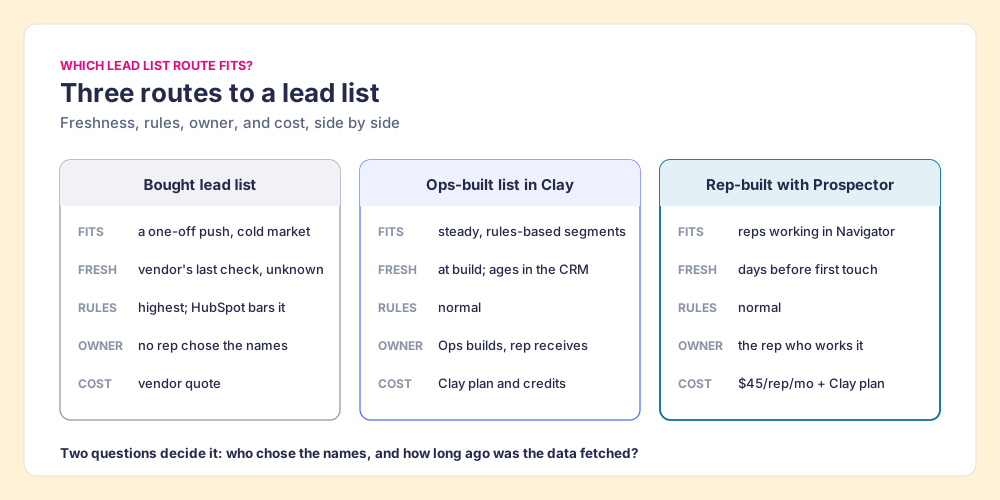
Which lead list route fits your team?
| Route | Best fit | Data freshness | Compliance burden | Who owns the list | Cost basis |
|---|---|---|---|---|---|
| Bought lead list | One-off push into a market you cannot reach otherwise | As old as the vendor’s last verification | Highest: HubSpot bars it; GDPR source notice; CASL consent proof | No rep chose the names | Vendor quote |
| Ops-built list in Clay | Steady, rules-based segments with a GTM engineer | Fresh at build, ages in the CRM | Normal | Ops builds, rep receives | Clay plan and credits |
| Rep-built list with Prospector on Clay | Reps who prospect in Sales Navigator, on teams with Clay | Fetched days before first touch | Normal | The rep who will work it | $45 per rep per month plus your Clay plan |
Why trust this guide?
Before Supered I started RevPartners, a HubSpot partner that did only sales implementations and reached HubSpot’s Elite tier in 13 months, which meant years of watching purchased lists get imported, bounced, and deleted, and rep-built lists get worked. Supered is the #1 sales enablement app on the HubSpot marketplace, rated 5.0 from 122 reviews there and 4.9 out of 5 from 81 reviews on G2 (checked October 1, 2026). The disclosure: we make Prospector, and it appears above as one of three routes.
What we recommend
The evidence points one way. A bought list starts aging at the vendor’s last check, in a labor market where 3.2% of US jobs ended in August 2026 alone. It meets five gates on the way to a reply, two of them set by your own CRM and your recipients’ inbox. And it arrives pre-assembled, which is the box people value least.
- Bought lists. Use one only for a single push into an unreachable market, with the source notice, the opt-out, and an email tool that permits it.
- Ops-built lists. Keep them for steady segments, and hand them to the rep while the data is days old.
- Rep-built lists. Make them the default: the rep picks the guests in Sales Navigator, a waterfall fetches the addresses, the CRM check stops double invitations, and the leader follows each list from sourced to closed.
If your team has Clay, Prospector is the shortest way to that default. The list is step one; the sales prospecting process covers what happens after it, the sales prospecting guide covers the whole motion, and our LinkedIn prospecting interview shows one rep’s sequence from the first touch. If you are weighing whether to keep Navigator at all, start with Sales Navigator alternatives.
Frequently asked questions
Where can I buy a lead list?+
Is it legal to buy a B2B lead list?+
How often does a lead list go out of date?+
Where can I find free lead lists?+
Can I export a prospecting list from Sales Navigator?+
Do I need Clay to use Supered Prospector for lead lists?+
Your process, running itself.