HubSpot Solutions Architect Kasey Chan's Top Five Tools, From Endel to Claude
Kasey Chan, the HubSpot architect who goes by the CRM Chef, counted down his five tools on Show Me Your Stack. His picks, from a focus app to Claude, and what each one teaches about getting more value out of HubSpot data.
A HubSpot solutions architect designs how a company's HubSpot portal fits its revenue process, from the data model and automations to the prompts, apps and AI tools that help people get value out of the data.
The first tool Kasey Chan named was a sound app. Before any HubSpot software came up, he talked about Endel, which plays soundscapes meant to help you concentrate. I told him he was the first guest to put something outside revenue tech on the list.
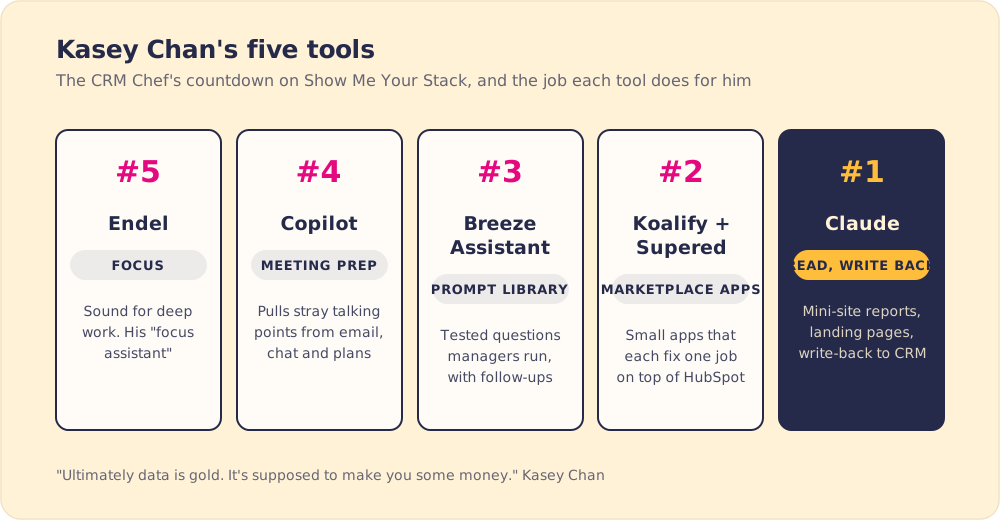
Kasey is a HubSpot solutions architect at Growth Critic and goes by the CRM Chef on LinkedIn. His job is designing HubSpot portals for the teams that work in them, and when he came on Show Me Your Stack he counted down the five tools he leans on most in 2026. He closed with the belief behind all five: “ultimately data is gold. It’s supposed to make you some money.” Some of his picks keep him focused enough to design a good portal. The rest help managers and sellers, people who don’t live in RevOps, get money out of the data.
Why does a HubSpot architect rank a focus app?
Endel, his number five, uses AI to shape sound for different kinds of work and different lengths of session. Kasey’s reason was plain. A digital workspace pulls you in many directions and you have a long task list. “I call it the focus assistant so that you can do the rest of the stuff very efficiently,” he said.
I compared it to a pillow. You use it every day and never think about it.
Gloria Mark, who studies attention at UC Irvine, reports that attention on a screen now averages about 47 seconds (Gloria Mark). Architecture work needs much longer stretches than that. Change one property and you have to trace what happens to each workflow, list and report that reads it. Kasey uses a tool to hold that time together. If your own architect’s week is cut into half-hour meetings, look there first when a design comes back with holes in it.
What does Copilot add to meeting prep?
Number four, he admitted, is “slightly controversial”: Microsoft Copilot. He was the first guest to name it, and he said Google Workspace can do much of the same. He uses it for the work around a meeting. HubSpot has meeting notes, he said, “but I would say Copilot Workspace, they go even two level deeper. They can go through all your, you know, chit-chat, all your email, all your … planner project management tools so that you can actually track some of those like awkward unexpected talking points.”
Those are the points a consultant tends to forget: a stray comment in a chat thread, a task that slipped in the project plan. Copilot pulls them into the agenda before the call, and afterward Kasey ties the notes back to a project update. Any assistant with access to your email and chat can do this. The meeting can start on decisions instead of ten minutes of catching up on what happened since the last call.
Why would Kasey replace a dashboard with a prompt library?
His number three is HubSpot’s own assistant, Breeze Assistant, and in particular its projects and prompt library. He built it for the sales manager or senior seller. “Rather than like creating a dashboard or creating a report that is quite static,” he said, the RevOps team can write “a list of let’s say prompt library” that managers run, “maybe like let’s say every start Monday,” and “reuse it again and again.”
What he likes most is what happens after the first answer. The assistant has “a natural space for people to ask like follow-up questions automatically.” With a dashboard, the manager sees a number slip and has to email RevOps to find out why, and that becomes another report request on the architect’s desk. With a tested prompt run against live data, the manager asks the follow-up right there. Kasey measures it in money: it adds value to the data “and ultimately add a value to the HubSpot investment.”
HubSpot reports that customers using Breeze Assistant on their closing work closed nearly 3x more deals in its February 2026 data (HubSpot, 2026). It is vendor data, and early adopters may be stronger teams to begin with, but it matches what Kasey sees in client work.
To start your own library, list the questions managers asked you to answer by hand last month. Turn the five most common into prompts, test them against real data, and hand them over with the follow-up questions each one tends to raise.
Which HubSpot apps made his number two?
Kasey asked for a 2A and a 2B, both from the HubSpot marketplace. “Anyone in HubSpot, you should know these two apps,” he said. One was Koalify, which he singled out for cleaning up duplicates. The other was Supered, the app we make. I told him I would have been angry if he had ranked us below Microsoft Copilot.
What he likes about both is how they grew. Each started on one simple problem and got good at it, and a few apps like that, sitting on top of a core HubSpot setup, make the whole operation run better. He allowed that other teams prefer other micro apps. His advice to architects is to know the handful of marketplace apps that each solve one job well, and to add them before building the same fix by hand.
Duplicates cost more once AI reads the portal. An AI tool reading a portal full of duplicate companies gives confident answers about the wrong records. Our guide to CRM best practices covers the field and dedupe rules to enforce before any AI gets access.
How does Claude help a HubSpot architect?
Number one got his biggest shout-out. Kasey calls himself a vibe coder, and he uses Claude with HubSpot for three jobs. The first is taking dashboards and reports and turning them into a polished mini site people can share. The second is building HubSpot-themed landing pages, work that used to mean hand coding. The third, and the one he values most, is that Claude reads HubSpot data, and “you can analyze and you can write back.”
He named the limit himself: “not every company allowed to use Claude,” for IT and data reasons. For smaller RevOps teams that can use it, he called Claude a “no-brainer” and the way to “punch above the weight.”
Write-back needs care. Gartner predicted at least 30% of generative AI projects would be abandoned after proof of concept by the end of 2025, naming poor data quality and inadequate risk controls among the causes (Gartner, 2024). HubSpot is moving the same way Kasey is: its Fall 2026 release describes a Breeze Assistant that “doesn’t just answer questions, it now takes action based on the direction you give it” (HubSpot, 2026).
Few teams point AI at that kind of work yet. In The State of Sales Enablement 2026, teams most often used AI for call analysis (73%), prospect research (64%) and content creation (64%). CRM admin and cleanup sat at 46%, rep coaching at 29%, and deal strategy and forecasting at 26% (The State of Sales Enablement 2026).
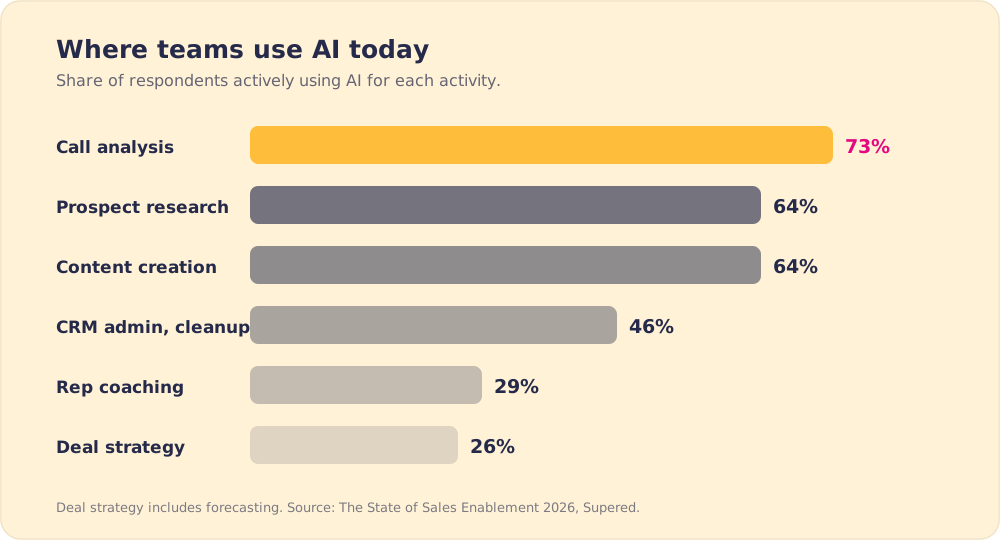
Managers still work through deal strategy and coaching by hand, one deal at a time. Kasey’s Monday prompts and Claude’s write-back are aimed at that work: the same questions, asked of the same data, each week.
Key points from a HubSpot solutions architect’s stack
- Thinking time. Kasey ranks a focus app because portal design needs long, unbroken attention.
- Context before the meeting. Copilot pulls stray talking points from email, chat and project tools into the agenda.
- Prompts over static reports. A prompt library gives managers tested questions and room for the follow-up.
- Small apps, one job each. Koalify for duplicates is the kind of add-on he wants every HubSpot user to know.
- Claude’s read, analyze and write-back. It lets a small RevOps team do a larger team’s work, where company policy allows it.
- Data that earns money. His test for each tool: does it add value to the HubSpot investment?
What we would take from Kasey’s list
If you build or run a HubSpot portal, start with his number three. Collect the questions your managers asked you last month, turn the top five into tested Breeze prompts, and watch which follow-ups they ask. Clean duplicates before you give any AI tool write access, and write down which fields it may change. Then block off a few hours a week for design work, with Endel or without it.

For the foundation under all of this, the data model, pipelines and automations, read our guide to HubSpot implementation. Our guide to HubSpot integration covers the data flows any AI tool will depend on.
Frequently asked questions
What tools does a HubSpot solutions architect use?+
What is a HubSpot prompt library?+
How does a HubSpot architect use Claude?+
Should AI tools be allowed to write back to HubSpot?+
Why would a HubSpot architect use a focus app?+
Your process, running itself.
Turn the playbook into rep behavior.
More from Show Me Your Stack

RevOps Tech Stack: Chantel Hirschel's Five Tools, With Salesforce at the Center
Chantel Hirschel
RevOps Software: Scott Silman's Top Five Tools, and the Opinion Behind Them
Scott Silman