CRM Best Practices: 10 That Survive Contact With Real Reps
Most CRM best-practice lists are about enforcing data entry.
Reps will never love feeding a database. Here are the ten habits that keep a CRM accurate by design, because the update happens in the flow of the work.
CRM best practices are the habits that keep a CRM accurate and useful (clean data, current stages, consistent fields), and the ones that work share a principle the hygiene checklists miss: reps update a CRM that meets them in the flow of work, not one they must stop to feed.
The top-ranking CRM best-practices articles, Salesforce’s own list among them, arrive at the same destination: keep your data clean, fill in the fields, enforce the process. Salesforce’s and HubSpot’s own adoption playbooks lean the same way, on required fields, manager check-ins, training in the first 90 days. Underneath all of it runs an old slogan from the database world, garbage in, garbage out, and the unspoken assumption that the garbage comes from careless reps. Grant the school its due first, because it is half right. Dirty data does poison a forecast, and a CRM the sales team does not trust is worse than no CRM at all. The diagnosis is sound. The prescription is where it goes wrong, and the CRM adoption best practices that move the number invert its core assumption.
Reps do not avoid the CRM because they lack discipline. They avoid it because updating it means stopping the work, leaving the deal, opening a database, and typing into fields whose purpose no manager explained. When the right thing is harder than the wrong thing, the wrong thing wins, on every team, no matter how many reminders you send. So here are ten CRM best practices that survive contact with real reps, built on a different assumption: a CRM stays accurate when the update is easy and meets the rep where the work is, not when a manager nags harder. The throughline, and our point of view: a clean CRM is a byproduct of good behavior, not a behavior you can demand.
What are the most important CRM best practices?
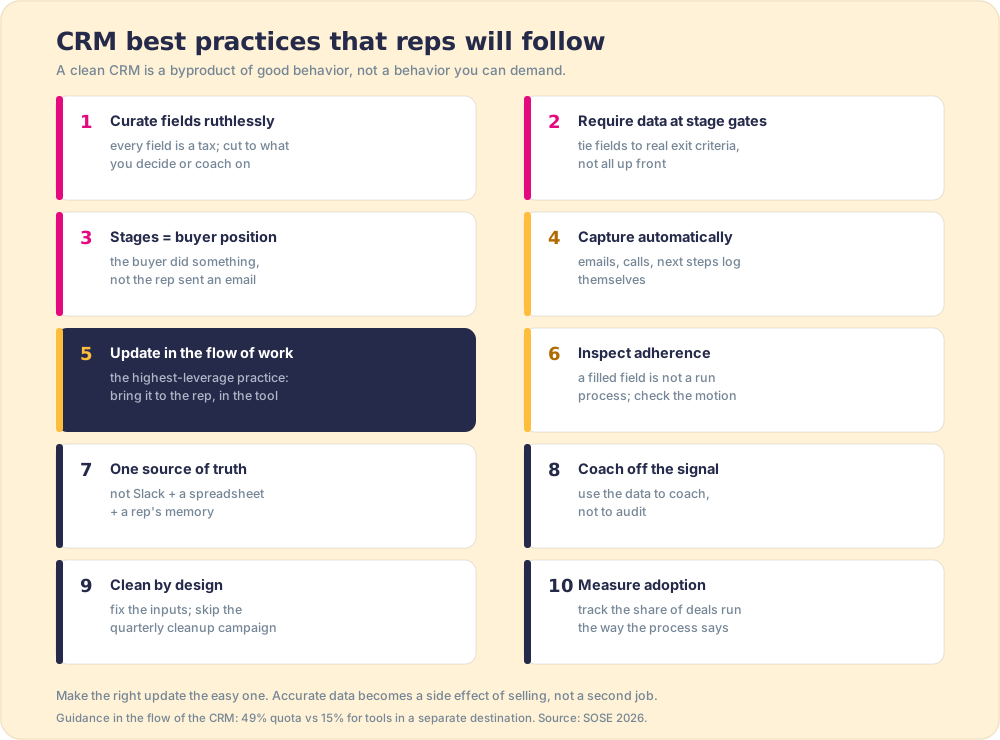
Ten that hold up, ordered roughly from the foundation to the finish. Each is written against the grain of the usual advice, because the usual advice has been tried and the data is still dirty.
- Curate the fields ruthlessly. Each field you add is a tax on every deal. Cut the CRM down to what you will use to decide or coach. A short, meaningful set gets filled; a long, hopeful one gets faked.
- Require data only at stage gates. Do not demand everything up front. Tie required fields to real exit criteria, the facts that must be true to advance, so the data has a reason and a moment.
- Make stages reflect the buyer, not the rep. A stage should mean the buyer did something (agreed to a business case, confirmed a budget), not that the rep sent an email. The buyer-commitment principle from what is a sales pipeline keeps the pipeline accurate.
- Capture automatically wherever you can. Emails, calls, meetings, and next steps should log themselves, the way a booking made through HubSpot Meetings logs itself in HubSpot with no manual step. A field a human does not have to type is a field that stays accurate.
- Surface the update in the flow of work. The single highest-impact practice. Bring the CRM update to the rep inside the tool where they are working, so following the process is the path of least resistance, not a tab-switch they resent.
- Inspect adherence, beyond completeness. A filled field is not a run process. Check whether the motion happened, which is the difference between data that looks complete and data that is true.
- Keep one source of truth. When the deal’s story lives in Slack, a spreadsheet pipeline tracker, and a rep’s memory, the CRM is a museum. Decide the CRM is the record, then make it the easiest place to put the record.
- Coach off the CRM signal. The CRM earns its keep when managers use it to coach, not to audit. If the only time a rep hears about the CRM is when something is missing, they learn it is a punishment, not a tool.
- Clean by design, not by campaign. Quarterly data-cleanup projects are a confession that the system creates mess faster than you can mop it. Fix the inputs and the periodic scrub mostly disappears.
- Measure adoption as a number. Track the share of deals run and updated the way the process says, and treat that as a leading sales KPI. What you measure and coach is what improves.
Why do reps not update the CRM?
Because the CRM asks them to leave the work to feed it, and that friction beats good intentions every time. Follow the rep mid-deal. They are in their inbox, on LinkedIn, in the dialer, where selling happens. Updating the CRM means stopping, context-switching to a separate system, and entering data that helps the manager more than it helps them. They are not idle, either. Salesforce’s 2026 sales statistics, published February 3, 2026 with its seventh State of Sales report, cite a 2025 Gartner survey: “Sales reps spend 60% of their time on non-selling tasks,” manually entering customer notes into the CRM among them (Salesforce). The rep is already drowning in admin. Asking for one more form is asking the wrong thing of an already-overloaded person.
The mechanism here has a name. BJ Fogg, who runs the Behavior Design Lab at Stanford, puts it as a single equation, B=MAP: “Behavior happens when Motivation, Ability, and a Prompt come together at the same time. When a behavior does not occur, at least one of those three elements is missing” (behaviormodel.org). Read that against a CRM update and the failure is obvious. The motivation is low (the data helps the manager, not the rep). The ability is low (it takes a tab switch and a hunt for the right field). The prompt arrives late or never. Enforcement tries to fix all three by cranking motivation alone: nag harder, gate the commission, make the rep want it. Fogg’s model says ability is the cheaper lever by far. Make the action easy enough and you need almost no motivation at all. Make it hard and no amount of willpower holds.
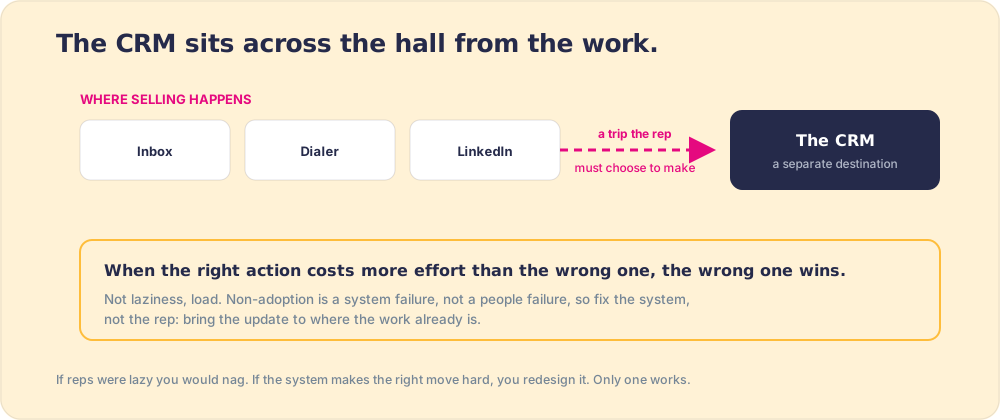
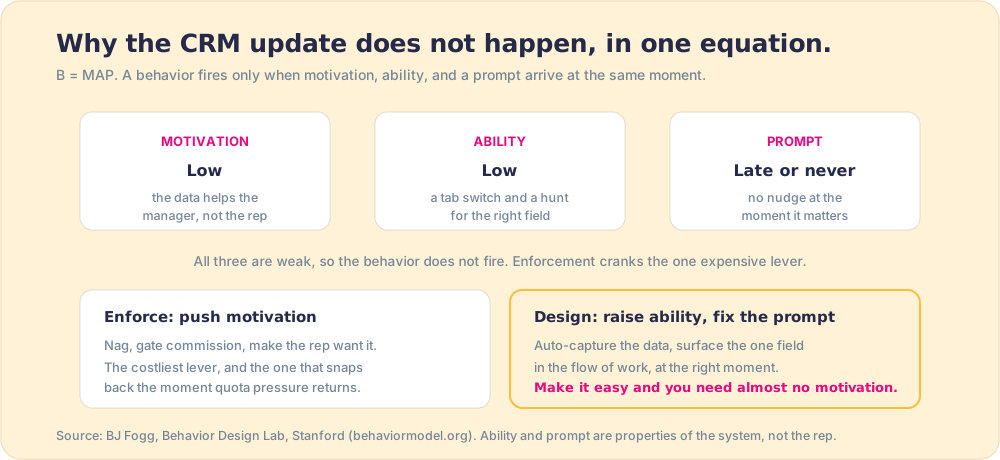
So we treat non-adoption as a system failure rather than a people failure, and it is more than a nicety, because it decides the fix. If reps are careless, you nag and enforce. If the system makes the right move hard, you redesign the system so the right move is the easy one. One of those approaches works, and it is not the nagging. Fogg’s model is the proof: when the behavior does not happen, the missing element is ability or a prompt far more often than motivation, and ability and prompt are properties of the system, not the person.
Should you enforce CRM data entry?
Enforcement produces filled fields, not accurate data, and it is the most common mistake on this whole topic. Make a field required and it gets filled with whatever satisfies the check. Gate commission on CRM completeness and you get a beautifully complete CRM full of fiction. The rep is not cheating; they are doing the least-cost thing to clear an obstacle you put between them and getting paid.
The analysts have been pointing at the same wreckage for two decades, even if the industry keeps reading the warning backward. Gartner’s long-cited finding is that roughly half of CRM projects fail to meet expectations, and Forrester has put the figure near 47 percent; poor user adoption is the reason named most often (Johnny Grow’s 2025 CRM failure analysis). The standard response to that number is more of the exact thing that caused it: more mandates, more change-management, more training. The CRM does not fail because reps were undertrained on where to click. It fails because the design asked them to do a hard thing at a bad moment, and they did the human thing instead.
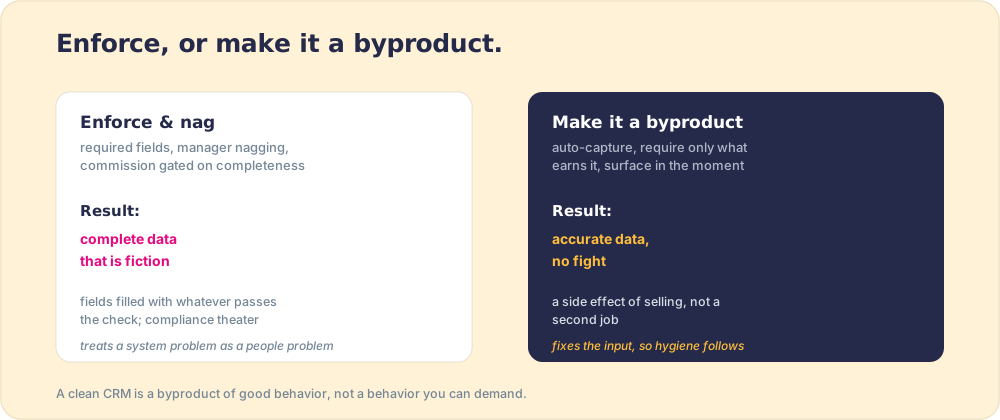
The alternative is to make the accurate update the path of least resistance: auto-capture what you can, require only what a manager will use, and surface the field at the moment it is relevant, while the rep is already working the deal. Accurate data then becomes a side effect of selling, not a second job. The same logic runs through CRM adoption generally, and it explains why our field data is so lopsided: The State of Sales Enablement 2026 found teams whose guidance lives in the flow of the CRM hit quota at 49 percent against 15 percent for teams whose tools sit in a separate destination (The State of Sales Enablement).
How do you apply CRM best practices in HubSpot and Salesforce?
You apply CRM best practices by wiring each one into a setting the CRM enforces, so the practice survives the week the person who wrote it goes on vacation. A best practice that lives in an onboarding deck decays at the rate people forget decks. One that lives in a required stage property holds until someone changes the property.
The table maps each practice to its setting in the two CRMs most mid-market teams run, as of October 2026.
| CRM best practice | In HubSpot | In Salesforce |
|---|---|---|
| Curate fields | Data quality tools; archive properties with no recent values | A field fill-rate report (Salesforce Optimizer retired in Winter ‘26) |
| Require data at stage gates | Conditional stage properties, marked Required, in pipeline settings | Validation rules on stage, plus key fields on Path |
| Capture automatically | Email and meeting logging from the Gmail and Outlook integrations | Einstein Activity Capture |
| Kill duplicates | Duplicate management | Duplicate rules and matching rules |
| Guide the next step | Sales playbooks, or a business logic layer | Path “guidance for success,” or a business logic layer |
| Measure adherence | A daily count of open deals breaking each rule | The same count, as a report or a board |
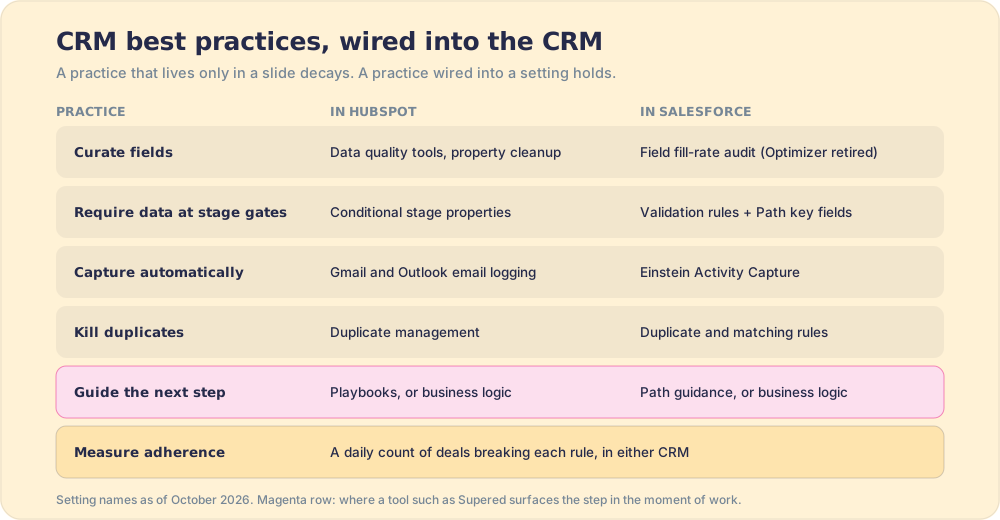
The row that matters most is the one the native tools cover worst. Path guidance and HubSpot playbooks show a rep what to do if the rep opens them, on the record page, inside the CRM. A rep working from Gmail, LinkedIn or a call tool never sees them. That gap is why buyers search for “which CRMs or plugins give reps step-by-step next best actions.” The native answer stops at the edge of the CRM tab. A business logic layer such as Supered carries the next step to wherever the rep is working and counts whether it happened.
Then run a 30-minute audit against the table, once a quarter.
- Field count against field use. List required fields per stage and mark the ones a manager used in the last pipeline review. Cut the rest.
- Stage gates against exit criteria. For each stage, is there one required field that proves the buyer did something?
- Auto-capture coverage. Open five deals at random. Did the last email and the last meeting log themselves?
- Duplicates. Run the duplicate tool. A steady stream of duplicates on records created this quarter means the intake needs fixing before the cleanup does.
- The adherence number. How many open deals break a rule today? If finding the answer takes more than a minute, start there.
How do you make CRM adoption stick?
Reduce the friction and surface the work in the moment, then coach off the signal instead of auditing for gaps. The CRM adoption best practices that last are not motivational; they are structural. Even the enforcement camp half-admits this when it works: the most-repeated tip in the vendor playbooks is to let email, calls, and meetings log themselves, because, as HubSpot’s own adoption guidance puts it, the more activity the CRM captures automatically, the more reps trust it and the more consistently they use it. Fogg’s ability lever, in plain clothes. Auto-capture raises ability to the ceiling, so the behavior fires without anyone being told to want it. The fix that survives is the one that makes the right action the easy action: bring the next required field to the rep where they work, capture the rest automatically, and let managers spend the CRM’s data on coaching the behavior rather than chasing the blanks.
This reframes CRM data hygiene entirely. It stops being a cleanup project and becomes a property of a well-designed flow. A team that surfaces the update in the moment, captures automatically, and coaches off the signal does not run quarterly scrubs, because the data was never allowed to rot. The discipline that makes it work is the same one behind sales process adoption: make the right action the easy action, then measure it.
What are CRM best practices for 2026, now that AI can update the CRM?
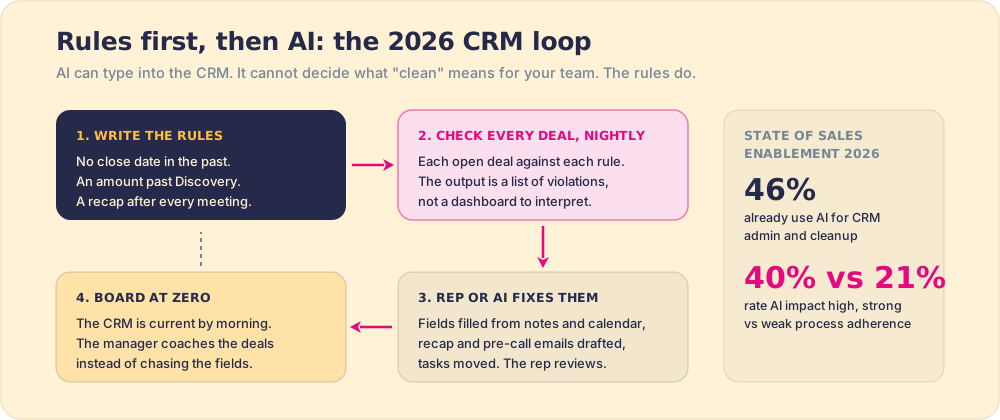
The CRM best practice that changed in 2026 is the order of operations. Write the rules first, then let a rep or an AI assistant do the updating against them. AI can now fill a field from meeting notes, set a close date from the calendar, and draft the recap email. It cannot decide what a clean CRM means for your team. Hand an assistant a vague instruction like “tidy up my pipeline” and it will tidy to its own standard, which is a polite way of saying it will guess.
Teams have already started. In The State of Sales Enablement, 46 percent of teams use AI for CRM admin and cleanup. The same survey shows why the rules come first. Among teams with strong process adherence, 40 percent rate AI’s impact as high, against 21 percent of teams with weak adherence. AI amplifies the process you have, the clean one and the messy one alike.
I run this on my own deals. My board, “Sales Expectations,” checks 22 rules against my open HubSpot deals every day: no close date in the past, an amount on anything past Discovery, no overdue tasks, a pre-call email in the 24 hours before a meeting, a recap after it, a named decision maker. One evening it showed 11 violations. I gave Claude, connected to Supered, HubSpot and Gmail, one prompt, to fix my violations and draft anything that needs an email. It read the rules, updated the fields from context (the amount from my discovery notes, close dates matched to the next meetings on my calendar), and left recap and pre-call emails in my Gmail drafts for me to review. By hand that is about 45 minutes of my evening. With the rules written down and Claude doing the typing, it was about 10. One person’s example, not a study, but it shows the shape.
Three practices follow for 2026.
- Rules written where software can read them. “Keep the CRM clean” is a wish. “A close date in the past is a violation” is a rule a rep, a manager, a report and an AI assistant can all check the same way.
- Drafts reviewed by a human. Let AI fill fields and draft emails; keep the send button and the stage change with the rep, because the buyer’s position is a judgment call. The activity gets recorded, and the stage still reflects what the buyer did.
- The same rules on every screen. The rule that flags a missing amount in the CRM should flag it in the AI assistant too, so the standard does not depend on which window the rep happens to have open.
What we recommend
Two ways to chase a clean CRM. You can enforce: require fields, nag in pipeline reviews, gate pay on completeness, and accept that the resulting data is complete and false. Or you can design for adoption: cut the fields, automate capture, surface the update in the flow, make stages reflect the buyer, and coach off the signal, so accurate data is a byproduct of the work.
We recommend designing for adoption, without hedging, and the evidence is the same convergence we see everywhere. Friction drives non-adoption far more than character does, and guidance in the flow more than triples quota attainment over guidance in a separate tool. Most sales CRM tips treat the rep as the variable to fix. The durable ones treat the system as the variable to fix. So stop treating dirty data as a discipline problem to be nagged out of reps. Treat it as a design problem, fix the inputs, and let the hygiene follow.
Start with the behavior principle in sales process adoption, the buyer-commitment stages that keep the pipeline accurate in what is a sales pipeline, the one adoption KPI worth tracking in sales KPIs, and the full system in the sales playbook guide.
Frequently asked questions
What are the most important CRM best practices?+
Why do reps not update the CRM?+
Should you enforce CRM data entry?+
What is the difference between CRM hygiene and CRM adoption?+
Which CRMs or plugins give reps step-by-step next best actions?+
How does AI change CRM best practices in 2026?+
Your process, running itself.