AI Competitive Intelligence for Sales: Let Your Calls Write the Battlecards
Competitive intel dies in a separate tool or a quarterly deck.
How to have Claude read your sales calls on a schedule, update your Supered battlecards and objection cards with your approval, and put them on the CRM record.
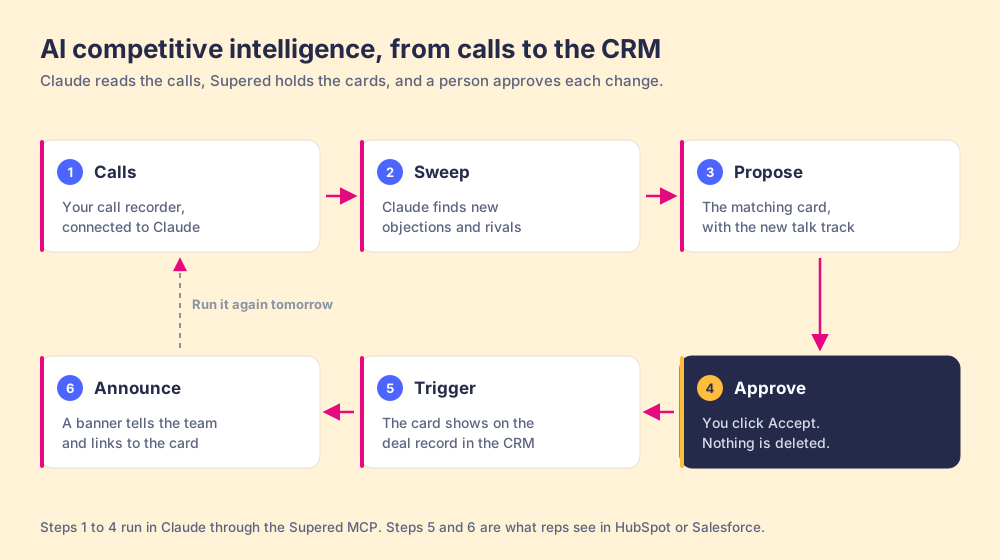
AI competitive intelligence for a sales team is using an AI like Claude to read your own sales calls on a schedule, pull out new competitor mentions and objections, and update the battlecards reps see in the CRM, with a person approving each change.
How to set up AI competitive intelligence with Claude and Supered
20 min- 1
Connect your call recorder to Claude
Check that your call recorder offers a Claude connector or MCP server, then add it in Claude so Claude can read your call transcripts.
- 2
Connect Supered to Claude
In Supered, open the AI section and click Connect Claude. Click Connect for Supered and for your CRM, then Continue Connecting, then Close.
- 3
Give the intel a home
Have Claude search your Supered content and set up a base with a Competitors folder for battlecards and an Objections folder for objection cards, without making duplicates.
- 4
Run the call sweep
Once a day or once a week, ask Claude to read a window of calls, list new competitor mentions and objections that came up on 2 or more calls, and propose updates to the matching cards.
- 5
Approve each card update
Review each proposed change, with the quote and call it came from, and click Accept on the ones that are right. Claude can't delete anything.
- 6
Put the card on the CRM record
Ask Claude to create a page trigger so the battlecard shows whenever that competitor's name appears on a CRM page.
- 7
Tell the team
Ask Claude to draft an announcement for the sales team, shown as a banner with an end date, that links to the updated card.
- 8
Save the sweep to the Prompt Library
Save the sweep prompt to your Supered Prompt Library, available in Claude, so any manager can run it and Prompt Analytics shows who uses it.
Most competitive intelligence dies in one of two places: a separate tool reps never open, or a quarterly deck that’s wrong by week three. I don’t think a better deck fixes that. The freshest intel your team has is sitting in yesterday’s call recordings, said out loud by buyers.
For a sales team, AI competitive intelligence means using an AI like Claude to read your own sales calls on a schedule, pull out new competitor mentions and objections, and update the battlecards reps see in the CRM, with a person approving each change. Reading the calls is the easy part for an AI. What decides whether any of it helps is where the answer ends up, and I want it on the CRM record the rep has open, the day after a buyer first said it.
This is one of the builds from my Claude second brain guide, taken all the way through, with the prompts I’d type.
What is AI competitive intelligence, and why does the usual kind fail?
Ben Gilad is where I’d start. He founded the Academy of Competitive Intelligence, and his definition is still the best one I’ve read: CI is “a perspective on changing market conditions” (Harvard Business Review, reposted by Bob Morris). His complaint is that companies keep shrinking it into something smaller.
In “Are Executives Blindsided by Competition?” he describes how companies “channeled the competitive information to sales or marketing managers,” where CI managers were “tasked with putting up static competitor ‘profiles’” (California Management Review, March 2020). Gilad’s worry is the executive who never sees the intel. I agree with his diagnosis and I’d add the other half. The static profile fails on the sales floor too. A profile is a snapshot, and buyers don’t talk in snapshots.
He has one more line I keep coming back to: “Much of these accumulated ‘clues’ signaling market change go unused until the shift is painfully obvious.” On a sales team, those clues aren’t hidden. A buyer says them on a recorded call. “We’re also talking to a cheaper option.” “Their rep told us you can’t do Salesforce.” The clue is sitting in a transcript, and the team doesn’t have time to read it.
Forrester’s research on battle cards found that inconsistent content was “undermining the value to sales reps,” and that the good cards hold “valuable talking points that lie at the intersection of buyer expectations and needs” (Forrester). Where do you find what buyers expect and need? On the calls. So the best source for a battlecard is the call, and the best place to deliver one is the record the rep opens right after it.
Why does competitive intel go stale before reps use it?
Think about a bus stop.
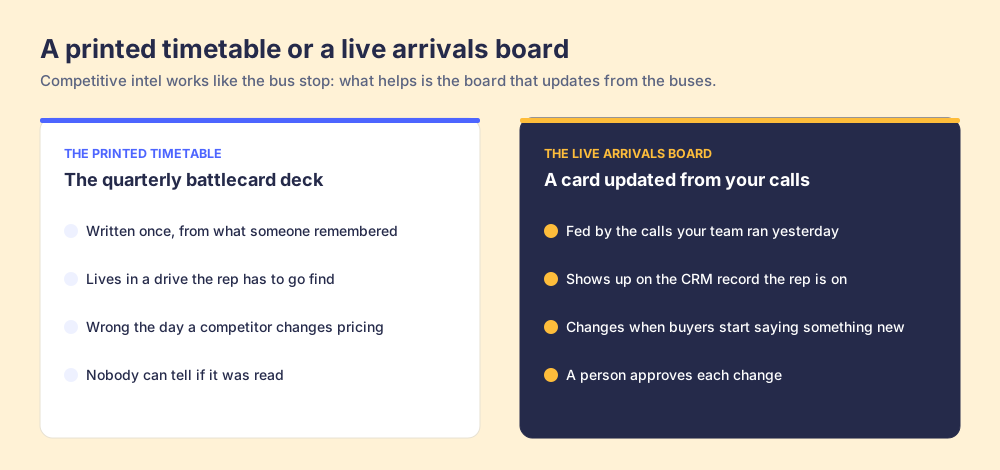
One stop has a printed timetable bolted to the pole. Somebody wrote it once, from the schedule as it was planned. It’s tidy. And the minute a route changes or a bus runs late, it’s wrong, and the timetable has no way of knowing. The other stop has a live arrivals board. It updates from the buses themselves, so when the 14 is running six minutes behind, the board says so.
A quarterly battlecard deck is the timetable. It was right on the day product marketing finished it. Then a competitor changed pricing, two buyers brought up a new objection, and the deck kept saying what it said in July. The card your team needs works like the arrivals board: fed by what buyers said this week, and posted where the rep is standing.
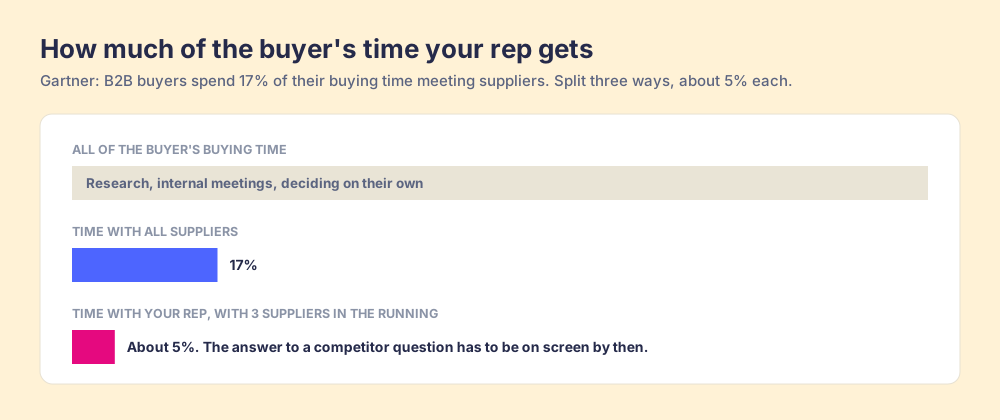
Where the card lives matters as much as how fresh it is, because your rep doesn’t get much time with the buyer. Gartner found B2B buyers spend 17% of their buying time meeting with suppliers. With 3 suppliers in the running, each one gets about 5% (Gartner). If a competitor question comes up in that 5%, the answer has to already be on screen. A rep won’t open a drive mid-sentence.
A separate CI tool doesn’t solve that. It adds a tab. In a Gartner survey of 1,026 B2B sellers, 50% said they’re overwhelmed by the amount of technology their job needs, and overwhelmed sellers were 45% less likely to attain quota (Gartner, September 2024). When reps skip a tool like that, the system failed them, and the fix is fewer places to look.
Our own research found the same split. In The State of Sales Enablement, teams whose guidance reached reps inside the workflow reported 49% quota attainment. When guidance sat in docs or wikis, it was 15%.
How does battlecard AI work from your own sales calls?
Think of it as a newsroom.
Reporters go out and file stories. A wire desk sorts the pile, groups what’s related and flags what’s new. An editor decides what runs, because the paper’s name is on it. Then the paper lands on the porch, where the reader already is.
Your reps are the reporters, and each call is a story filed. Claude is the wire desk: it reads the transcripts and sorts new objections and competitor mentions from noise. You’re the editor. Nothing changes on a card until you click Accept. And the porch is the deal record in HubSpot or Salesforce, where the card shows up through a page trigger.
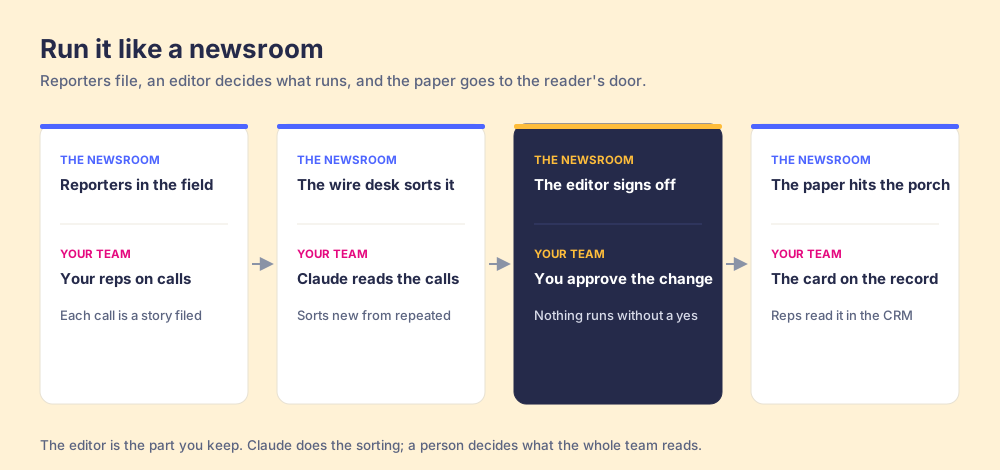
I like this split because battlecard AI is great at the wire desk job and bad at the editor job. It can read a week of calls without getting bored. It can’t tell whether “their rep said you can’t do Salesforce” is a fair point or a smear. That call belongs to someone who knows the product.
How do you set up AI competitive intelligence with Claude and Supered?
The full build takes about 20 minutes the first time.
- Connect your call recorder to Claude. Check that your recorder offers a Claude connector or MCP server, and add it in Claude. You’re giving Claude read access to transcripts.
- Connect Supered to Claude. In Supered, open the AI section, click Connect Claude, click Connect for Supered and your CRM, then Continue Connecting (Supered MCP Server). Custom connectors usually need a paid Claude plan (Pro, Max, Team or Enterprise), and on Team and Enterprise an admin may need to allow them.
- Give the intel a home. Battlecards and objection cards need a base and folders, so Claude knows where to look and where to file.
- Run the sweep. Daily or weekly.
- Approve the updates.
- Put the card on the record with a page trigger.
- Tell the team with an announcement.
- Save the sweep to your Prompt Library.
Steps 3 through 8 each have a prompt below.
Step 3: Give the intel a home
Start by having Claude look before it builds. You probably have battlecards somewhere already, and three copies of the same card is how the old system died.
Search our Supered content for anything about competitors or sales objections. List what you find with the base and folder each card lives in. Then propose a base called Competitive Intel with two folders: Competitors (one battlecard per competitor) and Objections (one card per objection). Move nothing yet. Show me the plan first.Step 4: Run the call sweep
Run this one each morning for yesterday’s calls, or Monday morning for last week’s.
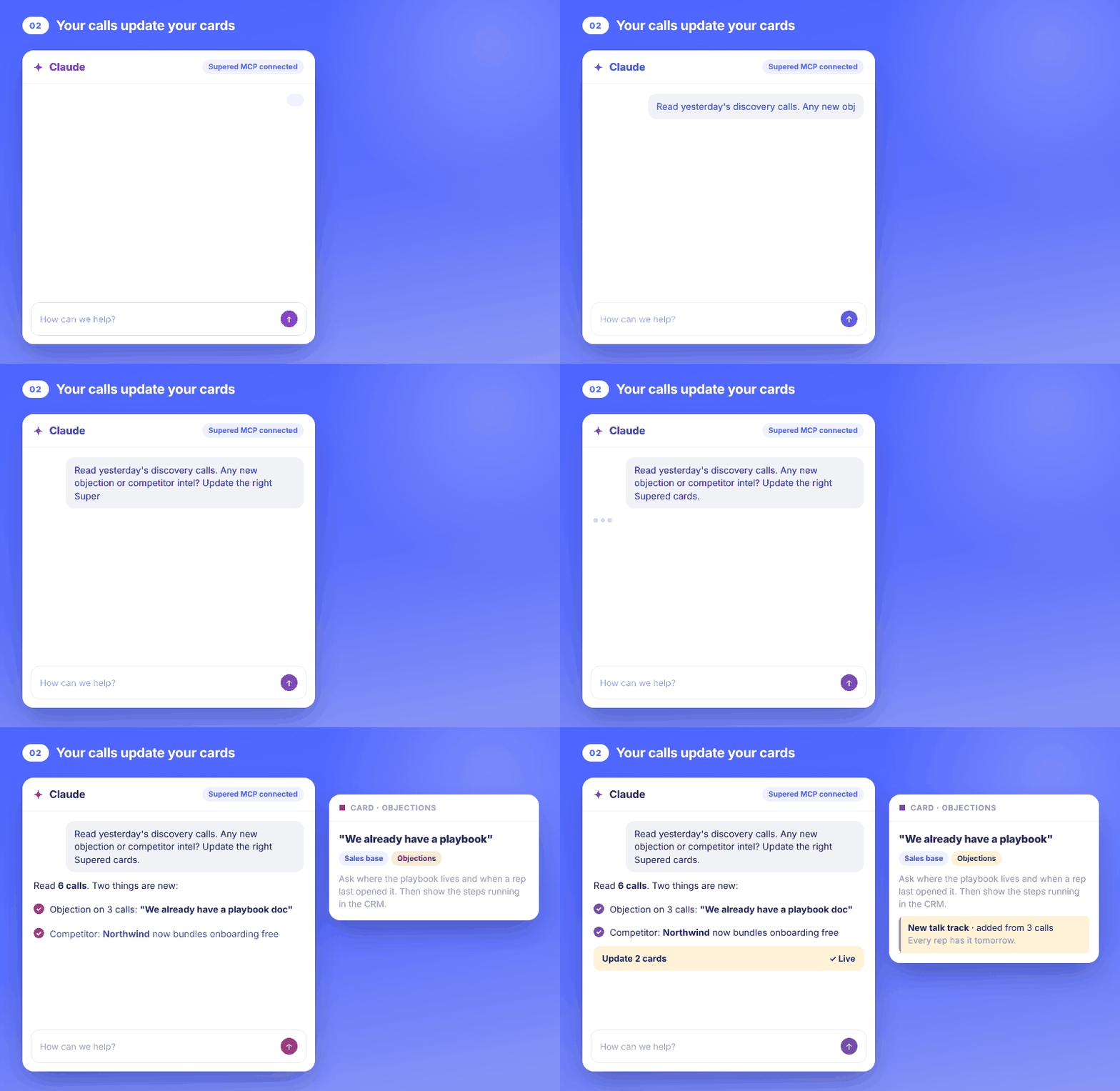
Read our discovery and demo calls from the last 7 days. Find (1) any competitor a buyer named, with what they said about them, and (2) any objection that came up on 2 or more calls. Ignore anything already covered by a card in our Supered Competitive Intel base unless the buyer said something the card doesn't cover. For each item, quote the buyer, give the call date and the rep, and tell me which card it belongs on. Don't change anything yet.Managers, y’all will want to keep the “2 or more calls” filter. One buyer saying something odd could mean anything, and when two say it in the same week, it earns a card.
Step 5: Approve the card updates
Once the sweep looks right, have Claude write the change. Keep cards short. A rep reading mid-call has seconds, and a card that runs past one screen is a document again.
For each item you found, propose an update to the matching Supered card. If no card exists, propose a new one in the right folder. Keep each card under 150 words with four parts: what the buyer is saying, the question to ask back, the talk track that worked on our calls, and one proof point. Under the talk track, add the call date it came from. Wait for my approval on each change.You’ll see each change and click Accept on the ones that are right. Claude can’t delete a card, so the worst a bad sweep can do is propose something you decline.
Step 6: Put the card on the CRM record
A current card in a folder is still a timetable. A page trigger puts it on the CRM page, where the rep already is. Triggers fire on text, so the competitor’s name showing up anywhere on the deal page is enough.
Create a page trigger for the battlecard on [competitor name] so it shows in HubSpot whenever the page contains "[competitor name]". Do the same for each battlecard in the Competitors folder. Show me the list of triggers before you create them.This is one more reason to record the competitor in a deal field. If it’s filled in, the name is on the page and the trigger catches it. If your team skips that field, a process rule that flags late-stage deals with no competitor recorded gets it filled in. The sales expectations page shows how those boards look across a team.
Step 7: Tell the team
A card that changed overnight helps the reps who happen to open that deal. An announcement reaches the rest of them.
Draft an announcement for the sales team only, shown as a banner for 7 days, that says what changed on the [competitor name] battlecard in one sentence and links to the card. Show me the draft before you publish.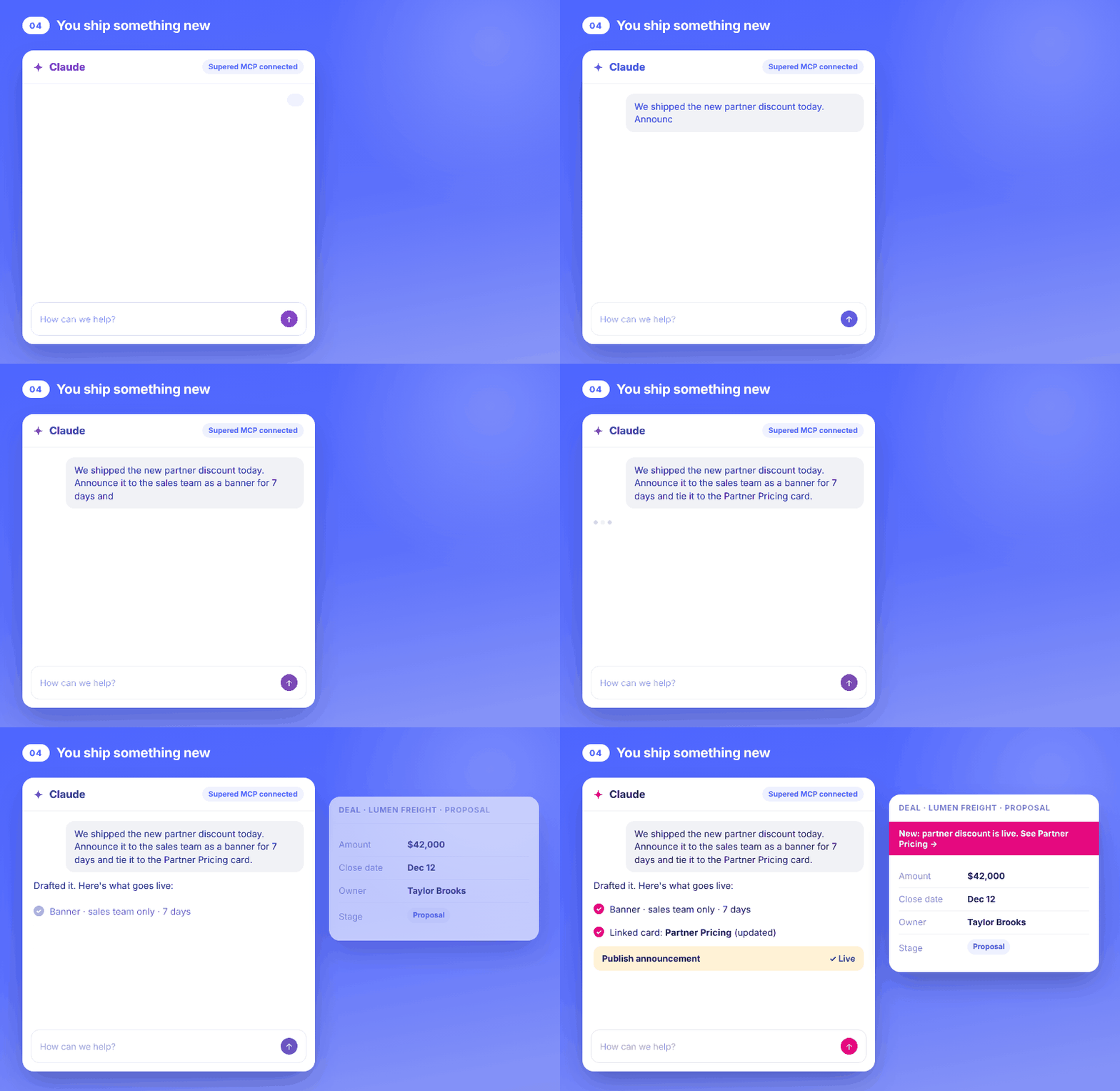
Step 8: Save the sweep to the Prompt Library
The sweep shouldn’t live in one manager’s chat history. Save it so anyone on the team can run it the same way.
Save the call sweep prompt from Step 4 to our Supered Prompt Library. Title it "Weekly competitive sweep," add a one-line description, put it in a folder called Competitive Intel, and make it available in Claude.Prompt Analytics in Supered shows who’s running it. If your Claude setup supports scheduled tasks, you can put the sweep on a schedule. If not, it’s a two-minute Monday habit.
Why does Supered fit AI competitive intelligence?
Because the intel needs four things a call recorder and a chat window don’t give you on their own. In Supered, those four look like this:
- A place to live: cards, filed in bases and folders, that Claude can search before it writes so you don’t end up with duplicates.
- A way to reach the rep: page triggers that show a card when a word or phrase you pick appears on a HubSpot or Salesforce page, plus announcements as a banner or a modal, for the team you pick, with an end date.
- A person in the loop: you approve every create and update through the Supered MCP server, and nothing can be deleted. The Supered Assistant inside the app works the same way.
- A way to check it’s working: a process rule can flag deals where the competitor field is blank, board analytics show which rules get skipped most and by whom, and Prompt Analytics shows who runs the sweep.
The bigger reason is the one I care about most. Supered is the business logic for your deals: what a good deal looks like at each stage. Your answer to a competitor is part of that definition. It lives in one place, reps follow it in the CRM or in Claude, and AI agents can read the same cards. If you want the longer version of why the rules shouldn’t live in a chat window, I wrote it up in Claude for sales.
What can’t AI competitive intelligence do?
I’d rather you hear this from me.
- It can’t verify a claim: a buyer repeating something a competitor’s rep said doesn’t make it true. So the sweep quotes the call, and a person approves.
- It only knows what’s recorded: if half your team’s calls aren’t recorded, the sweep sees half the picture. Fix the recording habit first.
- It won’t write your strategy: Gilad’s point stands. The sweep catches what buyers say this week. Deciding what to do about a competitor’s new pricing is still a leadership call.
- It needs feeding: run it once and stop, and the cards drift like any other doc. The Prompt Library save in Step 8 is how you keep it running.
- Rules need a CRM: page triggers and process rules run against HubSpot or Salesforce, so connect one first.
One more: don’t let the sweep turn into a gossip column. File what buyers said and what worked on the call. A battlecard full of rumors about a competitor’s layoffs doesn’t help anybody close anything. (And it ages worse than milk.)
Where should you start with battlecard AI?
Pick the one competitor your reps hit most, and run the sweep on last week’s calls for that one only. You’ll know in 10 minutes whether the cards you have match what buyers are saying. If they don’t, you’ve found your first update.
Then build out from there: the Objections folder next, then triggers, then the weekly habit. For what goes on a great card, see sales battlecards and the sales battlecard. For the talk tracks themselves, common sales objections and how to handle a sales objection are good next reads. And when you find out why you lost anyway, win-loss analysis picks up where the sweep stops.
This post is part of my Claude second brain series. If you haven’t built the cards yet, start with the AI sales playbook build, and feed the same cards into AI sales onboarding.
If you’d rather watch it run on your own calls, book a demo. Bring the competitor that keeps showing up in your pipeline.
Frequently asked questions
What is AI competitive intelligence?+
Can AI write sales battlecards?+
How often should battlecards be updated?+
Do I need a separate competitive intelligence tool to do this?+
Can Claude change my battlecards without approval?+
One definition of a good deal.