HubSpot Integration: Why Connecting the Tools Is the Easy Part
HubSpot's marketplace lists over 1,000 native integrations. Connecting them takes an afternoon. Getting reps to truly use the result is a different project, with a different failure mode, and a different fix.
A HubSpot integration is the technical connection between HubSpot and another business system, syncing records and automating data flow, and while the connectivity itself is straightforward, the real work is making the connected system change how reps behave.
There is a reasonable way to think about a HubSpot integration, and then there is what truly happens. The reasonable way: connect the tools, let the data flow, and the team works with better information. What truly happens: the connector goes live, the records sync cleanly, and three months later the team works the same way it always did, inside a marginally better-decorated tool. The data arrived. The behavior did not change.
A HubSpot integration is the technical connection between HubSpot and another business system, syncing records and automating data flow, and while the connectivity itself is straightforward, the real work is making the connected system change how reps behave. That gap between the technical and the behavioral is where most integrations fail to deliver on the reason you built them.
What does a HubSpot integration truly include?
HubSpot’s App Marketplace lists over 1,000 native integrations, most configurable in thirty minutes via a guided OAuth flow. Those hubspot native integrations span sales, marketing, service, and operations tools. The technical architecture is the same in almost every case:
- Field mapping. You declare which field in the source system corresponds to which field in HubSpot. A contact’s account in Salesforce maps to a company association in HubSpot. A deal stage in one system maps to a lifecycle stage in the other. The mapping is the design decision; the sync itself is automatic.
- Sync direction and conflict rules. Some integrations are one-way; data flows from system A to B and not back. Others are bidirectional, with rules for which system wins when the same field is updated in both. The HubSpot-Salesforce connector’s v2 sync engine added stronger deduplication and conflict resolution in 2026.
- Inclusion lists. Not every record should sync. A new lead in HubSpot that is not yet qualified should not create a Salesforce opportunity. Inclusion lists let you define which records trigger a sync and which do not.
- Trigger logic. Some data does not need to sync continuously; it syncs when an event occurs. A deal moving to Closed Won triggers a record in the accounting system. A call logged in Gong creates a task in HubSpot. Event-based triggers are where the integration starts to touch process as well as data.
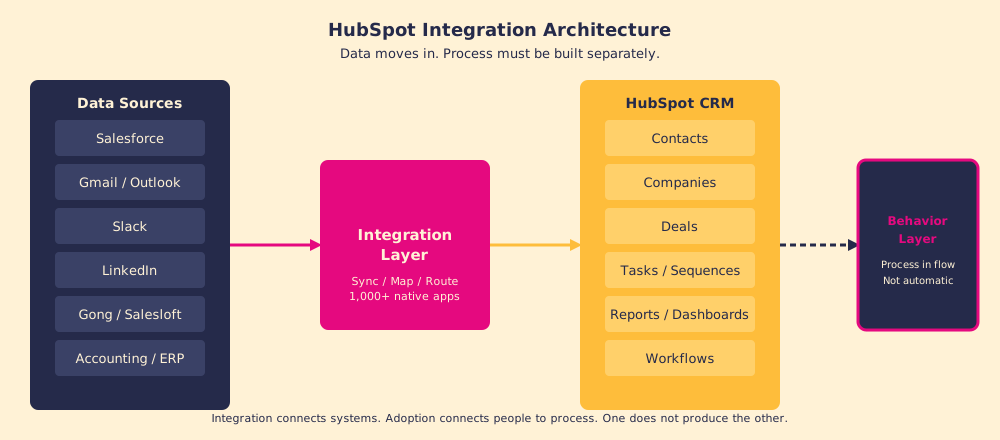
The technical piece is real work, but it is finite. A well-scoped integration project takes days to weeks. The part that takes longer, and that most teams underestimate, is what happens after.
Why does a successful HubSpot integration still fail to change behavior?
Think of a HubSpot integration as plumbing. Good plumbing is invisible and necessary: the water flows to the fixture, the pressure is right, nothing leaks. But plumbing does not decide whether anyone washes their hands. The water arrives at the tap; whether the right behavior happens at the tap is a different system entirely.
The gap between a working integration and changed behavior has a structural cause. Gartner reports a roughly 50% CRM failure rate, and the dominant reasons are not technical: lack of process change, inadequate adoption support, and missing cross-functional coordination account for the majority of failures (Gartner CRM research). The Salesforce-HubSpot integration alone has nearly 11,000 active daily users according to HubSpot, which means the connector itself is not the bottleneck; what reps do with the connected data is.
There is a cognitive reason behind the structural one. New data appearing in a familiar tool does not create new behavior; it creates a new tab that reps may or may not open. According to behavioral economist Richard Thaler’s research on default effects, people continue existing behaviors when the new option requires any additional effort, even trivially small effort (Thaler, Nudge, 2008). A Gong integration surfaces call intelligence in HubSpot. A rep who never checked that sidebar before the integration will not check it after unless something changes the cost or the expectation of checking it.
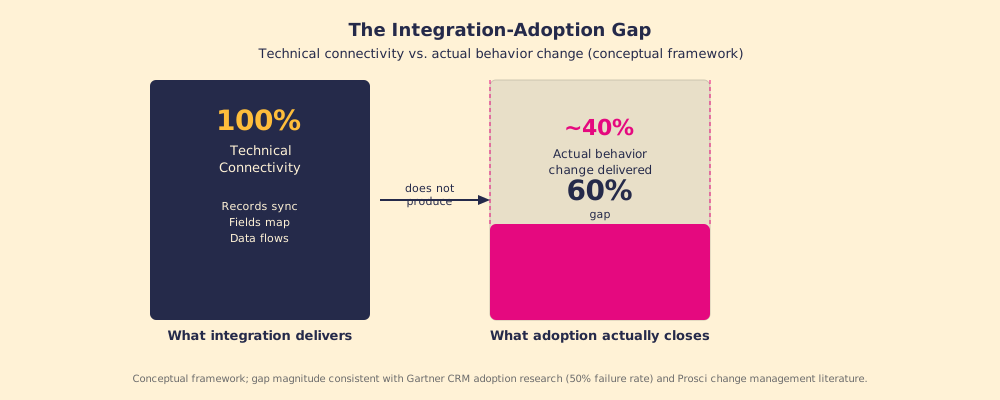
The 60% gap figure is directional, not a precise measure, but it captures the real dynamic: an integration creates the possibility of changed behavior; it does not create the change. That gap is what the adoption work closes.
What does it take to close the integration-adoption gap?
The answer is not a better integration. Swapping the connector for a fancier middleware does not address the behavioral gap, because the gap is not technical. What closes it is the same thing that closes any adoption gap: process reaching the rep in the moment of work, with measurement confirming it is happening.
Three moves close the gap:
- Anchor the process to the integrated data. If the integration surfaces Gong call summaries in HubSpot, the process should specify that reps review them before updating deal stage. The integrated data becomes a required input, not an optional sidebar. Without this anchor, the data sits in the system and the process runs on memory and habit as before.
- Measure adherence at the field level. Knowing that 40% of deals lack a call summary review tells you the integration is not producing the behavior you built it for. You cannot ask that question without measuring it, and you cannot improve the number without knowing it. The integration generates the data; the measurement confirms the data is changing behavior.
- Surface the next step where the work happens. Reps do not navigate to information; information has to navigate to them. Tenet 7 of the Supered core framework states that answers must reach the rep in the moment of the work, and every moment they must leave their current context to find something is a failure. An integration that puts data in HubSpot is necessary. A process that surfaces the right action based on that data, at the right moment, is what truly moves the rep.
How should you prioritize which HubSpot integrations to build?
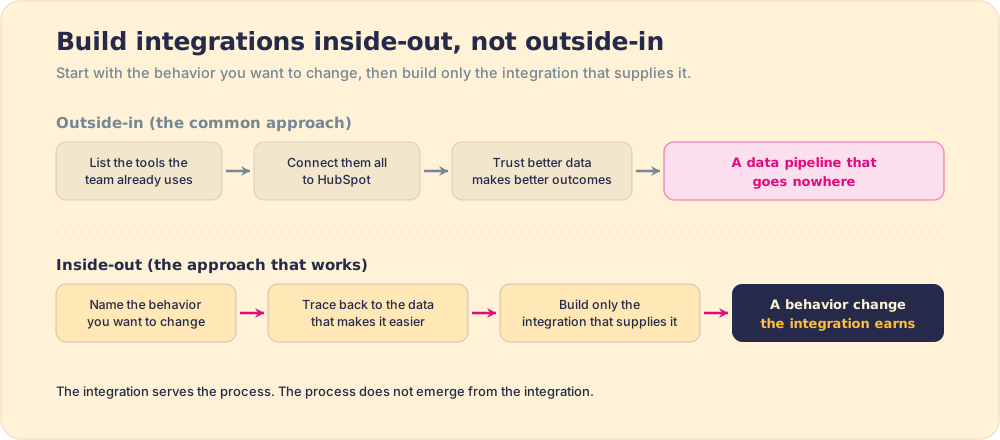
Most integration plans are built from the outside in: look at what tools the team uses, connect them to HubSpot, and trust that better data produces better outcomes. The approach that truly works is built from the inside out: start with the behavior you want to change, trace back to what data would make that behavior easier, and then build only the integrations that supply that data.
A few practical filters:
- Data missing at the decision moment. If reps are making stage-advancement calls without seeing the buyer’s most recent activity, a HubSpot CRM integration that surfaces that activity earns its complexity cost. If the data exists and is ignored, adding more native integrations does not help.
- Process requirement defined before the build. Defining the process change before building the integration is how you avoid building a data pipeline that goes nowhere. The integration serves the process; the process does not emerge from the integration.
- Data quality versus behavior investment. Both are legitimate, but they have different success metrics. A HubSpot-accounting integration that keeps revenue data accurate is a data-quality investment. A Gong-HubSpot Salesforce integration touchpoint that changes how reps prep for calls is a behavior investment. Measure each on the right axis.
What we recommend
Treat the technical integration as table stakes and treat adoption as the project. The connectivity, the field mapping, the sync rules, those are prerequisites. A mid-size integration project takes weeks. The behavior change, if you do not design for it explicitly, takes never, because it does not happen on its own.
Before building an integration, write down the specific behavior change you expect it to enable and how you will measure whether that change is happening. After the integration goes live, check the measurement. If the data is flowing but the behavior has not changed, the fix is not a better connector. The fix is bringing the process closer to the rep in the moment of work.
For more on how to close this gap across the full CRM setup, read HubSpot implementation, CRM adoption, and sales process adoption.
Frequently asked questions
What is a HubSpot integration?+
How does the HubSpot Salesforce integration work?+
What HubSpot integrations do sales teams use most?+
Why do HubSpot integrations fail to deliver expected results?+
Your process, running itself.