The Evaboot Chrome Extension in 2026: You Lend the Car, Read the Pooling Clause
The Evaboot Chrome extension hands Evaboot your LinkedIn session so Sales Navigator exports run after you close the browser, up to 2,500 leads a day per account. How it works, which extension it is now, install steps, cost, LinkedIn risk, and alternatives.
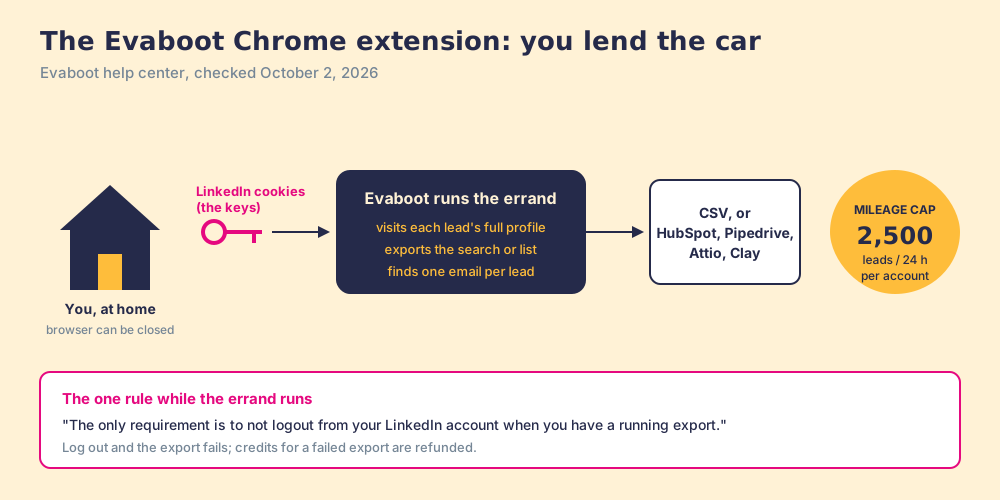
The Evaboot Chrome extension is the browser add-on that connects Evaboot to your Sales Navigator account through your LinkedIn cookies, so Evaboot can export your lead and account searches and lists, up to 2,500 leads a day, with a verified email for each lead.
The Evaboot Chrome extension is small, and the job it does is large. The quick answer, checked October 2, 2026:
- Evaboot’s extension. The cheapest way for a founder or an agency to turn a Sales Navigator search into a CSV of verified emails, from $29 a month for 400 credits, if you accept the account risk on a seat you can afford to lose.
- Supered Prospector. The pick for a team that already pays for Clay: reps push Sales Navigator leads to the team’s Clay table from their own browser, Clay’s waterfall returns emails and phones, $45 per rep per month billed annually.
- Wiza or Kaspr. The profile-by-profile alternatives for reps who want a reveal button and no bulk export.
The Evaboot Chrome extension is the browser add-on that connects Evaboot to your Sales Navigator account through your LinkedIn cookies, so Evaboot can export your lead and account searches and lists, up to 2,500 leads a day, with a verified email for each lead. Evaboot’s site claims “200,000+ users” and a 4.6 rating (evaboot.com). What the extension does matters less than where the work happens, and Evaboot’s own help center answers that plainly.
What does the Evaboot Chrome extension do?
Lend someone your car and the deal is simple: you hand over the keys, they run your errand, you stay home. A ride service does the same with more polish, a daily mileage limit and a route driven while you sleep. The details live in the paperwork.
Evaboot works the same way. Its help article on the connection reads: “Evaboot uses your Linkedin cookies to connect to your Linkedin account and export the data you need. The Chrome Extension is here to facilitate that process” (Evaboot help, how Evaboot connects, updated June 26, 2026). A cookie is the small token your browser keeps so LinkedIn knows you are logged in; whoever holds it can act as you. The cookie is the key to the car.
The errand runs without you. Evaboot’s article on failed exports says that once an export starts you can “leave the LinkedIn website,” “leave the Evaboot website,” and “close down your browser or your computer.” “The only requirement is to not logout from your LinkedIn account when you have a running export” (Evaboot help, why did my export fail). An export that keeps going after the laptop lid closes runs somewhere other than your browser, on your session.
What comes back is good. Evaboot’s extension page lists “lead and account searches and lists” plus saved searches, and says the tool “doesn’t work on Linkedin free version nor Linkedin Recruiter” (Evaboot, Chrome extension). Its safety article explains why the data is cleaner than a screen grab: “it visits each lead’s actual LinkedIn profile (e.g., linkedin.com/in/…)” instead of reading the search results page (Evaboot help, is it safe). Its daily-limit article lists what that buys: the LinkedIn URL, company website, industry, exact headcount, and more, and says skipping those fields would “decrease your email finding discovery rate by 20% on average” (Evaboot help, daily limit). Then Evaboot filters out leads that do not match your Sales Navigator filters and finds an email for the rest.
In fairness to Evaboot, a ride service with a mileage cap is more careful than a friend who keeps your car all weekend, and Evaboot’s cap is real.
Which extension is the Evaboot Chrome extension now?
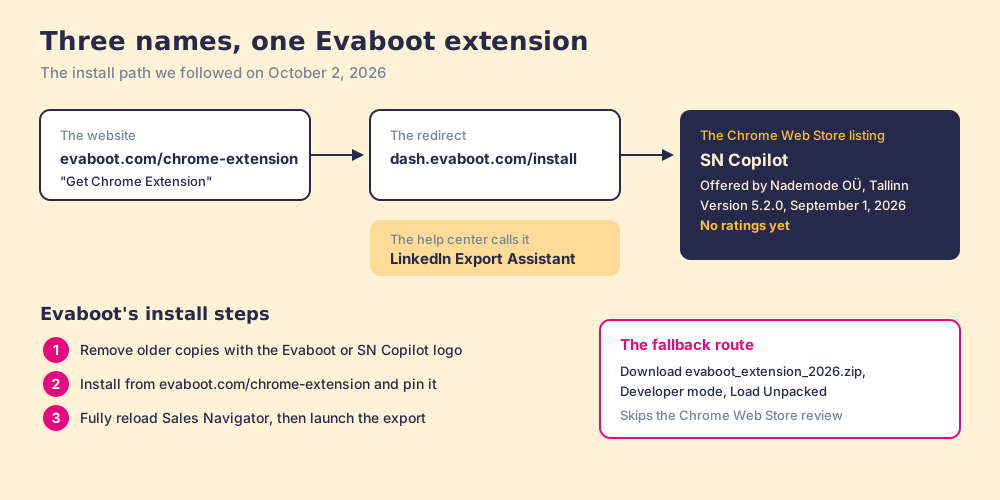
This trips people up. On October 2, 2026, we followed the trail. The Get Chrome Extension button on evaboot.com/chrome-extension goes to dash.evaboot.com/install, which redirects to a Chrome Web Store listing named SN Copilot, “Export leads from your searches with one click,” offered by Nademode OÜ in Tallinn, version 5.2.0, updated September 1, 2026, “No ratings” (Chrome Web Store, SN Copilot). Nademode OÜ is the company named in Evaboot’s terms. Evaboot’s install guide, updated July 27, 2026, calls the same thing “LinkedIn Export Assistant” (Evaboot help, install the latest extension). The older Evaboot listing that still sits in Google’s top ten for this search returned an empty store page when we opened it.
Evaboot’s install steps:
- Open chrome://extensions and remove any extension showing the Evaboot or SN Copilot logo; “Running an older copy alongside the current one blocks detection.”
- Install from evaboot.com/chrome-extension and add it to the toolbar.
- Fully reload the Sales Navigator tab, then launch the export from the button the extension adds.
If the store install fails, Evaboot’s manual guide has users download evaboot_extension_2026.zip, switch on Developer mode in chrome://extensions, and click Load Unpacked (Evaboot help, manual install). That route skips the Web Store’s review, which an IT team will want to know.
What does an export with the Evaboot extension cost?
The extension is free. The meter runs on credits, from evaboot.com/pricing on October 2, 2026: $29 a month for 400 credits, $49 for 1,000, $99 for 3,000, and custom Enterprise. “1 lead exported = 1 credit, and its verified email is included,” and “A lead we find no email for still costs 1 credit.” Seats are unlimited, credits roll over while the subscription is active, and a failed export is refunded. The one gap is phones: “Does Evaboot find phone numbers? No.” You also need Sales Navigator itself, which LinkedIn lists at US$119.99 a month per Core seat. The Evaboot pricing page works out the cost per usable email plan by plan.
Is the Evaboot Chrome extension safe for your LinkedIn account?
Evaboot’s answer is yes, with conditions it states itself. “Evaboot won’t let you export more than 2500 leads per day per Sales Navigator account to make sure your Linkedin account will never be restricted or banned,” and “LinkedIn’s main concern is the volume of activity rather than the originating IP address.” The condition: “Don’t use other Linkedin scraping tools the same day that you use Evaboot.” Evaboot’s export guide goes further and advises a dedicated prospecting seat, “not the profile your network lives on” (Evaboot blog, export leads).
LinkedIn’s answer is a different sentence. “We don’t permit the use of any third party software, including ‘crawlers’, bots, browser plug-ins, or browser extensions that scrape, modify the appearance of, or automate activity on LinkedIn’s website,” and members who use them “risk having their accounts restricted or shut down” (LinkedIn Help, prohibited software). On May 8, 2025, MarTech reported that Evaboot’s LinkedIn company page had disappeared, along with the pages of Apollo, Seamless.ai and La Growth Machine (MarTech); we did not re-check those pages for this article.
Then read the paperwork. Evaboot’s terms, from Nademode OÜ and “valid as of 6th March 2026,” carry three clauses a buyer should see before the first export (Evaboot terms):
- The liability line. “In no case Nademode OÜ can be held liable for LinkedIn’s actions on the Customer’s LinkedIn and LinkedIn Sales Navigator accounts (e.g. account suspension, restriction or ban).”
- The exclusivity line. “The Customer shall not use services that are similar to the Evaboot Services when the Customer has an active (or ongoing) subscription plan, an active (or ongoing) free trial, or have existing Evaboot credits.”
- The pooling line. “If the Customer subscribes or uses the Services, the Customer agrees to let Nademode OÜ access the Customer’s account on LinkedIn Sales Navigator for pooling features. The pooling features allow the Customer to use the full potential of the Services and obtain more extracted Data. In case the potential Customer does not want the pooling feature the potential Customer shall not create an Account and use the Services.”
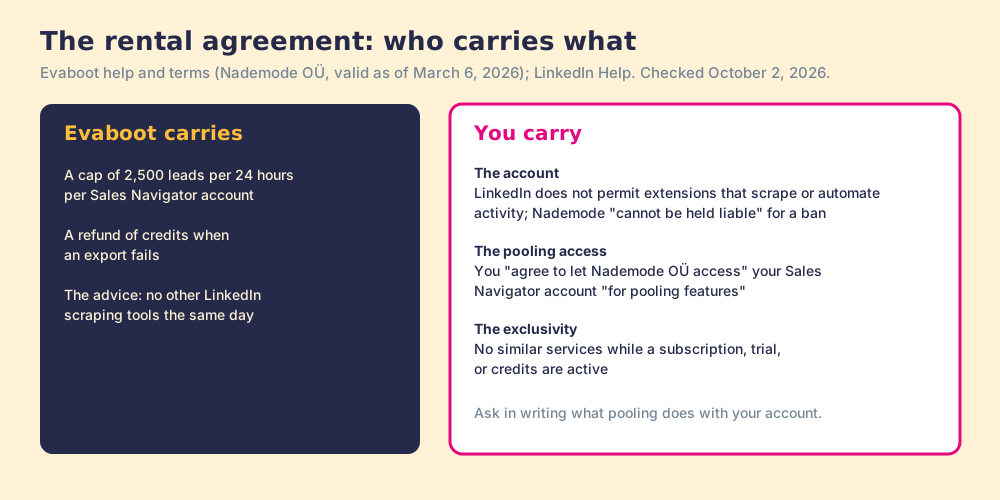
The terms say nothing more about pooling, so we will not guess. Ask Evaboot in writing what pooling does with your Sales Navigator account and whose exports it serves, before you lend the car. We would want a buyer to ask any vendor the same question, ours included: what runs on my LinkedIn session, and when?
What do Evaboot users say?
Buyers like it: G2 showed 4.6 out of 5 from 82 reviews on October 2, 2026 (G2, Evaboot reviews), and the customer quotes on Evaboot’s own page praise the filtering: one consultant writes that “Some of my lists get +50% error rate that Evaboot detects.” The complaints are about volume and bounces: “With large amounts of data, it becomes slow or the limit is reached beforehand” (a sales manager, April 2026), and an older review from 2023 reported a “20-30% email bounce rate.” Both follow from the design: a daily cap slows big jobs, and one email source misses some addresses.
Why trust this page?
I started RevPartners, a HubSpot partner that did only sales implementations and reached Elite tier in 13 months. Supered came out of that work and is the #1 sales enablement app on the HubSpot marketplace, with 5.0 from 122 reviews there and 4.9 out of 5 from 81 reviews on G2, both checked October 1, 2026. That is also the disclosure: we make Supered Prospector, which ranks first below for teams on Clay. Every Evaboot quote here comes from its own site, help center, or terms, opened October 2, 2026.
How does the Evaboot extension compare with the alternatives?
Each tool is scored 1 to 5 on coverage of the contact you need (x3), rep-side delivery (x2), price structure for a team (x2), what the leader sees after the export (x2), and bundled outreach (x1), out of 50, the same weights as the Wiza Chrome extension page and the Wiza alternatives grading. The Evaboot pricing page grades on a cost lens instead, where Evaboot scores higher.
| Rank | Tool | Grade | Score | Best fit | CRM integration | Setup effort | Pricing | Reason to switch from Evaboot |
|---|---|---|---|---|---|---|---|---|
| ref | Evaboot extension | D | 18 | A founder or agency exporting Navigator searches | HubSpot, Pipedrive, Attio; no native Salesforce | Minutes | $29 to $99 a month, plus Sales Navigator | Stay for cheap bulk email export |
| 1 | Supered Prospector | A | 44 | Teams already on Clay | Native (HubSpot, Salesforce, Pipedrive) | Under a week | $45 per rep per month, billed annually, plus Clay | Emails and phones from 200+ vendors |
| 2 | Apollo | A- | 36 | Data and sequences in one seat | Native (HubSpot, Salesforce) | A day | $49 per seat per month, billed annually | A database to search, no Navigator export |
| 3 | Kaspr | B- | 25 | Email-first reps on LinkedIn | Native (HubSpot, Salesforce, Pipedrive, Zoho) | Minutes | $49 per seat per month, billed annually | One profile at a time, phones included |
| 4 | Wiza | B- | 24 | One rep revealing full profiles | Native (HubSpot, Salesforce, Pipedrive, Zoho, Attio) | Minutes | Free to $1,990 a year per user | Verify-at-request emails and phones |
Evaboot’s 18 is coverage 1 (emails only, one source), rep-side delivery 2 (the export lands in a dashboard or CSV), price 4, leader view 1, outreach 1. On price per email it is hard to beat, and for an Evaboot LinkedIn export that is often the deciding number. Corporate status, checked October 2, 2026: no acquisition, merger or rebrand found for Evaboot; its terms name Nademode OÜ of Tallinn as the operator.
Where does Supered Prospector fit?
Back to the car. The other way to run the errand is to drive it yourself, with someone in the passenger seat who knows every shop in town. Prospector runs inside the Supered Chrome extension in the rep’s own browser, on the pages the rep is already reading, and the contact data comes from the team’s Clay account. On LinkedIn we keep the statement short: Prospector works within LinkedIn’s terms and does not copy search results in bulk; the contact data comes from Clay’s waterfall on the customer’s Clay account.
The passenger who knows every shop is Clay’s waterfall. Clay checks “multiple providers to return the most verified emails (lower bounce rate) and phone numbers (higher connect rate)” across 200+ data and AI vendors (clay.com, October 2, 2026), and “If an enrichment returns no result, you’re not charged Data Credits or Actions” (clay.com/pricing). Phones included, which Evaboot does not do.
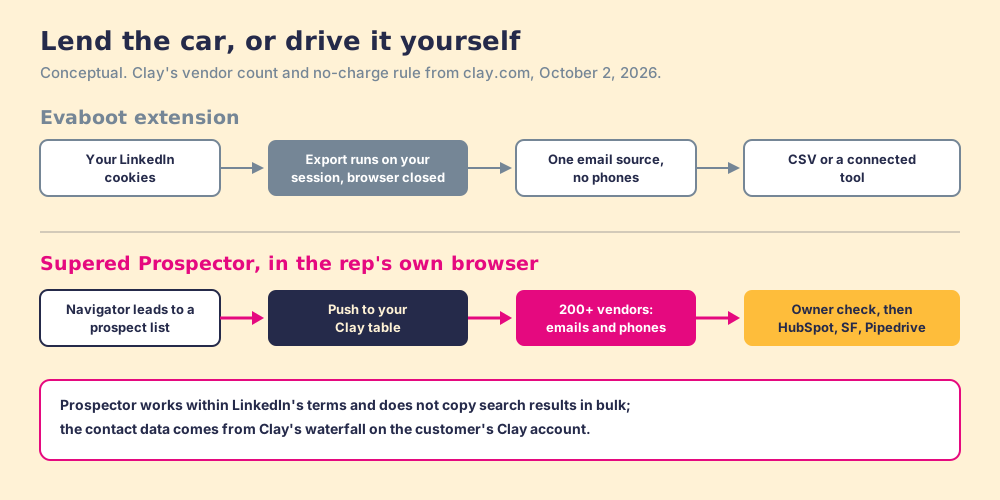
What the rep does with Prospector:
- A list from Sales Navigator. The rep adds Navigator leads to a prospect list and pushes the list into the team’s Clay table or any custom Clay workflow the GTM engineer built.
- Other starting points. A LinkedIn profile, a company website with company research, or the HubSpot, Salesforce, or Pipedrive record.
- The owner check first. The rep sees the matching CRM record and whether the prospect was already worked, then sends the lead to the CRM in one click.
- Lists the leader can follow. The manager sees who is working their list, and each lead ends the way the process says (Qualified, Recycled, or Disqualified), so coaching starts from what is converting.
For ten reps, both routes assume reps who start from Sales Navigator keep their seats (ten Core seats at US$1,079.88 a year are $10,798.80). On top of that, Evaboot’s $99 plan is $1,188 a year for 36,000 credits, emails only. Prospector is $5,400 for ten reps, plus Clay Growth at $495 a month ($5,940 a year), $11,340 in all, with phones and a CRM push included (Prospector). Evaboot is far cheaper per email. The trade is phones, the CRM, and who holds the keys.
Choose something else if you do not have Clay, since Prospector runs on the customer’s Clay account and has no free trial yet, or if you are a solo founder who wants a CSV of emails for a cold campaign this afternoon, where Evaboot is the faster, cheaper tool.
Which should you choose?
- Evaboot’s extension. The pick for a founder or agency exporting Sales Navigator searches to a CSV of emails, on a dedicated seat, after reading the pooling clause and asking Evaboot about it.
- Wiza or Kaspr. The pick for reps who want a reveal button on one profile at a time; the Sales Navigator scraper guide explains why the bulk route carries more account risk.
- Supered Prospector. The pick for a team on Clay that wants emails and phones from 200+ vendors, the CRM push, and lists the manager can watch become pipeline.
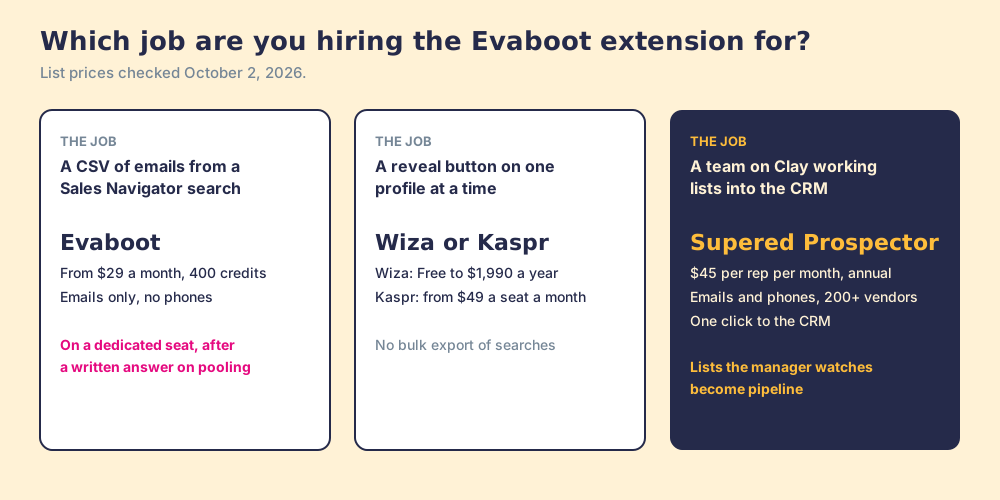
We recommend Evaboot to the buyer it was built for, a founder exporting a search into a cold campaign, on a seat they can afford to lose, after the pooling question has a written answer. For a sales team, keep the keys. Let reps build the list in their own browser and let Clay’s waterfall do the finding. The Sales Navigator export guide compares every route, and a Prospector demo shows the push from a Navigator list into your own Clay table.
Frequently asked questions
How does the Evaboot Chrome extension work?+
Which Chrome extension is Evaboot now?+
Is the Evaboot Chrome extension safe for my LinkedIn account?+
Does the Evaboot extension work without Sales Navigator?+
How much does the Evaboot Chrome extension cost?+
What is the best alternative to the Evaboot Chrome extension?+
Everything we have written on Evaboot
More on Evaboot
Looking past Evaboot? See Supered Prospector on your own Clay accountYour Clay waterfall, where reps already work.