AI Sales Playbook: Turn Your Playbook PDF Into Rules, Boards and Cards in Your CRM
An AI sales playbook runs in your CRM and gets measured.
I turn a playbook PDF or a voice note into process rules, a ruleset, a process board and cards with Supered Assistant or Claude, step by step, with the prompts.
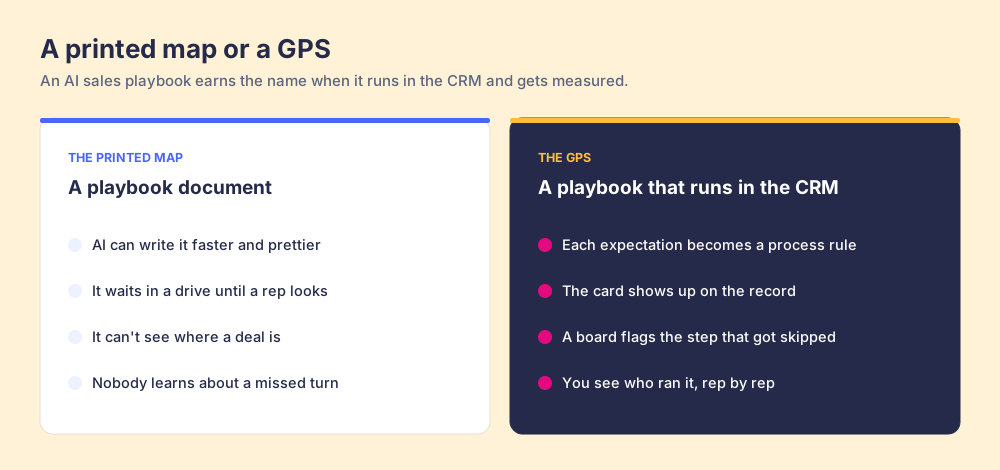
An AI sales playbook is a sales playbook that AI has turned into working parts of your CRM (process rules, a process board and the cards reps need) so it runs while reps sell and you can measure who follows it.
How to turn a sales playbook PDF into an AI sales playbook in Supered
30 min- 1
Prep the playbook
Pick one stage. Cut the pages that don't set an expectation, and rewrite each expectation so it names a CRM field, a stage or a number your CRM can check.
- 2
Set up the base and folder names
Decide on one base (for example Sales Playbook) and one folder per stage, and name rulesets and boards after the stage they cover, so everything the AI builds lands somewhere a person can find.
- 3
Give the Assistant the playbook and the prompt
Turn on Supered Assistant at Settings, then Artificial Intelligence. Open it in the app or the Chrome extension, attach the PDF or dictate, and paste the build prompt.
- 4
Review and accept each change
Read each proposed rule, ruleset and board. Check the property and condition on each rule, then click Accept. Nothing is created until you do.
- 5
Sync the board and tune the rules
Sync the board, check how many records each rule flags, and tune the rules until the board flags the deals you would want flagged, with no two rules flagging the same records.
- 6
Write the cards from the board
Once the board is right, ask for one card per rule that tells the rep what good looks like and how to fix the flag.
- 7
Add page triggers
Ask for a page trigger on each card so it shows on the CRM page when the stage name or a key phrase appears.
Search “ai sales playbook” and you’ll find two kinds of answers. One is a tool that writes the playbook for you. The other is a strategy article on adding AI to your sales team. Both assume the problem is the document.
I’ve done 100+ sales implementations, and I’ve never once seen a team lose because its playbook was badly written. An AI sales playbook is a sales playbook that AI has turned into working parts of your CRM (process rules, a process board and the cards reps need) so it runs while reps sell and you can measure who follows it. A prettier PDF is still a PDF.
This post shows how I build one, step by step, from a PDF or from somebody talking through what they expect, using Supered Assistant or Claude through the Supered MCP. Prompts included.
What is an AI sales playbook?
The page-one answers deserve a fair hearing. The generator tools are fast, and if you have no playbook at all, a decent first draft in ten minutes is a gift. The best of the strategy guides goes further. It describes an AI playbook as a set of custom chat assistants built from your approved sales guidance, one job per assistant, so the playbook hands a rep the next move instead of storing information. I agree with that last part completely.
Where I part ways is what happens after. A generated document still waits in a drive. A chat assistant still waits for a rep to open it and ask. And neither one can tell you whether the deals in your pipeline match the standard you wrote.
Our own research found 89% of sales leaders have a defined process and 36% see reps run it (The State of Sales Enablement). Writing faster won’t close that gap, because writing was never where it opened.
Think about a printed map next to a GPS. You can hire a great cartographer, and AI can make the map gorgeous. It still sits in the glovebox. A GPS knows where you are, speaks up at the turn, and knows when you missed it. I want playbook AI to work like the GPS.
Why does a written playbook stop working once it ships?
Research on how people follow through explains it better than I can.
The first is Peter Gollwitzer’s work on implementation intentions. A goal says what you want (“keep the close date current”). An implementation intention says when and how: “If X happens, then I do Y.” Across 94 independent studies and more than 8,000 participants, if-then plans had a medium-to-large effect on goal attainment, d = 0.65 (Wieber, Thürmer and Gollwitzer, Frontiers in Human Neuroscience). A playbook is mostly goals. A process rule is an if-then plan your CRM holds for the rep: if a deal is in Proposal with no champion, then flag it and show the card that fixes it.
The second is the surgical checklist. When Alex Haynes, Atul Gawande and their colleagues introduced a safety checklist across 8 hospitals and 7,688 patients, deaths fell from 1.5% to 0.8% and complications from 11% to 7% (Haynes et al., New England Journal of Medicine, 2009). The surgeons already knew every item on that list. The checklist put the knowledge at the table, at the moment, where somebody would notice a skipped step.
And reps are drowning. Gartner surveyed 1,026 B2B sellers and found 72% feel overwhelmed by the number of skills their job requires (Gartner, September 2024). A longer, better-written playbook adds to that pile. One flag on the record they’re working, with the fix right next to it, takes something off it.
What does a playbook turn into inside Supered?
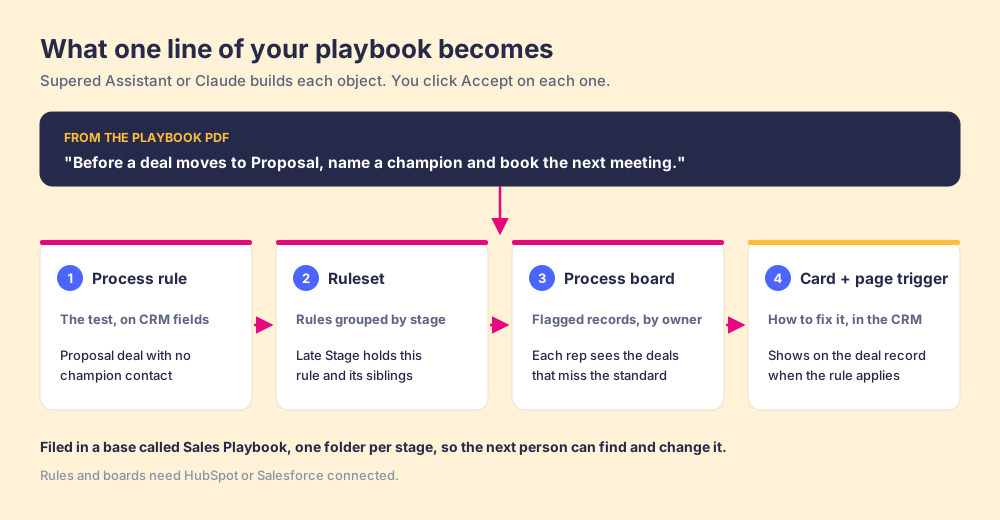
Supered is the business logic for your deals: what a good deal looks like at each stage. When you hand it a playbook, each expectation becomes four things:
- Process rule: the test, written against CRM fields. “Deal in Proposal with no contact marked as champion.”
- Ruleset: the rules for one stage or pipeline, grouped so you can manage them together.
- Process board: the records that miss a rule, by owner, so each rep sees their own list and managers see the team.
- Card and page trigger: the how-to for fixing it, shown on the CRM record when it applies.
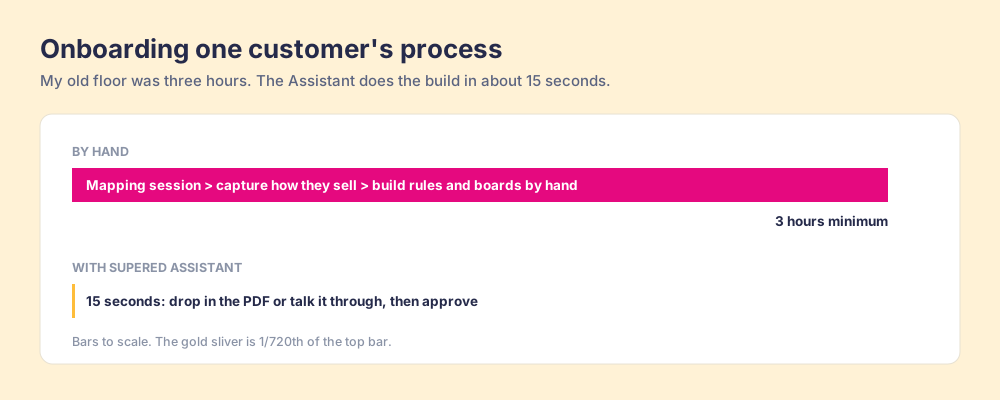
Building that by hand used to take me three hours, minimum. A mapping session, then capturing how the customer sells, then building the rules and boards one at a time. Today it takes about 15 seconds from a PDF or from somebody talking.
How do you build an AI sales playbook from a PDF, step by step?
Fifteen seconds is the build. Give yourself half an hour end to end, because the review is where you earn a board your reps trust.
1. Prep the playbook
Don’t feed it all 40 pages. Pick one stage, usually the one where your forecast gets fuzzy. Then cut anything that isn’t an expectation (company history, the mission slide) and tighten what’s left so a CRM could check it:
- Vague: “Make sure the deal is well qualified.”
- Checkable: “Before Proposal, the deal has a champion contact, a next meeting date and an amount.”
Use your CRM’s real stage names and field names. If your playbook says “Solutioning” and HubSpot says “Demo Completed,” the AI has to guess, and you don’t want it guessing.
No PDF? Click the microphone in the Assistant and talk through what you expect at that stage, the same way you’d explain it to a new rep. That works as well as a PDF.
2. Set up your base and folder names
Decide where things go before the AI builds anything. I use one base called Sales Playbook, one folder per stage, and rulesets and boards named after the stage they cover (“Late Stage,” “Late Stage Deals”). Six months from now, someone will need to find the rule that flagged their deal. Give them a filing system that makes sense.
3. Turn on the Assistant and paste the prompt
An admin turns it on at Settings, then Artificial Intelligence, and sets it to Enabled (Supered Assistant). Make sure HubSpot or Salesforce is connected, since rules and boards run against your CRM. Open the Assistant in the app or the Chrome extension, attach the PDF and send this prompt:
Attached is our sales playbook. Build the Late Stage part of our process from it.
Create:
1. One process rule for each expectation, using our real HubSpot deal properties and stage names.
2. A ruleset called "Late Stage" that holds those rules.
3. A process board called "Late Stage Deals" for open deals in Proposal and Contract Sent.
Don't write any cards yet.
File everything in a base called "Sales Playbook," in a folder called "03 Late Stage."
Make sure no two rules on the board flag the same records.
Before each change, tell me which property and condition the rule uses.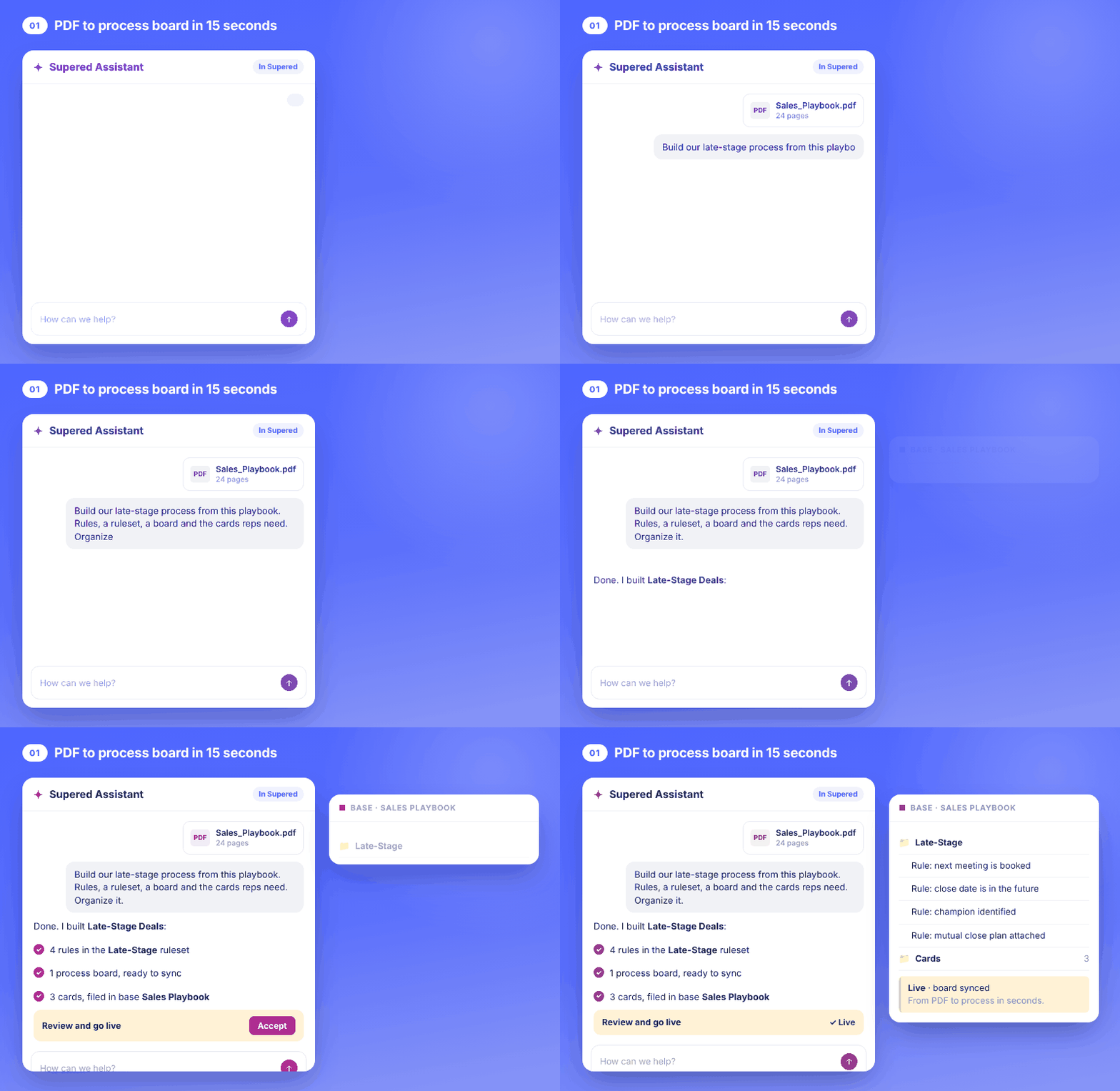
4. Review and accept each change
The Assistant proposes, and you click Accept on each create or update. It never deletes anything. Read every rule before you accept it:
- Property: is it checking the field your team uses, or a lookalike your reps leave blank?
- Condition: “is unknown” and “is before today” catch different deals.
- Scope: is the rule limited to the stages and pipeline it was written for?
If one’s wrong, say so in the chat (“use the Champion association, not the Champion text field”) and it’ll propose a fix.
5. Sync the board
Ask it to sync the board and report back:
Sync the Late Stage Deals board. When it's done, tell me how many records each rule flags and which three owners have the most flagged deals.Those counts are your first look at whether the playbook matches reality. Tune the rules (the section below on rules that flag too much or too little shows how) until the board flags the deals you’d want flagged. Don’t write cards until it does.
6. Write the cards from the board
I know this sounds backwards. Most people write the content first. But once the board is right, it tells you exactly where reps get stuck, so every card has a job: fixing one flag.
For each rule on the Late Stage Deals board, write one card that tells the rep what good looks like and how to fix the flag, in under 100 words. File them in Sales Playbook > 03 Late Stage. Show me each card before you create it.7. Add page triggers so the cards show up in the CRM
A card that never shows up is a doc with better formatting. Ask for triggers:
For each card in Sales Playbook > 03 Late Stage, create a page trigger in HubSpot so the card shows when the page contains "Proposal" or "Contract Sent", so reps see the checklist while they work those deals.Now a rep opens a deal that’s missing a champion and the card telling them how to find one is right there on the record.
Can you build it from Claude with the Supered MCP?
Yes. Supered is 100% headless, so you can make anything in Supered from anything else, one prompt each. If your team already lives in Claude, connect it through the Supered MCP server: in Supered’s AI section, click Connect Claude, click Connect for Supered and your CRM, then Continue Connecting. Custom connectors usually need a paid Claude plan (Pro, Max, Team or Enterprise), and on Team and Enterprise an admin may need to allow them first.
Then use the same prompt. Claude reads the PDF, builds through the MCP, and asks you to approve each create or update. It can’t delete anything either. The bonus is everything else Claude can see. Ask it to compare your board’s most-flagged rules with your call notes, or to check a deal against your process rules before a change (that check is read-only and never touches the CRM). The Claude second brain post walks through six more builds from there.
What do you do when a rule flags too much or too little?
Your first board will be wrong somewhere. Plan on it.
Think of a smoke detector. One that goes off every time you make toast gets its battery pulled, and now it protects no one in the house. One with a dead battery is worse, because it looks fine on the ceiling. You want the one that stays silent through breakfast and goes off for a real fire.
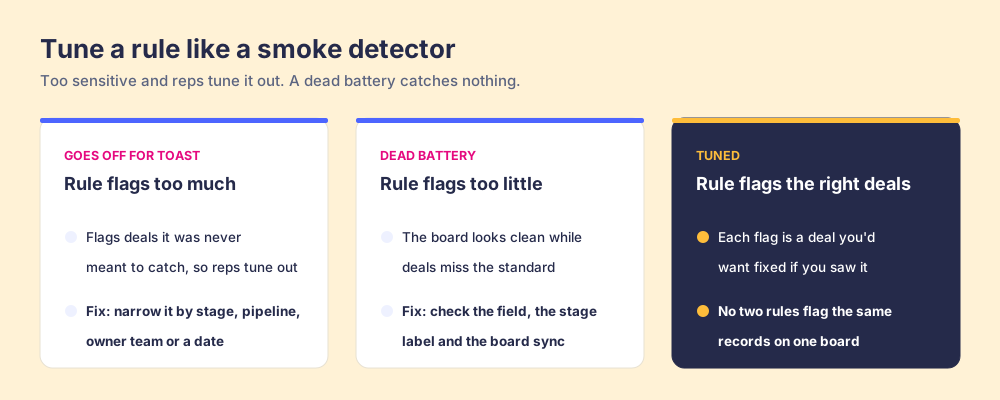
Too much (the toast problem). The rule catches deals it was never meant for: renewals in a new-business rule, a deal created yesterday held to a 30-day standard. Reps learn to scroll past the board. Narrow it:
The "No champion" rule flags too many deals. Limit it to the New Business pipeline, deals in Proposal or later, created after January 1 this year. Show me the new count before and after.Too little (the dead battery). The board looks clean and you can name three deals that shouldn’t pass. Usually the rule checks a field your team leaves blank, or a stage label that changed, or the board hasn’t synced. Open one of those deals, ask the Assistant why the rule isn’t flagging it, and it’ll read the rule against the page you’re on.
Overlap. Two rules flag the same records, so a rep sees one problem twice and the counts double. Keep one rule per data set on a board.
Then keep tuning, because the board tells you where. Supered’s board analytics show records over time, the most-violated rules and the owners with the most flagged records. A rule that half the team misses usually points at a step that’s unclear, and the fix goes in the system: a better card, a clearer field, a tighter rule. If reps don’t run the process, look at the system before you look at the rep.
Why does Supered fit this job?
Because the playbook needs somewhere to live that isn’t a doc and isn’t a chat window.
- The definition of good lives in one place: rules, rulesets, boards and cards sit in Supered, filed in bases and folders you named.
- People follow it where they work: cards and page triggers show up on HubSpot and Salesforce records, and reps can ask the same rules from Claude.
- AI agents follow it too: through the MCP, an agent reads the same rules your reps see, and can check a record against them first.
- A person approves every change: the Assistant and Claude propose, you accept, and nothing gets deleted.
- You can see who’s running it: process boards, board analytics and clean streaks by rep, so you can inspect what you expect and spend your time coaching.
I call Supered a living, breathing system for that reason, and your team’s second brain. It’s also how a team gets into an AI-first world with the process intact. AI amplifies the process you have, so give it a process that’s written down, running and measured.
What can’t an AI sales playbook do for you?
- Settle a fight: if your managers disagree on what “qualified” means, the AI will build whichever version you hand it. Agree first.
- Replace your judgment: you approve each change on purpose, so a person signs off before reps see anything new.
- Read the buyer’s mind: rules check what’s in the CRM. Pair seller activity with buyer facts (a named champion, a next meeting the buyer accepted) so a deal moves on the buyer’s reality as well as the rep’s checklist.
If you want the foundations before the AI part, start with what a sales playbook is, then how to create a sales playbook, or grab a sales playbook template and build from that.
This post is part of my Claude second brain series. Once the board is running, keep the cards fresh with AI competitive intelligence and build your next hire’s plan with AI sales onboarding.
Got a playbook PDF sitting in a drive? Book a demo and bring it. We’ll turn it into rules, a board and cards in your CRM while you watch.
Frequently asked questions
What is an AI sales playbook?+
Can AI build a sales playbook from a PDF?+
Is playbook AI the same as an AI playbook generator?+
Can I build my AI sales playbook from Claude instead of Supered Assistant?+
What if a process rule flags too many deals?+
Does an AI sales playbook work in HubSpot and Salesforce?+
One definition of a good deal.