AI Sales Onboarding: Build a New Rep's Plan From Your Second Brain With Claude and Supered
How to have Claude build a new rep's onboarding plan from the cards and rules already in Supered: phases, tasks, roles, due dates and a quiz, saved as a template. Then measure ramp on whether the rep runs the process.
AI sales onboarding is using an AI like Claude to build, assign and track a new rep's onboarding plan from the process your team already runs, so the plan teaches the same standard the rep is measured on from week one.
How to build an AI sales onboarding plan with Claude and Supered
30 min- 1
Connect Claude to Supered
In Supered, open the AI section and click Connect Claude, then click Connect for Supered and your CRM and finish the steps.
- 2
Inventory what the new rep needs
Ask Claude to search your Supered content and list the cards, guides and process boards a new rep in this role has to know, grouped by stage.
- 3
Build the onboarding template
Have Claude create an action plan template with phases, sections and tasks linked to those cards and guides, with due dates set as days from the start date.
- 4
Add a quiz
Have Claude write a knowledge check from the same cards and attach it to a task, with a passing score you choose.
- 5
Create the plan for the new hire
Have Claude create an instance from the template, assign the new rep and their manager by email with the right roles, and use the rep's start date.
- 6
Hold the rep to the board from week one
Confirm the process boards the plan teaches are synced, so the new rep's own records are checked against the same rules.
- 7
Check progress
Ask Claude for overdue tasks, quiz attempts across the template, and the new rep's flags and clean streak on the board.
I’ve done 100+ sales implementations. The course a new rep takes and the process they get inspected on tend to be two separate documents, written by different people at different times.
Enablement writes the course, RevOps builds the stages, and the manager carries a third version in their head. So the new rep passes a quiz on one standard and gets inspected on another.
AI sales onboarding is using an AI like Claude to build, assign and track a new rep’s onboarding plan from the process your team already runs, so the plan teaches the same standard the rep is measured on from week one. My take, and some enablement folks will disagree: if the plan and the process board don’t share a source, the AI only helps you ship the wrong course faster. Build the plan from the board, and ramp gets measured on output. In week three, I want to know whether the new rep runs the process. Whether they finished the course tells me a lot less.
Why doesn’t a finished course tell you much about ramp?
Ramp is getting longer. The Bridge Group’s 2026 AE report, from 158 B2B companies, put average account executive ramp at 6.2 months, the highest in the study’s history, with 48% of reps at quota (The Bridge Group, 2026). Six months is a long time to wait to find out whether the onboarding worked.
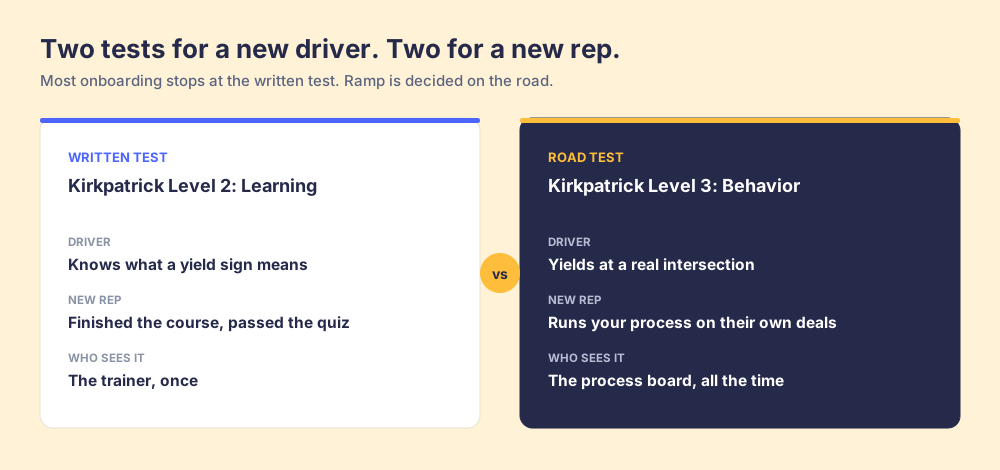
And most programs grade themselves on the wrong thing. Donald Kirkpatrick laid out the four levels of training evaluation in the 1950s: reaction, learning, behavior and results. Level 2, Learning, “measures the degree to which the target audience acquires the intended knowledge, skills, attitude.” Level 3, Behavior, “measures the degree to which the target audience performs the critical behaviors in its environment” (Kirkpatrick Partners).
I agree with Kirkpatrick completely, and I’d push it one step further. Course completion and quiz scores are Level 2. They’re inputs. A sales manager needs Level 3, and they need it on a weekly cadence, from the CRM, without a survey.
Think about getting your driver’s license. The written test tells the DMV you know what a yield sign means. The DMV doesn’t hand you the keys on that alone. You still take the road test, because knowing the sign and yielding at a real intersection are two different skills.
Memory makes the written test even weaker. A 2015 replication of Ebbinghaus’s forgetting curve found savings had fallen to about 4% after a month (Murre and Dros, PLOS ONE, 2015). Whatever the rep crammed in week one, they’re rebuilding by the time a real buyer asks the hard question. I made the longer case for onboarding as a behavior problem in sales onboarding, and the ramp math is in sales ramp time. Below is the build.
What goes into an onboarding action plan in Supered?
If you’ve already started a Claude second brain, you have most of the raw material: cards that explain each step, rulesets that define it, and process boards that check it. An action plan puts those in order for one person.
- Phases: the big chunks of the ramp, like learn the process, shadow and practice, run your own deals. They map well to a 30-60-90 day sales plan.
- Sections: groups of tasks inside a phase, usually one per stage or skill.
- Tasks: the things the rep clicks done on. A task can link to an existing card or guide, so the rep gets an Open card or Open guide button instead of a dead link to a doc.
- Due dates: on a template, each task is due a set number of days after the start date. Create the plan for a new hire and those become real dates from their start.
- Roles: Supered’s defaults are Key Person, Coordinator and Collaborator, and you can add your own. I use Key Person for the new rep and Coordinator for their manager.
- Quizzes: a knowledge check attached to a task. It gates that task, so the rep has to pass before they can mark it complete.
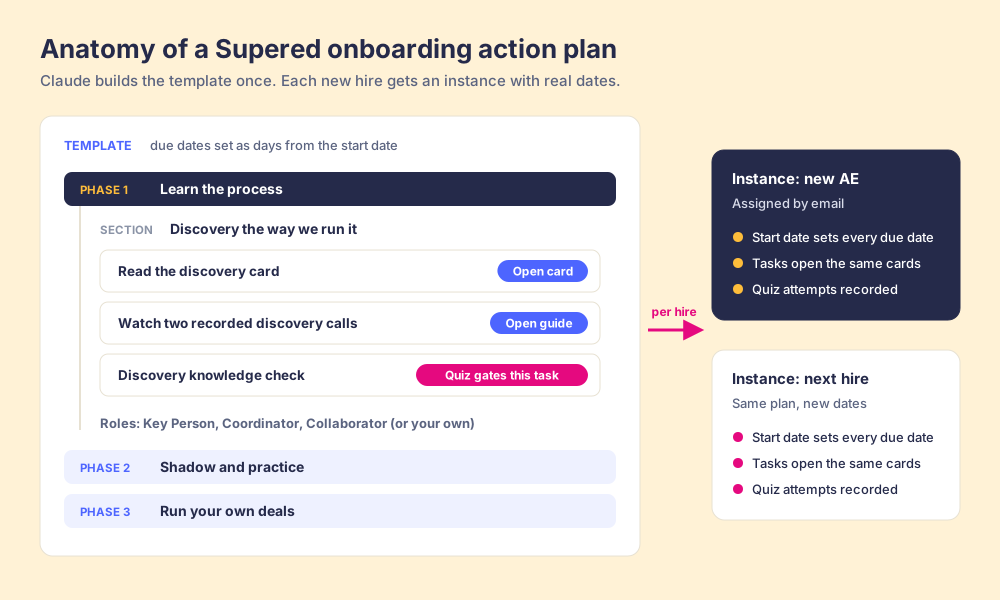
Claude can build all of that through the Supered MCP server. It can also turn a one-off plan into a template, which copies the phases, sections, tasks and quizzes, and then create a fresh plan from that template for the next hire.
How do you build an AI sales onboarding plan with Claude, step by step?
Before you start: connect Claude in Supered’s AI section (click Connect Claude, then Connect for Supered and your CRM). Custom connectors usually need a paid Claude plan. Neither Claude nor Supered Assistant can delete anything, and you approve each create or update.
1. Take inventory of what a new rep needs
Start with what exists. If you skip this, Claude will happily write you new content, and you’ll end up with two versions of your process again.
I'm hiring an Account Executive. Search our Supered content and list the cards, guides and process boards a new AE needs to know, grouped by deal stage. Flag any stage that has a process rule but no card explaining it, and any card that looks out of date. Don't create anything yet.The gaps list is the useful part. A rule with no card means you’re holding reps to a step you never taught them. Fix those cards first.
2. Build the template
Now have Claude assemble the plan as a template, so the timing carries over to every hire.
Create an action plan template called "AE Onboarding" in our Sales base. Three phases: Learn the process (days 1 to 10), Shadow and practice (days 11 to 30), Run your own deals (days 31 to 90). Inside each phase, add one section per deal stage. Make each task link to the existing card or guide you found, with due dates as days from the start date. Use the Key Person role for the new rep and Coordinator for their manager. Show me the outline before you build it.Read the outline before you approve it. Fourteen tasks in the first week is a firehose with nicer formatting. I’d rather see a short list of tasks tied to the steps that show up on the board.
3. Write the quiz from the same cards
The quiz should test the steps the board will check, using the cards the rep was assigned. Nothing else.
Add a quiz to the last task in the Learn the process phase. Write 8 questions from the cards linked in that phase, focused on the steps our late-stage process board checks: what has to be true before a deal moves forward, and why. Single or multiple answer. Require 7 correct to pass. Use the button text "Check your knowledge."Because the quiz gates the task, the rep can’t mark week one done without passing it. And because the questions come from the same cards, a missed question points straight at the card to reread.
4. Create the plan for the new hire
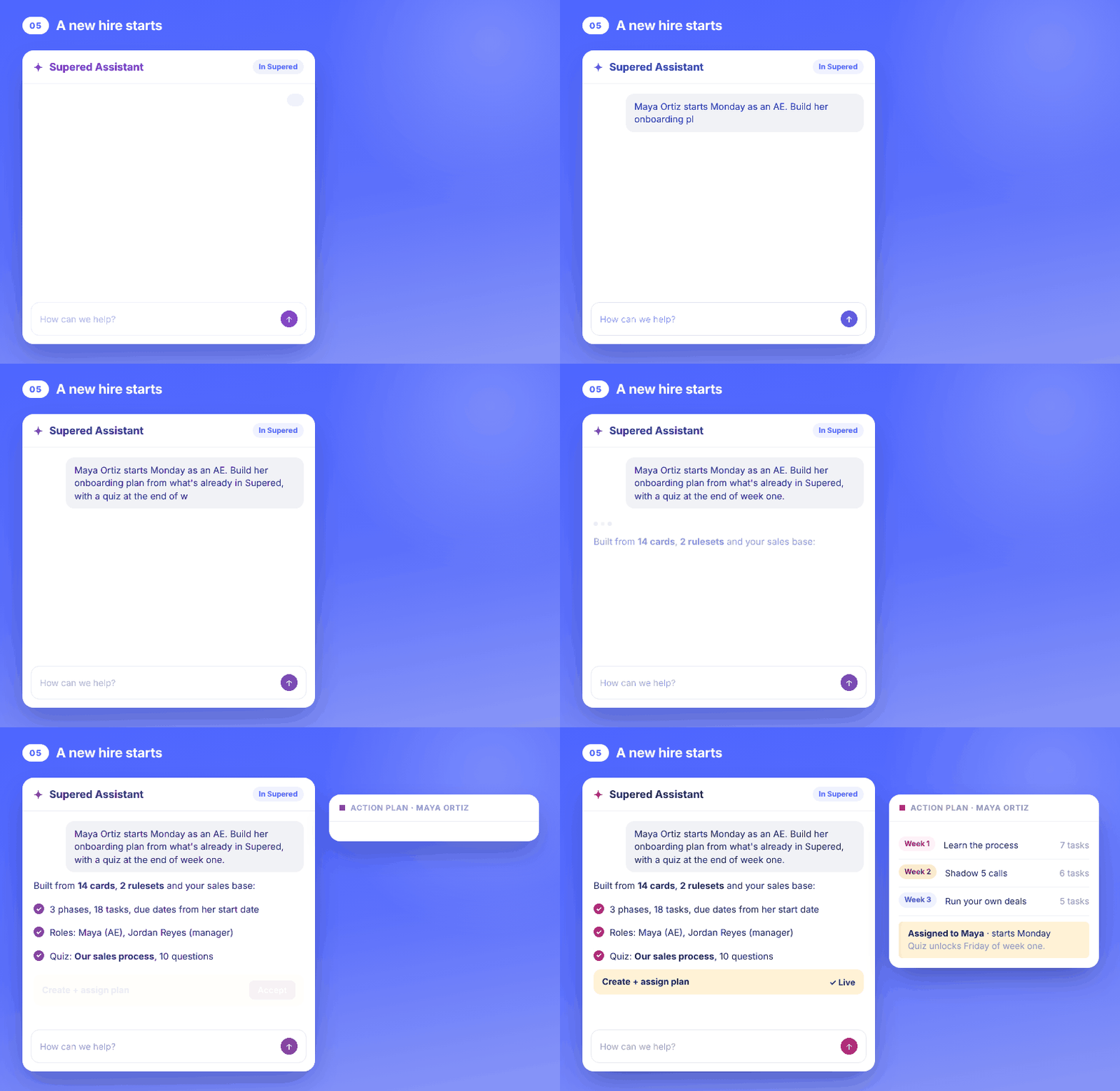
Create a plan from the AE Onboarding template for Maya Ortiz, starting Monday, in the America/New_York time zone. Assign Maya as Key Person and Jordan Reyes as Coordinator, and send them both an email.Next hire, same prompt with a new name. One template covers every AE you hire after this one, and when you update a card, the task that links to it opens the new version.
5. Put the rep on the board from week one
Teams skip this step all the time. The plan teaches the standard, and the process board holds the rep to it starting the day they own their first record.
List the process boards that check the steps taught in the AE Onboarding template. Sync them, and tell me when each sync is done and how many records each board flags right now.No new board for new reps. They get held to the same rules as the rest of the team. A ramped quota already gives them room on the number, so they don’t need a separate definition of a good deal too.
Why should the plan and the board teach the same standard?
Airline pilots train in a simulator with the same checklists they use in the real cockpit. A pilot doesn’t learn one set of steps in training and a different set on the flight deck, because an engine warning is the worst possible time to translate between two versions.
Sales onboarding usually asks reps to translate. The course says “confirm a champion.” The stage requirement says “champion field filled in.” The manager asks “who’s your coach on this?” Three phrasings, one step, and the new rep has to guess which one counts.
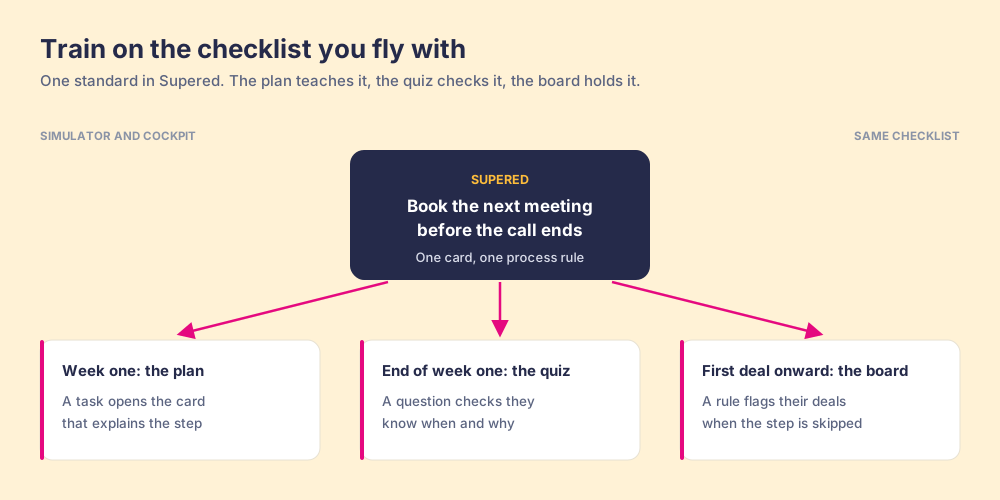
When the plan is built from the cards behind your process rules, there’s one phrasing. The task opens the card. The quiz asks about the card. The board flags the record when the step gets skipped, and the flag points back to the same card. The new rep sees the standard three times, in three formats, and it never changes on them.
Inspection is what makes the difference. In our State of Sales Enablement research with 198 sales leaders, teams that inspect process adherence consistently hit quota at 6.3x the rate of teams that rarely do. A new rep is the person who needs that inspection most, and usually the one who gets the least of it, because the manager is busy with the reps who already have pipeline.
How do you check a new rep’s ramp without a spreadsheet?
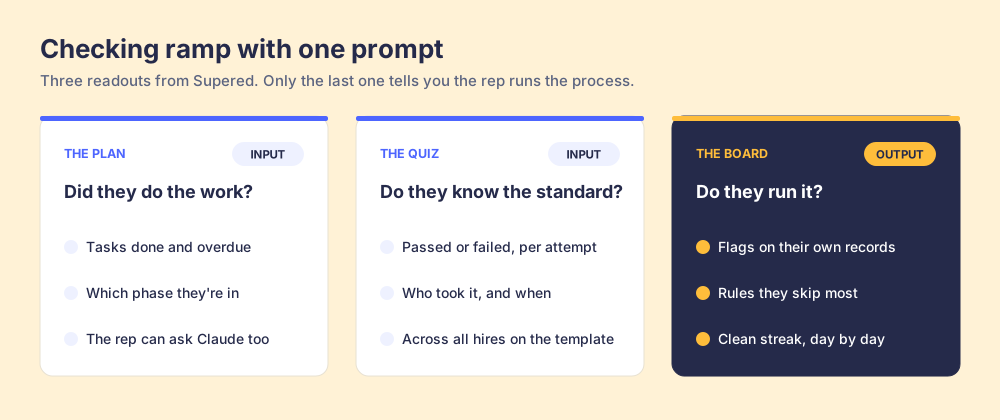
Once the plan is live, you need three readouts, and Claude can pull all three from Supered.
- The plan: which tasks are done, which are overdue, and which phase the rep is in. The rep can ask Claude this too, about their own assigned plans.
- The quiz: every attempt, passed or failed, with who took it and when. Filter by template and you see it across every hire who’s ever run the plan.
- The board: flags on the new rep’s own records, the rules they skip most, and their clean streak.
I’d run this one every Friday for the first 90 days:
Give me a ramp check for Maya Ortiz. From her AE Onboarding plan: tasks overdue and what phase she's in. From quiz submissions on the AE Onboarding template: her attempts and whether she passed, plus how other AEs on this template did on the same quiz. From our process boards: how many of her records are flagged, which rules she skips most, and her current clean streak. Finish with the one thing her manager should coach on next week.Read the readouts in order of weight. Overdue tasks are worth a nudge. A failed quiz means reread a card. Flags on the board are where the coaching goes, because that’s the road test. And if three hires in a row miss the same quiz question, the card is the problem, and you fix it once for the whole team.
Why does Supered fit AI sales onboarding?
Most onboarding tools hold the course. Supered holds the course and the process it’s teaching, in the same place, so Claude can build one from the other. What that looks like:
- One source for the plan and the rules: tasks link to the same cards your process rules point to, so updating a card updates the onboarding.
- Templates with relative dates: due dates are days from the start, and each hire gets their own instance with real dates and their own assignments.
- A quiz that gates the work: the rep passes before the task completes, and managers can pull attempts across every plan from a template.
- The board from day one: process boards run against HubSpot or Salesforce, and new reps see their flags inside the CRM, where they’re working.
- A person approves each change: Claude and Supered Assistant propose, you click Accept, and neither can delete anything.
You can do the same builds from Supered Assistant inside the app or the Chrome extension, including by attaching a PDF of your current onboarding doc. The onboarding and ramp page shows the rest of it, and if you’re comparing tools, I wrote up what to look for in sales onboarding software.
What can’t AI sales onboarding fix?
- A process your managers haven’t agreed on: if your managers define a qualified deal three ways, Claude will build a plan for whichever one you hand it. Settle the standard first.
- Missing cards: the plan is only as good as the content it links to. The inventory step will show you the holes, and somebody still has to approve the fixes.
- Practice: a plan can schedule ride-alongs and call reviews. The new rep still has to get on the phone, and the manager still has to coach.
- Rules without a CRM: process boards need HubSpot or Salesforce connected before they can check anything.
This post is part of my Claude second brain series. The plan is only as good as the cards behind it, so build them with the AI sales playbook walkthrough and keep them current with AI competitive intelligence.
If you want to watch us build the plan, the quiz and the board from your own process, book a demo. Bring the onboarding doc you’ve got today, even the outdated one.
Frequently asked questions
What is AI sales onboarding?+
Can Claude build an onboarding plan in Supered?+
How do due dates work in a Supered onboarding template?+
How does a quiz work in a Supered action plan?+
How do you measure ramp with AI sales onboarding?+
One definition of a good deal.