What Is Lead Enrichment? The Three Questions It Answers, and the Order That Sets the Cost
Lead enrichment answers three questions about a new lead: is this person ours, does the company fit, how do we reach them.
The order you ask in sets the cost, because a mobile costs 8 to 10 times a work email.
Lead enrichment is the practice of adding the missing facts to a new lead from outside data, whether the person is already in your CRM, whether their company fits, who should own them, and how to reach them, so the next action on that lead can be decided and taken.
A good emergency room does not send a patient with a sprained wrist for an MRI. A nurse checks whether you are already a patient and whose care you are under, takes your pulse and temperature, and only then decides who needs the expensive machine. The scan is not the problem. Ordering it for the person with a splinter is.
Lead enrichment works the same way, and most setups run it backwards. The field list is identical on every vendor page. What decides whether lead enrichment pays is the order you ask the questions in, because the questions cost wildly different amounts: on three vendors’ published meters, checked October 2, 2026, a mobile number costs 8 to 10 times a work email, while the first question, whether this person is already in your CRM, buys no data at all.
Lead enrichment is the practice of adding the missing facts to a new lead from outside data, whether the person is already in your CRM, whether their company fits, who should own them, and how to reach them, so the next action on that lead can be decided and taken.
What is lead enrichment, and what does it add to a lead?
A lead arrives thin. A form gives you a name and an email. A LinkedIn profile gives you a name, a title and a company, and no way to write to them. Lead enrichment fills the gap with three questions, and the questions matter more than the fields.
- The chart question. Is this person, or their company, already in the CRM, and who owns them? A match sends the lead to its owner and ends the spending. Clay’s HubSpot integration ships a Lookup object action for exactly this check, and Clay University puts the HubSpot Object ID first in the filter list because matching on the record ID “is the most precise option available.”
- The pulse question. Does the company fit? Industry, headcount, revenue range and location come from the company domain, and they are the cheap fields: HubSpot’s native enrichment fills them from Starter up (HubSpot knowledge base, updated July 20, 2026).
- The owner question. Who works it? Fit and territory decide the owner; the lead routing guide covers the rules once the fields exist.
- The scan question. How do we reach them? A work email first, a mobile only when a rep will dial it.
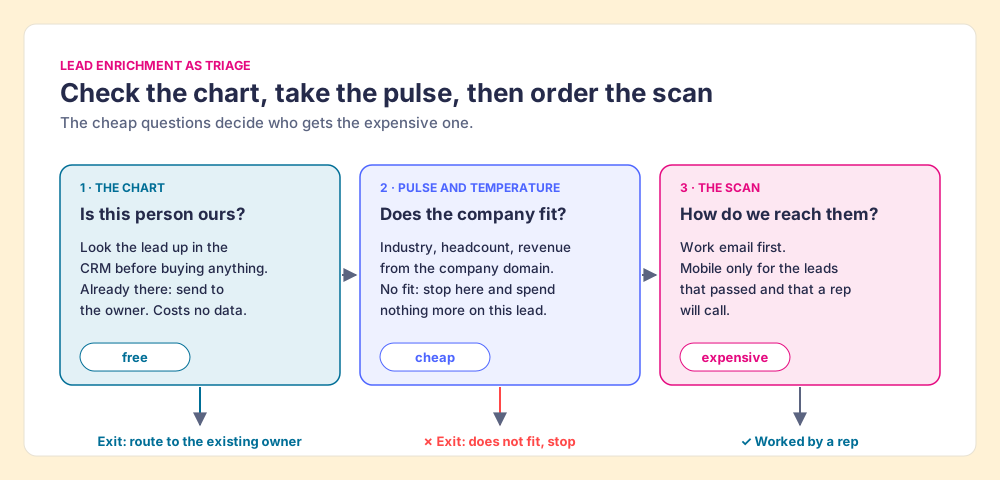
The picture stops in one place. An emergency room has to treat whoever comes through the door. A sales team does not, and a lead that fails the fit question can stop there with nothing more spent on it.
Lead enrichment is narrower than its cousins on this site. CRM data enrichment completes and refreshes records you already hold; the data enrichment tools guide sorts the software by job. Lead enrichment is the moment a new name shows up and someone has to decide, quickly, whether and how to act.
What is email enrichment, and why does it run in two directions?
Email enrichment is the phrase that causes the most confusion, because it names two opposite jobs.
An inbound lead arrives like a letter with a return address and an unreadable signature. You know where to write back; you do not know who wrote. Email enrichment here means turning the address into a person and a company, a reverse lookup. FullEnrich prices a reverse email lookup at 1 credit (FullEnrich pricing, checked October 2, 2026), and HubSpot’s own enrichment only runs on a contact with a business address: “Contacts must have a business email address. Personal addresses such as Gmail or Yahoo will not be enriched.”
An outbound lead is the reverse: you know exactly who you want to write to and have no address. Email enrichment here means finding the work email, then deciding whether to trust it. Clay’s people-enrichment lesson says its waterfall validates each email with ZeroBounce by default and counts catch-all addresses as valid unless you switch on “Only mark Safe to Send emails as valid” (Clay University). The Clay email finder guide works through that setting.
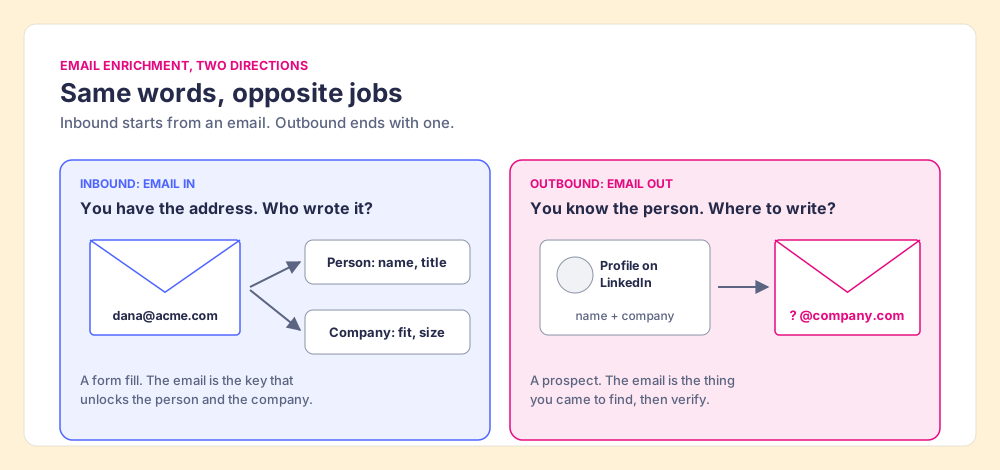
The direction changes the order. Inbound, the email you already hold answers the chart and pulse questions almost for free, and the only purchase left is a phone. Outbound, the email is itself the purchase, so the fit check has to happen from the company name before you buy anything.
How much does lead enrichment cost per lead?
Less than people fear for the email, more than they expect for the phone. The published credit rates per field found, from the vendors’ own pages on October 2, 2026:
| Vendor | Work email | Mobile | Source |
|---|---|---|---|
| Apollo | 1 credit | 8 credits | Apollo API docs |
| LeadIQ | 1 credit | 10 credits | LeadIQ pricing |
| FullEnrich | 1 credit | 10 credits | FullEnrich pricing, $0.055 a credit on Pro |
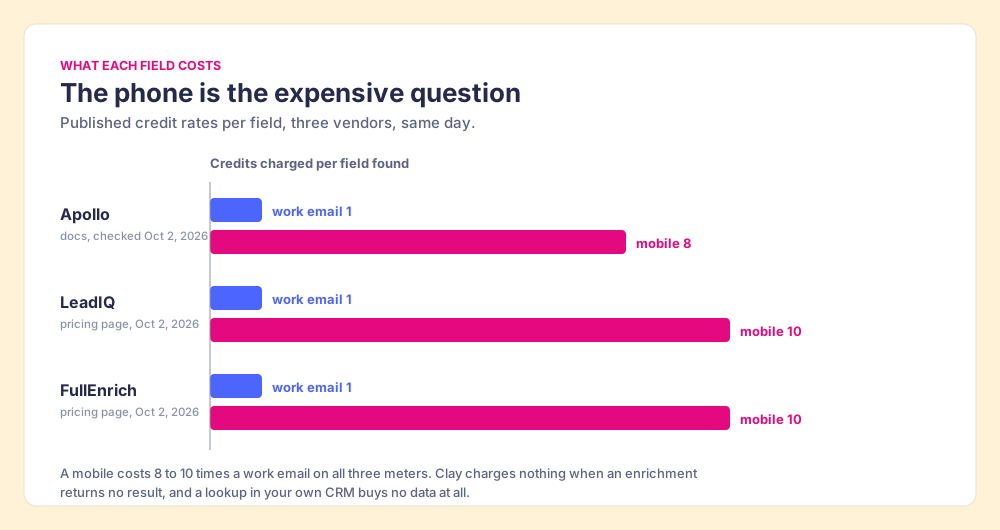
Do the arithmetic at FullEnrich’s Pro rate and an email is about 5.5 cents while a mobile is 55. For every 100 leads that fail your fit check, skipping the mobile saves 1,000 credits, $55, and the email you skipped saves another $5.50. Small per lead. Not small across an inbound program that enriches everything on arrival.
Two meters run the other way. Clay’s Data Credits start at $0.05, and “if an enrichment returns no result, you’re not charged Data Credits or Actions” (Clay pricing, checked October 2, 2026), which is why a waterfall can ask provider after provider without paying for the misses. And HubSpot’s native fit fields come with the Starter seat you already pay for. The cheap questions are cheap. The expensive one is expensive by an order of magnitude, and it is the one most likely to be bought for a lead no rep ever calls.
When should you enrich a lead?
At three moments, each for a different reason.
- At entry, for inbound. A form fill is a person with their hand up, and they cool fast; the speed to lead guide has the research on how fast. Enrich at entry, in order, so routing can happen while the lead is warm. HubSpot’s settings call this “Automatically enrich new records” (HubSpot knowledge base, updated July 31, 2026).
- At the moment of work, for outbound. A name on a list costs nothing until you buy its phone. Enrich when a rep picks the lead to work, and the expensive field gets bought for someone who will be called that day.
- On a schedule, for everything kept. A lead enriched once is a photograph, and people walk out of photographs. In January 2026, 20.6% of US wage and salary workers had been with their employer a year or less (Bureau of Labor Statistics, released September 24, 2026). HubSpot’s continuous mode refreshes previously enriched records monthly; Clay’s CRM enrichment page describes scheduled refreshes “to catch job changes and company growth.”
The mistake to avoid is the batch that runs all fields on every new lead overnight. It is late for inbound and wasteful for outbound in the same run.
How do you set up lead enrichment, step by step?
Write the order down once, wherever the enrichment runs (a Clay table, a HubSpot workflow, a vendor’s automation), and put a gate before each meter.
- Match. Look the lead up in the CRM by email, then by domain. Found: hand it to the owner and stop.
- Fit. Pull firmographics from the company domain. No fit: stop, and record why.
- Route. Name the owner from fit and territory before anyone acts.
- Email. Find or confirm the work email, about 1 credit, and choose your catch-all rule by sending volume.
- Mobile. Buy the phone, 8 to 10 credits, only for leads a rep will call. Not calling: skip.
- Save. Write back to the CRM by record ID. Clay University’s HubSpot docs keep “Ignore blank values” on by default, “so blank values coming from Clay are left alone in HubSpot.”
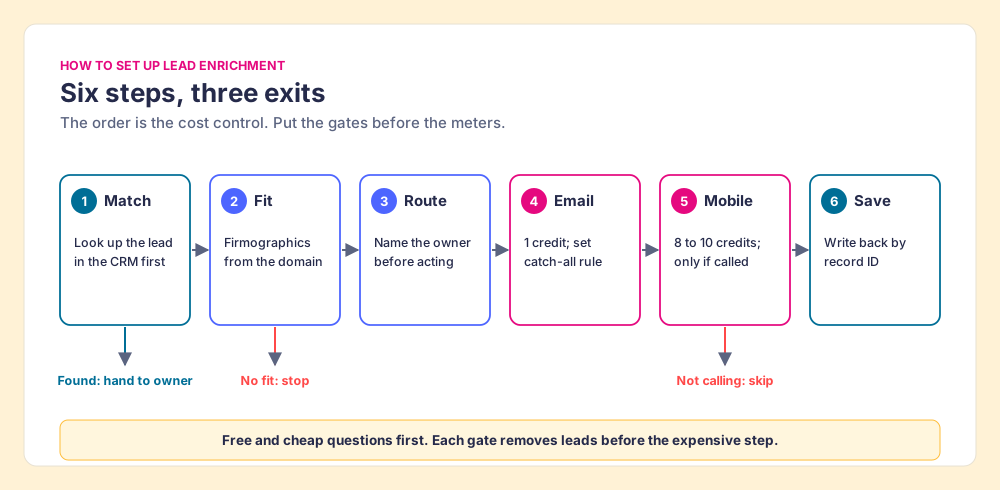
I ran RevOps as a service for HubSpot customers for years before Supered, and the enrichment setups that wasted the most money I saw had a mobile column near the front of the table, filling for every row. Moving that column behind the fit gate costs nothing to build.
Where does Prospector fit in lead enrichment?
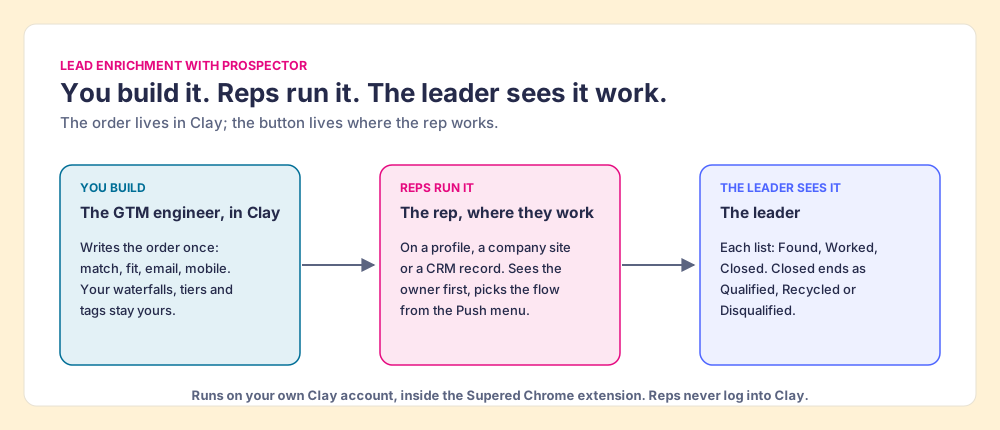
For teams on Clay, the order above lives in a Clay table the GTM engineer builds once. The hard part is the last mile: outbound lead enrichment wants to happen at the moment of work, and the rep’s moment of work is a LinkedIn profile, a company website or a CRM record, not a Clay tab.
Prospector, which we make, puts the GTM engineer’s table one click from those pages. The rep sees whether the person is already in the CRM and who owns them before anything runs, and sees a flag when a teammate already prospected them. Then the rep picks the flow from a Push menu, the team’s Clay table runs in the order it was built, and the lead lands in HubSpot, Salesforce or Pipedrive. “Your logic stays yours: waterfalls, tiers, tags, and sequence variables.” The leader sees each list as Found, Worked and Closed, and every closed lead ends the way the process says: Qualified, Recycled or Disqualified. Clay plus Supered is the best way for a sales team to prospect: GTM engineers build in Clay, reps never open Clay.
Prospector works within LinkedIn’s terms and does not copy search results in bulk; the contact data comes from Clay’s waterfall on the customer’s Clay account. Supered does not bring its own database. It brings Clay’s waterfall across 200+ providers, which is every database, routed, and that is why we chose Clay as our only data provider. Prospector runs inside the Supered Chrome extension and costs $45 per rep per month, billed annually, from one rep, on your Clay plan and credits. Start with the Supered Clay template, or bring your own tables. Prospector for GTM engineers shows the builder’s side, and the sourcing use case walks the rep loop.
Choose something else if:
- No Clay account. Prospector needs one. A single-database tool with a credit meter, such as Apollo, is the simpler start; the contact enrichment tools guide compares them.
- Inbound only, no rep in the loop. Enrichment at entry is a job for a Clay table triggered from the CRM or HubSpot’s automatic mode; HubSpot data enrichment covers the native settings.
- Fit fields are all you need. HubSpot’s native enrichment answers the pulse question from Starter up.
Why trust this guide?
Before Supered I started RevPartners, a HubSpot partner that did only sales implementations, sold roughly twice as much Sales Hub as any other partner, and reached HubSpot’s Elite tier in 13 months. Enrichment tables were part of most of those builds. Supered is rated 5.0 from 122 reviews on the HubSpot marketplace and 4.9 out of 5 from 81 reviews on G2 (checked October 1, 2026). The disclosure: we make Prospector, and it appears above for teams that run Clay.
What we recommend
Treat lead enrichment as triage and write the order down before you buy a single credit. Enriching every field on arrival overpays for leads no rep works; enriching nothing until a rep asks leaves inbound leads waiting. We recommend an ordered setup with gates, because the meters above already make the case:
- The free question first. A CRM lookup buys no data and stops the duplicates before they cost anything.
- The cheap question second. Fit fields come with a HubSpot Starter seat or a few Clay credits, and they decide whether the lead earns anything more.
- The expensive question last. A mobile costs 8 to 10 times a work email on Apollo, LeadIQ and FullEnrich, so buy it only for a lead a rep will call.
Inbound leads get that order at entry; outbound leads get it at the moment a rep picks them; everything you keep gets a scheduled refresh, because a fifth of workers had been in their job a year or less in January 2026. If you run Clay, put the order in a table once and the button where your reps already work.
The next read is waterfall enrichment, which explains why the email and mobile steps find more when they ask many providers in turn, and then the Clay Chrome extension guide for how reps run that table without opening Clay.
Frequently asked questions
What is lead enrichment?+
What is email enrichment?+
What is the difference between lead enrichment and data enrichment?+
How much does lead enrichment cost per lead?+
Should lead enrichment run automatically or when a rep works the lead?+
Can HubSpot do lead enrichment on its own?+
Your Clay waterfall, where reps already work.