Lead Routing Ends at the Owner Field. Your Leads Need an Ending.
Lead routing guides stop when the owner field is filled.
The leads get lost after that. The three routing methods, how lead assignment rules work in Salesforce, HubSpot and Pipedrive, what lead routing software costs, and the three rules that route each lead to an ending.
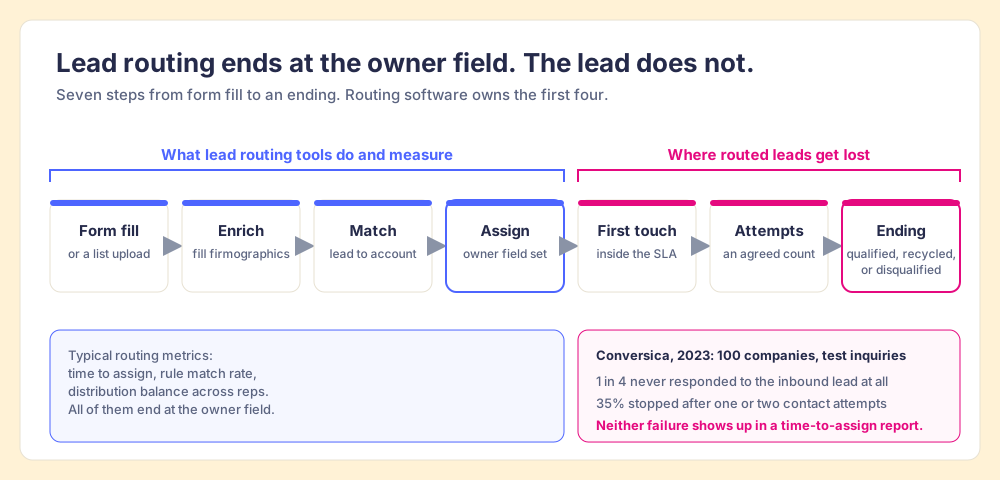
Lead routing is the set of rules that decides which rep owns a new lead and hands it to them, and it works only when each routed lead also reaches an ending: qualified, recycled, or disqualified.
A sorting office is judged on whether the letter reaches the right box. The sorting office never asks whether the letter was opened. Most lead routing advice is written from inside the sorting office, and that is where it goes wrong.
Lead routing is the set of rules that decides which rep owns a new lead and hands it to them, and it works only when each routed lead also reaches an ending: qualified, recycled, or disqualified. The first half of that sentence is what the top guides cover well. The second half is where the money leaks. When Conversica submitted inquiries to 100 mid-market and enterprise companies and tracked the replies for 22 days, one in four never responded to the inbound lead at all, and 35% followed up with only one or two contact attempts (Conversica via Business Wire, May 2023). A router can fill the owner field in a second. It cannot make anyone open the letter.
What is lead routing, and where does it stop?
Read the pages that rank for this term and you get a consistent, useful picture. Default defines lead routing as “the process of internally distributing potential customers sourced through inbound channels” (Default, February 2026). ZoomInfo calls it “the automated process of assigning inbound leads to the right sales rep based on predefined criteria, such as territory, company size, or account ownership” (ZoomInfo, updated July 2026). Both then walk through round robin, territory rules and account matching, and both are right about all of it.
Both definitions also stop at the same verb. Distributing. Assigning. The lead is done, as far as the definition cares, the moment it has an owner.
LeanData’s guide goes one step further, and it deserves the credit: after assignment it starts SLA timers and reroutes leads that a rep has not updated within the window (LeanData, April 2026). LeanData has the right instinct. Its timer still measures the first touch, and the first touch is the middle of the story. A lead that got one call and then sat in “attempting” for five weeks passed the SLA and still went nowhere.
So I would split the job in two:
- Assignment. Picking the owner. Software does this well, quickly, and in every major CRM.
- Follow-through. Getting the lead from owner to an ending. Follow-through is the half that fails, and the half no router can see, because it happens in the rep’s day.
The rest of this post covers both halves, assignment first.
Why does a shared lead queue get worked slower than a named owner?
One routing pattern deserves a warning before the methods, because it feels fair and works badly: the open pool, where new leads land in a shared queue and any rep can claim one.
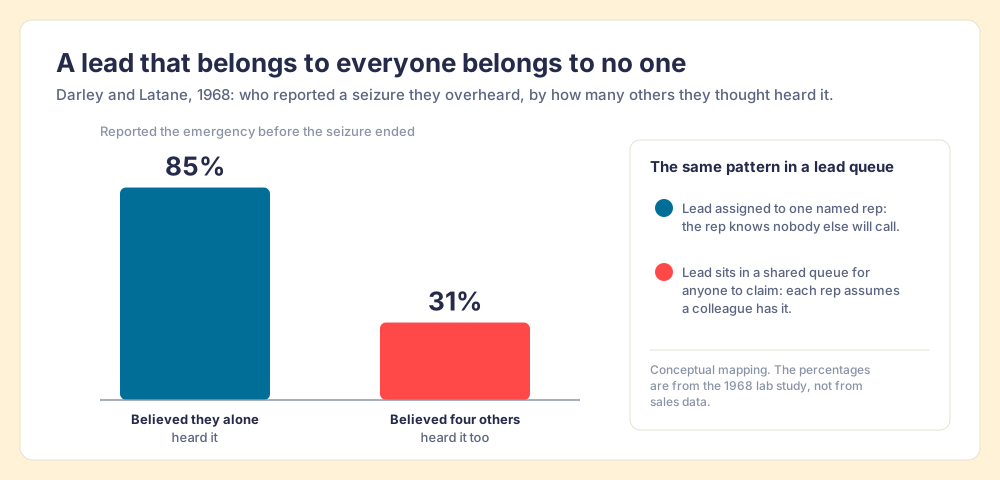
In 1968 John Darley and Bibb Latané put students in separate booths on an intercom and staged a seizure over the line. Of the students who believed they alone could hear it, 85% reported the emergency before the seizure ended. Of those who believed four others could hear it too, 31% did (Darley and Latané, Journal of Personality and Social Psychology, 1968). The students in the second group were not callous. Each of them assumed someone else had it.
A shared lead queue is that intercom. Five reps can see the new lead, so each has a reason to think another will grab it, and the lead with the least obvious value waits longest. A named owner removes the reason. The rep knows no colleague is calling.
The comparison has limits. Students in a booth had no manager and no commission. Reps do, and a hot inbound lead in a pool will get claimed fast. The leads that suffer are the ambiguous ones: the small company, the odd title, the form fill that lands after six in the evening. Those are the leads a pool leaves until last.
Which lead routing method should you use?
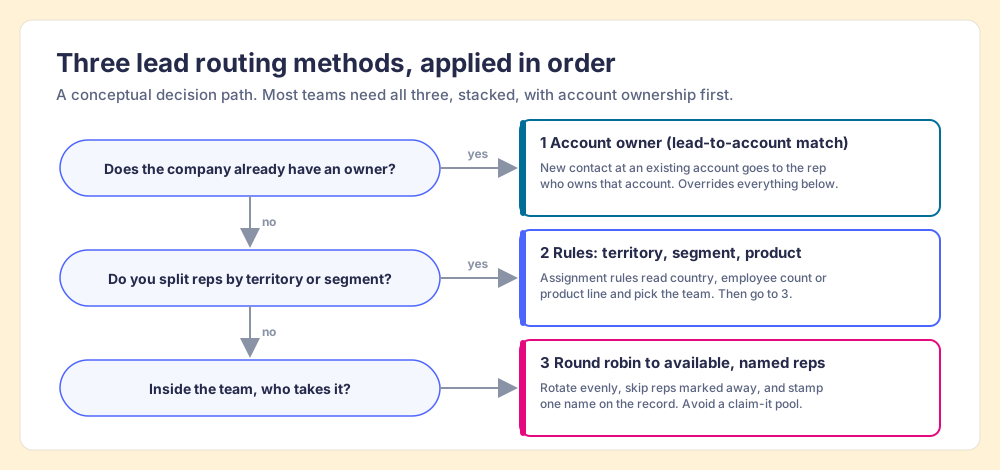
There are three methods worth using, and the best setups stack all of them in a fixed order.
- Account owner first. If the lead’s company is already an account in your CRM with an owner, the lead goes to that owner. Default calls this lead-to-account matching. It keeps a second rep from cold-calling your customer’s new VP, and it overrides everything below it.
- Rules second. Territory, segment or product rules pick the team: country, employee count, industry, the product the form asked about. These are your lead assignment rules, and they should be short enough that a rep can recite them.
- Round robin last. Inside the team the rules picked, rotate evenly among named reps who are available today. Skip anyone who is out. Stamp one name on the record.
Two variants come up often enough to name. Weighted round robin gives a senior rep two leads for each one a new rep gets, which is a fair way to ramp someone. Score-based routing sends high-scoring leads to a faster queue, which is where routing meets HubSpot lead scoring: the score decides how good the lead is, the router decides who gets it. Treat AI routing the same way. A model that picks the owner is one more way to fill the owner field, and the follow-through still needs its own check.
How do lead assignment rules work in Salesforce, HubSpot and Pipedrive?
All three CRMs route leads without extra software. The mechanics differ in ways that matter when you design the rules.
| CRM | Native feature | Plan it needs | How it decides | Limit worth knowing |
|---|---|---|---|---|
| Salesforce | Lead assignment rules | Sales Cloud editions that include assignment rules | Entries checked in order; first match wins; assigns to a user or a queue | ”Only one rule can be in effect at any time” per rule type |
| HubSpot | Workflows with the Rotate record to owner action | Sales Hub or Service Hub Professional or Enterprise | Rotates evenly within a team or a list of users; can assign to available users only | If every user is marked away, the owner stays unassigned |
| Pipedrive | Automatic assignment | Professional and higher plans | Rules on lead added, deal added or deal updated; assign to a user, a team by round robin, or the organization or contact owner | Up to 50 rules per entity type; history kept for seven days |
Sources, checked October 2, 2026: Salesforce Help on lead assignment rules, HubSpot Knowledge Base, updated September 1, 2026, Pipedrive Support, updated September 3, 2026.
Three design notes fall out of that table.
- One rule, many entries, in Salesforce. Because only one lead assignment rule is active, the order of its entries is the whole routing logic. Put account-owner and named-account entries at the top and the catch-all at the bottom, and point the catch-all at a person, because a queue with no owner is the pool from the section above.
- Availability settings in HubSpot. The “Assign to available users only” option skips reps marked away, which prevents leads from piling up behind someone on vacation. It also means that when the whole team is away, the owner field stays blank, so a rule has to catch blank owners.
- The organization owner in Pipedrive. Assigning to the organization owner is Pipedrive’s built-in lead-to-account match. Use it first, then a team round robin.
Do you need lead routing software?
You need lead routing software when native assignment rules run out: matching leads to accounts across messy domains and subsidiaries, routing many objects at once, or booking a meeting with the right rep the moment a form is submitted. Below that, the CRM is enough. Prices below were checked on each vendor’s pricing page on October 2, 2026, and none of these three companies had announced a merger or acquisition as of that date.
| Lead routing software | Best fit | Pricing (checked 2026-10-02) | Tradeoff |
|---|---|---|---|
| Native CRM rules | Teams with simple territories and one inbound form | Included in the CRM plans in the table above | Account matching and availability logic are basic |
| Chili Piper | Inbound teams that want a meeting booked from the form | Routing and Scheduling from $1,250 a month ($15,000 a year), 15 seats included, $45 per seat per month after that (Chili Piper) | Annual platform price before the first extra seat |
| Default | Teams that want routing, enrichment and workflows in one tool | Growth platform $1,250 a month ($15,000 a year); Routing and Scheduling seats $45 per user per month (Default) | Routing is a seat add-on on top of the platform fee |
| LeanData | Salesforce teams with complex lead-to-account matching | Not published; three editions priced on “features, objects, and number of Salesforce users or queues” (LeanData) | Sales call required for a number |
All of these do the assignment half better than a spreadsheet of rules ever will. None of them can tell you whether the rep called, and that is where we go next.
Where do routed leads get lost?
Back to the letter in the box. In 2011, Harvard Business Review published an audit of 2,241 US companies: 37% responded to a lead within an hour, and the average response time, among companies that responded within 30 days, was 42 hours (Oldroyd, McElheran and Elkington, HBR, March 2011). Twelve years later, Conversica found one company in four not responding at all. The two studies measured different things and point the same way: the lead reaches the company quickly, and the reply comes slowly or not at all. (If the response clock is your problem, our speed to lead post covers it in depth; this post is about the hand-off and the ending.)
A relay team has a rule for exactly this moment. The runner bringing the baton keeps holding it until the next runner has a grip, inside a marked exchange zone. Complete the pass outside the zone and the team is disqualified. A typical lead router works like a mail slot instead: the router lets go the instant the owner field is set, whether or not anyone is reaching for the lead.
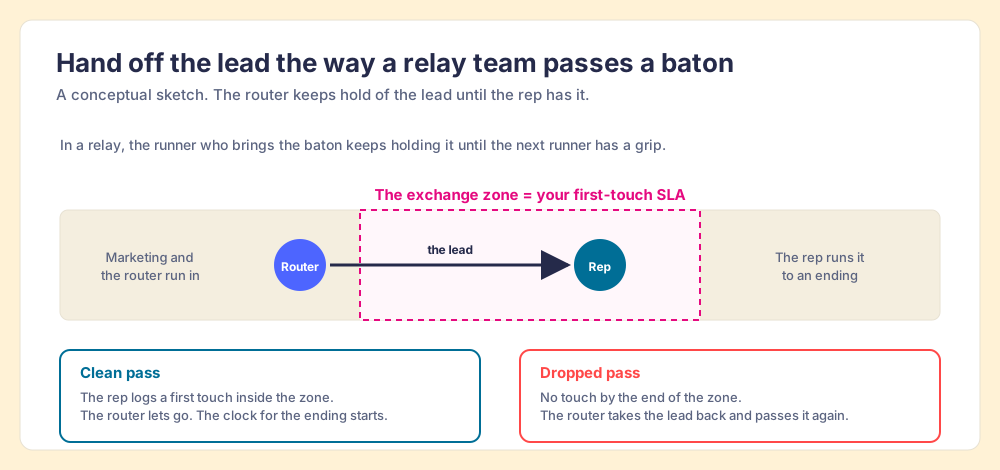
The relay picture covers the first touch. Leads also get lost later, after a call or two, in a status like “attempting” or “working” that no rule requires anyone to close. Conversica’s 35%, the companies that made one or two tries and then went silent, fit this pattern. Leads like these have an owner and some activity, so a routing report counts them as handled.
These failures are not about lazy reps. A rep with forty open leads and three demos tomorrow makes reasonable choices about where the next hour goes, and an ambiguous lead with no deadline loses that contest every time. In The State of Sales Enablement 2026, 89% of teams had a defined sales process and 36% saw reps run it, and process adherence fell from 47% on teams with one to five reps per manager to 23% on teams with six to eight. Managers do not have the hours to read every lead record. The fix belongs in the system: a deadline the rep can see, and a check that runs without a manager.
How do you check that every routed lead reaches an ending?
Write three rules, check them every night, and allow exactly three endings.
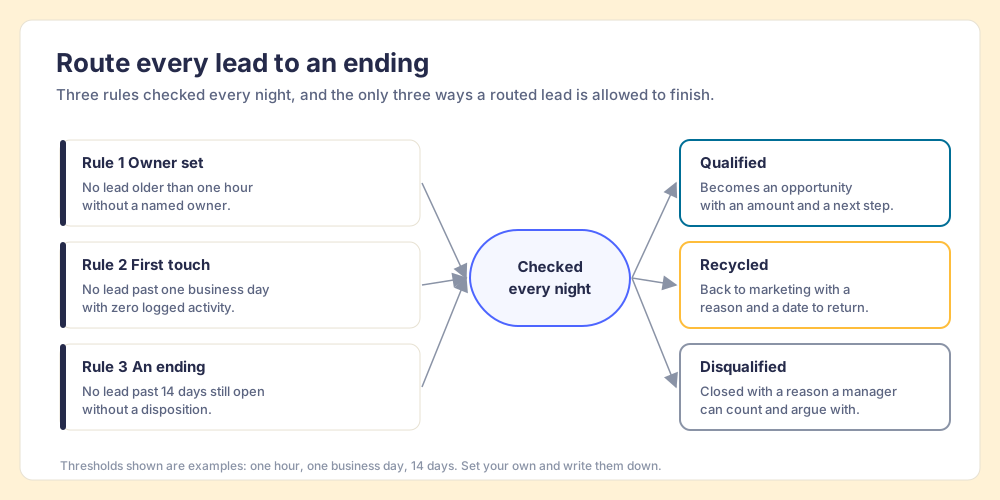
- An owner within the first hour. No lead older than an hour without a named owner. This catches the blank owners that HubSpot’s availability setting and a Salesforce catch-all queue both leave behind.
- A first touch within one business day. No lead past one business day with zero logged activity. The exchange zone lives here, and a lead that breaks it goes back to the router.
- An ending within an agreed window. No lead older than, say, 14 days still open without a disposition. This catches the leads stuck in “attempting”, which are the ones no SLA timer sees.
- Three endings, and only three. Qualified: it becomes an opportunity with an amount and a next step. Recycled: it goes back to marketing with a reason and a date to return. Disqualified: it closes with a reason a manager can count and argue with.
The endings matter as much as the rules. A recycled lead with a reason is information marketing can use; a lead that fades out in “attempting” is a lost buyer and a lost lesson. And the disqualification reasons, counted each month, tell you whether your routing rules are sending the wrong leads to the wrong team. Whether you hit the response time or not, the buyer who filled in your form gets a reply, an answer, and a clear next step, which is the experience they asked for.
Why nightly? Because inspection is the lever. In The State of Sales Enablement 2026, teams that inspect deals against a defined process at the highest frequency hit quota at 6.3x the rate of the lowest band. A rule checked every night is inspection a manager does not have to perform by hand, and the manager gets those hours back for coaching the reps whose leads keep breaking the same rule.
The rules also apply to leads the router never sees. A rep who sources a list of prospects is the router and the owner at once, and those leads need an ending as much as any form fill. If your team builds lists in Clay, Supered Prospector lets reps run the team’s Clay tables from LinkedIn, a company site or the CRM, and shows leaders which lists were found, worked and closed, with each lead ending as Qualified, Recycled or Disqualified. It is $45 per user per month billed annually, from one user, on your own Clay account.
What we recommend
Keep the router you have, add the three follow-through rules on top, and buy lead routing software only when native assignment runs out. Staying with native routing and adding nothing leaves the leaking half unwatched, and buying a router first spends money on the half that already works. The evidence above points one way:
- Assignment is the solved half. HubSpot, Salesforce and Pipedrive all route natively, and Chili Piper, Default and LeanData handle the harder matching. Spending more here improves the step that already works.
- Follow-through is the leaking half. One company in four never responded to Conversica’s inquiries, and 35% stopped after one or two attempts. No router reports either number.
- One name per lead. Darley and Latané’s 85% versus 31% is the cleanest evidence there is against the shared pool.
- Nightly checks do the inspection. Adherence halves from 47% to 23% as a manager’s span grows, so the check has to run without the manager.
In Supered, those three rules are Process Rules inside a Process Ruleset, written against lead or contact records with date conditions like “within X days”, and a Process Board checks every open lead against them each night. Reps see the broken rule on the record in HubSpot, Salesforce or Pipedrive, and the same rules work in Claude for a rep who would rather fix a stack of leads with one prompt. Process Compliance is $40 per user per month paid yearly ($45 monthly), five-user minimum, on the pricing page. The sales expectations use case shows the board and the morning summary.
If your leads already get worked and the trouble is what happens once they become deals, CRM hygiene applies the same nightly check to your pipeline. If you are deciding which leads deserve a rep at all, start with lead qualification. Or book a demo and we will write your three routing rules against your own leads.
Frequently asked questions
What is lead routing?+
What are lead assignment rules?+
What is the best lead routing method?+
Do I need lead routing software?+
How do you measure lead routing?+
What is the difference between lead routing and lead scoring?+
Your process, running itself.