Contact Enrichment Tools: Three Kinds of Directory, Sorted by the Job Each One Does, and Where the Rep Uses Them
Contact enrichment tools come in three kinds: a single database, a waterfall across many, and the CRM's own enrichment. Sorted by job (work email, mobile, verification, bulk, the rep's screen), with each vendor's own credit rates from September 2026, and the step after the find.
Contact enrichment tools are software that takes a partly identified person (a name and company, a LinkedIn profile, a CRM record) and returns the missing fields, usually a verified work email, a mobile number, and a current title, from one database or several asked in sequence.
The list arrives from marketing with a few hundred names, a company beside each, and a phone number beside a handful, and the rep who inherits it does what reps do: opens the extension the team pays for, clicks through the first twenty profiles, and gets mobiles for fewer than half. So she asks in the channel whether anyone has a login to the other one. Someone does. Contact enrichment tools get bought at that moment, and it is the wrong moment to learn that the two tools on the team are the same kind of tool, and that the kind is the problem.
Contact enrichment tools are software that takes a person you have partly identified, a name and a company, a LinkedIn profile, or a CRM record, and returns the missing fields, most often a verified work email, a mobile number, and a current title, from one database or from several asked in sequence. There are three kinds, and a buyer who sorts by kind before sorting by brand ends up paying for one contract instead of three. Sort by the job after that, and the table at the bottom of this page reads itself. Then comes the part the vendors leave out: the number found is a contact sourced, and nothing in the category measures whether it was worked.
What are the three kinds of contact enrichment tools?
Picture three ways to find a person’s number in a town that still had operators. There is the printed directory, one book, updated once a year, complete for the people who were listed when it went to press. There is the operator, who does not own a directory but has a row of them and works down the row until one has the name. And there is the front-desk clerk in your own building, who can tell you everything the building already knows about a tenant, apartment, lease, floor, and nothing about anyone who does not live there.
- The single database. Apollo, Lusha, Cognism (with Kaspr), RocketReach. One book, one contract, one Chrome extension. Deep where its collection method reaches and empty where it does not, and the miss costs a second book: one Cognism buyer on Vendr reports “using ZoomInfo in tandem with Cognism” (vendr.com/marketplace/cognism, opened September 25, 2026). That sentence is a two-book waterfall run on two seat fees.
- The waterfall. The operator with the row of directories. Clay is the largest: “One contract to buy data from 200+ data and AI vendors” (clay.com, September 25, 2026), asked in sequence until one returns a verified email or phone, and Clay’s own claim is that the approach “routinely triples our customers’ data coverage and quality” (clay.com/waterfall-enrichment). FullEnrich is a smaller operator, 25+ sources, sold per result. The waterfall enrichment page has the mechanism, and why the ponds hold different fish.
- The CRM’s own enrichment. The clerk. HubSpot’s native enrichment fills job title, seniority, LinkedIn URL, city, and the company’s revenue range and employee count from “HubSpot’s commercial dataset,” inside the record, for contacts that already have a business email (knowledge.hubspot.com, updated July 20, 2026). The contact property list carries no email and no phone. The clerk describes tenants; the clerk does not find strangers.
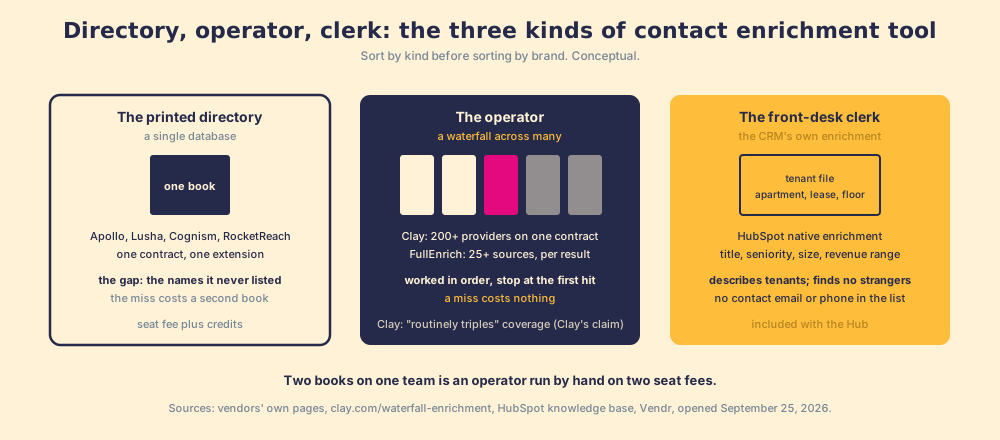
A printed directory shows its age on the cover; a database does not, and the vendors know it. Contact data enrichment from one book is only as current as that book’s last press run. Cognism’s own page says of the category, its competitors included, “Each provider applies different collection methods, refresh cycles and standards” (cognism.com/cognism-vs-clay). The operator exists for that reason.
Which contact enrichment tool does which job?
Sort by the job the rep is doing, because the kinds split along the jobs.
- The work email. All three kinds do this, and it is the cheap field: 1 credit on Apollo, Lusha, and FullEnrich alike. The difference is verification, covered below. Clay’s email waterfall names its providers in a row, “Prospeo, DropContact, Datagma, Hunter, PeopleDataLabs, Nimbler, Apollo, Lusha, Snov, & more,” and asks them in order.
- The mobile. The hard field, and the vendors price it that way: Apollo 8 credits against 1 for an email (apollo.io/pricing), Lusha 5 against 1 (lusha.com/pricing), FullEnrich 10 against 1 (fullenrich.com/pricing). Cognism sells its manually phone-verified mobiles under a name, Diamond Data, and reserves “higher-quality, accurate mobile data” for its Pro package (cognism.com/pricing). Geography decides the book: Vendr describes ZoomInfo as “strong North America coverage” and Cognism as “Strong EMEA coverage,” and Clay added Lusha to its marketplace in March 2026 “for better EMEA match rates” (clay.com/changelog/lusha). For the mobile, the operator wins on mechanism: each added book is stocked from a different river.
- Verification. Finding an address and confirming it are two steps, and the tools that separate them say so. Clay’s Clay 101 lesson: the email waterfall “validates them as well,” ZeroBounce by default, catch-alls counted valid unless “Only mark ‘Safe to Send’ emails as valid” is on (Clay University). FullEnrich’s headline is “Verified, Or It’s Free.” RocketReach: “A lookup is used if we find and verify email or phone, otherwise it is refunded” (rocketreach.co/pricing).
- Bulk, into the CRM. The clerk and the operator. HubSpot enriches from an index page (100 at a time), a segment, an import, or a workflow. Clay imports a HubSpot or Salesforce list, runs the waterfall, and writes back by record ID, on its Growth plan at $495 a month (clay.com/pricing); the CRM data enrichment page sorts that job on its own.
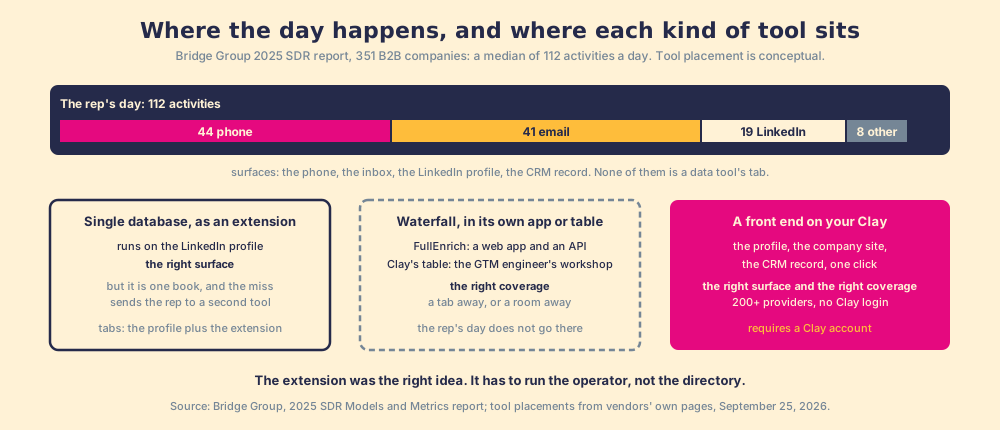
- From the rep’s screen, now. The single databases ship extensions for LinkedIn. The operator, in Clay’s own product, runs in a table the GTM engineer owns. A rep-side front end on Clay runs the operator from the profile, the company site, or the CRM record, which is the job the rep in the first paragraph was doing by hand.
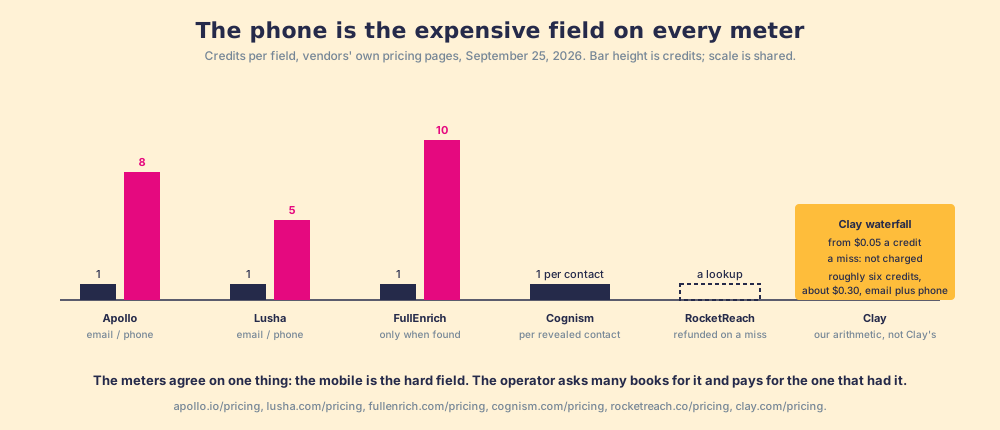
How do the contact enrichment tools compare, on their own numbers?
The short table, from each vendor’s own pricing page on September 25, 2026. Prices move; re-open the page before you buy.
| Tool | Kind | Phone | Meter (own page, Sep 25, 2026) | Where the rep uses it | |
|---|---|---|---|---|---|
| Apollo | Single database, plus Waterfall Enrichment (Apollo first, then 20+ partners, emails and phones only) | 1 credit | 8 credits | $49 / $79 / $119 per user per month, annual; 2,500 credits a month on Basic | Chrome extension, web app |
| Lusha | Single database | 1 credit | 5 credits | Starter $37.45 a month annual (4,800 credits a year); Pro $52.45 | Chrome extension, web app |
| Cognism (Kaspr) | Single database, EMEA-strong; Diamond Data phone-verified | 1 credit per revealed contact | Same credit | Quote-based; Vendr median $32,750 a year; Kaspr Starter EUR 59 per user per month with 100 phone credits | Extension, web app |
| RocketReach | Single database | Lookup | Lookup | Essentials $33 a month annual, email only; Pro $75, email and phone; a miss is refunded | Extension, web app |
| FullEnrich | Waterfall service, 25+ sources | 1 credit | 10 credits | $55 a month for 1,000 credits, unlimited users, only when found | Web app, API |
| HubSpot native enrichment | CRM’s own | No contact email in the list | Company phone only | Included from Starter tiers; contact needs a business email | The record’s Intelligence tab |
| A front end on your Clay (Supered) | Clay’s waterfall across 200+ providers, from the rep’s screen | Waterfall, validated | Waterfall | Clay’s meter: Data Credits from $0.05, no charge on a miss; Supered’s own price not published here | LinkedIn profile, company site, CRM record; no Clay login |
Sources: apollo.io/pricing, lusha.com/pricing, cognism.com/pricing, kaspr.io/pricing, rocketreach.co/pricing, fullenrich.com/pricing, knowledge.hubspot.com, clay.com/pricing. Two footnotes carry the last row. Supered’s coverage is Clay’s coverage: it brings no database of its own, on purpose; it brings Clay’s waterfall, which is every database, routed, and that is the reason we chose Clay as our only data provider. And Clay is not a row, because Apollo and Lusha, two of the rows, are also providers inside Clay’s marketplace; Clay is the row that holds the other rows. The Clay alternatives page grades these options with weights showing.
You might say the single database is simpler, and it is. One login, one invoice, one extension the reps already know. The cost of simple is the miss, and the miss is priced in the seat: the median Vendr buyer pays $32,750 a year for Cognism and $33,500 for ZoomInfo (vendr.com/marketplace/zoominfo), and the buyer running both is paying twice for the operator’s job. Clay’s Growth plan, which carries the CRM connector, is $495 a month.
Where do contact enrichment tools meet the rep, and what happens after?
Count the tabs. The Bridge Group’s 2025 SDR report, 351 B2B companies, gives the median rep 112 activities a day: 44 phone, 41 email, 19 LinkedIn, 8 other (Bridge Group, 2025), and a median of 60% of SDRs at quota, the lowest in the study’s history. Those 112 happen on the profile, in the inbox, on the record. A web app is a tab away, and a Clay table is a room away. The single databases understood this first, which is why each ships an extension; the operator, in Clay’s own product, still lives in the workshop. The extension is the right idea. It has to run the operator, not the directory.
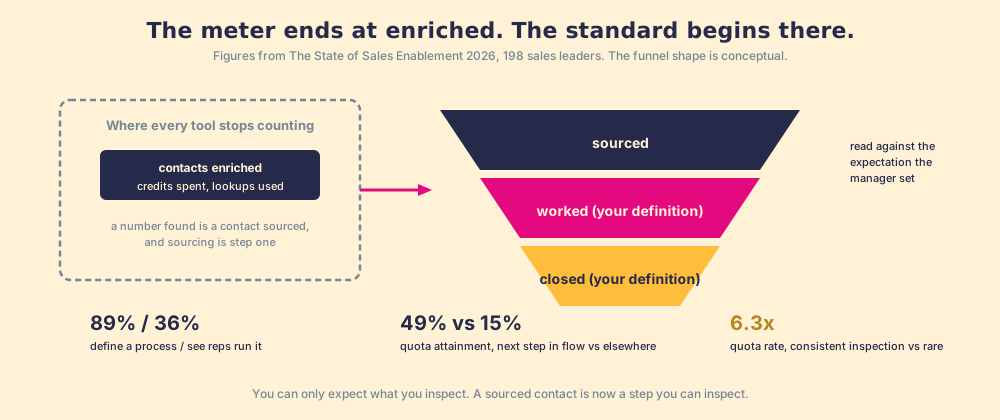
Then the step no tool in the table measures. The rep from the first paragraph gets her mobiles, more of them from the operator than from the book, and the list is now sourced. Whether it is worked is a behavior question. Our field data says how that question usually goes: across 198 sales leaders, 89% have a defined process and 36% see reps run it; reps who get the next step in the flow of work report 49% quota attainment against 15% for reps who have to go elsewhere for it; teams that inspect deals against the process consistently hit quota at 6.3x the rate of teams that rarely do (The State of Sales Enablement).
Supered sits here, once and late. It runs on the customer’s own Clay account, so the rep on the LinkedIn profile, the company site, or the CRM record gets Clay’s waterfall in one click with no Clay login, and the sourced contact then enters a motion the Behavior Layer guides and inspects: the next expected action reaches the rep on the record, and the manager reads sourced, worked, closed, with “worked” and “closed” defined by the customer, against the expectation the manager set. Clay governs the data. Supered governs the motion.
What we recommend
For a mid-market team, run Clay’s waterfall from the rep’s screen with a standard behind it, because the step after the find decides the number: 49% against 15% and 6.3x. The rest of the evidence above points the same way: the mechanism says coverage comes from asking many books, and the meters say the phone is the expensive field and a miss should be free. Which buy fits which team:
- A single database. Right for a team of two or three whose buyers all live in one book’s river, and who will accept the miss rather than pay for a second book. Read the exit terms before signing; the Apollo alternatives page runs the credit arithmetic.
- A waterfall service without a platform. Right for a small team that wants the operator’s coverage per result and no builder; FullEnrich’s $55 for 1,000 credits is the reference price.
- Clay’s waterfall, run from the rep’s screen, with a standard behind it. Right for a team that has Clay, or should, and whose reps live on the profile and the record. Coverage is the operator’s; the meter charges only for the catch; and the contact enters an inspected process.
How the operator works, pond by pond, and why one book misses in the places you sell into, is the subject of waterfall enrichment.
Frequently asked questions
What are contact enrichment tools?+
Which contact enrichment tool is best for phone numbers?+
How much does contact data enrichment cost per contact?+
Do contact enrichment tools verify the email addresses they return?+
Which contact enrichment tools work inside the CRM record?+
What should happen after a contact is enriched?+
Your process, running itself.