Data Enrichment Tools, Sorted by the Job: The Fields Each Fills, Why a Waterfall Wins, and What Happens After
Data enrichment tools graded for a mid-market sales team and sorted into four shapes: CRM-native enrichment, single-source APIs, waterfall enrichment, and the rep-side layer. Plus why a waterfall out-matches one source, and the funnel after.
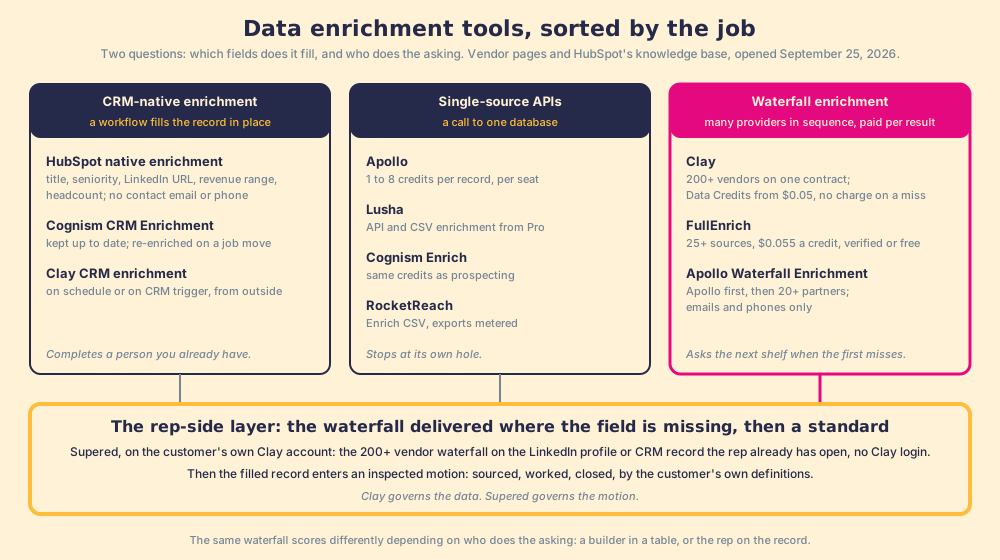
Data enrichment tools are the software that fills the missing fields on a contact or company record from an outside dataset, and they come in four shapes: CRM-native enrichment, single-source APIs, waterfall enrichment, and the rep-side layer on the record the rep has open.
A contact record in the CRM has a name, a company, and a title from two jobs ago. The mobile field is blank. The rep who owns it has a call block starting and no number to dial, so she opens a second tab and starts searching, which is the moment the record stops being an asset and starts being a chore. Data enrichment tools are the software that fills the missing fields on a contact or company record from an outside dataset, and in 2026 they come in four shapes: CRM-native enrichment, single-source APIs, waterfall enrichment across many providers, and the rep-side layer that fills the field from the profile or record the rep already has open. The argument of this page: a single source stops at its own hole, a waterfall asks the next shelf and charges only for the hit, but the waterfall is built by one person and the reps never open it, so what it fills never becomes a call. The fix is to deliver the waterfall where the rep is, then inspect whether the filled record was worked.
What are data enrichment tools, and what are the four shapes?
The lists you find for the best data enrichment tools (and for lead enrichment tools, which are the same tools with the trigger moved to the moment a lead appears) rank HubSpot’s enrichment beside Clay beside Apollo as if they filled the same fields the same way. They do not. Sort by two questions instead, which fields the tool fills and who does the asking, and the category resolves into four shapes.
- CRM-native enrichment. The record is already in the CRM and the tool fills the blanks in place. HubSpot’s native enrichment does this from “HubSpot’s commercial dataset,” automatically for new records, on demand from the record’s Intelligence tab, or in bulk from an index page, segment, import, or workflow (HubSpot knowledge base, updated July 20, 2026). Cognism sells CRM Enrichment as an add-on that promises “Enrich a contact once, and we keep it up to date” (cognism.com/pricing). Clay’s CRM enrichment use case does the same from the outside, “in real-time or on schedule,” and can “Auto-update millions of CRM records” (clay.com/use-cases/crm-enrichment).
- Single-source APIs. One database, called by an API, a CSV upload, or a Chrome extension: Apollo’s enrichment at 1 to 8 credits per record, Lusha’s API and CSV enrichment from its Pro plan, Cognism’s Enrich on the same credits as prospecting, RocketReach’s Enrich CSV. Each fills what its one dataset holds and stops there.
- Waterfall enrichment. Many providers asked in sequence, the org paying per result. Clay is the largest, routing across 200+ data and AI vendors on one contract (clay.com, September 25, 2026). FullEnrich sells a waterfall across 25+ sources; Apollo’s Waterfall Enrichment fills each record “with Apollo data first, then lets 20+ partners fill in the rest” (apollo.io/product/waterfall).
- The rep-side layer. Not a dataset. The waterfall delivered on the LinkedIn profile, Sales Navigator list, company website, or CRM record the rep already has open, with one click to the CRM and, in the one we built, a standard after the sync. Clay describes the category on its own rep-prospecting page; Supered adds the inspection, and it arrives late in this page, after the mechanism.
Why does waterfall enrichment find more than a single source?
Start with a small errand. You need a prescription filled, and the pharmacy on the corner is out of stock. You can go home, or you can go to a chain that checks the shelf at every branch in the city and charges you only when the box is in your hand. That is the difference between a single-source API and a waterfall, and it is the entire mechanism: each provider’s dataset has holes, the holes are in different places, and a waterfall asks the next provider whenever the first one misses. Clay’s waterfall page puts it in one line, “Waterfall enrichment lets you search sequentially across multiple tools until you find a valid match,” and then makes the claim we print as Clay’s, never as measured: “This routinely triples our customers’ data coverage and quality!” (clay.com/waterfall-enrichment). The pricing page adds the part that makes the errand cheap: “If an enrichment returns no result, you’re not charged Data Credits or Actions” (clay.com/pricing).
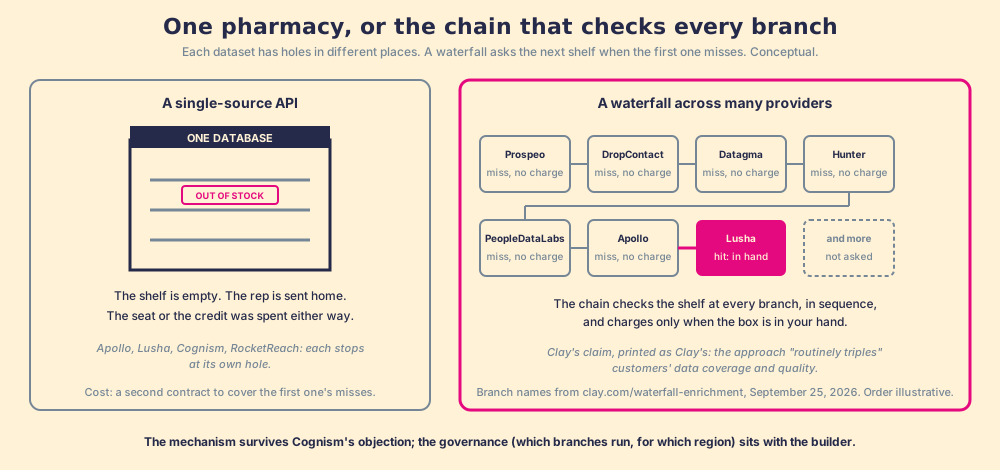
The branches are the same names on every enrichment list. Clay’s work-email waterfall lists “Prospeo, DropContact, Datagma, Hunter, PeopleDataLabs, Nimbler, Apollo, Lusha, Snov, & more,” and its mobile waterfall “People Data Labs, ContactOut, Selligence & more.” Apollo and ZoomInfo are Clay-built integrations in the marketplace, each requiring the customer’s own account (clay.com/integrations); Lusha joined as a waterfall step on March 10, 2026, “for better EMEA match rates” (Clay changelog). Vanta’s line on Clay’s CRM enrichment page is the customer’s version of the mechanism: “We’re no longer limited by the accuracy of any single provider” (clay.com/use-cases/crm-enrichment).
Now the objection, in its strongest form, because Cognism makes it by name. Its comparison page argues that stacking providers with different “collection methods, refresh cycles and standards” raises “the likelihood of inconsistency, duplication and compliance exposure, particularly in Europe,” and notes that Clay’s provider list “doesn’t include industry leaders ZoomInfo or Cognism” (cognism.com/cognism-vs-clay). Grant the compliance half its full weight. A waterfall is as compliant as its least careful branch unless the builder gates the branches, and Clay’s conditional runs exist for that: a step can be set to “Only run if” a region matches (Clay University). An EMEA team should insist on it, and a team whose legal counsel asks first is the case for Cognism’s own posture (data scrubbed against 15 Do Not Call and TPS lists, data generally kept inside the EEA, per cognism.com/compliance). The ZoomInfo half is out of date: Clay’s directory lists ZoomInfo as a Clay-built integration, joined January 15, 2025, though only on the customer’s own ZoomInfo account. The mechanism survives the objection. The governance sits with the builder.
Which data enrichment tools fill which fields?
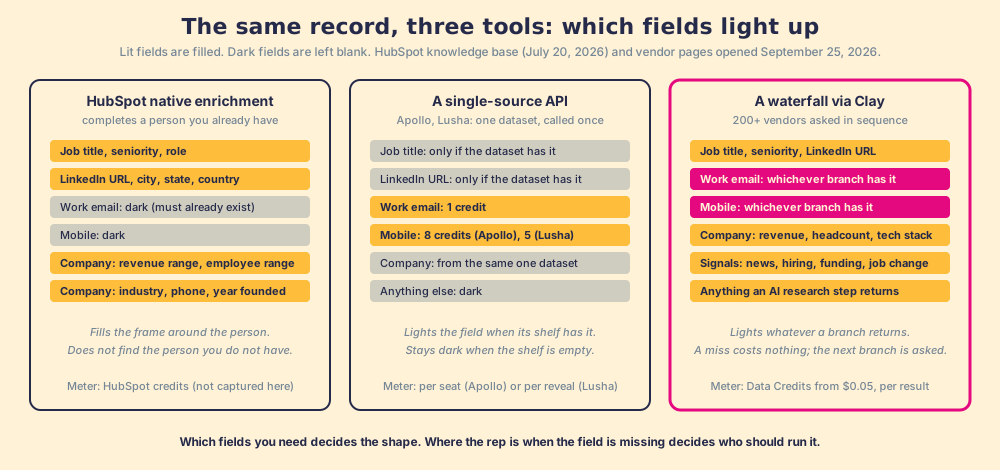
This is the question the lists skip, and it decides more purchases than match rate does. A tool that fills revenue range and headcount is doing a different job from one that finds a mobile number, and HubSpot’s own documentation is the cleanest place to see it.
| Tool | Contact fields it fills | Company fields it fills | Trigger | Meter |
|---|---|---|---|---|
| HubSpot native enrichment | City, country, employment role, seniority, sub role, first and last name, job title, LinkedIn URL, state; no email, no phone | Annual revenue, employee range, industry, phone number, revenue range, total money raised, web technologies, year founded, LinkedIn page | Automatic on new records, manual, continuous, bulk, workflow | HubSpot credits (not captured from a primary; see the caution below) |
| Cognism CRM Enrichment | Emails and mobiles, kept up to date; re-enriched when key details change, like a job move | Company hierarchies on Pro | Add-on to a Prospecting package | 1 credit per revealed contact, charged again only when key details change |
| Apollo enrichment | Email (1 credit), phone (8), enrichment 1 to 8 per record | Company data from its 30M companies | API, CSV, extension, or Waterfall Enrichment (emails and phones only) | Seat with a credit allowance, $49 to $119 a user a month |
| Lusha | Email (1 credit), phone (5) | Company lookalikes; Signals on Pro | API and CSV enrichment from Pro ($52.45 a month billed yearly) | Credits per reveal |
| FullEnrich | Work email (1 credit), mobile (10), personal email (3); profile and company data included | Included with the contact | Web app, API, HubSpot integration, MCP | $0.055 a credit, only on a verified result |
| Clay | Any field a provider or an AI research step returns | Any field, including news, hiring, tech stack, funding | Table, schedule, CRM trigger, or a rep-side front end | Data Credits from $0.05, no charge on a miss |
The HubSpot row rewards a second read. The contact property list carries no work email and no phone, and the knowledge base says plainly that “Contacts must have a business email address” before enrichment runs at all. HubSpot’s enrichment completes a person you already have; it does not find the one you do not. That is a real job, and for a team whose gap is firmographics on existing records it is the right tool and it is already in the CRM. It is a different job from the one the rep with the blank mobile field needs done. (HubSpot’s credit pricing for enrichment was not captured from a HubSpot primary in this session and is not printed here; the Clay HubSpot integration page covers the mechanics of the outside-in route.)
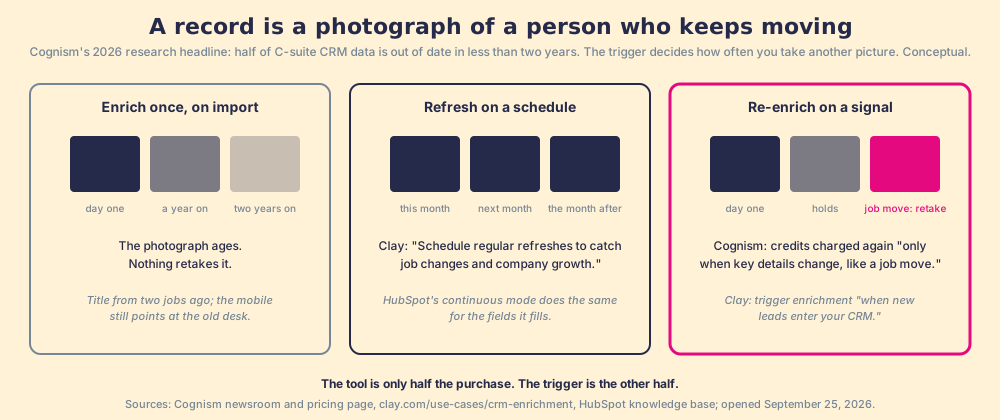
Cognism’s 2026 research headline makes the case for continuous enrichment in one line, “Half of C-suite CRM data out of date in less than two years” (Cognism newsroom), and it is the reason the trigger column exists. A record enriched once decays. A record enriched on a schedule, or re-enriched when a job change fires, stays a record. Clay’s CRM enrichment page describes exactly that loop: “Trigger enrichments automatically when new leads enter your CRM” and “Schedule regular refreshes to catch job changes and company growth.” A record is a photograph of a person who keeps moving; the trigger is how often you take another one.
How we graded the data enrichment tools
A ranking that hides its math is an advertisement. The lens is a mid-market sales team, ten to fifty reps, whose gap is the blank email and mobile field at the moment a rep needs it, and a leader who wants to know whether the filled record was worked. A RevOps lead cleaning firmographics across the whole company object would weight the same rows differently, and the HubSpot row would rise.
| Job | Weight | What a 5 looks like |
|---|---|---|
| Coverage across providers | 3 | Many datasets asked in sequence, paid per result |
| Where the field gets filled | 2 | On the record or profile the rep already has open |
| Cost per result | 2 | The bill tracks fields found, not seats |
| Fields it fills | 2 | Work email and mobile, plus whatever else a branch returns |
| Inspection after the fill | 1 | Was the record worked and closed, by your definitions |
Each row is scored 1 to 5 per job, times the weight, out of 50. Sources: the vendors’ own pages, HubSpot’s knowledge base, and Vendr, opened September 25, 2026. Letter bands: A 44 and up, B+ 38 to 43, B 32 to 37, B- 28 to 31, C+ 24 to 27.
| Rank | Option | Grade | Score | Best lane | Why it ranks here |
|---|---|---|---|---|---|
| 1 | Clay’s waterfall from the rep’s tab, with a standard (Supered) | A | 48 | A team that has Clay and reps who never open it | Coverage is Clay’s 200+ vendors; the field fills on the LinkedIn profile or CRM record with no Clay login; the filled record enters an inspected process. Requires a Clay account. |
| 2 | Clay’s waterfall, run by the builder in a table | B+ | 38 | A RevOps team enriching on schedule or on CRM trigger | The same coverage and meter; the rep is not in the loop, so what it fills waits in a table or a CRM field for someone to notice. |
| 3 | Apollo Waterfall Enrichment | B | 32 | A team with no builder that wants sequence-asking from one seat | Apollo first, then 20+ partners, emails and phones only; seat-priced, Vendr median $19,000 a year on 101 purchases. |
| 4 | FullEnrich | B- | 31 | A two-to-five-person team that wants per-result waterfall without a platform | 25+ sources, $55 a month for 1,000 credits, unlimited users; a web app, so the rep goes to it. |
| 5 | Cognism CRM Enrichment | C+ | 27 | An EMEA team that wants one compliant source kept current | Verified mobiles, refreshed on job change, credits charged again only when details change; one database, quote-only. |
| 6 | Single-source API (Apollo, Lusha, RocketReach class) | C+ | 26 | A team that wants one vendor and will accept one vendor’s holes | Fills email and phone from one shelf, per seat or per reveal; the rep or a workflow does the asking. |
| 7 | HubSpot native enrichment | C+ | 26 | A HubSpot team whose gap is firmographics on existing records | Fills the frame, in place, automatically; no contact email or phone; contact needs a business email first. |
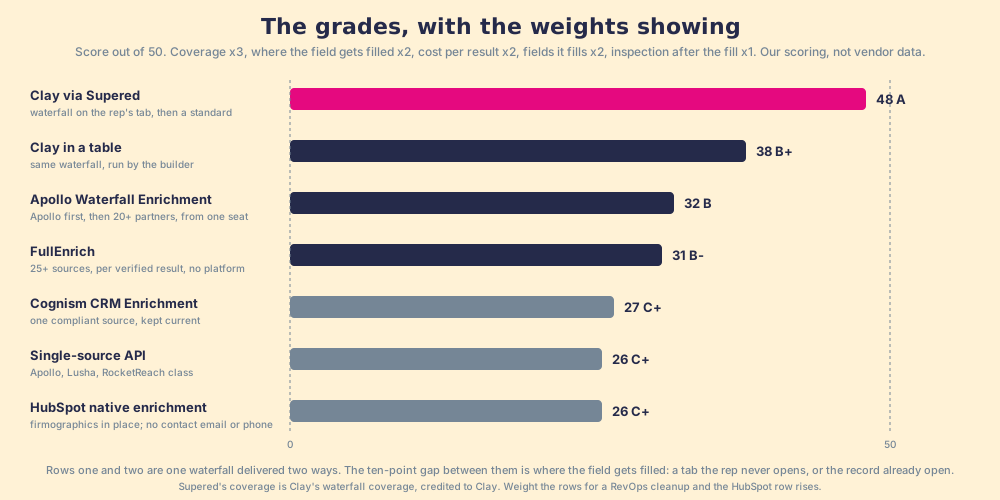
The per-job scores, so you can argue with them:
| Option | Coverage (x3) | Where filled (x2) | Cost (x2) | Fields (x2) | Inspection (x1) | Total |
|---|---|---|---|---|---|---|
| Clay via Supered | 5 | 5 | 4 | 5 | 5 | 48 |
| Clay in a table | 5 | 2 | 4 | 5 | 1 | 38 |
| Apollo Waterfall Enrichment | 4 | 4 | 2 | 3 | 2 | 32 |
| FullEnrich | 4 | 2 | 4 | 3 | 1 | 31 |
| Cognism CRM Enrichment | 2 | 4 | 2 | 4 | 1 | 27 |
| Single-source API | 2 | 3 | 2 | 4 | 2 | 26 |
| HubSpot native | 1 | 5 | 3 | 2 | 3 | 26 |
Two footnotes. Supered’s coverage score is Clay’s coverage, because Supered brings no database of its own; it brings Clay’s waterfall, which is every database, routed, and that is the reason we chose Clay as our only data provider. And Clay is not a vendor row; the two Clay rows are one waterfall delivered two ways, and the second exists to make the point of this page visible in the arithmetic: the same coverage scores 38 when the builder runs it and 48 when the rep does, and the difference is a tab.
What does b2b data enrichment cost per record?
The meter, because the enrichment lists quote a seat price and stop. Three meters exist, and the picture from the b2b data providers page holds: a seat on the boat, a fish carried off the dock, a fish on the market slab.
- Per seat, with credits inside. Apollo: $49, $79, or $119 a user a month on annual billing, with 1 credit per email, 8 per phone, and 1 to 8 per enrichment (apollo.io/pricing). Cognism: quote-only, 10,000 credits a year on a Standard seat and 12,000 on Pro, one credit per revealed contact, charged again only on a job change. The credit is spent whether or not the rep ever calls.
- Per reveal or export. Lusha: 1 credit for an email, 5 for a phone, Starter $37.45 and Pro $52.45 a month billed yearly (lusha.com/pricing); the Lusha pricing page does the phones-per-plan sum. RocketReach: exports per year, 1,200 to 20,000 depending on tier.
- Per verified result. Clay: Data Credits “start at $0.05 each,” nothing charged on a miss; our calculator arithmetic on Clay pricing puts a work email plus phone at roughly six credits, about $0.30 at the entry rate, labelled as our supposition. FullEnrich: $0.055 a credit, 1 for a work email, 10 for a mobile, “Verified, Or It’s Free” (fullenrich.com/pricing).
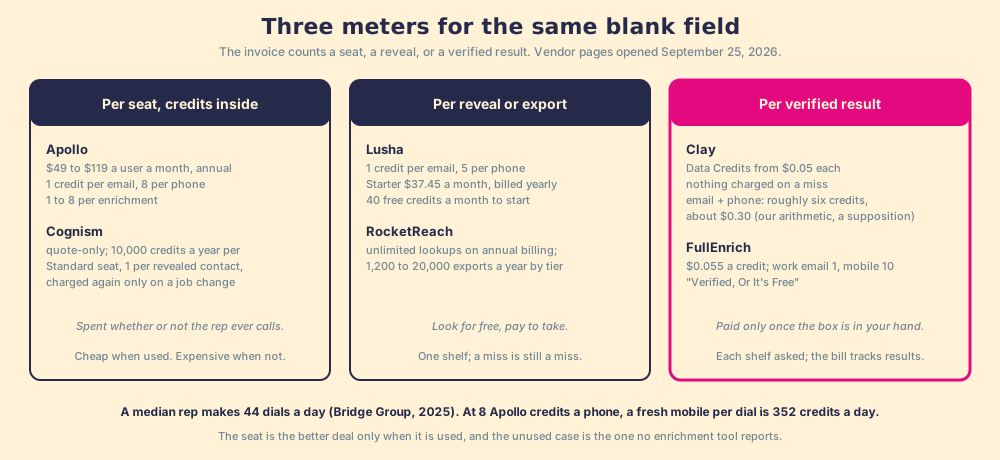
You might say the seat is the better deal at volume, and for a rep who dials all day it can be. Run the Bridge Group number against the meter first. The 2025 SDR report puts the median rep at 44 dials a day (Bridge Group, 2025); at 8 Apollo credits a phone, a fresh mobile for every dial is 352 credits a day, and the Apollo alternatives page runs the burn-down by tier. The seat is cheap when it is used and expensive when it is not, and the second case is the one no enrichment tool reports.
What happens after the record is enriched?
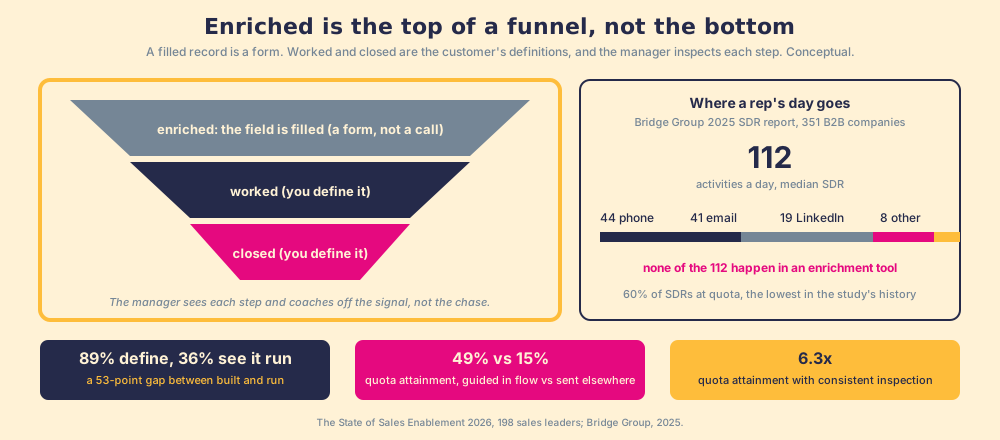
An enriched record is a filled form. It is not a booked meeting, and the gap between the two is where a data budget leaks. The Bridge Group report puts the median SDR at 112 activities a day, 44 phone, 41 email, 19 LinkedIn, 8 text or other, with 60% of SDRs at quota, “the lowest reported in study history.” None of the 112 happens in an enrichment tool, a Clay table, or a HubSpot enrichment queue. And the report’s own limitation line on its $3.78M median pipeline sourced per SDR states the gap in plain words: “Pipeline figures represent raw pipeline generated, not forecast or closed-won revenue.”
Our field data measures the same gap for the sales process as a whole, and the shape transfers. Across 198 sales leaders, 89% have a defined sales process and 36% see reps run it, a 53-point gap between built and run; reps who get the next step in the flow of their work report 49% quota attainment against 15% for reps who have to go somewhere else for it; and teams that inspect deals against the process consistently hit quota at 6.3x the rate of teams that rarely do (The State of Sales Enablement). A record enriched in a table no rep opens sits in that gap. So does a record enriched inside the CRM that no rule ever turns into a next action.
Clay says the first half of this in its own words: “Build centralized workflows for any rep to run,” and on its rep-prospecting page, a Chrome-extension partner that “lets reps enrich with Clay and sync prospects to your CRM anywhere on the web,” with a sales team that put 110 reps on Clay prospecting and “No Clay login required” (clay.com/use-cases/rep-prospecting). The category is real, and Clay endorses it. The second half is the one the category lacks: a front end that fills the field and stops is a faster way to fill the CRM with records no one works.
The one we built is Supered. It runs on the customer’s own Clay account, so a rep on a LinkedIn profile, a Sales Navigator list, a company website, or a HubSpot or Salesforce record gets Clay’s waterfall across 200+ vendors in one click, with no Clay login, and the filled record then enters a motion the Behavior Layer guides and measures: sourced, worked, closed, by the customer’s own definition of worked and closed, deal by deal, with the manager coaching off the signal. It is for a team that has Clay; a team that does not is better served by one of the other shapes above, and we say so plainly. Clay governs the data. Supered governs the motion.
What we recommend
The shapes, and who each is for. CRM-native enrichment when the gap is firmographics on records you already own and the record already carries a business email; HubSpot’s does it in place and Cognism’s keeps one compliant source current. A single-source API when the team wants one vendor and has priced the holes against a second contract. A waterfall when the gap is the blank email and mobile field, because it asks every branch and charges only for the box in your hand, and Clay says that routinely triples coverage. The smaller waterfalls, FullEnrich and Apollo’s, when there is no builder and none coming.
And when the team already has Clay, do not move the waterfall; move where it fills. Put it on the rep’s screen and set a standard behind it: 49% against 15% is the difference the delivery makes, and 6.3x is the difference the standard makes. The whole category of vendors that feed the waterfall, sorted by what each meter counts, is the b2b data providers map; the process the filled record enters, from the first sourced contact to your definition of closed, is the sales prospecting guide; and the case for a front end over a replacement is Clay alternatives.
Frequently asked questions
What are the best data enrichment tools for a sales team?+
What is the difference between data enrichment and lead enrichment tools?+
Why does waterfall enrichment find more than a single data source?+
Does HubSpot's native data enrichment give me emails and phone numbers?+
What does b2b data enrichment cost per record?+
What should happen after a record is enriched?+
Your process, running itself.