CRM Data Enrichment: Four Jobs Under One Term, Two Directions It Runs, and the Record as the Place the Rep Starts
CRM data enrichment means four jobs (fill the blanks, find the missing channel, keep it fresh, enrich at the moment of work) and runs in two directions (overnight from a table, or now from the record). Sorted by job, with the tools for each, and the step after the record fills.
CRM data enrichment is the practice of filling and refreshing the fields on contact and company records in your CRM from outside data sources, either in bulk on a schedule or on demand from the record itself.
The sales leader inherits a CRM the way you inherit an address book: names in three people’s handwriting, a phone number crossed out and rewritten twice, a company that was acquired in 2023 still listed under its old name, and no way to tell, from the outside of the book, which entries would still pick up. So she budgets for CRM data enrichment, and the first vendor call teaches her that the phrase means four different things, each priced and built differently, and that the one she needs most is the one the CRM vendors talk about least.
CRM data enrichment is the practice of filling and refreshing the fields on contact and company records in your CRM from outside data sources, either in bulk on a schedule or on demand from the record itself. That sentence hides four jobs and two directions. Sort them first and the tools sort themselves, and the last job, the rep on a record who needs the missing number now, is where the address book stops being a data problem and becomes a behavior one.
What are the four jobs inside CRM data enrichment?
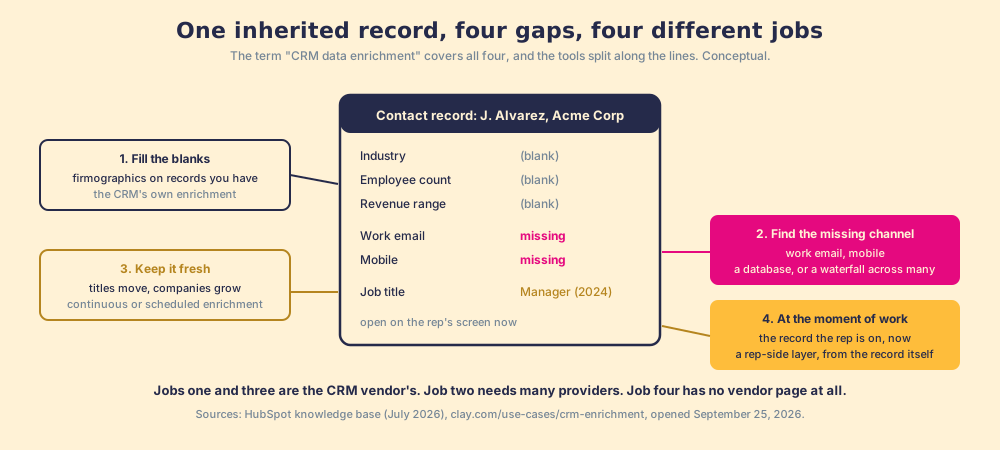
Open one contact record and look at what is missing, because each kind of gap is a different job.
- The blank fields. Industry, employee count, revenue range, seniority, city. The record exists; its description does not. The CRM vendors mean this job when they say enrichment: HubSpot’s native enrichment fills exactly these, from “HubSpot’s commercial dataset,” for contacts with a business email and companies with a domain (knowledge.hubspot.com, updated July 20, 2026).
- The missing channel. No work email, or no mobile. The record cannot be worked because there is nothing to dial. HubSpot’s enrichable contact list carries no email or phone at all; this job belongs to contact databases and to a waterfall across them.
- The stale value. The title from two years ago; the champion who moved. Cognism’s own 2026 research carries the headline “Half of C-suite CRM data out of date in less than two years” (cognism.com/newsroom). This is continuous enrichment: HubSpot’s continuous mode updates “property values previously filled using enrichment,” and Clay’s CRM enrichment page describes scheduling “regular refreshes to catch job changes and company growth” (clay.com/use-cases/crm-enrichment, opened September 25, 2026).
- The record the rep is on right now. An account with a buying committee of one, a contact whose number bounced this morning. The rep needs the gap filled while she is looking at it, not in tonight’s batch. No CRM vendor’s enrichment page describes this job, and it is the one the rep feels.
The address-book picture has an edge. A paper book only goes stale; a CRM also grows, by import and by form and by rep, and each new record arrives with its own gaps. So the four jobs never finish. They run on a clock, and the clock is the next thing to sort.
Which direction should CRM enrichment run, overnight or now?
Two directions, and a sales team needs both because they serve different jobs.
The first direction runs from the CRM outward and back, overnight. A table imports a list (“Contacts, no phone,” “Companies missing revenue range”), enriches it, and writes back. Clay’s version: import any HubSpot object or list into a table, run the waterfall across 200+ providers, and update each record by its Object ID, with “Ignore blank values” on by default so a provider that found nothing does not erase what was there (Clay University, HubSpot integration, opened September 25, 2026). CRM integrations are a Growth-plan feature on Clay, $495 a month (clay.com/pricing, same day; the Clay HubSpot integration page walks every action). HubSpot’s own automatic mode does the same for firmographics: it “fills properties containing blank or empty values” and “doesn’t overwrite values set by a user or another system.” This direction is right for jobs one and three. It is cheap, it is repeatable, and the rep never sees it happen.
The second direction runs from the record inward, now. The rep is on the account and pulls. Nothing runs overnight because the rep cannot wait until overnight; the buyer is on the other line. The difference is a water main against a tap. The main is filled once a night by the utility and reaches every house at once; the tap is opened by whoever is thirsty, at the sink, when they are thirsty. A town needs the main. A person needs the tap.
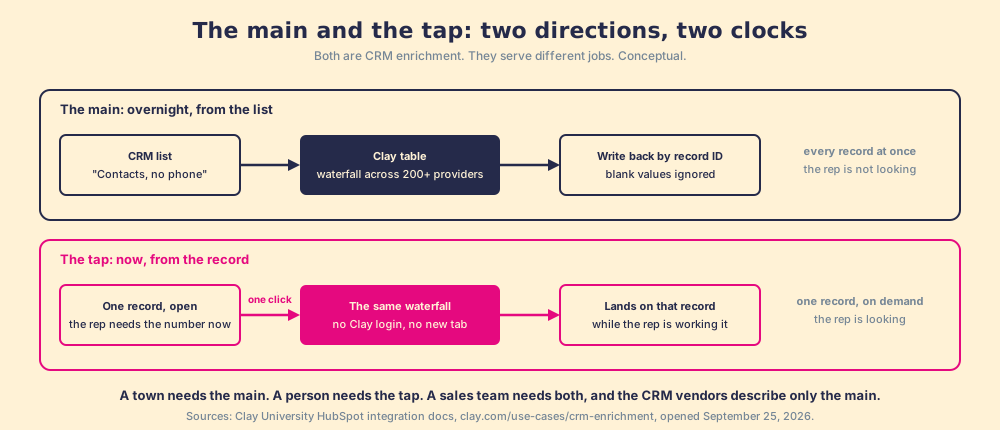
Clay describes the main and hands the tap to a partner. Its CRM enrichment page is about triggers and schedules; its rep-prospecting page says “One click runs Clay’s waterfall enrichment. If one source misses, it tries the next,” and points to a Chrome-extension partner for the rep who wants that click from the browser (clay.com/use-cases/rep-prospecting). The CRM record, an account or a contact already in HubSpot or Salesforce, is the tap a sales team uses most, and it is the entry point the Clay integrations hub treats as both a starting point and a destination.
Which CRM enrichment tools do which job?
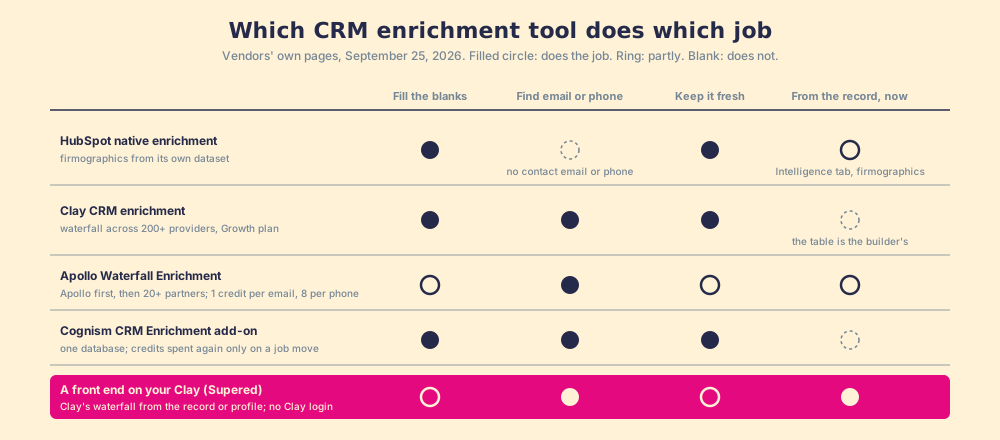
Sorted by job, from the vendors’ own pages on September 25, 2026. No tool does all four well, and the two that try are built on the same idea, a waterfall.
| Tool | Fills the blanks | Finds email or phone | Keeps it fresh | From the record, now | Meter |
|---|---|---|---|---|---|
| HubSpot native enrichment | Yes: title, seniority, LinkedIn URL, city; company revenue range, employee count, industry, company phone | No contact email or direct dial in the property list | Yes: continuous mode, monthly | Yes, the record’s Intelligence tab, firmographics only | Included from Starter tiers up; contact needs a business email first |
| Clay CRM enrichment | Yes, any field a provider returns | Yes: waterfall across 200+ providers, validated | Yes: scheduled refreshes | No; the table is the builder’s | Per result; a miss is not charged; Growth plan for the CRM connector |
| Apollo Waterfall Enrichment | Partly, from Apollo’s own data | Yes: Apollo’s data first, then 20+ partners; “emails and phone numbers” only | Via re-runs | From Apollo’s extension | Seat plus credits: 1 per email, 8 per phone |
| Cognism CRM Enrichment add-on | Yes, from one database | Yes, from one database | Yes: “Enrich a contact once, and we keep it up to date”; credits spent again only on a job move | No | Quote-based; 1 credit per revealed contact |
| A front end on your Clay (Supered) | Via Clay’s table | Yes: Clay’s waterfall, from the record | Via Clay’s schedule | Yes: the record, the profile, or the company site, one click, no Clay login | Clay’s meter; Supered’s own price not published here |
Sources: knowledge.hubspot.com, clay.com/use-cases/crm-enrichment, apollo.io/product/waterfall, cognism.com/pricing. Two footnotes. Supered’s coverage is Clay’s coverage: it brings no database of its own, on purpose; it brings Clay’s waterfall, which is every database, routed, and that is the reason we chose Clay as our only data provider. And Clay is not scored as one vendor among the rest, because Apollo, one of the rows above, is also a provider inside Clay’s own marketplace (clay.com/integrations/data-provider/apollo-io); Clay is the row that holds the other rows.
The waterfall enrichment page explains why the waterfall rows find more than the single-database rows: each provider is stocked from a different river, and a sequence of them covers ground no one of them reaches. Clay’s own claim is that the approach “routinely triples our customers’ data coverage and quality” (clay.com/waterfall-enrichment), Clay’s number about Clay’s customers.
What happens after the CRM record is enriched?
Reason it through from the rep’s side. The overnight main ran; this morning a batch of records on her list have a mobile number they did not have yesterday. They look exactly like the ones that always had one. No flag says “new.” No task says “dial.” The Bridge Group’s 2025 SDR report gives the median rep 112 activities a day, 44 of them calls (Bridge Group, 2025), and she will spend them on whatever the CRM puts in front of her, which is a page of records that all look full.
You might say a workflow closes this: property changed, task created. Fair, and it is the first thing a good admin builds. It creates the task. It cannot tell the manager, a month on, how many of the batch were worked, advanced, and closed against the number she expected, and it cannot help the rep who is on a LinkedIn profile right now and wants the number before the record exists at all.
Our field data measures the gap between a record filled and a record worked. Across 198 sales leaders, 89% have a defined process and 36% see reps run it; reps who get the next step in the flow of work report 49% quota attainment against 15% for reps who must go elsewhere for it; teams that inspect deals against the process consistently hit quota at 6.3x the rate of teams that rarely do (The State of Sales Enablement).
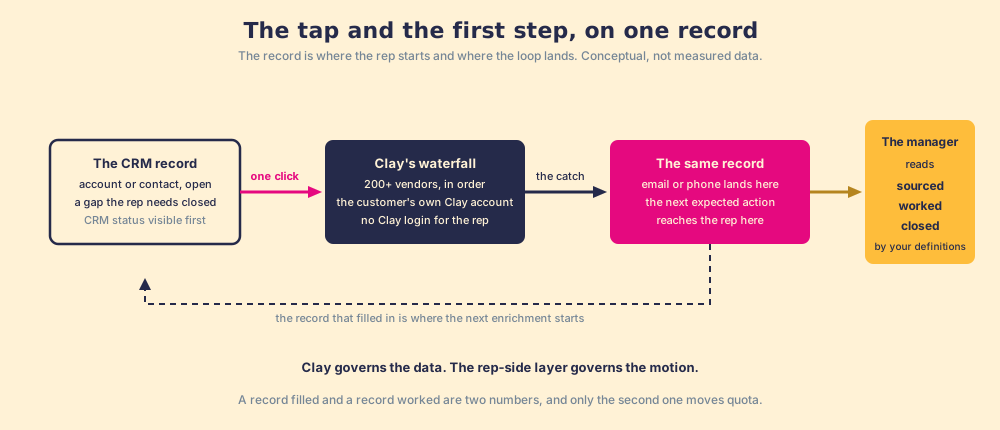
So the record has to be both the tap and the first step. Supered sits there. It runs on the customer’s own Clay account, so a rep on an account or contact record, a LinkedIn profile, or a company site runs the GTM engineer’s table from there, one click, no Clay login, field mapping set once by Ops, with the CRM status visible before she adds a duplicate. The sourced contact then enters a motion the Behavior Layer guides and measures: the next expected action reaches the rep on the record, and the manager reads sourced, worked, closed, with “worked” and “closed” defined by the customer, against the expectation the manager set. Clay governs the data. Supered governs the motion.
What we recommend
Use the CRM’s own enrichment and a waterfall from the record together: let the CRM fill its own blanks, run Clay’s waterfall from the record for the channel the rep needs now, and put an expectation behind the record so 49% against 15% and 6.3x are the team’s numbers rather than the survey’s. What each approach fixes in the address book:
- The CRM’s own enrichment. Fills blanks and keeps firmographics fresh, inside the record, for nothing more than credits. Right for jobs one and three, and it will not find a mobile number.
- A waterfall on a schedule. Clay’s table watching the CRM, 200+ providers asked in sequence, paid per catch. Right for jobs two and three at scale. The rep never sees it run, and nothing measures whether the filled records were worked.
- A waterfall from the record, with a standard behind it. The same Clay account, started by the rep on the record, and the sourced contact inspected to close.
For a HubSpot team the native half is specific enough to deserve its own page, and it is next: HubSpot data enrichment, what the Intelligence tab gives you and what a waterfall on the record adds.
Frequently asked questions
What is CRM data enrichment?+
What is the difference between CRM enrichment and contact enrichment?+
Which CRM enrichment tools find a mobile number?+
Should CRM enrichment run automatically or on demand?+
How does Clay enrich CRM data without creating duplicates?+
What happens after the CRM record is enriched?+
Your process, running itself.