LinkedIn Automation Tools in 2026, Graded by What They Do to Your Account
LinkedIn automation tools graded for a 10 to 50 rep team: HeyReach, Waalaxy, Expandi, Dripify, Dux-Soup and PhantomBuster, plus two tools that move LinkedIn people into Clay and the CRM without running the rep's account. Checked October 2, 2026.
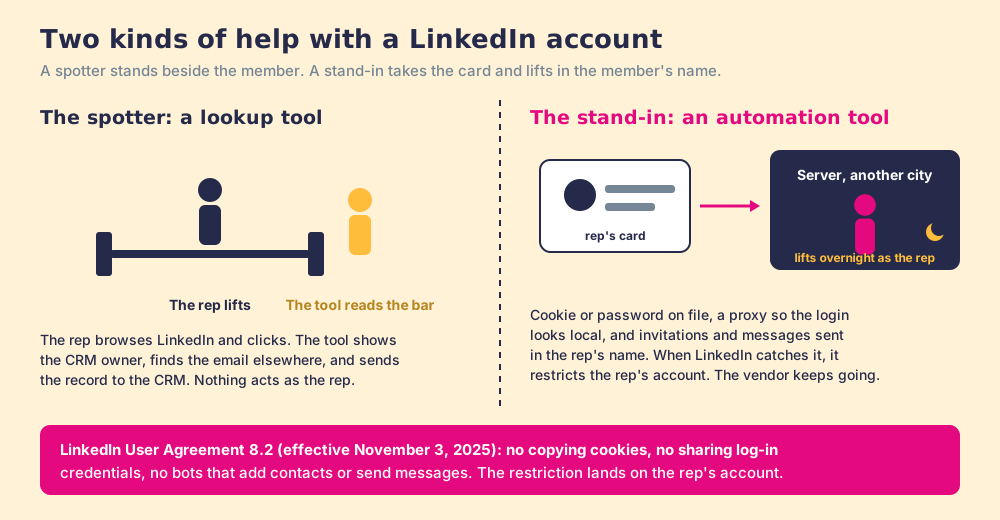
LinkedIn automation tools are software that sends profile visits, connection requests, messages, and follow-ups for a rep by operating the rep's own logged-in account from a server or a desktop app, unlike lookup tools that help a rep while the rep browses.
LinkedIn automation tools are software that sends profile visits, connection requests, messages, and follow-ups for a rep by operating the rep’s own logged-in account from a server or a desktop app, unlike lookup tools that help a rep while the rep browses. The short answer, graded below:
- HeyReach. For a team that has decided to automate outreach across many senders: $79 per sender a month.
- Waalaxy. For one seller on a budget: from $16 a user a month, billed yearly.
- Supered Prospector. For a Clay team whose real job is getting the right LinkedIn people into Clay and the CRM, with nothing sent from the rep’s account: $45 per rep per month, billed annually.
A gym membership card has your photo on it. A spotter may stand beside you while you lift, read the weight on the bar, and tell you to keep your elbows in. You still do the lifting, and the gym is glad to have him. A stand-in who borrows your card and works out in your name overnight is a different arrangement, and the gym’s rules are written about him. When the gym catches the stand-in, it cancels the card. Your card. The stand-in walks out and finds another member.
LinkedIn is the gym, and the rep’s account is the card. The tools on the ranking lists for this search are each a spotter or a stand-in, and the lists rarely say which. This page sorts them, grades them for a team of 10 to 50 reps, and prices them, with the vendors’ own help centers as the evidence.
How do LinkedIn automation tools work?
An automation tool can only send a connection request as you if LinkedIn believes it is you. The help centers describe three ways to arrange that.
- A copied session cookie. HeyReach’s preferred method, in an article updated September 26, 2026: install a cookie-editor extension, log in to LinkedIn, export your cookies as a JSON file, and paste the file into HeyReach. PhantomBuster’s extension does the same thing automatically and “works silently in the background.”
- Your password, kept on file. Waalaxy’s “Infinite Login” asks for your LinkedIn email, your password, and your two-factor secret key, so that its cloud “can send your actions (invitations, messages, profile visits, etc.) without interruption, even when your computer is turned off” (Waalaxy Help Center, July 8, 2026).
- A desktop app on your own machine. Dux-Soup, now sold as STACKED, offers a “local” version that “runs on your own machine” at $55 a seat a month, and a cloud version at $99 that “runs continuously, no need to keep a machine on” (STACKED pricing, October 2, 2026).
Then the tool needs to look like it is logging in from where you live. HeyReach assigns each account “a dedicated static residential proxy (i.e. real IP address that never changes).” Expandi lists a “dedicated country-based IP-address” on its pricing page. A proxy is a borrowed front door: a server in a data center walks out of a house in your city.
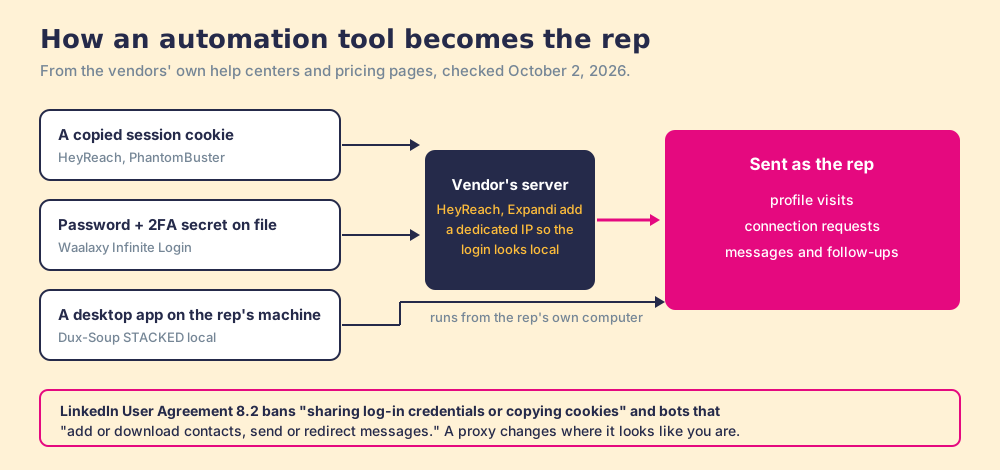
LinkedIn’s User Agreement, section 8.2, effective November 3, 2025, names both halves. Members agree not to “use or attempt to use another’s account (such as sharing log-in credentials or copying cookies)” and not to “use bots or other unauthorized automated methods to access the Services, add or download contacts, send or redirect messages” (LinkedIn User Agreement). Its help page on prohibited software, checked October 2, 2026, adds that members who use such tools “risk having their accounts restricted or shut down” (LinkedIn Help).
What do the vendors’ own help centers say about LinkedIn risk?
The pricing pages sell safety: Expandi lists “Account Safety” and Dripify “Built-in LinkedIn protection.” The help centers, written for customers whose accounts got restricted, say something closer to the truth, and they do not agree with each other.
| Vendor | What its help center or pricing page says | Checked |
|---|---|---|
| Waalaxy | ”Waalaxy is 100% undetectable as a tool by LinkedIn.” Also: “We strongly advise against telling LinkedIn support that you use Waalaxy.” And: “Unfortunately, Waalaxy does not comply with LinkedIn’s Terms of Service.” | Article updated July 8, 2026 |
| PhantomBuster | ”LinkedIn evaluates activity at the account level, not per Phantom.” “No automation tool can eliminate risk entirely.” Upgrading “never lifts LinkedIn’s own limits.” | Articles updated August 3 and October 2, 2026 |
| HeyReach | ”We truly pride ourselves on adhering to every LinkedIn rule to the letter,” in the same help center that walks you through exporting your LinkedIn cookies. | Article updated February 17, 2026 |
| Expandi | Sells “Campaign Types that Allow Bypassing Outreach Limits,” for example a Mobile Connector campaign that “allows you to send an additional 100 connection requests per week.” | Pricing page, October 2, 2026 |
Give Waalaxy credit for candor: it is plain about the rule, and it offers to move a subscription to a new LinkedIn profile if the old one is banned. That offer also tells you what the vendor expects to happen to some customers.
The number they argue about is the weekly invitation cap. PhantomBuster’s help center puts LinkedIn’s limit at “~100/week, dynamic by account.” HeyReach says “each of us gets around 100 connection requests to send per week.” Waalaxy says “LinkedIn limits the number of invitations you can send to 200 per week” (Waalaxy Help Center, September 24, 2026). LinkedIn itself publishes no number: its help page says all members “are subject to these limits,” that a restriction “typically lasts one week,” and that “LinkedIn Support cannot disclose the type or reason for the restriction” (LinkedIn Help, invitation limit). A second page adds that if LinkedIn suspects an automation tool, “we may suspend or restrict your account” (LinkedIn Help, invitation restrictions).
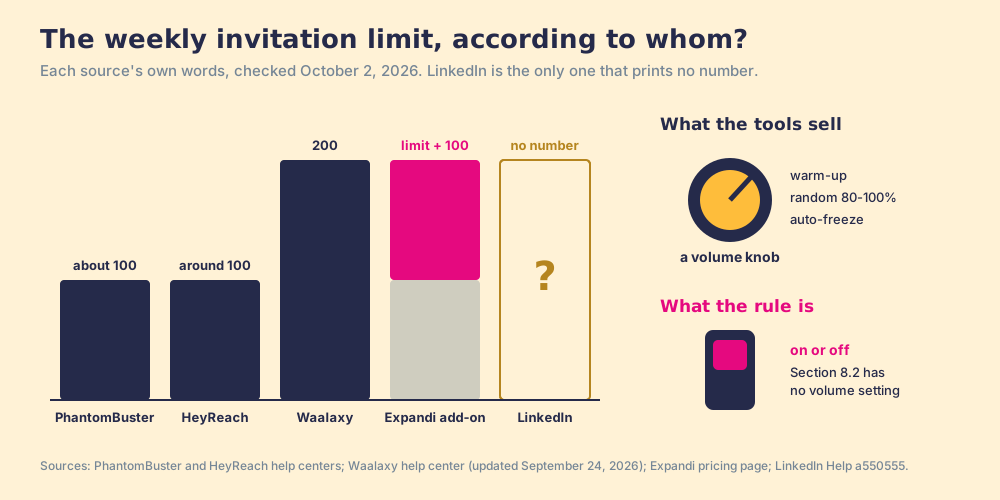
The disagreement teaches the mechanism. A speed limit is posted so drivers can obey it. LinkedIn’s limit is unposted and “dynamic by account,” which means it is a detection threshold, and a detection threshold is something you find by crossing it. The vendors sell a volume knob: warm-up schedules, Waalaxy’s daily quota set at a random 80% to 100% of your maximum, HeyReach’s automatic freeze near 100. The rule on automation is a light switch. Turning the knob down changes how likely you are to be noticed. It does not change which side of the switch you are on.
Why trust this ranking?
I started RevPartners, a HubSpot partner that did only sales implementations, sold roughly twice as much Sales Hub as any other partner, and reached Elite tier in 13 months. Supered came out of that work and is rated 4.9 from 81 reviews on G2 and 5.0 from 122 reviews on the HubSpot App Marketplace (both checked October 1, 2026). The disclosure: we make Supered Prospector, and it is graded here in its own lane, which is not automated outreach. The weights are printed so you can flip them.
The best LinkedIn automation tools, graded
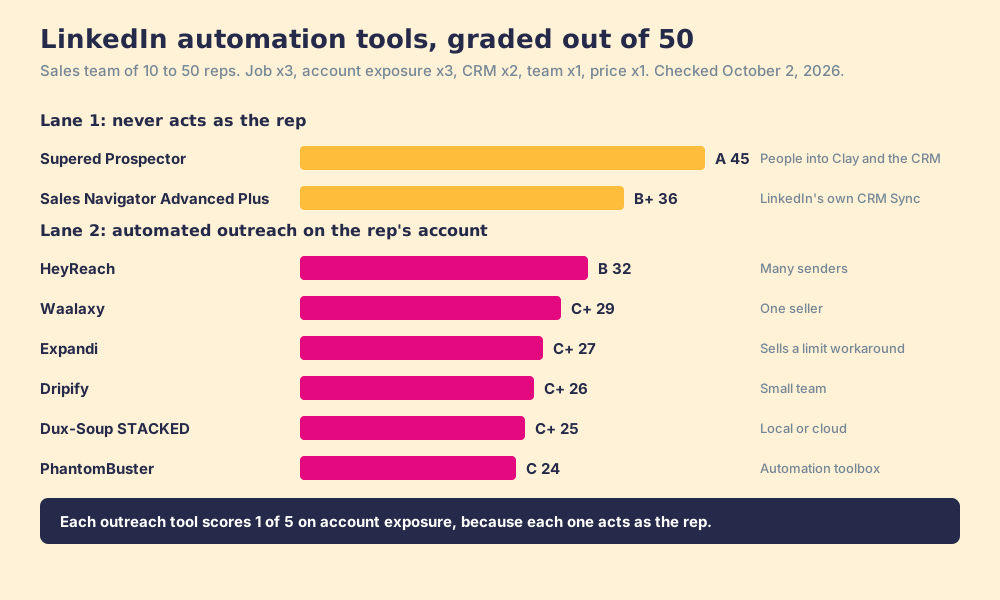
The lens is a sales team of 10 to 50 reps. Each tool is scored 1 to 5 per criterion and multiplied by the weight, for a maximum of 50, and each earns its job score in its own lane.
| Criterion | Weight | What it rewards |
|---|---|---|
| The job, done well | x3 | Automated outreach that books replies, or LinkedIn people landing in Clay and the CRM |
| Account exposure | x3 | Nothing acts on LinkedIn as the rep; 5 is LinkedIn’s own product |
| Gets the contact into the CRM | x2 | Native HubSpot, Salesforce, Pipedrive |
| Team control | x1 | Many reps, no duplicate outreach, a manager view |
| Price for ten reps | x1 | Published, predictable |
| Rank | Tool | Grade | Score | Lane | CRM integration | Setup effort | Pricing (checked Oct 2, 2026) | Why it ranks here |
|---|---|---|---|---|---|---|---|---|
| 1 | Supered Prospector | A | 45 | LinkedIn people into Clay and the CRM | Native (HubSpot, Salesforce, Pipedrive) | Under a week on an existing Clay account | $45/rep/mo, billed annually, plus your Clay plan | Sends nothing from the rep’s account; Clay’s waterfall across 200+ vendors |
| 2 | Sales Navigator Advanced Plus | B+ | 36 | LinkedIn’s own CRM Sync | Native (Salesforce, Dynamics, HubSpot) | A day | Quote only | Zero account exposure; no emails or phones |
| 3 | HeyReach | B | 32 | Automated outreach, many senders | HubSpot, Clay via integrations | A day | $79/sender/mo; Agency $999/mo for 25 senders | Best multi-sender outreach; runs on copied cookies or passwords |
| 4 | Waalaxy | C+ | 29 | Automated outreach, one seller | Native HubSpot, Pipedrive; Salesforce via Zapier | An hour | Pro $19, Advanced $39, Business $69/user/mo; $16, $32, $55 yearly | Cheapest and simplest; says it does not comply with LinkedIn’s terms |
| 5 | Expandi | C+ | 27 | Automated outreach | Integrations | A day | $99/seat/mo, $79 annual | Sells a campaign type to send beyond the limit |
| 6 | Dripify | C+ | 26 | Automated outreach | HubSpot on Pro | An hour | Pro $79, $59 annual | Clear plans; G2 reviewers flag missing Salesforce |
| 7 | Dux-Soup (STACKED) | C+ | 25 | Automated outreach | Native Salesforce, HubSpot, Pipedrive | An hour | Local $55, cloud $99/seat/mo monthly | Best native CRM list in the lane; dated interface per G2 reviews |
| 8 | PhantomBuster | C | 24 | Automation toolbox | HubSpot advanced sync; Salesforce, Pipedrive one-way | A day | Grow $159/mo, $128 annual, per workspace | Broadest toolbox; outreach is one Phantom among many |
The scores, criterion by criterion (job, exposure, CRM, team, price): Prospector 5, 4, 5, 5, 3. Sales Navigator Advanced Plus 3, 5, 4, 3, 1. HeyReach 5, 1, 3, 5, 3. Waalaxy 4, 1, 3, 3, 5. Expandi 4, 1, 3, 3, 3. Dripify 4, 1, 2, 3, 4. Dux-Soup 3, 1, 4, 2, 3. PhantomBuster 3, 1, 3, 2, 4. No outreach tool scores above 1 on exposure, because each one acts as the rep. No contact-data tool scores a 5, ours included, because only LinkedIn’s own products can.
Flip the lens and the order flips. If the job is automated LinkedIn outreach, Prospector and Sales Navigator score zero on it and leave the list, and HeyReach ranks first, then Waalaxy for one seller. Prospector does not do that job.
News check, October 2, 2026: no 2026 acquisition or merger found for Waalaxy, HeyReach, Expandi, Dripify, or PhantomBuster. Dux-Soup now sells as STACKED, and Waalaxy pulled its Chrome extension and went cloud-only on July 1, 2026 (Waalaxy Help Center).
1. Supered Prospector: the job around LinkedIn, for teams on Clay
A sales team can mean two different outcomes by LinkedIn automation. One is messages sent while the rep sleeps. The other is the tedious part gone: copying names out of Sales Navigator, finding an email and a mobile, checking whether a teammate already owns the account, and keying it all into the CRM. The second job does not need anything to act as the rep on LinkedIn.
Prospector runs inside the Supered Chrome extension and puts the team’s Clay tables in the rep’s hands. Clay plus Supered is the best way for a sales team to prospect: GTM engineers build in Clay, reps never open Clay. On a Sales Navigator lead or list, the rep adds leads to a prospect list and pushes the list to the team’s Clay table. On a LinkedIn profile, the rep sees the matching CRM record, who owns it, and a flag if the person was prospected before. On a company website, the rep runs the buying-committee lookup the team defined. The data comes from Clay’s waterfall, which “check[s] multiple providers to return the most verified emails (lower bounce rate) and phone numbers (higher connect rate)” (Clay), across 200+ providers, and Clay charges nothing when an enrichment comes back empty (Clay pricing). One click sends the record to HubSpot, Salesforce, or Pipedrive, and to the team’s sales engagement tool through the flows the GTM engineer built.
The leader sees each list as Found, Worked, and Closed, where Closed means every lead ends the way the process says: Qualified, Recycled, or Disqualified. Prospector for sales leaders shows that view.
Supered’s own statement on LinkedIn: Prospector works within LinkedIn’s terms and does not copy search results in bulk; the contact data comes from Clay’s waterfall on the customer’s Clay account. We do not claim LinkedIn approval or partnership.
Prospector is $45 per rep per month, billed annually, from one rep, on your own Clay account, with no free trial; it starts with a demo (Prospector). Choose something else if you want connection requests and follow-ups sent automatically (HeyReach or Waalaxy, with the risk above), if you are not on Clay (Sales Navigator next to Apollo or Kaspr, compared on the LinkedIn prospecting tools page), or if your sellers work from phones in the field, since Supered has no mobile product.
2. Sales Navigator Advanced Plus: LinkedIn’s own sync
On Advanced Plus, LinkedIn’s own CRM Sync links Sales Navigator leads and accounts with Salesforce, Microsoft Dynamics, or HubSpot, and lets a rep create a CRM record from a lead page (Sales Navigator Help). It is quoted, returns no email or phone, and carries zero account exposure. The Sales Navigator CRM Sync page covers setup.
3. HeyReach: the multi-sender outreach engine
HeyReach is built for running many LinkedIn senders at once. Growth is $79 per sender a month on monthly billing, with quarterly 10% and yearly 20% discounts; Agency is $999 a month for 25 senders; Unlimited is $2,999, capped at 300 senders under a fair-use policy (HeyReach pricing, October 2, 2026). It has a unified inbox across senders, and Clay’s outbound page lists HeyReach as an export destination (Clay). G2 rates it 4.6 from 73 reviews (October 2, 2026). It is the strongest outreach tool here, and each sender connects by copied cookies or credentials, behind a proxy.
4. Waalaxy: the simplest start
Pro is $19 a user a month, with 300 invitations a month; Advanced is $39 with 800; Business is $69 and adds cold email and 500 email-finder credits; yearly billing takes 20% off, to $16, $32, and $55 (Waalaxy pricing, October 2, 2026). It finds emails through a waterfall of BetterContact, FullEnrich, and Dropcontact, at 25 credits a seat a month on Pro and Advanced. HubSpot and Pipedrive sync natively; Salesforce goes through Zapier. G2 rates it 4.5 from 1,604 reviews (October 2, 2026). One license covers one LinkedIn account, and its help center tells you plainly that the tool does not comply with LinkedIn’s terms. PhantomBuster vs Waalaxy compares the two head to head.
5. Expandi: outreach with a limit workaround
Expandi’s Business plan is $99 a seat a month, or $79 billed annually, with a 7-day free trial, cloud running, a dedicated country-based IP, auto warm-up, and the Mobile Connector campaign it says adds 100 connection requests a week (Expandi pricing, October 2, 2026). G2 rates it 4.3 from 162 reviews (October 2, 2026). A feature built to exceed LinkedIn’s limit meets a second clause of section 8.2, which bans attempts to “bypass or circumvent any access controls or use limits.”
6. Dripify: clear plans for a small team
Dripify sells Basic at $59 a user a month or $39 billed annually, Pro at $79 or $59, and Advanced at $99 or $79 (Dripify pricing, October 2, 2026). Pro allows 75 connection requests and 100+ messages a day and adds HubSpot. G2 rates it 4.5 from 353 reviews, and reviewers there flag pricing and missing Salesforce and HubSpot integrations among the complaints (October 2, 2026).
7. Dux-Soup STACKED: local or cloud
STACKED, “powered by Dux-Soup,” still offers to run on your own machine: local at $55 a seat a month ($41.25 annual) and cloud at $99 ($74.17 annual), with native Salesforce, HubSpot, and Pipedrive integrations. G2 rates Dux-Soup 4.4 from 90 reviews, and reviewers there most often criticize the interface (October 2, 2026). Running locally changes where the actions leave from. The actions stay the same.
8. PhantomBuster: the toolbox
PhantomBuster is a workshop of automations across LinkedIn, Sales Navigator, Instagram, X, Google Maps and more, priced per workspace: Start $69 a month, Grow $159, Scale $439, 20% off annually (PhantomBuster Help Center). It is rated 4.4 from 138 reviews on G2. For LinkedIn outreach alone, the single-purpose tools above need less setup. The PhantomBuster review grades it on its own.
What do LinkedIn automation tools cost for ten reps?
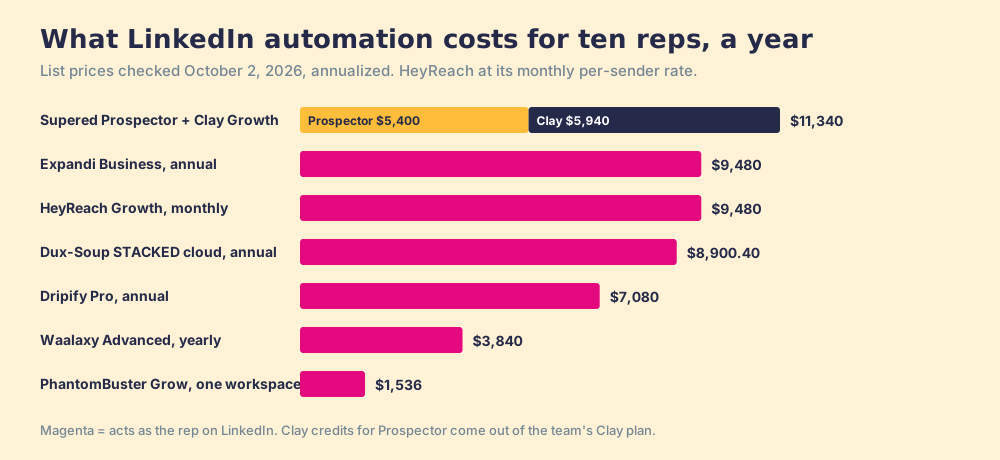
At list prices checked October 2, 2026:
| Tool | Ten reps | Billing basis |
|---|---|---|
| HeyReach Growth | $790 a month | Monthly, per sender |
| Expandi Business | $9,480 a year | Annual, $79 a seat a month |
| Dripify Pro | $7,080 a year | Annual, $59 a seat a month |
| Dux-Soup STACKED cloud | $8,900.40 a year | Annual, $74.17 a seat a month |
| Waalaxy Advanced | $3,840 a year | Yearly, $32 a seat a month |
| PhantomBuster Grow | $1,536 a year | One workspace, shared |
| Supered Prospector | $5,400 a year, plus Clay | Annual, $45 a rep a month |
Counting Clay Growth at its $495 monthly list ($5,940 a year), the Prospector stack for ten reps is $11,340 a year, and Clay credits come out of the team’s Clay plan. PhantomBuster is cheapest because the plan is per workspace: ten reps share one plan’s hours and credits, while each account carries its own risk.
Which LinkedIn tasks should a sales team automate?
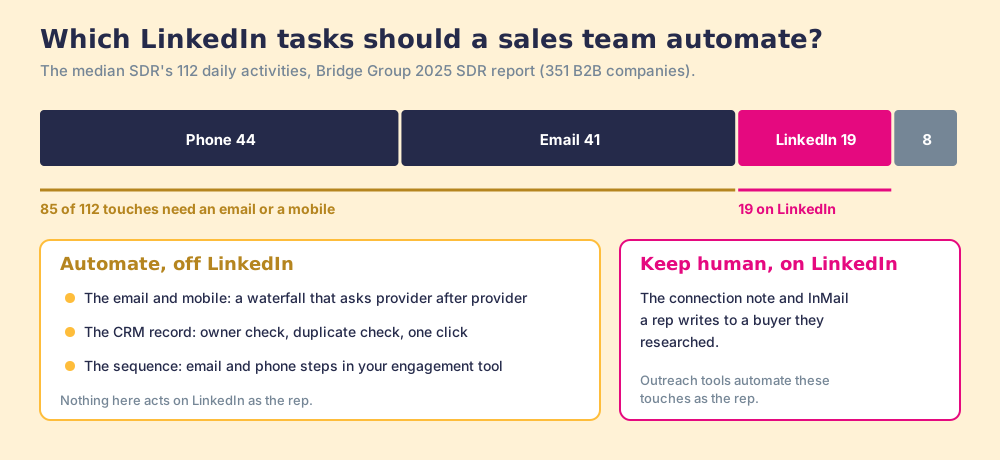
The Bridge Group’s 2025 SDR report, covering 351 B2B companies, puts the median SDR at 112 activities a day: 44 phone, 41 email, 19 LinkedIn, and 8 text or other (Bridge Group, 2025). The outreach tools on this list automate a share of the 19, on the channel with the strictest rules and an unposted limit. The 85 phone and email touches need a working mobile and a verified address, and those are the tasks a team can automate without lending anyone its card.
- Finding the email and mobile. A waterfall that asks provider after provider beats one database, and it runs off LinkedIn.
- The CRM record. Owner check, duplicate check, one click into HubSpot, Salesforce, or Pipedrive.
- The sequence. Email and phone steps in the team’s sales engagement tool, which LinkedIn’s rules do not touch.
- The LinkedIn touch itself. A connection note or InMail a rep writes by hand to a buyer they researched.
Which LinkedIn automation tool should you choose?
Two facts decide it: the account risk you accept, and whether you have Clay.
- A team that has decided to automate outreach. HeyReach for many senders, Waalaxy for one seller on a budget. Read the vendor’s help center first, and accept that the rule has no safe volume.
- A team on Clay that wants the tedious work gone. Supered Prospector, so the rep sends the right people to the team’s Clay table and the CRM from the page they are on, and nothing acts as the rep on LinkedIn.
- A team without Clay. Sales Navigator to find, a contact-data tool to fill emails and phones, both covered on the LinkedIn prospecting tools page.
- A team on Advanced Plus. LinkedIn’s own CRM Sync first, since it is the one sync with no account exposure.
What we recommend for a sales team: automate everything around LinkedIn and keep the LinkedIn touch human. The data says the meetings come from the 85 phone and email touches, and those are the ones you can automate without staking a rep’s network on a number LinkedIn does not publish. The LinkedIn Chrome extension page shows how to tell a spotter from a stand-in before you install anything, the LinkedIn prospecting guide covers the hand-written half, and a Prospector demo on your own Clay account shows a Sales Navigator list landing in the CRM without anything sent in the rep’s name.
Frequently asked questions
What are the best LinkedIn automation tools in 2026?+
Are LinkedIn automation tools allowed?+
How many connection requests can a LinkedIn automation tool send per week?+
Is cloud-based LinkedIn automation safer than a Chrome extension?+
What does LinkedIn automation cost for a ten-rep team?+
Is Supered Prospector a LinkedIn automation tool?+
Your Clay waterfall, where reps already work.