Data Enrichment API in 2026: What Apollo, ZoomInfo, Lusha and PDL Return, and How to Waterfall Them in Clay
A technical guide to the data enrichment API for RevOps and GTM engineers: what Apollo, ZoomInfo, Lusha and People Data Labs return, how each one reports a miss, their rate limits and billing, and how to chain them into a waterfall in Clay.
A data enrichment API is an endpoint that takes an identifier you hold, such as an email, a LinkedIn URL, or a name plus company domain, and returns the matching person or company record with work email, phone, title, and firmographics, billed per match or per revealed field.
A data enrichment API is an endpoint that takes an identifier you hold, such as an email, a LinkedIn URL, or a name plus company domain, and returns the matching person or company record with work email, phone, title, and firmographics, billed per match or per revealed field. The four I checked for this guide on October 2, 2026 (Apollo, ZoomInfo, Lusha and People Data Labs) agree closely on what a hit looks like. They disagree on what a miss looks like. One returns a 404. One returns a 200 with nothing in it. One writes “NOT_FOUND” inside the result. One charges a credit for a record once and then not again for a year. A waterfall is a chain of “if that one missed, ask the next,” so the miss is the hinge the whole build swings on. I read the five third-party guides ranking on page one for “data enrichment api” that day (Autobound, Nubela, Olostep, MeasureOne, Cognism), and none of them mentions a 404, a confidence threshold, or what an empty answer costs.
The short version, for the three jobs people usually mean:
- One provider, called from your own code. People Data Labs or Apollo, both with self-serve keys and published per-match billing.
- Several providers in order, without writing a service. Clay, where the native integrations and the HTTP API step chain into a waterfall across Clay’s 200+ vendors.
- The answer on a rep’s screen. No API at all for the rep; Supered Prospector runs the Clay table from the LinkedIn profile, company site, or CRM record.
What does a data enrichment API return?
The shape is the same everywhere. You send what you know; the vendor finds one person, scores how sure it is, and returns a record plus a signal about whether you were charged.
People Data Labs is the plainest example. Its Person Enrichment API lives at https://api.peopledatalabs.com/v5/person/enrich, accepts a name, company, email, phone, LinkedIn profile URL and a dozen other optional inputs, and promises that “adding more data points to a request increases the probability of a 200 response” (PDL reference, checked October 2, 2026). Apollo’s people enrichment is POST https://api.apollo.io/api/v1/people/match, with a match_confidence of high, medium, low or none on every answer (Apollo docs). Lusha’s V3 accepts a LinkedIn URL, an email, a Lusha ID, or a first and last name with a company name or domain, and returns a canReveal list that prices each field before you buy it (Lusha docs). ZoomInfo describes its API as access to “100M+ companies, 500M+ professionals” behind OAuth 2.0, with search free and enrichment metered (ZoomInfo developer docs).
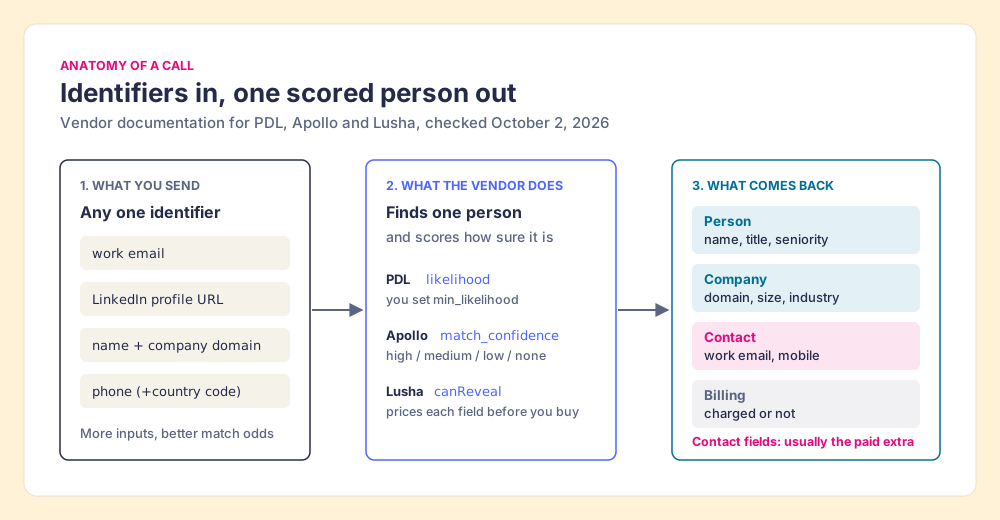
Three details in that response decide how much work the build will be:
- The confidence field. PDL calls it a likelihood score and lets you set
min_likelihood, “the minimum likelihood score that a response must have to return a 200 status code.” Apollo calls itmatch_confidence. The threshold you pick decides how many of your rows count as a miss. - The contact fields. Apollo returns no personal emails or phones unless you pass
reveal_personal_emailsorreveal_phone_number, and phones arrive later, at a webhook. PDL’s free Testing plan returns emails, phone and address “obfuscated” (PDL pricing). Lusha’s search returns a preview with “no emails or phone numbers yet.” - The billing signal. Lusha puts
contact.isCreditChargedon each enriched contact. The others tell you through a usage endpoint or your dashboard.
How does each API say “not found”?
Suppose you walk down a high street asking four shopkeepers for one man’s address. The first shakes his head. The second smiles, hands you an envelope, and the envelope is empty. The third hands you a sealed note that reads “not found,” tucked in a stack of other people’s notes. The fourth says he will post it to you, and bills you once for the year whether or not you come back. Only one of them said no in a way you could hear from the door.
That high street is the four APIs, read straight from their own documentation:
- People Data Labs: a clear no. “When the API finds a matching person, it returns this person along with an HTTP response code of 200. When it doesn’t find a matching person, it returns an HTTP response code of 404. We charge per match.”
- Apollo: an empty envelope. With too little input “you might receive a 200 response, but the response indicates that no records have been enriched.” In the bulk endpoint, “unmatched people are returned as null.” No credit-consuming data found means 0 credits.
- Lusha: a note in the stack. A miss comes back as a result whose
errorcode isNOT_FOUND,COMPLIANCE_RESTRICTED, orENRICH_FAILED, next to the hits from the same batch of up to 100. - ZoomInfo: billed by the year. “Each time a record is enriched for the first time within a rolling 12-month period, one credit is consumed and the record is placed Under Management for one year” (ZoomInfo credits). Search and lookup are free.
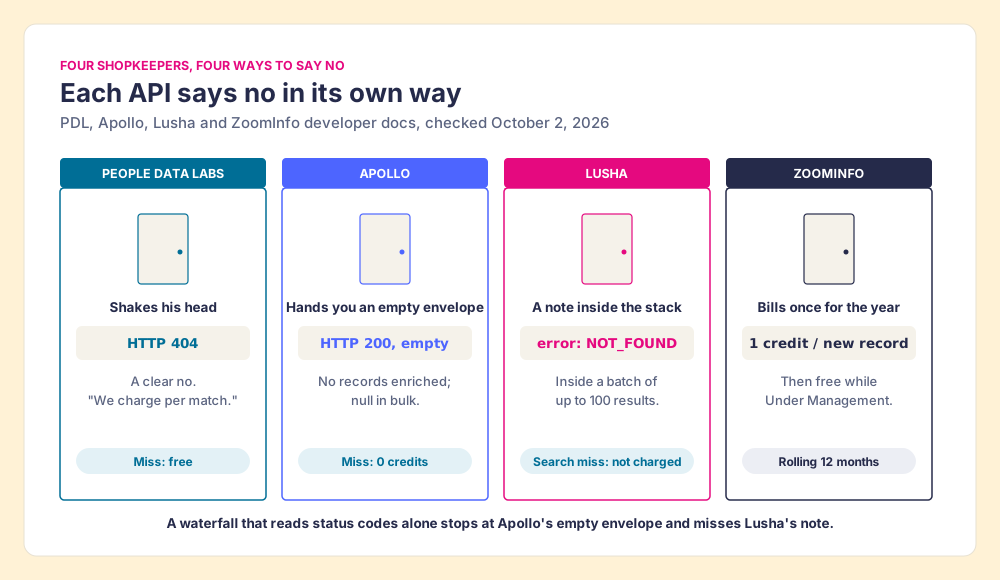
A waterfall built on status codes alone stops in the wrong place. Code that treats “200” as “found” will accept Apollo’s empty record and never ask the second provider. Code that treats “no 200” as “missed” will work for PDL and fail on Lusha, where a missing person rides inside a batch that succeeded. The fix is to normalize: decide, per provider, what field has to be present (a work email that passed validation, a mobile number) and treat anything else as a miss.
One more trap sits in Lusha’s own docs. Its Search Contacts page says “looking up a contact that returns NOT_FOUND isn’t charged,” while its getting-started page says credits are charged “with a minimum of 1 credit per request, even if no match is found” (Lusha introduction, both checked October 2, 2026). Both may be true for different endpoints. Test it on ten rows and read isCreditCharged before you trust either sentence with a hundred thousand.
How much do Apollo, ZoomInfo, Lusha and PDL charge, and how fast can you call them?
Each vendor meters a different unit, so a per-call price comparison misleads. PDL bills a match. Apollo bills data points with a heavy surcharge on mobiles. Lusha bills each revealed field. ZoomInfo bills a record once a year.
| Provider (docs checked 2026-10-02) | Person endpoint | What you pay for | Rate limit | Batch size |
|---|---|---|---|---|
| People Data Labs | GET/POST /v5/person/enrich | A match (404 is free). Testing $0, 100 credits/mo, contact data obfuscated. Self-Serve from $98/mo or $940/yr, from 350 credits/mo | 100/min free, 1,000/min paid | Bulk endpoint, “up to a hundred times” the rate |
| Apollo | POST /api/v1/people/match | 1 credit for demographics or email, +8 if a mobile is returned, 0 if nothing found | Enrichment: 1,000/min on paid plans, no hourly or daily cap. Free: 50/min, 200/hr, 600/day | 10 per bulk_match request |
| Lusha (V3) | POST /v3/contacts/search-and-enrich | Search per successful result; reveals per data point; rates from your account manager | 25 requests/second per account | 1 to 100 contacts per call |
| ZoomInfo | Enrich Contacts (OAuth 2.0) | 1 bulk data credit per new record per rolling 12 months; search free; credits bought annually | Standard 25/sec, 54,000/hr, 648,000/day. Builder 5/sec, Scaling 35/sec | See ZoomInfo’s batching docs |
Sources: PDL reference and pricing; Apollo rate limits and API pricing; Lusha rate limits; ZoomInfo rate limits.
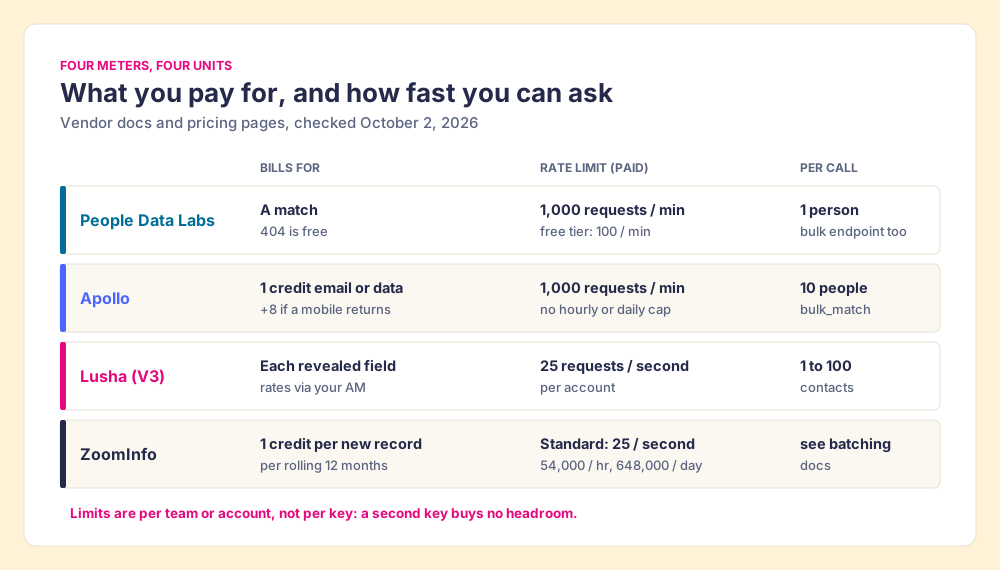
A few things in those pages change how you plan a job:
- Limits per team, not per key. Apollo says its limits are “per team, not per API key or per user,” and child workspaces share the parent’s. Lusha says the same per account.
- Three windows at once. Apollo and ZoomInfo each enforce per-minute or per-second, per-hour, and per-day windows together, and a 429 can come from any of them. ZoomInfo’s example: an exhausted hourly window with a
Retry-Afterof 719 seconds, about 12 minutes. - Headers you should test. Apollo and Lusha return
x-minute-requests-leftstyle headers. ZoomInfo’s rate-limit page says limits are “visible on every API response via the X-RateLimit-Limit-* headers,” while its credit page, updated August 24, 2026, says “rate-limit headers are not currently returned.” Write your backoff so it works either way. - The mobile surcharge. On Apollo a found mobile costs nine credits against one for an email, and Apollo’s docs say its phone waterfall typically uses 8 to 25 credits a number, with “some configurations” at 45 or more. On those numbers, a list that needs mobiles costs Apollo credits at up to nine times the rate of a list that needs emails.
For a sense of the money: if PDL’s $98 entry price buys its 350-credit starting tier, that is about 28 cents a matched record. That is our arithmetic; PDL’s page lists the two as separate “starting at” figures. ZoomInfo publishes no API price; Vendr reports a median ZoomInfo contract of $33,500 a year across 1,573 purchases (Vendr, page updated February 2026). Lusha’s own pricing page put API access on its Pro plan at $52.45 a month billed yearly when we captured it on September 25, 2026 (Lusha pricing); see Lusha pricing, Apollo pricing and ZoomInfo pricing for the seat plans around these APIs.
Why chain several APIs instead of picking the best one?
Because each one is a single database, and a single database has holes in different places. Clay’s waterfall page puts the case in one line: “Why use one contact database when you can use them all?” (Clay). The holes follow geography and source: a vendor strong in North America may be thin in EMEA, and Clay’s own changelog pitched its Lusha step as “better EMEA match rates” (Clay changelog, March 10, 2026).
So the second and third APIs buy coverage. The engineering job is to ask them in order, stop at the first good answer, and pay only for answers. You can write that service yourself (a queue, a provider order, a normalizer for the four kinds of “no” above, backoff for three different 429s, a validator, a CRM writer that never blanks good data), or let Clay hold most of it.
How do you build a waterfall in Clay with HTTP API steps?
Clay runs the waterfall as a set of columns in a table. Its Clay 101 lesson describes the mechanism plainly: you query “providers in a specific order,” usually starting with the most cost-effective, and “once Clay finds what it needs from one provider, it won’t check the others. This helps save your credits” (Clay University). Clay’s pricing page adds the billing rule that makes it cheap to over-ask: “If an enrichment returns no result, you’re not charged Data Credits or Actions” (Clay pricing, checked October 2, 2026).
The build, in order:
- Check the directory before writing a request. Apollo, ZoomInfo, Lusha and People Data Labs already have native Clay integrations. Apollo, ZoomInfo and Lusha mark their person-enrichment actions “Bring Your Own Account Required,” so you connect the key you already pay for. Clay’s pricing FAQ: “If you bring your own API keys for a data provider, you skip Data Credits entirely and only use Actions.”
- Start from a prebuilt waterfall. In a table, Add enrichment, search the data point (work email, phone), pick the waterfall, then “reorder, add, or delete your waterfall data providers” (Clay waterfall docs). Clay validates emails as it goes, with ZeroBounce by default (Clay University).
- Add an HTTP API column for any provider Clay does not list. Clay’s HTTP API enrichment sends GET, POST, PUT or DELETE “even when Clay doesn’t offer a native integration” (Clay HTTP API docs). Put the key in an HTTP API (Headers) account, which Clay encrypts at the workspace level; keys typed into the Headers field “are visible in plain text to anyone with access to the table column.”
- Gate it on the miss. Set the column’s run condition to run only when the waterfall’s email or phone column is empty. That one condition turns a standalone call into the next step of the waterfall, and Clay recommends conditional runs to avoid “unnecessary API calls, error messages, and wasted credits.”
- Map the response with field paths. List only the paths you need (Clay’s example:
data.user.email). Write the normalizer here: the column only counts as a hit if the field you need is present. - Set the rate limit from the vendor’s page. Clay’s setting is a request limit per duration in milliseconds: 10 per 1,000 ms is ten a second. For PDL’s paid tier, 1,000 per 60,000 ms. Turn on “Remove empty fields from request” so blanks never overwrite good values.
- Test one row, then ten. Clay’s docs say “Click Test to run on a single row.” Read the raw response, the status, and the vendor’s billing field before you run the table.
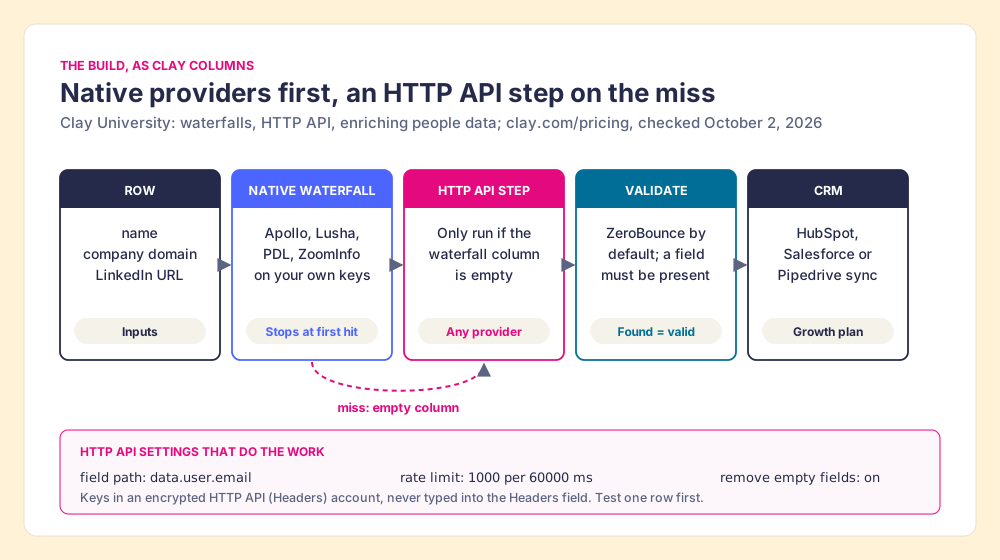
Two plan facts decide whether this build is open to you. Clay’s compare table lists HTTP API integrations and CRM integrations as not included on Free or Launch and included on Growth, which starts at $495 a month, or $446 a month billed annually (Clay pricing, checked October 2, 2026). Launch starts at $185. Clay’s Data Credits “start at $0.05 each”; Actions, which meter the platform work, apply even on your own keys. Clay use cases shows six builds that start from tables like this one.
When should you write your own b2b data integration instead?
A Clay table is not the right home for every enrichment job. Write the service yourself when:
- The trigger is product traffic. A signup that needs a firmographic answer at the moment it lands, before the welcome email, belongs in your backend calling PDL or Apollo directly.
- The volume outgrows a table. Clay’s HTTP API as a source caps an import at 50,000 rows. A nightly refresh of millions of records is a data-engineering job with bulk endpoints.
- One provider covers you. If your market is North American mid-market and one vendor fills what you need, a waterfall is cost without coverage.
Use Clay when the job is a sales motion: lists, CRM records, the GTM engineer’s next play (what Clay is covers who builds in it).
When does the result need to be on the rep’s screen?
An enrichment API is a water main. It runs under the street, it moves a lot of water at a steady pressure, and it fills the tanks in the basement: the CRM fields, the warehouse, the nightly refresh. A rep standing in the kitchen with a glass does not want a water main. The rep wants a tap.
Suppose a rep is on a prospect’s LinkedIn profile, or on a target company’s website, or on a HubSpot contact with no phone, and wants the number now, before the thought passes. The API that filled the CRM last night did not fill this person, because this person was not in the CRM last night. RevOps built a Clay table that would find them in one run. The rep does not have a Clay login, and should not need one.
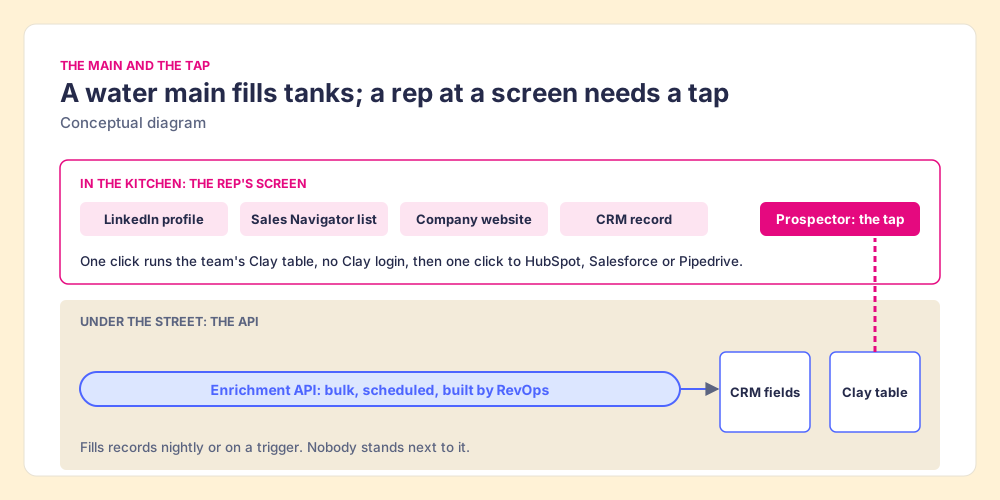
Supered Prospector is that tap. It runs inside the Supered Chrome extension, on the customer’s own Clay account, and reps never log into Clay:
- Entry points where reps already are. A LinkedIn profile, a Sales Navigator list, a company’s website with company research alongside, or a HubSpot, Salesforce or Pipedrive record.
- The GTM engineer’s tables, one click away. Any custom Clay workflow runs from Prospector, a whole list can be pushed into a Clay workflow, and the buying-committee lookup uses the titles, departments and seniority the team set.
- A CRM check before the new record. On a LinkedIn profile the rep sees the matching CRM record and whether the person was already worked in the past.
- One click to the CRM. Ops sets the field mapping once; the contact lands in HubSpot, Salesforce or Pipedrive with the waterfall’s email and phone, and the team’s process applies to it from there, so the manager sees which sourced lists get worked and which close.
Supered does not bring its own database. It brings Clay’s waterfall, which is every database, routed, and that is why we chose Clay as our only data provider. Clay governs the data. Supered governs the motion. Prospector costs $45 per rep per month billed annually, from one rep, plus your Clay plan (Prospector); the full rep loop is on the sourcing use case.
Choose something else if:
- No Clay account. Prospector needs one. A single-vendor extension or the vendor’s own API is less setup.
- The job is a backend pipeline. Prospector is for a person at a screen; product signups and nightly refreshes belong to the API.
- AI-written outreach. Prospector does not draft or send email; it hands the contact to your CRM and sequencer.
Why trust this guide?
Before Supered I started RevPartners, a HubSpot partner that did only sales implementations and reached HubSpot’s Elite tier in 13 months, which meant years of building CRMs for sales teams and deciding which data belonged in them. Supered is rated 5.0 from 122 reviews on the HubSpot App Marketplace and 4.9 from 81 reviews on G2 (checked October 1, 2026). The disclosure: we make Prospector, which appears above as one way to put a waterfall in front of reps. The endpoints, limits and prices on this page come from the vendor’s own documentation or pricing page, linked where it appears and opened on October 2, 2026 unless a different date is given.
Which data enrichment API should you use?
The ways forward, in the order a growing team meets them:
- A single API in your own code. Right for product-side enrichment and for one-provider markets. PDL is the easiest start (self-serve, a clear 404, per-match billing, 1,000 requests a minute paid). Apollo fits if you already pay for it: 1 credit for an email, 9 with a mobile.
- A waterfall in Clay. Right for sales lists and CRM records. Native providers on your own keys, HTTP API steps gated on the miss, validation, then the CRM, on the Growth plan.
- A tap for reps. Right once the waterfall exists and the people who need it are reps, not RevOps.
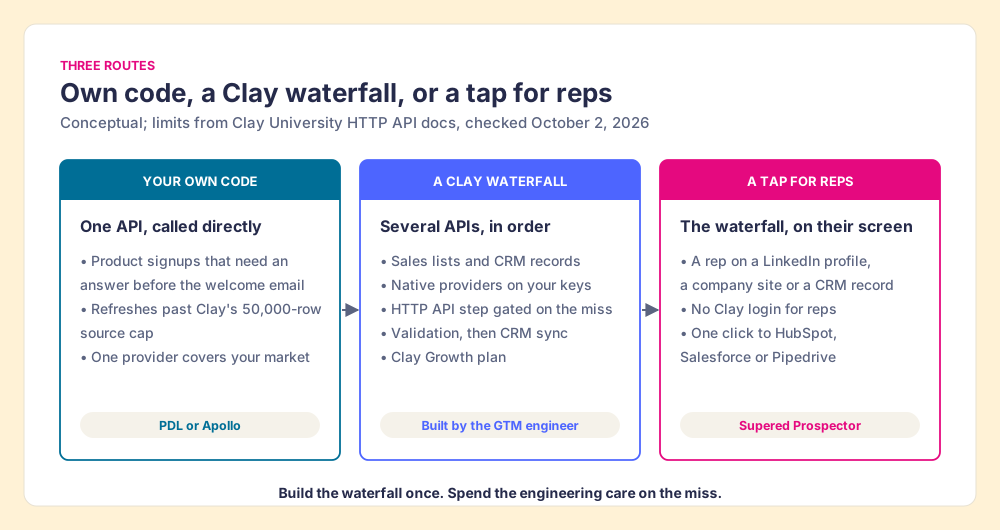
Our recommendation: build the waterfall once, in Clay, and spend your engineering care on the miss. Decide per provider what counts as found, test each one’s billing on ten rows, and set every rate limit from the vendor’s page instead of from memory. Then stop treating the API as the product. The product is the right contact on the screen of the person about to call them.
If you are deciding whether you need a data vendor contract at all, Kaspr alternatives and RocketReach pricing work the per-contact math for single-vendor tools, Clay prospecting shows how the builder’s tables reach reps, and the LinkedIn Sales Navigator API guide explains why LinkedIn’s API will never hand you an email address.
Frequently asked questions
What is a data enrichment API?+
How much does a contact enrichment API cost?+
What are the rate limits on Apollo, ZoomInfo, Lusha and People Data Labs?+
Can I call any data enrichment API from Clay?+
What is the difference between a b2b data api and waterfall enrichment?+
Do sales reps need an enrichment API to get emails and phones?+
Your Clay waterfall, where reps already work.