Best Knowledge Base Software in 2026, Graded by the Job It Does
The best knowledge base software for 2026, graded: Supered, Guru, Notion, Document360, Zendesk, and Confluence, with dated G2 ratings, pricing, CRM fit, and a plain answer on when to pick each.
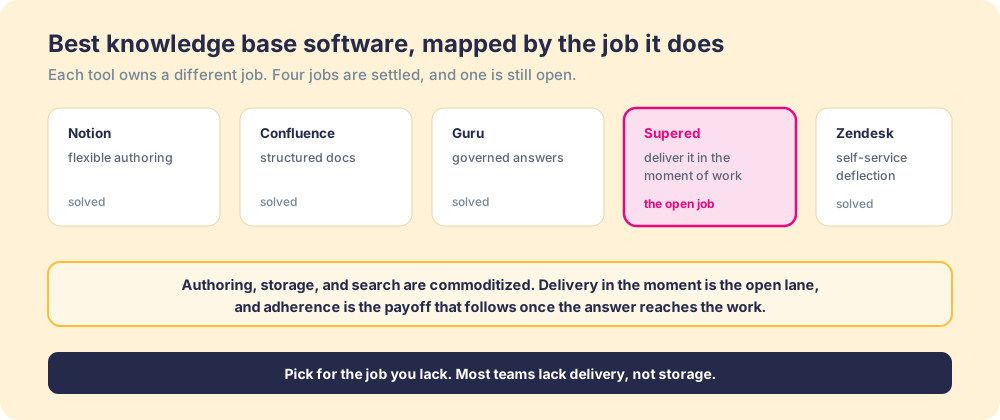
The best knowledge base software is the tool that does the job your team lacks: for revenue teams in HubSpot or Salesforce that is Supered, which delivers answers inside the CRM at the moment of work, while Guru, Notion, and the rest each lead their own lane.
The best knowledge base software depends on the job you need done, so here is the short answer before the long one:
- Supered. Best for revenue teams in HubSpot or Salesforce that need answers used during the work, rather than sitting stored.
- Guru. Best for a whole company that needs verified answers, with owners re-certifying each card.
- Notion. Best for small teams that want a flexible, inexpensive place to write.
Disclosure up front: Supered is our product. We rank it first only for the lane this page is weighted toward, a mid-market revenue team choosing an internal knowledge base, and we say plainly below where Guru, Notion, Document360, Zendesk, or Confluence is the better buy.
A sales rep keeps a folder of saved answers the way a cook keeps a recipe box. The pricing rule, the security one-pager, the line that handles the procurement objection, all of it filed and findable. Then, in the middle of a live call with the buyer waiting, the rep does not open the box. The answer sits three clicks away. We have never had better knowledge base software, and people still lose close to a fifth of their week looking for what a colleague already wrote down (McKinsey Global Institute). The grades below explain why.
Which knowledge base software is best? The decision table
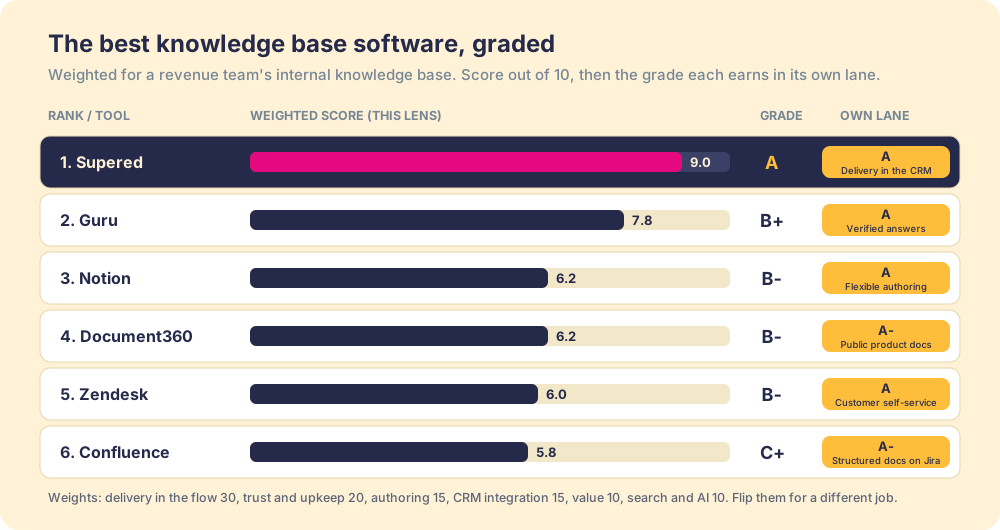
Six tools, ranked on one lens and graded in their own lanes. Ratings and prices were checked on October 1, 2026.
| Rank | Tool | Grade (this lens) | Grade in its own lane | Best fit | CRM integration | Setup effort | Pricing | Reason to switch to it |
|---|---|---|---|---|---|---|---|---|
| 1 | Supered | A | A: delivery in the CRM | Revenue teams on HubSpot or Salesforce | Native: cards embed in HubSpot, Salesforce, and web apps | Low: about three weeks to roll out | $13.50/user/mo yearly, free trial | Answers appear on the record the rep is working |
| 2 | Guru | B+ | A: verified answers | Company-wide knowledge, mid-market to enterprise | Extension plus Salesforce, Slack, Teams integrations | Medium to high | Custom quote | Owners verify every card on a schedule |
| 3 | Notion | B- | A: flexible authoring | Small teams on a budget | API and connectors; read in Notion | Low | Free; $10 or $20/member/mo | The fastest, cheapest place to write |
| 4 | Document360 | B- | A-: public product docs | Software companies publishing documentation | API and integrations | Medium | Custom quote | Versioning and review workflows for docs |
| 5 | Zendesk | B- | A: customer self-service | Support teams deflecting tickets | Native to Zendesk; CRM via apps | Medium | From $55/agent/mo yearly | Help center tied to the ticket queue |
| 6 | Confluence | C+ | A-: structured docs on Jira | Large or engineering-heavy orgs | Marketplace apps and API | Medium | Free to 10 users; ~$5.42 to $10.44/user/mo | Permissions and hierarchy at scale |
How did we grade knowledge base software?
Six weighted criteria, scored 1 to 10 for each tool and judged for one buyer: a mid-market revenue team choosing an internal knowledge base. The weights serve that job, and they lean hard on delivery, so a team with a different job should flip them.
- Delivery in the flow, 30 percent. Does the answer reach the person inside the tool they are working in, without a search?
- Trust and upkeep, 20 percent. Owners, verification, review dates, and how the base stays true after launch.
- Authoring, 15 percent. How fast a non-technical person writes and updates an answer.
- CRM integration, 15 percent. How natively the tool works inside HubSpot and Salesforce.
- Value, 10 percent. Published price, free tier or trial, and return against cost.
- Search and AI, 10 percent. Finding the one right answer when someone does go looking.
| Tool | Delivery (30%) | Trust (20%) | Authoring (15%) | CRM (15%) | Value (10%) | Search/AI (10%) | Weighted | Grade |
|---|---|---|---|---|---|---|---|---|
| Supered | 10 | 8 | 8 | 10 | 9 | 8 | 9.0 | A |
| Guru | 7 | 10 | 8 | 7 | 6 | 8 | 7.8 | B+ |
| Notion | 4 | 6 | 10 | 3 | 10 | 8 | 6.2 | B- |
| Document360 | 5 | 8 | 8 | 3 | 6 | 8 | 6.2 | B- |
| Zendesk | 5 | 7 | 7 | 5 | 5 | 8 | 6.0 | B- |
| Confluence | 4 | 7 | 7 | 4 | 9 | 6 | 5.8 | C+ |
Grade bands: A at 8.5 and above, B+ from 7.5, B from 6.5, B- from 6.0, C+ from 5.5. Flip the weights toward authoring and value and Notion leads. Weight customer self-service and Zendesk leads. The table shows fit for one buyer, and the lane column above is there so no tool is judged on a job it was never built for.
Why trust this ranking?
Because we have built knowledge bases inside CRMs from both sides of the table. Before Supered, our founding team co-founded RevPartners, a HubSpot partner that did only sales implementations and reached HubSpot’s Elite tier in 13 months, which meant years of watching client knowledge bases get built, filed, and skipped by reps mid-deal. Supered holds a 4.9 on G2 from 81 reviews as of October 2026 (Supered on G2), and its customers filed it into G2’s Knowledge Base category, where it earned five badges in G2’s Fall 2026 reports (our G2 badge breakdown). We graded our own product on the same six criteria as the other five tools, and every rival’s rating below is dated and linked so you can check it.
Why do teams switch knowledge base software?
Read the G2 reviews of the established tools and the same complaints repeat. Confluence reviewers report searches where outdated pages surface first. Guru reviewers report search that needs overly precise keywords as a base grows. Notion reviewers cite a steep learning curve and slowdowns on large databases. Document360 and Zendesk reviewers cite pricing add-ons. Those are real, and each one is fixable inside the tool.
Underneath them sits a single pattern: the base lives in one place and the work lives in another. Search has to be precise because people only search when they are already stuck. Outdated pages surface because no one opened them often enough to notice they were wrong. A team that switches tools without changing where the answer appears tends to rebuild the same problem with a nicer editor. So the switching reasons become the evaluation criteria in the grading above: delivery first, then trust, then the rest.
Supered: the best knowledge base software for revenue teams in the CRM
The problem Supered solves is use, not storage. A rep in HubSpot with a buyer waiting does not leave the deal to search a wiki, so the answer has to come to the deal page instead. Supered stores knowledge in Bases, folders, and Cards, the way any knowledge base does (Supered help center, Bases and Folders). Card triggers then embed the right card directly in HubSpot, Salesforce, or any web app, keyed to the page and the moment, so the pricing rule appears on the quote and the discovery guide appears when the deal enters discovery (Supered help center, Card Triggers). The Sidekick extension for Chrome and Edge carries the same cards to Gmail, LinkedIn, and other tools reps work in, and the Supered Assistant answers questions from your own content in plain language.
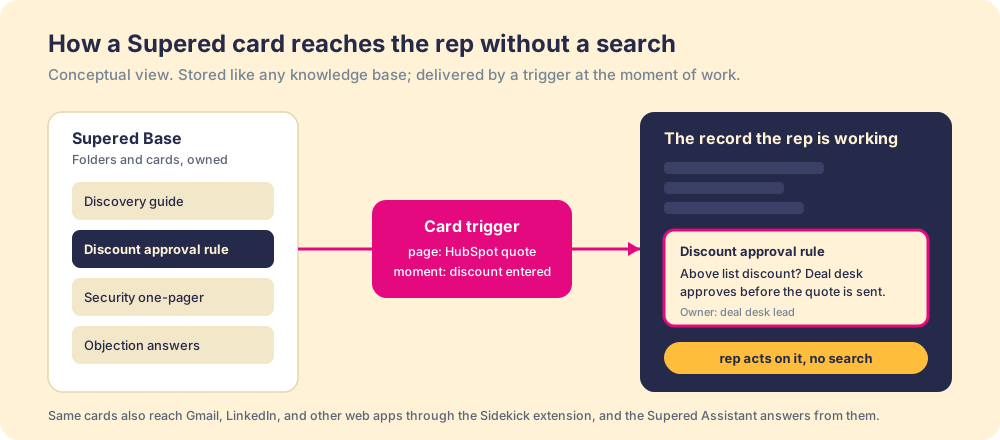
The payoff is measurable. Our State of Sales Enablement found teams whose guidance reaches the rep in the flow of the work hit quota at 49 percent, against 15 percent for teams whose knowledge sits in a separate place to be looked up (The State of Sales Enablement). Same stored answers, opposite results, and the difference is where the answer appeared.
Pricing is per user and published. Digital Adoption, the knowledge base tier with cards, guides, triggers, the assistant, and the extension, is $13.50 per user per month billed yearly or $15 monthly, with no seat minimum. Process Compliance, which adds process rules and boards that check whether the process was followed, is $40 per user per month billed yearly or $45 monthly, with a 5-user minimum. Both start with a free trial and no card (Supered pricing). Supered’s implementation is included and takes under a week.
Choose something else in four cases. If your team does not work in HubSpot or Salesforce and lives mostly in documents, Notion or Confluence fits better. If the base is a public help center for customers, pick Zendesk or Document360. If you need one verified source for HR, IT, engineering, and sales across a large company, Guru is built for that breadth. And if you want a free editor and will handle delivery yourself, Notion’s Free plan costs nothing.
Which other knowledge base tools are worth considering?
Each of these is the best pick for its own job, and each is graded lower here only because this page’s lens weights delivery inside the CRM.
- Guru, for verified company-wide answers. Guru repositioned through 2026 as an AI source of truth that answers from content experts have verified, with ownership cycles that prompt re-verification, its main defense against stale answers. Rated 4.7 on G2 from 2,323 reviews (Guru on G2, checked October 1, 2026). It no longer lists public prices; its pricing page routes buyers to sales for a custom quote (Guru pricing). The tradeoff: its browser extension and integrations bring answers closer to the work, but the rep still asks. Pick it when the base must serve the whole company under formal verification.
- Notion, for flexible authoring. The workspace was valued at $11 billion in a January 2026 employee tender, with more than half its recurring revenue from AI-enabled customers (NewsBytes, January 27, 2026). Rated 4.6 on G2 from 13,859 reviews (Notion on G2). Free, then $10 per member per month for Plus and $20 for Business, which includes Notion AI (Notion pricing). The tradeoff: an unopened page looks the same as one that closed a deal. Pick it when you need a place to write, cheaply.
- Document360, for public product documentation. Built for software companies publishing docs, with versioning, review workflows, and an AI search assistant called Eddy. Rated 4.7 on G2 from 547 reviews (Document360 on G2). Pricing is a custom quote (Document360 pricing). The tradeoff: reviewers name price as the top complaint, and it points outward at customers. Pick it when the base is your product documentation.
- Zendesk, for customer self-service. The help center tied to the ticket queue, sharpened by Zendesk’s March 2026 acquisition of the agentic AI company Forethought (TechCrunch, March 11, 2026). Rated 4.3 on G2 from 7,087 reviews (Zendesk on G2). Suite Team is $55 and Suite Professional $115 per agent per month billed yearly (Zendesk pricing). The tradeoff: it serves customers and agents, not a rep mid-deal. Pick it when the job is deflecting tickets.
- Confluence, for structured docs at scale. Atlassian’s wiki, now threaded with Rovo AI, is the default for teams already on Jira. Rated 4.1 on G2 from 4,369 reviews (Confluence on G2). Free to 10 users, then about $5.42 per user per month for Standard and $10.44 for Premium, with Rovo AI metered by credits (Carly, Confluence pricing, July 2026). The tradeoff: it is a destination, and reviewers report outdated pages surfacing in search. Pick it when you need permissions and hierarchy for a large, technical organization.
Why is storage solved and delivery still open?
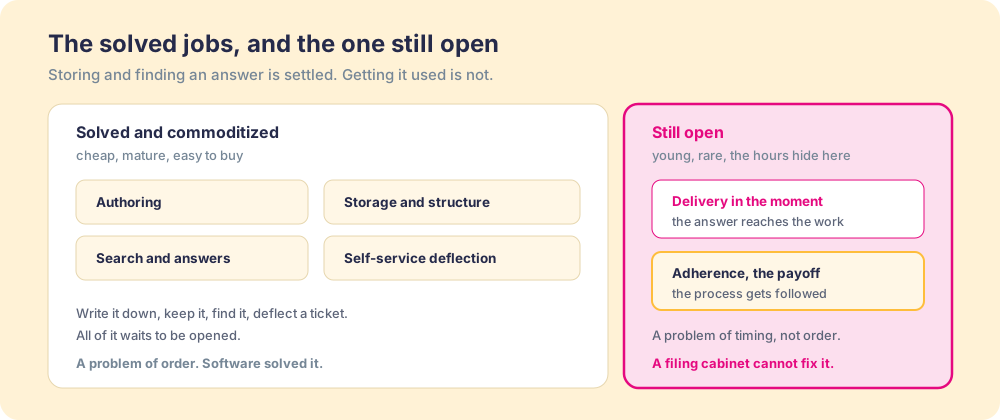
Because the two jobs differ in kind. Storing an answer is a problem of order: put it somewhere, label it, make it retrievable. That yields to good software, and all six tools above do it well. Delivering an answer is a problem of timing: get the right thing in front of the right person at the second they need it, without making them leave the work. That is a behavior problem in a software costume, and a better filing cabinet does not solve it.
You might say a sharper search closes it. Fair, and search is the part of the field improving fastest; an AI answer layer returns a clean reply to anyone who pauses to ask. The trouble is the pause. The rep mid-deal does not stop to wonder, so the best search never gets its chance. Think of a kitchen: a stocked pantry, a labeled spice rack, and a recipe box thick with cards, and still a cold, late dinner, because none of those is the act of cooking. The pantry is storage, the recipe box is your knowledge base, and the cooking, the right move with the pan hot, is delivery.
What should you look for in knowledge base software?
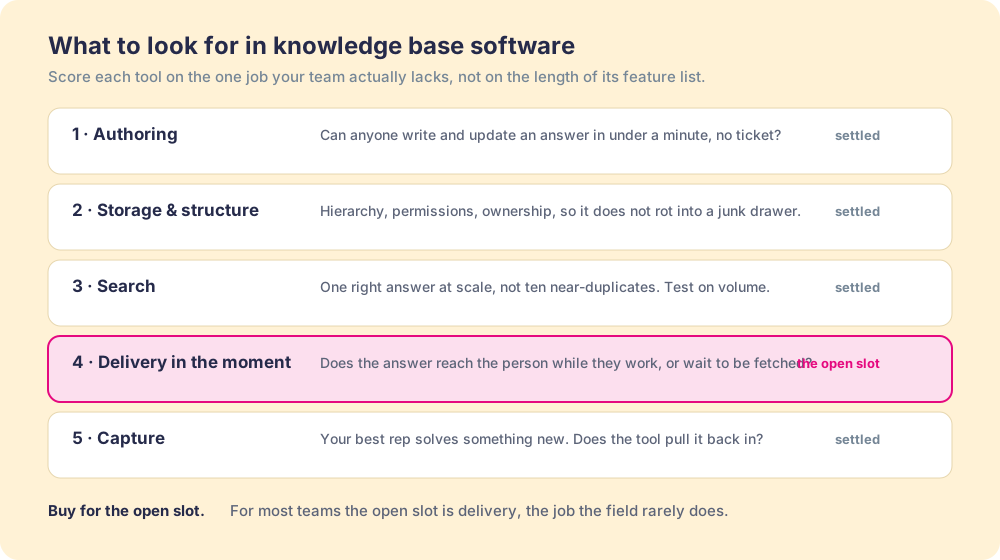
A feature checklist rewards the tool with the longest list, which is seldom the tool that closes your gap. Ask five questions instead, in order, and score each tool on the one you lack:
- Authoring. Can a non-technical person write and update an answer in under a minute, without filing a ticket? If writing is a chore, the base goes stale.
- Storage and structure. Can you set hierarchy, permissions, and an owner on every article so the base does not rot into a junk drawer?
- Search. When someone does go looking, do they find the one right answer or ten near-duplicates? Test it on your real content, not a demo of twelve tidy pages.
- Delivery in the moment. Does the answer reach the person while they work, or does it wait to be fetched? The McKinsey finding puts a size on this job: close to a fifth of the week lost to the fetch.
- Capture. When your best rep solves something new, does the tool pull that answer back in, or does it die in a Slack thread?
For the build that sits behind whichever tool you choose, see how to build an internal knowledge base, and for the article skeleton and category map to fill it with, our knowledge base template.
What we recommend
Name the job, then buy for it. For a revenue team that already works in HubSpot or Salesforce and stores answers fine but watches reps skip them mid-deal, we recommend Supered, because it is the only tool on this list built to put the answer on the record at the moment of work, and the 49-versus-15 quota gap between guidance in the flow and guidance in a separate tool is the size of that difference. Start the free trial with the ten answers your reps ask for most and wire each to its deal stage.
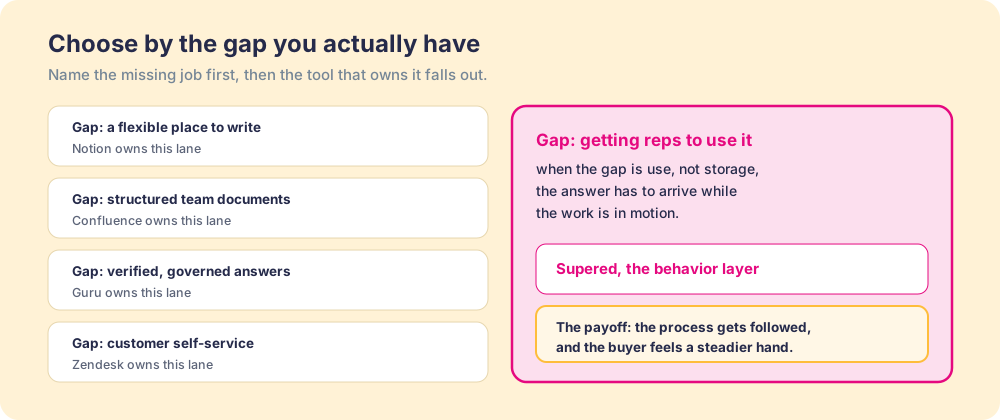
For other jobs, the branch is clean. Guru for a verified source across a whole company. Notion for a cheap, flexible place to write. Document360 for public product docs. Zendesk for customer self-service. Confluence for structured documentation on Jira. Several of these pair well with Supered: a team can keep writing in its existing base and use Supered to deliver the answers in the CRM.
If you are leaving a specific tool, our Guru alternatives and Notion alternatives comparisons go deeper, and the sales knowledge base guide covers what a revenue team’s base should hold. Before you buy, study the habits in our knowledge base examples so the new tool does not inherit the old base’s problems.
Frequently asked questions
What is the best knowledge base software?+
What is the best free knowledge base software?+
What is the best knowledge base software for HubSpot or Salesforce?+
How much does knowledge base software cost?+
Does AI replace knowledge base software?+
Why do teams switch knowledge base software?+
Your process, running itself.