Internal Knowledge Base: Why Most Get Built and Never Used
An internal knowledge base puts every answer in one place. Most still go unread, because storing and finding were never the hard part. Using is.
An internal knowledge base is the single place a company stores the answers its people need to do their jobs, the policies, playbooks, and product details, so the knowledge lives outside any one person's head and a colleague can find it without asking around.
A growing company builds its internal knowledge base, and then, more often than anyone budgets for, builds it again. The first one sprawls until people stop trusting it. Someone declares a fresh start, a cleaner tool, a stricter structure, and within a year the second one has drifted into the same fog as the first. The tool was rarely the problem. The team keeps rebuilding a library it pays for and seldom visits.
Storing the knowledge is easy now, and finding it is close to free, yet the base still goes unread on the afternoon someone needs it. This page covers the whole job: what an internal knowledge base is, what goes in it, how it differs from a customer help center, how to build one step by step, and why so many go stale. The throughline is our position: an internal knowledge base is judged by whether its answers reach people at the moment of the work, not by how much it holds or how well it searches.
What is an internal knowledge base?
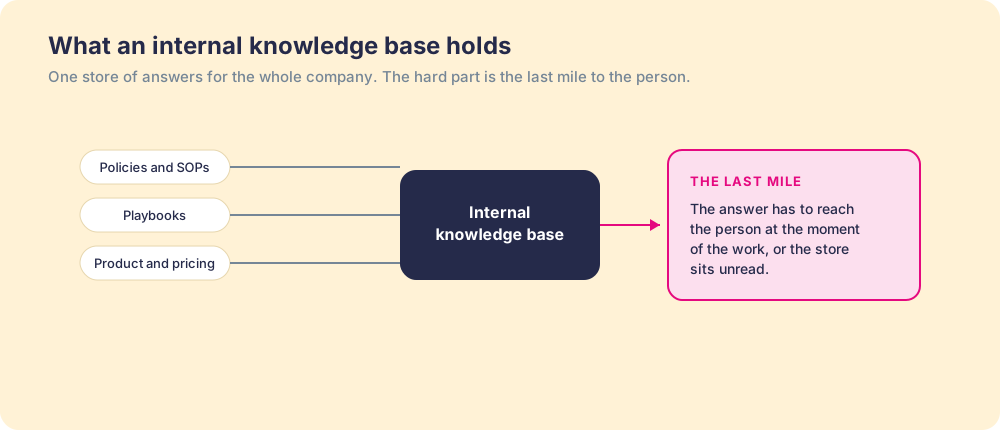
An internal knowledge base is the central store of the answers a company’s own people need to do their work: the policies, the processes, the product and pricing details, the playbooks, the onboarding paths. It points inward, at employees, which is what separates it from a customer help center. Build one well and the knowledge stops living in five people’s heads and starts living somewhere a colleague can reach without tapping a shoulder.
The format varies and matters less than people think. A company wiki is the loose version, a set of pages anyone can edit. Dedicated knowledge base software adds search, permissions, structure, and analytics. Both are containers for the same thing, and both succeed or fail on the same question, which is not how neatly the answers are stored but whether they arrive when someone is working.
It helps to be strict about what belongs inside. The test for inclusion is not whether a thing is true, it is whether someone will need it in the moment of the work. Process steps, security responses, the pricing rule, the captured motion of your best people: those earn a place. The all-hands deck from two years ago is archive, and stuffing archive into the base is one of the two ways it starts to rot.
What goes in an internal knowledge base?
The answers people ask each other for more than once. For a mid-market company, that usually sorts by team like this:
- Sales. Discovery questions, objection answers, competitor notes, the discount approval rule, and what to send after each meeting.
- Customer success and support. The handoff checklist from sales, implementation steps, escalation paths, and known-issue fixes.
- Product and pricing. Current packaging, what each plan includes, the roadmap answer reps are allowed to give, and release notes written for the field.
- Operations and IT. CRM stage definitions and required fields, tool access, the security questionnaire answers, and data policy.
- People. Time off, expenses, benefits, travel, and the onboarding path for a new hire’s first weeks.
A starter category map and an article skeleton for this list are in our knowledge base template, and filled-in sample articles from sales, IT, and HR are in knowledge base examples.
What is the difference between an internal and an external knowledge base?
An internal knowledge base serves employees and sits behind a login; an external knowledge base, usually called a help center, serves customers and sits on the public web. The content, the access, and the measure of success all differ:
| Internal knowledge base | External knowledge base | |
|---|---|---|
| Who reads it | Employees: reps, support agents, managers, new hires | Customers and prospects |
| What it holds | Processes, pricing rules, playbooks, policies, security answers | Product how-tos, troubleshooting, account and billing help |
| Access | Private, permissioned by team or role | Public, indexed by search engines |
| Success looks like | The right action taken during the work | Tickets deflected and customers unblocked |
| Typical tools | Notion, Confluence, Guru, Supered | Zendesk, Document360, Intercom |
The two fail the same way, which is why the lessons travel. A help center that waits on a separate site to be searched deflects fewer tickets than one whose answer appears beside the product, and an internal base that waits in a separate tab gets opened less than one whose answer appears in the CRM. For a side-by-side of the tools, see the best knowledge base software, compared by job.
What are the benefits of an internal knowledge base?
Time back, knowledge that survives turnover, and faster ramp for new hires, each of which the research puts a size on:
- Hours recovered. The McKinsey Global Institute estimated employees spend close to a fifth of the workweek searching for and gathering information, about 1.8 hours a day (McKinsey Global Institute).
- Knowledge that stays when people leave. Panopto’s 2018 survey of 1,001 US workers found 42 percent of institutional knowledge is unique to the individual, and that workers waste 5.3 hours a week waiting for information from colleagues (Panopto via PR Newswire).
- Faster ramp. The same survey found new hires take about six months to reach full productivity and spend up to 3.5 months of that hunting for information on their own.
- Consistent answers. When the discount rule lives in one owned article, every rep quotes the same rule, and the buyer hears one answer instead of three.
None of those benefits arrives because the base exists. They arrive when people use it, which is where most internal knowledge bases fall short.
Why do internal knowledge bases go unused?
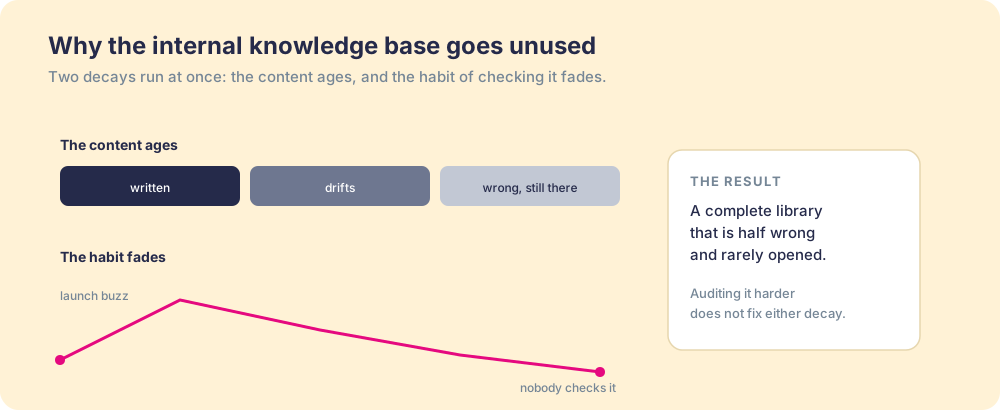
Because two decays run at the same time, and both are baked in from the start. The first is the content. Most answers go in without an owner or a review date, so the moment the process changes, the page becomes wrong and stays up, indistinguishable from the pages that are still right. A store you cannot trust is a store you stop checking. The second decay is the habit. After the launch push fades, consulting the base means leaving the work to go look, and under deadline that detour loses to a guess or a quick message to a colleague.
The cost of that second decay is measurable. The McKinsey Global Institute estimated that employees spend close to a fifth of the workweek, on the order of 1.8 hours a day, searching and gathering information (McKinsey Global Institute). Salesforce’s State of Sales report, published February 3, 2026, found sales reps spend 60 percent of their time on non-selling tasks, a chunk of it hunting for information rather than talking to buyers (Salesforce State of Sales, 2026). The base was supposed to end that hunt. When it sits one detour off the road, the hunt continues and the base watches from the shelf. No one on the team voted to abandon it; the detour decided for them, one deadline at a time.
The shelves were never the problem.
A sales knowledge base hits the same wall, and the same one the CRM hits from the other direction. As we argue in CRM adoption, people skip the system not from laziness but because the right action costs more effort than the wrong one. A knowledge base inverts the CRM’s problem: instead of asking the rep to leave the work to put data in, it asks them to leave the work to take an answer out. Same detour, same result.
Why is my internal knowledge base always out of date?
Because the changes happen somewhere else and nothing tells the base. Pricing changes in a finance meeting, a stage definition changes in a RevOps channel, a product ships with a release note, and the articles that describe the old way stay up, looking exactly as trustworthy as the ones still right. The fault sits in the wiring: no line runs from the place a process changes to the person who owns the page that describes it.
Three causes show up again and again. Articles without a named owner, so a change has no one to notify. Review dates without deadlines, so upkeep waits for a cleanup sprint that keeps getting pushed. And a base written for launch, hundreds of pages in a burst, faster than any team can maintain. The fixes are an owner per article, change events routed to those owners, and a retirement rule for pages with no opens, set out in detail in knowledge base best practices.
How do you build an internal knowledge base, step by step?
Start from demand, not from a blank wiki, and wire each answer to its moment before you write the next one. Six steps, in order:
- Harvest the questions. Export the last 90 days of questions from your team’s help channels, new-hire Slack threads, and manager inboxes. The questions asked three or more times are your first articles.
- Pick twenty and name owners. Choose the twenty most-asked questions and assign each a named owner before anyone writes. An article written without an owner starts aging the day it ships.
- Choose where it lives. Pick the tool by the job you lack: a flexible editor, a structured wiki, a verified-answer layer, or delivery inside the CRM. Our knowledge base software comparison maps the options.
- Write in one shape. Use one article template, question title, answer first, applies-when line, owner, and review-by date, so readers find the answer in the same place on every page.
- Wire each answer to its moment. Decide where each article should appear without a search: the deal stage, the ticket type, the form. This step decides whether the base gets used.
- Measure use and prune. After 90 days, check which answers were reached during the work and changed what people did. Rewrite the ones that were reached and ignored, retire the ones never reached, and add the next twenty questions.
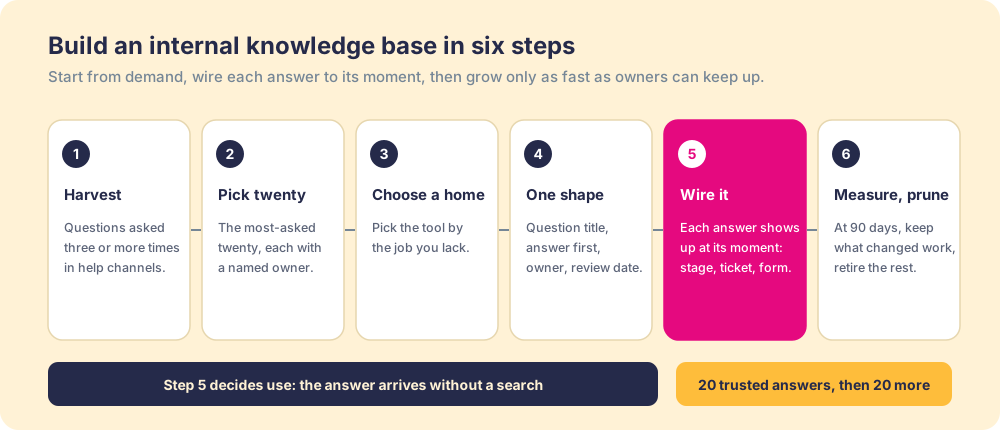
A base built this way starts small, twenty trusted answers instead of four hundred hopeful ones, and grows only as fast as owners can keep it true.
How do you get people to use an internal knowledge base?
Build it for use rather than for completeness, and treat the last mile as the actual product. The moves are structural, not motivational, and they map onto the two decays directly:
- Curate to what gets used. Cut the base to the answers people reach for, so the store stays small enough to trust. A smaller, true base beats an exhaustive one the team has stopped believing.
- Give every answer an owner. Each entry gets a person and a review date, so a changed process updates the page instead of orphaning it. Ownership is what stops the content decay.
- Deliver it in the flow of work. Surface the answer inside the tools where the work happens, the CRM, the inbox, the help desk, so consulting it costs no detour and the habit never has to fight friction.
- Inspect use, not page views. Measure whether the answer changed what someone did, not how many articles exist or got opened. You can only improve what you inspect, and page counts inspect the wrong thing.
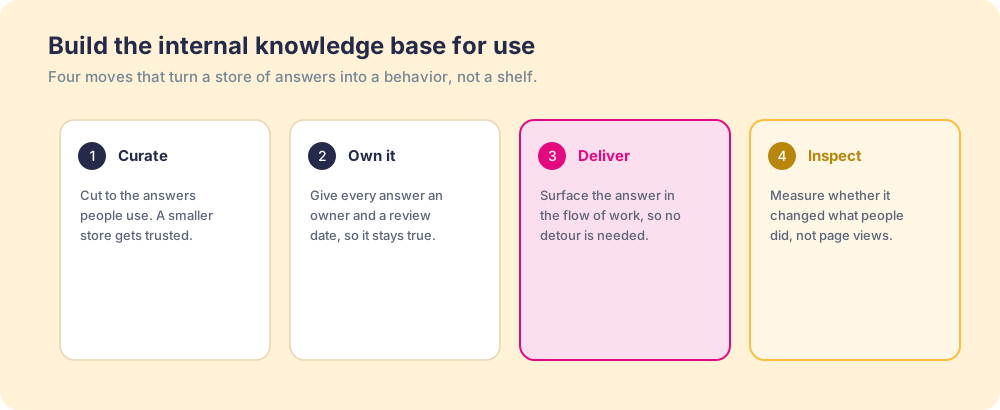
The third move is the one that breaks the old model. A knowledge base is built to be visited; a base built for use comes to the person instead. When the answer arrives in the flow, surfaced by what the person is doing, the base stops being a destination and becomes a behavior. That shift is the same one behind the best digital adoption platforms, and it is where the captured expertise of your best people, the tribal knowledge that Panopto’s survey found makes up 42 percent of what a company knows, finally reaches the rest of the team.
The proof is in whether behavior changed. Our State of Sales Enablement found teams whose guidance lives in the flow of the work hit quota at 49 percent against 15 percent for teams whose knowledge sits in a separate destination (The State of Sales Enablement). Same content, same people; the difference was whether the answer reached them where they stood. A base measured on page counts would have rated both teams the same. A base measured on use tells them apart.
What we recommend
Build small and wire first. Take the twenty questions your team asks most, give each an owner and a review-by date, write them in one shape, and connect each to the moment in the work where someone needs it, before writing article twenty-one. Then judge the base after 90 days on one question: did the answers reach people during the work and change what they did?
We would build it that way because each failure on this page traces to the same two gaps. The base goes stale because changes never reach an owner, and it goes unopened because the answer sits one detour from the work. A fifth of the week lost to searching, 42 percent of company knowledge held in individual heads, and the 49-versus-15 quota gap between guidance in the flow and guidance in a separate tool all point at the same remedy. Tidier folders appear nowhere in it.
For the copyable article skeleton and category map, start with our knowledge base template. For the habits that keep a base current, read knowledge base best practices. For the sales-specific version, see the sales knowledge base, and for the wider pattern, the sales execution gap.
Frequently asked questions
What is an internal knowledge base?+
What is the difference between an internal knowledge base and a company wiki?+
Why do internal knowledge bases go unused?+
How do you build an internal knowledge base step by step?+
Why is my internal knowledge base always out of date?+
What is the difference between an internal and an external knowledge base?+
What should go in an internal knowledge base?+
Your process, running itself.