HubSpot Data Agent: The Research Desk That Bills by the Question
HubSpot's data agent answers questions you write about records already in your CRM, at 10 credits per answer, filled or blank.
A refresh schedule turns one question into a monthly bill. What it does well, what it costs, and the job it leaves to Clay.
The HubSpot data agent is HubSpot's AI research tool for records already in the CRM: you write a question as a smart property, and it answers per record from web research, the company website, another property, or your calls and emails, at 10 HubSpot Credits per answer.
The HubSpot data agent is HubSpot’s AI research tool for records already in the CRM: you write a question as a smart property, and it answers per record from web research, the company website, another property, or your calls and emails, at 10 HubSpot Credits per answer (HubSpot knowledge base, updated January 12, 2026). That price is printed. Two things are not on the pages that rank for it: the agent bills for a blank answer the same as a full one, and a refresh schedule turns one question into a standing monthly charge. The short version for a HubSpot sales team:
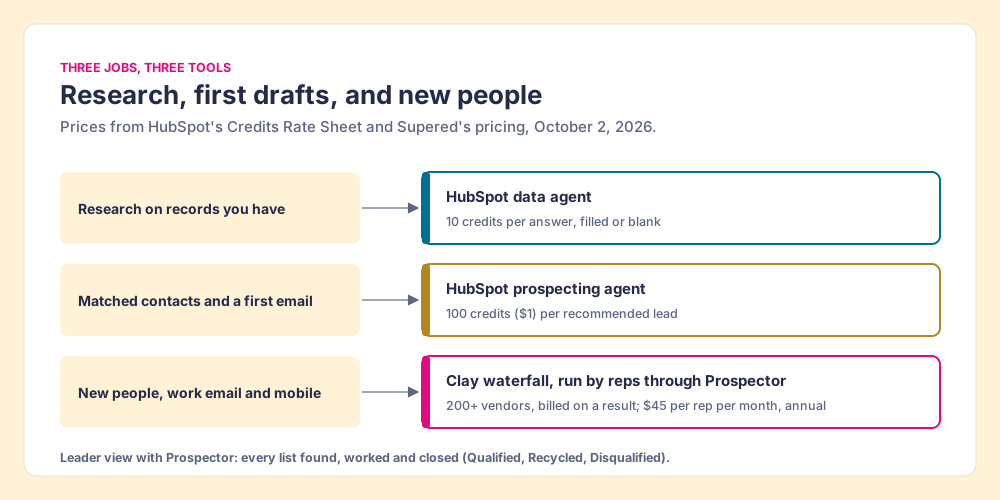
- The data agent. For questions about accounts you already have, answered from your own calls and emails or the company’s website. 10 credits per answer.
- HubSpot’s prospecting agent. For finding contacts at companies that match your signals and drafting the first email. 100 credits per recommended lead.
- Clay, run by reps through Supered Prospector. For new people and the work email or mobile to reach them, from a waterfall across 200+ vendors that bills only on a result. $45 per rep per month, billed annually.
What does the HubSpot data agent do?
A good reference library has a research desk. You walk up with a question about something in the building, the librarian goes to the stacks, reads the files, checks the newspaper archive by the window, and writes you an answer on a slip. She is fast and she knows your collection. She also charges a dime a slip, and a slip that says “could not find it” costs a dime too.
HubSpot’s data agent is that desk. Its product page puts the price in plain sight: “Smart properties $0.10 per answer” (HubSpot, October 2, 2026). The rate sheet gives the same price in credits, 10 per “Generate response to one prompt for one record” (HubSpot Product and Services Catalog, October 2, 2026). And the knowledge base adds the line about the empty slip: “Running a smart property consumes HubSpot Credits, even when a value isn’t filled for the property” (HubSpot, updated July 24, 2026).
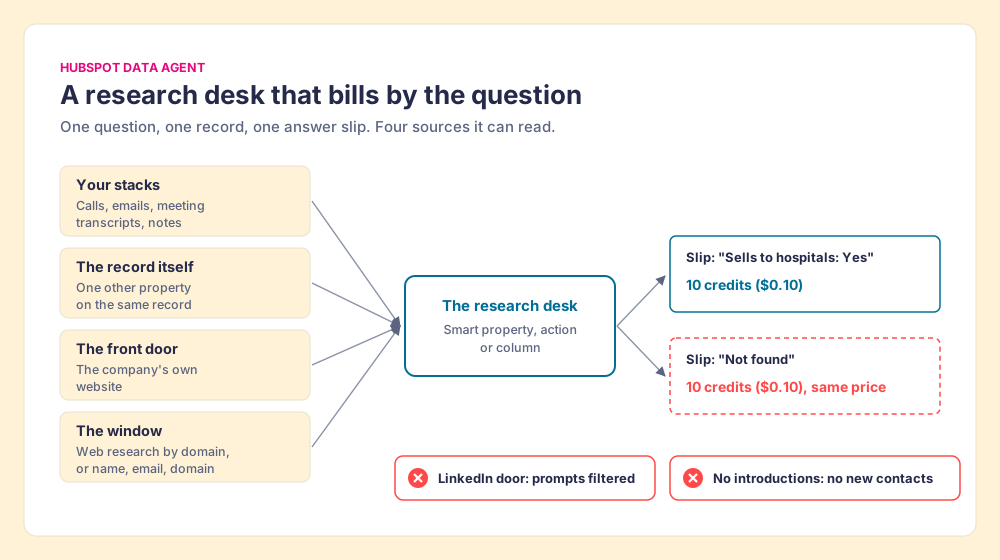
The desk has three windows, each a way to ask, and HubSpot smart properties are the main one:
- Smart properties. A custom property with a prompt attached, on contacts, companies, deals, tickets or custom objects. The field type can be single-line text, multi-line text, number, single checkbox, multiple checkboxes, radio select or dropdown select.
- Smart actions. A data agent step inside a workflow (“Data Agent: Fill Smart Property”, marked beta), so a new record gets its answer on creation.
- Smart columns. The same research run as a column in Data Studio.
And four sources, picked per property: web research, which looks up a company by its domain and a contact by first name, last name, email and company domain; the company website; one other property on the same record; and “activities and transcripts”, meaning logged calls, emails, meeting transcripts and notes. HubSpot’s Fall 2026 Spotlight widened the desk: “Ask one question and get answers from your full CRM, without choosing any properties or activities first” (HubSpot Spotlight). The data agent now sits in Agent Hub, HubSpot’s home for its agents, and HubSpot files its setup guides under the Breeze Library in its community, which is why the same feature gets searched as the breeze data agent or the hubspot breeze data agent.
The best testimony for it says what kind of tool it is. Truth Gordon, a sales operations analyst at Ironmark, on HubSpot’s page: “What I love most is that it does not add more data or overwhelm the team, but instead focuses on making what we already have truly usable.” A research desk could not ask for a better review. It works on the collection in the building.
How much does the HubSpot data agent cost?
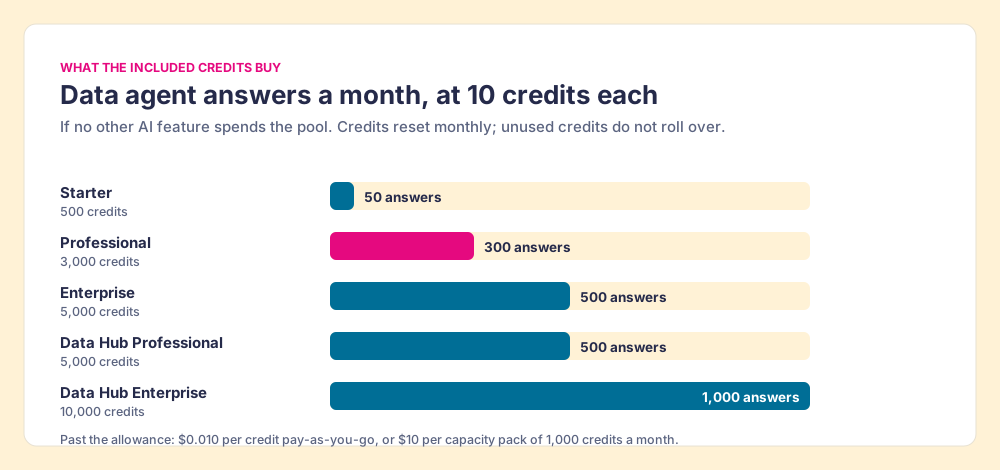
The meter runs at ten credits per answer, per record, per run. The allowance that pays for it is shared with every other AI feature in the portal, and it resets each month: “Unused credits do not roll over into the following month,” says HubSpot’s catalog. Divide the included credits by ten and you get the number of data agent answers a month, if nothing else touches the pool.
| Subscription | Included credits a month | Data agent answers if credits go to nothing else |
|---|---|---|
| Starter (Smart CRM, Marketing, Sales, Service, Content Hub) | 500 | 50 |
| Professional (same Hubs) | 3,000 | 300 |
| Enterprise (same Hubs) | 5,000 | 500 |
| Data Hub or Customer Platform, Professional | 5,000 | 500 |
| Data Hub or Customer Platform, Enterprise | 10,000 | 1,000 |
Past the allowance, credits cost $0.010 each on pay-as-you-go, “invoiced monthly after they’re incurred in increments of ten (10) credits,” or $10 per capacity pack of 1,000 credits a month. If you configure automatic upgrades, the catalog says, “your account will automatically be upgraded for the remainder of your term” when usage runs past the limit. Included credits are not additive across products: a portal with Marketing Hub Professional and Sales Hub Enterprise gets the Enterprise allotment, not both.
One small disagreement inside HubSpot’s own pages matters before you budget. The product page heads its pricing block “Pay when your CRM is updated.” The knowledge base says a run consumes credits “even when a value isn’t filled.” Both are HubSpot’s words. The second is the operating manual, so plan on it: a question the agent cannot answer for 400 of 1,000 records still costs 1,000 answers.
Why does a scheduled smart property cost more than it looks?
A schedule works like a standing order at the desk. Leave the librarian a note that says “check these thousand files every Monday and update the slips,” and you have bought four thousand slips a month, whatever she finds.
HubSpot built the schedule in, and sells it as a feature: “Set your refresh cadence, and smart properties updates the answer on your schedule.” In the data agent’s Manage tab, an auto-fill runs on record creation or on a schedule, with a segment, a frequency (“daily, weekly, or monthly”), the days and a time of day. The knowledge base does not publish what each fill option skips, so read the dialog before you save; it shows “the count of records to enrich and the credits available in your account.” If the schedule re-answers the whole segment, which is what a refresh cadence means, the arithmetic for one question on 1,000 company records runs like this:
- Monthly refresh. 1,000 answers, 10,000 credits, $100 at pay-as-you-go. That alone is more than three times a Professional portal’s 3,000 included credits.
- Weekly refresh. About four runs a month: 40,000 credits, $400.
- Daily refresh. About thirty runs: 300,000 credits, $3,000 a month.
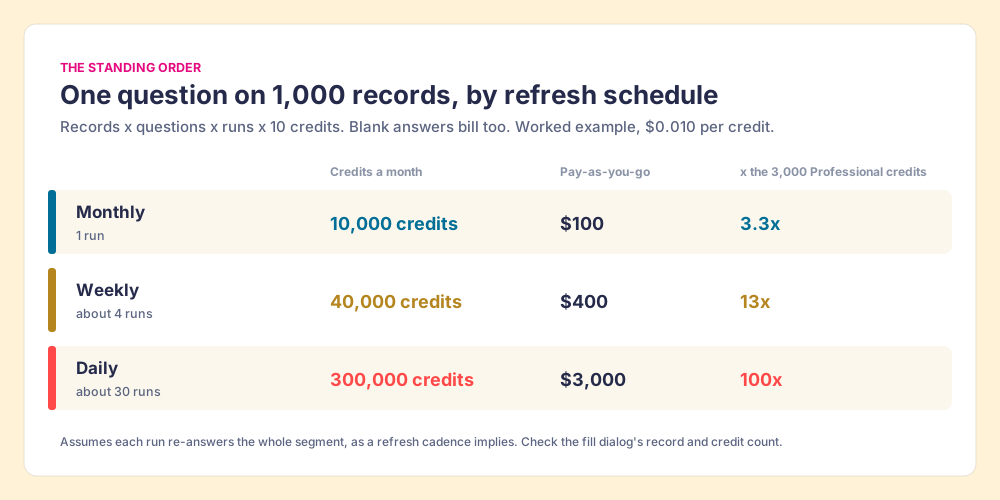
The multiplier is the part to watch, because a smart property bills on three axes at once: records, times questions, times runs. A RevOps lead who adds three questions to a 1,000-account target list on a weekly schedule has ordered 12,000 answers a month. Scale works the same way in the other direction. Anna Farley at Fast Slow Motion wrote up a university fundraising team that used the data agent to score more than 100,000 donors (Fast Slow Motion, June 30, 2026). The write-up gives no cost. At list rate, one question on 100,000 records is 1,000,000 credits, or $10,000 per pass; a contract price may differ, and the answers may well have been worth it. The point is that the pass and the refresh are separate decisions, and the second one recurs.
None of this makes the data agent expensive by nature. A dime is cheap for a question that saves a rep ten minutes of reading before a call. It makes the schedule the setting that decides the bill, and the setting is three clicks deep in a Manage tab.
What questions is the HubSpot data agent good at?
The desk earns its dime on questions where the answer already sits in the building or on the company’s own front door. HubSpot’s own examples are the right shape: “What products and services does a company offer?”, “Does their product or service require a sales team?”, “Does this company have a European headquarters?”, “Has my sales team spoken to this person about XYZ yet?” The last one is the kind no data vendor can sell you, because the answer lives in your call transcripts.
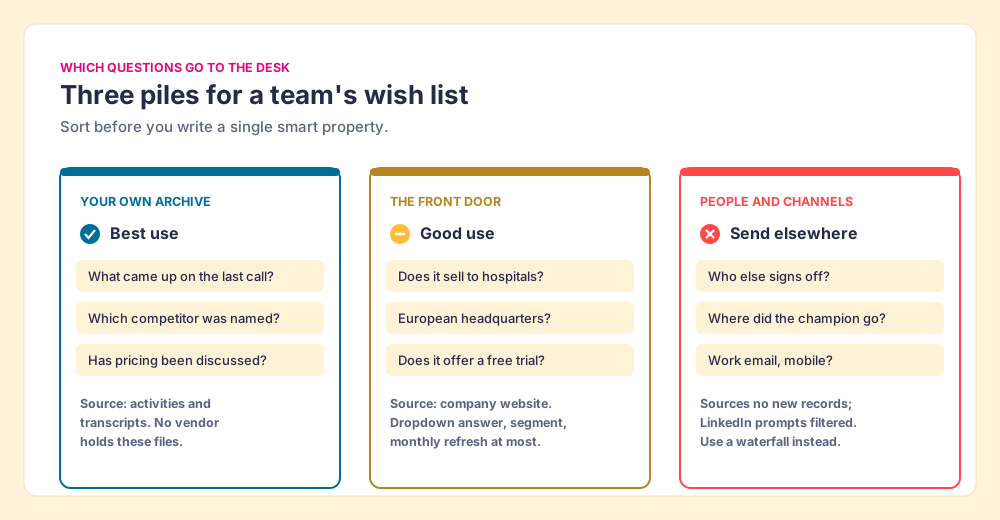
Sorting a team’s wish list into three piles makes the decision for you:
- Your own archive. Summaries of the last call, objections raised, competitors named, whether pricing came up. Source: activities and transcripts. These are the best use of the desk, because no data vendor holds your files.
- The company’s front door. Yes-or-no fit questions answered from the company website: sells to hospitals, has a free trial, hires field sales. Use a dropdown or checkbox type so the answer drives segments, and refresh monthly at most; a company’s market changes slowly.
- People and channels. Who else is on the buying committee, a champion’s new employer, a direct work email, a mobile. Send these elsewhere. HubSpot’s FAQ is direct about it: data agent “works with the accounts and contacts already in your CRM” and “does not automatically import or source new records.” And the knowledge base notes that “prompts that use LinkedIn (e.g., search LinkedIn company profile for sales roles) will be filtered out and may not return values when enriched.”
The third pile is where teams lose credits, because the question sounds like research. “Find the VP of Sales and her email” sounds like a research job. The desk will try, write a slip, and bill for it, and HubSpot’s standard enrichment, the free tool beside it, lists no contact email or mobile among the fields it fills either (HubSpot data enrichment walks that list). A contact channel is the answer least likely to be in any single source, which is why a waterfall asks one provider after another.
How do you set up a smart property without wasting credits?
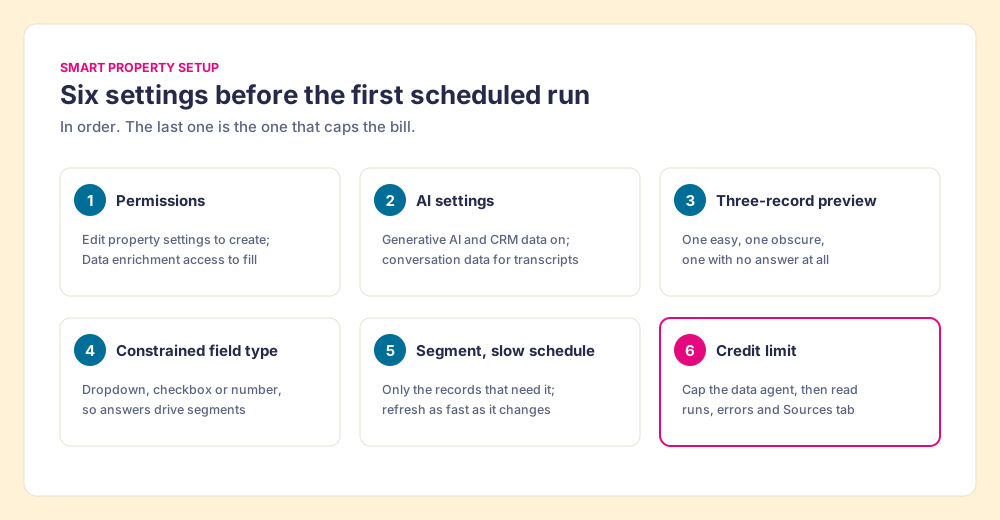
Six settings, in the order HubSpot’s knowledge base presents them, with the credit control added where it matters.
- Permissions. “Edit property settings” or Super Admin to create a smart property; “Data enrichment access” or Super Admin to fill one.
- AI settings. “Give users access to generative AI tools and features” and “CRM data” on; “Customer conversation data” on as well if you want the transcripts source, which is the source that earns the most.
- A preview on real records. The editor lets you select a record and preview the answer before saving. Pick three: one easy, one obscure, one where you expect no answer at all. The obscure and missing ones show you what a blank costs.
- A constrained field type. A dropdown, checkbox or number answer can feed segments, reports and workflows; a paragraph cannot. Smart properties also cannot take validation rules, so the field type is your only guardrail on format.
- A segment and a slow schedule. Restrict auto-fill to the segment that needs the answer, and match the frequency to how fast the answer changes. A headquarters location does not need a daily refresh.
- A credit limit. HubSpot’s credits article covers “setting credit limits for specific features, monitoring usage, and more”; set one for the data agent before the first scheduled run, and check the Manage tab’s “fill usage data, successful runs, and number of errors” after it.
Then read the sources. Each filled value has a Sources tab listing the website links or record it drew on. Kristopher Crockett’s validation checklist for the data agent puts the risk in one line: “A populated CRM property can look authoritative even when its value came from an uncertain source” (Selworthy, September 25, 2026). A slip in the librarian’s handwriting looks the same whether she read the file or guessed from the cover.
What does the data agent leave undone, and who does it?
The research desk has no introductions office. It cannot hand you the person you have not met, and it was never meant to. HubSpot sells two other tools around it. The HubSpot prospecting agent finds contacts at companies that match your signals and drafts outreach, at 100 credits, or $1, per lead it recommends. Its standard enrichment fills title, seniority and firmographics for free and lists no contact email or mobile. The prospecting agent pulls contacts partly from outside providers (ZoomInfo announced on July 9, 2026 that it was “selected as a third-party data provider for HubSpot’s Breeze Prospecting Agent”, per ZoomInfo), and it bills per lead it recommends for outreach, which is a different purchase from a channel for a person your rep already picked.
That gap is where HubSpot sales teams with outbound reps tend to add Clay. Clay’s waterfall asks 200+ data vendors in turn (clay.com, October 1, 2026) until one returns a verified email or phone, and it meters the other way from the desk: “If an enrichment returns no result, you’re not charged Data Credits or Actions” (clay.com/pricing, October 2, 2026). The Clay vs HubSpot comparison runs the full side-by-side on fields and cost, and the Clay HubSpot integration page covers writing results back by record ID.
Clay has its own catch. It is built for the person who builds tables, the GTM engineer, and reps rarely open it. So the engineer who built a fine waterfall ends up as the list desk, fielding Slack requests for one more list.
Where Supered Prospector fits
A disclosure first. I started RevPartners, a HubSpot partner that did only sales implementations and reached Elite tier in 13 months, and Supered came out of that work. Supered is the #1 sales enablement app on the HubSpot marketplace, at 5.0 from 122 reviews there and 4.9 from 81 on G2 (October 1, 2026). We make Prospector, and Prospector runs on Clay.
Clay plus Supered is the best way for a sales team to prospect: GTM engineers build in Clay, and reps never open Clay. Prospector runs inside the Supered Chrome extension on the team’s own Clay account.
- The GTM engineer. Builds named flows once, each mapped to a Clay table or function, such as person enrichment or a buying committee, and a destination, such as the HubSpot account or a sequence. “Your logic stays yours: waterfalls, tiers, tags, and sequence variables.” The Prospector page for GTM engineers shows the builder’s side.
- The rep. Gets the table as a button on a HubSpot record, a LinkedIn profile, a company’s website or a Sales Navigator prospect list, picks a flow from the Push menu, sees the matching HubSpot record and who owns it, then syncs in one click. HubSpot, Salesforce and Pipedrive all work.
- The leader. Sees every list as Found, Worked and Closed, with each lead closed the way your process says: Qualified, Recycled or Disqualified. That view is how the Clay budget grows.
On LinkedIn, ask every vendor what it reads, ours included. Prospector works within LinkedIn’s terms and does not copy search results in bulk; the contact data comes from Clay’s waterfall on the customer’s Clay account.
Prospector costs $45 per rep per month, billed annually, from one rep, on top of your Clay plan (Prospector). Choose something else if you do not have Clay, because Prospector does nothing without the team’s own Clay account, and a team that has never built a waterfall needs someone to build it (GTM engineer salary covers that cost). Choose something else, too, if your questions are about your own calls and customers. The research desk does that job inside the record, and does it well.
Should you use the HubSpot data agent?
Use it for the first two piles, with the meter in view, and send the third elsewhere. The ways forward, by job:
| Job | Tool | What it costs (October 2, 2026) | Watch for |
|---|---|---|---|
| Summaries and answers from your own calls, emails and notes | HubSpot data agent, transcripts source | 10 credits per answer | Turn on customer conversation data; read the Sources tab |
| Yes-or-no fit questions about a company | HubSpot data agent, company website source | 10 credits per answer, per run | Dropdown answers, segment restriction, monthly refresh at most |
| Title, seniority, firmographics on records you have | HubSpot standard enrichment | 0 credits | Mapping rules decide what it overwrites |
| Signal-matched contacts and a first email | HubSpot prospecting agent | 100 credits ($1) per recommended lead | Draft quality; review before sending |
| New people, work emails and mobiles, run by reps | Clay waterfall through Supered Prospector | Your Clay plan plus $45 per rep per month, billed annually | Needs Clay tables and someone to build them |
Our recommendation, on the evidence above: point the data agent at your archive first, because the transcripts source answers questions no vendor can, at a dime each. Put fit questions on dropdowns and a monthly schedule, and set a credit limit before the first scheduled run, because HubSpot’s own article says a blank answer bills and a refresh cadence re-asks. Keep people and channels away from the desk entirely. That job belongs to a waterfall, and if you already pay for Clay, to the reps who need the numbers. The sales prospecting with Clay page shows that loop end to end, and the Clay Chrome extension page covers how reps reach Clay tables from the browser without a Clay login. For where the data agent sits among HubSpot’s other agents, and what each one costs in credits, see the HubSpot Breeze AI guide.
Frequently asked questions
What is the HubSpot data agent?+
How much does the HubSpot data agent cost?+
Does the data agent charge when it finds nothing?+
Can the HubSpot data agent find emails and phone numbers?+
What is the difference between the data agent and the prospecting agent?+
What are the best questions to give the HubSpot data agent?+
Your Clay waterfall, where reps already work.