HubSpot Breeze AI in 2026: Good Tradespeople, Billed by the Job, Working to a Code They Never Saw
HubSpot Breeze AI is now Breeze Assistant plus the agents in Agent Hub, each billed in HubSpot Credits.
What each agent does and costs, what 3,000 credits buy, what Breeze does well, and the one thing it cannot know: your sales rules.
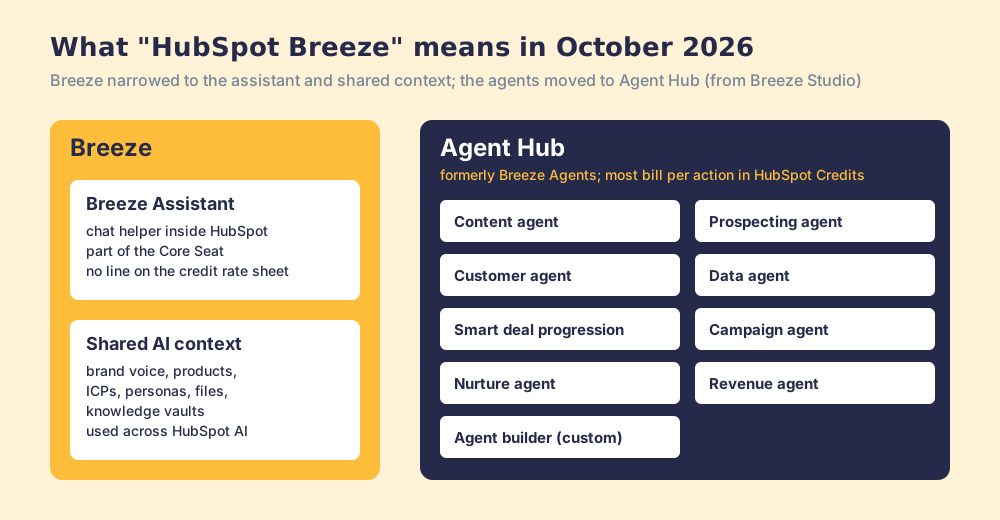
HubSpot Breeze AI is HubSpot's built-in AI: Breeze Assistant, the chat helper included with every Core Seat, plus the agents now managed in Agent Hub (customer, prospecting, data, content, deal progression and custom agents), most of which bill per action in HubSpot Credits.
HubSpot Breeze AI is HubSpot’s built-in AI: Breeze Assistant, the chat helper included with every Core Seat, plus the agents now managed in Agent Hub (customer, prospecting, data, content, deal progression and custom agents), most of which bill per action in HubSpot Credits. The prices are posted, and fairly low. HubSpot Breeze pricing is a penny a credit, metered per job. What no Breeze page tells you is the condition that decides whether the work is any good: an agent can only work to the standard it has been given, and your sales standard is probably written nowhere an agent can read it. The short version:
- Breeze agents. The right buy for a HubSpot Professional or Enterprise team with a high-volume, well-defined job (support conversations, research on records you already have, deal updates after calls), paid per completed task.
- Supered, alongside them. The right add when you want a written set of sales expectations checked against every open deal each day, so the work an agent does is measured against your rules, and Claude can read those rules and fix what breaks them. Process Compliance is $40 per user per month, paid yearly, 5-user minimum.
- Claude with HubSpot’s connector and Supered. The pick when the daily CRM work should follow your rules today, without waiting for HubSpot to add a connector.
What is HubSpot Breeze AI in 2026?
The name moved this summer, and some of the pages that rank for it have not caught up. Martech.org’s August 2026 roundup put it in one line: “Agent Hub is the evolution of Breeze Studio, a new and improved home for agentic workflows and custom agents,” and it added that agents “that were free during Breeze Studio’s beta… now consume credits” (MarTech, August 21, 2026). The HubSpot partner Fast Slow Motion explained what the brand kept: “Breeze hasn’t gone away, it’s narrowed to specifically mean the assistant layer and the shared AI context underneath it” (Fast Slow Motion, August 18, 2026).
So in October 2026, “HubSpot Breeze” means two things that behave differently:
- Breeze Assistant. A chat helper inside HubSpot that answers when you ask. HubSpot’s catalog lists it as part of the Core Seat (“built-in AI with Breeze Assistant, enriched data, and Smart CRM”), and the credit rate sheet carries no line for it.
- The agents in Agent Hub. Workers that run on their own once set up. HubSpot’s knowledge base describes Agent Hub as the place to “view all agents and agentic workflows running across your HubSpot account, including pre-built agents and custom agents” (HubSpot KB, updated September 16, 2026). HubSpot’s product page lists nine: content, prospecting, customer, data, smart deal progression, campaign, nurture, revenue, and an agent builder for your own (HubSpot Agent Hub).
The page that sits right below HubSpot’s own in the results for this keyword, Hublead’s review of September 6, 2026, still prices Breeze Intelligence credit packs (Hublead). Those packs are gone from HubSpot’s current Product and Services Catalog, and standard enrichment no longer bills at all. If a page shows you a $30 pack of 100 credits, check it against the catalog before you budget.
Which HubSpot Breeze agents ship, and what does each cost?
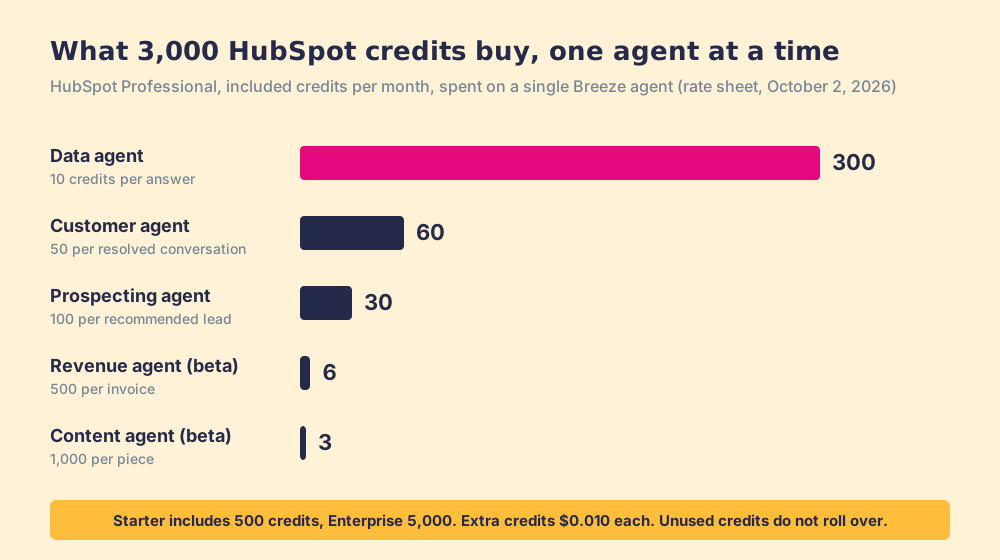
A HubSpot Credit is a penny. The catalog sells extras at “$0.010 per credit, invoiced in increments of 10 credits,” or as a capacity pack at $10 per 1,000, and it says plainly that “unused credits do not roll over into the following month” (catalog, read October 2, 2026). The rate sheet then prices the work, one action at a time:
| Breeze agent | What it bills for | Credits | At pay-as-you-go |
|---|---|---|---|
| Customer agent | Resolve one text conversation | 50 | $0.50 |
| Prospecting agent | Recommend outreach for one lead | 100 | $1.00 |
| Data agent | One answer to one prompt on one record | 10 | $0.10 |
| Content agent (beta) | Generate one piece of content | 1,000 | $10.00 |
| Knowledge base agent (beta) | Write one new article | 200 | $2.00 |
| Nurture agent (beta) | Personalize one email for one contact | 10 | $0.10 |
| Revenue agent (beta) | Start collection outreach for one invoice | 500 | $5.00 |
| Workflows | Run one AI action in a workflow | 10 | $0.10 |
| Custom agents (beta) | One action unit | 1 | $0.01 |
Two of these bill on outcome. HubSpot moved the customer and prospecting agents to pay-when-done pricing on April 14, 2026, and its chief customer officer, Jon Dick, put the pitch plainly: “You pay when it works, full stop” (HubSpot news, April 13, 2026). The data agent does not. HubSpot’s own article says a smart property consumes credits “even when a value isn’t filled,” which the HubSpot data agent page works through with the refresh math.
The included credits set how far that goes before the meter runs: 500 a month on Starter, 3,000 on Professional, 5,000 on Enterprise of Smart CRM, Sales, Marketing, Service, Content or Revenue Hub, and 500, 5,000 or 10,000 on Data Hub or the Customer Platform. Allotments are not additive; a customer with several hubs gets the highest one. Spend Professional’s 3,000 credits on one agent alone and you get:
- Customer agent. 60 resolved conversations a month.
- Prospecting agent. 30 recommended leads.
- Data agent. 300 answers.
- Content agent. 3 pieces of content.
- Revenue agent. 6 invoices chased.
Is HubSpot Breeze AI free?
The assistant is, in the sense that it comes with the seat. The agents are free to switch on and paid per job, and the job prices are small enough that a pilot costs less than the meeting to approve it. A team that resolves 500 support chats a month through the customer agent spends 25,000 credits, $250 at pay-as-you-go less whatever its included allotment covers. So a team can test a Breeze agent on real work for the cost of a team lunch.
Edition gates matter more than price. Agent Hub itself is in all paid editions, but HubSpot’s knowledge base says some HubSpot-built agents need Professional or Enterprise, agentic workflows need Professional or Enterprise, and deal progression needs Sales Hub or Service Hub Professional or Enterprise with an assigned seat (HubSpot KB, updated September 11, 2026).
What does Breeze do well?
More than its critics allow. Four things stand out from HubSpot’s own documentation, and each is a fair reason to turn it on.
- Updates after the call. Deal progression reads meeting transcripts and logged emails, proposes property changes and next steps, and lets the rep approve each suggestion or approve all. Admins can set a methodology (BANT, MEDDIC, SPICED, SPIN or a custom one) as context. Default properties cost no credits; custom ones run through the data agent.
- Shared context. HubSpot’s AI context settings hold your brand voice, products and services, ICPs, personas, email personalities, custom text or files, and knowledge vaults for specific agents, available on all plans (HubSpot KB, updated September 16, 2026). An agent that knows who you sell to writes a better first email.
- Outside tools, with a leash. HubSpot’s MCP client lets a cloned agent call 17 supported connectors, among them Gmail, Google Calendar, Gong, Notion, Slack and Zapier, with each tool set to “Always allow,” “Ask permission,” or “Never allow” (HubSpot KB, updated September 14, 2026).
- One bill, one login. For a team that runs on HubSpot, nothing else to buy, connect or train on. HubSpot Sales Hub holds 4.4 out of 5 from 14,347 reviews on G2 (October 1, 2026).
Two cautions belong next to the praise. HubSpot’s Agent Hub page claims results such as “26% higher deal win rate” and “65% more sales leads created on average per month” with no footnote, baseline or sample, so treat them as marketing until you measure your own. And Gartner predicts “over 40% of agentic AI projects will be canceled by end of 2027” for “escalating costs, unclear business value or inadequate risk controls” (Gartner, June 25, 2025). Value is easier to show when someone wrote down what good looks like before the agent started.
What does Breeze not know about your sales process?
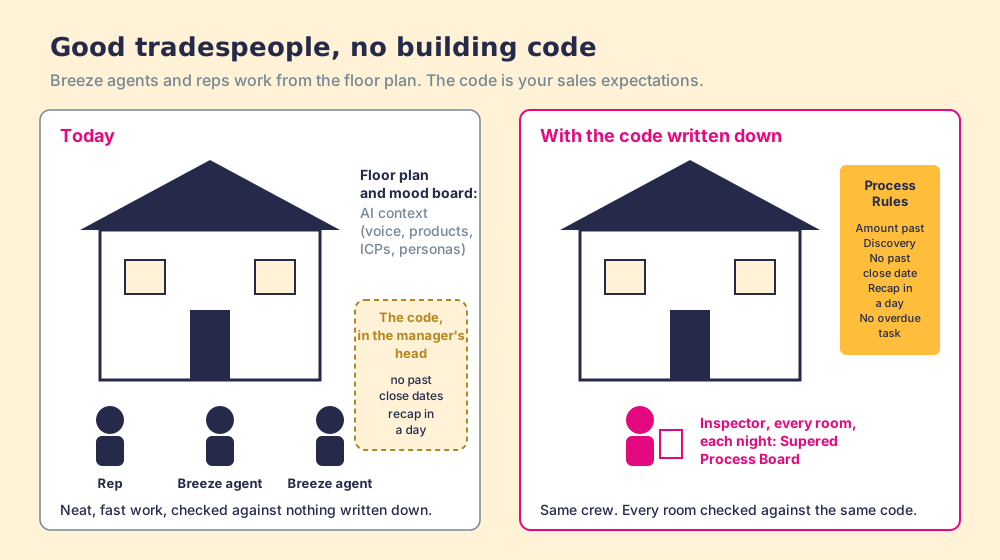
Suppose you hire a crew of good tradespeople to work on a house while you are away. An electrician, a plumber, a carpenter. They are skilled, they bill by the job, and they are fast. You give them the floor plan and a mood board. You do not give them the building code, because the building code lives in your head, as a collection of things you would be angry to find undone. When you come home the work is neat and quick, and three outlets are in places the code forbids. The crew was careful. The code was never on site.
Breeze agents are those tradespeople. AI context is the floor plan and the mood board: who you sell to, how you sound, what you sell. The code is your sales expectations. A deal past Discovery has an amount. A close date is never in the past. A recap goes out within a day of the meeting. No task sits overdue. Those are the rules that decide whether your pipeline means anything, and on a lot of teams they live in the sales manager’s head. In our State of Sales Enablement survey, 89% of teams said they have a defined process and 36% said reps follow it.
HubSpot does give you some code. Its pipeline settings can make a property required before a deal enters a stage, and on Professional and Enterprise, pipeline rules can stop reps skipping stages or moving deals backward (HubSpot KB, updated September 8, 2026). Those are rules at the door. They fire when someone moves a deal. The expectations that break most often are rules about standing still: the close date that slid into the past while the record sat untouched, the recap that was never sent, the task that went overdue on its own. A door rule cannot see a deal rotting in the hallway.
None of the HubSpot documentation I read for this page (Agent Hub, AI context, deal progression, pipeline rules, the MCP client) describes a place to write a standing expectation and see, each morning, every open deal that breaks it. That gap is narrow, and it is the one that decides whether an agent’s work counts. Our survey found that teams with strong process adherence rated AI’s impact high 40% of the time, against 21% for teams with weak adherence. An agent amplifies the process it finds.
How do you give Breeze, or any AI, your sales rules?
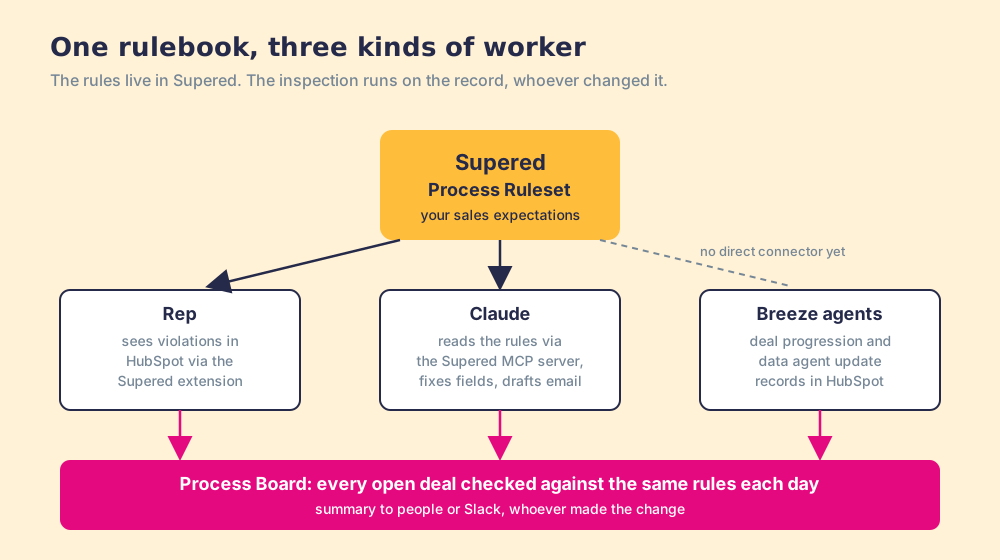
Write the code once, in a place every worker can be checked against. Supered does that job, and the design choice that matters is that the rules live outside any one worker.
- The rules live in Supered. A Process Ruleset holds your expectations as Process Rules, written in the terms a manager uses: momentum (no close date in the past), data (amount required past Discovery), process (recap sent within a day). A rule fires when its condition is true, with day-based date operators such as “is more than X days ago.”
- A board inspects every open deal. The Process Board lists each record that breaks a rule and can send a daily or weekly summary to people or a Slack channel, with streaks for clean days. The manager stops chasing and starts coaching.
- The rep sees it in HubSpot. The board and the violations show up inside HubSpot through the Supered extension, in the moment the rep is working the record.
- Claude reads the same rules and does the work. Through the Supered MCP server, Claude loads your rules, finds every violation, updates HubSpot fields from context and drafts the emails into Gmail. The HubSpot Claude connector guide walks through it with my own board.
Breeze fits this arrangement as one more worker on the crew. As of September 14, 2026, HubSpot’s MCP client calls only the connectors HubSpot supports, and Supered is not on that list, so a Breeze agent cannot open your Process Ruleset directly today. It does not need to for the inspection to work. Let deal progression and the data agent update records; the Process Board checks those records against your rules the next morning, the same way it checks a rep’s work or Claude’s. The inspector does not care who held the screwdriver.
My own board makes the case better than a diagram. One night it showed 11 violations across the 22 rules on my open deals: past close dates, no amount past Discovery, overdue tasks, missing recaps. One prompt in Claude, with Supered, HubSpot and Gmail connected, cleared it. By hand it would have taken me about 45 minutes; with Supered and Claude it took about 10. That is one founder’s pipeline, not a study, and the next morning’s Slack summary read zero.
Why trust this page?
I started RevPartners, a HubSpot partner that did only sales implementations, sold roughly twice as much Sales Hub as any other partner, and reached Elite tier in 13 months. Supered came out of that work. It is the #1 sales enablement app on the HubSpot marketplace, rated 5.0 from 122 reviews there and 4.9 out of 5 from 81 reviews on G2 (checked October 1, 2026), and it runs on HubSpot, Salesforce and Pipedrive. The disclosure: we sell the rules layer this page recommends next to Breeze, and every Breeze price above comes from HubSpot’s own catalog so you can check it without trusting us.
Should you buy HubSpot Breeze agents?
The choice turns on two questions: is the job high-volume and well defined, and are your rules written down somewhere a worker can be checked against them.
- Breeze agents, on their own. The pick for a Professional or Enterprise team with one clear job, such as support chats or research on records you already hold, where HubSpot’s outcome pricing makes a pilot cheap. Start with one agent and a credit limit.
- Breeze plus Supered. The pick for a sales team that wants agents updating deals and a manager who sees, each morning, which open deals still break the rules. Breeze does the work; the Process Board inspects it.
- Claude plus Supered, with or without Breeze. The pick when the nightly cleanup should read your rules directly today. Claude connects to HubSpot through HubSpot’s own connector and to Supered through its MCP server.
- Something else entirely. If you do not run HubSpot, Breeze is not an option, and the AI CRM guide grades the alternatives, including Salesforce’s Agentforce. If your team is under five users, Supered’s Process Compliance minimum will not fit, and HubSpot’s pipeline rules are the sensible place to start.
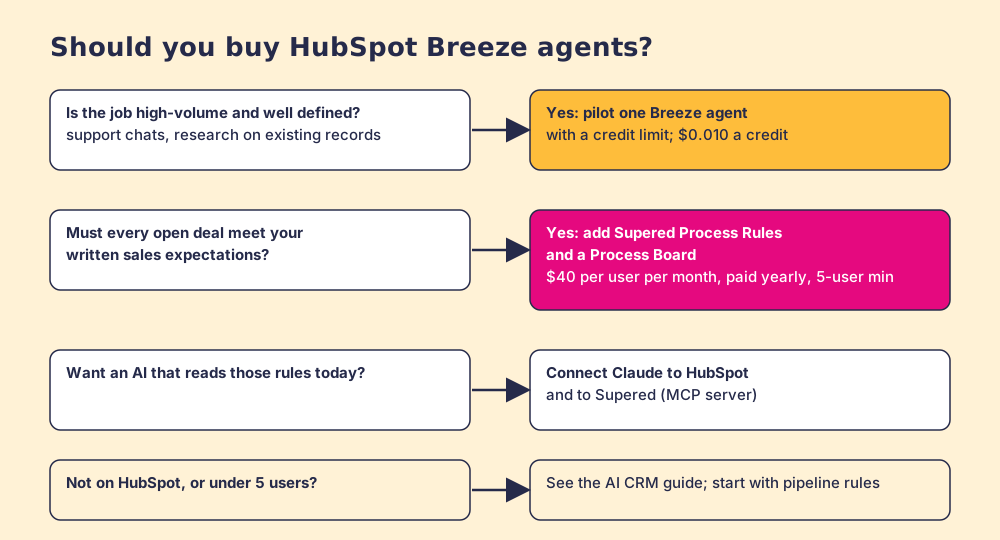
What I recommend: turn on the Breeze agent that matches your highest-volume chore, because at a penny a credit the pilot is cheap and the deal progression suggestions after calls are good. Before you let any agent touch deal records, write your sales expectations down as rules and put a board over them. Then you can answer the question Gartner says sinks agent projects, whether the work had value, with a count of open deals that break your rules this morning compared with last month. The sales expectations use case shows the setup, Supered for HubSpot shows what reps see in the CRM, and Claude for sales covers the rest of the AI stack.
Key points
- The rename. Breeze now means Breeze Assistant and the shared AI context; the agents live in Agent Hub, and agents free in the Breeze Studio beta now consume credits.
- The meter. A credit is $0.010. Customer agent 50 per resolved conversation, prospecting agent 100 per lead, data agent 10 per answer, content agent 1,000 per piece, and unused credits reset monthly.
- The strengths. Deal progression after calls, shared AI context, 17 supported connectors, and one bill for a HubSpot team.
- The missing code. Breeze works from your floor plan and mood board; your standing sales expectations need writing down and inspecting, whoever does the work.
- The arrangement. Rules in Supered, every worker checked against them each day: the rep, Claude, and Breeze.
Ready to see your own pipeline checked against your own rules? Book a demo.
Frequently asked questions
What is HubSpot Breeze AI?+
Is HubSpot Breeze AI free?+
Which HubSpot plans include Breeze agents?+
What happened to Breeze Intelligence pricing?+
Can Breeze agents use tools outside HubSpot?+
Does Breeze know my sales process?+
Your process, running itself.