The Findymail Chrome Extension in 2026: A Rod, a Net, and the Water It Fishes
We unpacked version 1.0.43 of the Findymail Chrome extension.
It is two tools: a profile button for emails and phones, and an exporter that pages through LinkedIn, Sales Navigator and Apollo searches, up to 2,500 people a run. Costs, limits, and the LinkedIn question.
The Findymail Chrome extension is Findymail's free browser add-on that finds verified work emails (1 credit) and non-EU phone numbers (10 credits) on LinkedIn and Sales Navigator profiles, and exports LinkedIn, Sales Navigator and Apollo search results to Findymail lists or CSV.
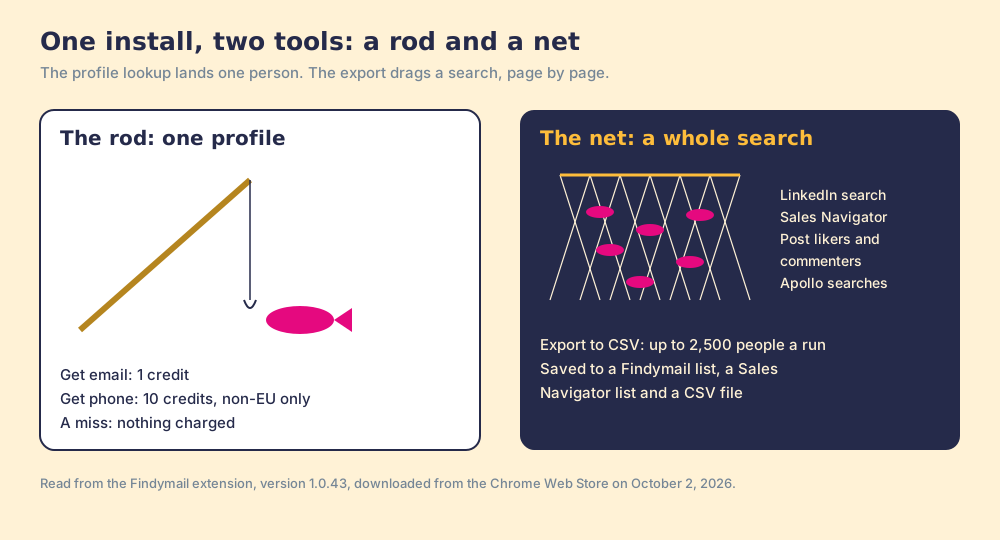
The Findymail Chrome extension looks like one button and is two tools. One is a fishing rod: a rep on a LinkedIn profile clicks Get email or Get phone and lands one fish, the person on the screen. The other is a trawl net. On a LinkedIn search, a Sales Navigator search, a LinkedIn post or an Apollo search, it adds an Export to CSV button that drags through the results page by page, up to 2,500 people a run. The quick answer:
- The Findymail extension. The right install for a rep on a Findymail plan who prospects from LinkedIn profiles and wants verified emails at about 2 cents each on Starter.
- Supered Prospector. The right buy for a team that already pays for Clay: Clay’s waterfall across 200+ vendors, Findymail kept as a step if you like, from LinkedIn, the company site and the CRM record, at $45 per rep per month billed annually.
- Apollo or Lusha. The non-Clay alternatives: Apollo for a dialer and sequences in the same seat, Lusha for an extension that also opens on company websites and inside the CRM.
The Findymail Chrome extension is Findymail’s free browser add-on that finds verified work emails (1 credit) and non-EU phone numbers (10 credits) on LinkedIn and Sales Navigator profiles, and exports LinkedIn, Sales Navigator and Apollo search results to Findymail lists or CSV. Its Chrome Web Store listing, “Findymail - Email & Phone Finder” by Peanuts SaaS Studio, showed 20,000 users and 4.6 out of 5 from 63 ratings on October 2, 2026, version 1.0.43, updated August 30, 2026 (Chrome Web Store). The listing says little more than “find emails & phone numbers from the largest professional networks in seconds,” so we downloaded version 1.0.43 from the store on October 2, 2026, and read its manifest and scripts. The findymail linkedin extension described below is that build. Findymail holds 4.9 out of 5 from 57 reviews on G2, and Clay’s North American work-email test, last run October 22, 2025, put it first of 13 at 90.26% coverage (Clay data test).
What does the Findymail Chrome extension do?
Start with the rod. On a LinkedIn profile or a Sales Navigator lead page, the extension opens a “Profile enrichment” panel with two buttons, Get email and Get phone, a list picker (“Select the list where the contact will be saved”), and your finder-credit balance. A hit saves the contact to a Findymail list. A miss shows “Couldn’t find an email with enough confidence” and “This search didn’t cost a credit.” The panel is plain and quick, and it matches Findymail’s pricing rule: “You only pay for verified results. No charge if we can’t find it” (findymail.com/pricing).
Then the net. The extension’s onboarding screen leads with it: “Email finding and exporting. Export contacts from Apollo.io searches and other sources.” On search pages it adds an “Export to CSV” button and asks “How many people would you like to export?” with a ceiling of 2,500 in the code. It can save the people to a Findymail list and to a Sales Navigator list, offers a “Fast mode” that “finds ~10% less emails,” and asks the rep to keep the tab open while it works. On a LinkedIn post, the button becomes “Get likers” or “Get commenters.”
The pages ranking for this search on October 2, 2026 are the store listing, Findymail’s own pages, G2 and review sites that mention the extension in a line; none of them describes the export. The net is where most of the credits, and most of the risk, end up.
Where does the Findymail extension run?
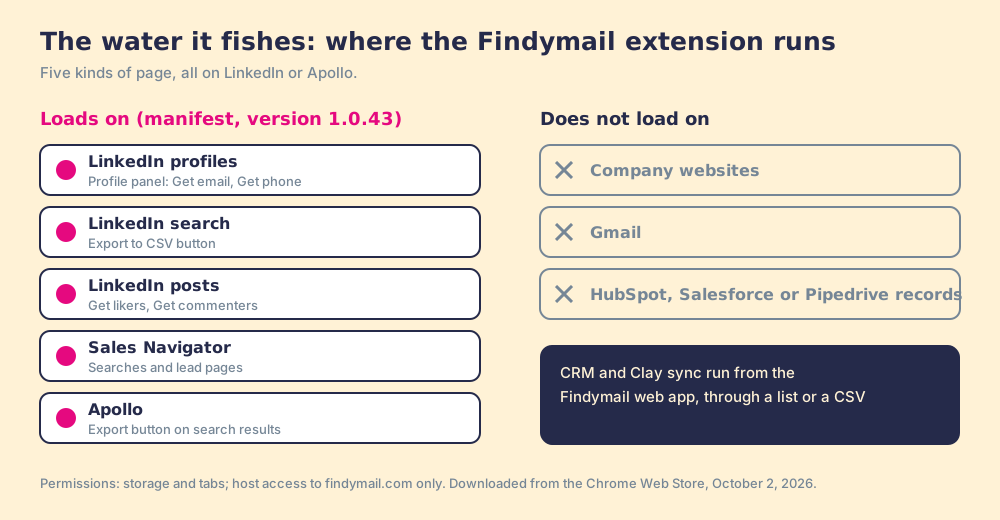
A Chrome extension declares in its manifest which pages it loads on. Findymail’s version 1.0.43 loads on five kinds of page:
- LinkedIn profiles. Any linkedin.com page, with the profile panel.
- LinkedIn search. linkedin.com/search, with the export button.
- LinkedIn posts. linkedin.com/posts, with Get likers and Get commenters.
- Sales Navigator. linkedin.com/sales, both searches and lead pages.
- Apollo. app.apollo.io, with an export button on Apollo’s search results.
Nothing else is on the list. The extension does not load on company websites, Gmail, or CRM records in HubSpot, Salesforce or Pipedrive, and its permissions reach only findymail.com. Findymail’s CRM and Clay integrations are real (findymail.com/pricing lists Clay, HubSpot, Salesforce, Pipedrive and more), and they run from the Findymail web app. A rep who wants to push a contact from the extension to the CRM goes through a Findymail list or a CSV.
For a rep who prospects from LinkedIn, this map is fine. For a rep whose day starts in the CRM record or on a company’s website, the extension stays dark. Lusha’s extension, by comparison, opens on company websites, Gmail and inside Salesforce, HubSpot and Pipedrive (the Lusha Chrome extension page).
How many credits does the Findymail extension use?
The extension spends the same credits as the rest of Findymail, from one pool shared across the team.
- An email on a profile. 1 finder credit, charged only on a verified result.
- A phone on a profile. 10 finder credits, charged only when found, and only for contacts outside the EU.
- A LinkedIn or Sales Navigator export. Up to 1 finder credit per person exported, since a person with no email found costs nothing. The modal warns that duplicates found during the export mean “you may receive less leads than initially expected.”
- An Apollo export. Two modes. With “Do not use Apollo’s emails (faster & safer)” ticked, the modal says “This will use up to” so many “finder credits.” Unticked, it uses “verifier credits and Apollo email credits,” so Findymail verifies the emails Apollo already holds, spending your Apollo credits and Findymail’s bonus verifier credits.
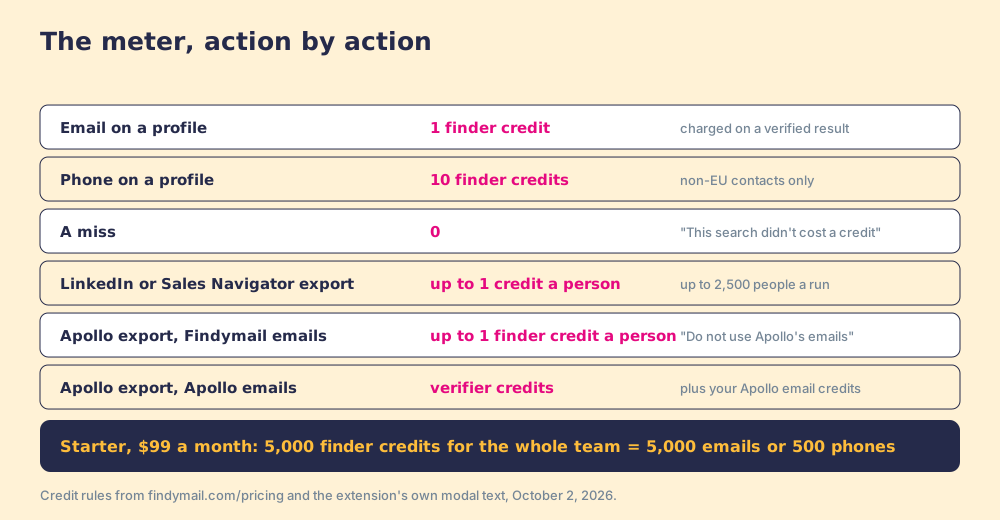
Put a net next to a team’s budget and the arithmetic moves fast. Starter is $99 a month for 5,000 finder credits shared by the whole team, so two full 2,500-person exports would use it in an afternoon if most people come back with an email. Phones are thinner: Clay’s mobile test had Findymail finding 45.84% of North American mobiles, 13th of 15 (Clay data test, mobile). Findymail pricing prices every tier.
How do you install the Findymail Chrome extension?
Findymail’s own guide lists the steps (Findymail, find emails on LinkedIn):
- Open the Chrome Web Store listing “Findymail - Email & Phone Finder” and click Add to Chrome.
- Click the puzzle-piece icon in Chrome’s toolbar and pin Findymail.
- Click the Findymail icon and log in, or create an account; a new account gets 10 free credits.
- Open a LinkedIn or Sales Navigator profile and use the panel, or open a search and use Export to CSV.
The listing names Peanuts SaaS Studio in Capinghem, France, as the developer, and Findymail’s site shows SOC 2 Type 2 and GDPR badges.
Is the Findymail extension safe to use on LinkedIn?
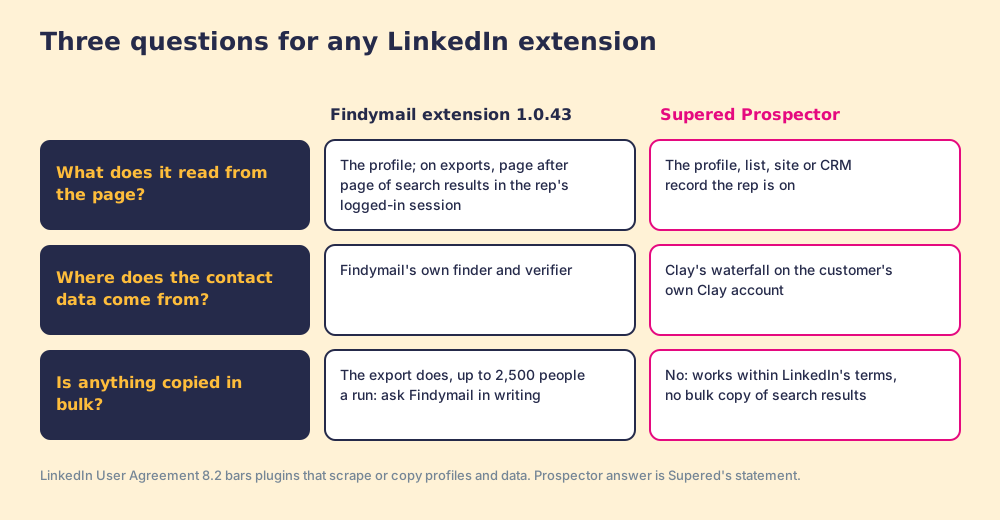
Ask this of any LinkedIn extension, ours included, and ask it most of the net. LinkedIn’s User Agreement, effective November 3, 2025, has members agree not to “Develop, support or use software, devices, scripts, robots or any other means or processes (such as crawlers, browser plugins and add-ons or any other technology) to scrape or copy the Services, including profiles and other data from the Services” (LinkedIn User Agreement, section 8.2). LinkedIn’s help center adds that members who use such tools “risk having their accounts restricted or shut down” (LinkedIn Help, prohibited software).
On a search page, version 1.0.43 works like this. The export runs in the rep’s own logged-in LinkedIn session: the script reads the session’s security token and calls Sales Navigator’s own list and lead endpoints, turns the pages itself, and pauses several seconds between pages. Whatever LinkedIn decides about that traffic, it decides about the rep’s account. The profile panel is a different matter, a lookup on a page the rep is already reading. Findymail’s store listing and pricing page say nothing about LinkedIn’s terms, so the fair advice is the one we give for every extension: ask the vendor in writing what the export does on LinkedIn, and keep it off the accounts your best reps depend on. The Sales Navigator Chrome extension guide applies the same test across the field, and Wiza’s August 2026 decision to remove bulk export from LinkedIn, covered on the Wiza pricing page, shows where at least one vendor has landed.
Why trust this page?
I founded RevPartners, a HubSpot partner that did only sales implementations and reached Elite tier in 13 months. Supered grew out of that work and holds 4.9 out of 5 from 81 reviews on G2 and 5.0 from 122 on the HubSpot App Marketplace (checked October 1, 2026). That is also the disclosure: we make Supered Prospector, a Chrome extension product, and it ranks first below for teams that have Clay.
How does the Findymail extension compare with the alternatives?
The lens is a team of ten to fifty reps who want contact data where they already work and a leader who can see which lists turn into pipeline. Scores use the weights on the Findymail alternatives page: coverage (x3), rep-side delivery (x2), price structure (x2), what the leader sees (x2), bundled outreach (x1), out of 50.
| Rank | Tool | Grade | Best fit | Where the extension runs | CRM integration | Pricing (plan with the extension) | Reason to switch from Findymail |
|---|---|---|---|---|---|---|---|
| ref | Findymail extension | B+ (29) | Email-first reps who prospect from LinkedIn | LinkedIn, Sales Navigator, Apollo | Native, from the web app | Starter $99 a month for the team | Stay if your reps live on LinkedIn and mostly email |
| 1 | Supered Prospector | A (44) | Teams already paying for Clay | LinkedIn, Sales Navigator lists, company websites, CRM records | Native: HubSpot, Salesforce, Pipedrive | $45 a rep a month, billed annually, plus your Clay plan | Clay’s waterfall across 200+ vendors, Findymail as a step, owner check before the push |
| 2 | Apollo | A- (36) | Data, dialer and sequences in one seat | LinkedIn, Gmail, company websites, CRM pages | Native: HubSpot, Salesforce | $49 a seat a month, billed annually; phone 8 credits | Phones and outreach in the plan |
| 3 | Lusha extension | B+ (29) | A few reps revealing from LinkedIn and company sites | LinkedIn, company websites, Gmail, CRM | Native: Salesforce, HubSpot, Pipedrive | Starter $449.10 a year (Oct 1, 2026) | Opens on the CRM record and company sites |
| 4 | Skrapp extension | B- (23) | Small teams that only email | LinkedIn, Sales Navigator, company websites | List sync on Professional | $29 a month yearly for 2 users | Cheaper entry; no phones |
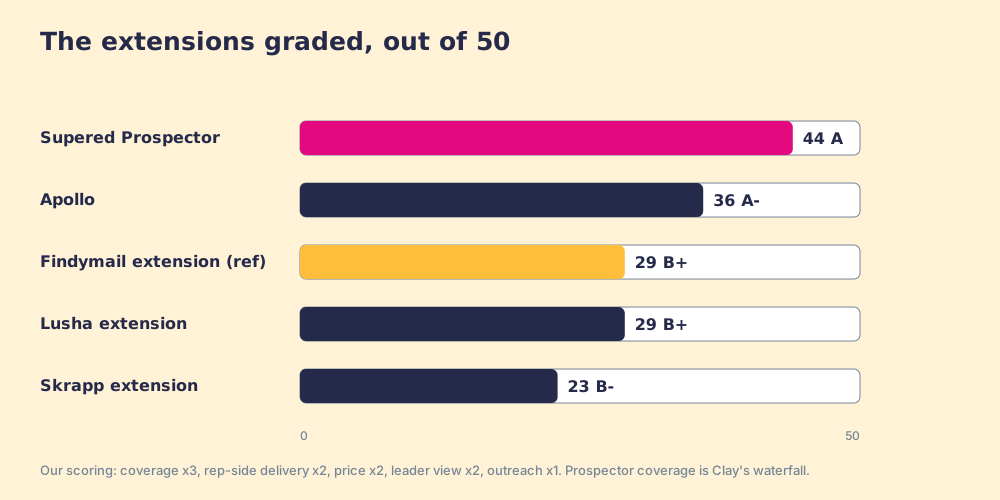
Findymail’s 29 is coverage 4 (5 for email, 2 for phones), rep-side 3 (LinkedIn and Apollo only), price 4, leader view 1, outreach 1. Prospector’s coverage score is Clay’s waterfall, credited to Clay. Corporate status, checked October 2, 2026: Findymail and Skrapp show no 2026 acquisition or funding round; Apollo acquired Pocus in March 2026; Lusha is independent.
Where does Supered Prospector fit?
Back to the water. Rod or net, the angler has to stand on the right bank, and reps stand in four places: a LinkedIn profile, a Sales Navigator list, a company’s website, and the CRM record. Findymail’s extension fishes the first two.
Prospector does not bring its own database. It brings Clay’s waterfall, which is every database, routed: “One contract to buy data from 200+ data and AI vendors” (clay.com), asked in the order the GTM engineer writes, with no charge when a provider finds nothing (clay.com/pricing). Findymail is in Clay’s directory since September 1, 2022, so it can stay the email step. Clay plus Supered is the best way for a sales team to prospect: GTM engineers build in Clay, reps never open Clay. Prospector runs inside the Supered Chrome extension, on your own Clay account.
- Four banks, one button. A LinkedIn profile, a company website (with company research alongside), or the HubSpot, Salesforce or Pipedrive record: the rep picks a flow from a Push menu and the table runs. In Sales Navigator, reps add leads to a prospect list and push the list to a Clay table.
- The owner check. Before a push, the rep sees the matching CRM record, who owns it, and whether the person was already prospected, so no two reps work the same lead.
- The leader’s view. Found, Worked, Closed: which lists reps found, who is working theirs and who isn’t, and how each lead ended the way your process says, Qualified, Recycled or Disqualified.
On LinkedIn, Prospector works within LinkedIn’s terms and does not copy search results in bulk; the contact data comes from Clay’s waterfall on the customer’s Clay account. The arithmetic for ten reps: Clay Growth at $495 a month is $5,940 a year, and Prospector is $45 per rep per month billed annually (Prospector), $11,340 a year together. Findymail Starter at $996 a year is far cheaper for email. The difference buys every other provider behind Findymail, the company site and the CRM record as places to start, and a list the leader can follow to closed.
Choose something else if you do not have Clay, because Prospector runs on the customer’s Clay account and does nothing without one. Choose something else, too, if your reps live on LinkedIn profiles and send email, because Findymail’s rod at about 2 cents an email on Starter is hard to beat for that job. The sourcing use case shows the rep’s loop for teams that start from more than one bank.
Which should you choose?
Two questions settle it: where do your reps start, and do you have Clay.
- The Findymail extension, kept. The pick for reps who prospect from LinkedIn profiles, mostly email, and want verified results on a shared team pool. Use the rod freely; ask Findymail in writing before anyone runs the net.
- Apollo. The pick for a dialer and sequences in the same seat (the Apollo Chrome extension page).
- Lusha. The pick when reps start on company sites and CRM records.
- Supered Prospector. The pick when the team already pays for Clay: one extension on all four banks, Findymail as a step if your data says so, and a view of which lists got worked and closed.
What we recommend: keep the rod and put the net down. Findymail’s profile lookup is accurate, cheap and charged only on a hit, and Clay’s own test puts its emails first in North America. The export pages through LinkedIn search results in the rep’s own session, and LinkedIn’s terms are blunt about that. If you run Clay, give reps one extension that starts wherever they stand, with Findymail as the email step in the route. The Clay Chrome extension page shows what a rep-side layer on Clay should do, and Findymail pricing prices the credits the rod spends.
Frequently asked questions
Is the Findymail Chrome extension free?+
What does the Findymail Chrome extension do?+
Does the Findymail extension work on company websites or in my CRM?+
Can the Findymail extension find phone numbers?+
Is the Findymail extension safe to use on LinkedIn?+
What is the best alternative to the Findymail Chrome extension?+
Everything we have written on Findymail
More on Findymail
Looking past Findymail? See Supered Prospector on your own Clay accountYour Clay waterfall, where reps already work.